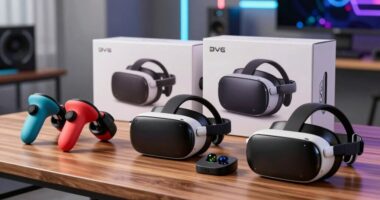
Choosing a VR flight simulator for an immersive experience starts with a practical distinction: two picks here are flight simulation software, while three are PC VR headsets that need compatible software to create a cockpit view. I rank RealFlight Evolution with the InterLink DX controller first for most RC pilots because it combines a broad aircraft and field library with a purpose-built control setup and VR compatibility. The software-only edition is the more flexible alternative if you already own a compatible controller.

Get business pricing on tech for your team
- Business-only prices and quantity discounts
- Tax-exempt purchasing
- Multiple users, one account, clear invoices
For the headset side, Pimax Crystal Super prioritizes a wide field of view and high pixel density, while the lighter Beyond 2e emphasizes comfort and micro-OLED clarity. Their tradeoff is the setup: each needs a capable PC, and the Beyond 2e also requires SteamVR base stations and separate controllers. I include Airplane RC PRO as a limited-information entry, but its listing lacks the details needed to judge its VR support or immersion. My ranking reflects how confidently each option can serve the title’s promise, not a claim that every item is a complete VR simulator on its own.
Key Takeaways
- RealFlight Evolution with InterLink DX is the clearest all-in-one starting point for RC practice because the software and dedicated controller are bundled, though VR immersion still depends on a compatible headset and setup.
- The software-only RealFlight Evolution edition has the same stated library scale and VR compatibility, so it suits buyers who already have a supported controller and want to avoid duplicating hardware.
- Pimax Crystal Super is the headset pick for buyers who prioritize 140-degree field of view and 3840 × 3840 pixels per eye, with a wired PC connection and capable Windows system as the tradeoffs.
- Beyond 2e suits long sessions where low headset weight and micro-OLED resolution matter, but its required base stations and unbundled controllers add setup requirements.
- Airplane RC PRO cannot be meaningfully ranked for VR immersion from the supplied listing alone because it provides no headset compatibility, platform, aircraft library, or feature details.
| RealFlight Evolution RC Flight Simulator with InterLink DX Controller |  | Best Overall for an RC VR Setup | Software: RealFlight Evolution RC Flight Simulator | Included controller: InterLink DX | Aircraft: More than 300 | VIEW ON AMAZON | See Our Full Breakdown |
| Pimax Crystal Super VR Headset |  | Best Premium Headset for Peripheral Detail | Resolution: 3840 × 3840 per eye | Pixel density: 50 PPD | Display: QLED with Mini-LED local dimming | VIEW ON AMAZON | See Our Full Breakdown |
| Beyond 2e Ultra-Light PC VR Headset |  | Best Lightweight Headset for Long Sessions | Weight: 108 g | Resolution: 2560 × 2560 per eye | Display: Micro-OLED | VIEW ON AMAZON | See Our Full Breakdown |
| RealFlight Evolution RC Flight Simulator (Software Only) – RFL2001 |  | Best Value for Existing Controller Owners | Model: RFL2001 | Product type: RC flight simulator software only | Platform: PC via Steam | VIEW ON AMAZON | See Our Full Breakdown |
| Airplane RC PRO Flight Simulator |  | Best for Buyers Seeking a Basic RC Simulator Listing | Product name: Airplane RC PRO Flight Simulator | Product category: RC flight simulator | Aircraft included: Not specified in supplied details | VIEW ON AMAZON | See Our Full Breakdown |
| vr flight simulators for immersive experience | Platform |
|---|---|
| RealFlight Evolution RC Flight | — |
| Pimax Crystal Super VR Headset | PC VR; Windows 10 listed |
| Beyond 2e Ultra-Light PC VR He | — |
| RealFlight Evolution RC Flight | PC via Steam |
| Airplane RC PRO Flight Simulat | Not specified in supplied details |
More Details on Our Top Picks
RealFlight Evolution RC Flight Simulator with InterLink DX Controller
For most buyers building an RC flight practice setup with a clear route toward VR, this is the most straightforward starting point in the lineup. RealFlight Evolution includes the InterLink DX controller, so the buyer gets a dedicated flight control device with the software rather than having to source that part separately. Its stated library of more than 300 aircraft and over 75 flying sites also gives pilots a broad range of aircraft types and environments to practice in. VR headset compatibility, instructor lessons, and online multiplayer add options beyond solo flying.
Compared with the software-only RealFlight edition, the main difference is the included controller; the core appeal of the simulator remains similar. That bundle makes this the better pick for a first-time RC simulator buyer, while the software-only edition makes more sense if an appropriate controller is already on hand. Compared with the Pimax Crystal Super or Beyond 2e, however, this is the simulation software and control package, not a headset. A buyer seeking a complete VR experience still needs compatible PC hardware and a VR headset.
The library and lessons make it a stronger choice for practice than Airplane RC PRO, whose supplied listing offers no comparable feature information. Its tradeoff is that extra models and fields may require separate purchases or a season pass, so the advertised breadth should not be mistaken for every future add-on being included. I would choose this when the priority is a well-specified RC simulator foundation with controller included, rather than maximum headset display detail.
Pros:- InterLink DX controller is included for dedicated simulator control.
- More than 300 aircraft and over 75 flying sites are listed.
- VR headset compatibility, instructor lessons, and multiplayer support.
- Editable aircraft and sites add ways to tailor practice.
Cons:- A compatible PC and VR headset are still needed for headset-based immersion.
- Some additional models and fields may require separate purchases or a season pass.
- The bundle is less useful to buyers who already own a suitable controller.
Best for: RC pilots who want a substantial simulator library, practice lessons, VR compatibility, and a dedicated controller in the same package.
Not ideal for: Buyers who need a VR headset included, do not use a PC, or want every future aircraft and field included without additional purchases.
- Software:RealFlight Evolution RC Flight Simulator
- Included controller:InterLink DX
- Aircraft:More than 300
- Flying sites:Over 75
- VR support:VR headset compatible
- Instruction:Virtual Flight Instructor lessons and practice challenges
- Multiplayer:Online
- Editing:Editable aircraft and sites
Our verdict“I recommend this as the most approachable RC simulator entry in the comparison when the buyer wants controller hardware and VR-compatible software together.”
Pimax Crystal Super VR Headset
Among the headsets listed, the Pimax Crystal Super is the strongest match for buyers who want a broad, detailed view in a PC flight simulator. Its stated 140-degree field of view can help keep more of a virtual cockpit and surrounding scene in view, while the 3840 × 3840 resolution per eye and 50 pixels per degree target fine visual detail. QLED with Mini-LED local dimming and aspherical lenses round out a display specification set that is clearly aimed at demanding simulation use.
Compared with the Beyond 2e, Pimax puts more emphasis on the width of the view and pixel density, while Beyond 2e stands out for its 108-gram weight and micro-OLED panels. That makes the Pimax the more compelling choice for buyers whose priority is scene coverage, but the headset’s wired DisplayPort connection and requirement for a compatible Windows PC narrow its convenience. Its stated refresh rate reaches up to 90 Hz, which may not satisfy users who specifically want higher refresh rates.
This is a headset, so it does not replace RealFlight Evolution or another flight simulator. Its inside-out tracking and eye tracking are listed features, as are integrated spatial audio and a noise-canceling microphone, but buyers still need to check their PC and software compatibility before assembling a setup. Compared with buying the RealFlight bundle alone, this adds the visual hardware needed for PC VR rather than RC practice content. I would reserve it for a capable-PC owner who values field of view and image detail enough to accept a wired setup.
Pros:- 140-degree field of view emphasizes broad peripheral scene coverage.
- 3840 × 3840 resolution per eye and 50 PPD target fine detail.
- QLED with Mini-LED local dimming is designed for contrast and brightness.
- Inside-out tracking and eye tracking are listed features.
Cons:- Requires a wired DisplayPort connection to a compatible PC.
- Up to 90 Hz may not meet buyers seeking higher refresh rates.
- Headset alone does not provide flight simulation software or RC control hardware.
Best for: PC flight and racing simulation fans who prioritize a wide field of view, high stated per-eye resolution, and inside-out tracking.
Not ideal for: Buyers seeking a standalone headset, a wireless setup, or a complete simulator package with software and RC controls included.
- Resolution:3840 × 3840 per eye
- Pixel density:50 PPD
- Display:QLED with Mini-LED local dimming
- Field of view:140 degrees
- Refresh rate:Up to 90 Hz
- Tracking:Inside-out tracking and eye tracking
- Connection:Wired DisplayPort and USB
- Platform:PC VR; Windows 10 listed
Our verdict“I would choose Pimax Crystal Super for PC pilots who put broad, detailed cockpit views ahead of wireless convenience and an all-in-one package.”
Beyond 2e Ultra-Light PC VR Headset
Beyond 2e makes its case through comfort-oriented design paired with a sharp PC VR display. At 108 grams, it is notably light on paper, a useful distinction for buyers planning longer sessions where headset weight can become a distraction. The micro-OLED panels provide 2560 × 2560 pixels per eye, and the 116-degree diagonal field of view gives a broad view, though narrower than the Pimax Crystal Super’s stated 140 degrees.
Its eye tracking and dynamic foveated rendering are aimed at directing rendering effort toward where the wearer is looking, while adjustable IPD and soft and firm universal-fit cushions address fit. Compared with Pimax, this headset favors a lighter form and micro-OLED display over the wider field of view and greater stated pixel count. That is a meaningful split: choose Beyond 2e if comfort and fit adjustment lead; choose Pimax if peripheral coverage is the stronger priority.
The setup requirements are a substantial part of this decision. Beyond 2e needs SteamVR base stations, which are not included, and its controllers are also separate. It also calls for a capable PC, with a listed minimum of an RTX 3070 or better, a quad-core processor, and 16 GB RAM. Like Pimax, it is a headset rather than flight simulation content, so RealFlight or other compatible software must be acquired separately. I would not recommend it to a buyer who wants a self-contained headset setup or has not checked SteamVR tracking compatibility.
Pros:- 108-gram design is suited to buyers sensitive to headset weight.
- 2560 × 2560 micro-OLED resolution per eye.
- Eye tracking supports dynamic foveated rendering.
- Adjustable IPD and two cushion options support fit customization.
Cons:- SteamVR base stations are required and not included.
- Controllers are not included.
- Requires a capable PC and separate compatible flight simulation software.
Best for: PC VR flight sim users who value low headset weight, micro-OLED resolution, eye tracking, and adjustable fit for extended sessions.
Not ideal for: Buyers who want all tracking equipment and controllers included, lack a capable gaming PC, or prioritize the widest listed field of view.
- Weight:108 g
- Resolution:2560 × 2560 per eye
- Display:Micro-OLED
- Field of view:116° diagonal
- Eye tracking:Yes, with dynamic foveated rendering
- Fit:Adjustable IPD; soft and firm universal-fit cushions
- Tracking platform:SteamVR base stations required; not included
- PC requirements:RTX 3070 or better, quad-core CPU, 16 GB RAM listed
Our verdict“I see Beyond 2e as the comfort-focused headset pick for PC sim pilots willing to assemble its SteamVR tracking setup.”
RealFlight Evolution RC Flight Simulator (Software Only) – RFL2001
This edition is the software-first counterpart to the RealFlight bundle. The stated simulator library is substantial: 300-plus aircraft and more than 75 flying sites, spanning airplanes, helicopters, and drones. It also lists VR headset compatibility, online multiplayer, Virtual Flight Instructor lessons, and quarterly new content through Steam. For a buyer who already owns an appropriate controller, the software-only format avoids purchasing a second control device.
Compared with the InterLink DX bundle, its defining limitation is also its advantage: no controller is included. If this is a first simulator purchase, the bundled edition is simpler because it supplies dedicated control hardware. If the controller is already sorted, the software-only version keeps the choice focused on the simulator itself. The listed interface can be used without a mouse or keyboard with an InterLink DX controller, but buyers should verify their own control setup before assuming the same convenience.
For immersion, the software offers breadth and VR compatibility, not the headset. A compatible PC, headset, and control device remain part of the overall setup, so this is not a standalone VR product. The quarterly releases provide a route to new content, while additional content beyond the base package may involve extra purchases. Compared with Airplane RC PRO, this listing gives buyers concrete information about aircraft, sites, lessons, and multiplayer; that makes it easier to judge before purchase. I would pick it for an existing RC simulator owner, not someone expecting headset hardware in the box.
Pros:- More than 300 aircraft and over 75 flying sites are listed.
- Supports VR headsets, online multiplayer, and instructor lessons.
- Quarterly new content releases through Steam.
- Software-only format suits buyers who already have suitable controls.
Cons:- InterLink DX controller is not included.
- A compatible VR headset and PC are separate requirements.
- Additional content beyond the base package may cost extra.
Best for: PC users who already own a compatible flight controller and want RealFlight’s broad aircraft and site library with VR support.
Not ideal for: First-time buyers who need a controller included, headset shoppers, or anyone expecting all future add-on content in the base package.
- Model:RFL2001
- Product type:RC flight simulator software only
- Platform:PC via Steam
- Aircraft:300+
- Flying sites:75+
- VR compatibility:Yes
- Multiplayer:Online
- Included brands:E-flite, HobbyZone, Hangar 9, Blade
Our verdict“I recommend the software-only edition to existing controller owners who want RealFlight’s breadth and VR compatibility without duplicating the bundle’s hardware.”
Airplane RC PRO Flight Simulator
Airplane RC PRO is the least verifiable option in this comparison. The supplied listing names it as an airplane RC flight simulator but includes no description, specifications, or stated VR compatibility. That makes it impossible to compare its aircraft selection, supported platform, controls, visual presentation, or headset requirements with RealFlight Evolution. I place it fifth because the article is about immersive VR experiences and the available details do not establish that this product supports VR at all.
Compared with either RealFlight Evolution edition, the difference is confidence in what the buyer receives. RealFlight provides named aircraft and site counts, headset compatibility, lessons, and multiplayer information; Airplane RC PRO provides none of those details here. That does not prove it lacks those features, but a buyer should not infer them from the product title. Compared with the Beyond 2e and Pimax Crystal Super, it may belong to the software side of a flight setup, but its platform and relationship to PC VR are unspecified.
This entry may still be relevant to someone researching a basic RC flight simulator, but the listing information supplied is too sparse to recommend it for immersive VR specifically. Before choosing it, a buyer would need to confirm platform support, controller requirements, aircraft included, and whether any headset mode exists. I would favor one of the RealFlight options when a known library and explicit VR compatibility are priorities. Airplane RC PRO’s role is therefore a cautious placeholder for buyers willing to investigate missing details, not a comparable VR pick.
Pros:- The product is identified as an airplane RC flight simulator.
- May merit further research for buyers focused on RC aircraft simulation.
- Its listing title makes the general product category apparent.
Cons:- No VR compatibility details are provided.
- No platform, control, aircraft library, or system requirements are supplied.
- Immersion and feature comparisons cannot be established from the available listing.
Best for: A buyer who is specifically researching this named RC simulator and is prepared to verify its platform, controls, and VR support before buying.
Not ideal for: Anyone who needs confirmed VR headset compatibility, clear system requirements, or a documented aircraft and flying-site library.
- Product name:Airplane RC PRO Flight Simulator
- Product category:RC flight simulator
- Aircraft included:Not specified in supplied details
- Platform:Not specified in supplied details
- VR compatibility:Not specified in supplied details
- Controller requirements:Not specified in supplied details
Our verdict“I would only shortlist Airplane RC PRO after confirming its VR and platform details, since the supplied information cannot support an immersion recommendation.”

How We Picked
I ranked these options by how directly they support an immersive VR flight setup, how much information is available to judge that fit, and what a buyer must supply beyond the product. The two RealFlight Evolution editions are software: both list VR headset compatibility and extensive RC aircraft and flying-site libraries, but only the bundled edition includes the InterLink DX controller. I put the bundle first for buyers starting from scratch because it is clearer what control hardware they receive.
The Beyond 2e and Pimax Crystal Super are headsets, not flight simulator software. I compared their stated visual characteristics, comfort features, tracking requirements, and connection needs, while treating the PC and accessory requirements as meaningful tradeoffs. I placed Pimax ahead among headsets for simulation immersion due to its stated wider field of view and pixel density; Beyond 2e has a stronger case for lightweight extended wear. Airplane RC PRO ranks last because the supplied product information does not identify its platform, VR support, controls, or contents. I do not fill those gaps with assumptions.
This lineup mixes products that solve different parts of a setup, so a high ranking does not mean every option works alone. Buyers should match software, controller, headset, PC, and tracking equipment before choosing. I use only the provided product details and do not imply hands-on testing.
| vr flight simulators for immersive experience | Platform |
|---|---|
| RealFlight Evolution RC Flight | — |
| Pimax Crystal Super VR Headset | PC VR; Windows 10 listed |
| Beyond 2e Ultra-Light PC VR He | — |
| RealFlight Evolution RC Flight | PC via Steam |
| Airplane RC PRO Flight Simulat | Not specified in supplied details |
Factors to Consider When Choosing Vr Flight Simulators For Immersive Experiences
These five listings cover separate parts of a potential setup. I would decide first whether I need simulation software, flight controls, a VR headset, or more than one of those. The RealFlight products provide simulator software; the Pimax and Beyond products provide PC VR headsets; the Airplane RC PRO listing lacks enough detail to classify its setup confidently. Treating those categories as interchangeable can lead to buying a headset without software, or software without a suitable control device.
Start with the part of the setup you are missing
If I need RC practice content, RealFlight Evolution is the clearest documented option here. Its bundle includes the InterLink DX controller, while the software-only version is suited to someone who already has controls. Neither listing says that a VR headset is included. If I need the headset itself, Pimax Crystal Super and Beyond 2e are the relevant options, but neither replaces a simulator application such as RealFlight. Before buying, I would map the items I already own against the items each listing supplies.
Choose software based on controls and library
The two RealFlight editions share the stated scale of more than 300 aircraft and over 75 flying sites, along with VR compatibility and instruction features. The bundle makes the first purchase easier to understand because the InterLink DX is included. The software-only edition fits a buyer who has an appropriate controller and would rather not duplicate hardware. Both have potential add-on content costs, so I would check which aircraft and fields are part of the base package if a particular model or location matters to my practice.
Balance field of view, resolution, and comfort
For a headset, headline display numbers only help when they line up with my priorities and PC. Pimax lists the wider 140-degree field of view and 3840 × 3840 resolution per eye, making it the more spec-forward choice for visual coverage and detail. Beyond 2e lists 2560 × 2560 per eye, a 116-degree diagonal field of view, micro-OLED panels, and a 108-gram weight. I would favor Pimax for breadth of view and Beyond 2e for a lightweight headset with fit adjustments. Fit, prescription needs, and comfort can vary by wearer, so listed weight and resolution cannot settle those questions alone.
Check PC, connection, and tracking requirements
Both headsets depend on a PC VR setup. Pimax lists wired DisplayPort and USB connectivity and up to 90 Hz, while Beyond 2e requires SteamVR base stations that are not included, along with separate controllers. Beyond 2e also lists a minimum RTX 3070 or better, a quad-core processor, and 16 GB of RAM. I would compare these requirements with my computer and existing tracking hardware before selecting a headset. The RealFlight listings specify PC via Steam for the software-only version, but this information does not confirm compatibility with every headset or PC configuration.
Treat missing details as a buying risk
Airplane RC PRO is named as an RC flight simulator, but the supplied information does not state whether it works with VR, which platform it runs on, what controls it needs, or what aircraft are included. That leaves more unanswered setup questions than the RealFlight options. I would seek those details from the seller or product documentation before treating it as an immersive VR candidate. If clear compatibility information is a priority, the listings with explicit VR support are easier to compare.
Frequently Asked Questions
Are the RealFlight Evolution products complete VR setups?
No. They are RC flight simulator software products that state VR headset compatibility. The edition with InterLink DX includes a controller, while the software-only edition does not. Neither listing identifies a headset as included, so a buyer needs to account for the PC, headset, and other compatible equipment needed for their setup.
Which RealFlight Evolution edition should I choose?
I would choose the InterLink DX bundle if I need a dedicated controller along with the simulator software. The software-only edition is the more suitable match if I already own a compatible control device and want the same general library and VR compatibility without another controller. Both listings note that some additional content may require separate purchases.
Is Pimax Crystal Super or Beyond 2e better for flight simulation?
That depends on what I value in the headset. Pimax Crystal Super lists a wider 140-degree field of view and 3840 × 3840 pixels per eye, while Beyond 2e lists a lighter 108-gram design, micro-OLED displays, and 2560 × 2560 pixels per eye. Beyond 2e also requires SteamVR base stations and separate controllers; Pimax uses a wired DisplayPort PC connection. I would check comfort and system compatibility alongside display specifications.
Can Airplane RC PRO be recommended for VR immersion?
The details provided are not enough to recommend it for VR immersion. The listing names an RC flight simulator but does not state VR support, platform, controls, aircraft content, or system requirements. I would confirm those points before purchase. RealFlight Evolution is easier to assess for this purpose because its listings explicitly state VR headset compatibility and describe the simulator library.
What should I verify before buying a VR flight simulator setup?
I would check that the simulator software, headset, PC, and controls work together. Confirm the headset’s connection and tracking needs, whether the necessary base stations or controllers are included, and whether the PC meets the listed requirements. For the software, check what aircraft and flying sites are included and whether a controller comes in the package. This comparison contains both software and headset products, so no single listing should be assumed to provide the whole setup.
Conclusion
For a first RC simulator purchase, I would start with RealFlight Evolution with InterLink DX because the controller is included and the listing spells out a broad aircraft and site library. If I already own a compatible controller, I would choose the software-only RealFlight edition instead. For headset selection, I would pick Pimax Crystal Super when field of view and per-eye resolution lead my priorities, and Beyond 2e when low weight and fit options matter more and I have the required SteamVR tracking equipment. I would shortlist Airplane RC PRO only after confirming its missing platform and VR details. The right choice depends on which part of my setup I still need and whether my PC and controls support it.
Halloween Picks
halloween
As an affiliate, we earn on qualifying purchases.