To build a mini music studio with the Airstudio One and Smart Guitar, start by soundproofing your space with sealing gaps and using heavy curtains to block noise. Place the Airstudio One interface and Smart Guitar in a dedicated corner for easy access and quick setup. Use quality monitors or headphones to guarantee accurate sound. Keep your workspace organized and comfortable. Stick with this approach, and you’ll discover more tips to create a professional-sounding home studio.
Key Takeaways
- Use soundproofing techniques like sealing gaps and adding foam panels to improve acoustic isolation in a small space.
- Choose the Airstudio One interface for its compact design and high-quality preamps, ideal for limited setup areas.
- Incorporate the Smart Guitar for versatile, lightweight recording and tone shaping without bulky equipment.
- Position monitors or headphones correctly, forming a triangle at ear level for accurate sound monitoring in your mini studio.
- Keep the workspace organized and dedicated, combining portable gear and soundproofing to create an efficient home recording environment.

Creating a mini music studio at home is an achievable way to produce quality recordings without needing a large space or expensive equipment. With portable gear like the Airstudio One and Smart Guitar, you can set up a functional and efficient workspace that suits your creative needs. One of the key aspects to consider when building your mini studio is soundproofing techniques. Even with compact setups, unwanted noise can interfere with your recordings and compromise sound quality. You don’t need a professional soundproof room; simple methods like sealing gaps around doors and windows, using heavy curtains, and placing foam panels strategically can significantly reduce noise bleed. These soundproofing techniques help isolate your recordings from external sounds and prevent your music from disturbing others, creating a better environment for both tracking and mixing.
Additionally, ensuring your studio setup incorporates quality assessment techniques helps you select the best equipment for your needs, enhancing your overall sound. Next, focus on your studio monitoring. Good studio monitoring means having reliable speakers or headphones that provide a flat, accurate sound. When working in a small space, you might opt for nearfield monitors or high-quality headphones designed for mixing and mastering. Proper placement is vital—position your monitors at ear level and form a triangle with your listening position to get the best stereo imaging. This setup ensures you hear a true representation of your recordings, allowing you to make precise adjustments. The Airstudio One, with its compact design, pairs well with portable monitors or headphones, making it ideal for a small setup. When choosing your studio monitoring equipment, prioritize accuracy over volume, so you can catch every detail in your recordings and mixes.
Using portable gear like the Smart Guitar and Airstudio One simplifies your setup without sacrificing quality. The Smart Guitar is lightweight, easy to connect, and offers versatile tones, making it perfect for quick recording sessions or experimenting with different sounds. Meanwhile, the Airstudio One provides a compact, all-in-one interface with high-quality preamps and built-in monitoring, streamlining your workflow. By combining these tools with effective soundproofing techniques and proper studio monitoring, you create an environment where your creativity can thrive. You’ll find it easier to record, mix, and produce professional-sounding music right in your home, even in a small space.
The key is to keep your setup simple, functional, and well-organized. With a little effort on soundproofing and investing in quality portable gear, your mini music studio becomes a powerful tool for your musical journey. You don’t need a dedicated, large room—just a dedicated corner equipped with the right techniques and equipment. This way, you’ll enjoy seamless sessions and consistently high-quality recordings, all while maintaining the comfort of your home environment.

Focusound 52 Pack Acoustic Foam Panels 1" x 12" x 12" Sound Proof Foam Panles Soundproofing Noise Cancelling Wedge Panels for Home Office Recoding Studio with 300PCS Double-Side Adhesive
Soundproofing - Acoustic foam panels triangular grooves structure for better noise absorption, helps to reduce and absorb unwanted...
As an affiliate, we earn on qualifying purchases.
Frequently Asked Questions
How Do I Connect Airstudio One to My Existing Studio Equipment?
You can connect the Airstudio One to your existing studio setup by using its USB or audio outputs, guaranteeing your gear compatibility. Start by plugging the Airstudio One into your computer via USB for seamless digital integration. If you’re connecting to external gear, use the line outputs to route audio. Check your equipment’s input options and set your software preferences accordingly to ensure a smooth, compatible studio setup.
What Are the Power Requirements for Portable Use?
Imagine you’re recording outdoors and need reliable power; the Airstudio One runs on a standard power source like a portable battery pack. It typically requires a 9V DC power supply, with a compatible USB-C or power adapter. For portable use, check the battery life—usually around 4-6 hours—so you can plan your sessions without interruptions. Always carry a spare battery or power bank for extended recording sessions.
Can I Record Multiple Instruments Simultaneously With This Setup?
Yes, you can record multiple instruments simultaneously with this setup. The Airstudio One supports multi-track recording, allowing you to layer different sounds effortlessly. To guarantee clear recordings, focus on instrument isolation, which minimizes bleed between tracks. This setup is ideal for capturing a full band or multiple instruments at once, giving you flexibility and professional-quality results in your portable mini music studio.
How Do I Ensure Low Latency During Recording Sessions?
To guarantee low latency during recording, focus on optimizing your studio acoustics and microphone placement. Use a high-quality audio interface like the Airstudio One, which minimizes delay. Position your microphones correctly to reduce sound reflections and interference. Also, lower your buffer size in your recording software to improve response time. These steps help you capture performances in real-time without annoying lag, making your recording sessions smoother and more precise.
Is the Smart Guitar Compatible With All Mobile Devices?
Imagine plugging in your smart guitar and instantly syncing with your device, creating a seamless musical flow. The smart guitar is compatible with most mobile devices, but check its audio compatibility and device connectivity options first. It works well with many smartphones and tablets, but some older or less common models might need adapters or updates. Always verify compatibility details to guarantee smooth, hassle-free jam sessions.

Acoustic Panels - 12 Pack 12x12x2 Inches Black Pyramid Acoustic Foam, Fire-Proofed Soundproof Wall Panels, 25kg/CBM Sound Proof Foam Panels , Sound Panels for Recording Studio and Music Room
【Unique Pyramid 3D Design】Our acoustic foam panels are an ideal option for absorbing flutter echoes, standing waves and...
As an affiliate, we earn on qualifying purchases.
Conclusion
Now, with your tiny studio packed with the sleek Airstudio One and a smart guitar, you might think you’re ready to conquer the music world. Ironically, all that compact gear might just turn your bedroom into the next big hit factory — or a chaotic soundproof chaos zone. Either way, you’ve built a mini studio that proves sometimes, size really does matter, especially when you’re cramming talent into a surprisingly tiny space.
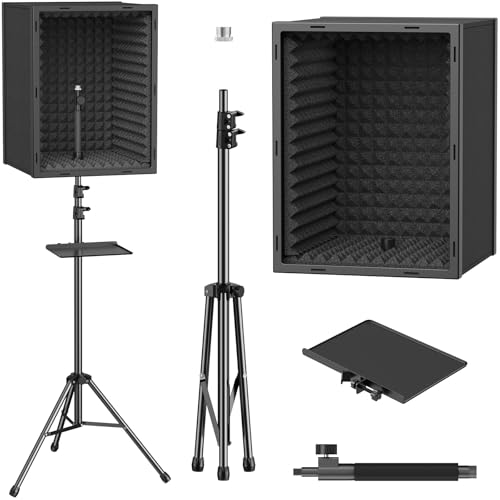
TONOR Personal Vocal Booth, Microphone Isolation Shield for Studio, Framed Acoustic Foam Box, Sound Absorbing, for Professional Recording, Podcast, Singing, Adjustable Height, Max 190 cm/53.1inch
Sound Absorption & Isolation: This vocal booth features a box design combining five high-density foam and sound absorbing...
As an affiliate, we earn on qualifying purchases.

TroyStudio Large Microphone Isolation Shield, Foldable Vocal Booth Reflection Filter, 2 Inches Thick Acoustic Foam Panel Music Sing Podcast Recording Studio Adjustable Sound Box for Desk & Laptop
【BASIC INFO】: Size after setup: As depicted in product images; Adjustable & Large space - accommodating a variety...
As an affiliate, we earn on qualifying purchases.