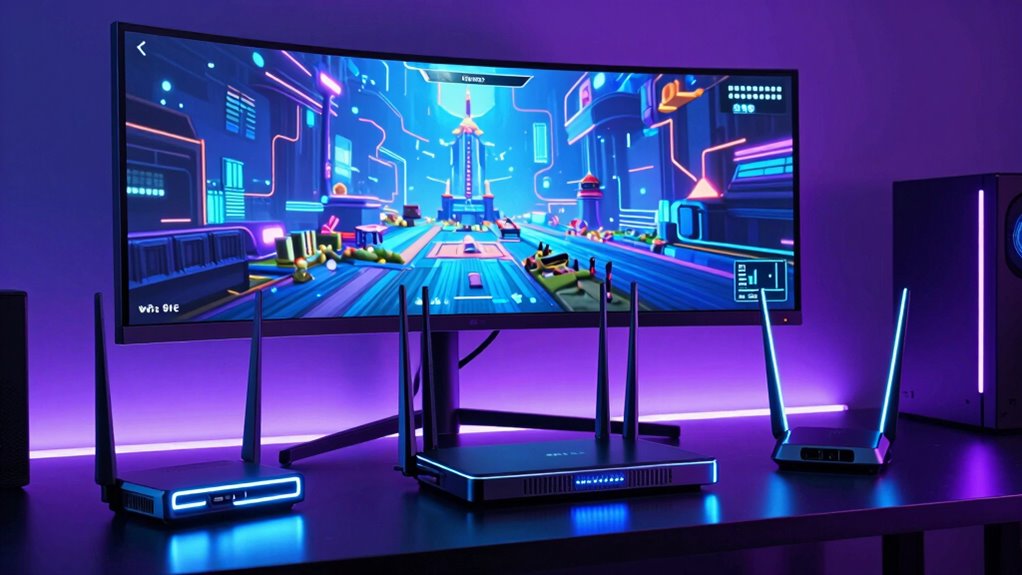

For VR enthusiasts, a reliable and fast Wi Fi 6E router is essential to support seamless streaming, low latency, and multiple device connections. The MSI Radix AXE6600 stands out as the best overall choice, offering impressive tri-band performance tailored for high-demand VR setups. The TP-Link Archer AXE7800 and Linksys Hydra Pro 6E deliver excellent coverage and speed, making them ideal for larger or more complex home environments. However, buyers face tradeoffs between coverage area, speed, and price, especially when balancing mesh systems versus single routers. Continue reading for a detailed breakdown of these options and what makes each suitable for different needs.

Get business pricing on tech for your team
- Business-only prices and quantity discounts
- Tax-exempt purchasing
- Multiple users, one account, clear invoices
Key Takeaways
- Tri-band Wi Fi 6E routers generally outperform dual-band models in VR setups due to better bandwidth distribution.
- Mesh systems like TP-Link Deco XE75 excel in covering larger spaces but often come at a higher cost per device.
- Choosing a router with multi-gig ports supports future-proofing, especially for VR streaming over wired connections.
- Performance can vary significantly based on home layout and interference; higher-tier routers tend to handle these issues better.
- Price and coverage are often inversely related; the most expensive models might not always be necessary for small or medium-sized spaces.
| MSI Radix AXE6600 WiFi 6E Tri-Band Gaming Router |  | Best for High-Performance VR Gaming and Heavy Use | WiFi Bands: 2.4GHz, 5GHz, 6GHz | Speed: Up to 6.6Gbps | Processor: 1.8 GHz quad-core | VIEW ON AMAZON | See Our Full Breakdown |
| ARRIS Surfboard G36 DOCSIS 3.1 Multi-Gig Modem & Wi-Fi 6 Router | AX3000 | 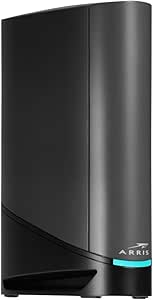 | Best for Simplified, Combined Internet and Wi-Fi Solution | Modem Technology: DOCSIS 3.1 | Wi-Fi Standard: Wi-Fi 6 | Speed: AX3000 | VIEW ON AMAZON | See Our Full Breakdown |
| TP-Link Tri-Band AXE5400 Wi-Fi 6E Gaming Router Archer GXE75 |  | Best for Dedicated Gaming and VR Performance | Wi-Fi Speed: Up to 5.4 Gbps | Bands: Tri-Band (2.4 GHz, 5 GHz, 6 GHz) | Ports: 1 x 2.5G WAN, 4 x 1G LAN | VIEW ON AMAZON | See Our Full Breakdown |
| TP-Link Archer AXE7800 Tri-Band Wi-Fi 6E Router |  | Best for Maximum Device Support and Speed | Wi-Fi Standard: Wi-Fi 6E (802.11AX) | Bands: Tri-Band | Maximum Speed: 7.8 Gbps | VIEW ON AMAZON | See Our Full Breakdown |
| Linksys Hydra Pro 6E Tri-Band Mesh WiFi AXE6600 Router |  | Best for Whole-Home Mesh Coverage with Easy Setup | WiFi Standard: AXE6600 | Bands: Tri-band (6 GHz, 5 GHz, 2.4 GHz) | WiFi Range: 2700 sq ft | VIEW ON AMAZON | See Our Full Breakdown |
| TP-Link Deco XE75 AXE5400 Tri-Band WiFi 6E Mesh System – 3 Pack |  | Best Overall for Large Homes with Seamless Coverage | Coverage: 7,200 sq. ft. | WiFi Bands: Tri-Band (6 GHz, 5 GHz, 2.4 GHz) | Total Speed: up to 5,400 Mbps | VIEW ON AMAZON | See Our Full Breakdown |
| TP-Link Deco XE70 Pro AXE4900 Tri-Band WiFi 6E Mesh Router – 2.5Gbps WAN, 2x1Gbps LAN Ports, 2900 sq ft Coverage, Connects up to 200 Devices |  | Best for High Device Capacity and Fast Speeds in Large Homes | Speed: up to 4.9 Gbps | Coverage: 2900 sq ft | WAN Port: 2.5 Gbps | VIEW ON AMAZON | See Our Full Breakdown |
| eero Pro 6E Mesh Wi-Fi Router – Supports Internet Plans up to 2.5 Gbps, Coverage up to 2,000 sq. ft., Connect 100+ Devices, 1-Pack |  | Best for Simplicity and Reliable Expansion | Max Internet Speed: 2.3 Gbps | Coverage Area: 2000 sq. ft. | Supported Devices: 100+ | VIEW ON AMAZON | See Our Full Breakdown |
| TP-Link AXE5400 Tri-Band WiFi 6E Router |  | Best for Powerful Hardware and Seamless Mesh Integration | WiFi Speed: up to 5400 Mbps | Bands: Tri-Band (6 GHz, 5 GHz, 2.4 GHz) | Processor: 1.0 GHz dual-core CPU | VIEW ON AMAZON | See Our Full Breakdown |
More Details on Our Top Picks
MSI Radix AXE6600 WiFi 6E Tri-Band Gaming Router
This router stands out for its combination of tri-band WiFi 6E support and a powerful 1.8 GHz quad-core processor, making it an excellent choice for gamers and VR enthusiasts who demand reliable, high-speed connections. Compared with the Linksys Hydra Pro 6E, the MSI Radix offers superior processing power and RGB aesthetics, but its setup is more complex and the price is higher. The tri-band design helps manage multiple devices simultaneously, reducing lag during VR sessions. However, the RGB lighting, while customizable, may be unnecessary for some users and adds to the cost. This model is best suited to advanced users who prioritize performance over simplicity.
Pros:- Supports high-speed WiFi 6E with tri-band for multiple devices
- Powerful 1.8 GHz quad-core processor ensures fast performance
- RGB Mystic Light adds customizable aesthetic
Cons:- Complex setup for non-technical users
- Premium price may be high for some buyers
Best for: Gamers and VR users who need a robust, high-speed network with aesthetic appeal.
Not ideal for: Casual users or those seeking a simple plug-and-play setup, due to its complex configuration and premium price.
- WiFi Bands:2.4GHz, 5GHz, 6GHz
- Speed:Up to 6.6Gbps
- Processor:1.8 GHz quad-core
- Features:AI QoS, RGB Mystic Light, MU-MIMO, 8-Stream, Tri-Band
Our verdict“This router is ideal for serious gamers and VR enthusiasts who need top-tier performance and don’t mind a complex setup.”
ARRIS Surfboard G36 DOCSIS 3.1 Multi-Gig Modem & Wi-Fi 6 Router | AX3000
Compared to dedicated routers like the TP-Link AXE5400, the ARRIS Surfboard G36 offers the convenience of a combined modem and router, reducing clutter and compatibility concerns. Its DOCSIS 3.1 modem supports multi-gig speeds, making it ideal for households with high-speed internet plans. The Wi-Fi 6 coverage ensures stable connections for multiple devices, including VR setups, but the device requires technical knowledge for proper setup and configuration. While it offers excellent value for those wanting an all-in-one solution, it might not match the raw performance or advanced features of premium routers like the TP-Link AXE7800. This model makes sense for users seeking simplicity and reliable internet access without separate devices.
Pros:- High-speed DOCSIS 3.1 modem supports multi-gig internet
- Wi-Fi 6 coverage for wider wireless performance
- Compatible with major ISPs and reduces rental fees
Cons:- Requires technical setup and configuration
- Price not specified, potentially costly for some
Best for: Home users who want a combined modem/router with solid WiFi 6 performance, especially with existing cable internet plans.
Not ideal for: Tech-savvy gamers or VR users needing the highest possible speeds and customization, due to setup complexity.
- Modem Technology:DOCSIS 3.1
- Wi-Fi Standard:Wi-Fi 6
- Speed:AX3000
- Service Compatibility:Xfinity, Spectrum, Cox
Our verdict“This all-in-one device suits households seeking a straightforward, reliable internet solution with decent VR support.”
TP-Link Tri-Band AXE5400 Wi-Fi 6E Gaming Router Archer GXE75
This router excels with its tri-band Wi-Fi 6E support and dedicated gaming features, such as a user-friendly game panel and real-time optimization, making it a strong choice for VR gaming. Its top speed of 5.4 Gbps and a 2.5G multi-gigabit port help reduce latency and provide fast wired connections. Compared with the Linksys Hydra Pro 6E, the GXE75 offers more gaming-specific features and easier setup via the Tether app. The complex feature set may overwhelm casual users, and the premium price reflects its gaming focus. If your priority is a smooth, low-latency VR experience, this router provides excellent performance, especially for dedicated gamers.
Pros:- High-speed tri-band Wi-Fi 6E with dedicated 6 GHz band
- Includes a 2.5G multi-gigabit port for fast wired connections
- User-friendly setup via Tether app with gaming optimization tools
Cons:- Complex features may be overwhelming for casual users
- Premium price point may be higher than standard routers
Best for: Serious gamers and VR users seeking optimized, low-latency connections with easy setup.
Not ideal for: Average users or those with minimal gaming needs, due to its complexity and higher cost.
- Wi-Fi Speed:Up to 5.4 Gbps
- Bands:Tri-Band (2.4 GHz, 5 GHz, 6 GHz)
- Ports:1 x 2.5G WAN, 4 x 1G LAN
- Security:TP-Link HomeShield
Our verdict“This router is well-suited for dedicated gamers and VR users who prioritize low latency and easy setup.”
TP-Link Archer AXE7800 Tri-Band Wi-Fi 6E Router
The AXE7800 is designed for users who need to connect a large number of devices, supporting up to 200 simultaneously. Its maximum speed of 7.8 Gbps and tri-band Wi-Fi 6E support make it a powerful choice for VR, streaming, and smart home hubs. Compared to the MSI Radix, the AXE7800 emphasizes device capacity and raw speed, but as a renewed product, it may have limited warranty and some uncertainty about longevity. Its complex setup process may challenge less experienced users. For large households or tech-heavy setups requiring extensive device support, this router provides exceptional speed and capacity.
Pros:- Supports up to 200 devices simultaneously
- High maximum speed of 7.8 Gbps
- Supports extensive device connections with tri-band Wi-Fi 6E
Cons:- Renewed product with potentially limited warranty
- Complex setup for less experienced users
Best for: Large households or smart home setups demanding high speed and extensive device support.
Not ideal for: Casual users or those seeking a simple, affordable router for light VR use, due to its complex setup and higher cost.
- Wi-Fi Standard:Wi-Fi 6E (802.11AX)
- Bands:Tri-Band
- Maximum Speed:7.8 Gbps
- Ethernet Port:2.5 Gbps WAN/LAN
Our verdict“This router is most suitable for large, device-dense environments needing maximum speed and capacity.”
Linksys Hydra Pro 6E Tri-Band Mesh WiFi AXE6600 Router
The Linksys Hydra Pro 6E offers broad coverage of up to 2,700 square feet, making it ideal for larger homes with multiple VR zones. Its mesh technology ensures seamless connectivity, reducing dead zones and maintaining strong VR performance across spaces. Compared with the MSI Radix, the Hydra Pro emphasizes wide coverage and easy setup over raw speed, making it more accessible to less technical users. Its premium price might be a barrier for some, and requiring compatible devices to fully leverage WiFi 6E could limit initial benefits. This pick makes sense for those seeking a reliable, easy-to-manage mesh network for VR-friendly environments.
Pros:- Ultra-fast multi-gigabit WiFi speeds
- Wide coverage of up to 2,700 sq ft
- Easy app-based setup with mesh technology
Cons:- Premium price may be high for some users
- Requires compatible devices to fully utilize WiFi 6E
Best for: Homeowners wanting extensive WiFi coverage and simple mesh setup for VR and streaming.
Not ideal for: Enthusiasts seeking maximum speed or advanced gaming features, as it prioritizes coverage and ease of use.
- WiFi Standard:AXE6600
- Bands:Tri-band (6 GHz, 5 GHz, 2.4 GHz)
- WiFi Range:2700 sq ft
- Ethernet Ports:5
Our verdict“This mesh router is perfect for large homes needing seamless VR and device coverage without complex setup.”
TP-Link Deco XE75 AXE5400 Tri-Band WiFi 6E Mesh System – 3 Pack
The TP-Link Deco XE75 stands out as the best option for large households needing extensive coverage without sacrificing speed. Its tri-band setup, including a dedicated 6 GHz band, reduces interference and congestion, making it ideal for streaming, gaming, and multiple smart devices. Compared with the eero Pro 6E, which offers slightly less coverage, the Deco XE75 provides a larger footprint—up to 7,200 square feet—making it better suited for sprawling homes. However, this system requires a separate modem for most ISPs and comes at a higher price point, especially for the 3-pack. The AI-driven management and TP-Link HomeShield security add convenience and protection, but the 6 GHz band is only accessible to WiFi 6E-compatible devices, limiting full benefit for older gadgets.
Pros:- Extensive coverage up to 7,200 sq. ft. suitable for large homes
- Fast speeds up to 5,400 Mbps with WiFi 6E tri-band technology
- Easy setup via Deco app and voice control compatibility
- Enhanced security with TP-Link HomeShield
Cons:- Requires a separate modem for most ISPs
- Higher price for a 3-unit system
- 6 GHz band limited to WiFi 6E devices only
Best for: Large families or multi-story homes with many devices demanding reliable, high-speed internet throughout
Not ideal for: Small apartments or users on a tight budget who do not need extensive coverage or advanced mesh features
- Coverage:7,200 sq. ft.
- WiFi Bands:Tri-Band (6 GHz, 5 GHz, 2.4 GHz)
- Total Speed:up to 5,400 Mbps
- Number of Units:3
- Compatibility:WiFi 6E, works with all ISPs
- Security:TP-Link HomeShield
Our verdict“Best suited for large homes needing seamless, high-speed WiFi 6E coverage with robust security features.”
TP-Link Deco XE70 Pro AXE4900 Tri-Band WiFi 6E Mesh Router – 2.5Gbps WAN, 2x1Gbps LAN Ports, 2900 sq ft Coverage, Connects up to 200 Devices
The TP-Link Deco XE70 Pro delivers impressive speeds up to 4.9 Gbps and supports up to 200 devices, making it a top choice for busy households with many smart gadgets. Its single-unit design simplifies setup and management through the Deco app, but compared to the Deco XE75 3-pack, it offers less coverage—around 2,900 sq. ft.—which may require additional units for larger spaces. The support for WiFi 6E ensures fast connectivity, but premium pricing and the need for compatible hardware to fully leverage WiFi 6E are considerations. It’s ideal for tech-heavy homes where speed and device capacity matter most, but less so for users seeking extensive coverage or budget-friendly options.
Pros:- Supports speeds up to 4.9 Gbps with WiFi 6E
- Supports up to 200 devices simultaneously
- Easy setup with the Deco app and robust security features
- Supports 2.5 Gbps WAN port for fast internet plans
Cons:- Premium price point
- Limited coverage of 2,900 sq. ft. per unit
- Requires compatible WiFi 6E devices for full benefit
Best for: Tech-savvy households with many smart devices and a need for high-speed connectivity in large or multi-room homes
Not ideal for: Small apartments or users with limited device counts who don’t need the highest speeds or capacity
- Speed:up to 4.9 Gbps
- Coverage:2900 sq ft
- WAN Port:2.5 Gbps
- LAN Ports:2 x 1 Gbps
- Device Capacity:up to 200
- Number of Units:1
Our verdict“Ideal for large, device-dense homes demanding high throughput and fast WiFi 6E performance.”
eero Pro 6E Mesh Wi-Fi Router – Supports Internet Plans up to 2.5 Gbps, Coverage up to 2,000 sq. ft., Connect 100+ Devices, 1-Pack
The eero Pro 6E offers a straightforward, scalable solution for homes needing reliable WiFi with minimal fuss. Its support for internet plans up to 2.5 Gbps and coverage of 2,000 sq. ft. makes it a solid choice for medium to large homes. Compared to the Deco XE75, it provides slightly less coverage but excels in simple setup and seamless expansion, especially for users already invested in the eero ecosystem. The support for over 100 devices and low latency makes it suitable for streaming and gaming, but the subscription-based security features and limited hardware options can be drawbacks for budget-conscious users. Overall, it’s best for users prioritizing ease of use and reliable coverage over raw speed or extensive coverage.
Pros:- Supports internet plans up to 2.5 Gbps
- Supports over 100 devices with low latency
- Easy to set up and expand via the eero app
- Reliable mesh coverage up to 2,000 sq. ft.
Cons:- Limited maximum internet speed compared to higher-end models
- Requires subscription for some security features
- Less coverage area than larger mesh systems like Deco XE75
Best for: Homeowners wanting a simple, expandable WiFi system with reliable performance and easy management
Not ideal for: Power users requiring ultra-high speeds or large coverage areas beyond 2,000 sq. ft.
- Max Internet Speed:2.3 Gbps
- Coverage Area:2000 sq. ft.
- Supported Devices:100+
- Ethernet Ports:1 x 2.5 Gb
- Backward Compatibility:Yes
Our verdict“Best for users seeking a hassle-free, expandable mesh WiFi with dependable coverage and simplicity.”
TP-Link AXE5400 Tri-Band WiFi 6E Router
The TP-Link AXE5400 delivers impressive speeds up to 5,400 Mbps across three bands, including the 6 GHz band, making it suitable for demanding VR experiences and high-bandwidth tasks. Its powerful dual-core CPU, 512 MB high-speed memory, and support for EasyMesh allow it to handle multiple devices and extend coverage easily. Compared with the Deco XE75, which emphasizes mesh coverage, this router’s hardware focus makes it better suited for users who want a central device with integrated mesh capabilities. The complex feature set, including VPN support and security with HomeShield, may be overkill for casual users, but it’s ideal for tech enthusiasts or gaming setups that demand top-tier performance. Its main drawback is the need for a modem, which adds to setup complexity.
Pros:- Fast WiFi speeds up to 5,400 Mbps with 6 GHz band
- Supports EasyMesh for flexible coverage extension
- Powerful dual-core CPU and 512 MB high-speed memory
- Built-in security with TP-Link HomeShield and VPN support
Cons:- Requires a modem for most internet service providers
- Complex setup and feature management may be overwhelming for casual users
- No specific price info available, potentially expensive
Best for: Power users and tech enthusiasts seeking high-speed, high-performance WiFi 6E with seamless mesh capabilities
Not ideal for: Casual users or those on a budget who prefer simple setups and minimal configuration
- WiFi Speed:up to 5400 Mbps
- Bands:Tri-Band (6 GHz, 5 GHz, 2.4 GHz)
- Processor:1.0 GHz dual-core CPU
- Memory:512 MB
- Compatibility:EasyMesh
- Security:TP-Link HomeShield, VPN
Our verdict“Ideal for tech-savvy users demanding top-tier hardware and seamless mesh integration for VR and high-bandwidth applications.”

How We Picked
These routers were evaluated based on a combination of performance metrics, such as throughput speeds and latency, and usability factors like ease of setup and management features. We prioritized models that explicitly support Wi Fi 6E, ensuring compatibility with the latest VR streaming protocols and devices. Coverage area and scalability, including mesh capabilities, were also critical, as VR users often need consistent connections across large or multi-room setups. Finally, value was considered—balancing price against features to identify models that offer the best performance for their cost, with a clear focus on those optimized for VR demands.Factors to Consider When Choosing Wi Fi 6e Router For Vr
When selecting a Wi Fi 6E router for VR, it’s essential to consider several factors that impact performance, coverage, and future-proofing. This guide highlights key considerations to help you avoid common pitfalls and choose a device tailored to your specific needs, whether for casual gaming or professional VR setups.Performance and Speed
VR demands low latency and high throughput to prevent lag and motion sickness. Look for routers that specify multi-gigabit speeds and support Wi Fi 6E’s 6GHz band, which reduces interference and congestion. Remember, real-world speeds often fall below theoretical maximums, so prioritize models with robust performance metrics to ensure smooth VR experiences.
Coverage and Scalability
VR setups often span multiple rooms or floors, making coverage a critical factor. Mesh systems or routers with multiple bands and extended range features help maintain stable connections across larger areas. Be cautious of models with limited coverage, which may require additional extenders, adding complexity and cost.
Wired vs. Wireless Connections
While Wi Fi 6E provides excellent wireless performance, wired connections still offer the lowest latency. Consider routers with multi-gig LAN ports, especially if your VR system benefits from Ethernet. Using wired connections for VR headsets or base stations can significantly improve reliability, though it may reduce mobility.
Ease of Setup and Management
Advanced features like easy app-based setup, parental controls, and device prioritization can simplify managing your network. For VR, stability is key, so look for routers with Quality of Service (QoS) options that can prioritize VR traffic over other devices. User-friendly interfaces matter, especially if you’re not a networking expert.
Price and Future-Proofing
Higher-priced models tend to offer better performance, coverage, and features such as multi-gig ports or advanced mesh capabilities. However, evaluate whether these extras align with your current needs and budget. Investing in a slightly more expensive router now can extend its usefulness as your VR setup or home network grows.
Frequently Asked Questions
Is Wi Fi 6E necessary for VR gaming?
Wi Fi 6E can significantly improve VR experiences by reducing latency and interference thanks to the 6GHz band. While not strictly necessary, it offers an advantage over Wi Fi 6, especially in busy environments with many connected devices. For high-end VR gaming or streaming, Wi Fi 6E ensures a more stable and responsive connection, but mid-range Wi Fi 6 routers can suffice for less demanding setups.
Can I use a mesh Wi Fi 6E system for VR?
Yes, mesh systems like TP-Link Deco XE75 are well-suited for VR setups, especially in larger homes. They provide extended coverage, reducing dead zones and maintaining stable connections across multiple rooms. However, mesh systems tend to be more expensive, and for small spaces, a single high-performance router may be more cost-effective without sacrificing performance.
What should I prioritize: speed or coverage?
This depends on your space and use case. For VR, low latency and stable connections are crucial, so prioritize routers with high throughput and good coverage to avoid interruptions. If your home is large, coverage becomes critical, and investing in a mesh system might be the better approach. Balancing both factors is ideal, but for most VR users, performance stability often outweighs raw speed.
Are multi-gig ports essential for VR?
Multi-gig Ethernet ports are a valuable feature for VR, especially if you prefer wired connections for the lowest latency. They allow you to connect VR headsets or base stations directly to the router with higher speeds, reducing lag and ensuring smoother performance. While not mandatory, having multi-gig ports future-proofs your network for evolving VR hardware.
How much should I expect to spend on a VR-optimized Wi Fi 6E router?
Prices vary widely based on features and coverage. Expect to spend between $200 and $500 for a high-quality Wi Fi 6E router tailored for VR. Cheaper models may lack the bandwidth or coverage needed for demanding setups, while premium options include advanced mesh capabilities, multi-gig ports, and extensive coverage, which are useful if you have a large or complex space.
Conclusion
For most casual VR users, the MSI Radix AXE6600 offers a balanced mix of speed, coverage, and ease of use, making it the best overall choice. Those with larger homes or demanding setups will benefit from the TP-Link Archer AXE7800 or mesh options like the TP-Link Deco XE75, which handle multiple rooms effectively. Budget-conscious buyers should consider mid-range models that deliver solid performance without overpaying. For gaming or professional VR applications, investing in routers with multi-gig ports and extensive coverage ensures a more reliable experience, while beginners might prefer simpler, user-friendly systems that still support Wi Fi 6E’s benefits.
As an affiliate, we earn on qualifying purchases.Fall Picks
fall essentials