
Finding the right accessories for your Steam Deck can significantly enhance your gaming experience, whether you’re at home or on the go. The best overall pick, the JSAUX 6-in-1 Docking Station, offers versatile connectivity, but it comes with a higher price and bulkier size. The JSAUX Carrying Case provides excellent protection, while the Syntech Silicone Case offers a sleek, budget-friendly shield. Tradeoffs often involve balancing performance, portability, and cost. Keep reading for a detailed breakdown of the top accessories and what makes each stand out.

Get business pricing on tech for your team
- Business-only prices and quantity discounts
- Tax-exempt purchasing
- Multiple users, one account, clear invoices
Key Takeaways
- Versatile docking stations provide the most value for expanding connectivity but tend to be larger and more expensive.
- Protection accessories like cases and screen protectors are essential for durability, though they vary in ease of installation and bulk.
- Charging options range from compact 45W chargers to multi-port docks, with tradeoffs in portability versus functionality.
- Cooling accessories can help manage device temperature during intensive gaming, but some add noticeable bulk.
- Compatibility with OLED versus LCD models is a key consideration, affecting the choice of cases and screen protectors.
| JSAUX 45W USB-C Charger for Steam Deck and More with 5FT Cable |  | Best Value for Versatile Charging | Power Output: 45W | Cable Length: 5 feet | Compatibility: Steam Deck, Switch, Galaxy S series, iPhone, Pixel, MacBook | VIEW ON AMAZON | See Our Full Breakdown |
| JSAUX Cooling Fan for Steam Deck and Steam Deck OLED with Stand |  | Best Cooling Solution for Extended Gaming | Compatibility: Steam Deck and Steam Deck OLED | Cooling Capacity: Reduces temperature by 8-15°C in 4-8 minutes | Operation Time: Up to 5 hours | VIEW ON AMAZON | See Our Full Breakdown |
| JSAUX Carrying Case for Steam Deck and ROG Ally |  | Best Protective Travel Case | Compatible Devices: Steam Deck OLED, ROG Ally, PlayStation Portal | Material: EVA shell | Features: Large capacity, double zipper, fleece compartment, reinforced handle | VIEW ON AMAZON | See Our Full Breakdown |
| JSAUX 6-in-1 Docking Station for Steam Deck, ROG Ally X, Legion Go |  | Best High-End Dock for Power and Performance | HDMI Output: 4K@120Hz | Power Delivery: 100W | USB Ports: 3 x USB 3.0 | VIEW ON AMAZON | See Our Full Breakdown |
| JSAUX 5-in-1 Docking Station for Steam Deck, ROG Ally X, Legion Go |  | Best Compact High-Performance Dock | HDMI Output: 4K@120Hz | Power Delivery: 100W | USB Ports: 2 x USB A 2.0 | VIEW ON AMAZON | See Our Full Breakdown |
| JSAUX 2-Pack Ultra HD Screen Protector for Steam Deck OLED/LCD |  | Best Screen Protection for Clarity and Fingerprint Resistance | Compatibility: Steam Deck LCD & OLED | Size: 7-inch | Material: Tempered glass | VIEW ON AMAZON | See Our Full Breakdown |
| JSAUX ModCase for Steam Deck and Steam Deck OLED |  | Best Modular Protection with Enhanced Cooling and Customization | Material: Eco-friendly PC-ABS and silicone | Compatibility: Steam Deck (2022) and Steam Deck OLED | Included Accessories: Cooling fan, metal stand, strap, face cover | VIEW ON AMAZON | See Our Full Breakdown |
| JSAUX Carrying Case for Steam Deck and Steam Deck OLED | 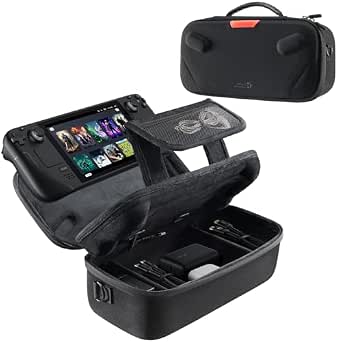 | Best Organized Carry Solution with Dual-Layer Storage | Compatibility: Steam Deck and Steam Deck OLED | Storage Layers: Dual layer (console + accessories) | Cable Port: Yes, built-in | VIEW ON AMAZON | See Our Full Breakdown |
| Anker Steam Deck Dock, 6-in-1 4K@60Hz HDMI Docking Station for Steam Deck |  | Best High-Resolution, Versatile Docking Station | Number of ports: 6 | HDMI resolution: 4K@60Hz | Power Delivery: 100W | VIEW ON AMAZON | See Our Full Breakdown |
| JSAUX PC0104 ModCase Compatible with Steam Deck |  | Best Protective and Modular Case with Detachable Front | Compatibility: Steam Deck OLED (2023/2024+) and LCD | Material: Eco-friendly PC-ABS and TPU | Includes: Detachable front cover, metal kickstand, silicone strap | VIEW ON AMAZON | See Our Full Breakdown |
| Syntech Protective Silicone Case for Steam Deck OLED & LCD – Gray |  | Best All-Around Protection and Comfort | Compatibility: Steam Deck OLED & LCD | Material: Recycled silicone | Color: Gray | VIEW ON AMAZON | See Our Full Breakdown |
| steam deck accessorie | Compatibility | Material |
|---|---|---|
| JSAUX 45W USB-C Charger for St | Steam Deck, Switch, Galaxy S series, iPhone, Pixel, MacBook | — |
| JSAUX Cooling Fan for Steam De | Steam Deck and Steam Deck OLED | Plastic |
| JSAUX Carrying Case for Steam | — | EVA shell |
| JSAUX 6-in-1 Docking Station f | Steam Deck, ROG Ally X, Legion Go | — |
| JSAUX 5-in-1 Docking Station f | Steam Deck, ROG Ally, Legion Go | — |
| JSAUX 2-Pack Ultra HD Screen P | Steam Deck LCD & OLED | Tempered glass |
| JSAUX ModCase for Steam Deck a | Steam Deck (2022) and Steam Deck OLED | Eco-friendly PC-ABS and silicone |
| JSAUX Carrying Case for Steam | Steam Deck and Steam Deck OLED | — |
| Anker Steam Deck Dock | — | — |
| JSAUX PC0104 ModCase Compatibl | Steam Deck OLED (2023/2024+) and LCD | Eco-friendly PC-ABS and TPU |
| Syntech Protective Silicone Ca | Steam Deck OLED & LCD | Recycled silicone |
More Details on Our Top Picks
JSAUX 45W USB-C Charger for Steam Deck and More with 5FT Cable
This charger stands out for its ability to power multiple devices like Steam Deck, Nintendo Switch, and MacBooks, thanks to its 45W output and intelligent power management. Compared with specialized chargers, it offers broad compatibility and a lengthy, flexible cable that enhances convenience. However, its 45W limit means it can’t support full-speed charging for some high-powered devices like the Switch 2, making it less ideal for those with demanding power needs. Its safety protections, including over-current and over-voltage, add peace of mind, but some users might find its maximum wattage restrictive for future-proofing. This pick makes the most sense for users seeking a reliable, multi-device charger without the premium price of high-wattage models.
Pros:- Supports fast charging for a wide range of devices including Steam Deck and Switch
- Long, durable 5-foot cable enhances flexibility during charging
- Intelligent output adjustment with multiple safety protections
Cons:- Limited to 45W, not suitable for high-demand devices
- Does not support full-speed charging for Switch 2
Best for: Budget-conscious users who need a reliable, multi-device USB-C charger for their Steam Deck and other gadgets.
Not ideal for: Power users who want ultra-fast charging for high-power devices like newer MacBooks or future gaming consoles.
- Power Output:45W
- Cable Length:5 feet
- Compatibility:Steam Deck, Switch, Galaxy S series, iPhone, Pixel, MacBook
- Protection Features:Over-current, over-voltage, overheating, short-circuit
- Certification:UL 62368-1
Our verdict“This charger is perfect for users who want versatile, safe charging without investing in high-wattage power supplies.”
JSAUX Cooling Fan for Steam Deck and Steam Deck OLED with Stand
This cooling fan excels at preventing overheating during intense gaming sessions, outperforming passive cooling methods or basic stands. Its adjustable speed allows customization of noise and cooling levels, which is a step above simpler fans. The integrated stand enables hands-free play, a feature not available with basic cooling pads. The fan can reduce device temperature by up to 15°C within minutes, enhancing performance and longevity. However, at higher speeds, it can become noticeably louder, which might distract during quieter moments. Manual adjustment is necessary to optimize cooling, adding some setup complexity. This product is ideal for gamers who prioritize maintaining device performance and comfort during marathon sessions.
Pros:- Effective cooling reduces device temperature quickly
- Integrated stand offers hands-free gaming convenience
- Adjustable speed for personalized noise and cooling balance
- Operates up to 5 hours at lower speeds
Cons:- Louder noise at higher wind speeds
- Requires manual adjustments for optimal performance
Best for: Gamers who regularly play for extended periods and want to keep their Steam Deck cool and quiet at lower speeds.
Not ideal for: Casual players or those sensitive to noise, as higher fan speeds can be loud and distracting.
- Compatibility:Steam Deck and Steam Deck OLED
- Cooling Capacity:Reduces temperature by 8-15°C in 4-8 minutes
- Operation Time:Up to 5 hours
- Adjustable Speed:0-100%
- Material:Plastic
Our verdict“This cooling fan is a smart choice for dedicated gamers seeking reliable thermal management without sacrificing comfort.”
JSAUX Carrying Case for Steam Deck and ROG Ally
This hard-shell case provides comprehensive protection for Steam Deck (OLED), ROG Ally, and PlayStation Portal Remote Player, making it ideal for transport. Its large capacity accommodates multiple accessories, unlike smaller cases that only hold the device itself. The reinforced handle and secure zipper enhance portability and security, but it’s not compatible with ASUS ROG Xbox Ally or Legion GO, limiting versatility for other gaming devices. The case does not include accessories, so users must purchase those separately. Its impact-resistant EVA shell and fleece-lined interior make it a strong choice for safeguarding electronics on the go, though bulkiness might be a concern for some travelers. This case suits users who prioritize durability and ample storage during travel.
Pros:- Provides excellent impact and scratch protection
- Large capacity for multiple accessories
- Reinforced handle for easy carrying
- Secure zippers prevent accidental openings
Cons:- Not compatible with certain devices like ASUS ROG Xbox Ally
- Accessories are not included, requiring additional purchases
Best for: Travelers and gamers needing a rugged, spacious case for their Steam Deck, ROG Ally, or PlayStation Remote Player.
Not ideal for: Casual users with minimal accessories or those preferring lightweight, compact cases.
- Compatible Devices:Steam Deck OLED, ROG Ally, PlayStation Portal
- Material:EVA shell
- Features:Large capacity, double zipper, fleece compartment, reinforced handle
- Color:Black
Our verdict“This case is a solid investment for gamers who want maximum protection and storage during their travels.”
JSAUX 6-in-1 Docking Station for Steam Deck, ROG Ally X, Legion Go
This docking station offers remarkable connectivity, supporting 4K@120Hz HDMI output and 100W PD charging, making it ideal for high-performance gaming and multimedia. The inclusion of three USB 3.0 ports and Gigabit Ethernet ensures versatile peripherals and stable online connections, surpassing simpler 4-in-1 docks. Compared to the 5-in-1 model, this station provides more ports, but its compatibility is limited to specific devices like Steam Deck, ROG Ally X, and Legion Go, excluding other popular handhelds. The need for a 100W power supply for full Turbo Mode support adds an extra requirement. Its premium features justify a higher price point, but this dock is best suited for serious gamers and streamers who demand maximum performance and connectivity.
Pros:- Supports ultra-smooth 4K@120Hz visuals
- Delivers rapid 100W charging for extended use
- Multiple ports for peripherals and Ethernet connectivity
Cons:- Limited to specific devices like Steam Deck and Legion Go
- Requires a 100W charger for full Turbo Mode performance
Best for: Power users who require high-resolution output, fast charging, and multiple peripherals for their Steam Deck or similar devices.
Not ideal for: Casual gamers who do not need extensive connectivity or who own incompatible devices like Xbox X series.
- HDMI Output:4K@120Hz
- Power Delivery:100W
- USB Ports:3 x USB 3.0
- Ethernet:Gigabit Ethernet
- Compatibility:Steam Deck, ROG Ally X, Legion Go
Our verdict“This dock is best for gamers who want premium visuals, fast charging, and extensive connectivity in one package.”
JSAUX 5-in-1 Docking Station for Steam Deck, ROG Ally X, Legion Go
This docking station provides a well-balanced mix of features, including 4K@120Hz HDMI output and 100W PD charging, in a smaller form factor compared to the 6-in-1. Its dual USB A 2.0 ports support basic peripherals, and the Ethernet port ensures reliable wired connections. While slightly limited in port variety compared to the 6-in-1, it still covers essential needs for most gamers. Compatibility is restricted to Steam Deck, ROG Ally, and Legion Go, so it’s not suitable for broader device support. Its streamlined design makes it easier to transport, but users should note it lacks some of the expandability of larger docks. This model makes the most sense for those wanting a compact yet powerful docking solution for gaming and streaming.
Pros:- Supports ultra-smooth 4K@120Hz visuals
- Provides fast 100W charging
- Compact and portable design
- Reliable Ethernet connection
Cons:- Limited to specific devices like Steam Deck and Legion Go
- Fewer USB ports than larger docks
Best for: Gamers who prefer a smaller, portable dock without sacrificing key features like 4K@120Hz output and fast charging.
Not ideal for: Users who need extensive port options or own incompatible devices like Xbox X or ASUS ROG Xbox Ally.
- HDMI Output:4K@120Hz
- Power Delivery:100W
- USB Ports:2 x USB A 2.0
- Ethernet:RJ45
- Compatibility:Steam Deck, ROG Ally, Legion Go
Our verdict“This dock is ideal for gamers seeking a space-efficient, high-performance solution for their Steam Deck or similar devices.”
JSAUX 2-Pack Ultra HD Screen Protector for Steam Deck OLED/LCD
This tempered glass screen protector stands out for maintaining the Steam Deck’s vibrant display with 99.99% transparency, offering a clear visual experience that rivals plastic options like Syntech’s silicone case. Its edge-to-edge coverage ensures full protection, making it ideal for users concerned about scratches and fingerprints. Compared to plastic protectors, this glass provides a more durable barrier but can be more fragile if not handled carefully during installation. The oleophobic coating adds to its appeal by resisting fingerprints, which is a common annoyance on handheld devices. However, being made of tempered glass, it might crack under significant impact if not reinforced properly, unlike some plastic alternatives that bend more easily. Overall, this pick makes the most sense for users who prioritize screen clarity and fingerprint resistance, willing to handle a slightly more fragile protector.
Pros:- High transparency preserves display clarity
- Easy installation with guiding frame
- Full edge-to-edge coverage for comprehensive protection
- Oleophobic coating resists fingerprints
Cons:- Fragile compared to plastic protectors if not reinforced properly
- Only compatible with Steam Deck LCD & OLED models
Best for: Steam Deck owners seeking high transparency and fingerprint resistance for daily gaming sessions
Not ideal for: Heavy travelers or those prone to drops, due to the fragility of tempered glass compared to plastic protectors
- Compatibility:Steam Deck LCD & OLED
- Size:7-inch
- Material:Tempered glass
- Features:Edge-to-edge, easy to install, 99.99% transparency, oleophobic coating, reinforced at 500℃
Our verdict“This screen protector is best for users who prioritize visual clarity and fingerprint resistance over ultra-tough durability.”
JSAUX ModCase for Steam Deck and Steam Deck OLED
The JSAUX ModCase offers comprehensive protection tailored for the Steam Deck, with a modular design that allows adding accessories like cooling fans and stands—this makes it stand out compared to simpler cases like the Syntech silicone cover. Its durable PC-ABS and silicone materials provide solid defense against bumps and scratches, but the added bulk from modular components could make handling less sleek. The included cooling fan is a plus for extended gaming sessions, helping prevent overheating, a feature not available with more basic cases. While the customization options are appealing, they require some assembly and adjustment, which might be a drawback for users seeking a quick, no-fuss solution. This case is ideal for gamers who want to upgrade their device’s protection and performance with modular add-ons but are okay with the extra size and setup time.
Pros:- Provides durable, full-coverage protection
- Modular design allows adding cooling fans and accessories
- Includes cooling fan to reduce overheating during intensive gaming
- Precise cut-outs for all ports
Cons:- Can be bulky and less portable
- Requires assembly and customization for optimal use
Best for: Power users who want full protection, cooling, and customization for extended gaming sessions
Not ideal for: Casual gamers or users preferring a slim, lightweight case with minimal setup
- Material:Eco-friendly PC-ABS and silicone
- Compatibility:Steam Deck (2022) and Steam Deck OLED
- Included Accessories:Cooling fan, metal stand, strap, face cover
- Features:Modular design, customizable, precise port cut-outs
Our verdict“This case suits gamers needing maximum protection and cooling, accepting some extra size and setup effort.”
JSAUX Carrying Case for Steam Deck and Steam Deck OLED
The JSAUX Carrying Case excels in organization, featuring a dual-layer design that separates the console, accessories, and cables—this makes it more versatile than simpler cases like the Syntech silicone model. Its built-in cable port and foldable stand add convenience for charging on the go and tabletop gaming, respectively. The hard shell exterior combined with soft padding offers solid protection against impacts during travel, but its bulkiness might deter those looking for a lightweight, pocket-sized option. The case does not include accessories, so users must purchase storage for additional peripherals separately. This makes it a smart choice for gamers who prioritize organized transport and protection over ultra-compact size.
Pros:- Dual-layer storage keeps console and accessories organized
- Built-in cable port for convenient charging
- Durable exterior with soft padding for impact absorption
- Includes a foldable stand for tabletop gaming
Cons:- Accessories not included, requiring additional purchase
- May be bulky for some portable needs
Best for: Travelers and commuters who need organized, protected storage for their Steam Deck and accessories
Not ideal for: Minimalists or those seeking a lightweight, pocketable case for quick trips
- Compatibility:Steam Deck and Steam Deck OLED
- Storage Layers:Dual layer (console + accessories)
- Cable Port:Yes, built-in
- Includes:Right angle USB C to USB C cable
Our verdict“This case is perfect for users who value organized, protected transport with added functionality like charging and stand support.”
Anker Steam Deck Dock, 6-in-1 4K@60Hz HDMI Docking Station for Steam Deck
The Anker 6-in-1 dock shines with its support for 4K@60Hz output, making it ideal for users wanting crisp visuals on larger screens, unlike the JSAUX 2-in-1 dock that offers more basic display options. Its 100W Power Delivery ensures fast charging, and the inclusion of Gigabit Ethernet and multiple USB ports offers a versatile setup for streaming, data transfer, and wired connections. However, the USB-C port’s lack of support for screen mirroring limits some uses, and its compatibility is limited to Steam Deck, unlike multi-platform docks. The compact, built-in cable simplifies setup but sacrifices some expandability like SD card slots. This dock makes sense for gamers and streamers prioritizing high-res output and fast connectivity, but not for those seeking broader media support.
Pros:- Supports 4K@60Hz high-resolution output
- Fast 100W Power Delivery for quick charging
- Multiple USB ports and Gigabit Ethernet for connectivity
- Compact, integrated cable design
Cons:- USB-C port does not support screen mirroring
- Limited to Steam Deck compatibility
- Lacks SD card slot or additional media features
Best for: Steam Deck users who want a reliable, high-resolution docking station for gaming and streaming
Not ideal for: Users needing multi-platform or multi-device docking, or those who require SD card support
- Number of ports:6
- HDMI resolution:4K@60Hz
- Power Delivery:100W
- Ethernet:1Gbps
- USB-A ports:2 at 5Gbps
- USB-C port:1 at 5Gbps
- Cable length:8.66 inches
Our verdict“This dock is well-suited for gamers who want crisp visuals and reliable wired connectivity, but not for multi-platform use or media expansion.”
JSAUX PC0104 ModCase Compatible with Steam Deck
The JSAUX PC0104 ModCase offers a comprehensive shell that emphasizes durability and access, with a detachable front cover for added screen protection—this contrasts with the simpler, non-modular cases like the Syntech silicone model. Its impact-resistant body and modular metal kickstand provide stability for tabletop gaming, while the silicone strap offers attachment options, making it a versatile choice. The case’s design ensures easy access to all buttons and controls, but the added bulk could be a concern for those who prefer slim cases. Assembly of modular components can also be a minor hassle for some users. This case is best for gamers who want full protection, easy access, and flexibility for both handheld and tabletop play, accepting some size increase as a tradeoff.
Pros:- Full access to controls with sleek design
- Detachable front cover for screen protection
- Modular metal kickstand for stable tabletop use
- Silicone strap for attaching accessories or extending battery life
Cons:- May add bulk compared to slim cases
- Requires assembly of modular parts
Best for: Users seeking rugged, modular protection with easy access for casual and tabletop gaming
Not ideal for: Minimalists or those needing ultra-lightweight cases for quick trips
- Compatibility:Steam Deck OLED (2023/2024+) and LCD
- Material:Eco-friendly PC-ABS and TPU
- Includes:Detachable front cover, metal kickstand, silicone strap
- Warranty:12 months
- Support:24/7 customer support
Our verdict“This case is ideal for gamers wanting rugged, full access protection with added modular features, tolerating some size and assembly effort.”
Syntech Protective Silicone Case for Steam Deck OLED & LCD – Gray
This silicone case stands out for offering comprehensive protection while enhancing the grip and comfort during extended gaming sessions. Compared to the JSAUX Carrying Case, which focuses more on portability, the Syntech silicone case provides all-around safeguard against scratches, dust, and scuffs, making it ideal for everyday use. Its ergonomic design with grip convex domes and non-slip thumb grips improves control, especially during intense gameplay. However, it isn’t compatible with the official Steam Deck dock, which could be a limitation for users relying on docking features. Additionally, if your screen protector is particularly thick, the fit may be slightly compromised. The recycled silicone material offers durability and eco-friendliness but comes in limited color options, mostly gray. This pick makes the most sense for gamers who want reliable protection combined with improved handling during long play sessions.
Pros:- Offers full protection against scratches, dust, and scuffs
- Enhanced grip and ergonomic design for comfortable extended use
- Includes non-slip thumb grips for better control
- Made from durable, eco-friendly recycled silicone
Cons:- Incompatible with the official Steam Deck dock
- May not fit perfectly if a thick screen protector is installed
- Limited to a single color option (gray)
Best for: Steam Deck owners seeking durable, all-around protection that enhances grip and comfort during extended gaming
Not ideal for: Users who frequently dock their Steam Deck or prefer a more stylish aesthetic with multiple color choices
- Compatibility:Steam Deck OLED & LCD
- Material:Recycled silicone
- Color:Gray
- Design Features:Enhanced alignment, all-around protection, grip convex domes, ergonomic design, enlarged Type-C cutout, non-slip thumb grips
- Protection Type:Scratch, dust, scuff resistance
- Fitment:Precise for standard devices, may vary with thick screen protectors
- Eco-Friendly:Yes
- Compatibility Limitations:Not compatible with official dock
Our verdict“This case is best suited for gamers who prioritize protection and grip without needing docking compatibility.”

How We Picked
Products were evaluated based on performance, build quality, compatibility, ease of use, and value. Accessories that seamlessly integrate with the Steam Deck and enhance its capabilities ranked higher. We also considered user convenience, such as portability and installation complexity. The ranking reflects a balance between functionality and practicality, ensuring each pick offers a clear benefit while acknowledging potential tradeoffs like size, price, or compatibility limits.| steam deck accessorie | Material |
|---|---|
| JSAUX 45W USB-C Charger for St | — |
| JSAUX Cooling Fan for Steam De | Plastic |
| JSAUX Carrying Case for Steam | EVA shell |
| JSAUX 6-in-1 Docking Station f | — |
| JSAUX 5-in-1 Docking Station f | — |
| JSAUX 2-Pack Ultra HD Screen P | Tempered glass |
| JSAUX ModCase for Steam Deck a | Eco-friendly PC-ABS and silicone |
| JSAUX Carrying Case for Steam | — |
| Anker Steam Deck Dock | — |
| JSAUX PC0104 ModCase Compatibl | Eco-friendly PC-ABS and TPU |
| Syntech Protective Silicone Ca | Recycled silicone |
Factors to Consider When Choosing Steam Deck Accessories
Choosing the right accessories for your Steam Deck involves more than just features; it requires understanding your gaming habits and specific needs. Consider how often you’ll use certain accessories, such as chargers or docks, and whether portability or maximum performance matters most. Compatibility is crucial—make sure accessories fit your specific Steam Deck model, especially if you own an OLED version. Price versus longevity and utility should also guide your decision, as investing in quality can save money in the long run. Finally, ease of installation and maintenance are often overlooked but can significantly impact your overall experience.Compatibility and Model Specifics
Always double-check that accessories are compatible with your Steam Deck version—be it LCD or OLED. Some cases, screen protectors, and docks are optimized for specific models, affecting fit and function. Buying incompatible accessories can lead to frustration and potential damage, so verify specifications before purchase. This is especially important for accessories like screen protectors and cases, which must align precisely with your device’s dimensions and ports.
Portability vs. Performance
Decide whether you prioritize a lightweight setup or maximum connectivity. Compact chargers and cases are great for travel, but they may lack the additional ports or cooling features that larger docks provide. Conversely, multi-port docks enhance connectivity but add bulk, making your setup less portable. Consider your typical gaming environment—at home or on the move—and choose accordingly to avoid carrying unnecessary weight or sacrificing convenience.
Build Quality and Longevity
Opt for accessories made from durable materials, especially for frequently handled items like cases and cables. Cheaply made accessories might save money initially but tend to wear out faster or cause damage to your device. Investing in well-constructed options ensures longevity and better protection, which ultimately offers better value over time despite higher upfront costs.
Ease of Installation and Use
Simplicity matters—an accessory that’s difficult to install or use can deter regular use. Screen protectors should be bubble-free and easy to apply; cases should snap on securely without complicated steps. Accessories with intuitive designs improve your overall experience and reduce frustration, especially if you plan to swap or upgrade frequently.
Price and Value Balance
While premium accessories often offer advanced features, they’re not always necessary for every user. Budget-friendly options can be sufficient for casual gamers, but serious users might find value in investing more for durability and enhanced functionality. Consider your budget and how often you’ll use each accessory to determine where to allocate your spending for maximum benefit.
Frequently Asked Questions
Will a larger docking station hinder portability?
Yes, larger docking stations generally add bulk and weight, making them less convenient for travel. If portability is a priority, look for compact docks with essential features. However, larger docks typically offer more ports and features, which can be valuable for a stationary setup. Balancing size and functionality depends on whether you’re gaming mostly at home or on the go.
Are screen protectors necessary for the Steam Deck?
Screen protectors help prevent scratches and minor damage, especially if you carry your Steam Deck frequently or use it in rough environments. They’re a cost-effective way to extend your device’s lifespan without adding much bulk. However, quality screen protectors can sometimes affect touch sensitivity or display clarity if poorly applied, so choosing a reputable brand is important.
Can I use a standard USB-C charger for my Steam Deck?
While many USB-C chargers will work, it’s important to select one that provides enough power—at least 45W—to ensure efficient charging. Using a lower wattage charger may result in slower charging or insufficient power during intensive gaming sessions. Always check compatibility and power output specifications to avoid potential damage or suboptimal charging performance.
Is it worth investing in a premium carrying case?
Premium cases often offer better protection, more storage options, and higher-quality materials, which can be worthwhile if you frequently travel or own valuable accessories. Cheaper cases may save money initially but tend to wear out faster and provide less protection. Consider how often you’ll carry your device and whether added durability justifies the higher cost.
Do cooling fans significantly improve performance?
Cooling fans can help keep your Steam Deck at optimal temperatures during intense gaming, potentially preventing throttling. However, they also add bulk and noise, which might be distracting. If you play demanding titles regularly, a cooling accessory could be beneficial; for casual use, it may not be necessary. Always ensure the fan’s fit and noise level align with your preferences.
Conclusion
For most users, the JSAUX 6-in-1 Docking Station offers the best combination of versatility and performance, making it ideal for those who want a powerful, all-in-one setup at home. Casual gamers or those on a tight budget will find the Syntech Silicone Case or JSAUX Protective Screen Protector affordable and effective. Beginners or infrequent travelers should prioritize simple, lightweight accessories, like basic cases or chargers. Power users seeking maximum connectivity and durability should consider premium options like the Anker 6-in-1 Dock or the JSAUX ModCase. Tailor your choices based on how you use your Steam Deck to get the most value and enjoyment from your accessories.
Fall Picks
fall essentials
As an affiliate, we earn on qualifying purchases.