For a professional event booth, a projector has to do more than make a large image: it needs to stay readable under venue lighting, fit into a practical setup, and connect to the source you plan to use. I rank the Epson Pro EX9270 first because its 4,100 lumens, Full HD resolution, wireless options, and image adjustments suit changing booth layouts. The Epson EpiqVision Flex CO-W01 is a simpler, lighter pick for teams that can manage with HDMI, while the Happrun 2000 ANSI offers autofocus and more connection types at the cost of lower brightness and a native 1080p panel.

Get business pricing on tech for your team
- Business-only prices and quantity discounts
- Tax-exempt purchasing
- Multiple users, one account, clear invoices
The main tradeoff is between venue visibility and easy setup. The EX9270 has the strongest brightness specification here and more adjustment tools, but it is the more business-focused choice rather than the simplest option. The CO-W01 keeps the kit straightforward, while Happrun automates some setup tasks but is better suited to controlled lighting than a bright expo floor. I’ve ranked these around booth use, not a projector’s general home-entertainment appeal.
Key Takeaways
- The Epson Pro EX9270 is my first pick for brighter booths: it combines 4,100 lumens, Full HD 1080p, wireless casting, and a 1.6x optical zoom.
- The Epson EpiqVision Flex CO-W01 is the straightforward carry-along option, but its listed connectivity is HDMI rather than wireless casting.
- Happrun’s autofocus, 6D keystone correction, and obstacle avoidance can simplify setup, though its 2,000 ANSI lumens trail the Epson business model.
- A 300-inch maximum image is not a promise of a legible booth display at that size; screen distance, ambient light, and content all affect the result.
- For a booth that changes venues often, prioritize brightness and physical image adjustment; for a dimmer, smaller display area, portability and simple connections may matter more.
| Epson Pro EX9270 Wireless Full HD 1080p 3LCD Business Projector |  | Best Overall for Bright, Flexible Booth Setups | Resolution: Full HD 1080p | Display technology: 3-chip 3LCD | Brightness: 4,100 lumens color and white | VIEW ON AMAZON | See Our Full Breakdown |
| Epson EpiqVision Flex CO-W01 Portable Projector |  | Best Compact, Simple Carry-Along | Display technology: 3-chip 3LCD | Brightness: 3,000 lumens color and white | Maximum image size: 300 inches | VIEW ON AMAZON | See Our Full Breakdown |
| Happrun 2000 ANSI 4K Decoding Projector with WiFi and Bluetooth, Auto Focus |  | Best for Automated Setup and Flexible Connections | Native resolution: 1920 x 1080 | 4K support: 4K video decoding | Brightness: 2,000 ANSI lumens | VIEW ON AMAZON | See Our Full Breakdown |
| professional portable projector for event booth | Brightness | Display technology | Maximum image size |
|---|---|---|---|
| Epson Pro EX9270 Wireless Full | 4,100 lumens color and white | 3-chip 3LCD | 300 inches |
| Epson EpiqVision Flex CO-W01 P | 3,000 lumens color and white | 3-chip 3LCD | 300 inches |
| Happrun 2000 ANSI 4K Decoding | 2,000 ANSI lumens | — | — |
More Details on Our Top Picks
Epson Pro EX9270 Wireless Full HD 1080p 3LCD Business Projector
I put the Epson Pro EX9270 at the top because it covers the most common professional booth problem: getting a detailed image to remain visible when the room is not fully dark. Its 4,100 lumens of color and white brightness are the highest listed here, and Full HD 1080p gives presentations, product visuals, and text a defined native image. Against the CO-W01, it brings more brightness, wireless options, and installation flexibility; against Happrun, it has the brighter specification and does not rely on 4K decoding to describe its resolution.
The 1.6x optical zoom is especially useful when a booth layout limits where the projector can sit. Keystone correction and four-corner adjustment provide further ways to square the image if the screen and projector do not line up neatly. Those features cannot replace sensible placement, but they give this model more room to adapt than the CO-W01’s simpler feature set. Apple AirPlay and Miracast can also reduce cable clutter for compatible devices, while two HDMI ports leave room for wired sources.
The tradeoff is that this is the most feature-rich business pick, not the bare-minimum carry-on solution. It still needs a suitable screen and a deliberate setup, and its two HDMI inputs may feel limiting if several wired devices need to stay connected. The USB port is described as a power source for streaming devices, not as another video input. I’d choose it for a booth that needs a large, bright, adjustable image; I would skip it if the job is simply to project a small graphic in a dark, compact space.
Pros:- 4,100 lumens of color and white brightness suit brighter event spaces better than the other listed models.
- Full HD 1080p native resolution gives presentation text and graphics a clear, detailed source image.
- AirPlay, Miracast, two HDMI ports, and a USB power port offer useful source flexibility.
- Optical zoom, keystone correction, and four-corner adjustment help adapt to restricted booth placement.
Cons:- Two HDMI ports may not cover a booth with several permanently connected sources.
- The USB port is specified for powering streaming devices, not for video input.
- Its added adjustment and wireless features may be unnecessary for a small, dim display area.
Best for: Booth teams presenting in rooms with ambient light, switching between wireless and HDMI sources, or working around less-than-ideal projector placement.
Not ideal for: Buyers seeking the smallest, simplest HDMI-only kit or a projector with more than two HDMI connections.
- Resolution:Full HD 1080p
- Display technology:3-chip 3LCD
- Brightness:4,100 lumens color and white
- Maximum image size:300 inches
- Wireless streaming:Apple AirPlay and Miracast
- HDMI:2 ports
- Optical zoom:1.6x
- Image adjustment:Keystone correction and four-corner adjustment
Our verdict“I recommend the EX9270 as the strongest all-round booth choice when brightness, Full HD detail, and flexible setup matter more than keeping the kit minimal.”
Epson EpiqVision Flex CO-W01 Portable Projector
The Epson EpiqVision Flex CO-W01 is my pick for teams that want a portable projector without building a complicated wireless presentation setup around it. Its compact, lightweight design is a practical advantage when staff carry booth equipment between venues, and its 3,000 lumens of color and white brightness give it more headroom than the Happrun’s 2,000 ANSI lumens on paper. Its 3LCD system is also a useful fit for colorful brand imagery, with color and white brightness specified at the same level.
For basic booth playback, the arrangement is direct: connect a compatible source through HDMI, place the projector, and use the built-in speaker when the audience and room are small enough for it. The stated maximum image size of 300 inches gives plenty of scale flexibility, although I would not treat that number as a guarantee of a readable image in every booth. Compared with the EX9270, this model gives up Full HD specification, wireless casting, optical zoom, and detailed image adjustments. In return, it keeps the feature set and carry kit more straightforward.
That simplicity becomes a limitation if a team expects staff to cast wirelessly or alter the image around awkward booth geometry. No streaming device is included, so anyone planning to play streamed content needs to bring a compatible source; some streaming apps may also require paid subscriptions. The built-in speaker helps keep a small setup uncluttered, but I would not select it as the main audio solution for a noisy exhibit hall. I see it as a portable HDMI workhorse for controlled, modest displays rather than the best fit for a bright, high-traffic booth.
Pros:- Compact and lightweight design is convenient for mobile event teams.
- 3,000 lumens of color and white brightness outpace Happrun’s listed brightness.
- 3LCD technology supports accurate color without rainbowing.
- HDMI and a built-in speaker keep a basic presentation setup uncomplicated.
Cons:- The listed connection is HDMI, with no wireless casting feature specified.
- A compatible streaming device is not included.
- It lacks the EX9270’s optical zoom and image adjustment options.
Best for: Small teams that carry gear between events and need a compact HDMI projector for modest booth displays or controlled lighting.
Not ideal for: Exhibitors who need wireless casting, more elaborate placement correction, or the strongest brightness available in this group.
- Display technology:3-chip 3LCD
- Brightness:3,000 lumens color and white
- Maximum image size:300 inches
- Connectivity:HDMI
- Built-in speaker:Yes
- Portability:Compact and lightweight
Our verdict“I’d choose the CO-W01 for a light, uncomplicated HDMI setup, but not for a booth that needs wireless sharing or advanced placement flexibility.”
Happrun 2000 ANSI 4K Decoding Projector with WiFi and Bluetooth, Auto Focus
Happrun takes a different approach from the two Epsons: rather than leading with the highest brightness, it emphasizes automatic setup and broad connectivity. AI-driven autofocus, 6D keystone correction, and obstacle avoidance can reduce the number of manual adjustments when the projector is moved between booth positions. Two HDMI ports and two USB ports, plus AV and a 3.5 mm audio jack, give this unit a broad selection of physical connections. Wi-Fi 6 supports wireless mirroring, and Bluetooth 5.2 can connect compatible audio equipment.
Its native 1920 x 1080 resolution is Full HD, while 4K decoding means it can process 4K content rather than display it natively at 4K. That distinction matters if a buyer expects the highest source resolution to equal a 4K image. The listed 2,000 ANSI lumens are below the CO-W01’s 3,000 lumens and well below the EX9270’s 4,100-lumen specification. So while Happrun includes a long list of convenience features, I would choose one of the Epsons for a booth where ambient light and screen legibility are the main concerns.
Placement still matters despite the automated tools: the supplied information says autofocus may fail when the projector is angled more than 15 degrees, and best picture quality requires a dark environment. Its 300-inch maximum image is not a substitute for managing light and distance. The built-in 8W speaker and Bluetooth support add useful flexibility for quieter demonstrations, but they do not change its brightness ranking. I’d put Happrun ahead when setup automation and connection variety are priorities; I’d pass if the booth sits under bright hall lighting or needs native 4K display.
Pros:- Autofocus, 6D keystone correction, and obstacle avoidance can make repositioning easier.
- Wi-Fi 6, Bluetooth 5.2, two HDMI ports, and two USB ports support varied setups.
- Native 1080p resolution supports Full HD content, with 4K decoding for compatible sources.
- Built-in 8W speaker can serve a small presentation without a separate audio device.
Cons:- Its 2,000 ANSI lumens are below both Epson models in this comparison.
- Best picture quality still calls for a dark environment.
- Autofocus may not work as intended when angled more than 15 degrees, and 4K is decoded rather than displayed natively.
Best for: Exhibitors who value autofocus, automatic image correction, wireless mirroring, and multiple connection types for a controlled-lighting booth.
Not ideal for: Teams presenting in bright halls, buyers who require native 4K resolution, or users who need dependable autofocus at steep projector angles.
- Native resolution:1920 x 1080
- 4K support:4K video decoding
- Brightness:2,000 ANSI lumens
- Contrast ratio:20,000:1
- Image size:50 to 300 inches
- Wireless:Wi-Fi 6, 2.4 GHz and 5 GHz
- Connections:2 HDMI, 2 USB, AV, 3.5 mm audio
- Speaker:Built-in 8W; Bluetooth 5.2
Our verdict“Happrun is the feature-rich setup pick for dimmer booths, but the lower brightness makes it a less persuasive choice for a typical brightly lit expo floor.”
How We Picked
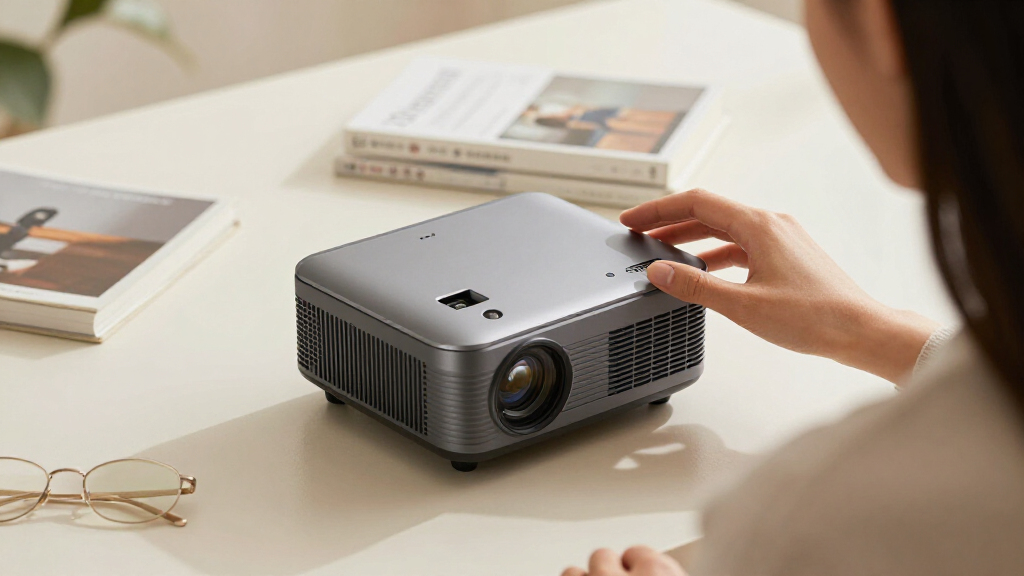
I ranked these three models by how well their stated features address the practical demands of professional event booths. My priorities were brightness for ambient light, useful image resolution, connection options, and how much room a setup gives you to adjust the picture when a table, screen, or projector position cannot be placed exactly where you want it. Portability matters too, but a lightweight projector is not a strong booth choice if the image is hard to see in the venue.
The EX9270 leads because it pairs the highest listed brightness with Full HD resolution, wireless casting, optical zoom, and multiple image-adjustment tools. The CO-W01 ranks next as a compact, uncomplicated HDMI projector with 3,000 lumens and 3LCD color. Happrun earns a place for its automated setup aids, broad physical connections, and wireless mirroring, but I place it behind the Epsons for professional use because its brightness is lower and its native resolution is 1080p despite 4K decoding support.
I use the supplied specifications rather than assuming that a maximum image size will work in every booth. Advertised screen size does not account for room lighting, projection distance, image content, or audience position. I also distinguish native resolution from decoded content and a USB power port from a data or video input. Those details can change what you need to bring on event day.
Factors to Consider When Choosing Professional Portable Projector For Event Booths
I would choose a booth projector by matching the venue and presentation workflow, rather than choosing by maximum image size alone. The practical differences in this lineup are brightness, connection method, and how much adjustment the projector offers once it is on the stand.
Match brightness to the room
Ambient light can wash out a projected image, especially when the content uses dark colors or fine text. The EX9270 has the strongest listed brightness at 4,100 lumens, followed by the CO-W01 at 3,000 lumens and Happrun at 2,000 ANSI lumens. These specifications use different stated descriptions, so I would not treat them as perfectly interchangeable measurements. Still, they show why I rank the EX9270 for brighter halls and why Happrun makes more sense when the booth can control its light. A larger projection also spreads the available light across more screen area, so do not assume a 300-inch maximum is the right working size.
Check resolution against your content
Text-heavy slides, labels, charts, and product details benefit from a clearly specified native resolution. The EX9270 lists Full HD 1080p, and Happrun lists a native 1920 x 1080 panel. Happrun’s 4K decoding describes supported input content, not native 4K display. The CO-W01’s supplied specifications do not state a resolution, so I would verify that detail against the intended content before choosing it for fine-detail work. For looping brand videos or simple visuals, brightness and screen placement may matter more than chasing a higher source format.
Plan for the source device
Make a short list of what will feed the projector: a laptop, media player, phone, or streaming device. The EX9270 gives buyers a choice of AirPlay, Miracast, and two HDMI ports; the CO-W01 keeps to HDMI and requires you to supply any streaming device. Happrun mixes Wi-Fi mirroring with two HDMI and two USB ports, plus AV and audio connections. Check each device’s compatibility before event day, and remember that the EX9270 USB port is listed as a power source for streaming devices rather than as an additional video input.
Allow room for setup and sound
A booth often has fixed tables, limited floor space, or a screen that cannot move. In that situation, the EX9270’s 1.6x optical zoom and image adjustments provide more placement options than the CO-W01’s listed feature set. Happrun offers automated focus and keystone correction, though its stated angle limitation is worth taking seriously. All three include a speaker, but a built-in speaker is most useful for a small or quiet demonstration. For a busy hall, plan to check whether the sound carries clearly or bring compatible external audio.
Frequently Asked Questions
Which projector is the best fit for a brightly lit event booth?
I would start with the Epson Pro EX9270 because it has the highest listed brightness in this group at 4,100 lumens and adds Full HD resolution and image adjustments. Room lighting, screen size, and content still affect visibility, so I would test the planned layout before relying on a maximum image-size claim.
Is Happrun a 4K projector?
Happrun supports 4K video decoding, but its native resolution is 1920 x 1080. It can process supported 4K content, yet it does not display that content at native 4K resolution. I would compare it with the EX9270 and CO-W01 based on the actual panel resolution and booth conditions, not the decoding label alone.
Which model is easiest to carry between events?
The Epson EpiqVision Flex CO-W01 is described as compact and lightweight, which makes it the clearest carry-focused pick from the supplied details. Happrun includes setup automation that may help after moving it, while the EX9270 offers more positioning flexibility. The right choice depends on whether the bigger burden is transporting the kit or adapting it to each booth.
Can I use these projectors without connecting a laptop?
Each model has connection paths that can work with compatible external devices, but the supplied information does not establish that any one of them includes every streaming service or playback feature a booth might need. The CO-W01 specifically does not include a streaming device. I would bring a tested source and confirm the required app, cable, or wireless protocol before the event.
Does a 300-inch maximum image mean I should project at that size?
No. A listed maximum image size describes a possible scale, not a guarantee that the image will look bright and readable at that size in a real venue. Ambient light, projection distance, screen material, and content detail all matter. For booth signage and presentation text, a smaller, brighter, easier-to-view image can serve visitors better than pushing toward the maximum.
Conclusion
I’d choose the Epson Pro EX9270 for an exhibitor who needs the strongest listed brightness, Full HD detail, wireless casting, and more ways to adjust the picture around booth constraints. For a compact team kit built around an HDMI source and a less demanding display, the Epson EpiqVision Flex CO-W01 is the simpler carry-along. Choose Happrun when autofocus, wireless mirroring, and connection variety outweigh the need for higher brightness, and the booth can keep light under control.
My overall recommendation is the EX9270 for the widest range of professional booth conditions. I would move to the CO-W01 to favor portable simplicity, or to Happrun for automated setup features in a dimmer space. Before committing to any of them, match the projector to the expected screen size, source devices, and room lighting—those details will shape the result more than the maximum image size on its own.