When it comes to Luna cloud gaming controllers, choosing the right one can significantly impact your gaming experience. The Official Luna Wireless Controller stands out as the best overall due to its native compatibility and solid build. For those seeking enhanced features, the Ymir Wireless Controller offers versatile connectivity across multiple devices, making it a strong contender. However, buyers often face tradeoffs between price, comfort, and customization options. Continue reading for a detailed breakdown of these controllers to find the best fit for your gaming needs.

Get business pricing on tech for your team
- Business-only prices and quantity discounts
- Tax-exempt purchasing
- Multiple users, one account, clear invoices
Key Takeaways
- The top-ranked controllers combine native Luna compatibility with ergonomic design for extended play sessions.
- Many options include additional features like back paddles or turbo functions, but these often come at a higher price point.
- Device versatility varies; some controllers work seamlessly across Luna, PC, Fire Stick, and other platforms, while others are more specialized.
- Build quality and battery life are critical considerations, especially for gamers who play long sessions regularly.
- Price differences reflect features such as customization, wireless range, and extras like phone clips or back buttons.
| Official Luna Wireless Controller |  | Best Overall for Versatile Compatibility | Compatibility: Amazon Luna, Windows, Mac, Fire TV, Fire tablet, iPhone, iPad, Chromebook, Android | Connectivity: WiFi, Bluetooth, USB | Features: Offset thumbsticks, easy-access bumpers, precise triggers, responsive buttons, 4-way D-pad | VIEW ON AMAZON | See Our Full Breakdown |
| Ymir Wireless Controller for Luna, PC, Fire Stick, PlayStation 4, Steam, Phone, Tablet, TV |  | Best Value for Extensive Device Support | Compatibility: Luna, Fire TV Stick, Apple TV, Samsung TV, PS4, PC, tablets, smartphones, Tesla, Steam Deck | Connectivity: Bluetooth 5.0 | Back Paddles: 2 programmable | VIEW ON AMAZON | See Our Full Breakdown |
| KentroGrip Alternative for Luna Controller for Fire TV Stick, Wireless Turbo Gamepad with ALPS Joysticks, Rechargeable 1200mAh, 2 Back Buttons, Red |  | Best for Precise Control and Long Sessions | Battery: 1200mAh rechargeable | Joystick Type: ALPS | Back Buttons: 2 | VIEW ON AMAZON | See Our Full Breakdown |
| KentroGrip Wireless Gamepad for Fire TV and PC, Midnight Blue | 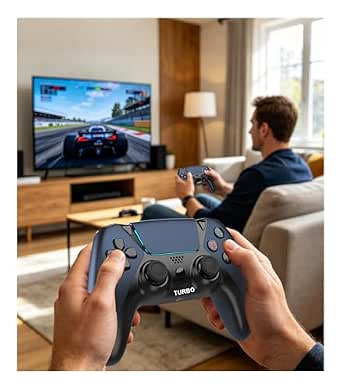 | Best for Immersive Features and Versatile Use | Compatibility: Fire TV, Fire Stick, Fire Cube, PC, Android, iOS | Joystick Type: ALPS | Back Buttons: 2 programmable | VIEW ON AMAZON | See Our Full Breakdown |
| Wireless Gaming Controller for Luna, Fire TV, PC, Tablet, and Phone with Back Paddles and Turbo |  | Best for Cloud Gaming with Customization | Compatibility: Luna, Fire TV, PC, Tablet, Phone, Android | Joystick Type: ALPS | Back Paddles: 2 programmable | VIEW ON AMAZON | See Our Full Breakdown |
| Enstixsm Upgraded Wireless Game Controller for Luna with Back Paddles, Turbo, No Drift ALPS Joystick, Blue |  | Best Overall for Precision and Compatibility | Compatibility: Luna, Fire TV, PC, GeForce NOW, Tablet, Phone, Android | Joystick Type: ALPS analog sticks | Back Paddles: 2 programmable paddles | VIEW ON AMAZON | See Our Full Breakdown |
| Enstixsm Upgraded Wireless Game Controller for Luna, PC, Fire TV, and More – Purple |  | Best for Comfort and Multi-Platform Use | Compatibility: Luna, PC, Fire TV, Firestick, GeForce NOW | Connectivity: Bluetooth, Type-C port | Battery: 1200mAh built-in rechargeable battery | VIEW ON AMAZON | See Our Full Breakdown |
| Luna Controller + Phone Clip Bundle |  | Best for Mobile Luna Gaming | Compatibility: Luna Controller and smartphones | Adjustable Width: 2.26 to 3.74 inches | Foldable: Yes | VIEW ON AMAZON | See Our Full Breakdown |
| luna cloud gaming controller | Compatibility | Connectivity | Back Paddles | Battery Capacity |
|---|---|---|---|---|
| Official Luna Wireless Control | Amazon Luna, Windows, Mac, Fire TV, Fire tablet, iPhone, iPad, Chromebook, Android | WiFi, Bluetooth, USB | — | — |
| Ymir Wireless Controller for L | Luna, Fire TV Stick, Apple TV, Samsung TV, PS4, PC, tablets, smartphones, Tesla, Steam Deck | Bluetooth 5.0 | 2 programmable | 1200mAh |
| KentroGrip Alternative for Lun | — | Bluetooth | — | — |
| KentroGrip Wireless Gamepad fo | Fire TV, Fire Stick, Fire Cube, PC, Android, iOS | — | — | 1200mAh |
| Wireless Gaming Controller for | Luna, Fire TV, PC, Tablet, Phone, Android | — | 2 programmable | 1200mAh |
| Enstixsm Upgraded Wireless Gam | Luna, Fire TV, PC, GeForce NOW, Tablet, Phone, Android | — | 2 programmable paddles | 1200mAh |
| Enstixsm Upgraded Wireless Gam | Luna, PC, Fire TV, Firestick, GeForce NOW | Bluetooth, Type-C port | Programmable for quick access | — |
| Luna Controller + Phone Clip B | Luna Controller and smartphones | — | — | — |
More Details on Our Top Picks
Official Luna Wireless Controller
The Official Luna Wireless Controller stands out for its broad compatibility, supporting Amazon Luna, Windows, Mac, Fire TV, and mobile devices. Unlike the Ymir Controller, which emphasizes gaming features, this model focuses on seamless multi-platform use with a straightforward design. Its multiple connectivity options—WiFi, Bluetooth, and USB—offer flexibility, though switching between them requires some setup, especially for wired play. The ergonomic controls make long gaming sessions comfortable, but it’s primarily optimized for low-latency gaming on supported devices. This controller makes the most sense for gamers who need a reliable, multipurpose device that can switch between devices with ease, even if it doesn’t include advanced programmable features.
Pros:- Supports a wide range of devices and platforms
- Multiple connectivity options for flexibility
- Ergonomic design for comfortable use
Cons:- Limited to low-latency gaming on supported devices
- Requires setup for different connection types
Best for: Gamers who want a versatile, all-in-one controller compatible with many platforms including Luna, PC, and mobile devices
Not ideal for: Casual gamers seeking a simple plug-and-play experience without setup complexity or those wanting advanced customization
- Compatibility:Amazon Luna, Windows, Mac, Fire TV, Fire tablet, iPhone, iPad, Chromebook, Android
- Connectivity:WiFi, Bluetooth, USB
- Features:Offset thumbsticks, easy-access bumpers, precise triggers, responsive buttons, 4-way D-pad
Our verdict“This controller is best for users who prioritize device compatibility and flexible connectivity over advanced gaming features.”
Ymir Wireless Controller for Luna, PC, Fire Stick, PlayStation 4, Steam, Phone, Tablet, TV
The Ymir Wireless Controller offers a compelling mix of performance and affordability, with extensive compatibility across Luna, PC, PS4, Steam, and mobile devices. Compared to the Luna Controller, it adds programmable back paddles and a larger rechargeable battery, making it more suitable for extended gaming sessions. Its Bluetooth 5.0 connection ensures stable gameplay, though it lacks wired options, which might be a drawback for players seeking minimal latency. The complex features like customizable buttons and back paddles are ideal for dedicated gamers but could overwhelm casual users. This pick makes the most sense for gamers who want a feature-rich controller without the high price tag, though casual players might find its options excessive.
Pros:- Compatible with a broad range of devices including Luna, PC, and consoles
- Programmable back paddles and customizable buttons
- Large rechargeable battery for extended play
Cons:- No wired connection option, potential latency issues
- Features may be complex for casual users
Best for: Dedicated gamers seeking a multi-device controller with customization and long battery life
Not ideal for: Casual gamers or users preferring simple plug-and-play controllers without complex features
- Compatibility:Luna, Fire TV Stick, Apple TV, Samsung TV, PS4, PC, tablets, smartphones, Tesla, Steam Deck
- Connectivity:Bluetooth 5.0
- Back Paddles:2 programmable
- Buttons:13 customizable
- Battery Capacity:1200mAh
- Charging Port:USB-C
Our verdict“This controller is ideal for experienced gamers who want extensive customization and long battery life without overspending.”
KentroGrip Alternative for Luna Controller for Fire TV Stick, Wireless Turbo Gamepad with ALPS Joysticks, Rechargeable 1200mAh, 2 Back Buttons, Red
The KentroGrip Alternative prioritizes precision with ALPS joysticks and a rechargeable 1200mAh battery, making it a strong choice for Fire TV Stick users and PC gamers alike. Its zero drift ALPS joysticks provide more reliable control than standard analog sticks, but the limited color options—only red—could be a downside for some. Unlike the Ymir, it lacks programmable back paddles, focusing instead on straightforward, precise gameplay. The quick Bluetooth pairing makes it convenient for multi-platform use, but the absence of wired connectivity may be a concern for players with latency-sensitive preferences. This model is better suited for gamers who want reliable, precise control for casual to mid-level play and aren’t concerned with extensive customization.
Pros:- Zero drift ALPS joysticks for accurate control
- Long-lasting rechargeable battery (10-12 hours)
- Quick Bluetooth pairing for multi-platform use
Cons:- Limited color choices (only red)
- No wired connection option mentioned
Best for: Fire TV and PC gamers who want precise, drift-free control with straightforward features
Not ideal for: Players seeking advanced customization, programmable buttons, or wired options
- Battery:1200mAh rechargeable
- Joystick Type:ALPS
- Back Buttons:2
- Connectivity:Bluetooth
- Color:Red
Our verdict“This controller suits gamers who prioritize precision and simplicity over extensive features or customization.”
KentroGrip Wireless Gamepad for Fire TV and PC, Midnight Blue
The KentroGrip Wireless Gamepad excels in delivering immersive gameplay with dual vibration motors and a 6-axis gyro, making it a good match for Fire TV and PC users who enjoy tactile feedback. Its quick pairing and programmable back buttons add convenience, but it’s primarily geared toward Fire TV and PC rather than mobile or console gaming. Unlike the Ymir or Luna Controller, this model emphasizes immersion and control features, though it might be complex for new users due to its setup options. The inclusion of turbo and gyro features makes it appealing for more engaged players, but its limited device compatibility means it’s not as versatile as some other picks. This controller is best for users who want immersive control features for Fire TV or PC gaming.
Pros:- Responsive wireless connection with Fire TV and PC
- Dual vibration motors and 6-axis gyro for immersive gameplay
- Programmable back buttons and turbo feature
Cons:- Limited device compatibility outside Fire TV and PC
- Setup may be complex for some users
Best for: Fire TV and PC gamers interested in immersive, feature-rich gameplay
Not ideal for: Casual mobile gamers or those seeking simple, plug-and-play controllers without setup complexity
- Compatibility:Fire TV, Fire Stick, Fire Cube, PC, Android, iOS
- Joystick Type:ALPS
- Back Buttons:2 programmable
- Turbo:Yes
- Battery Capacity:1200mAh
- Vibration:Dual motors
- Gyro:6-axis
Our verdict“Ideal for Fire TV and PC gamers seeking immersive feedback and advanced control features.”
Wireless Gaming Controller for Luna, Fire TV, PC, Tablet, and Phone with Back Paddles and Turbo
The Wireless Gaming Controller for Luna is designed with cloud gamers in mind, combining high-precision ALPS joysticks with programmable back paddles and turbo for an enhanced experience. Its ergonomic design minimizes fatigue during long sessions, and the inclusion of immersive features like a built-in speaker and gyro sensor adds to the overall gameplay quality. Compared to the KentroGrip models, this controller offers a broader range of features tailored specifically for Luna and mobile gaming, though it’s not compatible with Xbox or Switch, limiting its versatility. The long-lasting battery and seamless Bluetooth make it a strong choice for dedicated cloud gamers, but those seeking compatibility with a wider array of consoles might find it restrictive. This pick suits players focused on Luna and mobile cloud gaming, prioritizing customization and comfort.
Pros:- High-precision ALPS joysticks with no drift
- Programmable back paddles and turbo functions
- Ergonomic design with long battery life
Cons:- Limited to Luna, Fire TV, PC, and mobile devices
- Not compatible with Xbox or Switch
Best for: Cloud gaming enthusiasts using Luna, Fire TV, and mobile devices who want customizable controls
Not ideal for: Console gamers seeking compatibility with Xbox or Switch or casual players preferring minimal setup
- Compatibility:Luna, Fire TV, PC, Tablet, Phone, Android
- Joystick Type:ALPS
- Back Paddles:2 programmable
- Turbo:Yes
- Battery Capacity:1200mAh
- Special Features:Built-in speaker, gyro sensor
Our verdict“This controller is best for dedicated Luna and mobile cloud gamers who value customization and long sessions.”
Enstixsm Upgraded Wireless Game Controller for Luna with Back Paddles, Turbo, No Drift ALPS Joystick, Blue
This controller stands out for its high-precision ALPS joysticks that guarantee no drift, making it a top choice for gamers who need accuracy, especially when compared with the Luna official controller, which lacks programmable paddles. The inclusion of programmable back paddles and turbo enhances gameplay, but its design is primarily tailored for PlayStation-style games, which might limit versatility. Its ergonomic shape aims to reduce hand fatigue during marathon sessions, and compatibility across Luna, Fire TV, and PC broadens its appeal. However, the absence of weight details makes portability uncertain, and its focus on PS4 games could be a drawback for Xbox or Switch players.
Pros:- High-precision ALPS joysticks with no drift ensure reliable control
- Programmable back paddles and turbo boost gameplay versatility
- Ergonomic design reduces hand fatigue during long sessions
Cons:- Designed mainly for PS4 games, limiting use with other console genres
- Lack of specified weight could affect portability and travel suitability
Best for: Players seeking precise control with customizable paddles for Luna and PC, especially those who prioritize accuracy over broad console flexibility.
Not ideal for: Casual gamers or Xbox/Switch users who need a controller fully compatible with their native systems and prefer lighter, more portable options.
- Compatibility:Luna, Fire TV, PC, GeForce NOW, Tablet, Phone, Android
- Joystick Type:ALPS analog sticks
- Back Paddles:2 programmable paddles
- Turbo Function:Yes
- Battery Capacity:1200mAh
- Charging Port:Type-C
Our verdict“This controller is best suited for Luna users who need accurate, customizable control with long-term comfort in mind.”
Enstixsm Upgraded Wireless Game Controller for Luna, PC, Fire TV, and More – Purple
Compared with the Blue model, this purple version emphasizes ergonomic comfort, making it ideal for extended gaming on Luna, PC, and Fire TV. Its seamless Bluetooth connectivity and long 1200mAh battery life make it a reliable choice for players who prefer wireless freedom. The built-in speaker and no-drift ALPS joysticks add to the immersive experience, though its compatibility is limited to Luna, PC, and Fire TV, unlike some controllers that support Xbox or Switch. While the ergonomic design reduces fatigue, Bluetooth latency could pose issues on some systems, and it’s primarily tailored for PS5/PS4 games, which could restrict versatility for other genres.
Pros:- Ergonomic shape reduces hand fatigue during extended play sessions
- Seamless Bluetooth connection with long-lasting battery life
- Built-in speaker and no drift joysticks enhance immersion
Cons:- Limited compatibility excludes Xbox and Switch, reducing versatility
- Potential Bluetooth latency issues may affect responsiveness on some devices
Best for: Gamers who prioritize comfort and multi-platform flexibility, especially those who game long hours on Luna and PC with a preference for wireless play.
Not ideal for: Players who require cross-console compatibility with Xbox or Switch, or those who play non-PlayStation-style games where the controller’s design might feel less intuitive.
- Compatibility:Luna, PC, Fire TV, Firestick, GeForce NOW
- Connectivity:Bluetooth, Type-C port
- Battery:1200mAh built-in rechargeable battery
- Joystick:ALPS joystick with no drift
- Back Paddles:Programmable for quick access
- Additional features:Turbo function, built-in speaker, ergonomic design
Our verdict“This controller excels for Luna and PC gamers seeking comfort, reliable wireless connectivity, and extended gaming sessions.”
Luna Controller + Phone Clip Bundle
This bundle is tailored for Luna users who prefer gaming on their smartphones, offering an easy-to-use Luna Controller paired with an adjustable phone clip. Its portability and adjustable width (2.26 to 3.74 inches) make it a practical option for mobile gamers, especially when compared with the other controllers that are designed for traditional console or PC use. The foldable, adjustable angles add comfort, though it is limited to smartphones within the specified size range, and it requires the Luna Controller for full functionality. This setup works well for casual mobile gaming but isn’t suitable for gamers wanting a standalone controller for console or PC.
Pros:- Simple setup with Luna on mobile devices
- Adjustable, foldable design for personalized comfort
- Portable and easy to carry for gaming on the go
Cons:- Limited to smartphones within the set size range, reducing flexibility
- Requires Luna Controller for optimal operation, adding an extra component
Best for: Mobile gamers who want a seamless Luna experience on smartphones, particularly those who value portability and adjustable comfort.
Not ideal for: Gamers seeking a full-featured controller for gaming beyond mobile or Luna-specific use, or those with incompatible phone sizes.
- Compatibility:Luna Controller and smartphones
- Adjustable Width:2.26 to 3.74 inches
- Foldable:Yes
- Adjustable Angles:Yes
Our verdict“This bundle is perfect for Luna users who game on their phones and need a portable, adjustable controller setup.”

How We Picked
Our evaluation focused on several key factors that matter most to Luna cloud gaming users. Performance was assessed through connectivity stability, responsiveness, and compatibility with Luna and other devices. Build quality and comfort were also prioritized, as these influence extended gaming sessions. We considered value by comparing features against price, ensuring options cater to different budgets. Lastly, versatility and additional features like back paddles or turbo functions helped distinguish premium options from basic models, resulting in a ranked list that balances performance and affordability.| luna cloud gaming controller | Connectivity | Joystick Type |
|---|---|---|
| Official Luna Wireless Control | WiFi, Bluetooth, USB | — |
| Ymir Wireless Controller for L | Bluetooth 5.0 | — |
| KentroGrip Alternative for Lun | Bluetooth | ALPS |
| KentroGrip Wireless Gamepad fo | — | ALPS |
| Wireless Gaming Controller for | — | ALPS |
| Enstixsm Upgraded Wireless Gam | — | ALPS analog sticks |
| Enstixsm Upgraded Wireless Gam | Bluetooth, Type-C port | — |
| Luna Controller + Phone Clip B | — | — |
Factors to Consider When Choosing Luna Cloud Gaming Controllers
When selecting a Luna cloud gaming controller, understanding your specific gaming setup and preferences is crucial. Factors like compatibility, comfort, and features can drastically influence your overall experience. Considering these aspects will help you avoid common pitfalls such as buying a controller that doesn’t work well with your devices or lacks essential features for your style of play.Compatibility and Device Support
Ensure the controller supports Luna, but also check if it works smoothly with other devices like PC, Fire TV, or smartphones. Some controllers are designed specifically for Luna, offering native support that minimizes lag and connection issues. Others are more versatile but may require additional setup or software. Picking a controller that matches your current gaming ecosystem can prevent frustration and improve performance.
Comfort and Ergonomics
Extended gaming sessions demand a controller that feels comfortable in your hands. Look for models with ergonomic designs, textured grips, and well-placed buttons. Cheaper, less comfortable controllers may cause fatigue or discomfort over time, especially if you play regularly. Consider your hand size and grip style, and if possible, try holding controllers before purchasing to gauge comfort.
Features and Customization
Features like back paddles, turbo functions, or adjustable sensitivity can enhance gameplay but often come at a premium. Decide which extras are worth the investment based on your gaming style. For casual players, basic controllers may suffice, while competitive gamers might prioritize customization to gain an edge. Be wary of controllers with overly complicated setups that may require frequent adjustments.
Battery Life and Connectivity
Wireless controllers offer convenience but can run into issues if battery life is limited. Check how long a controller can last on a single charge and whether it has quick-charging features. Also, assess the range of wireless connectivity to avoid disconnects during play. Wired options eliminate latency concerns but reduce mobility, so consider your preferred setup.
Price and Value
While premium controllers boast advanced features, they may not be necessary for every gamer. Balance your budget against desired features; sometimes, a more affordable model offers excellent value without sacrificing essential performance. Watch for bundled deals, especially when phone clips or extra paddles are included, which can add value. Remember, the most expensive controller isn’t always the best fit for your needs.
Frequently Asked Questions
Can I use these controllers with other gaming platforms besides Luna?
Most controllers on this list are designed primarily for Luna but also support platforms like PC, Fire TV, and mobile devices. Compatibility varies, with some models offering native support and others requiring additional setup. If you plan to use a controller across multiple devices regularly, prioritize options explicitly built for multi-platform support to minimize lag and connection issues.
Are wireless controllers reliable for long gaming sessions?
Wireless controllers can provide great convenience, but their reliability depends on battery life and connection stability. Look for models with long-lasting batteries and stable Bluetooth or proprietary connections. Recharging or swapping batteries frequently can interrupt gameplay, so choosing a controller with robust power management is advisable for extended sessions.
Is it worth paying more for features like back paddles or turbo functions?
Features like back paddles and turbo modes can offer a competitive edge or enhanced comfort, especially for serious gamers. However, their value depends on your gaming style and priorities. If you’re casual or new to cloud gaming, a simpler controller may suit you better. Investing in advanced features makes sense if you want more customization or plan to play competitively.
Do I need a phone clip or additional accessories?
Many controllers in this lineup include or support phone clips, which are useful for mobile gaming. If you frequently play on a phone or tablet, a controller with a compatible clip can improve your experience. Otherwise, accessories like clips are optional but can enhance comfort and stability during gameplay.
How do I choose between wired and wireless controllers for Luna?
Wireless controllers offer freedom of movement but may have issues with latency or battery life, which can impact fast-paced gameplay. Wired controllers eliminate latency concerns and are often more reliable, especially for competitive play. Your choice depends on whether you prioritize mobility or performance; casual gamers might prefer wireless, while competitive players may opt for wired options.
Conclusion
For most gamers seeking the best overall experience, the Official Luna Wireless Controller strikes a balance of native support, comfort, and durability. If you want a versatile controller compatible with multiple devices, the Ymir Wireless Controller offers excellent flexibility at a reasonable price. Budget-conscious buyers should consider models like the KentroGrip Alternative for Luna, which delivers decent features without breaking the bank. Beginners or casual players will benefit from straightforward, comfortable options, while competitive gamers should look toward controllers with additional customization options and back paddles. Your ideal choice depends on how you plan to use your Luna cloud gaming setup and which features matter most to your style of play.