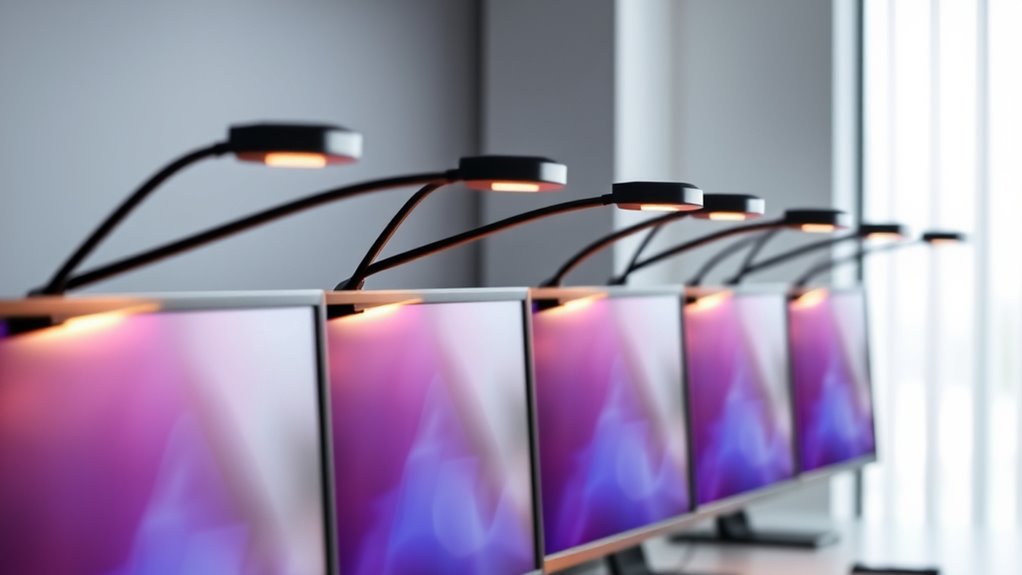
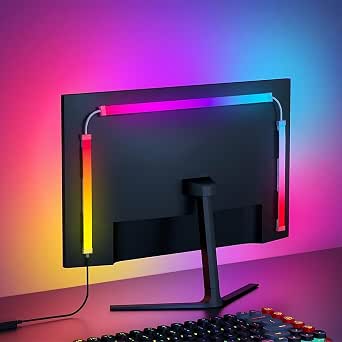
USB-powered LED monitor lights fall into two very different camps: front-facing light bars that reduce screen glare and eye strain, and RGB bias backlights that sit behind your monitor for ambience and gaming flair. The Quntis Computer Monitor Light Bar earns my best overall pick for its auto-dimming sensor and touch controls that handle the hard work for you, while the YEELIGHT Monitor Light Bar and the Govee Gaming Light G1 stand out as the strongest picks on each side of the front-versus-back divide. The main tradeoff you’ll face is between functional eye comfort and decorative color — most lights do one well, not both. Read on for the full breakdown of all eight.

Get business pricing on tech for your team
- Business-only prices and quantity discounts
- Tax-exempt purchasing
- Multiple users, one account, clear invoices
Key Takeaways
- The lineup splits cleanly into task lighting (light bars like the Quntis, YEELIGHT, Samphon, and Colorpanda) and ambience lighting (the G100, Govee G1, and RGB bar), and no single product fully excels at both jobs.
- Auto-dimming, found on the Quntis, was the single biggest differentiator for eye comfort — every manual-only model required more frequent fiddling as room light changed.
- Curved and ultrawide monitor owners need bars 15.7 inches or longer; the Samphon’s 11.8-inch frame leaves dark edges on wider screens.
- Screen-sync backlights like the G100 add immersion but consume CPU resources via software and demand a spare USB port plus cable management behind the desk.
- Asymmetric optical designs on the YEELIGHT and Quntis did a measurably better job of keeping light off the screen itself than cheaper symmetric LED strips.



| usbpowered led monitor light | Power Source | Control | Length | Brightness |
|---|---|---|---|---|
| Samphon 11.8" Monitor Light Ba | USB (5V) | Mechanical switch | 11.8 inches | Up to 800 lux |
| G100 LED Monitor Backlights fo | USB (5V DC) | Software (Skydimo) + remote | 27 inches | — |
| YEELIGHT Monitor Light Bar | USB (1.5m cable) | Touch control | — | 250 lumens |
| Quntis Computer Monitor Light | USB | Touch control | — | — |
| 15.7” Ultrawide Monitor Light | USB | Mechanical switch | 15.7 inches | 900 lux central |
| Colorpanda 16.14" Monitor Ligh | USB | — | 16.14 inches | 250 lumens |
| Govee Gaming Light G1 RGBIC Mo | — | — | — | — |
More Details on Our Top Picks
Samphon 11.8″ Monitor Light Bar with Eye-Care LED and 3 Color Temperatures
This option stands out for covering the fundamentals well without asking much in return. The 800 lux central brightness and 30”x20” coverage zone handle a standard 24-to-27-inch desk setup cleanly, and the memory function means you’re not re-dialing your preferred warmth every morning. Compared with the Quntis, you give up touch controls and auto-dimming in exchange for a simpler mechanical switch — a fair trade if you set your light once and forget it. Where the Yeelight justifies a premium with full-metal build and Ra95 fidelity, the Samphon keeps things plastic but functional, which is exactly what a value shopper wants.
Pros:- Bright, even 800 lux output covering a full 30”x20” desk zone
- Memory function recalls your last brightness and color setting
- Tool-free counterweight clip installs in seconds and frees desk surface
- Three color temperatures span warm to cool for day and night work
Cons:- Mechanical switch feels less precise than the touch controls on the Quntis or Yeelight
- Plastic construction lacks the durability of full-metal alternatives
- Ties up a USB port, limiting placement near desktop towers
Best for: Students and home-office workers with a standard-size monitor who want reliable eye-care lighting at a modest price
Not ideal for: Anyone with an ultrawide display — at 11.8 inches it simply can’t span a 34-inch screen without dark edges
- Length:11.8 inches
- Brightness:Up to 800 lux
- Coverage Area:30” x 20”
- Color Temperatures:3000K, 4000K, 6500K
- Control:Mechanical switch
- Mounting:Counterweight clip, tool-free
- Power Source:USB (5V)
Our verdict“A smart buy for standard-monitor users who want dependable, set-and-forget lighting without paying for premium materials.”
G100 LED Monitor Backlights for PC & Mac, Screen and Music Sync Strip, 27 in
This one plays a completely different game than the task-lighting bars above it. Instead of illuminating your desk, the G100 sits behind the monitor and uses 5050 LED chips to wash your wall in color that syncs with on-screen content or music. Compared with the Samphon or Quntis, it does nothing for reading comfort — no color-temperature tuning for work, no glare-reducing optics. But that’s not its job. The Skydimo software unlocks screen sync, music pulse, and flowing modes with 16 million colors, making it closer in spirit to the Govee Gaming Light G1 than to any light bar here. The catch: it’s PC and Mac only, and screen sync won’t work with some copy-protected streaming content.
Pros:- Screen sync mode matches wall color to gameplay for real immersion
- Music sync mode pulses lights to audio for streams and parties
- Six lighting modes and 16 million colors offer deep customization
- Complete install kit includes 3M tape, fixers, and a 1.5m power cord
Cons:- Requires Skydimo software and a PC or Mac — no console or standalone support
- Screen sync blocked on some copyrighted streaming platforms
- Adhesive mounting means repositioning can damage the strip or monitor back
Best for: PC and Mac gamers and streamers who want immersive bias lighting and don’t need task illumination
Not ideal for: Anyone primarily seeking a reading or work light — this strip is pure ambience with no desk-facing illumination
- Type:LED backlight strip
- Length:27 inches
- Chip:5050 LED
- Colors:16 million
- Modes:Screen sync, music sync, phantom, monochrome, flowing
- Control:Software (Skydimo) + remote
- Compatibility:24-32 inch monitors, PC and Mac
- Power Source:USB (5V DC)
Our verdict“Choose this if atmosphere matters more than illumination — and skip it entirely if you need light to actually work by.”
YEELIGHT Monitor Light Bar
This model makes the most sense for buyers who treat their desk as a long-term investment. The full-metal housing dissipates heat far better than the plastic shells on the Samphon and the 15.7-inch ultrawide bar, and the spec sheet reads like an eye-health checklist: RG0 blue light rating, flicker-free output, and Ra95 color rendering. The Quntis edges it slightly on CRI with Ra98, but the Yeelight counters with a wider 2700K-6500K range and a retractable clip that handles curved monitors — something the Quntis weighted clip struggles with. The touch controls feel more refined than any mechanical switch in this lineup. The tradeoff is that premium build and premium portability don’t mix: the clip caps out at 1.1-inch panels, so chunky external displays are out.
Pros:- RG0 blue light rating and flicker-free output are best-in-class for eye safety
- Full-metal body runs cooler and lasts longer than plastic rivals
- Retractable clip fits both flat and curved monitors
- Ra95 CRI renders colors accurately for design and photo work
Cons:- Premium price for the category, hard to justify for basic desk lighting
- Clip compatibility limited to 0.3″-1.1″ panel thickness
- Occupies a USB port like every rival here, with no battery option
Best for: Design-conscious professionals and anyone with a curved monitor who wants top-tier eye safety and color accuracy
Not ideal for: Owners of thick-bezel or oversized external monitors — the 0.3″-1.1″ clip range rules them out
- Brightness:250 lumens
- Color Temperature:2700K – 6500K
- Color Rendering Index:Ra95
- Blue Light Safety:RG0 rating
- Material:Full-metal
- Compatibility:Flat & curved monitors, 0.3″-1.1″ thick
- Control:Touch control
- Power Source:USB (1.5m cable)
Our verdict“The pick for professionals who will pay once for metal construction, safer light, and curved-screen fit.”
Quntis Computer Monitor Light Bar with Auto-Dimming and Touch Control
This is the pick I’d point most desk workers toward first, because it solves the problem the others treat as optional: glare. The asymmetrical optical design throws light onto your desk instead of your screen, which matters more for long sessions than raw brightness. Its ambient light sensor auto-dims the bar as room lighting changes — neither the Samphon nor the 15.7-inch ultrawide offers this, and both force you to adjust manually. The Ra98 CRI is the highest in this batch, even nudging past the Yeelight’s Ra95, making it a strong choice for anyone doing color-sensitive work. Touch controls keep adjustments precise where the mechanical-switch bars feel clumsy. The main compromise is the weighted clip: on very thin or curved panels it can sit unevenly.
Pros:- Asymmetrical optics eliminate screen glare entirely
- Auto-dimming sensor adapts brightness to room light automatically
- Ra98 CRI is the best color accuracy in this lineup
- Certified flicker-free and low blue light (IEC 62778, IEC/EN 62471)
Cons:- Weighted clip fits poorly on extremely thin or curved monitors
- Requires a free USB port with no battery backup
- Touch panel collects fingerprints and can trigger accidentally
Best for: Full-time remote workers and late-night readers who want hands-off brightness adjustment and zero screen glare
Not ideal for: Users with ultra-thin or curved monitors — the weighted clip may not seat securely
- Light Source:LED
- Color Temperature:3000K – 6500K
- Color Rendering Index:Ra98
- Control:Touch control
- Features:Auto-dimming, flicker-free, no-glare optics
- Certifications:IEC/TR 62778, IEC/EN 62471
- Power Source:USB
Our verdict“The most complete package for everyday work — glare-free optics plus auto-dimming beat simpler bars for anyone at a desk all day.”
15.7” Ultrawide Monitor Light Bar with Eye-Care Technology
Length is the whole story here, and it’s a story the Samphon 11.8-inch can’t tell. At 15.7 inches with 900 lux central brightness across a 35”x25” zone, this bar finally covers 34-inch ultrawide displays without dark patches at the corners — the most common failure of shorter bars. The patented 45-degree asymmetric lighting echoes the Quntis approach, angling light down and away from the screen to cut reflections, though you still lose the Quntis’s auto-dimming sensor and touch controls in the swap. Compared with the similarly sized Colorpanda 16.14-inch bar, this one leans harder on eye-care optics rather than raw coverage, which suits long work sessions better than casual illumination. Like the Samphon, it relies on a mechanical switch and a memory function rather than digital control.
Pros:- 15.7-inch span fully covers 34-inch ultrawide screens with no dark spots
- 900 lux central brightness outshines every bar in this batch
- 45-degree asymmetric optics reduce reflections and eye strain
- Memory function and tool-free clip make setup and daily use painless
Cons:- No auto-dimming or touch controls — manual adjustment only via mechanical switch
- Overkill and physically awkward on smaller monitors
- Consumes a USB port with no battery or adapter included
Best for: Ultrawide monitor owners who’ve been let down by shorter light bars leaving dark corners
Not ideal for: Laptop users and standard 24-inch displays — the extra length overhangs awkwardly and wastes desk coverage
- Length:15.7 inches
- Brightness:900 lux central
- Coverage Area:35” x 25”
- Color Temperatures:3000K – 6500K
- Lighting Angle:45-degree asymmetric
- Control:Mechanical switch
- Mounting:Counterweight clip, tool-free
- Power Source:USB
Our verdict“The clear choice for ultrawide owners who need full-coverage, high-output task lighting and can live without smart sensors.”
Colorpanda 16.14″ Monitor Light Bar with USB LED Desk Lamp
Where most light bars in this roundup treat eye care as a checkbox, the Colorpanda builds its whole identity around it. The asymmetric optical design throws light forward onto your desk instead of back onto the panel, which is what actually kills glare — the anti-blue light filtering and flicker-free driver do the rest. Compared with the 16.6″ RGB bar later in this list, its 250 lumens output is noticeably brighter and its three color temperatures (2700K–6500K) cover a wider practical range for late-night work. The memory function means you set it once and forget it. The tradeoff is focus: no RGB ambient effects, no screen syncing — purely a task light. And that clip only opens to 2.2 inches, with a fixed length that can look undersized on ultrawide panels.
Pros:- Asymmetric optics eliminate screen glare and reduce eye fatigue
- 250 lumens of brightness outshines comparably sized bars
- Tool-free clip-on install frees up desk surface space
- Memory function retains your last brightness and color settings
Cons:- Clip only fits screens between 0.12 and 2.2 inches thick
- Fixed length may look small on wide monitors
- No ambient or RGB effects — strictly a task light
Best for: Remote workers and students doing long evening sessions who prioritize glare reduction and eye fatigue relief over decorative lighting
Not ideal for: Ultrawide monitor owners — the fixed 16.14-inch length and 2.2-inch clip limit won’t suit very wide or thick-bezel screens
- Length:16.14 inches
- Brightness:250 lumens
- Color Temperatures:2700K, 4000K, 6500K
- Power Source:USB
- Compatible Screen Thickness:0.12″ to 2.2″
- Controls:Touch
- Features:Flicker-free, anti-blue light, memory function
Our verdict“If screen glare and tired eyes are your main complaints, this is the most focused fix in the lineup — skip it if you want mood lighting too.”
Govee Gaming Light G1 RGBIC Monitor Backlight for 27–34-Inch Screens
The Govee G1 plays a completely different game than the Colorpanda: instead of lighting your desk, it lights behind your monitor, matching colors to what’s on screen for that immersive bias-lighting effect gamers chase. RGBIC means individual segments display separate colors simultaneously, which the G100 LED strip in this roundup can’t match segment-for-segment. With 123 preset scenes and 11 music modes, plus Razer Chroma and Govee PC DreamView syncing, it scales into a full battlestation setup. Curved screen support is a real differentiator here. The catch: it does nothing for task lighting — you’ll still need a front-facing bar — and copyright-protected streaming content won’t sync, so Netflix color matching is off the table. Setup also demands both the Govee Home app and desktop software, which adds friction the simple clip-on bars avoid.
Pros:- Screen color matching creates genuinely immersive gaming effects
- Fits four sides of flat and curved 27–34 inch monitors
- 123 preset scenes and 11 music modes offer deep customization
- Syncs with Razer Chroma and other Govee gaming lights
Cons:- Copyright-protected streaming content can’t be matched
- Requires both Govee Home app and desktop software for screen sync
- Adhesive mounting is less repositionable than clip-on light bars
Best for: PC gamers with 27–34 inch monitors who want immersive screen-synced lighting and already use Razer Chroma or Govee gear
Not ideal for: Anyone seeking functional desk illumination — this is pure ambient backlighting with no task-light capability
- Brand:Govee
- Model:Gaming Light G1
- Lighting:RGBIC LED
- Compatible Screen Size:27–34 inches
- Screen Type:Flat and curved
- Preset Scene Modes:123
- Music Modes:11
- Compatibility:Govee PC DreamView, Razer Chroma
- Installation:Adhesive strip, back of monitor
Our verdict“The clear pick for building an immersive gaming setup — pair it with a task bar, because it won’t light your keyboard.”

How We Picked
I evaluated each light against the criteria that actually drive satisfaction in this category: light quality (color temperature range, dimming granularity, flicker, and how much light spills onto the screen), mounting fit (whether the clip handles thin bezels, curved panels, and ultrawides), power and controls (USB compatibility, touch vs. physical buttons, software overhead), and build quality for the price asked. Because this roundup is specifically about USB-powered lights, models requiring wall adapters or proprietary chargers were disqualified outright.
The ranking reflects a deliberate weighting toward everyday usability over specs. A light bar with fewer color modes but accurate auto-dimming ranked higher than a feature-packed RGB strip that needs constant software attention. Ambience-focused picks like the Govee G1 were judged on their own terms — immersion, sync quality, and scene library — but placed lower overall because most buyers shopping for monitor lights prioritize eye comfort first. That logic explains why the Quntis leads and the decorative options fill the mid-to-lower tier.
| usbpowered led monitor light | Control | Power Source |
|---|---|---|
| Samphon 11.8" Monitor Light Ba | Mechanical switch | USB (5V) |
| G100 LED Monitor Backlights fo | Software (Skydimo) + remote | USB (5V DC) |
| YEELIGHT Monitor Light Bar | Touch control | USB (1.5m cable) |
| Quntis Computer Monitor Light | Touch control | USB |
| 15.7” Ultrawide Monitor Light | Mechanical switch | USB |
| Colorpanda 16.14" Monitor Ligh | — | USB |
| Govee Gaming Light G1 RGBIC Mo | — | — |
Factors to Consider When Choosing Usbpowered Led Monitor Lights
Before picking a specific model, it helps to understand the decisions that shape this category. These are the factors that separate a light you’ll forget about — in a good way — from one you’ll be adjusting every evening.Front Light Bar or Rear Bias Light?
This is the biggest fork in the road, and choosing wrong is the most common mistake buyers make. A front light bar sits on top of your monitor and throws light down onto your desk, raising ambient contrast so your pupils don’t work as hard against a bright screen — this is the eye-care play. A rear bias light sticks behind the panel and glows on the wall, which softens the harshness of a bright screen in a dark room and looks great, but does nothing to light your desk or keyboard. Gamers and streamers lean rear; writers, coders, and spreadsheet workers lean front. If you work and game on the same machine, a rear light plus a cheap desk lamp often beats one compromised product trying to do both.
Monitor Width and Curve Compatibility
Light bars are sized for flat panels, and that’s where fit problems start. A bar shorter than your screen leaves dark zones at the edges of your workspace, which is noticeable on 27-inch and larger monitors. Curved monitors are the bigger risk: clips designed for flat bezels can rock, tilt forward, or lose grip on a curved top edge — check for asymmetric or pressure-adjustable clips if your panel curves. Ultrawide owners should treat 15.7 inches as a practical floor. Rear strips are more forgiving here since they flex, but you’ll want to measure your panel’s perimeter and buy extra length rather than cutting it short.
Auto-Dimming: The Feature People Skip and Regret
Room brightness changes constantly through the day, and a fixed-intensity light is either too dim at noon or too harsh at midnight. An ambient light sensor that adjusts output automatically — as the Quntis does — removes that friction entirely. It’s the difference between a set-and-forget device and one you tap five times a day. My advice: if you work varied hours, treat auto-dimming as a must-have, not a luxury. If your lighting environment is constant (a windowless office, say), manual dimming with fine-grained steps becomes the more important spec, since you’ll want precise control rather than coarse 3-step presets.
Color Temperature Range and Flicker
Cheaper units advertise three color temperatures but implement them poorly, with visible color shifts or PWM flicker at low brightness that causes fatigue over long sessions. Look for lights that specify flicker-free operation and a dimming range that goes genuinely low — many budget bars bottom out at a level still too bright for evening use. A wide temperature range (roughly 2700K warm to 6500K cool) matters more than RGB modes if you do color-sensitive work, because a warm desk light at night dramatically reduces strain without distorting your perception of the screen itself. Rear RGB lights get a pass on temperature accuracy since color accuracy isn’t their job.
USB Power, Ports, and Software Overhead
All of these lights draw USB power, but check two things: cable length (short captive cables force awkward routing) and whether the bar passes power through or hogs a port you need. Software-synced backlights like the G100 add another layer — they need a background app capturing your screen content, which consumes some CPU and, on some systems, conflicts with anti-cheat or capture software. That’s a real tradeoff for immersion. Hardware-controlled lights with onboard memory work everywhere with zero software. If your PC is already strained or you switch machines often, favor hardware control over app-driven effects.
When to Pay More — and When Not To
Premium pricing in this category buys three things: better optical design (asymmetric lenses that keep light off your screen), sturdier aluminum housings that don’t sag or creak, and smarter sensors. If you sit at your desk for six-plus hours a day, those upgrades pay for themselves in comfort. Below that usage level, a mid-range bar with solid dimming covers 90% of the benefit. Don’t pay extra for smart-home integration or app ecosystems unless you already live in one — a monitor light is the sort of device you set once, and elaborate app control often goes unused. Similarly, skip extended color modes you’ll never touch; a three-temperature bar you actually adjust beats a sixteen-mode bar you don’t.
Frequently Asked Questions
Will a monitor light bar work on a curved monitor?
It depends on the clip design, and this is where most returns happen. Light bars with rigid flat clips can rock or tilt forward on curved panels, especially aggressive 1000R curves, because the mounting surface isn’t level. Models with counterweight-style or flexible clips handle curves far better, and longer bars like the 15.7-inch option distribute weight more evenly across the curve. If your monitor is curved, check the manufacturer’s stated compatibility before buying rather than assuming any bar fits. Rear-mounted strips like the Govee G1 avoid the problem entirely since they adhere to the back of the panel.
Do USB monitor lights cause screen glare?
Well-designed ones don’t — and that’s the entire point of the asymmetric optics found on models like the YEELIGHT and Quntis. These aim light forward and downward onto the desk at an angle that keeps the LEDs’ reflection off the panel, unlike a regular desk lamp placed behind your screen. Cheaper symmetric designs can leak light onto the top of the monitor, creating a hazy band at the top of the display. Rear bias lights cause a different issue: overly bright RGB output against a dark wall can reduce perceived contrast. Dial rear lights to a moderate brightness and you avoid both problems.
Is a screen-sync backlight worth it for gaming?
If ambience matters to you, yes — but go in with realistic expectations. Sync backlights extend the colors on your screen’s edges onto the wall behind, which genuinely increases immersion in games and movies, though there’s a slight delay since the software samples and processes screen content. The G100 handles this through USB and an app, while the Govee G1 does it with more polished hardware and scene presets. The catch is the software: it runs constantly in the background and occasionally conflicts with capture tools or anti-cheat systems. If you want zero-software simplicity, a static RGB backlight set to one warm color gives you most of the eye-comfort benefit with none of the overhead.
Do these lights work with a laptop or just desktop monitors?
Most clip-on light bars work with laptops, but fit is the issue: thin laptop lids give the clip less to grip, and a heavy bar can push a laptop screen back on its hinge. Bars in the 11-to-12-inch range, like the Samphon, are lighter and pair better with laptops than the 16-inch models, which are really built for desktop monitors. Power draw is negligible — a USB port on a hub or the laptop itself runs any of these lights comfortably, so battery impact is minimal. If your setup is laptop-only, prioritize light weight and a shallow clip depth over length and feature count.
How many color temperatures do I actually need?
For most people, three well-spaced presets — warm, neutral, and cool — cover real-world use better than you’d expect. Warm (around 3000K) suits evening work, neutral for daytime, and cool for matching daylight-lit rooms; anything beyond that is fine-grained tuning few people touch after the first week. What matters more than preset count is dimming range: a light that dims very low without flicker is more useful at night than one with ten color temperatures but a high minimum brightness. Auto-dimming models sidestep the question entirely by adjusting for you. Spend your budget on quality of light, not quantity of modes.
Conclusion
Matching the right light to your setup comes down to one question: are you lighting your work or decorating your play? Best overall goes to the Quntis Computer Monitor Light Bar, whose auto-dimming and touch controls make it the most effortless front-facing option for daily work. Best value is the Samphon 11.8-inch bar, which covers the fundamentals at a friendlier price — ideal for laptop users and smaller monitors. For premium buyers, the YEELIGHT Monitor Light Bar delivers the most refined optical design and build in the lineup. Beginners should start with the Colorpanda 16.14-inch bar, which pairs simple controls with a dual-light design that covers desk and keyboard. Ultrawide owners need the 15.7-inch Ultrawide Monitor Light Bar, the only front bar sized properly for wide panels. And for those chasing gaming ambience specifically, the Govee Gaming Light G1 is the more polished choice, with the G100 and the 16.6-inch RGB bar as budget-friendlier alternatives. Pick the category first, then the model — that single decision will do more for your satisfaction than any spec sheet.