The best PS5 accessories solve a specific problem: the PlayStation DualSense Wireless Controller is my best overall pick for adding a second controller, while the OIVO charging station is a straightforward way to keep two controllers ready. For a broader setup upgrade, the Rysker cooling and charging stand combines several functions, though its larger footprint makes it less suited to compact spaces. The main tradeoffs are convenience versus desk space, specialized features versus flexibility, and simple add-ons versus higher-commitment gear. I compare all 12 options by their usefulness, compatibility, and fit for different players. Read on for the full breakdown and help choosing the right accessories for your setup.

Get business pricing on tech for your team
- Business-only prices and quantity discounts
- Tax-exempt purchasing
- Multiple users, one account, clear invoices
Key Takeaways
- A second DualSense is the most versatile upgrade: It supports local multiplayer and gives you a backup controller, while accessories like thumb grips serve a narrower comfort preference.
- Charging stands differ in complexity: The OIVO and PowerA stations focus on charging controllers, while the cooling stands add console organization and fan functions at the cost of more space and setup.
- Console compatibility matters more for stands and faceplates than it does for universal add-ons: Check whether a product fits your PS5 generation and Disc or Digital Edition before buying.
- The Logitech G29 and PlayStation Portal serve distinct play styles: The wheel is a specialized investment for racing games, while Portal suits remote play when your home network and gaming habits support it.
- Not every accessory improves gameplay: The media remote, HDMI cable, faceplates, and thumb grips each address a particular convenience or customization need rather than upgrading every part of the PS5 experience.
| CCFREELIFE Silicone Thumb Grips for PS4, PS5, and Xbox Controllers, 24-Pack |  | Best for Grip and Personalization | Brand: CCFREELIFE | Material: Silicone | Quantity: 24 caps (12 color pairs) | VIEW ON AMAZON | See Our Full Breakdown |
| PS5 Cooling Stand with Controller Charging Station and 3-Speed Fan |  | Best All-in-One Console Organizer | Brand: Kammkonb | Console compatibility: PS5 standard, Slim, and Pro, disc and digital | Cooling fan: 3 adjustable speeds | VIEW ON AMAZON | See Our Full Breakdown |
| PlayStation Media Remote for PS5 |  | Best for Streaming and Media Playback | Brand: PlayStation | Model: 3005727 | Connectivity: Infrared | VIEW ON AMAZON | See Our Full Breakdown |
| Joso Replacement Faceplates for PS5 Disc Edition, Black |  | Best for Protecting and Restyling an Original Disc PS5 | Brand: Joso | Material: ABS | Color and finish: Black, matte | VIEW ON AMAZON | See Our Full Breakdown |
| OIVO PS5 Controller Charging Station with AC Adapter |  | Best Dedicated Dual-Controller Charger | Compatible controllers: PS5 DualSense and DualSense Edge | Charging capacity: Up to 2 controllers | Stated charging time: About 2 hours | VIEW ON AMAZON | See Our Full Breakdown |
| Rysker Cooling and Charging Stand for PS5, PS5 Slim, and PS5 Pro |  | Best for Multi-Generation Console Setups | Brand: Rysker | Model: VG-P5328 | Console compatibility: PS5, PS5 Slim, and PS5 Pro | VIEW ON AMAZON | See Our Full Breakdown |
| Logitech G29 Racing Wheel and Pedals for PS5, PS4, and PC | 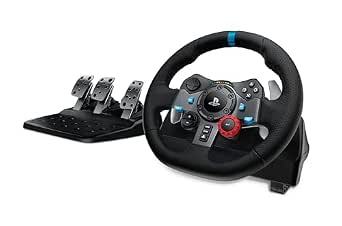 | Best for Racing Sim Setups | Compatible devices: PC, PlayStation 5, PlayStation 4, and Mac | Rotation: 900 degrees | Force feedback: Dual-motor | VIEW ON AMAZON | See Our Full Breakdown |
| PS5, PS5 Slim, and PS5 Pro Stand with Cooling Fan and Dual Controller Charger |  | Best for Storage and Charging | Compatible consoles: PS5, PS5 Slim, and PS5 Pro | Cooling fan: Three speeds, 3100–3500 RPM | Controller charging: Two controllers simultaneously; about 2.5 hours | VIEW ON AMAZON | See Our Full Breakdown |
| PlayStation DualSense Wireless Controller for PS5, PC, Mac, and Mobile |  | Best Core PS5 Accessory | Brand: PlayStation | Model: 1000050328 | Compatible devices: PlayStation 5, PC, Mac, Android, and iOS | VIEW ON AMAZON | See Our Full Breakdown |
| PowerA Twin Charging Station for PlayStation 5 DualSense Controllers |  | Best Simple Dual Controller Dock | Compatible devices: PlayStation 5 DualSense wireless controllers | Charging capacity: 2 controllers | Power source: Corded electric, AC adapter | VIEW ON AMAZON | See Our Full Breakdown |
| Highwings Certified Ultra High Speed HDMI 2.1 Cable, 8K, 6.6 ft |  | Best for High-Refresh-Rate Setups | Cable type: HDMI 2.1 | Length: 6.6 ft (2 m) | Bandwidth: 48 Gbps | VIEW ON AMAZON | See Our Full Breakdown |
| PlayStation Portal Remote Player for PS5 | 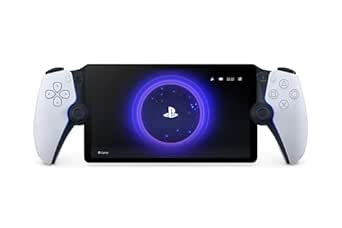 | Best for Playing Away from the TV | Compatible console: PlayStation 5 | Connectivity: Wi-Fi | Screen: 8-inch LCD, 1080p | VIEW ON AMAZON | See Our Full Breakdown |
More Details on Our Top Picks
CCFREELIFE Silicone Thumb Grips for PS4, PS5, and Xbox Controllers, 24-Pack
For a small, controller-focused upgrade, these caps add textured grip without changing the controller itself. The silicone stretches over existing sticks, so there is no adhesive to apply, and the caps can help guard against surface scratches and wear. Compared with the OIVO PS5 Controller Charging Station, this is a more personal comfort accessory rather than a way to keep gear powered and organized. Its main distinction is variety: 24 caps in 12 color pairs make it easy to coordinate or mix colors across compatible controllers. The tradeoff is that the description confirms compatibility only with PS4, PS5, and Xbox controllers, so I would not assume they fit other sticks. They also add grip, not extra controller functions.
Pros:- Textured silicone adds a non-slip surface to thumbsticks
- Can help protect existing sticks from scratches and wear
- Includes 12 color pairs for matching or mixing
- Stretches over sticks without adhesive
Cons:- Compatibility is specified only for PS4, PS5, and Xbox controllers
- Adds grip and surface protection but no new controller functions
Best for: PS5 players who want a simple, low-profile way to add thumbstick grip, protect stick surfaces, or distinguish multiple controllers by color
Not ideal for: Players seeking a full controller upgrade or confirmed fit for a controller model outside the listed PS4, PS5, and Xbox families
- Brand:CCFREELIFE
- Material:Silicone
- Quantity:24 caps (12 color pairs)
- Compatible controllers:PS4, PS5, and Xbox
- Installation:Stretch-fit over existing thumbsticks; no adhesive
- Item weight:1 g
- Warranty:3 months
Our verdict“Choose these caps if you want an inexpensive-feeling, easy-fit grip and color refresh for a compatible PS5 controller, not a broader controller upgrade.”
PS5 Cooling Stand with Controller Charging Station and 3-Speed Fan
This stand is the most consolidated setup option in this group: it combines three fan speeds, two controller docks, and storage for up to 13 game discs. The headset holder, media remote slot, and three USB ports also give smaller accessories a designated place. Compared with the OIVO PS5 Controller Charging Station, which focuses on charging two controllers, this model trades a simpler tabletop footprint for broader console-side organization. It fits PS5 standard, Slim, and Pro disc and digital consoles, but the charging docks do not support the DualSense Edge. The fan offers adjustable operation, though the listed details do not establish how much cooling changes console performance. I’d choose it for a crowded setup, while buyers who only need controller charging may prefer a dedicated charger.
Pros:- Supports PS5 standard, Slim, and Pro disc and digital consoles
- Combines adjustable fan, dual-controller charging, and disc storage
- Three USB ports plus a headset holder and media remote slot
- Includes a safety screw and overcharge protection
Cons:- Charging docks are not compatible with the DualSense Edge
- Console, controllers, headset, remote, and games are sold separately
- Has more setup features and storage than buyers seeking only a charger need
Best for: PS5 owners with several accessories and games who want console support, controller charging, and storage in one station
Not ideal for: DualSense Edge owners, or players who want a compact charger without extra console-side features
- Brand:Kammkonb
- Console compatibility:PS5 standard, Slim, and Pro, disc and digital
- Cooling fan:3 adjustable speeds
- Controller charging:Up to 2 controllers; approximately 3 hours to fully charge
- USB ports:3
- Game storage:Up to 13 discs
- Additional features:Headset holder, media remote slot, safety screw, and overcharge protection
- Controller compatibility note:Not compatible with DualSense Edge
Our verdict“Pick this stand if you want to organize a multi-accessory PS5 setup in one place and do not rely on a DualSense Edge controller.”
PlayStation Media Remote for PS5
The Media Remote suits PS5 owners who use the console for films and streaming as well as games. Its dedicated playback buttons make common actions like pausing, rewinding, and fast-forwarding more direct than reaching for a DualSense controller. It can also power on the PS5 and, with a compatible TV, control volume and power through infrared. Compared with the PlayStation Portal Remote Player, this is a straightforward living-room control accessory, not a way to play PS5 games remotely. Its limits are practical: TV functions depend on compatibility, some features may require a system update, and streaming services may need paid subscriptions. The included AA batteries are convenient, but buyers who rarely watch media on their console may get little use from a dedicated remote.
Pros:- Dedicated play, pause, fast-forward, and rewind buttons
- Can power on and navigate the PS5
- Can control power and volume on compatible TVs
- Two AA batteries are included
Cons:- TV controls depend on infrared compatibility
- Some functions may require a PS5 system software update
- Streaming access may depend on paid service subscriptions
Best for: PS5 owners who regularly stream shows or watch movies and want physical playback controls plus compatible TV power and volume control
Not ideal for: Players who mainly use the PS5 for games, or buyers whose TV is not compatible with the remote’s infrared controls
- Brand:PlayStation
- Model:3005727
- Connectivity:Infrared
- Buttons:15
- Maximum range:10 meters
- Batteries:2 AA batteries included
- Dimensions:7.44 × 3.29 × 1.54 inches
- Color:White
Our verdict“Choose this remote if your PS5 doubles as a regular media player and your TV supports its infrared controls.”
Joso Replacement Faceplates for PS5 Disc Edition, Black
These replacement panels are for owners who want to change the look of an original PS5 Disc Edition while covering the console’s exterior. The matte black ABS finish offers a different visual treatment from the supplied panels, and the stated design includes small fins to support ventilation. The covers install without blocking ports or buttons, so the console remains accessible. Compared with the PS5 Cooling Stand with Controller Charging Station, this pick changes and protects the console shell rather than adding charging, storage, or a fan. Compatibility is the deciding factor: the listed fit is limited to Disc Edition models CFI-10xxA, CFI-11xxA, and CFI-12xxA. It does not fit PS5 Slim or PS5 Pro, and the box contains only one top and one bottom cover.
Pros:- Matte black finish offers an alternative console appearance
- Designed to help protect the exterior from scratches, dust, and damage
- Small fins support ventilation
- Panels are designed not to block ports or buttons
Cons:- Does not fit PS5 Slim or PS5 Pro
- Compatible only with specified PS5 Disc Edition models
- Adds no charging, storage, or other console functions
Best for: Owners of a compatible 2020-era PS5 Disc Edition who want a matte black exterior and a protective replacement shell
Not ideal for: PS5 Slim or PS5 Pro owners, Digital Edition owners, and anyone seeking an accessory that adds charging or storage
- Brand:Joso
- Material:ABS
- Color and finish:Black, matte
- Compatibility:PS5 Disc Edition CFI-10xxA, CFI-11xxA, and CFI-12xxA
- In the box:1 top cover and 1 bottom cover
- Dimensions:15.35 in W × 1.77 in H
- Item weight:0.97 kg
Our verdict“Buy these panels only if you have one of the listed original Disc Edition PS5 models and want a protective matte-black restyle.”
OIVO PS5 Controller Charging Station with AC Adapter
For players who mainly want controllers charged and stored between sessions, this tabletop dock keeps the job simple: it can charge two DualSense or DualSense Edge controllers at once and includes its own AC adapter. The stated charging time is about two hours, while indicator lights show charging status and a rear switch provides a direct way to turn the unit off. Compared with the PS5 Cooling Stand with Controller Charging Station, the OIVO gives up console cooling, USB ports, and disc storage in favor of a focused charger that supports the Edge controller. Its main compromise is placement: it needs a corded power connection, and the charging lights may be bright in a dim room. I’d choose it over a larger stand when dual-controller charging matters more than organizing the entire console setup.
Pros:- Charges and stores up to two DualSense or DualSense Edge controllers
- Includes an AC power adapter
- Indicator lights show charging status
- Rear on/off switch gives a direct power control
Cons:- Requires a corded power connection
- Charging indicator lights may be bright during use
Best for: PS5 households that keep two DualSense or DualSense Edge controllers in rotation and want a dedicated tabletop charging spot
Not ideal for: Players who need a console stand, cooling fan, or extra accessory storage, or who want a charger without a power cord
- Compatible controllers:PS5 DualSense and DualSense Edge
- Charging capacity:Up to 2 controllers
- Stated charging time:About 2 hours
- Connector type:USB Type-C
- Input:5 V, 3 A
- Wattage:12 W
- Power source and mounting:Corded electric; tabletop
- Controls and indicators:Charging indicator lights and rear on/off switch
Our verdict“Choose the OIVO if reliable two-controller charging, including DualSense Edge support, matters more to you than cooling or console storage.”
Rysker Cooling and Charging Stand for PS5, PS5 Slim, and PS5 Pro
I’d choose the Rysker stand when one accessory needs to organize a console setup that may include more than one PS5 generation. It supports the original PS5, Slim, and Pro, and its adjustable charging port accommodates both standard DualSense and Edge controllers. Three USB hubs add room for charging or data transfer, while a single fan, RGB lighting, and a media remote slot combine several desk extras in one footprint. Compared with the PowerA Twin Charging Station, Rysker does more than charge controllers, but it is also a larger, more involved setup that needs a compatible power source. Its controller charging times differ by model, and the fan is only one fan rather than an adjustable-speed system. I’d pick it for breadth of compatibility, not for the simplest charging solution.
Pros:- Supports PS5, PS5 Slim, and PS5 Pro
- Adjustable charging port works with original and Edge controllers
- Three USB hubs support charging and data transfer
- Combines a console stand, cooling fan, RGB lighting, and remote slot
Cons:- Needs power from a compatible source, such as a console USB port or adapter
- Charging time varies by controller, at about 3.5 hours for an original controller and 2.5 hours for an Edge
Best for: PS5 owners who may upgrade between console generations and want a stand that also charges original or Edge controllers and adds USB ports.
Not ideal for: Players who only need a compact DualSense charging dock or who do not have a suitable power source for the stand.
- Brand:Rysker
- Model:VG-P5328
- Console compatibility:PS5, PS5 Slim, and PS5 Pro
- Controller compatibility:Original and Edge controllers
- Cooling fans:1
- USB hubs:3
- Charging time:About 3.5 hours for original controller; about 2.5 hours for Edge controller
- Warranty:2 years
Our verdict“Choose Rysker if you want a multi-generation console stand with broad controller compatibility, and skip it if you only need a straightforward charging dock.”
Logitech G29 Racing Wheel and Pedals for PS5, PS4, and PC
For players who want a more involved driving setup, I’d put the Logitech G29 ahead of general-purpose PS5 add-ons: its dual-motor force feedback, 900-degree rotation, and pressure-sensitive brake pedal are built around making steering and braking feel more responsive. Wheel-mounted controls and shift indicator LEDs keep useful information close at hand, while the leather cover and stainless steel paddles give the wheel a more substantial feel than a basic gamepad. Compared with the DualSense Wireless Controller, the G29 is far more specialized and takes up more space; it is a meaningful upgrade for supported racing games, not a replacement for everyday play. The corded setup also limits where it can sit, and the optional six-speed shifter is sold separately. PC buyers should check compatibility for their specific games.
Pros:- Dual-motor force feedback adds steering response in supported racing games
- 900-degree rotation supports broad steering movement
- Adjustable, pressure-sensitive nonlinear brake pedal
- Wheel includes 16 buttons, shift LEDs, leather cover, and stainless steel paddle shifters
Cons:- Corded setup needs a suitable place for the wheel and pedals
- Optional six-speed shifter is sold separately
- Compatibility depends on the PC game
Best for: PS5 racing-game players who have room for a dedicated wheel-and-pedal setup and want force feedback and adjustable braking.
Not ideal for: Players seeking a compact, wireless controller for varied games, or PC owners whose preferred titles have uncertain wheel compatibility.
- Compatible devices:PC, PlayStation 5, PlayStation 4, and Mac
- Rotation:900 degrees
- Force feedback:Dual-motor
- Pedals:Pressure-sensitive nonlinear brake pedal with adjustable pedal faces
- Wheel controls:16 buttons, D-pad, and RPM/shift indicator LEDs
- Materials:Hand-stitched leather cover and stainless steel paddle shifters
- Power source:Corded electric
- Color:Black
Our verdict“Choose the G29 for a dedicated PS5 racing setup with force feedback, but stick with a DualSense if you need an all-purpose controller.”
PS5, PS5 Slim, and PS5 Pro Stand with Cooling Fan and Dual Controller Charger
I’d rank this stand for players who want to tidy several parts of a PS5 setup at once: it combines dual-controller charging, a three-speed fan, three extra USB ports, and storage for as many as 14 game discs. The headset holder and slots for a remote and hard drive give it a broader organizing role than the PowerA Twin Charging Station, which focuses on displaying and charging two DualSense controllers. The tradeoff is a more feature-heavy stand with more to arrange around the console; its listed dimensions may not describe the fully assembled unit. Charging may also fail to start when a controller battery is above 70%, so the dock is less useful for topping up nearly full controllers. I’d choose it over the Rysker stand when disc and accessory storage matter more than Edge-controller charging support.
Pros:- Stores up to 14 game discs and includes a headset holder
- Charges two controllers simultaneously in about 2.5 hours
- Three-speed fan can be adjusted or switched off
- Includes three USB ports and several electrical protection features
Cons:- Charging may not start when a controller battery is above 70%
- Listed dimensions may not represent the full assembled stand
- Its storage and charging features make it a more involved setup than a simple dock
Best for: PS5 households with multiple discs and accessories that want console cooling and space to charge two controllers together.
Not ideal for: Minimalist setups with little room for a multi-function stand, or users who often dock controllers that are already above 70% charge.
- Compatible consoles:PS5, PS5 Slim, and PS5 Pro
- Cooling fan:Three speeds, 3100–3500 RPM
- Controller charging:Two controllers simultaneously; about 2.5 hours
- Extra USB ports:3
- Game storage:Up to 14 discs
- Listed dimensions:4.02 x 1.02 x 4.33 inches
- Item weight:907 g
- Color:White
Our verdict“Pick this stand if disc and accessory organization matter as much as cooling and dual charging, but look elsewhere for a compact charger.”
PlayStation DualSense Wireless Controller for PS5, PC, Mac, and Mobile
The DualSense is the most direct choice here for players who want the PS5’s signature controller features rather than a specialized add-on. Its haptic feedback and adaptive triggers let supported games vary vibrations and trigger resistance, giving actions more tactile distinction than a standard control setup. Bluetooth and USB-C connections extend its use to PC, Mac, Android, and iOS, though feature support can vary by device and game. Compared with the Logitech G29, it is much more versatile and easy to fit into a normal gaming space, but it cannot offer a racing wheel’s steering range or pedal control. The built-in microphone, mute button, and headset jack are handy for chat, while the listed requirement to pair it with a PS5 before first use may inconvenience buyers planning to use it only with another device.
Pros:- Haptic feedback and adaptive triggers add tactile effects in supported games
- Connects to PS5, PC, Mac, Android, and iOS through Bluetooth or USB-C
- Built-in microphone, mute button, and 3.5 mm headset jack
- Works as an all-purpose alternative to specialized accessories like the Logitech G29
Cons:- Must be paired with a PS5 console before first use
- Haptic and adaptive-trigger features depend on game and device support
Best for: PS5 owners who want an additional everyday controller and occasional Bluetooth or USB-C play on compatible computers and mobile devices.
Not ideal for: Buyers who need a controller that can be set up without first pairing it to a PS5, or racing fans seeking a wheel-and-pedal setup.
- Brand:PlayStation
- Model:1000050328
- Compatible devices:PlayStation 5, PC, Mac, Android, and iOS
- Connectivity:Bluetooth, wireless, and USB-C
- Buttons:14
- Weight:15.2 ounces
- Dimensions:7.87 x 7.48 x 2.87 inches
- Features:Haptic feedback, adaptive triggers, built-in microphone, mute button, and 3.5 mm headset jack
Our verdict“Choose DualSense as an everyday PS5 controller with broader device compatibility, but select the G29 if your priority is dedicated racing control.”
PowerA Twin Charging Station for PlayStation 5 DualSense Controllers
I’d choose the PowerA Twin Charging Station when the goal is simply to keep two DualSense controllers charged and displayed without adding console cooling or storage. Its tabletop design accepts two controllers, and the charging indicator shows when they are fully charged, so it is easy to see which one is ready. Compared with the Rysker stand or the storage-focused PS5 stand, this dock has a narrower job and avoids bundling in fans, disc slots, or extra console organization. That simplicity is also its limit: it is designed for DualSense controllers only, so it is less flexible than a stand with adjustable charging for original and Edge controllers. It also needs an AC adapter and outlet, making it a poor fit for users trying to reduce cables around their console.
Pros:- Charges two DualSense controllers at once
- Displays controllers while they charge
- Indicator shows when controllers are fully charged
- Officially licensed for PlayStation 5 and includes a two-year limited warranty
Cons:- Designed for DualSense controllers, limiting compatibility with other controller types
- Requires an AC adapter and power outlet
Best for: PS5 players with two DualSense controllers who want a dedicated tabletop dock with a visible full-charge indicator.
Not ideal for: Owners of Edge or other controller models seeking broader compatibility, or players without a spare power outlet near the console.
- Compatible devices:PlayStation 5 DualSense wireless controllers
- Charging capacity:2 controllers
- Power source:Corded electric, AC adapter
- Wattage:10 watts
- Output current:1.5 A
- USB ports:1
- Form factor:Tabletop
- Warranty:Two-year limited warranty
Our verdict“Pick PowerA for straightforward charging and display of two DualSense controllers, but choose the Rysker stand for broader controller compatibility and added console features.”
Highwings Certified Ultra High Speed HDMI 2.1 Cable, 8K, 6.6 ft
I’d choose the Highwings HDMI 2.1 cable for a PS5 setup where the existing cable is too short, damaged, or not suited to a high-refresh-rate display. Its 48 Gbps bandwidth and support for 4K at 120 Hz make it a fit for compatible TVs and monitors, while VRR and ALLM support can help a compatible setup make use of gaming display features. Unlike the PlayStation Portal, which changes where you play, this is a straightforward connection accessory for using your console at the main screen. The braided jacket and reinforced anti-bend design add protection around common stress points, but the 6.6-foot length limits placement flexibility. It’s also unnecessary if your current cable already supports the features your display and PS5 use.
Pros:- 48 Gbps bandwidth supports high-bandwidth HDMI 2.1 setups.
- Supports 4K at 120 Hz, plus VRR and ALLM features.
- Braided exterior and reinforced anti-bend design add protection against cable wear.
- Works with PS5 and a broad range of other HDMI devices.
Cons:- The 6.6-foot length may not reach across larger rooms or entertainment centers.
- Its advanced bandwidth offers little benefit with displays that cannot use HDMI 2.1 gaming features.
Best for: PS5 owners connecting to a compatible 4K 120 Hz TV or monitor who need a replacement or short-run HDMI cable.
Not ideal for: Players whose console is far from the display, or whose current cable already handles their display’s gaming features.
- Cable type:HDMI 2.1
- Length:6.6 ft (2 m)
- Bandwidth:48 Gbps
- Supported resolutions:8K at 60 Hz; 4K at 120 Hz and 240 Hz
- Connectors:Male-to-male HDMI
- Features:Braided, eARC, ARC, HDR10+, VRR, ALLM, QMS, QFT
- Compatible devices:PS5, PS4, Xbox Series X, computers, TVs, Blu-ray players, monitors, displays, projectors
- Warranty:Lifetime support
Our verdict“Choose this cable if your PS5 needs a short, durable HDMI 2.1 connection to a compatible high-refresh-rate display.”
PlayStation Portal Remote Player for PS5
The PlayStation Portal is the most substantial convenience upgrade here: it lets me play compatible games installed on a PS5 over Wi-Fi without taking over the household TV. Its 8-inch 1080p screen and built-in controls bring a dedicated handheld-style experience, with DualSense haptics and adaptive triggers available in supported games. That makes it a very different kind of accessory from the Highwings HDMI 2.1 cable, which improves a console-to-display connection but doesn’t free the main screen. The tradeoff is dependence on both a PS5 and a reliable Wi-Fi connection; this isn’t a standalone console, and streaming quality can be affected by the network. It also excludes VR games and titles that need certain additional peripherals, while some cloud streaming features require PlayStation Plus Premium.
Pros:- Lets players use a PS5 without occupying its connected TV.
- The 8-inch 1080p display provides a dedicated screen for remote play.
- Built-in controls include haptic feedback and adaptive triggers in supported games.
- Battery-powered design supports play away from the console’s display.
Cons:- Requires a PS5 and reliable Wi-Fi for play of installed games.
- VR games and titles requiring certain additional peripherals are incompatible.
- Some cloud streaming features require PlayStation Plus Premium.
Best for: PS5 households where someone wants to play compatible installed games in another room while the TV is in use.
Not ideal for: Travelers without dependable Wi-Fi, buyers seeking a standalone handheld, or players focused on VR and games requiring incompatible peripherals.
- Compatible console:PlayStation 5
- Connectivity:Wi-Fi
- Screen:8-inch LCD, 1080p
- Maximum frame rate:60 fps
- Controller type:Remote controller
- Power source:Battery powered
- Item weight:2.6 pounds
- Item dimensions:14 x 3.88 x 6 inches
Our verdict“Choose the Portal if you want to play compatible PS5 games around the home without using the main TV and have dependable Wi-Fi.”

How We Picked
I ranked these PS5 accessories by how clearly each one meets a real setup need, how easy its purpose is to understand, and how many players could benefit from it. I also weighed practical factors such as compatibility across PS5 versions, charging convenience, space requirements, and whether a product adds a distinct use rather than duplicating what a buyer may already own. Those considerations put the DualSense first for its broad usefulness, with charging and cooling stands ranked by how well their added functions justify their footprint.
Specialized products are placed according to the audience they serve, not treated as universal upgrades. The G29 is a focused choice for racing-game fans, while Portal makes sense for remote play rather than replacing a regular TV-based setup. Smaller add-ons such as thumb grips, a media remote, faceplates, and an HDMI cable can be worthwhile when they address a specific preference or connection need, but they rank below options with broader day-to-day utility. I do not treat extra features like fans as automatic benefits; fit, noise tolerance, setup space, and compatibility all affect their value.
Factors to Consider When Choosing Ps5 Accessories
Before choosing a PS5 accessory, I would start with the friction point in your current setup rather than the number of features on a product page. These factors help separate useful upgrades from add-ons that may take up space or duplicate gear you already own.
Match the Accessory to Your Actual Bottleneck
Ask what interrupts your play most often: an uncharged controller, limited room for the console, a need for another input device, or difficulty playing near the TV. The solution should address that problem directly instead of adding features for their own sake. A charging dock will not help much if you only use one controller and already charge it reliably. Likewise, a media remote is most useful when the PS5 doubles as a streaming device. I would list the two inconveniences you notice most, then skip accessories that do not address either one. This keeps a setup from accumulating gadgets that look useful but rarely get used.
Check PS5 Model and Edition Compatibility
Compatibility is not a detail to leave until checkout, especially for stands, faceplates, and other accessories that physically attach to the console. PS5 designs have changed across generations, and the Disc and Digital Editions do not share every dimension or feature. A stand advertised for PS5, Slim, and Pro may still have model-specific fitting or placement instructions, so check the supported versions and connection method. Do not assume that a faceplate made for the Disc Edition fits a Digital Edition, or that a stand leaves every port accessible. For accessories that only connect to a controller or HDMI port, physical console revisions are less likely to matter, but the product’s stated compatibility still deserves a check. Confirming the exact model number can prevent a poor fit and avoid return hassles.
Weigh Convenience Against Space and Setup
All-in-one charging and cooling stands can reduce clutter by grouping console support, controller charging, and storage in one spot. The tradeoff is a larger, more involved setup than a compact charging dock or a small add-on. Measure the console area, allow room for cables and airflow, and consider whether you want accessories attached to the console or placed separately. A stand with a fan may sound appealing, but added hardware is only a good fit if its footprint and operating noise suit your room. Buyers with a small desk may be better served by a focused charging station. Those with a dedicated gaming area may value the stand’s consolidated layout more.
Choose Charging for Your Controller Habits
Think about how many controllers you own, when you tend to charge them, and whether you want charging to be part of your routine. A twin dock is convenient for households that keep two controllers in rotation, while it can be unnecessary for a solo player with one controller. Check how the dock connects and whether it uses the power arrangement you prefer; a separate adapter, such as the one supplied with the OIVO station, can affect where you place it. Also consider how easy it is to align and remove controllers, since a dock that is awkward to use may not become a lasting habit. A charging station is most useful when its location makes returning controllers to it feel automatic. Avoid buying extra capacity just because it is available.
Spend on Specialized Gear Only If You Will Use It
Some accessories change how you play rather than simply organizing a setup. A racing wheel can add a dedicated control style for compatible racing games, but it takes more room and has less everyday use than a standard controller. PlayStation Portal supports a different kind of play by letting you stream from a PS5, so the value depends on where and how often you want to play away from the main screen. Before choosing either, check whether your preferred games suit the accessory and whether your home network or available space supports the experience. A media remote, by comparison, is a smaller convenience for players who use the PS5 for video as well as games. Match the commitment of the accessory to how consistently you expect to use its particular feature.
Avoid Upgrading Connections You Do Not Need
An HDMI cable should solve a connection problem or meet a display setup’s requirements, not be an automatic purchase with every console. Check the cable you already have, the ports on your display, and the resolution and refresh features you intend to use. A certified Ultra High Speed cable can make sense when you need a compatible link for demanding display features, but the label alone does not improve an older TV’s capabilities. Similarly, replacement faceplates are primarily a visual change, while thumb grips affect feel and handling rather than adding controller functions. I would separate functional upgrades from appearance or comfort preferences before deciding what belongs in the setup. That distinction helps prioritize accessories with a noticeable benefit for your own play.
Frequently Asked Questions
Should I buy a charging station or a cooling stand for my PS5?
I would choose a charging station if your main problem is keeping one or two controllers ready, since it addresses that need with less setup than a multi-function stand. A cooling stand may suit a player who also wants to consolidate console placement and accessories, but it uses more space and adds a fan feature. Do not assume that a fan accessory is necessary for every PS5 setup; placement and open airflow around the console matter too. Check whether the stand supports your exact PS5 model and leaves cables and ports accessible. If you mainly want reliable controller charging, a dedicated dock is the more focused purchase.
Will PS5 stands and faceplates fit every PS5 model?
No, fit can vary by console generation, size, and Disc or Digital Edition. Stands and faceplates rely on physical dimensions or mounting points, so verify the exact model listed by the manufacturer before ordering. A product name that mentions PS5 Slim or PS5 Pro does not automatically mean it fits every earlier console version. Check whether the accessory has separate configurations for different models and whether your edition has a disc drive. For less model-dependent items, such as controller grips, compatibility still needs to match the controller shape.
Is PlayStation Portal a replacement for a second controller?
No, Portal serves a different purpose: it provides a handheld way to play games streamed from your PS5, while a second DualSense is for local play, multiplayer, or having a backup controller. If you mostly play at the console and want another person to join, a second controller is the more direct fit. Portal is better suited to players who want to use their PS5 away from the main screen and have a home network that can support remote play. It does not remove the need for the PS5 itself. Decide based on where you want to play, not on whether the devices appear to overlap.
Do I need a new HDMI cable to get the most from my PS5?
Not necessarily; start by checking the cable you already use and the capabilities of your TV or monitor. A higher-spec cable cannot add features that the display does not support, and replacing a working cable may make no practical difference to your setup. A certified Ultra High Speed HDMI 2.1 cable is relevant when you need a compatible connection for supported high-bandwidth display features. Check the cable length and route as well, since a cable that cannot reach comfortably may create more trouble than it solves. Buy for a specific compatibility need rather than the broadest label.
Which PS5 accessory should I buy first if I am new to the console?
I would begin with the accessory that fills a clear gap in how you plan to play. If you expect local multiplayer or want a backup, a second DualSense is the most flexible first addition in this roundup. If you already own enough controllers but often find them uncharged, a charging station may be more useful. New players who mostly stream video could prefer the media remote, while those who want to play away from the TV should look at Portal and check their network setup first. There is no need to start with a stand, grips, or faceplates unless those match a specific space, comfort, or style preference.
Conclusion
For the broadest everyday usefulness, I recommend the PlayStation DualSense Wireless Controller as the best overall choice; it adds a second controller for multiplayer and gives players a ready backup. The OIVO charging station is my best value-style pick for buyers who want a dedicated way to charge two controllers without committing to a larger stand, while the Rysker cooling and charging stand is the best premium-style option for someone who wants to consolidate several functions and has room for it. For beginners, I would start with a second DualSense if local play matters, or a focused charging dock if controller upkeep is the immediate annoyance. Choose the Logitech G29 for racing games, PlayStation Portal for supported remote play, the media remote for video use, and the grips or faceplates for personal comfort or appearance. The HDMI cable makes sense when your display setup calls for a compatible replacement; otherwise, prioritize the accessory that fixes the most noticeable problem in your current setup.