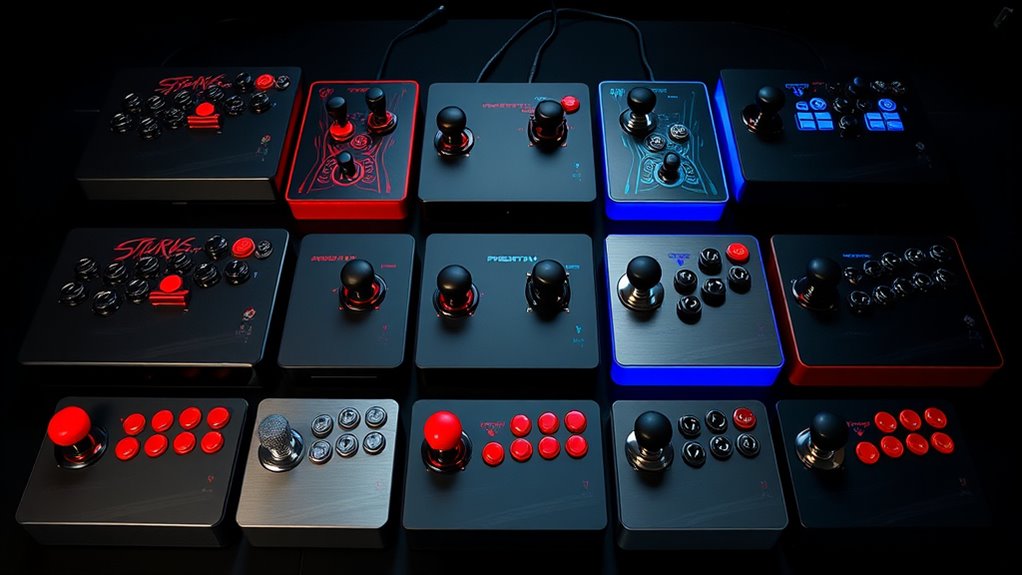
Tournament-grade arcade fight sticks need responsive controls, dependable construction, and platform support that fits your setup. I’d make the Victrix Pro FS my best overall pick for its premium, competition-focused design, while the HORI Fighting Stick Alpha stands out for a more serviceable layout and the Mayflash F300 for broad platform flexibility. The main tradeoffs are premium construction versus lower cost, console compatibility versus cross-platform versatility, and full-size stability versus easier storage. A stick built for one platform may not work on another without extra hardware, so compatibility deserves as much attention as the buttons and lever. Continue reading for the full comparison and guidance on choosing a stick for your play style.

Get business pricing on tech for your team
- Business-only prices and quantity discounts
- Tax-exempt purchasing
- Multiple users, one account, clear invoices
Key Takeaways
- The Victrix Pro FS leads for a premium competitive setup, while its specialist focus makes it a different proposition from lower-cost or more platform-flexible picks.
- The HORI Fighting Stick Alpha and Nacon Daija prioritize customization, giving buyers a stronger case for paying attention to access and serviceability rather than just appearance.
- The Mayflash F300 stands out for broad compatibility, but buyers should check which platform combinations and adapters their own setup requires before choosing it.
- The Qanba Drone 2 is the compact, accessible Qanba option; the larger Obsidian 2 is better suited to players who want a more substantial dedicated station.
- Several 8BitDo models split by platform and form: Switch and Windows options differ from Xbox variants, so the product name alone is not enough to confirm a match.
| Victrix Pro FS Arcade Fight Stick for PS5, PS4, and PC | 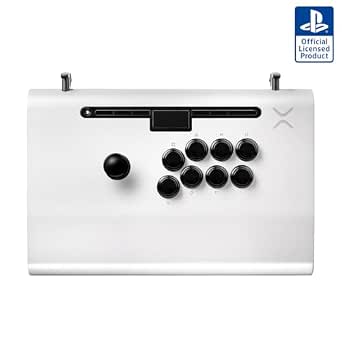 | Best Premium Tournament Pick | Compatibility: PS5, PS4, PC | Body material: Aircraft-grade aluminum | Buttons: 8 x 30 mm Sanwa Denshi | VIEW ON AMAZON | See Our Full Breakdown |
| KBSure R8 Arcade Fight Stick Joystick |  | Best for Multi-Platform Features | Model: R8 | Compatible platforms: Windows, Apple, Android, PS3, PS4, Nintendo Switch, Steam | Connectivity: USB | VIEW ON AMAZON | See Our Full Breakdown |
| Qanba Obsidian 2 Wired Joystick for PlayStation 5, PlayStation 4, and PC |  | Best for Sanwa Controls and PS5 Play | Compatible devices: PlayStation 5, PlayStation 4, PC | Connectivity: USB | Buttons: 16 | VIEW ON AMAZON | See Our Full Breakdown |
| 8BitDo Arcade Stick for Switch 2, Switch, and Windows PC, Purple |  | Best for Wireless Switch 2 Play | Compatible devices: Nintendo Switch, Switch 2, Windows PC | Connectivity: Bluetooth, 2.4G adapter, USB-C | Customization: Button mapping, macros, saved profiles | VIEW ON AMAZON | See Our Full Breakdown |
| 8Bitdo Arcade Stick for Nintendo Switch and Windows |  | Best for Customizable Wireless Value | Compatible devices: Nintendo Switch, Windows | Connectivity: Bluetooth, 2.4 GHz receiver, USB-C wired | Buttons: 16 | VIEW ON AMAZON | See Our Full Breakdown |
| Mayflash F300 Arcade Fight Stick |  | Best for Multi-Platform Modding | Compatible devices: Nintendo Switch, PS4, PS3, Xbox Series X/S, Xbox One, Xbox 360, Windows PC, macOS, Steam Deck, Android, NeoGeo mini, SEGA Mega Drive/Genesis | Connectivity: Wired USB | Customization: Buttons and joystick can be customized with Sanwa Denshi parts | VIEW ON AMAZON | See Our Full Breakdown |
| HORI Fighting Stick Alpha for PlayStation 5, PlayStation 4, and PC |  | Best for PlayStation Tournament Play | Compatible devices: PlayStation 4, PlayStation 5, PC | Connectivity: Wired USB | Joystick and buttons: HAYABUSA | VIEW ON AMAZON | See Our Full Breakdown |
| 8BitDo Arcade Stick for Xbox Series X|S, Xbox One, and Windows |  | Best Wireless Pick for Xbox | Compatible devices: Xbox Series X|S, Xbox One, Windows 10 and later | Connectivity: 2.4 GHz wireless or wired USB | Button count: 8 | VIEW ON AMAZON | See Our Full Breakdown |
| Nacon Daija Arcade Fight Stick for PlayStation and PC |  | Best Premium Sanwa Build | Compatible devices: Mac, PC, PlayStation 4, PlayStation 5 | Connectivity: USB | Joystick and buttons: Sanwa | VIEW ON AMAZON | See Our Full Breakdown |
| Subsonic Arcade Stick Controller for PS4, Xbox, PC, and PS3 |  | Best for Programmable Inputs | Model: SA5662 | Compatible platforms: Description lists PS4, Xbox Series X/S, Xbox One, PC, and PS3; compatible-device specs mention PC and PlayStation 3 | Connectivity: Wired USB | VIEW ON AMAZON | See Our Full Breakdown |
| 8BitDo Retro Wireless Arcade Fight Stick for Nintendo Switch and Windows PC | 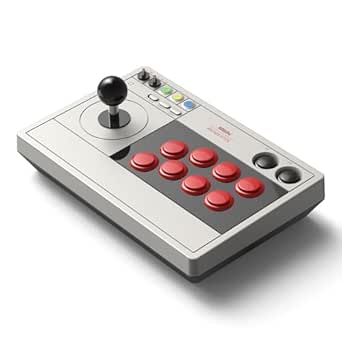 | Best for Wireless Customization | Compatible devices: Nintendo Switch, Windows PC | Connectivity: Bluetooth, 2.4 GHz wireless, wired USB-C | Joystick: 8-way | VIEW ON AMAZON | See Our Full Breakdown |
| 8BitDo Arcade Stick for Xbox Series X|S, Xbox One, and Windows (White) |  | Best for Xbox Tournament Setups | Compatibility: Xbox Series X|S, Xbox One, Windows 10 and later | Connectivity: Wireless 2.4 GHz or wired USB | Software: 8BitDo Ultimate Software | VIEW ON AMAZON | See Our Full Breakdown |
| Qanba Drone 2 Wired Joystick for PlayStation 5, PlayStation 4, and PC |  | Best Wired Pick for PlayStation | Compatible devices: PC, PlayStation 4, PlayStation 5 | Connectivity: USB | Buttons: Qanba 30 mm B30 buttons | VIEW ON AMAZON | See Our Full Breakdown |
| tournamentgrade arcade fight stick | Connectivity | Weight | Compatible devices | Dimensions |
|---|---|---|---|---|
| Victrix Pro FS Arcade Fight St | — | 7.8 lbs (3,538 g) | — | 16.25 x 11 x 2.25 in |
| KBSure R8 Arcade Fight Stick J | USB | Listed inconsistently as approximately 4 kg and 5 kg | — | 16.14 x 10.63 x 4.72 in |
| Qanba Obsidian 2 Wired Joystic | USB | 7.4 lbs | PlayStation 5, PlayStation 4, PC | 19.1 x 10.2 x 4.6 in |
| 8BitDo Arcade Stick for Switch | Bluetooth, 2.4G adapter, USB-C | 2,100 g | Nintendo Switch, Switch 2, Windows PC | — |
| 8Bitdo Arcade Stick for Ninten | Bluetooth, 2.4 GHz receiver, USB-C wired | 4.6 lbs | Nintendo Switch, Windows | 11.93 x 4.37 x 7.99 in |
| Mayflash F300 Arcade Fight Sti | Wired USB | 2 kg | Nintendo Switch, PS4, PS3, Xbox Series X/S, Xbox One, Xbox 360, Windows PC, macOS, Steam Deck, Android, NeoGeo mini, SEGA Mega Drive/Genesis | 22 x 13 x 11 inches |
| HORI Fighting Stick Alpha for | Wired USB | — | PlayStation 4, PlayStation 5, PC | — |
| 8BitDo Arcade Stick for Xbox S | 2.4 GHz wireless or wired USB | — | Xbox Series X|S, Xbox One, Windows 10 and later | 9.45 x 13.39 x 5.51 inches |
| Nacon Daija Arcade Fight Stick | USB | — | Mac, PC, PlayStation 4, PlayStation 5 | — |
| Subsonic Arcade Stick Controll | Wired USB | 760 g | — | 9.84 x 6.89 x 1.89 inches |
| 8BitDo Retro Wireless Arcade F | Bluetooth, 2.4 GHz wireless, wired USB-C | 2.44 kg | Nintendo Switch, Windows PC | — |
| 8BitDo Arcade Stick for Xbox S | Wireless 2.4 GHz or wired USB | — | — | — |
| Qanba Drone 2 Wired Joystick f | USB | 4 pounds | PC, PlayStation 4, PlayStation 5 | 14 x 8.7 x 4.6 inches |
More Details on Our Top Picks
Victrix Pro FS Arcade Fight Stick for PS5, PS4, and PC
The Victrix Pro FS is my premium pick for players who prioritize tournament-ready construction and familiar Sanwa controls. Its aircraft-grade aluminum body and 7.8-pound weight give it a planted feel, while the ergonomic wrist slope is designed for longer sessions. Compared with the lighter, wireless 8BitDo Arcade Stick for Nintendo Switch and Windows, the Victrix is less convenient to carry casually, but its detachable Sanwa JLF-based joystick and quick-access mod panel make it more appealing to players who plan to customize their setup. Tournament Mode, cable organizers, carrying handles, and a braided USB-C cable round out a competition-focused package. The tradeoff is a large 16.25-inch footprint and substantial weight, which can be awkward for cramped desks or frequent travel. I’d choose it for a dedicated PS5, PS4, or PC setup, not a compact all-purpose controller.
Pros:- Aircraft-grade aluminum body is built for a sturdy, planted setup.
- Sanwa Denshi buttons and Sanwa JLF-based joystick provide established arcade-style controls.
- Detachable joystick and quick-access mod panel support customization.
- Tournament Mode, wrist slope, handles, and cable organizers suit organized play.
Cons:- At 7.8 pounds, it is heavier than the wireless 8BitDo options in this roundup.
- Its 16.25 x 11-inch footprint can crowd smaller desks.
- Compatibility is limited to PS5, PS4, and PC.
Best for: PS5, PS4, and PC players seeking a durable, Sanwa-equipped stick with tournament-focused details and room for modifications.
Not ideal for: Players with limited desk space or those who regularly carry their controller; its 7.8-pound body and wide footprint work against portability.
- Compatibility:PS5, PS4, PC
- Body material:Aircraft-grade aluminum
- Buttons:8 x 30 mm Sanwa Denshi
- Joystick:Detachable Link 2 on Sanwa JLF base
- Connection:3 m braided USB-C cable
- Weight:7.8 lbs (3,538 g)
- Dimensions:16.25 x 11 x 2.25 in
- Audio:3.5 mm stereo output and microphone input
- Additional features:Tournament Mode, ergonomic wrist slope, quick-access mod panel
Our verdict“Choose the Victrix Pro FS for a sturdy Sanwa-based tournament setup, provided its weight and size fit your playing space.”
KBSure R8 Arcade Fight Stick Joystick
The KBSure R8 stands out for its unusually broad listed compatibility: Windows, Apple, Android, PS3, PS4, Nintendo Switch, and Steam. That range makes it a more flexible one-stick option than the Victrix Pro FS, which is focused on PS5, PS4, and PC, though the R8’s platform breadth does not by itself establish tournament-grade control quality. Its two gate options, tactile blue mechanical switches, and included replacement buttons give tinkerers practical ways to adjust the feel. The flip-top panel also offers easier internal access than a closed, hard-to-modify design, while RGB lighting and an LCD screen add features that are absent from the more competition-focused Victrix. The R8’s ABS frame, steel plates, and silicone base are intended to keep it steady, but its listed weight is inconsistent—about 4 kg in one place and 5 kg in another. I’d treat that uncertainty, along with the less established tournament pedigree in the supplied details, as a reason for cautious buyers to look elsewhere.
Pros:- Broad listed compatibility includes Windows, Apple, Android, PS3, PS4, Nintendo Switch, and Steam.
- Two joystick gate options let players change the input feel.
- Flip-top access and included replacement buttons support hands-on customization.
- Steel plates and a silicone base are designed to help stabilize the ABS frame.
Cons:- Weight is listed inconsistently as approximately 4 kg and 5 kg.
- The supplied details do not identify Sanwa controls, unlike the Victrix Pro FS and Qanba Obsidian 2.
- Its feature-heavy RGB and LCD design may matter less to buyers focused on tournament essentials.
Best for: Players who want one feature-rich USB stick across several listed systems and enjoy adjusting gates, buttons, and lighting.
Not ideal for: Tournament-focused buyers who prioritize clearly specified weight, established arcade-control parts, or a straightforward competition-oriented feature set.
- Model:R8
- Compatible platforms:Windows, Apple, Android, PS3, PS4, Nintendo Switch, Steam
- Connectivity:USB
- Controller type:Joystick
- Weight:Listed inconsistently as approximately 4 kg and 5 kg
- Dimensions:16.14 x 10.63 x 4.72 in
- Lighting:Customizable RGB
- Included accessories:Two replacement buttons and one gate ring
Our verdict“Pick the KBSure R8 if broad platform support and adjustable features matter more than a clearly documented tournament-control setup.”
Qanba Obsidian 2 Wired Joystick for PlayStation 5, PlayStation 4, and PC
The Qanba Obsidian 2 is a strong fit for PlayStation players who want Sanwa Denshi controls and a feature set built around console play. Its 16-button layout, touch pad, and 3.5 mm microphone input with mute control add useful access points beyond the core stick-and-button setup. Compared with the Victrix Pro FS, it is slightly lighter at 7.4 pounds and provides more listed buttons, but it lacks the Victrix’s stated aircraft-grade aluminum body, detachable joystick, and quick-access mod panel. The Obsidian 2 is also wired only, so its USB connection keeps the setup simple but restricts placement compared with the wireless 8BitDo models. Its 19.1-inch length makes it the largest footprint among these five picks, which may suit a fixed station better than a compact desk. I’d favor it for licensed PS5 and PS4 play with built-in audio controls; buyers who value portability or easy mod access should compare the Victrix first.
Pros:- Sanwa Denshi joystick and buttons provide a consistent arcade-control specification.
- Touch pad and 3.5 mm microphone input with mute control add console-focused functions.
- Compatible with PS5, PS4, and PC.
- Sony licensing makes its PlayStation focus explicit.
Cons:- Wired USB connectivity limits placement compared with wireless 8BitDo models.
- At 19.1 inches long, it takes up substantial desk space.
- The supplied details do not list a detachable joystick or quick-access mod panel like the Victrix Pro FS.
Best for: PS5 and PS4 players who want Sanwa controls, a touch pad, and a dedicated microphone mute control in a wired stick.
Not ideal for: Players who need wireless play, a compact desk footprint, or clearly stated quick-access mod features.
- Compatible devices:PlayStation 5, PlayStation 4, PC
- Connectivity:USB
- Buttons:16
- Joystick and buttons:Sanwa Denshi
- Microphone input:3.5 mm with mute button
- Weight:7.4 lbs
- Dimensions:19.1 x 10.2 x 4.6 in
- Warranty:1 year
- Power source:Corded electric
Our verdict“Choose the Obsidian 2 for wired PS5 or PS4 play with Sanwa controls and integrated audio functions, if its long body fits your setup.”
8BitDo Arcade Stick for Switch 2, Switch, and Windows PC, Purple
This 8BitDo stick is the most flexible connection choice here for players using Nintendo Switch, Switch 2, or Windows PC. It offers Bluetooth, 2.4G wireless, and USB-C, letting buyers choose wireless convenience or a wired link without being locked into one connection style. Its button mapping, macros, saved profiles, turbo function, and dynamic button layout also give it more software-side adjustment than the wired Qanba Obsidian 2. That versatility is the point: this pick suits a multi-mode home setup better than a narrow, competition-first stick. The supplied specifications do not name Sanwa controls or describe a detachable joystick, so players seeking confirmed tournament-standard parts may prefer the Victrix Pro FS or Obsidian 2. At 2,100 g, it is also a substantial piece to carry, and its listed compatibility leaves PlayStation users out. I’d choose it for configurable wireless Switch play, not as a universal tournament stick.
Pros:- Supports Bluetooth, a 2.4G adapter, and wired USB-C connections.
- Compatible with Nintendo Switch, Switch 2, and Windows PC.
- Button mapping, macros, and saved profiles allow per-game customization.
- Dynamic button layout and turbo functionality offer extra control options.
Cons:- At 2,100 g, it is not a lightweight travel stick.
- PlayStation compatibility is not listed.
- The supplied product details do not specify Sanwa controls or joystick-modification features.
Best for: Nintendo Switch, Switch 2, and Windows PC players who want wireless flexibility and saved control profiles.
Not ideal for: PlayStation players or tournament buyers who require specified Sanwa parts and a clearly documented competition-focused control layout.
- Compatible devices:Nintendo Switch, Switch 2, Windows PC
- Connectivity:Bluetooth, 2.4G adapter, USB-C
- Customization:Button mapping, macros, saved profiles
- Additional features:Turbo functionality, dynamic button layout
- Faceplate:Tempered glass
- Weight:2,100 g
- Color:Purple
- Brand:8BitDo
Our verdict“Choose this 8BitDo for configurable wireless play across Switch, Switch 2, and Windows, rather than for a specified Sanwa-based tournament build.”
8Bitdo Arcade Stick for Nintendo Switch and Windows
The original 8BitDo Arcade Stick is a practical fit for Switch and Windows players who want three connection options and a route to hardware changes. Bluetooth, a 2.4 GHz receiver, and wired USB-C make it more adaptable to different play spaces than the USB-only Qanba Obsidian 2, while button mapping and macros allow software customization. Its universal mounting plate supports Sanwa arcade sticks, which gives mod-minded owners a hardware upgrade path that is not stated for the newer purple 8BitDo model in this lineup. That flexibility comes with narrow listed compatibility—Nintendo Switch and Windows only—and a 4.6-pound weight that makes it less portable than a lightweight controller. Unlike the Victrix Pro FS, the product details do not identify included Sanwa controls, so buyers should distinguish mod support from confirmed stock parts. I’d pick it for Switch or Windows use and gradual customization, not for players needing verified multi-console tournament compatibility.
Pros:- Bluetooth, 2.4 GHz receiver, and wired USB-C provide connection flexibility.
- Button mapping and macros support customized inputs.
- Universal mounting plate supports Sanwa arcade sticks.
- Listed for Nintendo Switch and Windows.
Cons:- Compatibility is listed only for Nintendo Switch and Windows.
- The supplied details do not confirm Sanwa controls are included.
- At 4.6 pounds, it is not especially light for carrying.
Best for: Nintendo Switch and Windows players who want wireless and wired connections plus the option to fit Sanwa arcade sticks.
Not ideal for: Players on PlayStation or other unlisted platforms, or buyers who want Sanwa controls confirmed as standard equipment.
- Compatible devices:Nintendo Switch, Windows
- Connectivity:Bluetooth, 2.4 GHz receiver, USB-C wired
- Buttons:16
- Weight:4.6 lbs
- Dimensions:11.93 x 4.37 x 7.99 in
- Power source:Battery powered
- Included components:Arcade stick
- Mounting plate:Universal plate supports Sanwa arcade sticks
Our verdict“Choose the original 8BitDo if you play on Switch or Windows and value wireless options plus a Sanwa-compatible mod path.”
Mayflash F300 Arcade Fight Stick
The Mayflash F300 makes the most sense when one stick needs to cover several systems and leave room for upgrades. Its support for consoles, computers, Steam Deck, and Android is broader than the HORI Fighting Stick Alpha, which focuses on PlayStation and PC. Sanwa Denshi compatibility also lets buyers replace the joystick and buttons over time rather than commit to the stock setup. On PC, XInput and DirectInput support add flexibility, while adjustable turbo functions suit players who want them. The tradeoff is that this is a more basic starting point than the tournament-oriented HORI or Nacon Daija: PS5 use needs a separately acquired adapter or converter, and the USB cable rules out wireless play. I’d choose it for platform range and modding potential, not as a plug-and-play PS5 tournament pick.
Pros:- Broad compatibility across listed consoles, PC, macOS, Steam Deck, and Android
- Joystick and buttons can be customized with Sanwa Denshi parts
- Supports XInput and DirectInput on PC
- Adjustable turbo functions are available
Cons:- PS5 compatibility requires a separately acquired adapter or converter
- USB connection means there is no wireless option
- Stock parts may be less appealing to players seeking a tournament-ready Sanwa setup immediately
Best for: Players using several older consoles, PC, Steam Deck, or Android who want an affordable base for Sanwa upgrades.
Not ideal for: PS5 competitors who want native compatibility and a ready-to-use tournament setup without buying an adapter or modifying parts.
- Compatible devices:Nintendo Switch, PS4, PS3, Xbox Series X/S, Xbox One, Xbox 360, Windows PC, macOS, Steam Deck, Android, NeoGeo mini, SEGA Mega Drive/Genesis
- Connectivity:Wired USB
- Customization:Buttons and joystick can be customized with Sanwa Denshi parts
- PC input support:XInput and DirectInput
- Turbo:Adjustable turbo functions
- Weight:2 kg
- Dimensions:22 x 13 x 11 inches
- Warranty:90 days
Our verdict“Choose the F300 if broad platform support and a mod-friendly starting point matter more than native PS5 play or a premium out-of-box setup.”
HORI Fighting Stick Alpha for PlayStation 5, PlayStation 4, and PC
For players whose tournament setup centers on PlayStation, the HORI Fighting Stick Alpha is the clearest fit in this group. Its official PS5 and PS4 compatibility, HAYABUSA joystick and buttons, and tournament lock give it a competition-focused feature set without requiring the parts swaps the Mayflash F300 may invite. The hinged case is a practical distinction: it makes maintenance and artwork changes easier than on a conventional closed shell, while four profiles and onboard audio controls add useful setup options. Compared with the Nacon Daija, the HORI lists more profiles and a larger feature set for audio control; the Daija counters with Sanwa parts and a detachable cable. The HORI’s main compromise is its large footprint and wired-only connection, so it is less convenient to transport or use away from a fixed setup.
Pros:- Official compatibility with PS5, PS4, and PC
- HAYABUSA joystick and buttons are included
- Hinged case makes customization and maintenance easier
- Four custom profiles, tournament lock, and onboard audio controls
Cons:- Large dimensions take up substantial desk or lap space
- Wired USB connection limits placement and portability
- Compatibility is focused on PlayStation and PC rather than multiple console families
Best for: PS5 and PS4 tournament players who want licensed compatibility, easy internal access, and configurable profiles in one stick.
Not ideal for: Players who need wireless play, a compact travel setup, or compatibility with Xbox and Nintendo systems.
- Compatible devices:PlayStation 4, PlayStation 5, PC
- Connectivity:Wired USB
- Joystick and buttons:HAYABUSA
- Button count:17
- Features:Touchpad, tournament lock, replaceable artwork, onboard audio and microphone controls
- Custom profiles:4
- Cable length:10 ft
- Weight and dimensions:1500 g; 18.9 x 6.5 x 14.37 inches
Our verdict“Pick the HORI Alpha for a feature-rich, officially compatible PlayStation tournament setup if its large wired design suits your play space.”
8BitDo Arcade Stick for Xbox Series X|S, Xbox One, and Windows
The Xbox-focused 8BitDo Arcade Stick stands apart from the wired HORI Alpha and Nacon Daija by offering 2.4 GHz wireless play alongside USB. That flexibility helps players keep a setup tidy or switch to a wired connection when charging is needed. Custom button mapping and profile controls make it easier to keep preferred layouts ready, while the headphone jack and volume control put basic audio adjustments on the stick. Its stated compatibility is narrower than the Mayflash F300’s broad platform list, and the product data does not identify Sanwa or another premium joystick-and-button set. That matters for buyers putting component feel and upgrade details ahead of convenience. Battery life is listed at up to 30 hours, but a full charge takes four hours, so this is better for flexible home play than for someone who wants a wired-only competition stick with clearly specified arcade parts.
Pros:- Supports both 2.4 GHz wireless and wired USB connections
- Customizable button mapping and profile controls
- Headphone jack and volume control are built in
- Listed battery life is up to 30 hours
Cons:- Compatible-device list is limited to Xbox and Windows
- Charging takes four hours
- Product data does not specify premium joystick or button components
Best for: Xbox Series X|S and Xbox One players who want wireless convenience, remappable controls, and a wired fallback for Windows use.
Not ideal for: PlayStation or Nintendo players, and tournament competitors who prioritize named premium components or prefer a wired-only controller.
- Compatible devices:Xbox Series X|S, Xbox One, Windows 10 and later
- Connectivity:2.4 GHz wireless or wired USB
- Button count:8
- Controls:Customizable button mapping and profile buttons
- Audio:3.5 mm headphone jack and volume control
- Battery life:Up to 30 hours
- Charging time:4 hours
- Dimensions:9.45 x 13.39 x 5.51 inches
Our verdict“Choose this 8BitDo if Xbox compatibility and wireless flexibility matter more than broad console support or specified tournament-grade parts.”
Nacon Daija Arcade Fight Stick for PlayStation and PC
The Nacon Daija is the strongest fit here for players who want named Sanwa components and a sturdy, customizable PlayStation setup. Its Sanwa joystick and action buttons give buyers a clear component baseline, unlike the product data for the Xbox 8BitDo, which does not name its parts. Faceplate customization, two joystick heads, and included tools make tailoring the setup more accessible, while the textured palm rest supports longer sessions. Against the HORI Alpha, the Daija trades four custom profiles and onboard audio controls for a detachable cable, Mac compatibility, and a specified Sanwa component set. The tradeoffs are substantial weight and a wired-only connection; button remapping on PC or Mac also requires software. I’d favor it for a fixed PlayStation or computer setup, not for players who carry a stick frequently or need wireless play.
Pros:- Sanwa joystick and action buttons are specified
- Customizable faceplate and button mapping
- Includes two joystick heads and customization tools
- Detachable 3-meter cable and 3.5 mm audio jack
Cons:- At 7.7 pounds, it is heavy to carry between events
- Wired USB connection offers no wireless play
- PC and Mac button remapping requires software
Best for: PS4 and PS5 players, or PC and Mac users, who want Sanwa controls, a customizable faceplate, and a substantial stationary stick.
Not ideal for: Frequent travelers and players who want wireless operation, a lightweight controller, or onboard remapping without software.
- Compatible devices:Mac, PC, PlayStation 4, PlayStation 5
- Connectivity:USB
- Joystick and buttons:Sanwa
- Button count:8
- Customization:Customizable button mapping and faceplate
- Audio:3.5 mm audio jack
- Cable:Detachable 3-meter USB-A to USB-C
- Weight and dimensions:7.7 pounds; 14.96 x 10.28 x 2.76 inches
Our verdict“Choose the Daija if Sanwa parts and customization matter more than low weight, wireless use, or software-free remapping.”
Subsonic Arcade Stick Controller for PS4, Xbox, PC, and PS3
The Subsonic SA5662 focuses on direct input functions rather than the customization depth of the Nacon Daija or HORI Alpha. Its steel joystick and eight microswitch buttons provide a tactile arcade-style control layout, while AUTO and programmable COMBO functions are the defining extras for players who want repeat or programmed inputs. The 3-meter cable gives more reach than a short desk connection, and the listed platform support covers PS4, Xbox systems, PC, and PS3. Still, its tournament fit is less clearly established than the licensed HORI and Nacon models: the supplied compatibility details are inconsistent, naming only PC and PS3 in one device listing despite the broader description. It also lacks stated wireless support and named Sanwa or HAYABUSA parts. I’d treat it as a function-focused wired option, not the safest choice for strict tournament hardware requirements.
Pros:- Heavy-duty steel joystick
- Eight microswitch buttons
- AUTO and programmable COMBO functions
- Three-meter USB cable and broad compatibility claimed in the description
Cons:- Compatibility details conflict: the description lists more platforms than the compatible-device specs
- Wired USB connection has no wireless option
- No Sanwa or HAYABUSA components are specified
Best for: Players seeking a wired stick with AUTO and programmable COMBO functions for PS4, Xbox, PC, or PS3 use.
Not ideal for: Tournament competitors who need clearly documented platform compatibility, named premium components, or a licensed PS5-ready stick.
- Model:SA5662
- Compatible platforms:Description lists PS4, Xbox Series X/S, Xbox One, PC, and PS3; compatible-device specs mention PC and PlayStation 3
- Connectivity:Wired USB
- Controls:Heavy-duty steel joystick and eight microswitch buttons
- Functions:AUTO and programmable COMBO
- Cable length:3 m
- Weight:760 g
- Dimensions:9.84 x 6.89 x 1.89 inches
Our verdict“Consider the Subsonic for its programmable input functions, but verify platform support before choosing it for tournament use.”
8BitDo Retro Wireless Arcade Fight Stick for Nintendo Switch and Windows PC
For players who want a tournament-style layout without being tethered to the console, this 8BitDo offers the most connection flexibility here: Bluetooth, 2.4 GHz wireless, and USB-C. Its up to 40-hour 2.4 GHz battery life gives it an advantage over the Xbox 8BitDo Arcade Stick’s stated 30-hour maximum, while remappable controls, macros, and profile settings let players tailor inputs before a match. Replaceable 30 mm and 24 mm buttons and swappable joystick mounting plates also give it more hardware customization than the wired Qanba Drone 2. The tradeoff is platform focus: compatibility is listed for Switch and Windows PC, not PlayStation or Xbox, and charging takes four hours. Wireless convenience suits home setups, but players who want a simple, platform-specific tournament stick may prefer the Qanba.
Pros:- Three connection options, including wired USB-C
- Up to 40 hours of play time over 2.4 GHz wireless
- Button remapping, macros, and controller profiles
- Replaceable arcade buttons and swappable joystick mounting plates
Cons:- Compatibility is listed only for Nintendo Switch and Windows PC
- A full charge takes four hours
- Wireless play adds battery management that wired options such as the Qanba Drone 2 avoid
Best for: Switch and Windows PC fighting-game players who want wireless play, customizable inputs, and replaceable controls.
Not ideal for: PlayStation or Xbox players, and competitors who want a wired-only setup or a stick with explicitly listed support for their console.
- Compatible devices:Nintendo Switch, Windows PC
- Connectivity:Bluetooth, 2.4 GHz wireless, wired USB-C
- Joystick:8-way
- Buttons:12
- Macro buttons:2 (P1/P2)
- Replaceable arcade buttons:30 mm and 24 mm
- Battery life:Up to 40 hours on 2.4 GHz; up to 30 hours on Bluetooth
- Charging time:4 hours
- Weight:2.44 kg
Our verdict“Choose this 8BitDo if you play on Switch or Windows and value wireless flexibility and hardware customization over broad console compatibility.”
8BitDo Arcade Stick for Xbox Series X|S, Xbox One, and Windows (White)
This is the clearest fit in this group for Xbox players: it is officially licensed for Xbox Series X|S and Xbox One, with Windows 10 and later also listed. Wireless 2.4 GHz supports a tidy setup, while wired USB gives players a cable option; the 3.5 mm audio jack and volume control are practical touches for headset use during play. Compared with the Switch-and-PC 8BitDo Retro stick, this model trades Bluetooth and longer stated battery life for Xbox compatibility and built-in audio controls. Its 30-hour maximum play time is still substantial, but the four-hour charging time and reliance on a battery make it less straightforward than the wired Qanba Drone 2 for players who want no charging routine. The supplied details do not specify replaceable parts or button dimensions, so extensive hardware tuning is less clearly supported.
Pros:- Official Xbox licensing and compatibility with Xbox Series X|S and Xbox One
- Wireless 2.4 GHz and wired USB connection options
- Custom button mapping, fast-mapping, and profile settings
- 3.5 mm audio jack with volume control
Cons:- Maximum stated play time is 30 hours
- Charging takes four hours
- Listed compatibility does not include PlayStation or Nintendo Switch
Best for: Xbox Series X|S and Xbox One fighting-game players who want a licensed stick with wireless play, wired backup, and headset controls.
Not ideal for: PlayStation players or hardware tinkerers who want documented replaceable buttons and joystick parts.
- Compatibility:Xbox Series X|S, Xbox One, Windows 10 and later
- Connectivity:Wireless 2.4 GHz or wired USB
- Software:8BitDo Ultimate Software
- Customization:Custom button mapping, fast-mapping, and profile setting buttons
- Audio:3.5 mm audio jack and volume control
- Maximum play time:30 hours
- Charging time:4 hours
- License:Officially licensed for Xbox
- Color:White
Our verdict“Pick this model for an Xbox-centered setup where licensed compatibility and headset controls matter more than longer battery life or documented hardware swapping.”
Qanba Drone 2 Wired Joystick for PlayStation 5, PlayStation 4, and PC
The Qanba Drone 2 keeps the tournament setup straightforward: USB-only connection, full-size controls, and official PlayStation licensing for PS5 and PS4, with PC support as well. Its Qanba 30 mm B30 buttons and OV7 OMRON joystick switch provide named arcade components, while the 3.5 mm microphone input with mute control adds a useful communication feature without requiring wireless pairing or battery upkeep. Compared with the Xbox-focused 8BitDo stick, the Drone 2 serves a different console audience and favors a fixed wired connection; against the wireless 8BitDo Retro, it gives up portability of setup and extensive mapping features in favor of a simpler, corded arrangement. At 14 by 8.7 inches, it is a compact entry-level design, which may feel cramped to players seeking a larger deck for broad hand placement.
Pros:- Officially licensed for PlayStation 5 and PlayStation 4, with PC compatibility
- Full-size Qanba 30 mm buttons and OV7 OMRON joystick switch
- Wired USB connection avoids charging and wireless pairing
- 3.5 mm microphone input includes mute control
Cons:- USB-only connection offers no wireless option
- Compact dimensions may feel small for players who prefer a larger deck
- The supplied specifications do not list button remapping or macro support
Best for: PS5, PS4, and PC players who want a licensed wired stick with full-size arcade controls and a microphone mute feature.
Not ideal for: Players who want wireless play, a larger control surface, or extensive software-based remapping and macro features.
- Compatible devices:PC, PlayStation 4, PlayStation 5
- Connectivity:USB
- Buttons:Qanba 30 mm B30 buttons
- Joystick switch:Qanba OV7 OMRON
- Microphone input:3.5 mm with mute control
- Power source:Corded electric
- Weight:4 pounds
- Dimensions:14 x 8.7 x 4.6 inches
- Warranty:1 year
Our verdict“Choose the Drone 2 for a simple, wired PS5 or PS4 tournament setup; skip it if you need wireless play or more room on the control deck.”

How We Picked
I ranked these sticks by how well their stated platform support, control layout, construction, and setup features match the demands of regular competitive play. A strong pick should offer predictable inputs and a stable playing position, while its connection and compatibility details should fit the consoles or PC the buyer actually uses. I also weighed access for maintenance and customization, since replaceable parts and a serviceable enclosure can matter more over time than extra cosmetic features.
The order reflects different levels of specialization, not a claim that every player needs the same kind of stick. The Victrix Pro FS ranks first as the premium competition-focused choice; the HORI Fighting Stick Alpha and Nacon Daija appeal to players who value customization; and the Mayflash F300 earns attention for flexibility. Compact, entry-level, wireless, and platform-specific models rank according to their intended role, with compatibility caveats and practical limitations counted against them. I treat near-duplicate listings, such as separate color or platform versions, as distinct choices only where the supported system or configuration changes the buying decision.
Factors to Consider When Choosing Tournamentgrade Arcade Fight Sticks
A tournament-ready stick is not defined by a single feature. I’d match the controller to the event rules, console, preferred layout, and amount of time you expect to spend maintaining it; overlooking any one of those can make an otherwise capable stick a poor fit.
Confirm tournament and platform compatibility
Start with the exact console used at your local event, not just the platform listed on a product page. Compatibility can vary by model, connection mode, and game, and a stick that works on PC may not be accepted on a console tournament setup. Check the event’s controller rules before buying, especially if the stick relies on an adapter or special authentication. Adapters can add cost, setup steps, and another point of failure. When moving between home systems and events, a clearly supported wired connection is often simpler than assuming cross-platform support will work everywhere.
Choose a layout you can play consistently
Lever-and-button sticks remain familiar to many players, but leverless layouts and alternate button arrangements suit different techniques. Do not pick a layout because it is marketed as faster; execution depends on comfort and practice, and a new control scheme can disrupt established habits. If possible, try a friend’s layout or a demo unit before committing. Check button spacing and the position of auxiliary controls, since cramped or easy-to-hit system buttons can cause problems during play. Tournament organizers may also set rules around controller layouts, so review those before switching formats.
Separate useful customization from cosmetic extras
Customization matters most when it improves fit, repair, or long-term upkeep. Easy enclosure access can make it less troublesome to replace a worn button or change a lever, while artwork options mainly affect appearance. Before opening any controller, check its warranty terms and the manufacturer’s instructions. Buyers new to arcade controls may be better served by a reliable standard setup than by a model whose appeal depends on immediate modifications. A highly customizable stick earns its keep when you know which parts or layout you want to change.
Balance full-size stability against portability
A heavier, larger stick can stay planted during intense play, but it takes up more room in a bag and at home. A compact controller is easier to carry, though a smaller surface can feel less comfortable during long sessions or make hand placement less natural. Think about where you will use it most: a permanent desk setup favors stability, while frequent travel rewards a manageable footprint. Also account for cable storage, protective cases, and the space available at tournament stations. A portable choice is only convenient if its control layout still feels right for your hands.
Know what wireless changes at events
Wireless operation can simplify a home setup, but it introduces battery management and connection checks that a wired stick avoids. Tournament rules may restrict wireless controllers, and nearby devices can complicate pairing or setup. Read the event policy and the product’s connection details before treating wireless support as a benefit for competition. For home use, weigh the freedom from a cable against the need to keep the controller charged and paired. If you want one stick for both practice and events, wired compatibility should remain part of the decision.
Spend for the limitation you actually need to solve
Paying more makes sense when a premium enclosure, easier maintenance, or a specific platform feature will improve your regular use. It is less useful to buy premium construction if you are still unsure whether you prefer a lever, what console you will play on, or whether you will attend events. First identify the limitation of your current setup, then choose the feature that addresses it. Beginners often benefit more from a compatible, comfortable starting point than from advanced customization. Experienced players may value serviceability and a familiar layout enough to justify a more specialized option.
Frequently Asked Questions
Can I take any of these arcade sticks to a console tournament?
No; tournament acceptance depends on the event’s console, controller policy, and the specific stick’s compatibility. Check the rules for wired and wireless devices, adapters, and any platform authentication requirements before you travel. Do not assume a model that works on PC will connect to a console used at the venue. If the organizer provides a hardware list, compare the exact model and platform version against it. A quick pre-event check can prevent arriving with a controller you cannot use.
Should I choose the Victrix Pro FS or a less specialized stick?
The Victrix Pro FS makes the most sense if you want a premium, competition-focused controller and its platform support matches your setup. A less specialized choice may be a better fit if you are still learning arcade controls, need broader platform flexibility, or want a smaller commitment. Compare the features you will use regularly with the limitations you can accept, rather than choosing by premium positioning alone. Also check the exact model’s compatibility with your console and games. If you are uncertain about layout or platform, flexibility may matter more than a high-end enclosure.
Is the Mayflash F300 a safe choice if I use more than one platform?
It is a strong candidate for buyers who value versatility, but multi-platform support should never be assumed to mean every system works in every configuration. Verify the exact console, any required adapter, and whether the adapter is permitted at your tournament. Extra hardware can add setup steps and may change how convenient the stick is to carry. If you mostly play on one system, a platform-specific option could be simpler. Choose the F300 when its supported combinations match your actual devices, not just because its compatibility sounds broad.
Is a wireless arcade stick suitable for competitive events?
It can be, but only if the event permits wireless controllers and the connection method works with the venue’s setup. Battery charge and pairing become additional tasks, while a wired connection removes those particular uncertainties. Wireless can still be useful for home play where cable placement matters more than event rules. Check whether the controller also offers a supported wired mode if you want one device for both settings. Confirm the policy with the organizer rather than relying on the product’s wireless label.
What should a beginner prioritize before buying a tournament-grade stick?
A beginner should start with platform compatibility, a comfortable layout, and straightforward setup. It is easy to focus on premium construction or modification options before learning which control style feels natural. The Qanba Drone 2 is the more approachable compact Qanba option in this lineup, while the Mayflash F300 is worth checking if platform flexibility is a priority. Neither removes the need to verify the exact system you play on. If possible, try the layout first and reserve customization decisions until you know what you want to change.
Conclusion
For a dedicated premium setup, I’d choose the Victrix Pro FS as best overall, provided its platform fit suits the buyer. The Mayflash F300 is my best value-minded pick for flexibility, while the HORI Fighting Stick Alpha is a strong match for players who put customization and access near the top of their list. Beginners looking for a more compact Qanba option should start with the Qanba Drone 2; players who want a larger dedicated station can look to the Qanba Obsidian 2. For Xbox or Switch setups, choose the matching 8BitDo version only after confirming the exact platform support. The right choice is the one that fits your event rules, device, and preferred layout—not simply the most feature-rich stick.
Halloween Picks

Govee Outdoor Halloween Projector Light, 3D Dynamic Visual Holiday Decor

9 ft Halloween Inflatable Haunted Castle with Dragon and Ghost

HOPOCO Halloween Pumpkin Fog Machine with 12 LED Colors & Remote Control
As an affiliate, we earn on qualifying purchases.