
Robot pets range from cuddly robotic animals to AI companions, coding toys, and mobile cameras, so the right choice depends on whether you want comfort, play, learning, or remote monitoring. My best overall pick is the Loona Interactive AI Robot Pet for its voice and gesture control, while the Joy For All Orange Tabby Cat stands out for a more familiar companion-pet style and the Thames & Kosmos My Robotic Pet suits hands-on STEM play. The main tradeoffs are how interactive a pet feels, how much setup or supervision it needs, and whether its play stays engaging over time. Some options focus on lifelike touch responses, while others prioritize movement, AI features, or coding. Read on for the full breakdown and a guide to choosing a robot pet that fits your household.

Get business pricing on tech for your team
- Business-only prices and quantity discounts
- Tax-exempt purchasing
- Multiple users, one account, clear invoices
Key Takeaways
- Robot pets serve different needs: Loona emphasizes voice- and gesture-led interaction, while the Joy For All cat focuses on a familiar, plush companion experience.
- Not every robot pet is designed for cuddling: Plush companion animals and desk robots offer different kinds of interaction, so choose for the way the recipient actually wants to engage.
- Movement and monitoring are separate use cases: The Enabot EBO SE is a mobile pet camera, not a substitute for an interactive companion animal.
- Learning value comes with a different kind of play: The Thames & Kosmos coding chameleon is better suited to guided STEM activity than ongoing pretend companionship.
- Several picks share a brand but not a role: The two EMO desk robots and the pocket-sized AIBI call for comparisons around placement and use, while Eilik and Eiliko offer distinct compact-companion alternatives.
| Ruko 18011 Interactive Robot Dog with 30+ LED Expressions |  | Best Programmable Robot Dog | Age range: 3 years and up | LED expressions: More than 30 | Programmable moves: Up to 50 | VIEW ON AMAZON | See Our Full Breakdown |
| Chongker Realistic Companion Robot Dog Plush |  | Best Plush Comfort Companion | Brand: Chongker | Model: PERCY-ZJUK | Character: Robot dog | VIEW ON AMAZON | See Our Full Breakdown |
| Energize Lab Eilik Interactive Robot Companion, Blue |  | Best Compact Desk Pet | Brand: ENERGIZE LAB | Model: EILIK-BLUE | Color: Blue | VIEW ON AMAZON | See Our Full Breakdown |
| Joy For All Orange Tabby Cat Interactive Robotic Companion Pet |  | Best Robotic Cat for Gentle Companionship | Brand: Joy For All | Model name: Orange Tabby Cat | Model number: A7592 | VIEW ON AMAZON | See Our Full Breakdown |
| Loona Interactive AI Robot Pet with Voice and Gesture Control |  | Best Premium Interactive Robot Pet | Model: KYO04LN01 | Type: Interactive robot pet | Controls: Voice and gesture | VIEW ON AMAZON | See Our Full Breakdown |
| EMOPET EMO Interactive AI Desk Robot Companion |  | Best for AI Desk Companionship | Brand: EMOPET | Model: EMO | Figure type: Interactive gaming figure | VIEW ON AMAZON | See Our Full Breakdown |
| EMOPET EMO AI Desk Robot Companion with Voice Commands, Dance Features, and Charging Station |  | Best Self-Charging Desk Robot | Brand: EMOPET | Model: EMO GO HOME | Character: EMO | VIEW ON AMAZON | See Our Full Breakdown |
| Enabot EBO SE 1080p Mobile Pet Camera Robot |  | Best for Checking on Pets at Home | Video resolution: 1080p | Field of view: 360 degrees | Connectivity: Wi-Fi | VIEW ON AMAZON | See Our Full Breakdown |
| Thames & Kosmos My Robotic Pet: Coding Chameleon STEM Kit |  | Best Build-and-Code Robot Pet | Brand: Thames & Kosmos | Model: My Robotic Pet: Coding Chameleon | Length: 15 inches | VIEW ON AMAZON | See Our Full Breakdown |
| Just Play emotoBOT COR-A Interactive Robot Toy with Kitty-Ear Headphones |  | Best for Younger Kids and Offline Play | Brand: Just Play | Model: emotoBOT COR-A | Height: 6 inches | VIEW ON AMAZON | See Our Full Breakdown |
| HEX BOTS Wall Crawler Gecko Remote Control Toy | 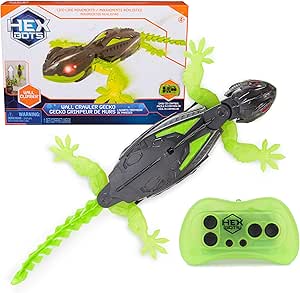 | Best for Wall-Climbing Action | Brand: HEX BOTS | Model: 6071514 | Recommended age: 4 years and up | VIEW ON AMAZON | See Our Full Breakdown |
| ENERGIZE LAB Eiliko Interactive Companion Robot, Blue |  | Best Clip-On Interactive Companion | Brand: ENERGIZE LAB | Model: Eiliko Blue | Color: Blue | VIEW ON AMAZON | See Our Full Breakdown |
| EMOPET AIBI Pocket AI Companion Robot |  | Best for Pocket-Sized AI Conversations | Brand: EMOPET | Model: AIBI-Pocket | Type: Interactive gaming figure | VIEW ON AMAZON | See Our Full Breakdown |
| robot pet | Brand | Model | Recommended age | Included components |
|---|---|---|---|---|
| Ruko 18011 Interactive Robot D | — | — | — | — |
| Chongker Realistic Companion R | Chongker | PERCY-ZJUK | 3 years and up | Robot dog, card, scarf, USB cable |
| Energize Lab Eilik Interactive | ENERGIZE LAB | EILIK-BLUE | — | — |
| Joy For All Orange Tabby Cat I | Joy For All | — | — | Plush cat, batteries |
| Loona Interactive AI Robot Pet | — | KYO04LN01 | 6 years and up | Charging dock, Type-C USB cable, game prop kit, robot, user manual, guidebook, warranty card |
| EMOPET EMO Interactive AI Desk | EMOPET | EMO | 15 years and up | Adapter, EMO robot, skateboard, smart light, user manual |
| EMOPET EMO AI Desk Robot Compa | EMOPET | EMO GO HOME | 15 years and up | Robot, charging station |
| Enabot EBO SE 1080p Mobile Pet | — | — | — | — |
| Thames & Kosmos My Robotic Pet | Thames & Kosmos | My Robotic Pet: Coding Chameleon | 8–12 years | Plastic building parts and manual |
| Just Play emotoBOT COR-A Inter | Just Play | emotoBOT COR-A | 6 years and up | — |
| HEX BOTS Wall Crawler Gecko Re | HEX BOTS | 6071514 | 4 years and up | Toy, remote control, charging cable, instruction guide |
| ENERGIZE LAB Eiliko Interactiv | ENERGIZE LAB | Eiliko Blue | 3 years and up | USB-C cable, user manual |
| EMOPET AIBI Pocket AI Companio | EMOPET | AIBI-Pocket | 15 years and up | — |
More Details on Our Top Picks
Ruko 18011 Interactive Robot Dog with 30+ LED Expressions
For buyers searching for a robotic furry dog that can do more than sit and respond to a pat, the Ruko 18011 offers the most dog-like play pattern in this group: it walks, spins, dances, wags its tail, and reacts to touch and gestures. Its up-to-50 programmable moves give kids room to invent routines, while obstacle-avoidance sensors help it move around furniture. Compared with the plush Chongker Companion Robot Dog, Ruko is built for active, remote-controlled play rather than soothing cuddles. More than 30 LED expressions add character, but they are a visual substitute for the soft, lifelike feel Chongker provides. The tradeoff is charging: up to 45 minutes of play follows about three hours on charge, and the remote needs separate AAA batteries.
Pros:- Combines touch, gesture, and remote control
- Programmable routines support creative play
- Obstacle-avoidance sensors help it navigate around furniture
- More than 30 LED expressions add visible character
Cons:- Up to 45 minutes of play requires about three hours of charging
- Remote needs two AAA batteries, which are not included
- Hard ABS-plastic body is less suited to cuddling than Chongker’s plush design
Best for: Children who want a robotic dog to control, teach movement routines, and watch navigate around a room.
Not ideal for: Buyers seeking a soft comfort companion or long play sessions without frequent charging and spare remote batteries.
- Age range:3 years and up
- LED expressions:More than 30
- Programmable moves:Up to 50
- Remote frequency:2.4 GHz
- Remote range:Up to 98 feet
- Charging time:About 3 hours
- Play time:Up to 45 minutes
- Material:ABS plastic
- Dimensions:8.86 × 8.86 × 9.84 inches
Our verdict“Choose Ruko if you want an active, programmable robotic dog; pick Chongker instead for a softer comfort-focused companion.”
Chongker Realistic Companion Robot Dog Plush
The Chongker Companion Robot Dog prioritizes comfort over tricks. Its plush body responds to touch at several spots, including the head, back, neck, tail, and legs, with dog sounds and purring; a heartbeat simulation adds a calming sensory cue. That makes it a better fit for someone seeking gentle interaction than the more active Ruko 18011, which walks, dances, and takes remote commands. Chongker also has voice interaction and USB-C charging, although the product details don’t specify battery life or exactly how voice responses work. Its strength is a soft, companion-like presence, not programmable play or room navigation. Buyers who want predictable information about charging routines or a lively toy with varied movement may prefer Ruko or the compact, animation-focused Eilik.
Pros:- Plush construction is more comfortable to hold than Ruko’s hard-shell body
- Touch sensors across multiple areas trigger sounds and purring
- Heartbeat simulation adds a soothing sensory feature
- Rechargeable with a USB-C charging port
Cons:- Battery life and charging time are not specified
- Voice interaction and customization details are limited
- Does not offer the programmable movement or obstacle avoidance of Ruko
Best for: Families looking for a soft, touch-responsive robotic dog for gentle companionship, including older adults or children who prefer plush toys.
Not ideal for: Buyers who want remote control, programmed tricks, active movement, or clear published battery-life details.
- Brand:Chongker
- Model:PERCY-ZJUK
- Character:Robot dog
- Color:Golden
- Material:Plush
- Power:Rechargeable battery
- Charging port:USB-C
- Recommended age:3 years and up
- Included components:Robot dog, card, scarf, USB cable
Our verdict“Choose Chongker for a soft, soothing robotic dog rather than an active toy built around movement and control.”
Energize Lab Eilik Interactive Robot Companion, Blue
Eilik is a small, expressive desk companion rather than a robotic dog that roams the room. Touch and movement trigger animations and playful reactions, and built-in mini games give it more to do than simply display expressions. At 4.3 × 4.1 × 5.2 inches, it fits a desk or bedside table where the larger Loona needs more floor space to follow people and play. Eilik also works without Wi-Fi or complicated setup, a plus for buyers who want immediate interaction without connected features. The tradeoff is scope: it does not offer Loona’s face recognition, voice-and-gesture control, or home-monitoring camera. Multiple Eilik robots can interact, but the optional AI Station and Panxer accessories are separate purchases.
Pros:- Compact footprint suits desks and small rooms
- Touch and movement trigger expressive reactions
- Mini games add interaction beyond simple animation
- Works without Wi-Fi or a complex setup
Cons:- No Wi-Fi or AI functionality
- AI Station and Panxer accessories are sold separately
- Stationary desk-companion format lacks Loona’s mobile play
Best for: Children or desk-robot fans who want a compact, offline companion with touch reactions and quick mini games.
Not ideal for: Buyers looking for a realistic dog or cat, a mobile pet that follows them, or camera-based interaction.
- Brand:ENERGIZE LAB
- Model:EILIK-BLUE
- Color:Blue
- Type:Interactive robot pet
- Age range:3 years and up
- Dimensions:4.3 × 4.1 × 5.2 inches
- Weight:8 ounces
- Connectivity:No Wi-Fi
- Warranty:90 days against manufacturer defects
Our verdict“Choose Eilik for a compact, offline desk pet; choose Loona if you want a robot that follows and responds around the room.”
Joy For All Orange Tabby Cat Interactive Robotic Companion Pet
The Joy For All Orange Tabby Cat is designed around calm, tactile companionship rather than games or programmable tricks. Petting and motion prompt head and paw movements and realistic meows, while its VibraPurr can be felt as well as heard. Those qualities suit seniors, caregivers, or anyone who wants a low-maintenance cat-like presence without feeding or litter care. Compared with Chongker’s plush robot dog, this cat emphasizes lifelike meows and a tactile purr; Chongker instead offers touch sensors across several body areas and a heartbeat simulation. Neither is a roaming robot like Loona. The Joy For All cat has limited movement and runs on batteries, so it is a poor match for buyers who want active play or a rechargeable companion.
Pros:- Petting and motion trigger lifelike head and paw movements
- Realistic meows make it feel more cat-like than Eilik’s abstract animations
- VibraPurr provides tactile as well as audible feedback
- No feeding, litter box, or veterinary care is needed
Cons:- Requires batteries, adding ongoing maintenance
- Limited movement compared with mobile robot pets such as Loona
- Listed with no warranty
Best for: Seniors, caregivers, and adults seeking gentle cat-like interaction without the responsibilities of a live pet.
Not ideal for: Buyers who want a rechargeable toy, broad movement, or active games and remote control.
- Brand:Joy For All
- Model name:Orange Tabby Cat
- Model number:A7592
- Age range:5–105
- Item count:1
- Included components:Plush cat, batteries
- Warranty:No warranty
Our verdict“Choose this cat for gentle, tactile companionship, not for movement, games, or low-maintenance rechargeable power.”
Loona Interactive AI Robot Pet with Voice and Gesture Control
Loona is the most capable choice here for interactive play across a room. Its camera and sensors recognize faces and gestures, respond to voice commands, follow people, and support games and object play; preset routes let it return to its charging dock. Compared with Eilik, which is a compact, offline desk pet, Loona offers mobile, camera-based interaction and a broader mix of activities. That extra capability brings practical demands: its sensors work best in a well-lit environment, and the dock needs clear space so it can return reliably. At 1.1 kg and 19 × 18 × 18 inches, it also needs more room than Eilik. Buyers should choose it for active, tech-forward play, not for a soft cuddle companion like Chongker.
Pros:- Recognizes faces and gestures and can follow people
- Voice commands support real-time interaction
- Games, quizzes, and object play offer varied activities
- Can return to its charging dock along preset routes
Cons:- Camera and sensors work best in a well-lit environment
- Charging dock needs an open, unobstructed area
- Larger and less cuddly than compact Eilik or plush Chongker
Best for: Families with children aged six and up who want a mobile robot pet with voice, gesture, face recognition, and interactive games.
Not ideal for: Buyers with dim play spaces, little clear floor space near a dock, or a preference for a soft pet that can be cuddled.
- Model:KYO04LN01
- Type:Interactive robot pet
- Controls:Voice and gesture
- Charging time:About 2.5 hours
- Weight:1.1 kg
- Dimensions:19 × 18 × 18 inches
- Recommended age:6 years and up
- Included components:Charging dock, Type-C USB cable, game prop kit, robot, user manual, guidebook, warranty card
- Warranty:1 year against manufacturer defects
Our verdict“Choose Loona for mobile, feature-rich play if you have a well-lit room and clear space for its charging dock.”
EMOPET EMO Interactive AI Desk Robot Companion
For a desk companion with conversation and games, EMO without the charging station has more interactive range than the camera-focused Enabot EBO SE. Voice commands, touch and gesture responses, dancing, and app-based games give it several ways to engage, while its AI conversations make it feel more like a character than a remote-controlled pet. The EMOPET app adds games and an achievement system, which may give owners a reason to return to it beyond a first look. The tradeoff is that complex conversations need a network connection, and this package does not include a charging station. Compared with the station-equipped EMO GO HOME, this version makes less sense for buyers who want the robot to return to a dedicated dock on its own.
Pros:- Voice commands and AI-powered conversations offer more interaction than a camera-only pet monitor.
- Responds to touch and gestures as well as voice.
- Dancing and app-based games provide varied desk activities.
- The app tracks shared moments and includes an achievement system.
Cons:- Complex conversations require network connectivity.
- Charging station is not included.
- App-based play may be less appealing to buyers who want a fully standalone toy.
Best for: Teenagers and adults who want a conversational, game-playing robot to keep on a desk and are comfortable using an app and network connection.
Not ideal for: Buyers who want a self-docking robot or dependable offline conversations; this package lacks the charging station and complex chats require network connectivity.
- Brand:EMOPET
- Model:EMO
- Figure type:Interactive gaming figure
- Included components:Adapter, EMO robot, skateboard, smart light, user manual
- Package edition:Without charging station
- Recommended age:15 years and up
Our verdict“Choose this EMO for app-connected conversation and play at a desk, but pick EMO GO HOME if automatic return to a charging station matters.”
EMOPET EMO AI Desk Robot Companion with Voice Commands, Dance Features, and Charging Station
This EMO keeps the conversational, game-playing personality of the other EMOPET EMO while adding a charging station that it can find automatically. That difference matters for an always-on-desk companion: owners do not have to treat charging as a separate routine. It responds to voice, touch, and movement, and network-connected ChatGPT-enabled conversations add a more open-ended angle than the structured activities of Just Play emotoBOT COR-A. COR-A is simpler for younger users and works offline, though; EMO is aimed at ages 15 and up and relies on the EMO app for games and volume adjustment. The station also does not remove the need for network access for complex chats, so I would choose this over the station-free EMO only when automatic docking is a priority.
Pros:- Automatically locates its charging station.
- Voice commands and network-enabled conversations make interaction more flexible.
- Responds to touch and movement, with dancing and games for variety.
- Includes the robot and charging station in the package.
Cons:- Complex conversations require a network connection.
- Games and volume adjustment require the EMO app.
- Its older age recommendation makes it a less direct fit for young children than COR-A.
Best for: Older teens and adults who want a conversational desk robot that can return to its own charging station.
Not ideal for: Younger children or buyers seeking offline play; the recommended age is 15 and up, and complex conversations need a network connection.
- Brand:EMOPET
- Model:EMO GO HOME
- Character:EMO
- Included components:Robot, charging station
- Dimensions:11 x 8.5 x 2.95 inches
- Recommended age:15 years and up
- Connectivity:Network connection and EMO app
- Battery:1 lithium-ion battery included
- Features:Camera, sensors, voice commands, light, sound, dancing, interactive games
Our verdict“Pick this EMO over the station-free version if self-docking is worth more to you than offline, child-focused play.”
Enabot EBO SE 1080p Mobile Pet Camera Robot
The EBO SE is a robot pet in the practical sense: it moves around the home so an owner can check on animals or family remotely, rather than acting like a character that plays alongside them. Its 1080p video, night vision, and two-way audio make it more useful for home check-ins than desk companions such as EMO GO HOME, which focuses on conversation and games. App control over Wi-Fi lets you steer it, and it returns to its dock when power runs low. That utility comes with a different kind of limitation: it depends on the ROLA app and a suitable indoor layout. The dock needs clear space away from mirrors and reflective objects, and its motion alerts are limited to motion rather than a broader set of alert types.
Pros:- Remote mobile control lets owners check different indoor areas.
- 1080p video and night vision support viewing in varied lighting.
- Two-way audio allows communication with pets or family.
- Returns to its charging dock automatically when power is low.
Cons:- Requires the ROLA app and Wi-Fi for connection and control.
- Dock needs clear space away from nearby mirrors or reflective objects.
- Motion is the listed alert type, limiting the range of alerts.
Best for: Pet owners who want to remotely view and talk to animals indoors, especially when they are away from home.
Not ideal for: Buyers seeking an affectionate playmate or a robot that works outdoors; this is an indoor, app-controlled camera robot, and dock placement has restrictions.
- Video resolution:1080p
- Field of view:360 degrees
- Connectivity:Wi-Fi
- Control:App control via ROLA app
- Audio:Two-way audio
- Night vision:Yes
- Alert type:Motion only
- Use:Indoor
- Auto-recharge:Yes
Our verdict“Choose the EBO SE for remote pet monitoring and two-way communication, not for the character-like play offered by EMO.”
Thames & Kosmos My Robotic Pet: Coding Chameleon STEM Kit
The Coding Chameleon stands apart from ready-to-play companions such as emotoBOT COR-A: children assemble the 15-inch robot, then use physical action cards to program its behavior. That makes the building and coding part of the pet experience, rather than an extra app activity. Color-changing LEDs, touch and gesture responses, and tongue movement give the finished chameleon a recognizable animal character, while its three modes mix coding with interactive pet play. The 48-page manual also introduces robotics and biomimicry. The cost of that richer build is time and possible adult involvement; the product recommends ages 8–12 and notes that younger children may need assembly help. Families wanting a robot that is ready to play immediately should look instead at COR-A.
Pros:- Physical action cards offer screen-free coding.
- Coding, Wild, and Pet modes provide different ways to play.
- Color sensing and interactive responses connect play to robotics concepts.
- The manual introduces biomimicry alongside the build.
Cons:- Assembly may require adult help for younger children.
- The experience depends on a child being interested in building and coding, not just pet-style play.
Best for: Children ages 8–12 who enjoy hands-on building, screen-free coding, and learning how animal-inspired robotics works.
Not ideal for: Families looking for a ready-to-use companion or a low-effort gift; assembly can call for adult help, especially for younger builders.
- Brand:Thames & Kosmos
- Model:My Robotic Pet: Coding Chameleon
- Length:15 inches
- Recommended age:8–12 years
- Play modes:Coding, Wild, and Pet
- Sensors:Color sensor and infrared sensor
- Lighting:RGB LEDs
- Manual:48 pages
- Included components:Plastic building parts and manual
Our verdict“Choose the Coding Chameleon for a child who wants to build and program a robotic animal, rather than simply play with one.”
Just Play emotoBOT COR-A Interactive Robot Toy with Kitty-Ear Headphones
For younger children who want a robot with a playful personality, COR-A offers a lower-friction alternative to the network-connected EMO companions. It works offline, responds to touch and sound, and packs more than 100 activities into a six-inch body, from games and dancing to yoga, jokes, and calming modes. The animated screen and included pretend accessories give it a more toy-like feel than the desk-oriented EMO models, while support for English, German, and French broadens its use for multilingual households. That simplicity has limits: it has no Wi-Fi, AI, or Bluetooth, so its interactions are not open-ended conversations, and some activities require another emotoBOT. I would favor the Coding Chameleon instead for children who want to build and program their own robotic pet.
Pros:- More than 100 activities span games, dancing, yoga, jokes, and calming modes.
- Works offline without Wi-Fi or Bluetooth.
- Supports English, German, and French.
- Includes kitty-ear headphones and pretend accessories for added play.
Cons:- USB-C charging cable is not included.
- Some interactions require another emotoBOT, sold separately.
- No Wi-Fi, Bluetooth, or AI conversations.
Best for: Children ages 6 and up who want a small, activity-rich robot that works without Wi-Fi or a companion app.
Not ideal for: Buyers seeking AI conversation, connectivity, or coding projects; COR-A is an offline activity toy, and some interactions need a second emotoBOT.
- Brand:Just Play
- Model:emotoBOT COR-A
- Height:6 inches
- Screen:2-inch animated LED
- Activities:100+
- Languages:English, German, French
- Connectivity:Offline; no Wi-Fi, AI, or Bluetooth
- Power and charging:Built-in rechargeable battery; USB-C cable not included
- Recommended age:6 years and up
Our verdict“Choose COR-A for a younger child who wants varied offline activities, but choose EMO for network-enabled conversation or the Coding Chameleon for hands-on programming.”
HEX BOTS Wall Crawler Gecko Remote Control Toy
Among these robot pets, the HEX BOTS gecko is the pick for kids who want a creature that moves across more than just a tabletop. Its wall-climbing and floor-crawling action gives it a distinct play style from the Ruko 18011 Interactive Robot Dog, which focuses on dog-like expressions and interaction rather than climbing. The remote steers movement in all directions within a 25-foot range, while LED eyes and flexible-looking silicone limbs add visual character. This is primarily a movement toy, not a conversational companion: unlike the app-connected Eiliko, it does not offer voice or AI interactions. USB recharging avoids replacing batteries in the gecko itself, but the remote needs two AAA batteries that are not included. I’d choose it for physical chase play, not ongoing pet-style responses.
Pros:- Climbs walls as well as crawling across floors
- Remote controls movement in all directions
- LED eyes and realistic silicone limbs and tail give it creature-like styling
- Gecko recharges by USB using the included cable
Cons:- Remote requires two AAA batteries, which are not included
- No manufacturer warranty is provided
- Offers movement play rather than voice, touch, or AI companion interactions
Best for: Children aged four and up who want a remotely controlled creature that can climb walls and crawl across floors.
Not ideal for: Buyers seeking a responsive companion that recognizes voice or supports conversation; this gecko is focused on remote-controlled movement.
- Brand:HEX BOTS
- Model:6071514
- Recommended age:4 years and up
- Control range:25 ft (8 m)
- Features:Wall climbing, LED eyes, remote control
- Charging:USB cable included
- Remote batteries:2 AAA batteries required; not included
- Included components:Toy, remote control, charging cable, instruction guide
Our verdict“Choose the HEX BOTS gecko for hands-on wall-climbing action, but pick a robot dog or interactive companion for more pet-like responses.”
ENERGIZE LAB Eiliko Interactive Companion Robot, Blue
Eiliko suits buyers who want a small character to carry around, with more ways to interact than the movement-focused HEX BOTS gecko. It reacts to touch, voice, and movement with expressive faces and animations, so play can feel more companion-like than steering a toy by remote. Connecting through the app over 2.4 GHz Wi-Fi adds AI conversations and lets Eiliko interact with other Eiliko characters. That connected layer is also its main tradeoff: conversation depends on the app and Wi-Fi, unlike a standalone remote-control toy. Its clip-on form favors portability, but it offers less room for physical play than larger options such as Loona. I’d place it between a carryable character toy and an app-based companion, rather than treating it as a full-size robot pet.
Pros:- Responds to touch, voice, and movement with expressive reactions
- App-based AI conversations add interaction beyond animations
- Clip-on design makes it easy to carry
- Can share interactions with other Eiliko characters
Cons:- AI conversations require the app and a 2.4 GHz Wi-Fi connection
- Small companion format limits physical play compared with larger robots
- Its connected features depend on access to a compatible app and network
Best for: Families with children aged three and up who want a portable character that responds to touch and voice and can connect for app-based interaction.
Not ideal for: Buyers who want an offline companion or a larger robot with room for more active physical play.
- Brand:ENERGIZE LAB
- Model:Eiliko Blue
- Color:Blue
- Recommended age:3 years and up
- Connectivity:2.4 GHz Wi-Fi
- Interactions:Touch, voice, movement, and app-based AI conversations
- Included components:USB-C cable, user manual
- Unit count:1
Our verdict“Pick Eiliko for portable, expressive interaction, provided app and Wi-Fi access are acceptable parts of the play experience.”
EMOPET AIBI Pocket AI Companion Robot
AIBI is the most conversation-focused of these three picks, aimed at older users who want a compact robot to answer questions and respond to voice commands. Its ChatGPT-powered answers make it a different proposition from the HEX BOTS gecko, which is built around physical movement, and Eiliko, which pairs expressive reactions with app-based AI. AIBI also adds camera-based face recognition and near-field communication for connecting with nearby AIBI devices. The magnetic attachment gives it a practical way to sit on a screen or another compatible surface, though its plastic, compact form is less suited to the tactile play of a plush companion like Chongker’s robotic dog. The age recommendation of 15 and up sharply narrows its audience, and the listed 9V battery means buyers should account for battery power rather than assuming USB recharging.
Pros:- Answers questions and responds to voice commands
- Camera can recognize faces
- Magnetic attachment allows placement on screens or other surfaces
- Near-field communication supports connection with nearby AIBI devices
Cons:- Recommended for ages 15 and up, so it is not aimed at younger children
- Uses a 9V battery rather than listing USB charging
- Plastic pocket-companion design offers less tactile pet play than a plush robot
Best for: Teenagers aged 15 and up who want a portable voice-driven robot for questions, face recognition, and companion-style conversation.
Not ideal for: Families shopping for a young child or buyers who want a plush, touch-oriented pet or a robot designed for active movement.
- Brand:EMOPET
- Model:AIBI-Pocket
- Type:Interactive gaming figure
- Recommended age:15 years and up
- Features:AI interaction, voice commands, magnetic attachment
- Connectivity:Near-field communication
- Material:Plastic
- Dimensions:8.1 x 7.9 x 2.75 inches
- Battery:1 included 9V battery
Our verdict“Choose AIBI for portable AI conversation and recognition features if the intended user is at least 15 and is comfortable with battery-powered operation.”

How We Picked
I ranked these robot pets by how well their design matches a clear buyer need, rather than treating every moving toy as a companion animal. I looked at the kind of interaction each product offers, including voice or gesture response, tactile companionship, remote movement, coding, and desk-based play. I also considered ease of use, where the robot is likely to live, the level of adult involvement a buyer may need to plan for, and whether the product’s role is easy to understand before purchase.
The ranking favors a strong fit between the promised experience and the product’s stated features. That puts versatile interactive companions ahead for buyers seeking an all-around robot pet, while plush companions, coding kits, and camera robots rise for their specific audiences. Products with similar names or overlapping formats are judged by their distinct use cases, not grouped as interchangeable. Since the supplied product details do not establish durability, battery life, app requirements, or long-term support, I avoid making those claims and recommend checking the maker’s current specifications before buying.
Factors to Consider When Choosing Robot Pets
Before choosing a robot pet, decide what kind of relationship or activity you want it to support. A plush animal, an AI desk companion, and a mobile camera may all be called robot pets, but they solve different problems. These factors can help you avoid paying for features that do not match the recipient’s habits.
Choose the Kind of Interaction You Want
Start with the response you want from the robot: touch, conversation, movement, or a task to solve. A companion animal is a closer fit when comfort and familiar pet-like interaction matter, while voice- and gesture-led models suit people who want active exchanges. Coding toys ask the owner to participate in building or programming rather than simply responding to a pet. A common mistake is to treat all animated movement as the same kind of companionship. Pick the interaction that the recipient will enjoy repeating, not the feature that looks most impressive in a short demo.
Match the Robot to Its Home
Think about where the robot will spend most of its time: a desk, a bedroom, a shared living area, or moving around the home. Compact companions and desk robots may suit limited space better than a model meant to roam or be handled. A mobile camera has a different job again, since its value depends on where it can travel and what the owner wants to monitor. Before buying, check the product’s current dimensions, operating surface requirements, charging method, and any app or network needs. A robot that is awkward to place or set up can get less use even when its feature list looks appealing.
Set Expectations for Setup and Supervision
Some robot pets are ready for simple play, while coding kits and connected devices can call for more adult help. Consider the recipient’s age, patience, and comfort with instructions before choosing a STEM-focused or app-linked model. Ask whether the robot needs an account, a compatible phone, internet access, or recurring setup; confirm those details in the current manufacturer information. Do not assume that a product marketed as interactive will work independently in every household. If the recipient wants to start playing right away, a simpler companion format may be a better match than a kit that rewards guided exploration.
Separate Companion Play from Practical Utility
A robot pet can be a toy, a comforting presence, a learning activity, or a camera platform, but those roles are not interchangeable. Buyers looking for a companion should judge how the robot responds and how it fits everyday routines, rather than giving extra weight to a camera or coding feature they may never use. Buyers who want to check on a pet remotely should focus on camera and connectivity details instead of expecting a mobile camera robot to behave like a cuddly animal. Decide which job matters most before comparing options. This avoids paying for a secondary feature while missing the experience you actually wanted.
Think About Longevity and Ongoing Care
Interactive toys can depend on software, accessories, charging parts, or a particular app, so check what continued use requires. Look for current information on cleaning, replacement parts, software support, and whether core functions still work if a connected service changes. Plush-style companions and electronic desk robots also call for different care: one may need gentle surface cleaning, while another may need protection from spills or rough handling. A frequent buying mistake is focusing only on the first play session instead of the routine needed to keep the robot available. Choose a care level the owner can sustain.
Pay for the Right Kind of Complexity
More sensors, AI features, or programmable functions are useful only when the owner wants to explore them. A child who enjoys building and experimenting may get more from a coding kit, while someone seeking an easy companion may prefer a product with a simpler purpose. For a connected model, confirm which features work locally and which depend on an app or network. Compare the complete setup, including any required accessories, rather than judging by the robot alone. Paying for complexity makes sense when it supports repeated play; otherwise, a focused design can be the more satisfying choice.
Frequently Asked Questions
Which robot pet is the best match if I want a robotic dog?
The Ruko 18011 Interactive Robot Dog is the most direct dog-shaped pick in this lineup, with LED expressions that give it a playful toy identity. The Chongker Realistic Companion Robot Dog Plush is a different fit for someone drawn to a softer, more lifelike plush companion. Choose based on whether the recipient prefers visible robotic effects or a plush-animal look and feel. Check the current product details for interaction types, handling guidance, and age recommendations before deciding.
Which robot pet is better for a child who wants to learn coding?
The Thames & Kosmos My Robotic Pet: Coding Chameleon STEM Kit is the clearest learning-focused option here because coding is part of its stated purpose. It is a better match for a child who enjoys following steps, experimenting, and solving problems than for someone who mainly wants a pet-like companion. Plan to check the recommended age and whether an adult should help with assembly or activities. If the goal is spontaneous interaction rather than a guided project, an interactive companion may be a closer fit.
Are the EMO desk robots and AIBI interchangeable?
No. The two EMO desk robot options are presented as desk companions, with one listing specifically calling out voice commands, dance features, and a charging station. The EMOPET AIBI Pocket AI Companion Robot is identified as a pocket companion, which points to a different placement and portability use case. Compare their current dimensions, charging arrangements, connectivity, and supported interactions before choosing. The best fit depends on whether the robot will mainly stay at a desk or travel with its owner.
Is the Enabot EBO SE a good replacement for a companion robot pet?
The Enabot EBO SE is described as a mobile pet camera robot, so its main appeal is remote viewing and movement rather than cuddly or character-led companionship. It may suit a buyer who wants a robot that can help monitor a pet or move around a home, subject to the manufacturer’s connectivity and camera details. It is not the closest choice for someone seeking a plush animal or an interactive desk friend. Check network requirements, privacy controls, and camera functions before treating it as a home-monitoring tool.
What should I check before buying a robot pet as a gift?
Match the product to the recipient’s preferred play style, then verify age guidance, setup demands, and the space available at home. Confirm whether it needs a phone, an app, an internet connection, batteries, or a separate charging accessory. For younger recipients, check whether assembly or ongoing supervision is expected; for someone seeking comfort, look closely at the product’s material and handling guidance. A gift can miss the mark when a technically advanced toy is chosen for someone who wants a simple companion. Current manufacturer details are the best source for compatibility and care requirements.
Conclusion
For the best overall balance of interactive features, I recommend the Loona Interactive AI Robot Pet, especially for buyers seeking voice and gesture control; it is also the strongest match here for someone specifically searching for a robot pet dog, though it is not a dog-shaped model. For best value by purpose, I would start with the Thames & Kosmos coding chameleon when learning matters more than companion behavior, and with the Joy For All Orange Tabby Cat for a familiar companion-animal style. The best premium-style pick is Loona for buyers prioritizing AI-led interaction, while the best choice for beginners is the plush Joy For All cat for someone who wants a more straightforward companion format. Choose the Enabot EBO SE for mobile pet-camera needs, the coding chameleon for STEM play, and the Ruko or Chongker robot dog for a dog-themed gift. Match the role to the recipient before comparing extra features.
Halloween Picks
halloween
As an affiliate, we earn on qualifying purchases.