
If you want a prebuilt VR gaming PC, I’d start with the MSI Aegis R2 AI: its RTX 5070 Ti, 32GB of memory, and 2TB SSD make it the strongest all-around balance here. The ZOTAC MEK pairs an RTX 5080 with a Ryzen 7 9800X3D for buyers chasing higher-end performance, while the MSI Codex Z2 offers an RTX 5070 with 32GB of memory and 2TB of storage. The main tradeoff is whether to prioritize graphics headroom, a more moderate component mix, or a lower-demand system with room for upgrades. I also weigh memory, storage, and the details available about each configuration, since a powerful graphics card is only part of a headset-ready setup. Read on for my full breakdown of which PC suits your VR plans and which ones I’d skip for demanding headsets.

Get business pricing on tech for your team
- Business-only prices and quantity discounts
- Tax-exempt purchasing
- Multiple users, one account, clear invoices
Key Takeaways
- The MSI Aegis R2 AI is my best overall pick because its RTX 5070 Ti is paired with 32GB of DDR5 and a 2TB SSD, rather than being the only standout part.
- The ZOTAC MEK is the performance-first choice with an RTX 5080 and Ryzen 7 9800X3D, but its listed configuration leaves memory and storage details unclear.
- The MSI Codex Z2 is a more balanced step-down from the Aegis R2, with an RTX 5070, 32GB of DDR5, and 2TB of storage.
- Several RTX 4060 systems are aimed at more modest VR use; the CyberPowerPC Gamer Xtreme VR with an i5-13400F is a clearly specified starting point, while other 4060 builds vary in CPU age and memory.
- The older GTX 1080 Ti and RX 580 systems sit apart from the newer GPU picks, and the limited component details on the MSI Codex R2 make it harder to judge against fully specified PCs.
| MSI Aegis R2 AI Gaming Desktop (Intel Core Ultra 9 285, RTX 5070 Ti, 32GB DDR5, 2TB SSD) |  | Best Overall | Processor: Intel Core Ultra 9 285 | Graphics: NVIDIA GeForce RTX 5070 Ti, 16GB GDDR6 | Memory: 32GB DDR5 | VIEW ON AMAZON | See Our Full Breakdown |
| Prebuilt Gaming PC with RTX 3060 Ti, AMD Ryzen 5 5500, 16GB RAM, 512GB SSD |  | Best Entry-Level VR Pick | Processor: AMD Ryzen 5 5500, 6 cores, 12 threads, up to 4.2GHz | Graphics: NVIDIA GeForce RTX 3060 Ti | Memory: 16GB RAM | VIEW ON AMAZON | See Our Full Breakdown |
| Horizon Autherium Dragon RGB Gaming Desktop PC, Core i9, RTX 5070 OC, 64GB RAM, 5TB Storage, Windows 11 Pro |  | Best for Heavy Multitasking | Processor: Unlocked Core i9, up to 5.4GHz; exact model and generation unspecified | Graphics: NVIDIA GeForce RTX 5070 OC, 12GB | Memory: 64GB RAM | VIEW ON AMAZON | See Our Full Breakdown |
| Prebuilt Gaming Desktop PC with 12-Core Xeon Processor, GTX 1080 Ti 11GB, 64GB RAM, 1TB NVMe SSD |  | Best for Legacy VR Setups | Processor: 12-core Xeon; model and generation unspecified | Graphics: NVIDIA GeForce GTX 1080 Ti, 11GB | Memory: 64GB | VIEW ON AMAZON | See Our Full Breakdown |
| Evounic Gaming Desktop PC with 12-Core Xeon Processor and Radeon RX 580 |  | Best for Basic PC Gaming and Everyday Tasks | Processor: 12-core Xeon; model and generation unspecified | Graphics: AMD Radeon RX 580, 8GB GDDR5 | Memory: 64GB DDR | VIEW ON AMAZON | See Our Full Breakdown |
| STORMCRAFT Falcon AI Gaming PC with Ryzen 7 7800X3D and Radeon RX 9070 XT |  | Best Radeon VR Performance | Processor: AMD Ryzen 7 7800X3D, 8 cores and 16 threads, up to 5.0 GHz | Graphics: AMD Radeon RX 9070 XT, 16GB | Memory: 32GB DDR5, 6000MHz | VIEW ON AMAZON | See Our Full Breakdown |
| Gaming Desktop PC with Intel Core i7-11700F, GeForce RTX 4060, 16GB DDR4 RAM, and 1TB NVMe SSD |  | Best Starter for PC VR | Processor: Intel Core i7-11700F | Graphics: NVIDIA GeForce RTX 4060, 8GB | Memory: 16GB DDR4 | VIEW ON AMAZON | See Our Full Breakdown |
| ZOTAC MEK Gaming Desktop PC with Ryzen 7 9800X3D and GeForce RTX 5080 |  | Best Premium VR Powerhouse | Processor: AMD Ryzen 7 9800X3D, 8 cores and 16 threads, up to 5.2GHz | Graphics: ZOTAC GeForce RTX 5080, 16GB GDDR7 | Memory: 32GB DDR5-6000MHz | VIEW ON AMAZON | See Our Full Breakdown |
| STORMCRAFT Sirius Gaming PC (i5-14400F, RTX 5060, 32GB DDR5, 1TB SSD) |  | Best Balanced Midrange VR Pick | Processor: Intel Core i5-14400F, 10 cores and 16 threads, up to 4.7GHz | Graphics: NVIDIA GeForce RTX 5060, 8GB GDDR7 | Memory: 32GB DDR5-6000MHz, maximum 256GB | VIEW ON AMAZON | See Our Full Breakdown |
| VIPRTECH Ghost 3.0 Gaming PC, Ryzen 7 3700X, RTX 4060 8GB, 16GB RAM, 1TB SSD, White |  | Best White VR-and-Streaming Build | Processor: AMD Ryzen 7 3700X, 8 cores and 16 threads, up to 4.4GHz | Graphics: NVIDIA GeForce RTX 4060, 8GB GDDR6 | Memory: 16GB DDR4 | VIEW ON AMAZON | See Our Full Breakdown |
| CyberPowerPC Gamer Xtreme VR Gaming PC (GXiVR8060A24) |  | Best for Balanced Midrange VR | Processor: Intel Core i5-13400F, 10 cores, 2.5GHz | Graphics: NVIDIA GeForce RTX 4060, 8GB GDDR6 | Memory: 16GB DDR5 | VIEW ON AMAZON | See Our Full Breakdown |
| MSI Codex Z2 Gaming Desktop |  | Best for Large VR Game Libraries | Processor: AMD Ryzen 7 8700F, 8 cores and 16 threads, up to 5.0GHz | Graphics: NVIDIA GeForce RTX 5070, Blackwell architecture | Memory: 32GB DDR5 | VIEW ON AMAZON | See Our Full Breakdown |
| Prebuilt Gaming PC with RTX 3060 Ti and AMD Ryzen 7 5700X |  | Best Previous-Generation 1440p Pick | Processor: AMD Ryzen 7 5700X, 8 cores, 3.4GHz | Graphics: NVIDIA GeForce RTX 3060 Ti, 8GB | Memory: 32GB DDR4 | VIEW ON AMAZON | See Our Full Breakdown |
| CyberPowerPC Gamer Xtreme VR Gaming Desktop with RTX 5060 | 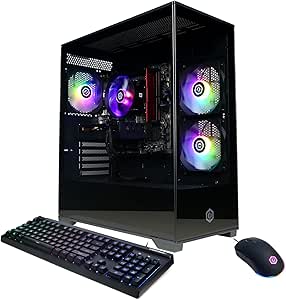 | Best Newer-Generation Starter | Processor: Intel Core i5-13400F, 10 cores, 2.5GHz | Graphics: NVIDIA GeForce RTX 5060, 8GB | Memory: 16GB DDR5, 6000MHz | VIEW ON AMAZON | See Our Full Breakdown |
| MSI Codex R2 Gaming Desktop PC |  | Best Overall VR Upgrade Path | Processor: Intel Core i5-14400F | Graphics: NVIDIA GeForce RTX 5070, 12GB | Memory: 32GB DDR5 | VIEW ON AMAZON | See Our Full Breakdown |
| prebuilt vr gaming pc | Processor | Graphics | Memory | Storage |
|---|---|---|---|---|
| MSI Aegis R2 AI Gaming Desktop | Intel Core Ultra 9 285 | NVIDIA GeForce RTX 5070 Ti, 16GB GDDR6 | 32GB DDR5 | 2TB M.2 NVMe SSD |
| Prebuilt Gaming PC with RTX 30 | AMD Ryzen 5 5500, 6 cores, 12 threads, up to 4.2GHz | NVIDIA GeForce RTX 3060 Ti | 16GB RAM | 512GB SSD |
| Horizon Autherium Dragon RGB G | Unlocked Core i9, up to 5.4GHz; exact model and generation unspecified | NVIDIA GeForce RTX 5070 OC, 12GB | 64GB RAM | 5TB total: 1TB M.2 NVMe SSD and 4TB 7200RPM HDD |
| Prebuilt Gaming Desktop PC wit | 12-core Xeon; model and generation unspecified | NVIDIA GeForce GTX 1080 Ti, 11GB | 64GB | 1TB NVMe SSD |
| Evounic Gaming Desktop PC with | 12-core Xeon; model and generation unspecified | AMD Radeon RX 580, 8GB GDDR5 | 64GB DDR | 512GB NVMe SSD and 1TB HDD |
| STORMCRAFT Falcon AI Gaming PC | AMD Ryzen 7 7800X3D, 8 cores and 16 threads, up to 5.0 GHz | AMD Radeon RX 9070 XT, 16GB | 32GB DDR5, 6000MHz | 1TB NVMe SSD |
| Gaming Desktop PC with Intel C | Intel Core i7-11700F | NVIDIA GeForce RTX 4060, 8GB | 16GB DDR4 | 1TB NVMe SSD |
| ZOTAC MEK Gaming Desktop PC wi | AMD Ryzen 7 9800X3D, 8 cores and 16 threads, up to 5.2GHz | ZOTAC GeForce RTX 5080, 16GB GDDR7 | 32GB DDR5-6000MHz | 2TB NVMe M.2 SSD |
| STORMCRAFT Sirius Gaming PC | Intel Core i5-14400F, 10 cores and 16 threads, up to 4.7GHz | NVIDIA GeForce RTX 5060, 8GB GDDR7 | 32GB DDR5-6000MHz, maximum 256GB | 1TB NVMe SSD |
| VIPRTECH Ghost 3.0 Gaming PC | AMD Ryzen 7 3700X, 8 cores and 16 threads, up to 4.4GHz | NVIDIA GeForce RTX 4060, 8GB GDDR6 | 16GB DDR4 | 1TB SSD |
| CyberPowerPC Gamer Xtreme VR G | Intel Core i5-13400F, 10 cores, 2.5GHz | NVIDIA GeForce RTX 4060, 8GB GDDR6 | 16GB DDR5 | 1TB PCIe Gen4 NVMe SSD |
| MSI Codex Z2 Gaming Desktop | AMD Ryzen 7 8700F, 8 cores and 16 threads, up to 5.0GHz | NVIDIA GeForce RTX 5070, Blackwell architecture | 32GB DDR5 | 2TB SSD |
| Prebuilt Gaming PC with RTX 30 | AMD Ryzen 7 5700X, 8 cores, 3.4GHz | NVIDIA GeForce RTX 3060 Ti, 8GB | 32GB DDR4 | 1TB PCIe NVMe SSD |
| CyberPowerPC Gamer Xtreme VR G | Intel Core i5-13400F, 10 cores, 2.5GHz | NVIDIA GeForce RTX 5060, 8GB | 16GB DDR5, 6000MHz | 1TB PCIe 4.0 NVMe SSD |
| MSI Codex R2 Gaming Desktop PC | Intel Core i5-14400F | NVIDIA GeForce RTX 5070, 12GB | 32GB DDR5 | 1TB NVMe SSD |
More Details on Our Top Picks
MSI Aegis R2 AI Gaming Desktop (Intel Core Ultra 9 285, RTX 5070 Ti, 32GB DDR5, 2TB SSD)
I rank the MSI Aegis R2 first for buyers who want a modern, high-performance base for VR and demanding PC games. Its RTX 5070 Ti with 16GB of memory gives it a stronger graphics position than the RTX 3060 Ti in the Prebuilt Gaming PC with Ryzen 5 5500, while the Core Ultra 9 and 32GB RAM suit gaming alongside creative or background workloads. The 2TB NVMe SSD also leaves more room for a sizable game library than several lower-capacity picks here. The tradeoff is a large, heavy tower with air cooling, which may be louder under sustained loads than the Horizon Autherium’s liquid setup. I’d choose this for performance headroom, not portability or quiet operation.
Pros:- RTX 5070 Ti with 16GB graphics memory is the strongest specified GPU in this five-PC group.
- 32GB DDR5 RAM supports gaming with other applications running.
- 2TB NVMe SSD offers more game-library space than the 512GB and 1TB options.
- USB-C, DisplayPort, HDMI, Bluetooth, and Ethernet provide useful connection choices.
Cons:- Air cooling may be louder under sustained heavy workloads than the Horizon Autherium’s 360mm liquid cooling.
- The 26.9-pound chassis is cumbersome to move and takes up substantial space.
- Windows 11 Home lacks some business features available with Windows 11 Pro.
Best for: VR players who want a powerful current-generation GPU, substantial SSD space, and memory for gaming alongside demanding desktop tasks.
Not ideal for: Buyers with limited desk or floor space, or those prioritizing a liquid-cooled or easily portable system.
- Processor:Intel Core Ultra 9 285
- Graphics:NVIDIA GeForce RTX 5070 Ti, 16GB GDDR6
- Memory:32GB DDR5
- Storage:2TB M.2 NVMe SSD
- Operating system:Windows 11 Home
- Cooling:Air cooling with RGB CPU cooler and four system fans
- Connectivity:USB Type-C, USB 3.2 Gen 2, Bluetooth, Ethernet, HDMI, DisplayPort
- Dimensions:19.4 x 9.1 x 19 inches
- Weight:26.9 pounds
Our verdict“Choose the MSI Aegis R2 if you want the strongest specified graphics performance here and can accommodate a large air-cooled tower.”
Prebuilt Gaming PC with RTX 3060 Ti, AMD Ryzen 5 5500, 16GB RAM, 512GB SSD
This PC is the more approachable option for a buyer who wants a discrete gaming GPU without the higher-end parts found in the MSI Aegis R2. Its RTX 3060 Ti and Ryzen 5 5500 make a more modest pairing for VR and general gaming, while 16GB RAM and a 512GB SSD call for a smaller installed library and fewer heavy tasks running at once. The six RGB fans and tempered-glass panels give it a showier case than the understated specs suggest, but they don’t change its performance ceiling. Compared with the MSI, it gives up graphics headroom, memory, and storage; its advantage is a simpler starting point for casual play. I’d verify headset and game requirements before buying, especially for demanding VR titles.
Pros:- RTX 3060 Ti provides a discrete graphics foundation for gaming and entry-level VR use.
- Windows 11 is pre-installed for an out-of-box setup.
- Six RGB fans and dust filters are listed for airflow and case customization.
- HDMI, DisplayPort, and Ethernet are included.
Cons:- The 512GB SSD can fill quickly with large games and VR applications.
- Ryzen 5 5500 is a modest CPU that may limit performance in CPU-heavy games.
- The listing notes that the display cable must connect to the lower GPU ports for proper output.
Best for: New PC gamers seeking a ready-to-use system for casual VR and 1080p gaming, with room to manage a smaller game library.
Not ideal for: VR enthusiasts targeting demanding titles, users who keep many large games installed, or buyers who want strong CPU headroom.
- Processor:AMD Ryzen 5 5500, 6 cores, 12 threads, up to 4.2GHz
- Graphics:NVIDIA GeForce RTX 3060 Ti
- Memory:16GB RAM
- Storage:512GB SSD
- Operating system:Windows 11
- Case features:Dual tempered-glass panels, six RGB fans, RGB CPU cooler
- Connectivity:USB 3.0/2.0, HDMI, DisplayPort, Ethernet
Our verdict“Pick this as a starting point for casual gaming and lighter VR if its smaller SSD and lower performance ceiling fit your plans.”
Horizon Autherium Dragon RGB Gaming Desktop PC, Core i9, RTX 5070 OC, 64GB RAM, 5TB Storage, Windows 11 Pro
I’d shortlist the Horizon Autherium Dragon for buyers who want generous memory and storage alongside a capable VR graphics card. Its overclocked RTX 5070 sits below the MSI Aegis R2’s RTX 5070 Ti on the supplied GPU specifications, but 64GB RAM and 5TB split between SSD and hard drive make this a better fit for large media libraries and memory-heavy workflows. The 360mm liquid cooler, Wi-Fi, and Windows 11 Pro add to its broad workload appeal. The main compromise is transparency: the listing calls the processor an unlocked Core i9 but omits its exact model and generation, making direct CPU comparisons difficult. Its 11 fans also mean more components to keep clean. I’d favor it over the MSI when capacity matters more than the fastest listed GPU.
Pros:- 64GB RAM supports demanding multitasking and creative workloads.
- 5TB combined storage pairs a fast 1TB NVMe SSD with a large 4TB hard drive.
- 360mm liquid cooling is specified for the processor.
- Windows 11 Pro, Wi-Fi, Bluetooth, and a listed parts-and-labor warranty add practical extras.
Cons:- The exact Core i9 model and generation are not identified.
- The RTX 5070 OC has 12GB of graphics memory, less than the MSI Aegis R2’s specified 16GB.
- Eleven fans may call for more cleaning and upkeep.
Best for: VR gamers who also run memory-intensive creative workloads or want ample room for games and stored media.
Not ideal for: Buyers who want clearly specified CPU generation and model, or who prioritize the strongest listed GPU over storage and memory capacity.
- Processor:Unlocked Core i9, up to 5.4GHz; exact model and generation unspecified
- Graphics:NVIDIA GeForce RTX 5070 OC, 12GB
- Memory:64GB RAM
- Storage:5TB total: 1TB M.2 NVMe SSD and 4TB 7200RPM HDD
- Operating system:Windows 11 Pro
- Cooling:360mm liquid cooling
- Networking:Wi-Fi up to 2.4GB/s, Ethernet up to 2.5GB/s, Bluetooth
- Ports:1 USB-C 3.2, 8 USB 3, 1 HDMI, 3 DisplayPort
- Power supply:850W 80+ Gold
Our verdict“Choose the Horizon Autherium if you value 64GB RAM, large mixed storage, and liquid cooling more than having the highest specified GPU tier.”
Prebuilt Gaming Desktop PC with 12-Core Xeon Processor, GTX 1080 Ti 11GB, 64GB RAM, 1TB NVMe SSD
The GTX 1080 Ti gives this desktop a different appeal from newer GPU-based picks: it may suit buyers assembling a legacy VR setup, but it lacks the newer RTX feature set found in the MSI Aegis R2 and Horizon Autherium. Its 11GB graphics memory and 64GB RAM are substantial on paper, while the 1TB NVMe SSD and liquid cooling round out a capable-looking system. Still, the 12-core Xeon is described without a model or generation, so its gaming behavior and upgrade path are hard to judge from the listing. The older GPU also narrows its appeal for demanding modern VR games. I’d put it ahead of the RX 580 Evounic for graphics capability, but only for buyers whose headset and games suit older hardware.
Pros:- GTX 1080 Ti has more graphics capability than the Radeon RX 580 in the Evounic desktop.
- 64GB RAM offers capacity for multitasking.
- 1TB NVMe SSD provides fast local storage.
- Wi-Fi 6 and Bluetooth 5.4 are listed.
Cons:- The GTX 1080 Ti is an older GPU and lacks the newer RTX feature set in current-generation alternatives.
- The Xeon processor’s model and generation are not specified.
- The listing does not provide specific port counts or display outputs for headset planning.
Best for: Owners of older VR headsets or game libraries who want a prebuilt desktop with a GTX 1080 Ti and ample system memory.
Not ideal for: Buyers seeking current-generation graphics features, a clearly identified CPU platform, or a system for demanding modern VR titles.
- Processor:12-core Xeon; model and generation unspecified
- Graphics:NVIDIA GeForce GTX 1080 Ti, 11GB
- Memory:64GB
- Storage:1TB NVMe SSD
- Cooling:Liquid cooled
- Operating system:Windows 11
- Wireless connectivity:Wi-Fi 6, Bluetooth 5.4
- Color:Black
Our verdict“Consider this PC for a compatible legacy VR setup, but choose a newer RTX system for modern graphics features and clearer platform specifications.”
Evounic Gaming Desktop PC with 12-Core Xeon Processor and Radeon RX 580
The Evounic is the least convincing choice here for demanding VR, but it has a clear role as a basic gaming and everyday-use desktop with substantial memory. Its Radeon RX 580 with 8GB GDDR5 is an older graphics card, so I would not treat the VR-ready language as a guarantee of smooth results in current, demanding games. Compared with the GTX 1080 Ti system in this roundup, it gives up graphics capability; against the MSI Aegis R2, the gap to a newer GPU is wider. The 64GB RAM, liquid cooling, and combined SSD/HDD storage are generous for general multitasking, though they can’t make up for the GPU’s age. I’d pick it for light gaming and daily tasks, not as a forward-looking VR investment.
Pros:- 64GB DDR memory provides substantial capacity for multitasking.
- 512GB NVMe SSD plus a 1TB HDD combines faster storage with extra space.
- Wi-Fi 6 and Bluetooth 5.4 are included.
- Liquid cooling and seven ARGB fans are specified.
Cons:- Radeon RX 580 is an older GPU that limits its suitability for demanding current VR games.
- The 12-core Xeon processor’s model and generation are not specified.
- The 650W power supply and unspecified upgrade details offer limited guidance for future component changes.
Best for: Buyers focused on everyday computing and lighter PC games who value high memory capacity and both SSD and HDD storage.
Not ideal for: VR buyers targeting demanding modern games, or anyone seeking a clearly identified modern CPU and graphics platform.
- Processor:12-core Xeon; model and generation unspecified
- Graphics:AMD Radeon RX 580, 8GB GDDR5
- Memory:64GB DDR
- Storage:512GB NVMe SSD and 1TB HDD
- Cooling:Liquid cooling
- Fans:Seven ARGB fans
- Operating system:Windows 11 Pro
- Wireless connectivity:Wi-Fi 6, Bluetooth 5.4
- Power supply:650W
Our verdict“Choose the Evounic for everyday use and lighter gaming, not if modern VR performance is your main goal.”
STORMCRAFT Falcon AI Gaming PC with Ryzen 7 7800X3D and Radeon RX 9070 XT
I rank the STORMCRAFT Falcon for buyers who want a high-performance foundation for demanding VR games without stepping up to the ZOTAC MEK’s RTX 5080. Its Ryzen 7 7800X3D and listed Radeon RX 9070 XT with 16GB give it a strong mix of processing and graphics hardware, while 32GB of DDR5 helps with multitasking and creative work alongside gaming. Hand-built assembly, stress testing, and lifetime technical support add reassurance for buyers who prefer a ready-to-use system. The main tradeoff is the 1TB SSD, which may fill quickly with large games. I’d also verify the graphics configuration with the seller: the description mixes Radeon and RTX claims, leaving some uncertainty about the exact build.
Pros:- Ryzen 7 7800X3D and listed Radeon RX 9070 XT provide substantial gaming hardware.
- 32GB DDR5 memory supports gaming alongside other active applications.
- Hand-built and stress-tested, with lifetime technical support.
- Includes Wi-Fi 6E, Bluetooth 5.2, USB-C, keyboard, and mouse.
Cons:- The 1TB SSD can constrain large VR game libraries.
- The description mixes Radeon and RTX graphics claims, so the precise configuration merits confirmation.
Best for: VR players who want a powerful AMD-based desktop, 32GB of memory, and hands-on technical support.
Not ideal for: Buyers who need a large game library installed at once or want unambiguous graphics-card specifications before ordering.
- Processor:AMD Ryzen 7 7800X3D, 8 cores and 16 threads, up to 5.0 GHz
- Graphics:AMD Radeon RX 9070 XT, 16GB
- Memory:32GB DDR5, 6000MHz
- Storage:1TB NVMe SSD
- Connectivity:USB-C, Wi-Fi 6E, Bluetooth 5.2
- Case:Tempered glass with RGB lighting
- Included accessories:Keyboard and mouse
- Warranty and assembly:1-year parts, 3-year labor, 1-year shipping; lifetime technical support; hand-built and stress-tested
Our verdict“Choose the Falcon for a powerful AMD gaming base and substantial memory, provided you confirm the graphics listing and can work with 1TB of storage.”
Gaming Desktop PC with Intel Core i7-11700F, GeForce RTX 4060, 16GB DDR4 RAM, and 1TB NVMe SSD
This desktop is a practical starting point for someone moving into PC VR who wants an NVIDIA RTX 4060 system rather than a premium-class build. Its RTX 4060 brings DLSS 3 and ray tracing support, while the 1TB NVMe SSD gives games and Windows room to load quickly. Compared with the STORMCRAFT Sirius, it pairs the GPU with an older Core i7-11700F and 16GB of DDR4, so I’d treat it as a more modest entry choice rather than a long-term high-end platform. Seven ARGB fans provide airflow and lighting, but the listing does not establish how quiet the system runs. The memory capacity may also call for an upgrade for demanding games or heavy multitasking, and the Windows 11 naming is inconsistent.
Pros:- GeForce RTX 4060 supports DLSS 3 and ray tracing.
- 1TB NVMe SSD offers quick storage for games and applications.
- Seven ARGB fans provide airflow and customizable lighting.
- Includes Wi-Fi 6 and Bluetooth 5.4.
Cons:- 16GB DDR4 is less memory than the 32GB in the STORMCRAFT Sirius and Falcon.
- The Core i7-11700F is an older processor generation.
- The listing varies between Windows 11 and Windows 11 Home.
Best for: First-time PC VR buyers seeking an RTX 4060 desktop for gaming and everyday use, with room to add memory later.
Not ideal for: VR players planning intensive multitasking or long-term high-demand use who want 32GB of memory out of the box.
- Processor:Intel Core i7-11700F
- Graphics:NVIDIA GeForce RTX 4060, 8GB
- Memory:16GB DDR4
- Storage:1TB NVMe SSD
- Operating system:Windows 11 Home (listing also says Windows 11)
- Cooling:Air cooling with 7 ARGB fans
- Connectivity:Wi-Fi 6 and Bluetooth 5.4
- Video outputs:HDMI and DisplayPort
Our verdict“Pick this as an entry-level RTX 4060 option if you accept 16GB of older-generation memory and plan modest VR use.”
ZOTAC MEK Gaming Desktop PC with Ryzen 7 9800X3D and GeForce RTX 5080
The ZOTAC MEK is the premium performance pick here, pairing a Ryzen 7 9800X3D with an RTX 5080 16GB for buyers targeting demanding VR games, high visual settings, or content creation. Its 32GB DDR5 and 2TB NVMe SSD give it more ready-to-use capacity than the STORMCRAFT Falcon, whose drive is half the size. A 360mm liquid cooler and 850W Gold power supply suit this higher-powered component mix, while HDMI 2.1b and DisplayPort 2.1b provide modern display connections. That hardware makes this a more ambitious system than the RTX 4060 desktops in this roundup, but it may be excessive for casual VR use. Warranty service return shipping is limited to U.S. addresses, which matters for buyers outside the country.
Pros:- Ryzen 7 9800X3D and RTX 5080 16GB target demanding gaming workloads.
- 32GB DDR5 and a 2TB NVMe SSD provide substantial ready-to-use capacity.
- 360mm AIO liquid cooling and an 850W Gold power supply suit the hardware.
- Includes Windows 11 Pro, Wi-Fi 6E, Bluetooth 5.3, and 5-Gigabit Ethernet.
Cons:- Its high-end configuration may be more than casual VR gaming requires.
- Warranty service return shipping is available only to U.S. addresses.
Best for: VR enthusiasts and creators seeking high-end graphics, a large included SSD, and a strong processor in one prebuilt system.
Not ideal for: Casual VR players who do not need high-end graphics hardware, or buyers outside the U.S. who need return shipping for warranty service.
- Processor:AMD Ryzen 7 9800X3D, 8 cores and 16 threads, up to 5.2GHz
- Graphics:ZOTAC GeForce RTX 5080, 16GB GDDR7
- Memory:32GB DDR5-6000MHz
- Storage:2TB NVMe M.2 SSD
- Operating system:Windows 11 Pro
- Power supply:850W 80+ Gold
- Cooling:360mm AIO liquid cooler with three 120mm fans
- Connectivity:Wi-Fi 6E, Bluetooth 5.3, 5-Gigabit LAN
- Video outputs:HDMI 2.1b and 3x DisplayPort 2.1b
Our verdict“Choose the ZOTAC MEK if you want this lineup’s most powerful listed graphics configuration and 2TB of storage, and the regional warranty limit works for you.”
STORMCRAFT Sirius Gaming PC (i5-14400F, RTX 5060, 32GB DDR5, 1TB SSD)
The STORMCRAFT Sirius makes the clearest case for a balanced midrange VR desktop: it combines an RTX 5060 with 32GB of DDR5-6000, so the system has more memory headroom than the 16GB RTX 4060 desktop in this roundup. The 10-core Core i5-14400F is a newer platform than that PC’s Core i7-11700F, while a 650W Gold power supply and Wi-Fi 6 round out a sensible everyday setup. It does not match the raw graphics ambition or 2TB storage of the ZOTAC MEK, and the 1TB SSD still asks players with extensive libraries to manage space. Its dimensions also make it a sizable tower, so I would not choose it for a cramped desk area.
Pros:- RTX 5060 graphics paired with a 10-core Core i5-14400F.
- 32GB DDR5-6000 memory provides more capacity than the 16GB RTX 4060 desktop.
- 650W 80+ Gold power supply and Wi-Fi 6 are included.
- Lifetime technical support and a 3-year labor warranty.
Cons:- The 1TB SSD offers less capacity than the ZOTAC MEK’s 2TB drive.
- The 26-pound tower takes up appreciable desk or floor space.
- The parts warranty lasts one year.
Best for: VR players who want a modern midrange graphics card, 32GB of DDR5 memory, and a prebuilt desktop for gaming and daily tasks.
Not ideal for: Buyers seeking premium graphics performance, a larger included game drive, or a compact desktop footprint.
- Processor:Intel Core i5-14400F, 10 cores and 16 threads, up to 4.7GHz
- Graphics:NVIDIA GeForce RTX 5060, 8GB GDDR7
- Memory:32GB DDR5-6000MHz, maximum 256GB
- Storage:1TB NVMe SSD
- Motherboard:Intel B760
- Power supply:650W 80+ Gold Certified
- Connectivity:Wi-Fi 6, Bluetooth, USB 2.0 and USB 3.0
- Dimensions and weight:16.6 x 10.2 x 14.4 inches; 26 lbs
Our verdict“Choose the Sirius for a balanced RTX 5060 build with 32GB of memory, but look elsewhere if you need premium-tier graphics or more than 1TB of storage.”
VIPRTECH Ghost 3.0 Gaming PC, Ryzen 7 3700X, RTX 4060 8GB, 16GB RAM, 1TB SSD, White
The VIPRTECH Ghost 3.0 suits buyers who want a white gaming tower that can handle VR alongside streaming or video editing. Its RTX 4060 with 8GB is a more current graphics pairing than the older CPU might suggest, but the Ryzen 7 3700X and 16GB of DDR4 make this a less balanced choice than the STORMCRAFT Sirius, which combines a newer Core i5 with 32GB of DDR5. The Ghost adds Windows 11 Pro, a 1TB SSD, Wi-Fi, Bluetooth, and a 120mm liquid cooler, giving it a useful set of included features. I’d favor it for buyers who value the white case and bundled setup over newer processor and memory specifications. The listing does not identify the Wi-Fi standard, and 16GB can constrain heavier workloads.
Pros:- RTX 4060 graphics with 8GB of video memory.
- Includes a 1TB SSD and Windows 11 Pro.
- White case, RGB lighting, and a 120mm liquid cooler offer a distinctive setup.
- Wi-Fi, Bluetooth, and nine USB ports are included.
Cons:- 16GB DDR4 trails the 32GB DDR5 in the STORMCRAFT Sirius.
- The Ryzen 7 3700X is an older processor generation.
- The Wi-Fi standard is not specified, and the warranty is one year.
Best for: Buyers who want a white prebuilt RTX 4060 desktop for VR, streaming, and editing, and are comfortable with 16GB of memory.
Not ideal for: Players who prioritize newer platform components, 32GB of memory out of the box, or clearly specified wireless standards.
- Processor:AMD Ryzen 7 3700X, 8 cores and 16 threads, up to 4.4GHz
- Graphics:NVIDIA GeForce RTX 4060, 8GB GDDR6
- Memory:16GB DDR4
- Storage:1TB SSD
- Operating system:Windows 11 Pro
- Cooling:120mm RGB liquid cooler
- Power supply:600W Gold-rated
- Connectivity and ports:Wi-Fi, Bluetooth, 9 USB ports, 1 HDMI port
- Dimensions and weight:15 x 8 x 19 inches; 20 pounds
Our verdict“Pick the Ghost 3.0 if its white design and RTX 4060 fit your setup, but favor the Sirius for newer core hardware and more memory.”
CyberPowerPC Gamer Xtreme VR Gaming PC (GXiVR8060A24)
I’d put this CyberPowerPC on the shortlist for buyers who want a capable VR starting point without stepping up to an RTX 5070 system. The RTX 4060 8GB and Core i5-13400F suit many 1080p gaming workloads, while the 1TB Gen4 SSD gives room for several games and quick loading. Compared with the newer CyberPowerPC Gamer Xtreme with RTX 5060, this model has older wireless connectivity and a previous-generation graphics card, so it’s the less forward-looking pick. Its 16GB DDR5 memory is a reasonable starting configuration, though demanding games and multitasking may call for an upgrade. Wi-Fi 5, the 30.6-pound case, and a one-year parts-and-labor warranty are practical compromises for a VR desktop.
Pros:- RTX 4060 and Core i5-13400F provide a balanced gaming-focused pairing
- 1TB PCIe Gen4 NVMe SSD offers fast loading and useful game capacity
- DDR5 memory and multiple HDMI and DisplayPort outputs
- Keyboard and mouse are included
Cons:- Wi-Fi 5 and Bluetooth 4.2 are older wireless standards than those in the RTX 5060 CyberPowerPC
- 16GB memory may need an upgrade for demanding games and multitasking
- Heavy 30.6-pound chassis and one-year parts-and-labor warranty
Best for: VR newcomers who want a balanced Intel-and-NVIDIA desktop for 1080p gaming and plan to add memory only if their games require it
Not ideal for: Buyers who want newer wireless standards, a longer listed hardware warranty, or more headroom for demanding VR titles without upgrades
- Processor:Intel Core i5-13400F, 10 cores, 2.5GHz
- Graphics:NVIDIA GeForce RTX 4060, 8GB GDDR6
- Memory:16GB DDR5
- Storage:1TB PCIe Gen4 NVMe SSD
- Operating system:Windows 11 Home 64-bit
- Connectivity:Wi-Fi 5, Bluetooth 4.2
- Video outputs:1 HDMI, 2 DisplayPort
- Dimensions and weight:18.11 x 9.25 x 19.61 inches; 30.6 pounds
Our verdict“Choose this model for a well-rounded midrange VR desktop if you can live with Wi-Fi 5 and a 16GB starting memory configuration.”
MSI Codex Z2 Gaming Desktop
The Codex Z2’s strongest case for VR is its 32GB DDR5 memory paired with an RTX 5070: it gives game sessions and background tasks more breathing room than the 16GB CyberPowerPC Gamer Xtreme models. Its 2TB SSD also holds more installed games than the 1TB drive in the MSI Codex R2, a useful advantage for buyers who switch among a large library. The Ryzen 7 8700F brings eight cores and 16 threads for gaming alongside other tasks. Four system fans and an ARGB air cooler provide active airflow, though this is still an air-cooled build rather than a liquid-cooled alternative. The listed details don’t specify its wireless standard, motherboard, power supply, or warranty, so I’d want those answers before planning future upgrades.
Pros:- RTX 5070 paired with an eight-core, 16-thread Ryzen 7 processor
- 32GB DDR5 memory is roomier than the 16GB configurations in the CyberPowerPC picks
- 2TB SSD offers more capacity than the MSI Codex R2’s 1TB drive
- Four system fans and an ARGB air cooler
Cons:- Air cooling may be louder under sustained heavy loads than a well-designed liquid-cooled setup
- The supplied product details do not identify the motherboard, power supply, wireless standard, or warranty
Best for: VR players who keep a large installed game library and run voice chat, streaming, or other applications alongside games
Not ideal for: Buyers who need confirmed Wi-Fi details, a specified power supply and motherboard, or a listed warranty before purchase
- Processor:AMD Ryzen 7 8700F, 8 cores and 16 threads, up to 5.0GHz
- Graphics:NVIDIA GeForce RTX 5070, Blackwell architecture
- Memory:32GB DDR5
- Storage:2TB SSD
- Operating system:Windows 11 Home
- Cooling:ARGB air cooler and four system fans
- Lighting:Customizable RGB lighting
Our verdict“Pick the Codex Z2 if 32GB of memory and 2TB of storage matter more to your VR setup than fully specified connectivity and upgrade details.”
Prebuilt Gaming PC with RTX 3060 Ti and AMD Ryzen 7 5700X
This build combines an RTX 3060 Ti with a Ryzen 7 5700X, making it a sensible option for buyers who prioritize a substantial graphics card and 32GB of memory over the latest platform features. For VR, that memory capacity offers more room for demanding games and background apps than the 16GB CyberPowerPC Gamer Xtreme with RTX 4060. The Wi-Fi 6 connection is also newer than that CyberPowerPC’s Wi-Fi 5. The tradeoff is the older B350 motherboard and DDR4 memory: compared with the MSI Codex R2, this system gives you less clarity and headroom for future platform upgrades. Its 600W Bronze power supply is adequate for the listed configuration, but leaves less room for a substantial graphics-card upgrade. I’d choose it for its current setup, not as a long-term platform project.
Pros:- RTX 3060 Ti and Ryzen 7 5700X suit 1080p and 1440p gaming
- 32GB DDR4 memory gives more room for multitasking than 16GB configurations
- Wi-Fi 6 and Bluetooth connectivity
- Compact dual-chamber case with tempered glass and adjustable RGB lighting
Cons:- Older B350 chipset can limit future platform upgrade options
- 600W 80 PLUS Bronze power supply leaves limited headroom for a larger future GPU
Best for: VR buyers seeking 32GB memory, Wi-Fi 6, and an RTX 3060 Ti system for current 1080p or 1440p gaming
Not ideal for: Upgraders who want a newer motherboard platform, DDR5 memory, or generous power-supply headroom for a future graphics card
- Processor:AMD Ryzen 7 5700X, 8 cores, 3.4GHz
- Graphics:NVIDIA GeForce RTX 3060 Ti, 8GB
- Memory:32GB DDR4
- Storage:1TB PCIe NVMe SSD
- Motherboard:AMD B350 chipset, B350M-PLUS
- Power supply:600W 80 PLUS Bronze ATX
- Connectivity:Intel Wi-Fi 6 AX200, Bluetooth, HDMI, DisplayPort, USB 3.0 and USB 2.0
- Dimensions and weight:8.1 x 18.8 x 15.2 inches; 20 pounds
Our verdict“Choose this build for its 32GB memory and RTX 3060 Ti today, but skip it if your plan centers on broad future upgrades.”
CyberPowerPC Gamer Xtreme VR Gaming Desktop with RTX 5060
This Gamer Xtreme is the more up-to-date starter pick in CyberPowerPC’s pair: it keeps the Core i5-13400F and 1TB SSD of the RTX 4060 version but moves to an RTX 5060 8GB. The upgrade in graphics generation makes it the more forward-looking choice of those two, while Wi-Fi 6 and Bluetooth 5.3 replace the older model’s Wi-Fi 5 and Bluetooth 4.2. A USB-C port, keyboard, and mouse add everyday convenience. For VR, the main catch is the 16GB DDR5 memory; it may be enough to start, but leaves less room for demanding games and multitasking than the MSI Codex R2’s 32GB. The 8GB graphics memory is another limit for high-resolution textures. This is a straightforward entry point, not the strongest long-session upgrade base in the lineup.
Pros:- RTX 5060 graphics with 8GB of memory
- Wi-Fi 6 and Bluetooth 5.3
- 1TB PCIe 4.0 NVMe SSD
- USB-C, keyboard, and mouse included
Cons:- 16GB DDR5 memory may constrain demanding games and multitasking compared with the MSI Codex R2
- 8GB graphics memory can limit high-resolution texture settings
Best for: First-time VR desktop buyers who want a newer-generation GPU, current wireless standards, and included keyboard and mouse
Not ideal for: VR players who want 32GB memory out of the box or plan to run high-resolution textures in demanding games
- Processor:Intel Core i5-13400F, 10 cores, 2.5GHz
- Graphics:NVIDIA GeForce RTX 5060, 8GB
- Memory:16GB DDR5, 6000MHz
- Maximum memory:192GB
- Storage:1TB PCIe 4.0 NVMe SSD
- Chipset:Intel B760
- Wireless:Wi-Fi 6, Bluetooth 5.3
- Video outputs:1 HDMI, 2 DisplayPort
- Warranty and support:One-year parts and labor warranty; lifetime technical support
Our verdict“Choose this CyberPowerPC as a newer-generation VR starter if its 16GB memory and 8GB graphics memory fit your game settings.”
MSI Codex R2 Gaming Desktop PC
I’d rank the Codex R2 first for buyers who want a strong VR graphics card without giving up a practical upgrade path. Its RTX 5070 12GB and 32GB DDR5 set it apart from both CyberPowerPC Gamer Xtreme models, which have 8GB graphics cards and 16GB memory. The Core i5-14400F is a capable gaming-focused match, though buyers pushing demanding 4K workloads may prefer a higher-tier processor. MSI lists standard components, a 750W Gold power supply, and Wi-Fi 6E, which give this machine a more upgrade-friendly foundation than the RTX 3060 Ti build with its 600W Bronze supply and older B350 board. The four-fan air cooler avoids liquid-cooling maintenance, but may be more audible under sustained heavy loads. Its 1TB SSD is smaller than the Codex Z2’s 2TB drive.
Pros:- RTX 5070 with 12GB graphics memory
- 32GB DDR5 and standard components support future upgrades
- 750W 80+ Gold power supply provides more headroom than the 600W Bronze unit in the RTX 3060 Ti build
- Wi-Fi 6E and four-fan air cooling
Cons:- 1TB SSD has less capacity than the MSI Codex Z2’s 2TB drive
- Air cooling may be more audible under sustained heavy loads
- Core i5-14400F is a less suitable match for demanding 4K workloads than a higher-tier CPU
Best for: VR gamers who want an RTX 5070, 32GB DDR5, Wi-Fi 6E, and standard components for future memory, storage, or GPU upgrades
Not ideal for: Buyers who need 2TB of storage immediately or prioritize a higher-tier processor and liquid cooling for demanding 4K workloads
- Processor:Intel Core i5-14400F
- Graphics:NVIDIA GeForce RTX 5070, 12GB
- Memory:32GB DDR5
- Storage:1TB NVMe SSD
- Operating system:Windows 11 Home
- Cooling:Four-fan air cooling
- Connectivity:Wi-Fi 6E, Ethernet, USB 3.2 Gen 1, USB 2.0, HDMI, DisplayPort
- Power supply:750W 80+ Gold
- Dimensions and weight:16 x 8.38 x 19 inches; 21.3 pounds
Our verdict“Pick the Codex R2 for a VR-ready RTX 5070 system with useful memory, power, and component headroom, unless you need 2TB storage from day one.”
How We Picked
I ranked these PCs around the demands of VR gaming, giving the most weight to the graphics card, then checking whether the processor, memory, and storage make a sensible pairing. A stronger GPU can offer more headroom for detailed headset visuals, while sufficient memory and fast storage help keep a gaming setup responsive and practical. I also looked at how clearly each configuration is described, since missing details about RAM, storage, or the exact processor make a prebuilt harder to compare and maintain.
Balanced, clearly specified systems rank ahead of builds with one standout component or older graphics hardware. That puts the MSI Aegis R2 AI ahead of the RTX 4060 options as an all-around choice, while the ZOTAC MEK leads for buyers who put raw graphics performance first. I treat the RTX 3060 Ti systems as more accessible options with useful differences in CPU, memory, and storage, and place the Xeon/GTX 1080 Ti and RX 580 configurations lower for demanding modern VR. I don’t infer performance or upgrade potential from product names when full specifications aren’t provided.
| prebuilt vr gaming pc | Operating system |
|---|---|
| MSI Aegis R2 AI Gaming Desktop | Windows 11 Home |
| Prebuilt Gaming PC with RTX 30 | Windows 11 |
| Horizon Autherium Dragon RGB G | Windows 11 Pro |
| Prebuilt Gaming Desktop PC wit | Windows 11 |
| Evounic Gaming Desktop PC with | Windows 11 Pro |
| STORMCRAFT Falcon AI Gaming PC | — |
| Gaming Desktop PC with Intel C | Windows 11 Home (listing also says Windows 11) |
| ZOTAC MEK Gaming Desktop PC wi | Windows 11 Pro |
| STORMCRAFT Sirius Gaming PC | — |
| VIPRTECH Ghost 3.0 Gaming PC | Windows 11 Pro |
| CyberPowerPC Gamer Xtreme VR G | Windows 11 Home 64-bit |
| MSI Codex Z2 Gaming Desktop | Windows 11 Home |
| Prebuilt Gaming PC with RTX 30 | — |
| CyberPowerPC Gamer Xtreme VR G | — |
| MSI Codex R2 Gaming Desktop PC | Windows 11 Home |
Factors to Consider When Choosing Prebuilt Vr Gaming Pc
I’d choose a VR PC by matching the whole system to the headset and games, rather than picking by processor name or RGB styling. These factors help separate a capable starting setup from a configuration that may need an early upgrade.
Start With the Headset’s Graphics Demands
The graphics card usually sets the ceiling for VR image quality and frame rates. Check the headset maker’s recommended PC specifications and the requirements of the games you actually plan to play. A demanding headset or visually complex game can benefit from more GPU headroom than a basic VR title. The RTX 5070 Ti in the MSI Aegis R2 and RTX 5080 in the ZOTAC MEK target more headroom than the RTX 4060 systems in this roundup. An older card can still suit lighter or older games, but I wouldn’t choose a GTX 1080 Ti or RX 580 build without checking the exact headset and game requirements. Match the card to your use instead of assuming every PC marketed for gaming will suit every headset.
Balance the Processor With the Graphics Card
A fast processor helps keep demanding games running smoothly, but it can’t make a weaker GPU stronger. For VR, I’d compare the CPU and graphics card as a pair, especially when a listing advertises an impressive processor but an older GPU. The Ryzen 7 9800X3D and RTX 5080 combination in the ZOTAC MEK is built for buyers who want both components at the high end. By contrast, a capable midrange processor with an RTX 4060 can make more sense for a beginner than paying for a premium CPU attached to entry-level graphics. Check the exact CPU model, not just labels such as “Core i9,” since names alone don’t tell you how the full system is balanced. This approach can prevent spending on a part that won’t address your actual VR performance limit.
Choose Memory and Storage for Your Library
Memory capacity affects how much room you have for games and background tasks. The 32GB configurations in the MSI Aegis R2, MSI Codex Z2, and STORMCRAFT Sirius offer more breathing room than the 16GB builds in several RTX 4060 PCs. Sixteen gigabytes may be an acceptable starting point for a simpler setup, but check whether the memory can be expanded and whether an empty slot is available. Storage matters too: a 1TB drive offers a more useful starting library than a 512GB drive, while a 2TB SSD reduces how often you need to remove games. Don’t treat a large storage figure as proof of a faster gaming PC; GPU choice matters more to VR rendering. Check whether the listed capacity is SSD storage and whether the system has space for another drive.
Check Headset Connections Before Ordering
Ports and connection methods have to match your specific headset. Some headsets connect to a PC by cable, while others support wireless PC play with particular network or software requirements. Confirm the headset’s requested video output, USB connection, and any adapter needs against the desktop’s rear and front ports. Don’t assume a gaming PC’s front USB-C port supports every headset feature; the port’s capabilities can vary. If you plan to use wireless streaming, check your network setup as well as the PC, since the headset and computer both need a suitable connection. This simple compatibility check can prevent buying a powerful desktop that still needs extra adapters or network upgrades.
Look Beyond the Component List to Upgrades and Cooling
A prebuilt is easier to live with when its case, power supply, and cooling leave room for future changes. Listings don’t always state the motherboard model, power supply capacity, or open drive and memory slots, so I’d check those details before treating a PC as upgrade-ready. A larger graphics card may need more case clearance and power capacity than the installed card. Cooling also matters during long sessions; check the case layout, number of fans, and whether the CPU uses air or liquid cooling. When the manufacturer gives little information, contact the seller or choose a better-documented configuration rather than assuming parts are standard. This matters most if you plan to replace the GPU or add storage later.
Frequently Asked Questions
Is an RTX 4060 prebuilt enough for PC VR?
It can be a reasonable starting point for some headsets and games, but I’d check the requirements for your specific headset and the titles you plan to play. The CyberPowerPC Gamer Xtreme VR with an i5-13400F and RTX 4060 is a clearly specified option in this group. More demanding games, higher visual settings, or a headset with greater rendering demands may benefit from a stronger GPU such as the RTX 5070 Ti in the MSI Aegis R2. The card’s 8GB of VRAM is another reason to check game-specific recommendations rather than relying on the PC’s “VR” label. If you expect to play demanding releases, a higher-tier GPU gives you more room.
Should I choose the RTX 5070 Ti MSI Aegis R2 or the RTX 5080 ZOTAC MEK?
I’d pick the MSI Aegis R2 for a more fully specified all-around configuration, with 32GB of DDR5 and a 2TB SSD listed alongside its RTX 5070 Ti. The ZOTAC MEK’s RTX 5080 and Ryzen 7 9800X3D make it the performance-first option in this roundup. Its listing does not give the same memory and storage detail, so I’d confirm those parts before choosing it. If your main goal is graphics headroom and you’re comfortable checking the missing configuration details, the ZOTAC may fit better. If you want a clear, balanced spec sheet, I’d favor the MSI.
Is 16GB of RAM enough for a prebuilt VR gaming PC?
Sixteen gigabytes can work as a starting configuration, but it gives you less room for VR games, background applications, and future needs than a 32GB system. I’d check whether the PC has upgradeable memory and whether the installed sticks leave open slots. The CyberPowerPC and several other RTX 4060 PCs list 16GB, while the MSI Aegis R2 and MSI Codex Z2 include 32GB. If you plan to keep many applications open or want fewer near-term upgrades, 32GB is the more comfortable choice. Memory capacity won’t compensate for a GPU that falls short of your headset’s requirements.
Should I buy an older GTX 1080 Ti or RX 580 system for VR?
I’d only choose those older-GPU systems for a specific, lighter-use plan after checking the headset and game requirements. The GTX 1080 Ti desktop lists 64GB of memory, but that large RAM figure does not make its older graphics hardware equivalent to the newer RTX 5070 or RTX 4060 options. The Evounic PC with an RX 580 sits further from the performance-focused choices in this roundup. Older parts may suit a limited game library or a buyer who already knows the headset works with the setup. For a first VR PC or demanding newer games, I’d favor a clearly specified system with a newer GPU.
What should I verify when a prebuilt listing leaves out specifications?
I’d ask for the exact parts list before buying a PC with missing details. Confirm the RAM capacity and configuration, SSD type and size, power supply model or wattage, motherboard, and available upgrade slots. For a VR setup, check the graphics outputs and USB ports against your headset’s connection requirements. This matters for listings such as the ZOTAC MEK, where the headline CPU and GPU are clear but memory and storage aren’t specified, and the MSI Codex R2, whose configuration details are limited here. If the seller can’t provide the information, I’d choose a better-documented PC rather than guessing about compatibility or future upgrades.
Conclusion
For most VR buyers, I recommend the MSI Aegis R2 AI as the best overall pick, thanks to its RTX 5070 Ti, 32GB of DDR5, and 2TB SSD. The MSI Codex Z2 is my best-balanced value choice for buyers seeking an RTX 5070 with 32GB of memory and 2TB of storage without stepping up to the Aegis configuration. For a best premium option, I’d choose the ZOTAC MEK for its RTX 5080 and Ryzen 7 9800X3D, after confirming the unlisted memory and storage details. Beginners who want a clearly specified, VR-branded system can start with the CyberPowerPC Gamer Xtreme VR with the i5-13400F and RTX 4060, provided it meets their headset’s requirements. If you specifically want an AMD graphics card, the STORMCRAFT Falcon with Ryzen 7 7800X3D and Radeon RX 9070 XT is the specialist pick; I’d match it to your headset and game list before deciding.
Fall Picks
fall essentials
As an affiliate, we earn on qualifying purchases.