Portable gaming monitors turn a laptop, console, or phone into a proper gaming setup anywhere, but the category splits sharply between high-refresh 144Hz–180Hz panels and cheaper 60Hz screens that only suit casual play. My top overall pick is the ARZOPA Z3FC, which pairs a 180Hz QHD panel with a compact 16.1-inch frame — the best balance of speed, sharpness, and travel-friendliness in this lineup. The UPERFECT 16-Inch 2K 120Hz stands out for resolution-focused buyers, while the budget-friendly TECLAST 16-inch 144Hz proves you don’t need to spend much for smooth 1080p gaming. The main tradeoffs you’ll face are refresh rate versus resolution, screen size versus portability, and built-in speakers versus an ultra-slim chassis. Keep reading for the full breakdown of all 14 models.

Get business pricing on tech for your team
- Business-only prices and quantity discounts
- Tax-exempt purchasing
- Multiple users, one account, clear invoices
Key Takeaways
- Refresh rate was the single biggest divider in this lineup: the ARZOPA Z3FC (180Hz), ARZOPA Z1FC and Acer Nitro PG161Q (144Hz–165Hz) deliver visibly smoother motion than 60Hz budget picks like the KYY and InnoView FHD models.
- Resolution and refresh rate rarely arrive together at this price — the UPERFECT and VisionOwl 2K/2.5K panels trade refresh headroom for sharper images, which suits slower-paced games more than competitive shooters.
- Screen size clustered into two camps: 15.6–16.1-inch models travel easily in a backpack, while the EVICIV and cocopar 18.5-inch screens feel more like portable desktops than travel companions.
- Cheap 1080p models without a high refresh rate (MNN, WGK, KYY, InnoView FHD) are better treated as productivity second screens than gaming monitors — their value case weakens once gaming is the priority.
- Built-in speakers, VESA mounts, and included smart covers varied wildly across similarly priced models; the VisionOwl and cocopar bundle the most, which matters if you want to avoid extra accessories on the road.
| ARZOPA Z3FC 16.1-Inch 180Hz QHD Portable Monitor |  | Best for QHD High-Refresh Gaming | Screen size: 16.1 inches | Resolution: 2560 × 1440 (QHD) | Refresh rate: 180Hz | VIEW ON AMAZON | See Our Full Breakdown |
| TECLAST 16-inch 144Hz Portable Gaming Monitor |  | Best for Lightweight Travel Gaming | Screen size: 16 inches | Resolution: 1920 × 1080 | Refresh rate: 144Hz | VIEW ON AMAZON | See Our Full Breakdown |
| EVICIV 18.5-Inch Portable Monitor, 120Hz, 1080p |  | Best for a Larger Portable Screen | Screen size: 18.5 inches | Resolution: 1920 × 1080 | Refresh rate: 120Hz | VIEW ON AMAZON | See Our Full Breakdown |
| Yxk 16-inch Portable Monitor 1200P 144Hz IPS HDR |  | Best for a 16:10 Gaming and Work Setup | Screen size: 16.1 inches | Resolution: 1920 × 1200 | Aspect ratio: 16:10 | VIEW ON AMAZON | See Our Full Breakdown |
| ARZOPA Z1FC 16.1-Inch 144Hz Portable Gaming Monitor |  | Best for Full HD Plug-and-Play Gaming | Screen size: 16.1 inches | Resolution: 1920 × 1080 | Refresh rate: 144Hz | VIEW ON AMAZON | See Our Full Breakdown |
| UPERFECT 16-Inch 2K 120Hz Portable Monitor |  | Best Color Accuracy Pick | Screen size: 16 inches | Resolution: 2560 × 1600 | Refresh rate: 120 Hz | VIEW ON AMAZON | See Our Full Breakdown |
| Acer Nitro PG161Q P 15.6-Inch FHD 165Hz Portable Gaming Monitor |  | Fastest Refresh Rate | Screen size: 15.6 inches | Resolution: 1920 × 1080 (Full HD) | Refresh rate: 165 Hz | VIEW ON AMAZON | See Our Full Breakdown |
| cocopar 18.5 Inch Portable Monitor 2K QHD 120Hz with Speakers, HDMI & USB-C |  | Best Big-Screen Pick | Screen size: 18.5 inches | Resolution: 2560 × 1440 (2K QHD) | Refresh rate: 120 Hz | VIEW ON AMAZON | See Our Full Breakdown |
| MNN 15.6-Inch Full HD Portable Monitor |  | Best Budget Starter | Screen size: 15.6 inches | Resolution: 1920 × 1080 | Refresh rate: 60 Hz | VIEW ON AMAZON | See Our Full Breakdown |
| VisionOwl 16 Inch 2.5K QHD 144Hz Portable Monitor with USB-C/HDMI, Speakers, Kickstand & VESA Mount |  | Best Overall | Screen size: 16 inches | Resolution: 2560 × 1600 (2.5K QHD) | Refresh rate: 144 Hz | VIEW ON AMAZON | See Our Full Breakdown |
| WGK 15.6″ Portable Monitor 1080P FHD HDMI/USB-C Travel Display with Stand, Speakers, and VESA Mount |  | Best for Desk-Style Setup Flexibility | Screen Size: 15.6 inches | Resolution: 1920 x 1080 (FHD) | Panel: IPS, matte finish | VIEW ON AMAZON | See Our Full Breakdown |
| KYY 15.6″ Portable Monitor, FHD 1080P IPS Display with Smart Cover | 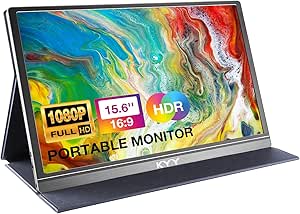 | Best Lightweight Travel Pick | Screen Size: 15.6 inches | Resolution: 1920 x 1080 (FHD) | Panel: IPS, matte finish | VIEW ON AMAZON | See Our Full Breakdown |
| InnoView 15.6 Inch Portable Monitor FHD 1080P with HDMI & USB-C |  | Best Plug-and-Play Starter Option | Screen Size: 15.6 inches | Resolution: 1920 x 1080 (FHD) | Panel: IPS, matte finish | VIEW ON AMAZON | See Our Full Breakdown |
| InnoView 16″ Portable Monitor 144Hz FHD IPS with Protective Sleeve |  | Best Value High-Refresh Gaming Pick | Screen Size: 16 inches | Resolution: 1920 x 1200 (16:10) | Refresh Rate: 144Hz (120Hz over HDMI) | VIEW ON AMAZON | See Our Full Breakdown |
| portable gaming monitor | Screen size | Resolution | Refresh rate | Weight |
|---|---|---|---|---|
| ARZOPA Z3FC 16.1-Inch 180Hz QH | 16.1 inches | 2560 × 1440 (QHD) | 180Hz | 780 g |
| TECLAST 16-inch 144Hz Portable | 16 inches | 1920 × 1080 | 144Hz | 700 g |
| EVICIV 18.5-Inch Portable Moni | 18.5 inches | 1920 × 1080 | 120Hz | 1.8 pounds |
| Yxk 16-inch Portable Monitor 1 | 16.1 inches | 1920 × 1200 | 144Hz | — |
| ARZOPA Z1FC 16.1-Inch 144Hz Po | 16.1 inches | 1920 × 1080 | 144Hz | 1.42 kg |
| UPERFECT 16-Inch 2K 120Hz Port | 16 inches | 2560 × 1600 | 120 Hz | 1.7 pounds |
| Acer Nitro PG161Q P 15.6-Inch | 15.6 inches | 1920 × 1080 (Full HD) | 165 Hz | 2.73 lbs |
| cocopar 18.5 Inch Portable Mon | 18.5 inches | 2560 × 1440 (2K QHD) | 120 Hz | 2.48 lbs |
| MNN 15.6-Inch Full HD Portable | 15.6 inches | 1920 × 1080 | 60 Hz | 1.5 lbs |
| VisionOwl 16 Inch 2.5K QHD 144 | 16 inches | 2560 × 1600 (2.5K QHD) | 144 Hz | 1.48 lbs |
| WGK 15.6" Portable Monitor 108 | 15.6 inches | 1920 x 1080 (FHD) | 60 Hz | 2.7 lbs |
| KYY 15.6" Portable Monitor | 15.6 inches | 1920 x 1080 (FHD) | 60 Hz | 1.7 lbs |
| InnoView 15.6 Inch Portable Mo | 15.6 inches | 1920 x 1080 (FHD) | 60 Hz | 2.7 lbs |
| InnoView 16" Portable Monitor | 16 inches | 1920 x 1200 (16:10) | 144Hz (120Hz over HDMI) | 1.73 lbs |
More Details on Our Top Picks
ARZOPA Z3FC 16.1-Inch 180Hz QHD Portable Monitor
The ARZOPA Z3FC pairs the sharpest resolution in this five-monitor set with its fastest refresh rate: 2560 × 1440 at 180Hz. That combination suits players who want finer detail and fluid motion on a portable screen, provided their laptop or console can drive it. The TECLAST offers a lighter Full HD option with FreeSync, while this ARZOPA gives up adaptive sync and some travel weight for higher resolution and refresh headroom. Its 400-nit brightness and matte finish are useful in varied indoor settings, and the adjustable kickstand makes a quick setup easier. The main tradeoff is that QHD at 180Hz can demand more from the connected device, and at 780 g it is heavier than the TECLAST. I’d choose it for gaming performance, not the lightest carry.
Pros:- 2560 × 1440 resolution adds detail beyond the Full HD options
- 180Hz refresh rate is the highest among these five monitors
- 400-nit brightness and matte finish suit brighter indoor spaces
- Two USB-C ports, Mini HDMI, and an adjustable kickstand support flexible setups
Cons:- At 780 g, it weighs more than the TECLAST
- No adaptive sync is listed
- High QHD refresh rates require a source capable of outputting them
Best for: PC gamers with a capable USB-C or Mini HDMI source who want QHD detail and high refresh in a portable display.
Not ideal for: Travelers prioritizing the lightest setup or console players whose device cannot make use of QHD at high refresh rates.
- Screen size:16.1 inches
- Resolution:2560 × 1440 (QHD)
- Refresh rate:180Hz
- Brightness:400 nits
- Color gamut:107% sRGB
- Connectivity:2 USB-C ports, Mini HDMI
- Weight:780 g
- Stand:Built-in adjustable kickstand
Our verdict“Choose the Z3FC if you want the strongest mix of resolution and refresh rate and can carry a slightly heavier monitor.”
TECLAST 16-inch 144Hz Portable Gaming Monitor
At 700 g, the TECLAST is the lightest of these five picks, making it a sensible companion for a laptop bag or a compact gaming setup on the move. Its 144Hz IPS display with FreeSync focuses on smooth Full HD play, while the ARZOPA Z3FC pushes resolution and refresh higher at the cost of added weight. TECLAST also gives you a kickstand and VESA mounting, so it can work on a hotel desk or a more fixed setup. A single USB-C cable can carry video and power when the source supports it, which cuts down on travel clutter. Its 1920 × 1080 image is less detailed than the Z3FC’s QHD panel, and there is no touchscreen. Buyers should also confirm device compatibility for USB-C power and video.
Pros:- 700 g weight makes it the easiest of these five to carry
- 144Hz refresh rate and FreeSync support smoother gameplay
- USB-C and Mini HDMI provide flexible connection options
- Built-in kickstand and VESA 75 × 75 mm support suit travel and desk setups
Cons:- 1920 × 1080 resolution is less detailed than the ARZOPA Z3FC’s QHD image
- No touchscreen functionality
- Single-cable USB-C use depends on the source supporting video and power
Best for: Laptop and handheld-console gamers who carry their display often and want a light, high-refresh monitor with FreeSync.
Not ideal for: Buyers seeking QHD sharpness, touchscreen controls, or a display whose console output is independent of the connected device.
- Screen size:16 inches
- Resolution:1920 × 1080
- Refresh rate:144Hz
- Response time:2.5 ms
- Panel type:IPS
- Brightness:350 nits
- Adaptive sync:FreeSync
- Weight:700 g
- Connectivity:USB-C, Mini HDMI
Our verdict“Pick the TECLAST if low carry weight and FreeSync matter more than QHD detail or touch controls.”
EVICIV 18.5-Inch Portable Monitor, 120Hz, 1080p
The EVICIV’s 18.5-inch panel gives games more room than the 16-inch ARZOPA and TECLAST models, which can be welcome when the monitor sits on a shared table or serves as a portable console display. Its 120Hz refresh rate is lower than either of those picks, so it favors screen size over motion speed. The included sleeve, adjustable 360° stand, and VESA mounting make it easier to adapt to different locations. There is a catch for bright settings: the glossy finish can reflect lights, unlike the matte surfaces on the Z3FC and TECLAST. The listed 16:10 aspect ratio also does not align with the supplied 1920 × 1080 resolution details, so I would verify the format before buying. It is the size-first choice, with some specification uncertainty.
Pros:- 18.5-inch screen provides more viewing area than the 16-inch alternatives
- 120Hz refresh rate and listed 1ms response time support responsive gaming
- 360° adjustable stand and VESA support offer flexible placement
- Protective travel sleeve is included
Cons:- 120Hz is slower than the 144Hz TECLAST and 180Hz ARZOPA Z3FC
- Glossy finish can reflect ambient light
- Listed 16:10 aspect ratio conflicts with the stated 1920 × 1080 resolution
Best for: Console and laptop gamers who want a larger portable screen for a desk, shared table, or temporary gaming station.
Not ideal for: Travelers who need the smallest display, players focused on the highest refresh rates, or buyers sensitive to screen glare.
- Screen size:18.5 inches
- Resolution:1920 × 1080
- Refresh rate:120Hz
- Response time:1ms
- Panel type:IPS
- Brightness:350 cd/m²
- Finish:Glossy
- Weight:1.8 pounds
- Mounting:VESA 75 × 75 mm
Our verdict“Choose the EVICIV if a larger portable image matters more to you than the highest refresh rate or a glare-resistant finish.”
Yxk 16-inch Portable Monitor 1200P 144Hz IPS HDR
The Yxk’s 1920 × 1200, 16:10 display leaves more vertical room than the 16:9 ARZOPA Z1FC, giving laptop users extra space for menus, documents, or split-screen tasks alongside games. Its 144Hz refresh rate puts it in the same speed class as the TECLAST, though TECLAST lists FreeSync while this model’s supplied specs do not. USB-C and Mini HDMI connect a range of devices, and the built-in kickstand plus VESA compatibility make setup adaptable. Dual speakers are handy when traveling without headphones, but they do not replace a dedicated audio setup. The resolution remains 1920 × 1200, so it will not match the finer QHD image of the ARZOPA Z3FC. Its brand history is less established in the provided information, which may matter to buyers seeking a more familiar option.
Pros:- 16:10 1920 × 1200 panel offers more vertical workspace than 16:9 Full HD models
- 144Hz refresh rate supports smooth gaming
- USB-C, Mini HDMI, kickstand, and VESA compatibility support flexible setups
- Dual built-in speakers provide audio without separate speakers
Cons:- Resolution is below the ARZOPA Z3FC’s QHD panel
- Adaptive sync is not listed, unlike FreeSync on the TECLAST
- Limited brand history is provided
Best for: Laptop gamers who also use their portable display for productivity and want extra vertical workspace with a fast refresh rate.
Not ideal for: Buyers who prioritize QHD detail, adaptive sync, or a well-established brand with a longer track record.
- Screen size:16.1 inches
- Resolution:1920 × 1200
- Aspect ratio:16:10
- Refresh rate:144Hz
- Panel type:IPS
- Response time:2 ms
- Connectivity:USB-C, Mini HDMI
- Speakers:Dual built-in speakers
- Stand:Built-in adjustable kickstand, VESA compatible
Our verdict“Pick the Yxk if you want a 16:10 screen for both gaming and laptop work and can forgo QHD and listed adaptive sync.”
ARZOPA Z1FC 16.1-Inch 144Hz Portable Gaming Monitor
The ARZOPA Z1FC keeps the portable gaming setup straightforward: a 16.1-inch IPS screen, 144Hz refresh rate, adjustable kickstand, and USB-C or Mini HDMI connections. Its 106% sRGB gamut adds color range beyond the TECLAST’s listed 100% sRGB, while the TECLAST counters with FreeSync and a lower stated weight. Compared with the QHD ARZOPA Z3FC, this model sticks to Full HD and a lower refresh ceiling, which can make it a more modest match for sources that do not need QHD output. The 300 cd/m² brightness is lower than the Z3FC’s 400 nits, and the provided specs list no adaptive sync. At 1.42 kg, it is also substantially heavier than the TECLAST’s 700 g, so I’d favor it for a portable desk setup over frequent bag-to-bag travel.
Pros:- 144Hz refresh rate supports smooth gaming
- IPS panel with 106% sRGB color gamut
- Two USB-C ports and Mini HDMI support varied sources
- Built-in adjustable kickstand simplifies portable setup
Cons:- At 1.42 kg, it is much heavier than the TECLAST
- 300 cd/m² brightness is lower than the ARZOPA Z3FC’s 400 nits
- Adaptive sync is not listed
Best for: Gamers who want a Full HD 144Hz portable display with a built-in stand and common USB-C and Mini HDMI connections.
Not ideal for: Frequent travelers seeking a light monitor, or players who want FreeSync, higher brightness, or QHD resolution.
- Screen size:16.1 inches
- Resolution:1920 × 1080
- Refresh rate:144Hz
- Panel type:IPS LCD
- Brightness:300 cd/m²
- Color gamut:106% sRGB
- Response time:1 ms
- Ports:2 USB-C, 1 Mini HDMI
- Weight:1.42 kg
Our verdict“Choose the Z1FC for a simple Full HD gaming display with broad connections, provided its weight and lack of listed adaptive sync suit your setup.”
UPERFECT 16-Inch 2K 120Hz Portable Monitor
This option stands out for its 100% sRGB coverage on a matte IPS panel, a combination that makes it better suited to color-sensitive work than the glossier TECLAST 1080p model. The 2560 × 1600 resolution paired with 120 Hz delivers sharp text and smooth motion, and the 16:10 aspect ratio gives you extra vertical room for documents or game HUDs. Compared with the MNN 15.6-inch, the higher pixel density is immediately noticeable when reading small text. The magnetic cover stand and VESA mounting keep setup flexible for both desk and travel use.
The tradeoffs are real, though. There is no internal battery, so the monitor always needs a powered host or outlet. And at 16 inches, it may feel cramped compared with the cocopar 18.5-inch if a desktop-replacement feel is the priority.
Pros:- Sharp 2K resolution at 120 Hz for crisp, smooth visuals
- Matte IPS panel with 100% sRGB and 178-degree viewing angles
- Lightweight 1.7 lb build with VESA mount and magnetic cover stand
- Flexible USB-C and Mini HDMI connectivity with built-in speakers
Cons:- No internal battery — requires a powered device or external source
- 16-inch size may feel small for desktop setups compared with larger portable options
Best for: Students and hybrid workers who want accurate color for photo editing alongside casual 120 Hz gaming
Not ideal for: Buyers who want a larger, more immersive desktop-style screen — 16 inches feels small next to 18.5-inch rivals
- Screen size:16 inches
- Resolution:2560 × 1600
- Refresh rate:120 Hz
- Panel type:IPS LCD, matte finish
- Brightness:400 nits
- Color gamut:100% sRGB
- Weight:1.7 pounds
- Ports:2 USB-C, Mini HDMI, 3.5 mm audio
Our verdict“A well-rounded pick for anyone who needs dependable color accuracy and a sharp 2K picture in a travel-friendly 16-inch frame.”
Acer Nitro PG161Q P 15.6-Inch FHD 165Hz Portable Gaming Monitor
Speed is the whole story here. The 165 Hz refresh rate with AMD FreeSync makes this the smoothest-motion option in the lineup, edging out the 144 Hz ARZOPA Z1FC and VisionOwl for competitive shooters where every frame counts. The 15° to 30° adjustable tilt stand is a genuine plus — most rivals, including the UPERFECT, rely on foldable covers that lock you into one awkward angle. Dual Mini HDMI ports alongside USB-C make connecting a console and a laptop simultaneously refreshingly simple.
The compromise is image quality per frame rather than frame count. At 250 nits and 1080p, it is dimmer and less detailed than the 2K UPERFECT or the 500-nit cocopar, so bright rooms and single-player visual showcases are not its strength. The 1W speakers are barely passable.
Pros:- Class-leading 165 Hz refresh rate with AMD FreeSync
- Adjustable tilt stand instead of a fixed cover
- Two USB-C and two Mini HDMI ports for multi-device setups
- Slim 0.42-inch design with VESA mounting
Cons:- 250-nit brightness struggles in well-lit environments
- 1W built-in speakers are weak for media
- 1080p resolution trails the 2K options in sharpness
Best for: Competitive gamers who prioritize maximum refresh rate and adaptive sync over resolution
Not ideal for: Bright-room users and visual-focused gamers — 250 nits and 1080p fall short of 2K rivals
- Screen size:15.6 inches
- Resolution:1920 × 1080 (Full HD)
- Refresh rate:165 Hz
- Adaptive sync:AMD FreeSync
- Brightness:250 nits
- Ports:2 USB-C, 2 Mini HDMI
- Weight:2.73 lbs
- Tilt range:15° to 30°
Our verdict“The pick when frame rate is the deciding factor and you play fast, competitive titles more than cinematic ones.”
cocopar 18.5 Inch Portable Monitor 2K QHD 120Hz with Speakers, HDMI & USB-C
If ‘portable’ can stretch a little, this is the screen that feels most like a real monitor. The 18.5-inch 2K panel at 500 nits is brighter than the UPERFECT’s 400 and dramatically more usable than the Acer Nitro’s 250, making it the strongest choice for daylight gaming near a window. The 120% sRGB gamut also edges out the VisionOwl’s 110% for color richness. An adjustable kickstand rather than a floppy cover gives it a more stable desktop presence.
The catch is the word ‘portable’. At 18.5 inches, it takes up more bag space than every 15.6- and 16-inch option here, and USB-C plug-and-play demands Thunderbolt 3/4/5 or DP Alt Mode — older laptops will need the HDMI route and separate power.
Pros:- Large 2K QHD panel with 120% sRGB coverage
- 500-nit brightness, the brightest in this batch
- 2.48 lb weight despite the bigger screen
- Adjustable kickstand plus VESA mount and dual USB-C/HDMI
Cons:- 18.5-inch size is less travel-friendly than 15.6- and 16-inch rivals
- USB-C single-cable use requires Thunderbolt or DP Alt Mode support
Best for: Travelers and hybrid workers who want the largest, brightest 2K picture possible and carry a roomier bag
Not ideal for: Minimalist packers and commuters with slim laptop sleeves — the 18.5-inch footprint defeats the purpose
- Screen size:18.5 inches
- Resolution:2560 × 1440 (2K QHD)
- Refresh rate:120 Hz
- Brightness:500 nits
- Color gamut:120% sRGB
- Weight:2.48 lbs
- Ports:1 HDMI, 2 USB-C
- VESA mount:75 × 75 mm
Our verdict“The best choice when screen real estate and brightness matter more than squeezing into a small bag.”
MNN 15.6-Inch Full HD Portable Monitor
This model makes the most sense for a first portable monitor purchase, where the goal is a reliable second screen without paying for high refresh rates. Compared with the Acer Nitro, you give up 105 Hz of refresh for HDR support, a slightly brighter 300-nit panel, and a lighter 1.5 lb frame — a fair trade for anyone who games casually rather than competitively. The PU leather smart cover doubling as a stand and portrait mode support make it equally at home as a productivity companion beside a laptop, and two full-function USB-C ports keep cabling tidy with compatible machines.
The limitations are predictable at this tier: 60 Hz and 1080p mean it lags the UPERFECT and VisionOwl badly for gaming sharpness and motion, and single-cable operation still requires Thunderbolt 3 or DP Alt Mode. Inconsistent screen measurements in the listing are also worth verifying before purchase.
Pros:- Light 1.5 lb design that slips into any bag
- HDR support with wide 178° viewing angles
- Multiple display modes including portrait orientation
- Smart cover included, doubling as a stand
Cons:- 60 Hz refresh rate trails every gaming-focused rival in the lineup
- Single-cable USB-C needs Thunderbolt 3 or DP Alt Mode
- Listing has inconsistent screen measurement details
Best for: First-time buyers who want an affordable second screen for laptop work with light, casual gaming
Not ideal for: Anyone chasing smooth fast-paced gameplay — 60 Hz is a full generation behind the 144-165 Hz options here
- Screen size:15.6 inches
- Resolution:1920 × 1080
- Refresh rate:60 Hz
- Panel type:IPS LCD
- Brightness:300 nits
- Ports:2 USB-C, 1 HDMI
- Weight:1.5 lbs
- Included accessory:PU leather smart cover/stand
Our verdict“A sensible entry point for work-first buyers who game only occasionally and want to spend the minimum to get a dependable second display.”
VisionOwl 16 Inch 2.5K QHD 144Hz Portable Monitor with USB-C/HDMI, Speakers, Kickstand & VESA Mount
This pick earns the top spot by refusing to compromise on either side of the gaming/productivity divide. The 2560 × 1600 panel at 144 Hz delivers sharper detail than the 1080p Acer Nitro and smoother motion than the 120 Hz UPERFECT, while the 16:10 aspect ratio mirrors MacBook displays without scaling awkwardness — something no 16:9 model here can claim. The 8-bit + 2FRC panel with 110% sRGB and 470 nits handles bright rooms and color work better than most rivals, and the 1.48 lb metal build with a built-in kickstand is sturdier than any cover-based stand in the lineup. Shipping with a sleeve, adapter, and every cable needed makes it genuinely ready out of the box.
Two honest caveats: single-cable USB-C still requires Thunderbolt or DP Alt Mode, and 16:9 games and video will show black bars.
Pros:- 2.5K resolution at 144 Hz — the best sharpness-to-speed balance here
- Bright 470-nit panel with 110% sRGB for creative work
- Slim 1.48 lb metal build with built-in kickstand and VESA mount
- Complete accessory kit including sleeve, adapter, and cables
Cons:- Single-cable USB-C operation requires Thunderbolt 3/4 or DP Alt Mode
- 16:10 aspect ratio produces black bars with some 16:9 games and video
Best for: MacBook owners and hybrid creator-gamers who want one monitor that excels at both work and play
Not ideal for: Console-first gamers who mostly play 16:9 content and would rather have a bigger 18.5-inch screen like the cocopar
- Screen size:16 inches
- Resolution:2560 × 1600 (2.5K QHD)
- Refresh rate:144 Hz
- Panel type:IPS (8-bit + 2FRC)
- Brightness:470 nits
- Color gamut:110% sRGB
- Ports:Full-size HDMI, dual USB-C
- Weight:1.48 lbs
Our verdict“The strongest all-around choice in this batch — if you want one portable monitor that games smoothly, displays color credibly, and travels light, this is it.”
WGK 15.6″ Portable Monitor 1080P FHD HDMI/USB-C Travel Display with Stand, Speakers, and VESA Mount
Most portable monitors force you into either a flimsy folio cover or a separate kickstand, but WGK builds in a proper adjustable stand and adds VESA mountability, which sets this model apart from the KYY and InnoView 15.6-inch options that rely on leather covers with limited angle grooves. That makes this pick better suited to buyers who want a semi-permanent second screen that can live on an arm mount at a desk and still travel when needed. Plug-and-play support across consoles, phones, and laptops means no driver hassle, and the matte IPS panel keeps reflections down during long sessions. The tradeoff is weight: at 2.7 lbs with a chunkier frame, it feels noticeably less bag-friendly than the 1.7 lb KYY. And like the other 60 Hz panels here, it falls well short of the InnoView 16″ 144Hz for anyone who plays fast-paced games.
Pros:- Built-in adjustable stand plus VESA mounting — rare flexibility at this size
- Broad plug-and-play compatibility with consoles, phones, and laptops
- Matte IPS panel with HDR, low blue light, and 178° viewing angles
- Supports copy, extended, and second-screen display modes
Cons:- At 2.7 lbs it’s one of the heavier 15.6-inch options in this roundup
- 60 Hz refresh rate limits appeal for fast-paced gaming
Best for: Remote workers and gamers who want a second screen that works on a VESA arm at a desk but still packs up for travel
Not ideal for: Competitive gamers — the 60 Hz refresh rate and 5 ms response can’t keep up with high-frame-rate play
- Screen Size:15.6 inches
- Resolution:1920 x 1080 (FHD)
- Panel:IPS, matte finish
- Refresh Rate:60 Hz
- Connectivity:2x USB-C, Mini HDMI
- Weight:2.7 lbs
- VESA Mountable:Yes
- Speakers:Built-in dual speakers
Our verdict“This is the pick if you want one portable monitor that doubles as a fixed, arm-mounted desk display rather than a pure travel screen.”
KYY 15.6″ Portable Monitor, FHD 1080P IPS Display with Smart Cover
At 0.3 inches thin and 1.7 pounds, the KYY is the easiest screen in this batch to actually forget you’re carrying — lighter than both the WGK (2.7 lbs) and the InnoView 15.6-inch, and on par with the slimmest high-refresh models like the InnoView 16″. The included PU smart cover doubles as a stand and screen protector, so there’s nothing extra to pack. Connectivity is solid for casual use: two full-function USB-C ports and Mini-HDMI cover laptops, phones, and consoles without drivers. Where it gives ground is image quality and versatility — 300 nits of brightness means washed-out visuals in sunlight, and the cover’s two grooves lock you into fixed angles, a clear step behind the WGK’s adjustable built-in stand or the VisionOwl’s integrated kickstand. For straightforward office work and travel, those compromises are easy to accept.
Pros:- Ultra-portable at 0.3 inches thin and 1.7 lbs
- Smart cover protects the screen and folds into a stand
- Plug-and-play USB-C and Mini-HDMI across laptops, phones, and consoles
- IPS panel with HDR and 178° viewing angles
Cons:- 300-nit brightness struggles in bright rooms or near windows
- Cover stand offers only two viewing angles and can wobble
Best for: Students and frequent travelers who want the lightest possible second screen for laptop productivity
Not ideal for: Gamers who need smooth motion — 60 Hz and a fixed two-angle stand make it a poor fit for anything but casual play
- Screen Size:15.6 inches
- Resolution:1920 x 1080 (FHD)
- Panel:IPS, matte finish
- Refresh Rate:60 Hz
- Brightness:300 cd/m²
- Connectivity:2x USB-C, Mini-HDMI, 3.5mm audio
- Weight:1.7 lbs
- Thickness:0.3 inches
Our verdict“The KYY makes the most sense for buyers whose priority is portability over picture quality and gaming performance.”
InnoView 15.6 Inch Portable Monitor FHD 1080P with HDMI & USB-C
This InnoView earns its spot as the zero-friction entry point into portable monitors — true plug-and-play over two full-function USB-C ports plus full-size HDMI, which is friendlier to beginners than the Mini-HDMI ports on the KYY and WGK that often need an adapter. The 80% color gamut and 1200:1 contrast give it a slight edge in image richness over the WGK’s 72% gamut, though its 250-nit brightness is the dimmest in this batch. Compared with its sibling InnoView 16″ 144Hz, this model is for work-first buyers: 60 Hz with FreeSync handles everyday content fine but not competitive gaming. The main frustration is power behavior — some devices will trigger flickering or restarts unless the monitor is separately powered, and the HDMI power cable isn’t included, so budget for a spare USB charger before your first trip.
Pros:- True plug-and-play with no drivers or software
- Full-size HDMI plus dual USB-C — no Mini-HDMI adapters needed
- 80% color gamut and 1200:1 contrast for above-average image quality
- 18-month warranty adds peace of mind for a starter purchase
Cons:- HDMI power cable not included in the box
- Can flicker or restart with low-power host devices unless separately powered
- 250-nit brightness is the lowest among these picks
Best for: First-time buyers and remote workers who want a simple, affordable second screen with standard HDMI connectivity
Not ideal for: Owners of older laptops without USB-C DisplayPort Alt Mode — single-cable use requires Thunderbolt 3/4 or USB 3.1
- Screen Size:15.6 inches
- Resolution:1920 x 1080 (FHD)
- Panel:IPS, matte finish
- Refresh Rate:60 Hz
- Color Gamut:80%
- Connectivity:2x USB-C, 1x HDMI
- Weight:2.7 lbs
- Warranty:18 months
Our verdict“A sensible first portable monitor for productivity use, as long as your laptop supports USB-C video and you have a spare power adapter.”
InnoView 16″ Portable Monitor 144Hz FHD IPS with Protective Sleeve
This is the only monitor in this batch that meaningfully serves actual gamers on a budget: a 144Hz refresh rate with FreeSync, an on-screen crosshair overlay, and a 16:10, 1920×1200 panel that gives slightly more vertical space than the 16:9 ARZOPA Z1FC or TECLAST 16-inch competitors. At 1.73 lbs and 0.25 inches thin, it matches the KYY’s portability while delivering double the frame rate — that combination is the core of its appeal for Steam Deck, PS5, and Xbox owners. Two caveats matter before buying: HDMI caps the panel at 120Hz, so you’ll want a USB-C connection for the full 144Hz, and no power adapter ships in the box. HDR support here is modest rather than transformative, and it can’t match the 2K resolution of the UPERFECT or VisionOwl for anyone who values sharpness over speed.
Pros:- 144Hz refresh rate with FreeSync for tear-free gaming
- 16:10 1920×1200 panel adds useful vertical space over 16:9 rivals
- Featherweight 1.73 lbs and 0.25-inch profile for real portability
- On-screen crosshair and HDR gaming features included
Cons:- No power adapter included in the box
- HDMI connection is limited to 120Hz — full 144Hz requires USB-C
Best for: Steam Deck, ROG Ally, and console gamers who want smooth high-frame-rate play in a screen that genuinely travels
Not ideal for: Photo and video editors who prioritize resolution — 1080p-class sharpness trails the 2K/2.5K options in this roundup
- Screen Size:16 inches
- Resolution:1920 x 1200 (16:10)
- Refresh Rate:144Hz (120Hz over HDMI)
- Panel:IPS with HDR
- Ports:2x USB-C, 1x HDMI
- Weight:1.73 lbs
- Thickness:0.25 inches
- Warranty:18 months
Our verdict“The best balance of speed, size, and price in this group for handheld and console gamers who travel with their gear.”

How We Picked
I evaluated each monitor through the lens of a traveling gamer: refresh rate and panel response first, since anything below 120Hz compromises fast-paced play; then resolution and panel quality, because portable screens sit close to your eyes and expose weak contrast and color; and finally practical portability — weight, thickness, included covers or stands, and whether the power and video connections work with a single USB-C cable. Models that bundled speakers, VESA mounts, or protective covers scored higher on travel readiness than bare panels at the same spec level.
The ranking order follows gaming suitability, not raw value. High-refresh models like the ARZOPA Z3FC and Acer Nitro PG161Q placed at the top because they serve the core purpose best; 2K/2.5K options like the UPERFECT and VisionOwl followed for gamers who prioritize image sharpness; and 60Hz budget screens ranked lower for gaming even though they remain fine as general second monitors. Every pick was compared directly against its closest rivals so the tradeoffs — speed versus sharpness, size versus weight, features versus slimness — stay visible throughout.
| portable gaming monitor | Panel type |
|---|---|
| ARZOPA Z3FC 16.1-Inch 180Hz QH | — |
| TECLAST 16-inch 144Hz Portable | IPS |
| EVICIV 18.5-Inch Portable Moni | IPS |
| Yxk 16-inch Portable Monitor 1 | IPS |
| ARZOPA Z1FC 16.1-Inch 144Hz Po | IPS LCD |
| UPERFECT 16-Inch 2K 120Hz Port | IPS LCD, matte finish |
| Acer Nitro PG161Q P 15.6-Inch | — |
| cocopar 18.5 Inch Portable Mon | — |
| MNN 15.6-Inch Full HD Portable | IPS LCD |
| VisionOwl 16 Inch 2.5K QHD 144 | IPS (8-bit + 2FRC) |
| WGK 15.6" Portable Monitor 108 | — |
| KYY 15.6" Portable Monitor | — |
| InnoView 15.6 Inch Portable Mo | — |
| InnoView 16" Portable Monitor | — |
Factors to Consider When Choosing Portable Gaming Monitors
Before choosing a portable gaming monitor, it helps to understand where the real tradeoffs live. The spec sheets all look similar at a glance, but a few decisions shape your experience far more than others.Refresh Rate Matters More Than Resolution for Gaming
The most common mistake buyers make is prioritizing resolution because it looks impressive on paper. On a 15.6–18.5-inch screen viewed at arm’s length, the difference between 1080p and 1440p is real but modest — while the difference between 60Hz and 144Hz is immediately obvious in any fast game. A high refresh rate reduces motion blur, makes aiming feel more responsive, and simply feels better even in menus and desktop use. That’s why a 1080p/144Hz panel generally beats a 1440p/60Hz panel for gaming, even though the latter sounds more premium. Resolution matters most if you play slower, visually rich games or also use the monitor for productivity work. If competitive or fast-action gaming is your focus, put refresh rate first every time.
Single-Cable USB-C Versus HDMI
Connection options determine how practical the monitor is day to day. A monitor with full-function USB-C (video plus power over one cable) turns into a genuine grab-and-go setup with a laptop or Steam Deck — one cable, no power brick hunt. HDMI-only or data-limited USB-C setups force you to carry a second cable and often a power adapter, which undermines the point of portability. Check whether the USB-C port supports video at your device’s full refresh rate, too; some budget panels accept video but cap at 60Hz over USB-C while only HDMI reaches higher rates. Console players should confirm HDMI works cleanly, since the Nintendo Switch, PlayStation, and Xbox ecosystems all rely on it. The best models in this roundup handle both without compromises.
Size and Weight: Where Portability Actually Breaks
There’s a meaningful line between 15.6–16.1-inch panels and 18.5-inch ones. The smaller sizes slip into most backpacks alongside a laptop and add under two pounds; the larger ones, like the EVICIV and cocopar 18.5-inch models, deliver a more immersive image but demand their own carrying case and start to feel like desktop replacements rather than travel gear. Ask yourself honestly how often you’ll carry the monitor versus leave it on a desk. Frequent flyers and commuters should stay at 16 inches or below. Players who mostly move between fixed locations — a dorm, a friend’s house, a hotel on weekends — can justify the bigger screen. Weight is also a stand issue: heavier panels overwhelm flimsy kickstands, so check what support the monitor includes.
HDR Claims Are Mostly Marketing at This Level
Many of these monitors advertise HDR support, but nearly all of them lack the local dimming, brightness, and wide color gamut needed for genuine HDR. What you actually get is HDR signal compatibility — the monitor accepts an HDR input and displays it on a standard SDR-class panel, sometimes looking worse than properly tuned SDR. Don’t pay extra for an HDR badge on a portable monitor, and don’t be surprised when HDR content looks flat. What does matter for image quality is IPS panel technology, decent brightness (300 nits or more), and stated color coverage. A well-built SDR IPS panel will outperform a cheap ‘HDR-ready’ screen every time.
Stands, Covers, Speakers, and the Accessories Tax
Portable monitors vary enormously in what comes in the box, and the gaps add up. A monitor that ships with only a foldable folio stand forces you to buy a tripod or VESA arm for stable positioning; a model with a built-in kickstand or magnetic cover saves that hassle. Built-in speakers are genuinely useful for travel — even mediocre ones spare you from packing headphones — but they add thickness and weight to panels designed to be razor-thin. VESA mounting support matters if you plan to dock the monitor at a desk between trips. My advice: decide how you’ll actually position and use the screen, then choose a model whose included accessories match, rather than paying the accessories tax after purchase.
Matching the Monitor to Your Gaming Device
Your source device should drive your choice more than most buyers realize. A Steam Deck, ROG Ally, or gaming laptop benefits from a 120Hz+ panel because the device can actually push those frame rates in many games. A Nintendo Switch caps at 60Hz, making a 144Hz monitor wasted capability — a sharp 60Hz or 120Hz panel is the smarter pairing. Console players on PlayStation or Xbox should remember that most portable monitors top out at 1080p or 1440p, well below what a PS5 can output to a living-room TV, so these screens suit dorm-room and travel scenarios rather than replacing a main display. Finally, phone gamers should verify their handset supports DisplayPort Alt Mode over USB-C, since not all do.
Frequently Asked Questions
Is a 1440p 120Hz portable monitor better than a 1080p 144Hz one for gaming?
It depends on what you play. Fast, competitive games — shooters, fighting games, racing — benefit more from the higher refresh rate, so a 1080p 144Hz panel like the ARZOPA Z1FC or Acer Nitro PG161Q is the better fit. Slower, visually rich games like RPGs, strategy, and story-driven adventures look better at 1440p, where the extra sharpness shows in fine textures and text. On a 16-inch screen, 1080p is already fairly crisp at typical viewing distance, which narrows the visual gap compared to a desktop monitor. Competitive players should choose refresh; everyone else can reasonably choose resolution.
Can I run a portable gaming monitor from a gaming laptop with just one USB-C cable?
Often yes, but only if both the monitor and your laptop support full-function USB-C with DisplayPort Alt Mode and sufficient power delivery. The monitor draws its power and video from that single cable, which is the cleanest travel setup possible. The catch is that some budget monitors accept video over USB-C but cap the refresh rate below their HDMI maximum, and some laptop ports are data-only. Check your laptop’s spec sheet for DisplayPort Alt Mode on the specific port you’ll use, and confirm the monitor’s USB-C refresh rate rather than assuming it matches HDMI. If either side falls short, you’ll need HDMI for video plus a separate USB-C cable for power.
Are 18.5-inch portable monitors still practical for travel?
They’re a compromise rather than a dealbreaker. Models like the EVICIV and cocopar 18.5-inch screens give you a noticeably bigger picture that feels closer to a small desktop display, which is great for hotel-room sessions or semi-permanent setups. But they won’t fit most laptop sleeves, weigh more, and typically need a dedicated bag or case, so daily commuters tend to regret the size. If you travel by car or only move the monitor occasionally, the larger panel is worth it. If you fly often or carry everything on your back, stay at 16.1 inches or below.
Do the built-in speakers on portable monitors replace headphones or external speakers?
They can for casual use, but temper expectations. Portable monitor speakers are typically thin, downward-firing drivers that work fine for dialogue, strategy game audio, and background music, but they lack bass and can distort at volume. Their real value is sparing you from packing headphones on short trips or letting a friend watch and hear a game alongside you. Models like the cocopar and VisionOwl put more effort into their speaker setups than bare-bones panels, but none match even a modest pair of desktop speakers. Treat built-in audio as a convenience feature, not a sound-quality feature, and keep headphones for anything immersive.
Should I buy a cheap 60Hz portable monitor if I mostly play casual or retro games?
Yes — that’s one of the few scenarios where a budget 60Hz panel makes sense. Models like the KYY, MNN, and InnoView FHD cost far less than high-refresh options, and for turn-based games, puzzle games, retro emulation, or console titles capped at 60fps, you lose almost nothing. They also double nicely as productivity second screens for spreadsheets and documents. The mistake is buying one expecting it to feel good in fast games, where the 60Hz ceiling becomes obvious immediately. If there’s any chance competitive gaming enters the picture, spend a little more on a 120Hz-plus model so you don’t end up buying twice.
Conclusion
After comparing all 14 models, the right choice comes down to what kind of gamer is packing the bag. For the best overall pick, the ARZOPA Z3FC wins with its 180Hz QHD combination — the fastest panel here paired with sharp resolution and a travel-friendly 16.1-inch size. For best value, the TECLAST 16-inch 144Hz delivers genuinely smooth gaming at a budget price, with the ARZOPA Z1FC as a close alternative if you can stretch slightly. For a premium image-first experience, the VisionOwl 2.5K 144Hz stands out with its resolution, speakers, kickstand, and VESA mount bundled together, with the UPERFECT 2K 120Hz as the sharper-value alternative. Beginners and casual players should start with the InnoView 16-inch 144Hz — high refresh, a protective sleeve, and simple connectivity without overwhelming cost. For specific needs: console and couch gamers get the best fit from the Acer Nitro PG161Q’s 165Hz panel, big-screen travelers should look at the cocopar 18.5-inch 2K, and Steam Deck or laptop owners wanting a single-cable setup will find the ARZOPA and UPERFECT models handle USB-C most gracefully. Whatever you pick, match the refresh rate to your games and the size to your travel habits — those two decisions matter more than anything else on the spec sheet.