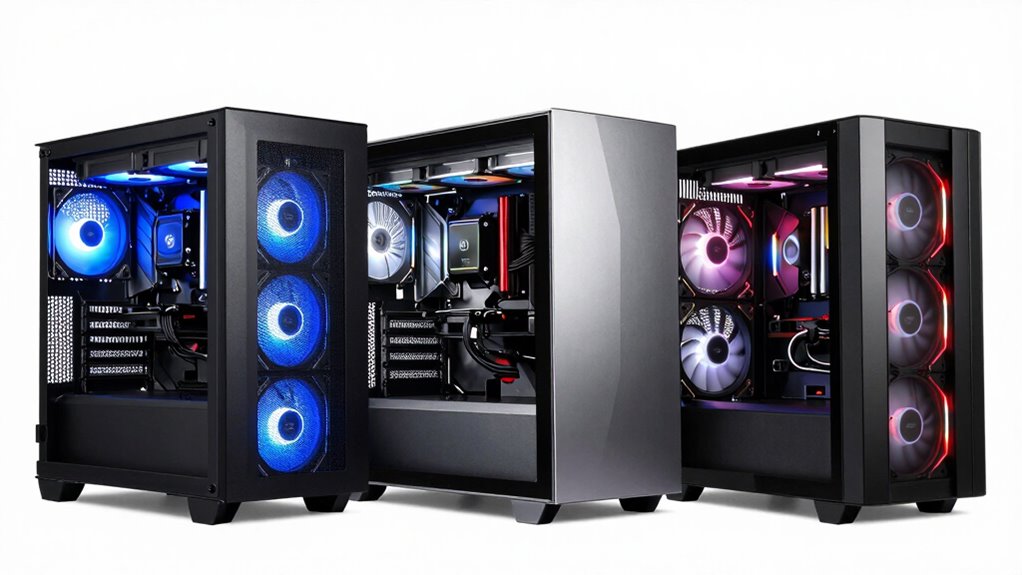

Choosing a PC case for VR builds demands a focus on airflow, cooling performance, and space for high-end components. The CORSAIR 4000D RS ARGB stands out for its modular design and pre-installed ARGB fans, ideal for custom cooling setups. The Antec Flux Pro offers exceptional airflow potential with support for up to 12 fans, making it perfect for enthusiast-level cooling. Meanwhile, the CORSAIR AIR 5400 RS ARGB excels with its triple-chamber design, isolating heat zones for quieter and more efficient cooling. Each of these options balances airflow and versatility, but they also come with tradeoffs like size, complexity, or price. Here’s how I compare the choices to help you pick the best fit for your VR gaming setup.

Get business pricing on tech for your team
- Business-only prices and quantity discounts
- Tax-exempt purchasing
- Multiple users, one account, clear invoices
Key Takeaways
- The CORSAIR 4000D RS ARGB provides high airflow through modular and customizable mounting options, suitable for advanced users.
- Antec Flux Pro supports the most fans and radiator options, making it ideal for maximum cooling but requires significant space and setup effort.
- CORSAIR AIR 5400’s triple-chamber design isolates heat sources, reducing noise and improving cooling efficiency in large builds.
- FOIFKIN F1 offers excellent cooling with six pre-installed ARGB fans but may be too large for compact spaces.
- NZXT H5 Flow balances airflow and size, with support for large radiators and quiet operation, perfect for space-conscious high-performance builds.
| CORSAIR 4000D RS ARGB Frame Modular Mid-Tower ATX PC Case, High Airflow, 3 Pre-Installed RS Fans, InfiniRail Mounting System, Supports ASUS BTF, MSI Zero, Gigabyte Stealth, Black |  | Best Overall for Customization and Airflow | Form Factor: Mid-Tower ATX | Color: Black | Pre-Installed Fans: 3 CORSAIR RS ARGB PWM Fans | VIEW ON AMAZON | See Our Full Breakdown |
| Antec Flux Pro Full-Tower E-ATX PC Case, 6 PWM Fans Included, Black |  | Best for Maximum Cooling and Expansion | Material: Metal, glass, wood | Fan Support: Up to 12 fans | Pre-installed Fans: 3 x Tranquil 140 PWM, 2 x P12R PWM, 1 x Tranquil 140 PWM | VIEW ON AMAZON | See Our Full Breakdown |
| CORSAIR AIR 5400 RS ARGB Triple-Chamber Panoramic Mid-Tower PC Case – Black |  | Best for Isolated Cooling and Low Noise | Design: Triple-Chamber | Color: Black | Cooling Support: 360mm radiator for CPU | VIEW ON AMAZON | See Our Full Breakdown |
| FOIFKIN F1 PC Case – ATX Mid-Tower with 6 ARGB Fans, Tempered Glass, Supports 360mm Radiator |  | Best for Budget and High Airflow | Design: Dual-Chamber | Material: Tempered glass, metal | Fans: 6 ARGB PWM fans | VIEW ON AMAZON | See Our Full Breakdown |
| NZXT H5 Flow – Compact ATX Mid-Tower PC Case – Black |  | Best for Space-Efficient High Airflow | Form Factor: Mid-Tower | Color: Black | Radiator Support: Up to 360mm front, 240mm top | VIEW ON AMAZON | See Our Full Breakdown |
| pc case for airflow in vr build | Material | Color | Pre-Installed Fans | Radiator Support |
|---|---|---|---|---|
| CORSAIR 4000D RS ARGB Frame Mo | Steel | Black | 3 CORSAIR RS ARGB PWM Fans | — |
| Antec Flux Pro Full-Tower E-AT | Metal, glass, wood | — | 3 x Tranquil 140 PWM, 2 x P12R PWM, 1 x Tranquil 140 PWM | 420mm and 360mm |
| CORSAIR AIR 5400 RS ARGB Tripl | Aluminum, steel | Black | — | — |
| FOIFKIN F1 PC Case | Tempered glass, metal | — | — | 360mm on top |
| NZXT H5 Flow | — | Black | 2 x 120mm Quiet Fans | Up to 360mm front, 240mm top |
More Details on Our Top Picks
CORSAIR 4000D RS ARGB Frame Modular Mid-Tower ATX PC Case, High Airflow, 3 Pre-Installed RS Fans, InfiniRail Mounting System, Supports ASUS BTF, MSI Zero, Gigabyte Stealth, Black
The CORSAIR 4000D RS ARGB excels in delivering high airflow through its modular design and flexible fan mounting options. The InfiniRail mounting system allows precise placement of fans and radiators, giving advanced users the ability to tailor airflow pathways. Its pre-installed ARGB fans add aesthetic appeal, making it a strong choice for those who want both performance and style. Compared with larger cases, this model offers a balanced size that fits most setups, but its complexity might intimidate beginners. The price reflects its feature set, making it more suitable for experienced builders who want maximum airflow and customization.
Pros:- Highly customizable with modular design
- Pre-installed high-performance ARGB fans
- Flexible fan and radiator mounting options
- Supports multiple motherboard sizes
Cons:- Complex setup may be challenging for newcomers
- Limited cable management info
- Higher price point
Best for: Enthusiasts and custom builders who want flexible airflow options and stylish lighting.
Not ideal for: Beginners or those seeking a straightforward, plug-and-play case.
- Form Factor:Mid-Tower ATX
- Color:Black
- Pre-Installed Fans:3 CORSAIR RS ARGB PWM Fans
- Fan Mounting System:InfiniRail
- Material:Steel
- Supports Motherboards:ASUS BTF, MSI Zero, Gigabyte Stealth
Our verdict“A top-tier choice for those who prioritize airflow customization and aesthetic flair.”
Antec Flux Pro Full-Tower E-ATX PC Case, 6 PWM Fans Included, Black
The Antec Flux Pro offers an impressive range of cooling support, supporting up to 12 fans and multiple radiator configurations. It’s built from durable metals, with a multi-directional vent design that promotes airflow from all angles. The case includes six pre-installed PWM fans, making it ideal for high-performance VR builds that demand consistent cooling. Its support for large radiators and removable brackets allows for flexible cooling setups, but its size can be a drawback in smaller spaces. The premium materials and extensive fan support come at a higher price, but for those who want maximum airflow potential, this case delivers.
Pros:- Supports up to 12 fans for optimal airflow
- Includes multiple pre-installed PWM fans
- Supports radiators up to 420mm
- Removable brackets for flexible cooling setups
Cons:- Large footprint requires plenty of space
- Complex assembly process
- Premium materials increase cost
Best for: High-end builders wanting maximum cooling capacity and expansion options.
Not ideal for: Limited space environments or users seeking a compact case.
- Material:Metal, glass, wood
- Fan Support:Up to 12 fans
- Pre-installed Fans:3 x Tranquil 140 PWM, 2 x P12R PWM, 1 x Tranquil 140 PWM
- Radiator Support:420mm and 360mm
- Features:iShift PSU mount, dual temperature display
- Supports Motherboards:E-ATX, ATX, Micro-ATX
Our verdict“Ideal for extreme cooling setups where space isn’t a concern and maximum airflow is required.”
CORSAIR AIR 5400 RS ARGB Triple-Chamber Panoramic Mid-Tower PC Case – Black
The CORSAIR AIR 5400 RS ARGB employs a triple-chamber design that separates the CPU, GPU, and power supply, each with dedicated airflow ducts. This approach boosts cooling efficiency and reduces noise, making it ideal for VR builds that need stable temperatures without excess fan noise. The case’s innovative duct system improves airflow velocity directly to critical components, but the complex internal layout can complicate assembly, especially for less experienced builders. While it might have limited compatibility with larger components due to its design, it offers a unique cooling advantage for high-performance VR configurations.
Pros:- Excellent cooling with dedicated chambers
- Reduces noise through airflow isolation
- Supports high-performance hardware
- Unique duct design improves airflow velocity
Cons:- Complex assembly process
- Limited compatibility with larger components
- Higher cost due to specialized design
Best for: Builds prioritizing quiet operation and efficient thermal management.
Not ideal for: Users who prefer simple, minimal internal layouts or need extensive component space.
- Design:Triple-Chamber
- Color:Black
- Cooling Support:360mm radiator for CPU
- Chamber Functions:CPU, GPU, PSU, storage
- Airflow Features:Dedicated ducts
- Material:Aluminum, steel
Our verdict“Best suited for builders seeking quiet, efficient cooling with innovative airflow management.”
FOIFKIN F1 PC Case – ATX Mid-Tower with 6 ARGB Fans, Tempered Glass, Supports 360mm Radiator
The FOIFKIN F1 offers an attractive package with six pre-installed ARGB PWM fans, a tempered glass side, and support for large radiators. Its dual-chamber design improves thermal performance and simplifies cable management. This case is suitable for gamers on a budget who want high airflow without sacrificing aesthetics or build quality. However, its large size may limit placement options in smaller rooms, and the inclusion of ARGB lighting means additional setup or customization may be needed. It balances affordability with high airflow potential for VR setups that need cooling at a lower cost.
Pros:- Six pre-installed ARGB fans
- Supports large radiators up to 360mm
- Tempered glass for showcasing hardware
- Dual-chamber design improves airflow
Cons:- Large footprint may not fit small spaces
- Limited drive bays for storage
- ARGB lighting may require customization
Best for: Budget-conscious builders wanting high airflow and aesthetics.
Not ideal for: Limited space or those seeking a more minimalist, simple case.
- Design:Dual-Chamber
- Material:Tempered glass, metal
- Fans:6 ARGB PWM fans
- Radiator Support:360mm on top
- Motherboard Compatibility:ATX, M-ATX, ITX
- GPU Max Length:400mm
Our verdict“Excellent value for high airflow, especially for budget builds with aesthetic focus.”
NZXT H5 Flow – Compact ATX Mid-Tower PC Case – Black
The NZXT H5 Flow combines compact size with high airflow, supporting large radiators up to 360mm in the front. Its ultra-fine mesh panels maximize dust filtering and airflow, making it suitable for VR builds where space is limited but cooling must not be compromised. The case includes two quiet 120mm fans and offers seamless cable management, simplifying the build process. Compared to larger cases, it strikes a good balance between size and cooling capacity, but the fans are not included, adding to the initial cost. This model suits builders who want a smaller footprint without sacrificing cooling performance.
Pros:- Supports large radiators for cooling
- Pre-installed quiet fans
- Maximizes airflow with mesh panels
- Good cable management
Cons:- Fans need to be purchased separately
- Limited drive bays for storage
- Less internal space for extra components
Best for: Space-conscious users seeking efficient airflow in a smaller form factor.
Not ideal for: Those needing extensive drive bays or large component support.
- Form Factor:Mid-Tower
- Color:Black
- Radiator Support:Up to 360mm front, 240mm top
- Pre-installed Fans:2 x 120mm Quiet Fans
- Airflow Features:Ultra-fine mesh panels
- Cable Management:Wide channels, hooks, straps
Our verdict“Ideal for compact builds where airflow and high performance matter equally.”
How We Picked
Our selection focused on cases that prioritize airflow in VR builds, emphasizing fan support, radiator compatibility, and airflow design. We compared features like pre-installed fans, modularity, and innovative airflow solutions, balancing performance with ease of assembly and space requirements. Price and material quality also influenced our choices, ensuring options for different budgets and experience levels. Ultimately, these cases stand out for delivering optimal airflow in VR-focused configurations, whether for enthusiasts or space-conscious gamers.
| pc case for airflow in vr build | Material |
|---|---|
| CORSAIR 4000D RS ARGB Frame Mo | Steel |
| Antec Flux Pro Full-Tower E-AT | Metal, glass, wood |
| CORSAIR AIR 5400 RS ARGB Tripl | Aluminum, steel |
| FOIFKIN F1 PC Case | Tempered glass, metal |
| NZXT H5 Flow | — |
Factors to Consider When Choosing Pc Case For Airflow In Vr Builds
When selecting a case for VR builds focused on airflow, the key considerations include fan support, radiator compatibility, internal airflow design, and overall size. A case that offers high fan capacity combined with innovative airflow pathways will keep VR hardware cool during extended gaming sessions. Understanding your space constraints and component size is essential, as larger cases often support more fans and radiators but may be impractical for smaller setups. Balancing ease of assembly with cooling performance ensures a build that’s both efficient and manageable.
Airflow and Fan Support
The foundation of any airflow-focused case is its ability to support multiple fans and radiators. Look for cases offering pre-installed fans or ample mounting points for additional fans. Cases with dedicated airflow ducts or modular mounting systems can significantly improve cooling efficiency, especially in VR builds where component temperatures tend to rise quickly. Remember, more fans mean better airflow, but also consider the noise levels and power consumption.
Design and Layout
Design plays a pivotal role in airflow. Cases with mesh panels, multiple ventilation zones, or innovative internal layouts like triple-chamber designs help direct airflow precisely where it’s needed. Modular or dual-chamber cases can isolate heat from high-performance components, reducing noise and improving thermal stability. Conversely, overly complex designs can complicate assembly, so choose a layout that matches your comfort level with building.
Size and Compatibility
Size impacts both airflow and space for components. Larger cases can support more fans, radiators, and bigger hardware, but may not fit in all environments. Mid-tower cases often strike a good balance, supporting VR hardware and high airflow potential without overwhelming your desk or room. Always verify compatibility with your GPU, radiator size, and motherboard before purchasing.
Frequently Asked Questions
Why is airflow important in a VR build?
Airflow is critical in VR builds because high-performance VR hardware generates significant heat during extended use. Proper airflow maintains stable temperatures, prevents thermal throttling, and prolongs component lifespan, ensuring a smooth and immersive VR experience.
Should I prioritize pre-installed fans or plan to add my own?
Pre-installed fans offer immediate cooling out of the box, which is convenient, but may limit customization. If you want tailored airflow or noise control, choosing a case with support for additional fans or modular mounting options allows for future upgrades and optimized cooling tailored to your VR setup.
Are larger cases always better for airflow?
Not necessarily. Larger cases can support more fans and radiators, but they also occupy more space and may be less practical. Well-designed mid-tower cases with optimized airflow paths can deliver excellent cooling without the bulk of full towers, making them a balanced choice for most VR builds.
How does internal design affect cooling in VR cases?
Internal design influences how effectively air moves through the case. Features like dedicated chambers, airflow ducts, and mesh panels guide air precisely over key components, reducing hotspots and noise. A thoughtfully designed interior helps keep VR hardware cool and quiet during demanding sessions.
What should I consider about radiators in airflow-focused cases?
Radiator support is vital if you plan to use liquid cooling. Look for cases supporting large radiators (at least 240mm or 360mm), placed in positions that maximize airflow. Proper placement ensures efficient heat dissipation, keeping your VR system cool and stable under load.
Conclusion
For builders who want maximum customization and flashy aesthetic options, the CORSAIR 4000D RS ARGB makes an excellent choice. If your priority is achieving the highest possible airflow with extensive fan support, then the Antec Flux Pro is unmatched—ideal for extreme cooling setups. Those seeking a quieter, more organized airflow system will find the CORSAIR AIR 5400 RS ARGB perfect for isolating heat zones. Finally, for space-conscious gamers who still want robust airflow and aesthetics, the NZXT H5 Flow balances size and cooling efficiently. Select based on your space, budget, and performance needs, and you’ll ensure your VR experience stays cool and immersive.
Halloween Picks

Panefright Halloween Window Projector – Scary Projector for Spooky Decor

MGparty 14.5 ft Halloween Inflatable Walk-In Pumpkin House with LED Lights

Gemmy 5.4 ft The Nun Animatronic Halloween Decoration
As an affiliate, we earn on qualifying purchases.