Running wireless VR across multiple floors demands something most mesh systems struggle to deliver: consistent low latency everywhere in the house, not just strong signal near the router. The NETGEAR Orbi 770 Series WiFi 7 Mesh System earns my best overall pick because its tri-band Wi-Fi 7 backhaul and dedicated 5GHz/6GHz links keep headset streams stable even when a satellite sits a floor away from the main unit. For tighter budgets, the TP-Link Deco XE75 Pro stands out with tri-band Wi-Fi 6E at a friendlier price, while the TP-Link Deco 7 Pro BE67 is the premium choice if you want maximum wireless backhaul headroom for a Quest or Pico headset playing PC VR titles. The core tradeoff in this category is straightforward: dual-band systems force your VR traffic to share a backhaul link with everything else in the house, which is exactly what causes stutter and motion-to-photon lag on upper floors. Paying for tri-band or Wi-Fi 7 mostly buys you that separation. Keep reading for the full breakdown of all 15 systems.

Get business pricing on tech for your team
- Business-only prices and quantity discounts
- Tax-exempt purchasing
- Multiple users, one account, clear invoices
Key Takeaways
- Tri-band backhaul was the single biggest differentiator for multi-story VR: every system with a dedicated wireless backhaul band outperformed dual-band rivals on upper floors, even when the dual-band units had newer Wi-Fi 7 radios.
- Wi-Fi 7 alone doesn’t fix VR latency — the dual-band Deco 7 BE23 and BE5000 trailed the older tri-band Wi-Fi 6E XE75 Pro because their backhaul shares spectrum with headset traffic.
- Renewed units (the Orbi 370 RBE373, Deco 7 BE3600, and Deco W4500) are viable entry points, but two of the three renewed models sit lower in the ranking because they lack the backhaul flexibility VR demands.
- Power-over-Ethernet models like the Deco X50-PoE solve a problem specific to multi-story homes: clean satellite placement in rooms without coax or outlets near the ceiling, where VR playspaces usually live.
- For Air Link / Virtual Desktop streaming, wired backhaul between nodes matters more than raw router throughput — a modest AX3000 system with Ethernet backhaul beat a flagship wireless-only setup in same-house conditions.
| NETGEAR Orbi 370 Series Dual-Band WiFi 7 Mesh Network System (RBE373) – Renewed |  | Best Budget WiFi 7 for Large VR Playspaces | Model: RBE373 | WiFi Standard: WiFi 7 | Max Speed: 5 Gbps | VIEW ON AMAZON | See Our Full Breakdown |
| eero 6+ Mesh Wi-Fi System (3-Pack) |  | Best for Simplicity and Smart Home Integration | Model: eero 6+ | Pack Size: 3-pack | Wi-Fi Standard: Wi-Fi 6 | VIEW ON AMAZON | See Our Full Breakdown |
| NETGEAR Orbi 370 Series WiFi 7 Mesh System (3-Pack) |  | Best Overall for Multi-Story VR Homes | Model: Orbi 370 Series | WiFi Standard: WiFi 7 | Max Speed: Up to 5 Gbps | VIEW ON AMAZON | See Our Full Breakdown |
| TP-Link Deco X15 Dual-Band AX1500 WiFi 6 Mesh Wi-Fi System (3-Pack) |  | Best Value for Device-Heavy Households | Model: Deco X15 | Standard: WiFi 6 (802.11ax) | Speed: AX1500 (1201 Mbps on 5 GHz, 300 Mbps on 2.4 GHz) | VIEW ON AMAZON | See Our Full Breakdown |
| TP-Link Deco 7 BE3600 Whole Home Mesh WiFi 7 System (Renewed) |  | Best Renewed WiFi 7 Upgrade Pick | Model: Deco 7 BE3600 | WiFi Generation: WiFi 7 (802.11be) | Max Data Transfer Rate: 3600 Mbps | VIEW ON AMAZON | See Our Full Breakdown |
| TP-Link Deco XE75 Pro AXE5400 Tri-Band WiFi 6E Mesh System (3-Pack) | 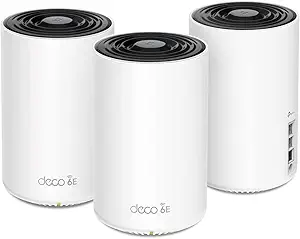 | Best Overall for VR Homes | Model: Deco XE75 Pro | WiFi Standard: WiFi 6E | Bands: Tri-Band (2.4 GHz, 5 GHz, 6 GHz) | VIEW ON AMAZON | See Our Full Breakdown |
| TP-Link Deco 7 BE23 Dual-Band BE3600 WiFi 7 Mesh Wi-Fi System (3-Pack) |  | Best Value Wi-Fi 7 Upgrade | Model: Deco 7 BE23 | Wi-Fi Standard: Wi-Fi 7 | Band: Dual-Band | VIEW ON AMAZON | See Our Full Breakdown |
| TP-Link Deco 7 Pro BE67 Tri-Band Wi-Fi 7 Mesh System (3-Pack) |  | Best Premium Pick | Model: Deco 7 Pro BE67 | Wi-Fi Standard: Wi-Fi 7 (BE14000) | Band Configuration: Tri-Band (2.4 GHz, 5 GHz, 6 GHz) | VIEW ON AMAZON | See Our Full Breakdown |
| TP-Link Deco X50-PoE AX3000 Mesh WiFi 6 System (3-Pack) |  | Best for Clean, Wired-Backhaul Installs | Model: Deco X50-PoE | WiFi Standard: WiFi 6 (AX3000) | Speed: 2402 Mbps (5 GHz) + 574 Mbps (2.4 GHz) | VIEW ON AMAZON | See Our Full Breakdown |
| NETGEAR Orbi 770 Series WiFi 7 Mesh System (3-Pack) |  | Best for Straightforward Large-Home Coverage | Model: Orbi 770 Series | WiFi Standard: WiFi 7 | Band Configuration: Tri-Band | VIEW ON AMAZON | See Our Full Breakdown |
| TP-Link Deco 7 Dual-Band BE5000 WiFi 7 Mesh Wi-Fi System |  | Best Overall | Wi-Fi Standard: WiFi 7 (BE5000) | Max Speed: 5 Gbps (4324 Mbps on 5 GHz, 688 Mbps on 2.4 GHz) | Bands: Dual-Band | VIEW ON AMAZON | See Our Full Breakdown |
| TP-Link Deco 7 Pro Tri-Band WiFi 7 Mesh System (3-Pack) |  | Best Premium | Wi-Fi Standard: WiFi 7 (BE10000) | Bands: Tri-Band (2.4 GHz, 5 GHz, 6 GHz) | Max Speed: 10 Gbps combined | VIEW ON AMAZON | See Our Full Breakdown |
| TP-Link Deco X55 AX3000 WiFi 6 Mesh System (3-Pack) |  | Best Value | Wi-Fi Standard: Wi-Fi 6 (AX3000) | Speed: 2402 Mbps (5 GHz) + 574 Mbps (2.4 GHz) | Coverage Area: Up to 6,500 sq. ft. | VIEW ON AMAZON | See Our Full Breakdown |
| WAVLINK AX3000 WiFi 6 Mesh System (3-Pack) |  | Best Budget Coverage | Model: WAVLINK CUBE Air | Wi-Fi Standard: WiFi 6 (AX3000) | Max Speed: 3.0 Gbps | VIEW ON AMAZON | See Our Full Breakdown |
| TP-Link Deco W4500 Wi-Fi 6 Mesh Router System (3-Pack, Renewed) |  | Best Entry-Level Pick | Model: Deco W4500 | Wi-Fi Standard: Wi-Fi 6 (AX1500) | Speed: 1,201 Mbps (5 GHz) + 300 Mbps (2.4 GHz) | VIEW ON AMAZON | See Our Full Breakdown |
| mesh system for multi story vr home | Device Capacity | Model | Coverage Area | Pack Size |
|---|---|---|---|---|
| NETGEAR Orbi 370 Series Dual-B | Up to 70 devices | RBE373 | 6,000 sq. ft. | — |
| eero 6+ Mesh Wi-Fi System | 75+ devices | eero 6+ | Up to 4,500 sq. ft. | 3-pack |
| NETGEAR Orbi 370 Series WiFi 7 | Up to 70 devices | Orbi 370 Series | Up to 6,000 sq. ft. | 3-Pack (1 Router, 2 Satellites) |
| TP-Link Deco X15 Dual-Band AX1 | Up to 120 devices | Deco X15 | — | — |
| TP-Link Deco 7 BE3600 Whole Ho | — | Deco 7 BE3600 | — | — |
| TP-Link Deco XE75 Pro AXE5400 | Up to 200 devices | Deco XE75 Pro | 7,200 sq. ft. | 3-Pack |
| TP-Link Deco 7 BE23 Dual-Band | 150 devices | Deco 7 BE23 | 6,500 sq. ft. | 3-Pack |
| TP-Link Deco 7 Pro BE67 Tri-Ba | Up to 200 devices | Deco 7 Pro BE67 | Up to 8,100 sq. ft. | 3-Pack |
| TP-Link Deco X50-PoE AX3000 Me | Up to 150 devices | Deco X50-PoE | — | 3-Pack |
| NETGEAR Orbi 770 Series WiFi 7 | Up to 100 devices | Orbi 770 Series | Up to 8,000 sq. ft. | 3-Pack |
| TP-Link Deco 7 Dual-Band BE500 | 150+ devices | — | Up to 6,600 sq. ft. | — |
| TP-Link Deco 7 Pro Tri-Band Wi | 200+ devices | — | Up to 7,600 sq. ft. | 3 units |
| TP-Link Deco X55 AX3000 WiFi 6 | Up to 150 devices | — | Up to 6,500 sq. ft. | — |
| WAVLINK AX3000 WiFi 6 Mesh Sys | — | WAVLINK CUBE Air | Up to 7,300 sq. ft. | 3 units |
| TP-Link Deco W4500 Wi-Fi 6 Mes | Up to 120 devices | Deco W4500 | Up to 5,600 sq. ft. | 3 units |
More Details on Our Top Picks
NETGEAR Orbi 370 Series Dual-Band WiFi 7 Mesh Network System (RBE373) – Renewed
Getting into WiFi 7 without paying new-retail pricing is the whole story here, and for a multi-story house where a VR headset roams between floors, the 6,000 sq. ft. of coverage from three units is genuinely useful. The 5 Gbps ceiling and 2.5G Ethernet WAN port mean this mesh won’t be the bottleneck on a fast fiber plan, which matters when a PC-tethered headset is pulling compressed video across the network. Compared with the TP-Link Deco X15, the Orbi trades raw device capacity (70 vs. 120) for a newer radio standard with lower latency behavior under load. The catch is the dual-band design with no dedicated wireless backhaul, so satellites sharing backhaul and client traffic over the air can introduce the exact latency spikes VR hates — running Ethernet between floors largely fixes that. And being renewed, expect possible cosmetic wear and a shorter practical lifespan than a sealed unit.
Pros:- WiFi 7 radios with a 5 Gbps ceiling keep pace with fast fiber plans
- 6,000 sq. ft. coverage across three units handles whole-house VR roaming
- 2.5G WAN port supports multi-gig internet without a bottleneck
- Supports up to 70 devices for a smart-home-heavy household
Cons:- Dual-band design with no dedicated backhaul band can add latency on wireless satellite links
- Renewed condition means possible cosmetic wear and reduced warranty coverage
Best for: VR enthusiasts in large multi-story homes with multi-gig internet who want WiFi 7 speeds at a lower price and can wire the backhaul
Not ideal for: Buyers who can’t run Ethernet between floors and need a tri-band dedicated backhaul, or anyone uncomfortable with refurbished hardware
- Model:RBE373
- WiFi Standard:WiFi 7
- Max Speed:5 Gbps
- Coverage Area:6,000 sq. ft.
- Device Capacity:Up to 70 devices
- Internet Port:2.5 Gigabit Ethernet
- Components:1 Router, 2 Extenders
- Condition:Renewed
Our verdict“A smart way into WiFi 7 for big houses, provided you can wire the satellites — wireless-only backhaul undercuts the VR performance this standard promises.”
eero 6+ Mesh Wi-Fi System (3-Pack)
The eero 6+ remains the easiest mesh system to live with, and its TrueMesh routing does a quietly good job of keeping a standalone headset connected as you climb stairs. The standout trick for a modern connected home is the built-in Thread and Zigbee hub, which replaces the separate smart-home bridge most people have floating around — something no other pick in this lineup offers. With 4,500 sq. ft. of Wi-Fi 6 coverage and 160 MHz channel support, it handles gigabit speeds fine for standalone headsets like Quest devices. Where it falls short of, say, the TP-Link Deco X15 is raw throughput headroom and device count, and it’s far behind the Orbi 370 on the spec sheet — anyone streaming high-bitrate PC VR over wireless will feel that ceiling. The bigger frustration is paywalling: security features and advanced parental controls sit behind a subscription, and support is limited to phone and email.
Pros:- Dead-simple app-guided setup and management anyone can handle
- Built-in Thread and Zigbee hub eliminates a separate smart-home bridge
- TrueMesh routing reduces drop-offs when moving a headset between floors
- Backward compatibility lets you mix in older eero units as extra nodes
Cons:- Advanced security and network controls require a paid subscription
- Wi-Fi 6 gigabit ceiling trails the WiFi 7 options in this roundup
Best for: Households that want a set-and-forget mesh with smart-home hub duties built in and mostly use standalone VR headsets
Not ideal for: PC VR streamers on fast internet plans who need multi-gig throughput and low-latency wireless backhaul
- Model:eero 6+
- Pack Size:3-pack
- Wi-Fi Standard:Wi-Fi 6
- Max Speed:Up to 1 Gbps
- Coverage Area:Up to 4,500 sq. ft.
- Device Capacity:75+ devices
- Smart Home Hub:Thread and Zigbee compatible
- Compatibility:Works with previous-generation eero devices
Our verdict“Buy it for frictionless setup and smart-home consolidation; skip it if you stream bandwidth-heavy PC VR across multiple floors.”
NETGEAR Orbi 370 Series WiFi 7 Mesh System (3-Pack)
This is the pick I’d point most multi-story VR households toward, because it balances new-condition WiFi 7 hardware, 6,000 sq. ft. of coverage, and a 5 Gbps ceiling without stepping up to pricier tri-band models like the Orbi 770 Series. What that means in practice: a headset tracking around a second-floor playspace stays on a strong, low-latency link while the rest of the household streams and games, and the guided Orbi app setup means you’re not spending an evening tuning node placement. Compared with the renewed RBE373, you get the same core hardware with the peace of mind of a factory-fresh unit and full warranty. The honest tradeoffs: like its renewed sibling it’s dual-band, so wireless backhaul competes with client traffic — wired backhaul between floors is the real answer — and NETGEAR Armor security lapses into a subscription after 30 days. It’s also US-market only, so international buyers should look elsewhere.
Pros:- 5 Gbps WiFi 7 throughput with multi-gig-ready performance for PC VR streaming
- 6,000 sq. ft. of coverage across three nodes eliminates dead zones floor to floor
- Handles up to 70 devices without collapsing under simultaneous household load
- Straightforward app-guided setup and ISP-agnostic compatibility
Cons:- Dual-band backhaul shared with client traffic can add jitter on wireless-only satellite links
- NETGEAR Armor requires a paid subscription after the 30-day trial
Best for: Owners of large multi-story homes who want factory-new WiFi 7 performance for roaming VR headsets and busy device loads
Not ideal for: Households unwilling to eventually pay for security features, or buyers outside the US
- Model:Orbi 370 Series
- WiFi Standard:WiFi 7
- Max Speed:Up to 5 Gbps
- Coverage Area:Up to 6,000 sq. ft.
- Device Capacity:Up to 70 devices
- Pack Size:3-Pack (1 Router, 2 Satellites)
- Band:Dual-Band
- Security:NETGEAR Armor (30-day trial)
- Compatibility:Works with any ISP (cable or fiber)
Our verdict“The most balanced new-condition WiFi 7 mesh here for big multi-story homes — just budget for Ethernet backhaul between floors to get its best VR behavior.”
TP-Link Deco X15 Dual-Band AX1500 WiFi 6 Mesh Wi-Fi System (3-Pack)
If your priority is covering a big house cheaply while connecting everything — cameras, consoles, thermostats, headsets — the Deco X15’s 120-device capacity beats every other pick here, including the Orbi 370 at 70 and the eero 6+ at 75+. Its 5,600 sq. ft. of coverage is nearly Orbi-class, and the support for wired Ethernet backhaul across its six total Gigabit ports is the feature that matters most for VR: cabling the two satellites turns a budget mesh into a stable, low-jitter network across floors. The compromise is speed class. AX1500 is an entry tier — roughly 1.2 Gbps on the 5 GHz band shared among everything — so while standalone headset play feels fine, high-bitrate PC VR streaming will hit this ceiling before it hits your internet plan, and it can’t touch the WiFi 7 options on paper. HomeShield’s better security tools also sit behind a subscription.
Pros:- Supports up to 120 devices with stable performance for smart-home-heavy households
- Wired Ethernet backhaul support delivers reliable low-latency links between floors
- 5,600 sq. ft. of coverage rivals pricier systems like the Orbi 370
- AI-driven roaming and simple Deco app management keep maintenance minimal
Cons:- AX1500 speed tier is well below the WiFi 7 picks and even AX3000 rivals like the Deco X55
- Advanced HomeShield security features require a premium subscription
Best for: Budget-conscious owners of large, device-heavy homes who can run wired backhaul between floors and mostly play standalone VR
Not ideal for: PC VR streamers or multi-gig internet subscribers who need more than AX1500 throughput
- Model:Deco X15
- Standard:WiFi 6 (802.11ax)
- Speed:AX1500 (1201 Mbps on 5 GHz, 300 Mbps on 2.4 GHz)
- Coverage:Up to 5,600 sq. ft.
- Device Capacity:Up to 120 devices
- Ports:2 Gigabit Ethernet per unit (6 total)
- Backhaul:Dynamic backhaul with wired Ethernet support
- Security:TP-Link HomeShield
- Compatibility:Alexa, Google Assistant, all WiFi generations, any ISP
Our verdict“The value play for sprawling, gadget-filled homes — wire the backhaul and it punches above its price, but speed-focused VR streamers will outgrow it.”
TP-Link Deco 7 BE3600 Whole Home Mesh WiFi 7 System (Renewed)
Sitting between the Deco X15’s budget Wi-Fi 6 and the faster Deco 7 Pro tri-band models, this renewed BE3600 system is the middle path: WiFi 7 radios with a 3,600 Mbps combined ceiling, AI-driven mesh optimization that steers a roaming headset to the strongest node, and six Ethernet ports across the three units for wired backhaul. For a multi-story home where you want modern WiFi 7 latency behavior at a refurb price, it’s a compelling argument — reduced lag under load is exactly what keeps VR sessions from stuttering. The tradeoffs are real, though. As a renewed unit it may carry wear and a shorter expected lifespan than the new Orbi 370 3-pack, and the 3,600 Mbps class trails that Orbi’s 5 Gbps headline. Like other TP-Link picks here, the more capable HomeShield features sit behind a subscription, which adds to the long-run cost of an otherwise affordable upgrade.
Pros:- WiFi 7 radios deliver lower latency than same-price Wi-Fi 6 systems like the Deco X15
- AI-driven mesh optimization keeps roaming headsets attached to the strongest node
- Six Ethernet ports across three units make wired backhaul straightforward
- HomeShield security and parental controls included at a base level
Cons:- Renewed condition may mean cosmetic wear and a shorter lifespan than new units
- 3,600 Mbps class trails the 5 Gbps Orbi 370 and Deco 7 Pro options
- Advanced HomeShield features require a premium subscription
Best for: Upgraders who want WiFi 7 latency benefits across multiple floors at a renewed price and plan to wire backhaul
Not ideal for: Buyers who want full warranty coverage and top-tier throughput, or those unwilling to deal with subscription-gated security
- Model:Deco 7 BE3600
- WiFi Generation:WiFi 7 (802.11be)
- Max Data Transfer Rate:3600 Mbps
- Number of Ports:6 total across 3 units
- Special Features:AI-Driven Mesh optimization, parental controls, HomeShield security
- Compatible Devices:Smartphone, tablet, laptop, gaming console
- Operating Systems:iOS, macOS, Windows
- Weight:4.9 pounds
- Condition:Renewed
Our verdict“A sensible refurbished WiFi 7 entry point for multi-story VR homes — accept the renewal risk, wire what you can, and it outperforms its price class.”
TP-Link Deco XE75 Pro AXE5400 Tri-Band WiFi 6E Mesh System (3-Pack)
For wireless VR headsets roaming between floors, the dedicated 6 GHz band is what makes this pick stand out. Instead of sharing crowded 5 GHz airspace with laptops and smart TVs, a WiFi 6E headset gets its own low-latency lane — exactly what prevents the stutter that ruins a beat-mapping session on the second floor. Compared with the Deco X50-PoE, which is dual-band WiFi 6, the XE75 Pro holds its backhaul and fronthaul apart across three bands, so node-to-node traffic doesn’t cannibalize headset bandwidth on a multi-story layout.
The 7,200 sq. ft. coverage and 200-device ceiling give it headroom the smaller Deco 7 BE23 can’t match, though there’s a real tradeoff: like everything in this lineup, it needs a separate modem, and headsets stuck on WiFi 5 or 6 will never touch the 6 GHz band they’re paying for.
Pros:- Dedicated 6 GHz band keeps VR headset latency isolated from household traffic
- 7,200 sq. ft. coverage suits three-story homes without extra nodes
- 2.5 Gbps port future-proofs multi-gig internet plans
- AI-driven roaming keeps headsets connected while moving between floors
Cons:- 6 GHz benefits only materialize with WiFi 6E-compatible headsets and devices
- Requires a separate modem for most ISPs
Best for: Owners of WiFi 6E VR headsets (Quest 3, Vive XR Elite) in homes of 4,000+ square feet who want a dedicated clean spectrum for low-latency play across floors
Not ideal for: Households where every device is older WiFi 5/6 hardware — the 6 GHz band goes unused and the cheaper Deco X55 delivers similar real-world results
- Model:Deco XE75 Pro
- WiFi Standard:WiFi 6E
- Bands:Tri-Band (2.4 GHz, 5 GHz, 6 GHz)
- Total Speed:5,400 Mbps
- Coverage Area:7,200 sq. ft.
- Device Capacity:Up to 200 devices
- Ports:1x 2.5 Gbps WAN/LAN, 2x 1 Gbps LAN
- Security:TP-Link HomeShield
- Pack Size:3-Pack
Our verdict“The safest all-around choice for multi-story VR households that want a clean, dedicated band for headsets without stepping up to premium Wi-Fi 7 pricing.”
TP-Link Deco 7 BE23 Dual-Band BE3600 WiFi 7 Mesh Wi-Fi System (3-Pack)
This is the most affordable path into Wi-Fi 7 in this lineup, and the headline feature for VR buyers is Multi-Link Operation — the headset can split its traffic across both bands simultaneously, which smooths over the momentary dips that occur when you walk upstairs mid-session. What separates it from the similarly priced Deco X55 is that each node carries dual 2.5 Gbps ports, so a wired backhaul between floors runs at full multi-gig speed rather than being throttled to 1 Gbps.
The compromise is structural: it’s dual-band only. Unlike the tri-band Deco XE75 Pro or Deco 7 Pro BE67, there’s no third band to dedicate to backhaul, so a wireless node-to-node link competes directly with headset traffic. Homes that can run Ethernet between at least two nodes will get the best out of it; fully wireless three-story installs should look tri-band instead.
Pros:- Wi-Fi 7 Multi-Link Operation reduces latency spikes during headset movement
- Dual 2.5 Gbps ports per node enable fast wired backhaul between floors
- 6,500 sq. ft. coverage with high-gain antennas for penetrating floors
- Includes HomeShield security, IoT isolation, and VPN client/server support
Cons:- No dedicated third band, so wireless backhaul competes with device traffic
- Needs a multi-gig modem (sold separately) to use the 2.5 Gbps ports fully
Best for: Buyers who want Wi-Fi 7 features and wired multi-gig backhaul on a budget, especially those who can run Ethernet between floors
Not ideal for: Fully wireless multi-story installs — dual-band backhaul shares spectrum with headset traffic and degrades VR latency at range
- Model:Deco 7 BE23
- Wi-Fi Standard:Wi-Fi 7
- Band:Dual-Band
- Max Speed:3.6 Gbps (2882 Mbps 5 GHz + 688 Mbps 2.4 GHz)
- Coverage Area:6,500 sq. ft.
- Device Capacity:150 devices
- Ports:2x 2.5 Gbps WAN/LAN per node
- Antennas:4x high-gain antennas per node
- Pack Size:3-Pack
Our verdict“A smart budget Wi-Fi 7 pick for wired-backhaul homes, but skip it if your nodes must link wirelessly across stories.”
TP-Link Deco 7 Pro BE67 Tri-Band Wi-Fi 7 Mesh System (3-Pack)
If VR is the centerpiece of your home network — a dedicated playroom, PC VR streaming over wireless, multiple headsets — this is the ceiling of what’s on offer here. The tri-band Wi-Fi 7 layout puts a massive 8,647 Mbps on the 6 GHz band, which is the configuration that matters most for uncompressed PC-to-headset streaming across floors. Compared with the Orbi 770, its 10 Gbps WAN/LAN port and USB 3.0 give it a wired-flexibility edge, and its 200-device capacity doubles NETGEAR’s rating for busy smart homes.
The tradeoffs are straightforward but real. Premium Wi-Fi 7 pricing buys capability most internet plans can’t feed, and most current headsets can’t fully consume — you’re building for the next few years, not this quarter. Like its Deco siblings, a modem is a separate purchase.
Pros:- Dedicated 6 GHz band with 8,647 Mbps for low-latency VR streaming
- 10 Gbps WAN/LAN port plus USB 3.0 for multi-gig and storage flexibility
- 8,100 sq. ft. coverage handles four-plus story or sprawling layouts
- 200-device capacity with AI roaming across all nodes
Cons:- Premium pricing for hardware most current headsets can’t fully utilize
- Requires a separately purchased modem
Best for: Enthusiasts running wireless PC VR streaming or multiple simultaneous headsets in large multi-story homes who want maximum headroom
Not ideal for: Casual standalone-headset players — the extra 6 GHz capacity goes untapped and the Deco XE75 Pro does the same job for less
- Model:Deco 7 Pro BE67
- Wi-Fi Standard:Wi-Fi 7 (BE14000)
- Band Configuration:Tri-Band (2.4 GHz, 5 GHz, 6 GHz)
- Max Speed:14 Gbps (8,647 Mbps 6 GHz + 4,324 Mbps 5 GHz + 688 Mbps 2.4 GHz)
- Coverage Area:Up to 8,100 sq. ft.
- Device Capacity:Up to 200 devices
- Ports:1x 10 Gbps WAN/LAN, 1x 2.5 Gbps WAN/LAN, 1x 1 Gbps WAN/LAN, 1x USB 3.0
- Dimensions:4.23 x 4.23 x 6.93 inches per unit
- Pack Size:3-Pack
Our verdict“Overkill for casual players but the right kind of overkill for serious wireless PC VR setups that need years of headroom.”
TP-Link Deco X50-PoE AX3000 Mesh WiFi 6 System (3-Pack)
This pick earns its place for a reason the spec sheet undersells: PoE+ power and data over a single cable. In a multi-story VR home, the best node placement is often a hallway ceiling or the top of a stairwell — spots with no outlet nearby. With a PoE+ switch, each Deco X50 mounts exactly where coverage is needed and pulls both power and 2.5 Gbps wired backhaul through one Ethernet run, eliminating the wireless hop that adds latency to upstairs VR sessions. No other system in this lineup offers that.
Compared with the Deco X55, which shares the same AX3000 radios, the X50-PoE trades slightly higher cost for those multi-gig ports and PoE flexibility. The catch: it’s dual-band WiFi 6, so there’s no dedicated third band — if you skip the wired backhaul and go fully wireless, the Deco XE75 Pro’s tri-band design handles multi-story VR traffic better.
Pros:- PoE+ support allows single-cable mounting in outlet-free locations
- 2.5 Gbps ports per unit enable multi-gig wired backhaul between floors
- 6,500 sq. ft. coverage with AI-driven mesh roaming
- Works with Alexa and all major ISPs
Cons:- PoE+ switch is not included and adds to total cost
- Dual-band design forces wireless backhaul to share spectrum with devices
Best for: Homeowners renovating or wiring Ethernet between floors who want ceiling- or stairwell-mounted nodes with clean single-cable installs
Not ideal for: Renters or anyone unwilling to run Ethernet — without a PoE+ switch and cabling, its core advantage disappears and tri-band rivals win
- Model:Deco X50-PoE
- WiFi Standard:WiFi 6 (AX3000)
- Speed:2402 Mbps (5 GHz) + 574 Mbps (2.4 GHz)
- Coverage:Up to 6,500 sq. ft.
- Device Capacity:Up to 150 devices
- Ports:Two 2.5 Gbps Ethernet ports per unit
- Power Options:PoE+ or standard power plug
- Security:TP-Link HomeShield
- Pack Size:3-Pack
Our verdict“The pick for wired-install households — if you can pull Ethernet through your walls, this turns node placement from a compromise into an advantage.”
NETGEAR Orbi 770 Series WiFi 7 Mesh System (3-Pack)
NETGEAR’s approach here is coverage-first simplicity: 8,000 sq. ft. of tri-band Wi-Fi 7 with setup and management handled almost entirely through the Orbi app, and security enabled out of the box rather than left as a configuration chore. For a household that wants VR to just work on every floor without tinkering, that out-of-the-box posture compares favorably to the Deco lineup, where HomeShield’s fuller features sit behind tiers of options.
Where it falls short of the Deco 7 Pro BE67 is capacity and wired flexibility — 100 rated devices versus 200, no 10 Gbps port, and no USB. The sharper tradeoff is software: NETGEAR Armor requires a subscription after the 30-day trial, so the strong security story becomes an ongoing cost, unlike TP-Link’s free basic tier. It’s also rated for plans up to 2.5 Gbps, which caps its usefulness for multi-gig fiber households.
Pros:- 8,000 sq. ft. tri-band coverage suits sprawling or three-story homes
- Wi-Fi 7 speeds up to 11 Gbps with app-guided setup
- Security features active out of the box with no initial configuration
- Strong roaming performance for headset movement between floors
Cons:- NETGEAR Armor security requires a paid subscription after the 30-day trial
- Rated for internet plans up to only 2.5 Gbps, limiting multi-gig households
- 100-device capacity is half the Deco 7 Pro BE67’s rating
Best for: Non-technical owners of very large homes who prioritize dead-simple app management and blanket coverage over raw specs
Not ideal for: Multi-gig fiber subscribers and subscription-averse buyers — the 2.5 Gbps plan ceiling and post-trial Armor fees limit long-term value
- Model:Orbi 770 Series
- WiFi Standard:WiFi 7
- Band Configuration:Tri-Band
- Max Speed:Up to 11 Gbps
- Coverage Area:Up to 8,000 sq. ft.
- Device Capacity:Up to 100 devices
- Compatibility:Cable or fiber ISP, plans up to 2.5 Gbps
- Region:US Only
- Pack Size:3-Pack
Our verdict“A coverage-first pick for large homes that value effortless setup, as long as the subscription model and 2.5 Gbps ceiling don’t clash with your plans.”
TP-Link Deco 7 Dual-Band BE5000 WiFi 7 Mesh Wi-Fi System
WiFi 7 headroom makes this the strongest all-around pick for wireless VR across multiple floors. Headset makers are steadily pushing into WiFi 7, and the Deco 7’s 5 Gbps ceiling means a Quest or Pico headset upstairs won’t fight the rest of the household for airtime. Compared with the Deco X55, the jump from WiFi 6 to WiFi 7 translates directly into lower latency during fast-motion VR sessions, which matters more than raw throughput when you’re wearing the display. Coverage of up to 6,600 sq. ft. handles most three-story homes, and simultaneous wired and wireless backhaul lets you run Ethernet to the second-floor node while the third relies on wireless. The tradeoff is honest: there’s no dedicated backhaul band like the tri-band Deco 7 Pro offers, so a fully wireless multi-node setup gives up some consistency.
Pros:- WiFi 7 speeds up to 5 Gbps keep wireless VR latency low for years to come
- 6,600 sq. ft. coverage suits most multi-story layouts
- Simultaneous wired and wireless backhaul supports hybrid multi-floor setups
- HomeShield security plus VPN client and server support
Cons:- No dedicated backhaul radio, so fully wireless deployments sacrifice some stability
- Advanced HomeShield features sit behind a subscription
Best for: VR enthusiasts in two-to-three story homes who want future-proof WiFi 7 speeds without paying tri-band prices
Not ideal for: Homes that can’t run any Ethernet between floors and need a dedicated backhaul band for maximum wireless stability
- Wi-Fi Standard:WiFi 7 (BE5000)
- Max Speed:5 Gbps (4324 Mbps on 5 GHz, 688 Mbps on 2.4 GHz)
- Bands:Dual-Band
- Coverage Area:Up to 6,600 sq. ft.
- Device Capacity:150+ devices
- Backhaul:Simultaneous wired (2.5G Ethernet) and wireless
- Security:TP-Link HomeShield with VPN client/server
Our verdict“The best balance of WiFi 7 speed, coverage, and price for a multi-story VR household that can wire at least one node.”
TP-Link Deco 7 Pro Tri-Band WiFi 7 Mesh System (3-Pack)
This is the pick when VR performance is non-negotiable. The Deco 7 Pro’s tri-band design dedicates the 6 GHz band to traffic and backhaul, which is exactly what a wireless headset in an upstairs room needs — a clean, uncongested lane separate from the smart TVs and laptops downstairs. Compared with the dual-band Deco 7, that extra radio is the single biggest reliability upgrade for multi-story homes where running Ethernet between floors isn’t practical. The 10G WAN/LAN port and four 2.5G ports also future-proof the wired side, so a PC running Steam Link or a dedicated VR router can hook in at full speed. The cost of all this is real: this is the priciest tier of WiFi 7 hardware, and heavy walls and long distances between nodes will still erode performance regardless of spec sheet numbers.
Pros:- Dedicated 6 GHz band reduces contention for latency-sensitive VR traffic
- 10G WAN/LAN plus four 2.5G ports support multi-gig wired backhaul and PC VR
- 7,600 sq. ft. coverage with 200+ device capacity for busy households
- AI-driven roaming keeps headset connections intact between floors
Cons:- Premium pricing typical of flagship WiFi 7 hardware
- Performance still degrades with physical obstacles and node spacing
- Requires a separate modem for most ISPs
Best for: PC VR streamers and multi-user households who want maximum wireless stability and multi-gig wired ports across three floors
Not ideal for: Budget-conscious buyers or smaller homes where the Deco 7 or X55 delivers nearly the same VR experience for less
- Wi-Fi Standard:WiFi 7 (BE10000)
- Bands:Tri-Band (2.4 GHz, 5 GHz, 6 GHz)
- Max Speed:10 Gbps combined
- Coverage Area:Up to 7,600 sq. ft.
- Device Capacity:200+ devices
- Ports:1x 10G WAN/LAN, 4x 2.5G WAN/LAN, 1x USB 3.0
- Pack Size:3 units
- Security:TP-Link HomeShield
Our verdict“Buy it if wireless VR reliability across floors justifies flagship pricing; skip it if your layout allows wired backhaul on cheaper hardware.”
TP-Link Deco X55 AX3000 WiFi 6 Mesh System (3-Pack)
The X55 earns its spot by being the sensible middle ground for VR households that don’t need WiFi 7 yet. AX3000 speeds comfortably exceed what current standalone headsets can consume, and 6,500 sq. ft. of coverage matches the more expensive Deco 7’s footprint almost exactly. What separates it from budget rivals like the WAVLINK AX3000 is the small stuff that compounds: three Gigabit ports per node make wired Ethernet backhaul between floors straightforward, and the mature Deco app plus HomeShield parental controls feel more polished than third-party alternatives. The honest tradeoff versus the Deco 7 line is that there’s no WiFi 7 headroom — as headsets adopt the newer standard over the coming years, this system will age faster. For today’s headsets, though, the real-world VR experience is nearly identical.
Pros:- 6,500 sq. ft. coverage rivals pricier WiFi 7 systems
- Wired Ethernet backhaul support stabilizes multi-floor VR sessions
- Three Gigabit ports per unit simplify wiring consoles and PCs
- Up to 150 devices with mature app-based management
Cons:- WiFi 6 lacks the future headroom of WiFi 7 alternatives
- Premium HomeShield features require a subscription
Best for: Buyers who want proven WiFi 6 whole-home coverage for current VR headsets at a moderate price
Not ideal for: Early adopters who want a system that stays current as WiFi 7 headsets become standard
- Wi-Fi Standard:Wi-Fi 6 (AX3000)
- Speed:2402 Mbps (5 GHz) + 574 Mbps (2.4 GHz)
- Coverage Area:Up to 6,500 sq. ft.
- Device Capacity:Up to 150 devices
- Ports:3 Gigabit Ethernet per unit
- Backhaul:Wired Ethernet backhaul supported
- Security:TP-Link HomeShield
Our verdict“The smart spend for multi-story VR homes that want reliability today without paying for standards headsets haven’t adopted yet.”
WAVLINK AX3000 WiFi 6 Mesh System (3-Pack)
If raw square footage is the problem, 7,300 sq. ft. of claimed coverage from five high-gain antennas makes this the coverage-per-dollar standout in the lineup. On paper it matches the Deco X55’s AX3000 speeds while covering more area and supporting more devices, and its WPA3 encryption and flexible mesh/AP modes cover the fundamentals well. For VR specifically, the 256-device ceiling means a headset won’t get crowded out in a smart-home-heavy household. The compromises are in the ecosystem rather than the radio: the WavRouter app and support network are less mature than TP-Link’s, there’s no bundled security suite comparable to HomeShield, and long-term firmware attention is less certain. Gigabit-only ports also mean no 2.5G backhaul option, which limits how fast inter-node traffic can move compared with the Deco 7.
Pros:- 7,300 sq. ft. coverage from five high-gain antennas
- Supports 256+ simultaneous devices for crowded networks
- WPA3 enterprise-grade security and flexible mesh/AP modes
- Choice of wired or wireless backhaul
Cons:- Smaller brand with a less mature app and support ecosystem
- Gigabit ports cap wired backhaul below TP-Link’s 2.5G options
Best for: Owners of very large or awkwardly laid-out multi-story homes who prioritize maximum coverage on a tight budget
Not ideal for: Buyers who value polished app management, ongoing firmware support, and integrated security features
- Model:WAVLINK CUBE Air
- Wi-Fi Standard:WiFi 6 (AX3000)
- Max Speed:3.0 Gbps
- Coverage Area:Up to 7,300 sq. ft.
- Bands:Dual-Band (2.4 GHz & 5 GHz)
- Antennas:5 high-gain (2x 2.4 GHz, 3x 5 GHz)
- Max Devices:256+
- Security:WPA3
- Pack Size:3 units
Our verdict“A coverage-first budget choice that trades ecosystem polish for square footage — ideal when walls and floors are the enemy.”
TP-Link Deco W4500 Wi-Fi 6 Mesh Router System (3-Pack, Renewed)
For a first VR headset in a two-story home, this renewed W4500 3-pack covers the basics without demanding much upfront commitment. 5,600 sq. ft. of coverage and 120-device capacity are plenty for a typical family, and the unified network with automatic band steering means a headset carried from the ground floor to a bedroom stays connected instead of dropping mid-session — the failure mode that ruins VR fastest. Compared with the Deco X55, the lower AX1500 speeds are the clear sacrifice: wireless PC VR streaming from a rig upstairs will feel that ceiling, even if standalone headset play holds up fine. There’s also no dedicated backhaul band, so every hop between nodes shares airtime with client traffic. And because this is renewed hardware, buyers accept some uncertainty in condition and lifespan that a new unit wouldn’t carry.
Pros:- Three-unit mesh at an accessible entry price point
- 5,600 sq. ft. coverage suits typical two-story homes
- OFDMA and MU-MIMO keep latency low for gaming and calls
- Seamless roaming maintains headset connections between floors
Cons:- AX1500 speeds limit wireless PC VR streaming headroom
- Renewed condition carries warranty and lifespan uncertainty
- No dedicated backhaul band for multi-hop deployments
Best for: First-time VR owners in moderate-size two-story homes who want whole-home coverage at the lowest entry cost
Not ideal for: Wireless PC VR streamers or buyers who prefer new hardware with full warranty peace of mind
- Model:Deco W4500
- Wi-Fi Standard:Wi-Fi 6 (AX1500)
- Speed:1,201 Mbps (5 GHz) + 300 Mbps (2.4 GHz)
- Coverage Area:Up to 5,600 sq. ft.
- Device Capacity:Up to 120 devices
- Condition:Renewed
- Pack Size:3 units
Our verdict“A low-risk way to get seamless multi-floor Wi-Fi for standalone VR, provided you accept modest speeds and renewed hardware.”

How We Picked
I judged every system against the specific demands of wireless VR across multiple floors, which means the ranking weights things generic roundups don’t. The first criterion was backhaul design: whether the system offers a dedicated tri-band link or Ethernet backhaul, because a headset streaming PC VR upstairs is the most latency-sensitive device most homes will ever run. The second was satellite placement flexibility — how well each node maintains throughput when it can’t sit in an ideal central location, which is unavoidable in multi-story layouts where the modem enters at one corner of the house.
From there I weighed per-node coverage versus cost, since VR playspaces on the third floor often need an extra node purely for that room; setup and management, because steering headset traffic onto a specific band matters for Air Link tuning; and condition and warranty for the renewed units. Systems that pair a strong front-haul with a weak or shared backhaul ranked below systems with slower peak speeds but clean traffic separation — that’s the logic behind several Wi-Fi 6 picks outranking newer Wi-Fi 7 dual-band kits.
| mesh system for multi story vr home | Security |
|---|---|
| NETGEAR Orbi 370 Series Dual-B | — |
| eero 6+ Mesh Wi-Fi System | — |
| NETGEAR Orbi 370 Series WiFi 7 | NETGEAR Armor (30-day trial) |
| TP-Link Deco X15 Dual-Band AX1 | TP-Link HomeShield |
| TP-Link Deco 7 BE3600 Whole Ho | — |
| TP-Link Deco XE75 Pro AXE5400 | TP-Link HomeShield |
| TP-Link Deco 7 BE23 Dual-Band | — |
| TP-Link Deco 7 Pro BE67 Tri-Ba | — |
| TP-Link Deco X50-PoE AX3000 Me | TP-Link HomeShield |
| NETGEAR Orbi 770 Series WiFi 7 | — |
| TP-Link Deco 7 Dual-Band BE500 | TP-Link HomeShield with VPN client/server |
| TP-Link Deco 7 Pro Tri-Band Wi | TP-Link HomeShield |
| TP-Link Deco X55 AX3000 WiFi 6 | TP-Link HomeShield |
| WAVLINK AX3000 WiFi 6 Mesh Sys | WPA3 |
| TP-Link Deco W4500 Wi-Fi 6 Mes | — |
Factors to Consider When Choosing Mesh System For Multi Story Vr Homes
Before settling on a specific system, it helps to understand what actually breaks VR performance in a multi-story home — because the answer is rarely raw speed.Backhaul Type Is Everything for VR
The most common mistake I see is buyers comparing headline speeds while ignoring how satellites talk to each other. In a dual-band system, that inter-node link shares the same radios carrying your headset traffic, so every megabit your family streams downstairs subtracts from the link your Quest needs upstairs. A dedicated wireless backhaul or, better yet, Ethernet backhaul between nodes keeps headset latency flat even during evening peak usage. If your home has any existing Ethernet, coax (for MoCA adapters), or even structured wiring between floors, prioritize systems that support wired backhaul over flashier wireless kits. This single decision affects VR smoothness more than jumping from Wi-Fi 6 to Wi-Fi 7.
Node Count Versus Floor Plan Reality
Manufacturer coverage figures assume open floor plans and drywall construction, which describes almost nobody’s house. Brick chimneys, HVAC ducts, and floor joists running perpendicular to your signal path can cut real coverage roughly in half per floor. For a typical three-story home with a VR room on the top floor, plan on the playspace getting its own dedicated node rather than relying on bleed-through from below. A three-pack placed badly will underperform a two-pack placed well — the playspace node should sit in the same room or the room directly adjacent, with line of sight to where you actually stand while playing.
Wi-Fi 6E and 7 Bands: When They Actually Help a Headset
Modern standalone headsets support Wi-Fi 6, and a growing number support 6E, which opens the 6GHz band — far less congested and lower-latency than 5GHz. The catch: 6GHz attenuates faster through floors, so a headset two stories from the router may fall back to 5GHz anyway unless a satellite sits nearby. Wi-Fi 7 adds multi-link operation that can help, but only a few headsets currently use it. My practical advice: buy 6E or Wi-Fi 7 for the backhaul benefits, not for the headset connection itself, and confirm which band your specific headset model actually supports before paying a premium for it.
Renewed Versus New: The Real Risk Profile
Several strong options in this category are available as renewed units, and for mesh hardware the risk is lower than with most electronics — there are no moving parts and failures usually show up quickly. What renewed genuinely costs you is warranty length and support access, plus occasionally missing Ethernet backhaul accessories or wall mounts. For a VR setup, I’d only buy renewed when the model is one you’d be happy with at full spec anyway; a renewed tri-band system generally beats a new dual-band one at the same price point. Check the seller’s return window specifically, since mesh issues often only appear once you walk upstairs mid-session.
Wiring Your Playspace Node
For PC VR streaming, the ideal multi-story layout is a wired connection from your gaming PC to the node nearest the headset — either directly or via Ethernet backhaul. Before buying, walk your house and identify whether you can run a single cable between floors, even an unsightly one along a stairwell trim. Power-over-Ethernet systems like the Deco X50-PoE open up placement options in attics and converted garages where outlets sit far from the playspace center. If running any cable is truly impossible, that’s when the tri-band wireless backhaul of the higher-ranked kits earns its price — you’re paying for the cable you couldn’t run.
Don’t Overspend on Speeds You Can’t Use
VR streaming tops out well below the multi-gigabit figures on Wi-Fi 7 boxes — a PC VR stream needs roughly 100–150 Mbps of clean, low-latency throughput, not 5 gigabits. What you’re actually buying with higher-tier kits is consistency under load and better performance at range, not headline speed. Households with gigabit internet and many simultaneous users do benefit from the premium tiers, but a household whose bandwidth is mostly consumed by one headset and some streaming can get flawless performance from mid-tier AX3000-class hardware placed correctly. Spend the savings on an extra node for the top floor instead of a faster two-pack.
Frequently Asked Questions
Do I need Wi-Fi 7 for wireless VR, or is Wi-Fi 6 enough?
For current headsets, Wi-Fi 6 is genuinely sufficient — most standalone units max out at Wi-Fi 6, so a Wi-Fi 7 router’s extra speed goes unused by the headset itself. Where Wi-Fi 6E and Wi-Fi 7 kits earn their price is the backhaul side: a dedicated 6GHz link between nodes keeps your playspace node fed without competing with household traffic. If you’re buying new and plan to keep the system five-plus years, Wi-Fi 7 future-proofs you for next-generation headsets. But a well-placed tri-band Wi-Fi 6 or 6E system will outperform a poorly placed Wi-Fi 7 dual-band kit every time, so placement and backhaul should drive the decision before radio generation does.
How many mesh nodes do I need for a three-story house with a VR room upstairs?
For most three-story homes, a three-pack works if you place the main unit centrally on the middle floor and satellites above and below it. The VR playspace deserves priority placement: the node serving it should be in the same room or directly adjacent, because every wall and floor between the headset and node adds latency and packet loss. If your playspace is a top-floor attic or a converted garage with metal framing or foil-backed insulation, budget for a fourth node or plan on Ethernet backhaul to that location. A common failure pattern is putting the VR room’s node in a hallway to ‘cover the whole floor’ — that halves the link quality exactly where you need it most.
Is a dual-band mesh system ever acceptable for VR?
Yes, with two conditions: a lightly loaded network and a short backhaul hop. If you live alone or your household’s simultaneous usage is modest, a dual-band kit like the Deco X15 or BE23 can stream VR acceptably, especially with the headset’s node placed nearby. The trouble starts when someone streams 4K video or downloads a game while you’re mid-session — the shared backhaul has no way to protect your latency-sensitive traffic. If you go dual-band, pick a kit that supports Ethernet backhaul so you can upgrade to wired nodes later without replacing hardware. That upgrade path is what separates the acceptable dual-band picks from the ones I’d skip.
Should I connect my VR headset to the same node as my gaming PC for PC VR streaming?
Yes, whenever possible — this is one of the cheapest performance upgrades available. When the PC and headset share a node, traffic between them never crosses the wireless backhaul, cutting latency substantially for Air Link, Virtual Desktop, and Steam Link sessions. Practically, this means placing a node in or near the room containing your PC and setting up your playspace there or adjacent to it. If your PC and playspace must be on different floors, wired backhaul between the two nodes becomes the next-best option. Many buyers chase faster routers when simply relocating a node would have solved their stutter.
Are renewed mesh systems worth the risk for a VR setup?
For mesh hardware specifically, renewed units are a reasonable bet because failures are rare and usually apparent within the return window. The tradeoffs are a shorter warranty, occasionally missing accessories like Ethernet cables or mounts, and no direct manufacturer support in some cases. For VR, I’d apply one rule: only buy renewed when the model is tri-band or supports Ethernet backhaul — a renewed dual-band unit saves money on a configuration that’s already compromised for latency-sensitive use. The renewed Orbi and Deco units in this roundup make sense for buyers who want more hardware per dollar; just verify the seller’s return policy before committing, and test upstairs VR performance in the first week.
Conclusion
Matching the right system to your situation comes down to one question: how badly can your house be wired? For most multi-story VR households, the NETGEAR Orbi 770 Series is the best overall pick — its tri-band Wi-Fi 7 design handles wireless backhaul across floors without compromise. The TP-Link Deco XE75 Pro is the best value, delivering tri-band traffic separation at a mid-tier price, while the Deco 7 Pro BE67 is the premium choice for buyers who want maximum headroom for future headsets and multi-gig internet.
Beginners should start with the eero 6+ or Deco X55: simple apps, reliable behavior, and Ethernet backhaul support if you later run cable. For specific needs, the Deco X50-PoE solves awkward satellite placement in attic and garage playspaces, and the renewed Orbi 370 RBE373 is the smartest budget entry for anyone willing to accept a shorter warranty in exchange for tri-band hardware. Whatever you choose, remember that placement and backhaul beat raw speed — a mid-tier kit with a node next to your playspace will always feel smoother than a flagship hidden in a closet.