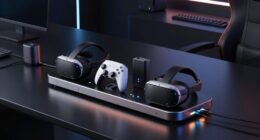
A magnetic charging system for VR controllers can make recharging easier, but the right pick depends on your headset and whether you want a dock or a cable. My best overall choice is the PlayStation VR2 Sense Controller Charging Station for a purpose-built fit with PSVR2 controllers, while the Anker Charging Dock for Oculus Quest 2 stands out for Quest 2 owners who want a dock-and-battery setup. For Quest 3 and 3S users, the ZVTE 30W Fast Charging Dock offers a broader battery bundle, though its added features may matter less than headset compatibility. The main tradeoffs are convenience versus desk space, rechargeable batteries versus cable charging, and a precise headset match versus broader use. Read on for the full breakdown of all 13 options and the factors that separate them.

Get tech for your team delivered free — and shop member deals
- Fast, free delivery on millions of items
- Access to Prime Big Deal Days deals on October 6–7
- Prime Video, Amazon Music and more included
Key Takeaways
- Headset compatibility separates the field: PSVR2 stations and docks are not substitutes for Quest 2, Quest 3, Quest 3S, Quest Pro, or PlayStation Move charging solutions.
- Dedicated docks suit repeat charging habits: The PSVR2 Sense station and headset-specific Quest docks provide a place to park controllers, while USB-C cables take up less space and offer more flexible placement.
- Rechargeable-battery bundles simplify Quest charging: Several Quest 2 and Quest 3/3S docks include batteries, but buyers should check that the battery covers and charging contacts match their controller model.
- Extra features add tradeoffs, not automatic value: The ZVTE dock’s 30W charging claim, four batteries, and RGB lighting appeal to feature-focused buyers, while simpler stations may suit people who want fewer extras.
- Older controller ecosystems still have dedicated options: The PowerA PlayStation Move dock fills a specific compatibility need that newer PSVR2 and Quest charging products do not address.
| Magnetic 2-in-1 USB-C Charging Cable for PSVR2 Controllers |  | Best Compact Cable | Brand: Haoyull | Model: 7647560223369 | Length: 80 cm (31.5 in) | VIEW ON AMAZON | See Our Full Breakdown |
| Charging Dock for Meta Quest 3S/Quest 3 with 2 Rechargeable Batteries and USB-C Adapter |  | Best for Quest 3 and 3S Battery Savings | Compatibility: Meta Quest 3S and Meta Quest 3 | Battery capacity: 2100 mAh | Charging time: 4–5 hours | VIEW ON AMAZON | See Our Full Breakdown |
| PSVR2 Charging Dock and Vertical Display Stand for PS5 |  | Best PSVR2 Storage-and-Charging Stand | Compatible devices: PS5 and PS5 Pro | Connector type: USB Type-C | Charging connectors included: 4 magnetic Type-C connectors | VIEW ON AMAZON | See Our Full Breakdown |
| PRISMXR Charging Dock for Meta Quest 3S |  | Best Quest 3S Accessory Compatibility | Compatibility: Meta Quest 3S | Headset charging time: 2 hours | Controller charging time: 6 hours | VIEW ON AMAZON | See Our Full Breakdown |
| KINWIN VR Charging Dock for Meta Quest 3S and Quest 3 |  | Best All-in-One Quest Charging Bundle | Compatibility: Meta Quest 3S and Meta Quest 3 | Charging capacity: Headset and 2 controllers simultaneously | Charging interface: Magnetic USB-C | VIEW ON AMAZON | See Our Full Breakdown |
| PowerA Charging Dock for PlayStation Move Motion Controllers | 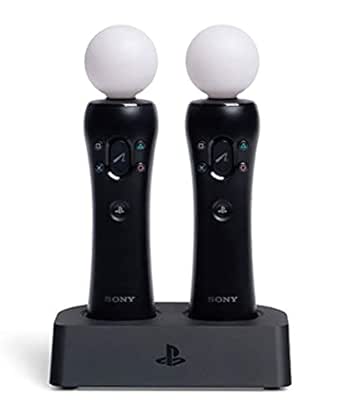 | Best for PlayStation Move Owners | Brand: PowerA | Compatibility: PlayStation Move controllers for PS3 and PS4/PS VR | Capacity: 2 controllers | VIEW ON AMAZON | See Our Full Breakdown |
| Bioherm Magnetic Charging Dock for Meta Quest 2 with Rechargeable Batteries |  | Best for a Complete Quest 2 Charging Setup | Compatibility: Meta Quest 2 | Battery capacity: 2100mAh each | Included rechargeable batteries: 2 | VIEW ON AMAZON | See Our Full Breakdown |
| AOJAKI Magnetic Charging Dock for Meta Quest 2 with Rechargeable Batteries |  | Best for Faster Quest 2 Turnaround | Brand: AOJAKI | Compatible devices: Meta Quest 2 headset and controllers | Charging technology: PD 18W fast charging | VIEW ON AMAZON | See Our Full Breakdown |
| PlayStation VR2 Sense Controller Charging Station |  | Best Simple Dock for PS VR2 | Compatible console: Sony PlayStation VR2 | Connectivity: USB | Features: Click-in design, magnetic clasp | VIEW ON AMAZON | See Our Full Breakdown |
| ZVTE 30W Fast Charging Dock for Meta Quest 3/3S with 4 Rechargeable Batteries and RGB Light | 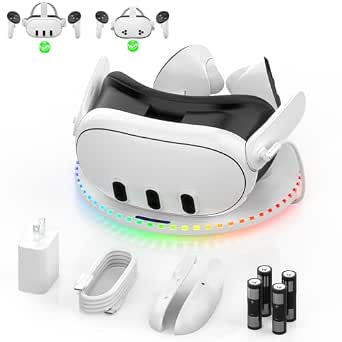 | Best for Quest 3/3S Battery Rotation | Brand: ZVTE | Compatibility: Meta Quest 3, Meta Quest 3S, Oculus Quest 3 | Charging power: 30W | VIEW ON AMAZON | See Our Full Breakdown |
| UMEEUTOO 2-in-1 USB-C Charging Cable for Meta Quest Pro Controllers |  | Best Compact Pick for Quest Pro Controllers | Brand: UMEEUTOO | Compatibility: Meta Quest Pro controllers | Connector: USB Type-C male-to-male | VIEW ON AMAZON | See Our Full Breakdown |
| Kinwin Magnetic Charging Dock for Meta Quest 3S and Quest 3 with RGB Lighting and Rechargeable Batteries |  | Best All-in-One Dock for Quest 3 and 3S | Compatible devices: Meta Quest 3 and Meta Quest 3S | Connector type: USB Type-C | Charging time: Headset: about 3 hours; controllers: about 4 hours | VIEW ON AMAZON | See Our Full Breakdown |
| Anker Charging Dock for Oculus Quest 2 with Rechargeable Batteries |  | Best Quest 2 Pick from a Certified Brand | Compatible device: Oculus Quest 2 | Connector type: USB Type-C | Included batteries: 2 rechargeable batteries, 1800mAh each | VIEW ON AMAZON | See Our Full Breakdown |
| magnetic charging system for vr controller | Compatibility |
|---|---|
| Magnetic 2-in-1 USB-C Charging | — |
| Charging Dock for Meta Quest 3 | Meta Quest 3S and Meta Quest 3 |
| PSVR2 Charging Dock and Vertic | — |
| PRISMXR Charging Dock for Meta | Meta Quest 3S |
| KINWIN VR Charging Dock for Me | Meta Quest 3S and Meta Quest 3 |
| PowerA Charging Dock for PlayS | PlayStation Move controllers for PS3 and PS4/PS VR |
| Bioherm Magnetic Charging Dock | Meta Quest 2 |
| AOJAKI Magnetic Charging Dock | — |
| PlayStation VR2 Sense Controll | — |
| ZVTE 30W Fast Charging Dock fo | Meta Quest 3, Meta Quest 3S, Oculus Quest 3 |
| UMEEUTOO 2-in-1 USB-C Charging | Meta Quest Pro controllers |
| Kinwin Magnetic Charging Dock | — |
| Anker Charging Dock for Oculus | — |
More Details on Our Top Picks
Magnetic 2-in-1 USB-C Charging Cable for PSVR2 Controllers
The Haoyull 2-in-1 cable suits PSVR2 owners who want a small charging setup rather than a storage dock. Its bifurcated design lets one USB port serve a controller, and the 90-degree USB-C connector can reduce awkward bending at the device end. Compared with the PSVR2 Charging Dock and Vertical Display Stand, it takes less space and can also charge compatible USB-C devices, but it does not store a headset or offer charging-status lights. The 80 cm length is the main constraint: it works best near a power source and may limit where you can leave the controller. The product data also does not spell out which non-PSVR2 devices are compatible, so I would treat that wider use as a convenience rather than a guarantee.
Pros:- Bifurcated design lets one USB port charge a controller
- Right-angle connector may reduce cable and port strain
- Can also charge compatible USB-C phones, tablets, and notebooks
Cons:- 80 cm length can restrict placement away from the power source
- Does not provide a headset stand or dedicated controller storage
- Compatibility beyond PSVR2 controllers is not specified
Best for: PSVR2 players with limited tabletop space who want a simple cable for controller charging and occasional compatible USB-C device charging.
Not ideal for: Players who want a dedicated magnetic dock, visible charge indicators, headset storage, or more reach than an 80 cm cable provides.
- Brand:Haoyull
- Model:7647560223369
- Length:80 cm (31.5 in)
- Connector type:USB Type-C
- Cable design:Bifurcated, 2-in-1
- Connector angle:90 degrees
- Materials:ABS and heat-resistant aluminum alloy port
- Compatible devices:PSVR2 controllers and compatible USB-C devices
Our verdict“Choose this cable for a compact PSVR2 charging setup, but pick the PSVR2 Charging Dock and Vertical Display Stand if you also want organized storage and charge indicators.”
Charging Dock for Meta Quest 3S/Quest 3 with 2 Rechargeable Batteries and USB-C Adapter
This Quest dock stands out for combining magnetic charging with two included 2100 mAh controller batteries, so it replaces routine disposable-battery changes with a dedicated charging-and-storage spot. It charges the headset and both controllers together, a more complete setup than the Haoyull cable, which only addresses controller charging. The stated 4–5 hour charge time and claimed 3000+ battery cycles give buyers a clear sense of the rechargeable system, though actual results can depend on use and setup. Its tradeoff is narrow fit: it is designed for Meta Quest 3 and Quest 3S, and the supplied battery covers are part of how the controllers connect correctly. Compared with the PRISMXR Quest 3S dock, this one supports both Quest generations, but its listed charge time is longer than PRISMXR’s stated headset charge time.
Pros:- Charges the headset and two controllers at the same time
- Includes two 2100 mAh rechargeable controller batteries
- Combines charging with a dedicated storage location
- Listed battery lifespan is 3000+ cycles
Cons:- Compatibility is limited to Quest 3 and Quest 3S
- Requires the included battery covers for proper fit
- Listed charging time is 4–5 hours
Best for: Quest 3 or Quest 3S owners who want one home base for headset and controller charging and prefer rechargeable controller batteries over replacements.
Not ideal for: Owners of other Quest models or players who do not want to use model-specific battery covers and accessories.
- Compatibility:Meta Quest 3S and Meta Quest 3
- Battery capacity:2100 mAh
- Charging time:4–5 hours
- Connector type:USB-C
- Battery lifespan:3000+ cycles
- Included components:Charging dock, 2 rechargeable batteries, USB-C adapter, charging head, 2 battery covers, welcome guide
- Charging method:Magnetic connection
Our verdict“Pick this dock if you own a Quest 3 or 3S and want bundled rechargeable batteries, while choosing a model-specific alternative if your headset is outside that range.”
PSVR2 Charging Dock and Vertical Display Stand for PS5
For PSVR2 owners who want their headset and controllers stored together, this dock earns its place through all-in-one tabletop organization. Magnetic USB-C connectors make it easier to set the two Sense controllers onto their charging points, while red and blue LEDs show whether charging is underway or complete. Compared with the Haoyull cable, it uses more space but adds headset storage and a charging-status glance; compared with the PRISMXR Quest 3S dock, it is purpose-built for PSVR2 rather than a Quest setup. A stated 2–3 hour charging time and over-current, overcharge, and short-circuit protection round out the practical case. The tradeoff is its dedicated fit and need for a tabletop spot, so it is not the flexible choice for owners of other VR systems or very compact play areas.
Pros:- Stores the headset and charges two PSVR2 controllers in one stand
- Magnetic USB-C connectors simplify controller placement
- LEDs distinguish charging from a full charge
- Includes overcharge, over-current, and short-circuit protection
Cons:- Designed for PSVR2 and PS5-compatible equipment
- Requires dedicated tabletop space
- Does not include rechargeable controller batteries
Best for: PSVR2 players who want a permanent tabletop home for the headset and both Sense controllers, with visible charging status.
Not ideal for: Owners of Quest or other VR systems, or PSVR2 players without room for a vertical tabletop stand.
- Compatible devices:PS5 and PS5 Pro
- Connector type:USB Type-C
- Charging connectors included:4 magnetic Type-C connectors
- Charging time:2–3 hours
- LED indicators:Red while charging; blue when fully charged
- Protection:Overcharge, over-current, and short-circuit protection
- Input and output:110 V input; 5 V output
- Wattage and mounting:10 W; tabletop
Our verdict“Choose this stand for an organized PSVR2 charging station, but go with a cable like the Haoyull if saving space matters more than storage.”
PRISMXR Charging Dock for Meta Quest 3S
The PRISMXR dock is the more targeted option for Quest 3S owners with an upgraded head strap. Magnetic pins attach the headset and controllers, and the dock lists support for elite-type, halo-type, and battery-integrated straps—a useful distinction when a basic stand may not fit a customized setup. It also includes a USB-C pass-through for an external peripheral, which gives it an advantage over the Quest 3/3S dock with rechargeable batteries when accessory connectivity matters more than bundled batteries. The stated two-hour headset charge is quick on paper, while controller charging is listed at six hours. The major limitation is clear: it is not compatible with USB 3.0 Link cables. Its Quest 3S-only fit also makes it less flexible than the dock that supports both Quest 3 and 3S.
Pros:- Charges the Quest 3S headset and both controllers together
- Magnetic pins simplify docking alignment
- USB-C pass-through supports an external peripheral
- Supports several listed strap styles, including battery-integrated straps
Cons:- Not compatible with USB 3.0 Link cables
- Designed for Quest 3S rather than both Quest 3 and 3S
- Controller charging is listed at six hours
Best for: Quest 3S owners using an alternate head strap who want magnetic charging and a USB-C pass-through for an external accessory.
Not ideal for: Quest 3 owners, users who rely on a USB 3.0 Link cable, or buyers seeking included rechargeable controller batteries.
- Compatibility:Meta Quest 3S
- Headset charging time:2 hours
- Controller charging time:6 hours
- USB-C pass-through:Female port for external peripherals
- USB 3.0 Link cable:Not compatible
- Strap compatibility:Elite-type, halo-type, and battery-integrated head straps
- Charging indicators:Orange while charging; green when fully charged
- Safety protections:Over-current, over-voltage, and overheating
Our verdict“Choose PRISMXR for a customized Quest 3S setup that benefits from strap support and pass-through connectivity, but skip it if USB 3.0 Link compatibility is required.”
KINWIN VR Charging Dock for Meta Quest 3S and Quest 3
KINWIN makes the most sense for Quest owners who want headset and controller charging plus rechargeable batteries in the box. The magnetic USB-C dock is listed for both Quest 3S and Quest 3, and it charges all three devices at once; stated times are about three hours for the headset and four for the controllers. That is a more inclusive bundle than the PRISMXR Quest 3S dock, which focuses on strap fit and USB-C pass-through, while the KINWIN includes two batteries and matching covers. Its orange and green lighting helps show charge status, but the product notes warn that controller battery orientation and contact alignment may need checking. The included cable may also be short for some room layouts, and the recommended 18 W adapter adds a power requirement buyers should account for when planning the setup.
Pros:- Charges the headset and both controllers simultaneously
- Works with Meta Quest 3S and Quest 3
- Includes two rechargeable batteries and two battery covers
- Orange and green lights indicate charging status
Cons:- Controller charging may require checking battery orientation and contact alignment
- Included cable may be too short for some setups
- Recommended power adapter is 18 W
Best for: Quest 3 or Quest 3S owners who want simultaneous magnetic charging and included rechargeable controller batteries in one bundle.
Not ideal for: Players who need a long included cable, prefer a minimal setup, or do not want to check battery orientation and charging contacts.
- Compatibility:Meta Quest 3S and Meta Quest 3
- Charging capacity:Headset and 2 controllers simultaneously
- Charging interface:Magnetic USB-C
- Charging time:About 3 hours for headset; about 4 hours for controllers
- Indicator lights:Orange while charging; green when fully charged or on standby
- Included accessories:2 rechargeable batteries, 2 battery covers, 2 magnetic headset connectors, 2 wipe cloths, USB-C to USB-C cable, user manual
- Recommended power adapter:18 W
- Item weight:1.31 pounds
Our verdict“Pick KINWIN for a bundled Quest 3 or 3S charging station with rechargeable batteries, but choose a different setup if cable reach or effortless controller alignment is your priority.”
PowerA Charging Dock for PlayStation Move Motion Controllers
PlayStation Move compatibility is the reason to choose this dock: it charges two Move controllers together and gives them a compact, stable place to sit between PS3 or PS VR sessions. The status LEDs make it easy to tell whether charging is underway, while the included AC adapter means you do not need to supply a separate power accessory. Compared with the PlayStation VR2 Sense Controller Charging Station, this serves an older, different controller generation; the two docks are not interchangeable. Its straightforward design also lacks the rechargeable batteries and headset storage found in the Bioherm Magnetic Charging Dock. The tradeoff is clear: this is a focused charging solution for Move owners, not a flexible magnetic system for newer VR controllers. It needs a wall outlet and is useful only if your controllers are compatible.
Pros:- Charges two PlayStation Move controllers at the same time
- LEDs show charging status
- Compact base has four non-slip feet
- AC power adapter is included
Cons:- Requires a wall outlet
- Compatibility is limited to PlayStation Move controllers
Best for: PS3 or PS VR owners who use PlayStation Move controllers and want a compact dock that charges both at once.
Not ideal for: Meta Quest or PS VR2 owners, since this dock is designed for PlayStation Move controllers and will not charge those other controller types.
- Brand:PowerA
- Compatibility:PlayStation Move controllers for PS3 and PS4/PS VR
- Capacity:2 controllers
- Power source:Corded electric
- Output voltage:12 V DC
- Material:Plastic
- Item weight:10.4 ounces
- Warranty:Two-year limited warranty
Our verdict“Choose this if you need a dedicated, compact charging dock for two PlayStation Move controllers, but skip it for newer VR systems.”
Bioherm Magnetic Charging Dock for Meta Quest 2 with Rechargeable Batteries
The Bioherm dock charges and stores a Quest 2 headset and both controllers, making it a practical pick for buyers who want one home for their whole setup rather than a controller-only charger. Its magnetic USB-C connectors and included rechargeable batteries and covers reduce the need to swap disposable cells, while charging indicators with a light-off button let you check status without keeping the lights on. Compared with the AOJAKI Magnetic Charging Dock, Bioherm lists a 4–5-hour full charge rather than separate, shorter charging times, so it suits buyers who value an all-in-one station more than quicker turnaround. The tradeoff is limited compatibility: it is made for Quest 2, not newer Quest models. Its 1.9-pound package and desk-oriented storage setup also make it less suited to someone seeking a minimal controller charger.
Pros:- Charges the Quest 2 headset and two controllers at once
- Includes two rechargeable batteries and controller covers
- Magnetic USB-C connectors support easy docking
- Charging LEDs can be switched off
Cons:- Designed specifically for Meta Quest 2
- Listed full charge time is 4–5 hours
- Stores the headset as well as controllers, taking more desk space than a controller-only solution
Best for: Meta Quest 2 owners who want to charge and store the headset and both controllers together, with rechargeable controller batteries included.
Not ideal for: Quest 3 or Quest 3S owners, or anyone prioritizing a smaller controller-only charger or faster listed charge times.
- Compatibility:Meta Quest 2
- Battery capacity:2100mAh each
- Included rechargeable batteries:2
- Charging time:4–5 hours
- Package weight:1.9 pounds
- Package dimensions:16.77 x 4.49 x 3.15 inches
- Manufacturer:Bioherm
Our verdict“Pick Bioherm for an all-in-one Quest 2 charging and storage station; choose AOJAKI if its shorter listed charging times matter more.”
AOJAKI Magnetic Charging Dock for Meta Quest 2 with Rechargeable Batteries
Among these Quest 2 options, AOJAKI emphasizes shorter stated charge times: about three hours for the headset and four for the controllers, with PD 18W charging. Magnetic alignment makes docking simpler, and the station charges the headset and controllers together while keeping them organized. It includes two 2000mAh rechargeable batteries, plus LED indicators and a one-touch light-off control. Compared with the Bioherm Magnetic Charging Dock, AOJAKI lists faster charging figures and a slightly smaller battery capacity per cell, while both are Quest 2-specific all-in-one stations. The compromise is that the rechargeable batteries need their supplied controller covers, adding an installation step before magnetic charging works. Buyers with other headsets should skip it, and anyone who prefers a simpler setup without replacement battery covers may favor a different charging approach.
Pros:- Charges the headset and both controllers simultaneously
- Magnetic alignment helps guide placement on the dock
- Includes two 2000mAh rechargeable batteries
- LED indicators have a one-touch light-off control
Cons:- Compatible specifically with Meta Quest 2
- Requires the included battery covers for the controllers
- Listed controller charge time is four hours
Best for: Quest 2 owners who want simultaneous headset and controller charging and value the listed three-hour headset charge time.
Not ideal for: Owners of Quest 3, Quest 3S, or other headsets, and buyers who do not want to install replacement battery covers on their controllers.
- Brand:AOJAKI
- Compatible devices:Meta Quest 2 headset and controllers
- Charging technology:PD 18W fast charging
- Connector type:USB Type-C
- Battery capacity:2000mAh each
- Included rechargeable batteries:2
- Charge time:3 hours for headset; 4 hours for controllers
- Special features:Magnetic alignment, LED indicators, overcharge protection
Our verdict“Choose AOJAKI if you want a Quest 2 all-in-one dock with a relatively short stated headset charge time and do not mind changing controller covers.”
PlayStation VR2 Sense Controller Charging Station
For PS VR2 owners who want a dedicated way to charge both controllers, this station keeps the process simple: click each Sense controller into place and let the magnetic clasp hold it there. It connects without occupying the PS5’s USB ports, which leaves those ports available for other accessories. Compared with the PowerA Charging Dock for PlayStation Move Motion Controllers, this is designed for the newer PS VR2 Sense controllers rather than PlayStation Move hardware; the two options serve different systems. It is also more focused than the Bioherm Magnetic Charging Dock, since it charges controllers rather than acting as a headset-and-controller storage station. That simplicity comes with limits: the controllers are sold separately, and the listed details do not include rechargeable batteries or a charge-time figure. It is a clean fit for PS VR2 owners, not a multi-platform choice.
Pros:- Charges both PS VR2 Sense controllers simultaneously
- Click-in design with a magnetic clasp holds controllers in place
- Does not use the PS5 console’s USB ports
- Dedicated fit for PS VR2 Sense controllers
Cons:- Controllers are sold separately
- Does not charge or store the headset
- Product details do not specify a charge time or included rechargeable batteries
Best for: PS VR2 owners who already have Sense controllers and want a dedicated, click-in station that keeps charging off the console’s USB ports.
Not ideal for: Buyers who need a headset-and-controller stand, rechargeable batteries, or a charging dock compatible with PlayStation Move or Meta Quest controllers.
- Compatible console:Sony PlayStation VR2
- Connectivity:USB
- Features:Click-in design, magnetic clasp
- Color:White
- Weight:0.76 kg
- Dimensions:10 x 2.75 x 7.5 inches
- Model number:CFI-ZSS1
Our verdict“Choose this dedicated station if you own PS VR2 Sense controllers and want straightforward charging without using the PS5’s USB ports.”
ZVTE 30W Fast Charging Dock for Meta Quest 3/3S with 4 Rechargeable Batteries and RGB Light
Four included 1800mAh rechargeable batteries give this ZVTE station a distinct role: Quest 3 and 3S owners can keep spare controller power ready while charging their setup. The split design uses a 30W USB-C connection for the headset and magnetic pads for the controllers, rather than relying on the same docking method for everything. That separates it from the Quest 2-focused AOJAKI Magnetic Charging Dock, which includes two batteries and is not listed for Quest 3 or 3S. An RGB ring provides charging feedback, and stated safety protections cover overcharging, short circuits, and overheating. The tradeoff is a more involved controller setup: battery polarity and contact alignment need attention, and the headset USB-C connection may require adjusting its resting angle. Buyers seeking a plug-and-place station may prefer a simpler dock.
Pros:- Compatible with Meta Quest 3 and Quest 3S
- Includes four 1800mAh rechargeable batteries
- Uses a 30W USB-C direct connection for the headset and magnetic controller pads
- RGB status ring and listed overcharge, short-circuit, and overheat protection
Cons:- Battery installation requires careful polarity and contact alignment
- The headset USB-C connection may need resting-angle adjustment
- Compatibility is limited to the listed Quest 3 and 3S models
Best for: Quest 3 or Quest 3S owners who want four rechargeable controller batteries, a dedicated headset USB-C connection, and visible charging feedback.
Not ideal for: Quest 2 or PS VR owners, and anyone who wants a dock with minimal battery installation or no headset angle adjustment.
- Brand:ZVTE
- Compatibility:Meta Quest 3, Meta Quest 3S, Oculus Quest 3
- Charging power:30W
- Battery capacity:1800mAh each
- Battery count:4
- Item weight:1.45 pounds
- Product dimensions:7.87 x 7.87 x 1.18 inches
- Release date:May 18, 2025
Our verdict“Choose ZVTE if you use Quest 3 or 3S and value four rechargeable batteries over the simpler setup of a basic magnetic dock.”
UMEEUTOO 2-in-1 USB-C Charging Cable for Meta Quest Pro Controllers
The UMEEUTOO 2-in-1 cable is the most portable option here for Quest Pro owners who want to charge both controllers without carrying a full dock. At 100 cm, it can connect the pair at once while taking little room in a travel bag, and its design works with various protective cases. Unlike the Kinwin Magnetic Charging Dock, it does not also hold or charge a headset, so it suits a lighter setup rather than a home charging station. The tradeoff is its narrow compatibility: it is specified for Meta Quest Pro controllers, not Quest 3, Quest 3S, or Quest 2. It is also a cable-only solution, with no rechargeable batteries or charging-status indicators included.
Pros:- Charges two Meta Quest Pro controllers simultaneously
- Compact 100 cm cable is easy to pack
- Works with various protective cases
- Designed to help prevent overheating and short circuits
Cons:- Compatibility is limited to Meta Quest Pro controllers
- Does not include a dock, rechargeable batteries, or charging indicators
Best for: Meta Quest Pro owners who travel often and want to charge both controllers with one compact cable.
Not ideal for: Quest 3, Quest 3S, and Quest 2 owners, or anyone seeking a magnetic dock that stores and charges a headset too.
- Brand:UMEEUTOO
- Compatibility:Meta Quest Pro controllers
- Connector:USB Type-C male-to-male
- Cable length:100 cm
- Color:Black
- Weight:0.03 kg
- Included components:Cable
- Warranty:1 year
Our verdict“Choose this cable if you have Quest Pro controllers and value portable simultaneous charging over an all-in-one dock.”
Kinwin Magnetic Charging Dock for Meta Quest 3S and Quest 3 with RGB Lighting and Rechargeable Batteries
The Kinwin magnetic dock is the lineup’s fuller charging station for Meta Quest 3 and Quest 3S owners: it powers the headset and both controllers at once, while keeping them together between sessions. Its magnetic connections help with placement, and indicator lights show charging status; the included rechargeable batteries and controller covers mean fewer separate accessories to source. Compared with the UMEEUTOO 2-in-1 cable, it is a better fit for a permanent play-space setup, but it is larger and needs a power adapter that is not included. The listed controller charging time is about four hours, and the product notes that charging pins may need adjustment if a controller fails to charge. Its compatibility is also limited to Quest 3 and 3S.
Pros:- Charges the headset and both controllers simultaneously
- Includes two rechargeable batteries and controller covers
- Magnetic connectors make device placement easier
- Charging indicators and RGB lighting show dock status
Cons:- Power adapter is not included
- Charging pins may need adjustment if a controller does not charge
- Designed for Meta Quest 3 and Quest 3S only
Best for: Quest 3 or Quest 3S owners who want a dedicated place to charge the headset and both controllers together.
Not ideal for: Travel-focused buyers, users of other headset generations, or anyone who needs a power adapter included in the box.
- Compatible devices:Meta Quest 3 and Meta Quest 3S
- Connector type:USB Type-C
- Charging time:Headset: about 3 hours; controllers: about 4 hours
- Input voltage:10 V
- Amperage:1 A
- Wattage:15 W
- Output current:2 A
- Power source:Corded electric
- Included items:Charging dock, 2 rechargeable batteries, 2 battery covers, 2 magnetic headset connectors, 2 wipe cloths, USB-C to USB-C cable, user manual
Our verdict“Pick the Kinwin dock for an organized, simultaneous Quest 3 or 3S charging station if you already have a suitable power adapter.”
Anker Charging Dock for Oculus Quest 2 with Rechargeable Batteries
For Quest 2 owners, this Oculus-certified Anker dock brings the headset and controllers together around a magnetic USB-C charging connection. It includes two 1800mAh rechargeable batteries, custom controller covers, and LED indicators, so it offers more than a bare charging cable. The automatic-off feature is another useful distinction from the Kinwin Quest 3/3S dock, although the two are aimed at different headset generations and are not interchangeable. Anker’s option is a tabletop station with a corded power requirement, so it is better suited to a stable play area than travel. Its biggest limitation is compatibility: Quest 2 only. Buyers with newer Quest 3 or 3S hardware should choose a dock made for those models instead.
Pros:- Oculus-certified dock for Quest 2
- Includes two 1800mAh rechargeable batteries and custom controller covers
- Magnetic USB-C connection and LED charging indicators
- Automatic-off feature and microfiber lens-cleaning cloth
Cons:- Compatible with Oculus Quest 2 only
- Requires a corded power source
- Tabletop design is less convenient to pack than the UMEEUTOO cable
Best for: Oculus Quest 2 owners who want a magnetic tabletop charger with included controller batteries and covers.
Not ideal for: Quest 3 or Quest 3S owners, and users looking for a portable cable-based charging setup.
- Compatible device:Oculus Quest 2
- Connector type:USB Type-C
- Included batteries:2 rechargeable batteries, 1800mAh each
- Input voltage:9 V
- Output voltage:15 V DC
- Output current:3 A
- Wattage:12 W
- Mounting type:Tabletop
- Weight and color:1.5 lb; white
Our verdict“Choose the Anker dock if you use a Quest 2 and want a dedicated magnetic charging station with included controller batteries.”
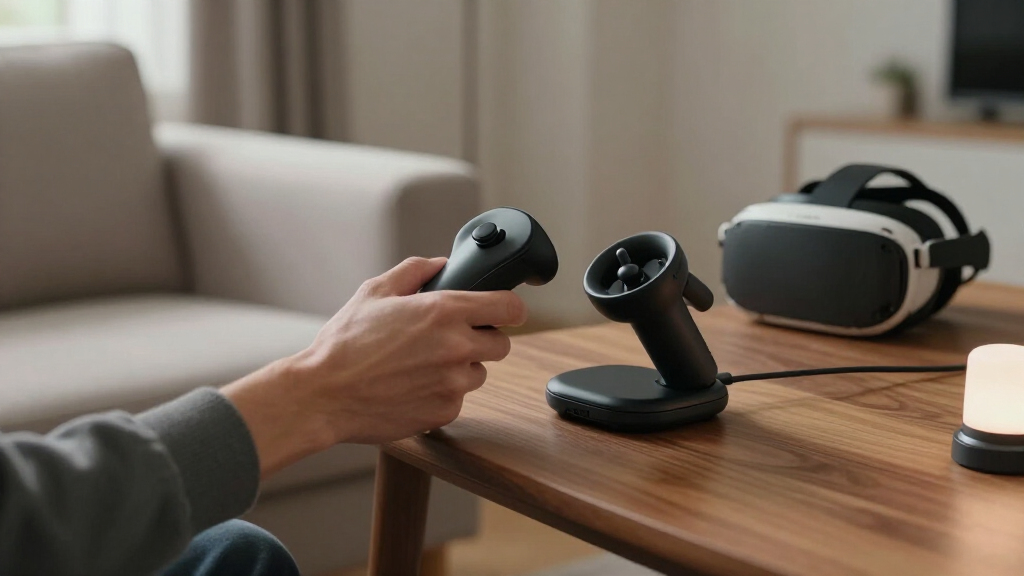
How We Picked
I ranked these products around the job implied by the search: charging VR controllers through a magnetic dock or magnetic connection with minimal daily hassle. The main criteria were stated headset and controller compatibility, how the charging method fits into regular use, whether rechargeable batteries or adapters are part of the setup, and how much desk space and setup complexity the design may add. I treated a headset-specific fit as more useful than a long feature list when those features only apply to a narrow controller generation.
The order reflects how directly each product serves its named controller, how complete its charging setup appears from its product description, and how clearly its tradeoffs can be matched to a buyer. Dedicated stations and docks rank ahead of simple cables for readers seeking a place-and-charge routine, while cables remain sensible for compact setups or controllers that need a specific USB-C solution. Products with similar names are kept distinct because compatibility, included batteries, lighting, and dock design can change the buying decision. I did not treat charging-speed claims or extra accessories as proof of better real-world performance.
| magnetic charging system for vr controller | Compatibility |
|---|---|
| Magnetic 2-in-1 USB-C Charging | — |
| Charging Dock for Meta Quest 3 | Meta Quest 3S and Meta Quest 3 |
| PSVR2 Charging Dock and Vertic | — |
| PRISMXR Charging Dock for Meta | Meta Quest 3S |
| KINWIN VR Charging Dock for Me | Meta Quest 3S and Meta Quest 3 |
| PowerA Charging Dock for PlayS | PlayStation Move controllers for PS3 and PS4/PS VR |
| Bioherm Magnetic Charging Dock | Meta Quest 2 |
| AOJAKI Magnetic Charging Dock | — |
| PlayStation VR2 Sense Controll | — |
| ZVTE 30W Fast Charging Dock fo | Meta Quest 3, Meta Quest 3S, Oculus Quest 3 |
| UMEEUTOO 2-in-1 USB-C Charging | Meta Quest Pro controllers |
| Kinwin Magnetic Charging Dock | — |
| Anker Charging Dock for Oculus | — |
Factors to Consider When Choosing Magnetic Charging System For Vr Controllers
Before choosing a dock, I would start with the exact controller generation rather than the headset name alone. Magnetic charging depends on physical alignment and compatible contacts or battery covers, so a product that fits one Quest generation may not fit another. The following checks help avoid a charging accessory that looks convenient but does not suit your equipment or routine.
Match the Controller Model, Not Just the Headset
Headset families often include controllers with different shapes, battery covers, or charging arrangements. Confirm the product names your exact headset and controller generation, especially when a listing groups Quest 3 and 3S together or uses older Oculus branding. A dock built for Quest 2 may rely on shaped rechargeable batteries or covers that do not transfer to Quest 3 controllers. PSVR2 and PlayStation Move accessories are separate ecosystems, even though both serve PlayStation VR users. A common mistake is buying by brand alone and discovering that the charging contacts do not line up. If compatibility details are vague, a standard USB-C cable may be a safer fallback than a controller-specific dock.
Choose Between a Dock and a Cable
A dock is most useful when you have a stable place to store controllers between sessions and want charging to happen as part of putting them away. Its footprint and fixed position can be inconvenient on a crowded desk or in a shared play area. A magnetic USB-C cable takes less room and can reach a charging spot that a dock cannot, but it does not provide the same organized storage. Think about where the controllers sit when they are not in use, not only how they charge. Buyers sometimes choose a dock for convenience without checking whether it fits their shelf or whether both controllers can be placed easily. If storage is already handled elsewhere, a cable may be the more practical magnetic setup.
Check What the Battery System Requires
Rechargeable-battery docks can reduce reliance on disposable batteries, but their convenience depends on the full system working together. Check whether batteries, replacement covers, adapters, or charging contacts are included, and whether the controller must keep a particular cover installed. Separate battery systems can also make it harder to replace one part if it is lost or worn. A buyer who already owns suitable rechargeable cells may prefer a cable or a dock without a proprietary battery arrangement. Avoid assuming that a dock’s included batteries will charge controllers while they are being used; the product description should spell out the charging routine. The fewer special parts a setup needs, the easier it is to maintain over time.
Treat Fast-Charging Claims as One Factor
A stated wattage or fast-charging label does not by itself tell you how quickly each controller will charge. Actual charging can depend on the dock, power adapter, controller battery, and the number of devices connected at once. Check whether the adapter is included and whether the product describes simultaneous charging for both controllers. If you usually charge overnight or between sessions, a tidy and dependable placement may matter more than a headline speed claim. Buyers with short gaps between play sessions should look for clear details about charging output and power requirements instead of relying on the label alone. Do not pay extra for speed features unless the listed setup supports the way you plan to use the dock.
Account for Space, Lighting, and Setup
Charging docks can occupy more room than a pair of cables, and some also serve as display stands or add lighting. Those extras can be useful when the dock doubles as a storage station, but they can add visual clutter or require a convenient outlet. RGB lighting is a preference feature rather than a charging benefit, so buyers who want a quiet, simple setup may favor a more restrained design. Check the dock’s orientation and whether controller placement depends on carefully lining up magnetic points. A stand that stores a headset and controllers may make sense on a dedicated gaming desk, while a compact setup may benefit from a single cable. Prioritize the parts you will use daily over display features you may rarely notice.
Weigh Convenience Against Replaceability
Integrated docks and matched battery covers create a tidy routine, but they can tie replacement parts to a specific product. A cable-based solution is less organized, yet a standard USB-C connection can be easier to replace or repurpose. Before choosing a proprietary battery setup, check whether spare batteries and covers are sold separately and whether the charging system remains useful if one component fails. This matters most for controllers that see frequent use or households that share the headset. A more elaborate kit can be worthwhile when it replaces several separate charging tasks; it is less compelling when its extras are difficult to maintain. Buyers who value long-term flexibility should favor clear compatibility and readily replaceable parts.
Frequently Asked Questions
Can I use one magnetic charging dock for Quest 2, Quest 3, and Quest 3S controllers?
Do not assume one dock fits all three. Controller shape, battery covers, and contact placement can differ by generation, and some docks rely on model-specific rechargeable batteries or replacement covers. Check the product’s explicit compatibility list for your exact controller rather than relying on a broad Quest label. If you own more than one headset generation, a standard USB-C cable may be more flexible, though it may not provide dock storage. A dock that names Quest 3 and 3S still should not be presumed to support Quest 2 unless the manufacturer says so.
Are rechargeable-battery docks a better choice than magnetic USB-C cables?
They solve different problems. A battery dock can offer a repeatable place to store and recharge controllers, which is useful if you want a dedicated home for them. A cable is usually simpler to position and does not require a compatible battery cover, but it offers less organized storage. For a controller that already uses a removable battery, check whether the dock’s battery system changes how you replace or charge cells. Choose the dock for a tidy routine and the cable for flexibility or a smaller setup.
Will a magnetic charging dock work while I use the controllers?
Most dock-style systems are intended to charge controllers while they are parked, not while they are being used. A magnetic cable may be physically connectable during use, but cable movement can get in the way and the product must support the controller’s charging method. Read the product details for how charging contacts or USB-C connections are meant to be used. If you need power during a session, prioritize a cable designed for that arrangement rather than assuming a dock’s magnetic contacts can serve the same purpose. Keep cable placement clear of movement to avoid snagging.
Do I need to buy a separate power adapter for these charging systems?
It depends on the individual product, since some listings include an adapter while others may expect you to supply a compatible power source. Check the included-items list and the stated input requirements before buying. A dock with multiple charging positions may need a different power arrangement than a single-controller cable. If you plan to use an existing adapter, confirm that its output matches the product’s requirements rather than assuming any USB adapter will deliver the stated charging behavior. This check can prevent a setup that arrives with a dock but no way to power it.
Is an RGB or multi-controller charging dock worth choosing over a simpler station?
It can be a good fit if you want the dock to act as a visible storage point and you will use its extra charging capacity. Lighting and bundled batteries do not automatically improve controller compatibility or daily reliability. Compare the extra features with the space required, power needs, and number of controllers you actually own. For a minimal desk or a single headset, a simpler station may be easier to place and maintain. Choose the feature-heavy option when its added functions solve a real storage or charging need, not just because the specification list is longer.
Conclusion
For most buyers seeking a purpose-built PSVR2 setup, my best overall pick is the PlayStation VR2 Sense Controller Charging Station. Quest 2 owners who want rechargeable batteries and a dock should look first at the Anker Charging Dock for Oculus Quest 2 as the roundup’s best value-style choice, while the ZVTE 30W Fast Charging Dock is the best premium-style option for Quest 3 or 3S users who want a larger battery bundle and extra features. For beginners, I would favor a clearly compatible, headset-specific dock with its required accessories included rather than a more elaborate setup with unclear fit. If you need a compact solution, choose a USB-C cable; for PlayStation Move controllers, the PowerA Charging Dock addresses that specific need. Match the controller generation first, then choose the charging format that fits your space and routine.
Halloween Picks
halloween
As an affiliate, we earn on qualifying purchases.