
For luxury high-end tablets, I’d put the 13-inch Apple iPad Pro with M5 first for its premium performance and expansive screen, while the Samsung Galaxy Tab S11 Ultra stands out for a large Android workspace and the reMarkable Paper Pro for focused reading and handwriting. The right choice depends less on prestige than on whether you need a versatile app platform, a generous canvas, or a paper-like writing tool. Larger screens can improve multitasking and creative work, but they are less convenient to carry; compact models are easier to handle but leave less room for split-screen use. Storage, included accessories, and the devices you already own also change the value equation. Read on for how these 10 options differ and which one best fits your work and habits.

Get business pricing on tech for your team
- Business-only prices and quantity discounts
- Tax-exempt purchasing
- Multiple users, one account, clear invoices
Key Takeaways
- The iPad Pro 13-inch M5 is the most balanced luxury pick here: it combines a large workspace with Apple’s premium tablet platform, though its size is less suited to one-handed use.
- The Galaxy Tab S11 Ultra models prioritize screen area; choose between 256GB and 512GB based on local files and app needs rather than assuming the larger capacity is automatically worthwhile.
- The reMarkable tablets serve a narrower, more focused role than the iPad and Galaxy options, favoring handwriting and reading over general-purpose apps and media.
- Included accessories affect the actual value: several listings bundle a pen or folio, while a premium tablet’s keyboard or other workflow gear may require separate spending.
- Premium does not always mean newest or most capable for every buyer; the Galaxy Tab S10+ and Lenovo Idea Tab can make more sense when their screen, storage, or bundled kit meets the need without flagship-level priorities.
| reMarkable Paper Pure 10.3-Inch E-Ink Tablet with Marker Plus and Ocean Blue Sleeve Folio |  | Best for Focused Handwriting | Display: 10.3-inch black-and-white E-Ink | Digital ink response: 21 ms | Connectivity: Wi-Fi | VIEW ON AMAZON | See Our Full Breakdown |
| Apple iPad Pro 13-inch with M5 chip, 256GB, Wi-Fi 7, Silver |  | Best Overall for a Large Premium Display | Display: 13-inch Ultra Retina XDR | Processor: Apple M5 | Storage: 256GB | VIEW ON AMAZON | See Our Full Breakdown |
| reMarkable Paper Pro with Marker Plus and Black Leather Book Folio |  | Best Premium E-Ink Notebook | Display: 11.8-inch Canvas Color E-Ink | Generation: 1st Generation | Connectivity: Wi-Fi, USB-C | VIEW ON AMAZON | See Our Full Breakdown |
| Samsung Galaxy Tab S11 128GB Wi-Fi Android Tablet, Silver |  | Best for Android Multitasking | Display: 11-inch Dynamic AMOLED 2X | Storage: 128GB | Expandable storage: microSD | VIEW ON AMAZON | See Our Full Breakdown |
| Apple iPad Pro 11-inch (M5), 512GB, Wi-Fi 7, Space Black |  | Best Compact Powerhouse | Display: 11-inch Ultra Retina XDR | Chip: Apple M5 | Storage: 512GB | VIEW ON AMAZON | See Our Full Breakdown |
| HONOR MagicPad4 12.3-Inch Wi-Fi Tablet, 256GB, 12GB RAM, Gray |  | Best OLED Alternative | Display: 12.3-inch OLED, 3000 × 1920 | Color depth: 1.07 billion colors | Processor: Qualcomm Snapdragon 8 Gen 5 | VIEW ON AMAZON | See Our Full Breakdown |
| Samsung Galaxy Tab S10+ 12.4-Inch 512GB Android Tablet, Platinum Silver |  | Best for Pen-Based Productivity | Display: 12.4-inch Dynamic AMOLED 2X | Processor: MediaTek Dimensity 9300+ | Processor speed: 3050 MHz | VIEW ON AMAZON | See Our Full Breakdown |
| Samsung Galaxy Tab S11 Ultra 14.6-Inch Wi-Fi Tablet, 256GB, 12GB RAM, S Pen and 25W Charger, Moonstone Gray |  | Best for a Massive Creative Canvas | Display: 14.6-inch Dynamic AMOLED 2X, 1848 × 2960, 120Hz, HDR10+ | Processor: MediaTek Dimensity 9400+ | Memory: 12GB RAM | VIEW ON AMAZON | See Our Full Breakdown |
| Lenovo Idea Tab 11-Inch 2.5K Tablet, 90Hz, 8GB RAM, 256GB Storage, Pen and Folio Case | 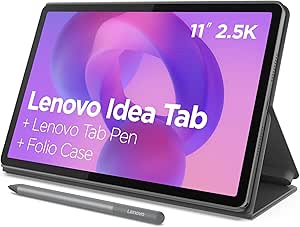 | Best Entry to Premium Tablet Extras | Display: 11-inch 2.5K IPS touchscreen | Refresh rate: 90Hz | Processor: MediaTek Dimensity 6300, up to 2.4GHz | VIEW ON AMAZON | See Our Full Breakdown |
| Samsung Galaxy Tab S11 Ultra 14.6-Inch Wi-Fi Tablet, 12GB RAM, 512GB Storage, Gray, with S Pen |  | Best for DeX Multitasking | Display: 14.6-inch Dynamic AMOLED 2X, 120Hz | Processor: Samsung Exynos, 2.4GHz, as listed | Memory: 12GB RAM | VIEW ON AMAZON | See Our Full Breakdown |
| luxury high end tablet | Display | Connectivity | Processor | Storage |
|---|---|---|---|---|
| reMarkable Paper Pure 10.3-Inc | 10.3-inch black-and-white E-Ink | Wi-Fi | — | — |
| Apple iPad Pro 13-inch with M5 | 13-inch Ultra Retina XDR | — | Apple M5 | 256GB |
| reMarkable Paper Pro with Mark | 11.8-inch Canvas Color E-Ink | Wi-Fi, USB-C | — | — |
| Samsung Galaxy Tab S11 128GB W | 11-inch Dynamic AMOLED 2X | Wi-Fi | 3nm MediaTek | 128GB |
| Apple iPad Pro 11-inch | 11-inch Ultra Retina XDR | Wi-Fi 7 with Apple N1 | — | 512GB |
| HONOR MagicPad4 12.3-Inch Wi-F | 12.3-inch OLED, 3000 × 1920 | Wi-Fi and Bluetooth 6.0 | Qualcomm Snapdragon 8 Gen 5 | 256GB |
| Samsung Galaxy Tab S10+ 12.4-I | 12.4-inch Dynamic AMOLED 2X | — | MediaTek Dimensity 9300+ | 512GB |
| Samsung Galaxy Tab S11 Ultra 1 | 14.6-inch Dynamic AMOLED 2X, 1848 × 2960, 120Hz, HDR10+ | Wi-Fi only, Bluetooth 5.4, USB Type-C 3.2 | MediaTek Dimensity 9400+ | 256GB, with dedicated microSD slot |
| Lenovo Idea Tab 11-Inch 2.5K T | 11-inch 2.5K IPS touchscreen | — | MediaTek Dimensity 6300, up to 2.4GHz | 256GB |
| Samsung Galaxy Tab S11 Ultra 1 | 14.6-inch Dynamic AMOLED 2X, 120Hz | Wi-Fi | Samsung Exynos, 2.4GHz, as listed | — |
More Details on Our Top Picks
reMarkable Paper Pure 10.3-Inch E-Ink Tablet with Marker Plus and Ocean Blue Sleeve Folio
I’d choose the reMarkable Paper Pure for a luxury tablet experience built around writing rather than apps. Its 10.3-inch black-and-white E-Ink screen and 21 ms ink response support natural-feeling notes, sketches, and document markup, while handwriting-to-text tools and cloud-service integrations help move work off the page. Compared with the reMarkable Paper Pro, it gives up color and an adjustable reading light, but remains a more focused fit for people who want a restrained digital notebook. The included Marker Plus and Ocean Blue Sleeve Folio make the bundle ready for meetings or study. The tradeoff is substantial: this is not a general-purpose media tablet, and some cloud features require a Connect subscription.
Pros:- Paper-like writing and document annotation on a 10.3-inch E-Ink display
- 21 ms digital ink response supports quick handwriting and sketching
- Handwriting-to-text and note organization tools
- Marker Plus and Sleeve Folio are included
Cons:- Black-and-white display is limiting for color documents and media
- Some cloud features, including unlimited storage, require a Connect subscription
- Wi-Fi-only connectivity and a focused operating system make it less versatile than either iPad Pro
Best for: Writers, students, and professionals who want a premium-feeling notebook for handwriting, PDFs, and distraction-light reading.
Not ideal for: Buyers who want color-rich media, broad app support, or one tablet for entertainment and creative software.
- Display:10.3-inch black-and-white E-Ink
- Digital ink response:21 ms
- Connectivity:Wi-Fi
- Operating system:reMarkable OS
- Weight:360 g
- Dimensions:8.98 × 7.37 in
- Included accessories:Marker Plus and Ocean Blue Sleeve Folio
- Warranty:1-year limited warranty
Our verdict“Choose the Paper Pure if your priority is a polished, focused digital writing surface rather than a multipurpose tablet.”
Apple iPad Pro 13-inch with M5 chip, 256GB, Wi-Fi 7, Silver
For buyers who want one high-end tablet to cover creative work, productivity, and media, I rank the 13-inch iPad Pro first. Its Ultra Retina XDR display gives detailed work and video a generous canvas, while the M5 chip is suited to demanding apps and on-device AI tasks. The four-speaker system and landscape Center Stage camera also make it better equipped for calls and entertainment than the writing-focused reMarkable Paper Pro. Compared with the 11-inch iPad Pro, the larger model favors workspace and viewing comfort, but is less compact to carry. The 256GB configuration offers less storage than that smaller iPad’s 512GB, and buyers must budget for the separately sold Apple Pencil or Magic Keyboard if they want a full creative or laptop-style setup.
Pros:- 13-inch Ultra Retina XDR display with ProMotion, P3 wide color, and True Tone
- M5 chip supports demanding workflows and on-device AI tasks
- Wi-Fi 7 connectivity and Face ID
- Landscape Center Stage camera and four-speaker audio system
Cons:- Apple Pencil and Magic Keyboard are sold separately
- 256GB storage is less than the 512GB configuration in the 11-inch iPad Pro
- Nano-texture display glass is limited to 1TB and 2TB configurations
Best for: Creative professionals and power users who want a large, color-accurate-feeling premium screen for demanding apps, video calls, and media.
Not ideal for: Frequent travelers who prioritize a compact tablet, or buyers who need a keyboard and stylus included in the box.
- Display:13-inch Ultra Retina XDR
- Processor:Apple M5
- Storage:256GB
- Wireless connectivity:Wi-Fi 7 with Apple N1
- Front camera:12MP landscape Center Stage
- Rear camera:12MP Wide with adaptive True Tone flash
- Security:Face ID
- Audio:Four-speaker system and four studio-quality microphones
- Color:Silver
Our verdict“Pick the 13-inch iPad Pro if display space and all-around performance matter more than portability or included accessories.”
reMarkable Paper Pro with Marker Plus and Black Leather Book Folio
The reMarkable Paper Pro is the premium choice here for readers and note-takers who want a larger writing surface without moving to a conventional backlit tablet. Its 11.8-inch color E-Ink display and adjustable reading light add useful flexibility for marked-up documents and varied lighting, while the included Marker Plus, spare tips, and black leather folio create a more complete bundle than the Paper Pure’s simpler monochrome setup. Color E-Ink is still a different experience from the vivid AMOLED screen on the Samsung Galaxy Tab S11; I’d favor the Samsung for video and general apps, but this reMarkable for focused writing and reading. The tradeoffs are its narrower purpose, marker compatibility limited to the tablet, and missing storage-capacity details.
Pros:- 11.8-inch color E-Ink display with adjustable reading light
- Marker Plus includes a built-in eraser and six spare tips
- Supports PDF annotation, note organization, and handwriting-to-text conversion
- Black leather Book Folio is included
Cons:- Color E-Ink is less suited to vivid video and app-heavy use than the Galaxy Tab S11 AMOLED display
- Marker works exclusively with the tablet’s display
- Storage capacity is not specified
Best for: Professionals and avid readers who want a large, paper-like E-Ink workspace with color markup, a reading light, and a premium folio.
Not ideal for: People who need a general entertainment tablet, broad app selection, or clearly specified storage capacity.
- Display:11.8-inch Canvas Color E-Ink
- Generation:1st Generation
- Connectivity:Wi-Fi, USB-C
- Battery life:Up to two weeks
- Included accessories:Marker Plus, six spare Marker tips, black leather Book Folio, and USB-C cable
- Handwriting tools:PDF annotation, note organization, and handwriting-to-text conversion
- Model:RM83C-1005NW
- Warranty:1-year limited warranty
Our verdict“Choose the Paper Pro if a refined, large-format E-Ink writing and reading bundle matters more than conventional tablet versatility.”
Samsung Galaxy Tab S11 128GB Wi-Fi Android Tablet, Silver
I’d put the Samsung Galaxy Tab S11 on the list for buyers who want a sleek premium Android tablet with a stylus included. Its 11-inch Dynamic AMOLED 2X display, 12GB of RAM, and 3nm MediaTek processor are a more versatile combination for multitasking, video, and creative apps than the focused E-Ink reMarkable models. Unlike either iPad Pro, the S11 includes an S Pen and supports expandable microSD storage, giving buyers more flexibility for notes and file libraries without choosing a larger built-in capacity at purchase. Its IP68 rating adds reassurance for use around water and dust. The compromise is the 128GB onboard storage, and some Galaxy AI features need an internet connection or Samsung account. I’d choose an iPad Pro instead for the M5 platform and Apple’s pro-oriented display options.
Pros:- 11-inch Dynamic AMOLED 2X display with Vision Booster
- 12GB RAM and 3nm MediaTek processor support multitasking
- S Pen and Galaxy AI tools support note-taking and creative work
- IP68-rated design and expandable microSD storage
Cons:- 128GB of built-in storage may be limiting without a microSD card
- Some AI features require an internet connection or Samsung account
- Less suited to buyers committed to Apple’s app and accessory ecosystem
Best for: Android users, students, and mobile professionals who want a vivid premium screen, included pen, multitasking headroom, and expandable storage.
Not ideal for: Buyers who need high built-in storage without a memory card, prefer iPadOS, or want every AI feature to work offline.
- Display:11-inch Dynamic AMOLED 2X
- Storage:128GB
- Expandable storage:microSD
- RAM:12GB
- Processor:3nm MediaTek
- Connectivity:Wi-Fi
- Water and dust resistance:IP68
- Included components:Galaxy Tab S11 and S Pen
- Warranty:2 years
Our verdict“Choose the Galaxy Tab S11 if you want a premium Android tablet with an included S Pen, expandable storage, and water resistance.”
Apple iPad Pro 11-inch (M5), 512GB, Wi-Fi 7, Space Black
The 11-inch iPad Pro gives buyers the M5 performance and premium display approach of its 13-inch counterpart in a more portable format. I’d favor this model for demanding creative apps, travel, and on-device AI when a smaller footprint matters; its 512GB storage also doubles the capacity of the 13-inch iPad Pro configuration in this roundup. The Ultra Retina XDR display, Wi-Fi 7, Face ID, and landscape Center Stage camera keep it firmly in the high-end class, while the LiDAR Scanner adds a tool for compatible spatial and measurement workflows. Compared with the Samsung Galaxy Tab S11, it offers a larger stated storage capacity and Apple’s M5 platform, but costs buyers the convenience of an included S Pen. Apple Pencil and Magic Keyboard are separate purchases, and the 11-inch screen provides less room for split-screen work than the 13-inch model.
Pros:- M5 chip supports demanding apps and on-device AI
- 512GB storage provides room for large creative projects
- 11-inch Ultra Retina XDR display with ProMotion, P3 wide color, and True Tone
- Wi-Fi 7, Face ID, and LiDAR Scanner
Cons:- Apple Pencil and Magic Keyboard are sold separately
- Smaller workspace than the 13-inch iPad Pro
- Nano-texture display glass is available only in 1TB and 2TB configurations
Best for: Mobile creatives and professionals who want M5-class performance, substantial storage, and pro features in a more compact iPad Pro.
Not ideal for: Buyers who want a large canvas for sustained split-screen work or expect a stylus and keyboard to be included.
- Display:11-inch Ultra Retina XDR
- Chip:Apple M5
- Storage:512GB
- Connectivity:Wi-Fi 7 with Apple N1
- Front camera:12MP Center Stage, landscape
- Rear camera:12MP Wide
- Security:Face ID
- Other features:LiDAR Scanner, four-speaker audio system, and four microphones
- Weight:15.7 ounces
Our verdict“Pick the 11-inch iPad Pro if you want the M5 platform and generous storage in a more travel-friendly size than the 13-inch model.”
HONOR MagicPad4 12.3-Inch Wi-Fi Tablet, 256GB, 12GB RAM, Gray
The HONOR MagicPad4 earns its place as a premium Android alternative for buyers who want a rich display and current flagship-class silicon without moving to a giant tablet. Its 12.3-inch OLED panel renders up to 1.07 billion colors at 3000 × 1920, while the Snapdragon 8 Gen 5 and 12GB of RAM give it a stronger performance profile than the Lenovo Idea Tab. Compared with the much larger Galaxy Tab S11 Ultra, the MagicPad4 is easier to handle, though it gives up that model’s 14.6-inch workspace and bundled S Pen. Its 10,100mAh battery is substantial, but the listing does not specify runtime, and software update support is unknown. I would choose it for display quality and speed, not for buyers who need a clearly documented long-term support plan.
Pros:- 12.3-inch OLED display with 3000 × 1920 resolution and 1.07 billion colors
- Snapdragon 8 Gen 5 processor paired with 12GB RAM
- 10,100mAh battery capacity
- More compact than the 14.6-inch Galaxy Tab S11 Ultra
Cons:- Software update support date is not provided
- No pen or protective folio is listed among the included components
- Wi-Fi model; cellular connectivity is not specified
Best for: Android buyers who want a high-resolution OLED screen, flagship-class processing, and a more manageable size than a 14.6-inch tablet.
Not ideal for: Buyers who need a confirmed software-support timeline, cellular connectivity, or a bundled pen and folio.
- Display:12.3-inch OLED, 3000 × 1920
- Color depth:1.07 billion colors
- Processor:Qualcomm Snapdragon 8 Gen 5
- Memory:12GB RAM
- Storage:256GB
- Operating system:Android 16 with MagicOS 10
- Battery:10,100mAh typical capacity
- Connectivity:Wi-Fi and Bluetooth 6.0
Our verdict“Choose the MagicPad4 for a compact, high-spec OLED Android tablet, but favor a Samsung alternative if bundled pen support or clearer product support details matter more.”
Samsung Galaxy Tab S10+ 12.4-Inch 512GB Android Tablet, Platinum Silver
The Galaxy Tab S10+ is the practical premium pick for buyers who want Samsung’s pen-and-software ecosystem without the footprint of the S11 Ultra. Its 12.4-inch Dynamic AMOLED 2X display provides a broad canvas for documents and media, and the included S Pen makes note-taking usable from day one. Compared with the Lenovo Idea Tab, this is the more premium display and performance tier; compared with the newer Galaxy Tab S11 Ultra, it is smaller and carries less storage, but avoids the international-model warranty caveat attached to that listing. Galaxy AI tools can help organize notes and search content, though some enhanced or third-party features may involve fees, and Sketch to Image requires a network connection and Samsung account. This suits users who value a polished Android work surface more than the largest possible screen.
Pros:- 12.4-inch Dynamic AMOLED 2X display with glare-reducing design
- S Pen is included for handwriting and drawing
- 512GB listed storage
- Water- and dust-resistant Armor Aluminum design
Cons:- Some enhanced Galaxy AI and third-party AI features may require fees
- Sketch to Image requires a network connection and Samsung account
- Smaller display than the Galaxy Tab S11 Ultra
Best for: Students and mobile professionals who want a premium Android screen, an included stylus, and tools for handwritten notes and document work.
Not ideal for: Buyers who need the largest tablet workspace, expandable storage details, or every AI feature without account or network requirements.
- Display:12.4-inch Dynamic AMOLED 2X
- Processor:MediaTek Dimensity 9300+
- Processor speed:3050 MHz
- Storage:512GB
- Operating system:Android
- Rear camera:12MP
- Video capture:4K UHD (2160p)
- Included accessory:S Pen
- Water and dust resistance:Water- and dust-resistant
Our verdict“Choose the Galaxy Tab S10+ if an included S Pen and premium Android productivity matter more than the S11 Ultra’s larger canvas.”
Samsung Galaxy Tab S11 Ultra 14.6-Inch Wi-Fi Tablet, 256GB, 12GB RAM, S Pen and 25W Charger, Moonstone Gray
For buyers who want a tablet to serve as a large-format drawing, viewing, and multitasking surface, the Galaxy Tab S11 Ultra makes the strongest case in this group. Its 14.6-inch 120Hz Dynamic AMOLED 2X display offers more room than the Galaxy Tab S10+ and the HONOR MagicPad4, while the included S Pen and 25W charger make the package ready for pen work and charging out of the box. The Dimensity 9400+ and 12GB RAM support a high-end configuration, and a dedicated microSD slot gives buyers a way to add storage beyond the included 256GB. The compromise is significant for a luxury purchase: this is a Wi-Fi-only international model with no U.S. domestic warranty. I would pick it for screen size and expandability only if that support limitation is acceptable.
Pros:- 14.6-inch Dynamic AMOLED 2X display with 120Hz refresh and HDR10+
- Includes an S Pen and 25W Samsung charger
- Dedicated microSD slot supplements 256GB internal storage
- Dimensity 9400+ processor and 12GB RAM
Cons:- International model with no U.S. domestic warranty
- Wi-Fi only, with no SIM or cellular network support
- Large display makes it less portable than the Galaxy Tab S10+
Best for: Digital artists, multitaskers, and media-focused buyers who want the largest screen in this set, an included S Pen, and expandable storage.
Not ideal for: U.S. buyers who require a domestic warranty, cellular data, or a tablet that is easy to carry in a small bag.
- Display:14.6-inch Dynamic AMOLED 2X, 1848 × 2960, 120Hz, HDR10+
- Processor:MediaTek Dimensity 9400+
- Memory:12GB RAM
- Storage:256GB, with dedicated microSD slot
- Operating system:Android 16 with One UI 8
- Battery:11,600mAh lithium-ion
- Connectivity:Wi-Fi only, Bluetooth 5.4, USB Type-C 3.2
- Included accessories:S Pen and 25W Samsung Super Fast Charger
- Warranty:International model; no U.S. domestic warranty
Our verdict“Choose this S11 Ultra for its expansive screen and included pen if you accept a Wi-Fi-only international model without a U.S. domestic warranty.”
Lenovo Idea Tab 11-Inch 2.5K Tablet, 90Hz, 8GB RAM, 256GB Storage, Pen and Folio Case
The Lenovo Idea Tab is the accessible entry point in this otherwise high-end-heavy lineup: it bundles a pen and folio, yet its hardware sits below the HONOR MagicPad4 and Samsung Galaxy Tab S10+. The 11-inch 2.5K IPS screen with a 90Hz refresh rate should make everyday scrolling and study materials look sharp and feel smoother than a basic tablet, while 8GB RAM and 256GB storage cover ordinary school and home use. Quad Dolby Atmos-tuned speakers and up to 12 hours of YouTube playback add appeal for lectures and video. The tradeoff is processing headroom: the Dimensity 6300 is a more modest chip than the premium processors in the MagicPad4 and S10+, so demanding creative work and sustained heavy multitasking are less compelling reasons to buy it. I’d choose it for the included accessories, not flagship performance.
Pros:- 11-inch 2.5K IPS touchscreen with a 90Hz refresh rate
- Lenovo Tab Pen and folio case are included
- 256GB storage and 8GB memory
- Quad Dolby Atmos-tuned speakers and up to 12 hours of YouTube playback
Cons:- Dimensity 6300 is a lower-performance tier than the processors in the MagicPad4 and Galaxy Tab S10+
- IPS display does not match the OLED contrast of the premium alternatives
- Listed charging cable uses USB-C 2.0
Best for: Students and families who want a sharp, smooth-screen Android tablet with a pen and folio already included for study and everyday media.
Not ideal for: Power users, professional digital artists, or buyers who expect flagship-level processing and an OLED display.
- Display:11-inch 2.5K IPS touchscreen
- Refresh rate:90Hz
- Processor:MediaTek Dimensity 6300, up to 2.4GHz
- Memory:8GB
- Storage:256GB
- Battery capacity:7216mAh
- Video playback:Up to 12 hours of YouTube playback
- Included accessories:Lenovo Tab Pen and folio case
Our verdict“Choose the Idea Tab for bundled study accessories and everyday use, but step up to the MagicPad4 or Galaxy Tab S10+ for OLED quality and higher-end processing.”
Samsung Galaxy Tab S11 Ultra 14.6-Inch Wi-Fi Tablet, 12GB RAM, 512GB Storage, Gray, with S Pen
This listing positions the Galaxy Tab S11 Ultra as a work-focused big-screen tablet: its 14.6-inch 120Hz AMOLED panel, S Pen, and Samsung DeX are suited to split-screen work and handwritten input. DeX’s support for up to four workspaces gives it a clearer productivity pitch than the Lenovo Idea Tab, while the S11 Ultra’s expansive display offers more room than the Galaxy Tab S10+. The listing also claims up to 23 hours of video playback and IP68 protection, but its specifications need careful checking before purchase. It describes the 512GB storage as 256GB internal plus a 256GB SD card, lists a Samsung Exynos 2.4GHz processor, and gives a 90-day limited warranty. Those details differ from the other S11 Ultra listing here, which names a Dimensity chip and has no U.S. domestic warranty. I would verify the exact configuration and warranty rather than assume these listings match.
Pros:- 14.6-inch Dynamic AMOLED 2X display with 120Hz refresh rate
- S Pen and Samsung DeX support for writing and multitasking
- Listing advertises up to 23 hours of video playback
- IP68 water and dust resistance is listed
Cons:- Storage is described as 256GB internal plus a 256GB SD card, so the internal capacity should be verified
- Listed Exynos processor differs from the Dimensity 9400+ in the other S11 Ultra listing
- 90-day limited warranty is shorter than the one-year warranty listed for the Galaxy Tab S10+
Best for: Buyers who want a large Samsung tablet for DeX-based multitasking, pen input, and media, and who are willing to verify the listed hardware and warranty.
Not ideal for: Buyers who need unambiguous internal storage, a clearly specified processor, or a longer, clearly documented warranty.
- Display:14.6-inch Dynamic AMOLED 2X, 120Hz
- Processor:Samsung Exynos, 2.4GHz, as listed
- Memory:12GB RAM
- Listed storage:512GB total, described as 256GB internal plus 256GB SD card
- Connectivity:Wi-Fi
- Battery:11,600mAh; up to 23 hours of video playback claimed
- Water and dust resistance:IP68
- Included accessory:S Pen
- Warranty:90-day limited warranty
Our verdict“Choose this listing for a DeX-focused large-screen setup only after confirming the exact storage, processor, and warranty details with the seller.”

How We Picked
I compared these tablets by how well they meet luxury buyers’ practical expectations: a polished build, responsive everyday use, a screen suited to the intended work, and enough capability to justify choosing a premium device. I also weighed portability, included accessories, storage, operating-system fit, and how much the tablet can do beyond a single specialty. A high-end tablet should make a noticeable difference to the buyer’s routine, not simply have a flagship label.
The ranking favors versatility first, then gives strong placements to products with a clear specialist advantage. That puts the 13-inch iPad Pro at the top as the broadest premium choice, while the S11 Ultra is compelling for buyers who want an especially large Android canvas. The reMarkable models rank as focused writing and reading tools rather than substitutes for full app-based tablets. Older or more budget-oriented models sit lower because their strongest case is a particular fit or bundle, not a clear lead across the whole luxury category.
| luxury high end tablet | Connectivity |
|---|---|
| reMarkable Paper Pure 10.3-Inc | Wi-Fi |
| Apple iPad Pro 13-inch with M5 | — |
| reMarkable Paper Pro with Mark | Wi-Fi, USB-C |
| Samsung Galaxy Tab S11 128GB W | Wi-Fi |
| Apple iPad Pro 11-inch | Wi-Fi 7 with Apple N1 |
| HONOR MagicPad4 12.3-Inch Wi-F | Wi-Fi and Bluetooth 6.0 |
| Samsung Galaxy Tab S10+ 12.4-I | — |
| Samsung Galaxy Tab S11 Ultra 1 | Wi-Fi only, Bluetooth 5.4, USB Type-C 3.2 |
| Lenovo Idea Tab 11-Inch 2.5K T | — |
| Samsung Galaxy Tab S11 Ultra 1 | Wi-Fi |
Factors to Consider When Choosing Luxury High End Tablets
Luxury tablet decisions are easier when I start with the job the device must do, then check how its size, software, accessories, and storage support that job. These broader tradeoffs can matter more than a small difference in headline specifications.
Choose a tablet around your main workload
Start by listing the three tasks you expect to do most, such as sketching, handwritten notes, document work, or streaming. A tablet built around a focused paper-like experience can be excellent for writing yet unsuitable if you rely on a broad app library. Conversely, a powerful general-purpose tablet may be excessive for someone who mainly reads and annotates. Buyers often mistake premium performance for a guarantee that every workflow will feel better. Check that the apps and file formats you need work well on the device before prioritizing its processor or finish. Pay more for capability you will use regularly, not for potential you cannot name.
Treat screen size as a mobility decision
A larger display gives documents, timelines, and split-screen apps more room, which can reduce the need to zoom or switch views. It also makes a tablet harder to hold for long reading sessions and more awkward to pack. Small differences in diagonal measurements can feel larger once you add a case or keyboard. Think about where the device will live: a desk-based creative setup can make a big tablet practical, while commuting favors a lighter footprint. One common mistake is buying the largest screen for flexibility and then leaving it at home. Match screen area to the places and postures in which you actually plan to use the tablet.
Check accessory compatibility and the full setup
A stylus, folio, and keyboard can change a tablet from a media device into a serious work tool, but bundled items differ across listings. Confirm exactly which accessories are included and whether they match your preferred way of working. A pen is most useful when handwriting or drawing is central; a keyboard matters more for extended writing than occasional replies. Do not assume a case provides the stand angles, protection, or typing comfort you need. Also check whether your existing accessories are compatible before paying for replacements. The real value is the complete setup you will use, not the tablet body by itself.
Buy storage for your habits, not the biggest number
Local video, large creative projects, offline files, and games can fill storage quickly, while cloud-based work may need much less device capacity. Estimate what you keep downloaded and how often you move projects between devices. A larger storage tier is harder to justify if most files live in a cloud service and your apps are modest in size. At the same time, a nearly full tablet can interrupt creative work and make offline travel less convenient. Check whether the model supports expandable storage or relies on fixed internal capacity. Choose enough room for your routine plus a sensible buffer, rather than paying for unused headroom.
Account for the software ecosystem
The operating system shapes file handling, app availability, accessory options, and how naturally the tablet works with your phone and computer. Staying within a familiar ecosystem can simplify tasks such as sharing files, continuing work, and using existing subscriptions. Switching platforms may still be the right move, but check for app equivalents and any migration effort before buying. Buyers sometimes focus on the tablet’s features and overlook the time cost of changing established workflows. Think through a typical day, from opening a document to exporting or sharing it. A luxury device should fit the rest of your setup rather than create a second, disconnected one.
Decide what premium means for your use
Premium can mean a refined build, a larger or better-suited display, strong performance, a specialist writing experience, or a useful accessory bundle. Those benefits do not always appear together in one model. Set a short list of non-negotiables and separate them from features that would merely be nice to have. A flagship is a sensible step up when demanding apps, multitasking, or a large canvas will make a regular difference. If your needs are mostly reading, browsing, and notes, a more modest tablet may deliver the better fit. Avoid paying for a premium identity when the feature you value most is available in a simpler package.
Frequently Asked Questions
Is the 13-inch iPad Pro a better choice than the Galaxy Tab S11 Ultra?
I’d choose between them by ecosystem and working style, not by screen size alone. The iPad Pro is the stronger all-round recommendation for buyers who want a premium general-purpose tablet and already rely on Apple apps or devices. The S11 Ultra makes more sense for someone who prefers Android and wants a broad canvas for multitasking. Both are large tablets, so neither is the easiest option for extended one-handed reading. Check the apps, pen workflow, and accessories you depend on before deciding.
Should I choose a reMarkable tablet instead of an iPad or Galaxy tablet?
Choose a reMarkable model when handwritten notes and reading are the main purpose, and a restrained, paper-oriented experience matters more than broad app access. An iPad or Galaxy tablet is a better fit if you also need entertainment, varied productivity apps, or flexible multitasking. Think about whether you need to create and share files in the same way as on a computer. A focused writing device can reduce distractions, but it is not a like-for-like replacement for a full tablet. If you want one device for many roles, the general-purpose models are safer picks.
Is 256GB enough, or should I choose a 512GB tablet?
For note-taking, browsing, common productivity apps, and streaming, 256GB may be ample if you do not keep much media on the device. Frequent video downloads, large design files, and extensive offline libraries make 512GB more useful. Consider how often you can rely on a reliable internet connection and whether your current storage habits already feel tight. Buying extra capacity can extend convenience, but it does not improve the tablet’s core experience by itself. Base the choice on files you expect to keep locally, not on the idea that the largest tier is always the safest.
Do the included pen and folio make a bundled tablet the better value?
They can, especially if you already know you will use both accessories and the included versions suit your needs. A bundled pen is less valuable to someone who rarely writes by hand, and a folio may not offer the keyboard or stand setup a buyer wants. Compare the accessory functions, compatibility, and protection level rather than counting items in the box. Also check whether a separate accessory is necessary for your intended workflow. A bundle is a real advantage only when it reduces purchases you would otherwise make.
Should I choose the older Galaxy Tab S10+ or a newer S11 model?
The S10+ can be a sensible choice if its screen size, storage, and Android tablet features already cover your routine. A newer S11 model is more appealing when you want the newer generation or a particular size and configuration that better fits your work. Do not assume that a newer name alone will improve your day-to-day experience enough to matter. Compare the specific configuration, included accessories, and software support relevant to your purchase. If the S10+ meets your needs and you do not need the newer model’s particular benefits, it remains a credible alternative.
Conclusion
Best overall: I recommend the 13-inch Apple iPad Pro with M5 for buyers seeking the most versatile premium option. Best for a large Android workspace: choose the Galaxy Tab S11 Ultra, then select 256GB or 512GB according to your local storage habits. Best focused writing pick: the reMarkable Paper Pro suits readers and note-takers who value a dedicated paper-like workflow. Best value: the Lenovo Idea Tab is worth a close look if its bundled pen and folio meet your needs and you do not require flagship-level performance. Best for beginners: the Galaxy Tab S11 offers a more approachable size than the Ultra while keeping a premium Android experience. For a compact premium setup, the 11-inch iPad Pro is the clearest fit; for the most specialized choice, select a reMarkable only if its focused role matches how you work.