
For families seeking interactive STEM robots for kids, I’d put the Makeblock mBot2 Rover first for its blend of hands-on building and coding, while MatataStudio Tale-Bot Pro stands out for young beginners and VinciBot for children ready to explore more advanced programming. The main tradeoff is between ready-to-play interaction and deeper learning through building, coding, or repeated experimentation. Age guidance, screen requirements, and how much adult setup a robot needs can matter as much as its features. I’ve compared all 13 options by how they support practical STEM play and where they may frustrate or outgrow a child. Read on for the full breakdown and a pick matched to your child’s age and interests.

Get business pricing on tech for your team
- Business-only prices and quantity discounts
- Tax-exempt purchasing
- Multiple users, one account, clear invoices
Key Takeaways
- mBot2 Rover ranks first because its build-and-code format offers more room to grow than a robot focused mainly on remote-controlled play.
- Tale-Bot Pro and Botley suit different early learners: Tale-Bot Pro targets preschoolers, while Botley offers screen-free coding play for children ready for a more structured challenge.
- VinciBot and TinkRbot are stronger fits for older kids who want a more involved coding or robotics project; their learning curve may be too steep for younger beginners.
- Build style changes the learning experience: the Sillbird solar kit and Design & Drill encourage construction, while Ozo and Cooper make coding play more immediate.
- Interactive does not always mean programmable. A remote-controlled dinosaur or voice-responsive robot dog may deliver lively play, but buyers should check whether they want coding lessons as well.
| Ruko 8809 Remote-Controlled Robot Dinosaur Toy |  | Best for Action-Packed Play | Character: T. rex | Recommended age: 3 years and up | Dimensions: 22.28 × 7.95 × 12.32 inches | VIEW ON AMAZON | See Our Full Breakdown |
| TinkRbot AI Robot Building Kit – Coding STEM Robotics Kit for Ages 12+ |  | Best for Advanced Coding and Engineering | Recommended age: 12+ | Sensors: Ultrasonic, reflectance, and infrared | Core components: Aluminum chassis, PCB, acrylic panels, motors, servo, and wheels | VIEW ON AMAZON | See Our Full Breakdown |
| okk Robot Building Kit for Kids Ages 6-12 |  | Best for Build-and-Drive Play | Recommended age range: 6–12 years | Piece count: 635 | Control methods: 2.4 GHz remote and companion app | VIEW ON AMAZON | See Our Full Breakdown |
| Dingdongwu Interactive Robot Dog with Voice Control and App Programming |  | Best for Multi-Mode Interaction | Recommended age: 6+; manufacturer age range also listed as 36 months–18 years | Actions: 30+ | Control methods: Voice commands, app, and remote control | VIEW ON AMAZON | See Our Full Breakdown |
| Sillbird 12-in-1 Solar Robot Building Kit, 190 Pieces |  | Best for Solar-Powered Building | Recommended age: 10 years and up | Number of models: 12 | Piece count: 190 | VIEW ON AMAZON | See Our Full Breakdown |
| Ozobot Ozo at Home STEM Coding Robot Kit for Kids Ages 5+ |  | Best for Guided Beginner Coding | Brand: Ozobot | Model: 70101KIT | Recommended age: 5 years and up | VIEW ON AMAZON | See Our Full Breakdown |
| Makeblock mBot2 Rover Robotics Kit for Kids Ages 8-12 |  | Best for Outdoor Rover Play | Target age: 8–12 years | Drive system: All-terrain, shock-resistant | Control: Remote control included | VIEW ON AMAZON | See Our Full Breakdown |
| Thames & Kosmos My Robotic Pet: Coding Chameleon STEM Kit |  | Best Screen-Free Build-and-Code Pet | Brand: Thames & Kosmos | Model: My Robotic Pet: Coding Chameleon | Model number: 620507 | VIEW ON AMAZON | See Our Full Breakdown |
| VinciBot Coding Robot for Kids Ages 8–12 |  | Best for Growing Coding Skills | Brand: MatataStudio | Recommended age: 8 years and up | Programming languages: Block-based programming and Python | VIEW ON AMAZON | See Our Full Breakdown |
| Educational Insights Design & Drill Robot Building Toy |  | Best for Preschool Construction | Brand: Educational Insights | Recommended age: 3 years and up | Piece count: 23 | VIEW ON AMAZON | See Our Full Breakdown |
| MatataStudio Tale-Bot Pro Screen-Free Coding Robot for Kids Ages 3–5 | 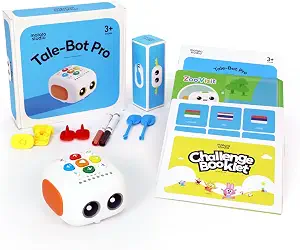 | Best for Preschool Beginners | Brand: MatataStudio | Model: Tale-Bot Pro | Recommended age: 3–5 years | VIEW ON AMAZON | See Our Full Breakdown |
| Learning Resources Botley the Coding Robot |  | Best for Logic Challenges | Brand: Learning Resources | Model: LER2936 | Recommended age: 5–8 years | VIEW ON AMAZON | See Our Full Breakdown |
| Learning Resources Cooper STEM Robot |  | Best for Sensor-Based Exploration | Brand: Learning Resources | Model number: LER3119 | Recommended age: 5–12 years | VIEW ON AMAZON | See Our Full Breakdown |
| interactive stem robots for kid | Recommended age | Brand |
|---|---|---|
| Ruko 8809 Remote-Controlled Ro | 3 years and up | — |
| TinkRbot AI Robot Building Kit | 12+ | TinkRworks |
| okk Robot Building Kit for Kid | — | — |
| Dingdongwu Interactive Robot D | 6+; manufacturer age range also listed as 36 months–18 years | — |
| Sillbird 12-in-1 Solar Robot B | 10 years and up | — |
| Ozobot Ozo at Home STEM Coding | 5 years and up | Ozobot |
| Makeblock mBot2 Rover Robotics | — | — |
| Thames & Kosmos My Robotic Pet | 8–12 years | Thames & Kosmos |
| VinciBot Coding Robot for Kids | 8 years and up | MatataStudio |
| Educational Insights Design & | 3 years and up | Educational Insights |
| MatataStudio Tale-Bot Pro Scre | 3–5 years | MatataStudio |
| Learning Resources Botley the | 5–8 years | Learning Resources |
| Learning Resources Cooper STEM | 5–12 years | Learning Resources |
More Details on Our Top Picks
Ruko 8809 Remote-Controlled Robot Dinosaur Toy
The Ruko 8809 is the pick for kids who want a robot dinosaur that reacts and performs, rather than a kit that prioritizes building or coding. It walks, turns, roars, dances, and launches soft foam darts, while touch interaction and LED eyes add character-driven play. Its standout STEM angle is the ability to program up to 50 commands, giving children room to arrange actions into sequences. That is more playful than the deeper sensor-and-code work offered by the TinkRbot AI, but less focused on construction than the 635-piece okk kit. The tradeoff is its substantial size: at over 22 inches long, it needs room to move, and the small darts can be misplaced. I’d choose it for interactive demonstrations and movement play, not for a child seeking a build-first robotics project.
Pros:- Combines walking, turning, roaring, dancing, songs, and foam-dart launching
- Allows programming of up to 50 commands
- Touch interaction and LED eyes add responsive play
- Remote control has a stated range of 15 meters
Cons:- Large dimensions call for more play space than compact robot kits
- Small foam darts can be misplaced
- Action-focused play offers less hands-on building than the okk kit
Best for: Families looking for a large, responsive dinosaur with programmable action sequences and plenty of movement-based play.
Not ideal for: Children who want to assemble a robot or work with sensors and coding concepts, and families with little floor space or a preference to avoid small accessories.
- Character:T. rex
- Recommended age:3 years and up
- Dimensions:22.28 × 7.95 × 12.32 inches
- Weight:2.02 kg
- Remote control range:15 meters
- Programmable commands:Up to 50
- Included components:Charging cable, 10 foam darts, dinosaur, remote control, and user manual
- Power:Rechargeable
Our verdict“Choose the Ruko 8809 for a child who wants a programmable dinosaur performer, rather than a robot-building or sensor-coding project.”
TinkRbot AI Robot Building Kit – Coding STEM Robotics Kit for Ages 12+
For older kids ready to build a robot from working components, the TinkRbot AI has the strongest engineering focus in this group. Its aluminum chassis, programmable microcontroller, and ultrasonic, reflectance, and infrared sensors support line-following, obstacle avoidance, and maze-solving. The online lessons add block coding and simple AI model training, so the learning can move beyond a single pre-set routine. That makes it a more technical choice than the Ruko 8809, whose programming arranges toy actions, and a more open-ended build than the solar-powered Sillbird kit. The tradeoff is the entry barrier: assembly, wiring, and coding take patience, and the recommended age is 12 and up. I’d favor it for a teen or classroom that wants repeatable engineering challenges, not a younger child seeking immediate, simple interaction.
Pros:- Uses ultrasonic, reflectance, and infrared sensors for varied robot challenges
- Supports line-following, obstacle avoidance, and maze-solving
- Online lessons include block coding and simple AI model training
- Can be reprogrammed and rebuilt for repeated projects
Cons:- Assembly, wiring, and coding can be demanding for new builders
- Recommended for ages 12 and up, limiting its fit for younger kids
- Less suited to immediate character-based play than the Dingdongwu robot dog
Best for: Teens aged 12 and up, or classroom groups, seeking hands-on wiring, sensor work, coding lessons, and a robot they can reprogram.
Not ideal for: Younger children or beginners who want a ready-to-play robot with minimal assembly and a short learning curve.
- Recommended age:12+
- Sensors:Ultrasonic, reflectance, and infrared
- Core components:Aluminum chassis, PCB, acrylic panels, motors, servo, and wheels
- Programming:Programmable microcontroller; online lessons include block coding and simple AI model training
- Robot activities:Line-following, obstacle avoidance, and maze-solving
- Included components:Aluminum chassis, PCB, acrylic panels, ultrasonic sensor, motors, USB cable, servo, remote, wheels, and screwdriver
- Brand:TinkRworks
Our verdict“Pick the TinkRbot AI when the goal is sustained engineering and coding practice for an older child, not quick interactive play.”
okk Robot Building Kit for Kids Ages 6-12
The okk kit balances construction and interaction: kids assemble a 635-piece robot, then drive it with a 2.4 GHz remote or use the companion app to program movement paths. That build-first structure gives it a clearer hands-on STEM role than the Ruko 8809, which arrives as a character toy, while its age range makes it more approachable than the TinkRbot AI for many elementary-school builders. A rechargeable robot battery also means fewer battery changes during play, although the remote needs two AAA batteries that are not included. The substantial piece count invites careful assembly, but younger children may still need adult help despite the illustrated guide. I’d choose this for a child who wants to make and control a robot; skip it if your priority is a fast, ready-to-play companion with voice or touch responses.
Pros:- 635 pieces support a substantial hands-on assembly project
- Remote and companion app provide different control options
- App supports programming movement paths
- Rechargeable robot battery reduces reliance on disposable batteries for the robot
Cons:- Assembly may require adult help, especially for younger children
- Remote requires two AAA batteries, which are not included
- Offers less sensor-based autonomy than the TinkRbot AI
Best for: Children around ages 6–12 who enjoy following build instructions and want both remote driving and app-based movement programming.
Not ideal for: Families seeking a ready-to-use robot with minimal assembly, or younger builders who cannot manage a detailed kit without help.
- Recommended age range:6–12 years
- Piece count:635
- Control methods:2.4 GHz remote and companion app
- Robot battery:Rechargeable lithium
- Remote batteries:2 AAA batteries, not included
- Remote range:Up to 65 ft
- Dimensions:11 × 10 × 2 inches
- Material and weight:Plastic; 2.2 pounds
Our verdict“Choose the okk kit for a school-age builder who wants to assemble a robot and then drive or program its movements.”
Dingdongwu Interactive Robot Dog with Voice Control and App Programming
The Dingdongwu robot dog is the most flexible choice here for children who want to switch between directing a robot and creating action sequences. It offers more than 30 actions, with voice, app, and remote control, plus app settings for volume and language. Programming mode gives it a more explicit sequencing activity than the Ruko 8809’s dinosaur performance, while its dog format may feel more companion-like than the construction-focused okk kit. The collision motor shutoff is a useful safeguard during active play, and USB-C charging is convenient. One point needs checking before purchase: the product information lists a 600 mAh rechargeable battery but also says three AAA batteries are included, leaving the power setup unclear. I’d select it for varied interactive play, but not for buyers who need unambiguous battery details or a serious build-and-code curriculum.
Pros:- Offers more than 30 actions and three control methods
- Programming mode lets children create custom action sequences
- App includes volume, language, and control settings
- Automatic motor shutoff responds to collisions
Cons:- Power details are unclear, listing both a 600 mAh rechargeable battery and three AAA batteries
- Broad manufacturer age range makes age suitability less clear
- Provides less hands-on construction than the okk robot kit
Best for: Families seeking a robot pet with voice, app, and remote controls, plus programmable action sequences for children aged 6 and up.
Not ideal for: Buyers who need clearly documented power requirements or want a kit centered on assembly, sensors, and structured coding lessons.
- Recommended age:6+; manufacturer age range also listed as 36 months–18 years
- Actions:30+
- Control methods:Voice commands, app, and remote control
- App compatibility:iOS and Android
- Battery information:600 mAh rechargeable battery; 3 AAA batteries also listed as included
- Charging and runtime:USB-C; full charge in 1.5 hours; up to 6 hours runtime
- Dimensions and weight:12.2 × 5.5 × 7.2 inches; 1.4 kg
- Material:ABS plastic
Our verdict“Choose the Dingdongwu robot dog for children who value several ways to interact and program actions more than building a robot from parts.”
Sillbird 12-in-1 Solar Robot Building Kit, 190 Pieces
The Sillbird kit gives renewable energy a tangible role: children assemble models and watch them run on a solar panel or strong artificial light, with no battery required. Its 12-model format encourages rebuilding, though the 190 pieces make it a simpler construction project than the 635-piece okk robot kit. It also differs from the TinkRbot AI: Sillbird is about assembling light-powered models, while TinkRbot adds sensors, programming, and autonomous challenges. That narrower focus can be a plus for families introducing basic mechanics and solar power without an app or coding setup. The key limitation is the power source: dim indoor conditions may prevent the models from operating, so the kit’s interactive payoff depends on access to suitable light. I’d pick it for a child who enjoys repeated, guided builds and can use it near a bright window or strong lamp.
Pros:- Supports building 12 different models from one kit
- Connects hands-on construction with renewable-energy concepts
- Step-by-step instructions guide the builds
- Runs on sunlight or strong artificial light without a battery
Cons:- Needs sunlight or strong artificial light to operate
- Less focused on coding and autonomous behavior than the TinkRbot AI
- Its 190 pieces offer a smaller build project than the okk kit
Best for: Children aged 10 and up who want a guided building activity that demonstrates solar power through multiple small models.
Not ideal for: Families without reliable sunlight or a strong artificial light source, and children seeking app control or advanced programming challenges.
- Recommended age:10 years and up
- Number of models:12
- Piece count:190
- Power source:Solar panel or strong artificial light
- Battery:No battery
- Material:ABS
- Dimensions:10.24 × 7.87 × 2.56 inches
Our verdict“Choose Sillbird for a guided, light-powered building project; pass if dependable operation in ordinary indoor light is a priority.”
Ozobot Ozo at Home STEM Coding Robot Kit for Kids Ages 5+
Ozo at Home is a strong starting point for children who need structured steps from hands-on play toward programming. Its 27 guided activities span color-code paths, magnetic-board challenges, engineering tasks, and Blockly, so kids can begin without a screen and add one when they are ready. Compared with My Robotic Pet: Coding Chameleon, which centers on building and programming one character, Ozo offers more varied activity formats and a clearer progression through coding concepts. That breadth makes it a useful choice for families who want a guided learning sequence, though it may feel less like an expressive, character-driven toy. Blockly also requires a computer or tablet, and the available details do not specify battery life or charging time.
Pros:- 27 activities offer a structured path across coding, engineering, and problem-solving
- Color coding lets children start without a computer or tablet
- Blockly adds a next step for children ready to program on a screen
- Story-based activities give sequencing and logic practice a playful context
Cons:- Blockly programming requires a computer or tablet
- Battery life and charging time are not specified in the product details
Best for: Families with children around age five or older who want guided, screen-free coding activities that can progress to tablet- or computer-based Blockly.
Not ideal for: Buyers seeking a detailed build-your-own robot project, or families who want all programming to stay screen-free.
- Brand:Ozobot
- Model:70101KIT
- Recommended age:5 years and up
- Activities:27
- Programming methods:Color Codes and Ozobot Blockly
- Included components:1 Ozo at Home robot and charging cable
- Material:Plastic
- Dimensions:9 x 7.5 x 2 inches
Our verdict“Choose Ozo at Home for a guided introduction that starts with physical color coding and grows into Blockly.”
Makeblock mBot2 Rover Robotics Kit for Kids Ages 8-12
The mBot2 Rover is the pick for kids who want a robot that can move beyond a tabletop. Its all-terrain, shock-resistant drive system suits outdoor exploration, while the build progresses from simple mBot2 assembly to a more involved rover. Dancing, music, and games add interactive play between building sessions. Compared with VinciBot, which foregrounds block coding, Python, and sensor-based projects, the Rover puts more emphasis on construction and physical movement. That makes it a better match for hands-on builders who want to steer a durable machine, but the supplied product details give less information about specific coding languages or lesson content. Power is another open question: additional batteries or power accessories may be needed and are not included.
Pros:- Build stages let children move from simpler assembly to a more advanced rover
- All-terrain, shock-resistant drive system suits outdoor exploration
- Dancing, music, and games add interactive play beyond driving
- Included remote control provides a direct way to operate the robot
Cons:- Additional batteries or power accessories may be required
- Product details do not specify programming languages or a set of coding lessons
Best for: Children ages 8–12 who enjoy building, remote-controlled exploration, and taking a robot onto varied outdoor terrain.
Not ideal for: Families prioritizing a clearly documented coding curriculum or a complete power setup in the box.
- Target age:8–12 years
- Drive system:All-terrain, shock-resistant
- Control:Remote control included
- Build stages:Simple mBot2 assembly to advanced rover
- Interactive functions:Dancing, music, and games
Our verdict“Pick the mBot2 Rover for a child who values building and outdoor robot driving more than a clearly outlined coding curriculum.”
Thames & Kosmos My Robotic Pet: Coding Chameleon STEM Kit
My Robotic Pet: Coding Chameleon combines construction, screen-free programming, and lifelike responses in one focused project. Kids build a 15-inch chameleon that reacts to touch and gestures, changes color, and moves its tongue; physical action cards let them program movements without an app. The included 48-page manual adds context about robotics and biomimicry, giving the build more learning structure than a simple interactive toy. Compared with the Ozobot Ozo at Home, which offers a wider range of guided activity formats, this kit is more immersive but centers on a single creature and build. Younger builders may need adult help with assembly, and independent play is recommended for ages 12 and up, despite the stated 8–12 age range.
Pros:- Physical action cards enable screen-free movement programming
- Color, touch, and gesture responses make the chameleon feel interactive
- Three modes offer coding, pet-style, and untamed play
- 48-page manual introduces assembly, robotics, and biomimicry
Cons:- Assembly may require adult help for younger children
- The experience focuses on one creature rather than a broad range of robot projects
- Independent play is recommended for ages 12 and up
Best for: Children ages 8–12 who enjoy assembling creatures and want tangible, screen-free coding with responsive play.
Not ideal for: Families seeking a quick-start coding robot, a broad set of unrelated projects, or a build children can complete independently at younger ages.
- Brand:Thames & Kosmos
- Model:My Robotic Pet: Coding Chameleon
- Model number:620507
- Recommended age:8–12 years
- Length:15 inches
- Play modes:Coding Mode, Wild Mode, and Pet Mode
- Sensors:Color sensor and infrared sensor
- Lighting:RGB LEDs
- Manual:48 pages
Our verdict“Choose the Coding Chameleon for a child who wants to build a responsive robotic pet and program it without a screen.”
VinciBot Coding Robot for Kids Ages 8–12
VinciBot is the most coding-focused choice here for children ready to move from visual blocks toward text-based programming. It supports block-based coding and Python, with eight sensors, preset activities, and a challenge booklet to give projects a starting point. Compatibility with LEGO bricks, TECHNIC motors, and third-party electronic modules lets kids extend the robot beyond its core activities. Compared with the Makeblock mBot2 Rover, which emphasizes rugged movement and remote-controlled play, VinciBot offers a more explicit programming path and broader expansion options. The tradeoff is setup: some tutorials and features require software or website access, while advanced AI, IoT, and TinyML projects may need extra compatible modules. Its richer scope suits motivated learners better than children seeking instant, mostly physical play.
Pros:- Supports both block-based programming and Python
- Eight sensors support varied interactive projects
- Compatible with LEGO bricks, TECHNIC motors, and third-party electronic modules
- Preset modes and a challenge booklet help kids begin exploring
Cons:- Some features and tutorials require software or website access
- Advanced AI, IoT, and TinyML projects may need extra setup or compatible modules
Best for: Children ages 8 and up who are ready for block coding, want a route toward Python, and enjoy extending projects with compatible components.
Not ideal for: Families looking for a simple screen-free robot or a complete advanced AI and IoT project setup without extra components.
- Brand:MatataStudio
- Recommended age:8 years and up
- Programming languages:Block-based programming and Python
- Sensors:8
- Battery capacity:1500 mAh
- Battery life:Over 4 hours per charge
- Preset modes:Line following, precision drawing, and IR remote
- Challenge booklet:17 coding cases
- Compatibility:LEGO bricks, TECHNIC motors, and third-party electronic modules
Our verdict“Choose VinciBot for a child who wants a sustained coding challenge that can grow from blocks to Python and expandable projects.”
Educational Insights Design & Drill Robot Building Toy
The Design & Drill Robot is the simplest and youngest-focused option in this group: children assemble and customize a robot with a kid-friendly screwdriver, colorful bolts, and stickers. That makes it a practical first step into hands-on engineering and fine motor practice, especially for preschoolers who are not ready for programming interfaces. Compared with Ozobot Ozo at Home, it offers direct building rather than guided coding activities; compared with the Coding Chameleon, it keeps assembly and play less involved. Its limits follow from that simpler format: the product details describe no sensors, autonomous movement, or coding, so it is a building toy rather than a programmable robot. Buyers seeking interactive robot behavior or lessons that progress into coding should choose another kit.
Pros:- Kid-friendly screwdriver and bolts give young children direct building practice
- Rebuilding and customizing support problem-solving and creativity
- Swiveling head, arms, and upper body offer adjustable play
- Stickers let children personalize the finished robot
Cons:- Product details do not describe programming, sensors, or autonomous robot behavior
- The activity centers on assembly and customization rather than a progressive coding curriculum
Best for: Preschoolers ages 3 and up who are ready to practice using a tool, assembling parts, and customizing a simple robot.
Not ideal for: Families seeking a robot that responds to commands, moves autonomously, or teaches coding concepts.
- Brand:Educational Insights
- Recommended age:3 years and up
- Piece count:23
- Included components:Robot with swiveling head, arms, and upper body; 15 multicolored bolts; kid-friendly screwdriver; decorative stickers
- Model number:EI-4127
- Warranty:1 year against manufacturer defects
Our verdict“Choose Design & Drill for a preschooler’s first robot-building activity, but pick a programmable model for coding or responsive play.”
MatataStudio Tale-Bot Pro Screen-Free Coding Robot for Kids Ages 3–5
For a first introduction to coding, the Tale-Bot Pro makes the commands physical and easy to explore: children press buttons on the robot, then watch it move across an interactive map. Its storytelling, voice recording, drawing, and music give preschoolers more ways to connect a sequence of commands to an outcome than a robot focused mainly on navigating obstacles. The 14-mission booklet offers a starting structure, while support for up to 256 commands leaves room for longer sequences as skills grow. Compared with Botley, Tale-Bot Pro is aimed at younger children and leans more toward creative play than logic features such as loops and if/then commands. The tradeoff is age range: children who are ready for more explicit programming challenges may outgrow its preschool focus, and extra activity boxes add learning materials beyond the included missions.
Pros:- Screen-free, touch-based controls make first coding sequences accessible to preschoolers.
- Interactive map and 14-mission booklet provide guided activities right out of the box.
- Storytelling, voice recording, drawing, and music extend play beyond movement commands.
- Supports up to 256 commands, 10 languages, and play with compatible LEGO blocks.
Cons:- Its recommended age range of 3–5 limits its fit for older children seeking more advanced challenges.
- Additional activity boxes are recommended for more learning materials.
Best for: Families introducing coding to children ages 3–5 who learn through stories, drawing, and hands-on button presses.
Not ideal for: Older children ready to practice logic structures such as loops and if/then commands, or families seeking a larger activity library without buying add-ons.
- Brand:MatataStudio
- Model:Tale-Bot Pro
- Recommended age:3–5 years
- Commands:Up to 256
- Languages supported:10
- Included components:Robot, double-sided interactive map, 14-mission challenge booklet, configuration card, 2 washable markers
- Dimensions:10.28 × 11.06 × 3.5 inches
Our verdict“Choose Tale-Bot Pro for a preschooler who will engage with coding through stories and creative play rather than advanced logic exercises.”
Learning Resources Botley the Coding Robot
Botley is the stronger choice for children ready to move from pressing simple movement commands to working out how a program behaves. Its remote programmer supports up to 80 steps, loops, and if/then logic, while the included tiles and obstacles let kids build a course and revise their instructions when the robot takes the wrong route. That makes it a more logic-centered pick than the Tale-Bot Pro, which emphasizes preschool storytelling and creative activities. Botley also needs no screen or app, keeping the coding interaction focused on the physical robot and course. The compromises are worth checking before purchase: it is recommended for ages 5–8, has no manufacturer warranty, and component counts are described inconsistently in the product information. Families wanting rechargeable features or sensing behaviors may prefer Cooper, though Botley’s obstacle-course setup is more explicit.
Pros:- Teaches sequencing, loops, and if/then logic through hands-on programming.
- Screen-free play requires no app or device.
- Supports programs of up to 80 steps for extended route-planning challenges.
- Includes coding cards, tiles, and obstacles for creating varied courses.
Cons:- No manufacturer warranty is listed.
- Included component counts vary between product descriptions, making the exact set contents less clear.
Best for: Families with children ages 5–8 who want to practice sequencing, loops, and conditional logic by building obstacle courses.
Not ideal for: Preschoolers who need simpler story-led activities, or buyers who prioritize a manufacturer warranty and clearly specified component counts.
- Brand:Learning Resources
- Model:LER2936
- Recommended age:5–8 years
- Programmable steps:Up to 80
- Programming concepts:Sequencing, loops, and if/then logic
- Screen-free:Yes
- Set contents:Botley, remote programmer, detachable arms, coding cards, tiles, and obstacles
- Warranty:No warranty
Our verdict“Pick Botley for a child ready to practice logic concepts through screen-free obstacle-course coding.”
Learning Resources Cooper STEM Robot
Cooper brings physical responses into screen-free coding: it can react to light, follow paths, and sense objects, giving children more to investigate than a robot that only follows a programmed route. The 40 coding cards and 10 guided challenges provide a defined starting point for practicing sequencing and problem-solving. Compared with Botley, Cooper’s appeal is its sensing and light interactions, along with a rechargeable design; Botley’s included obstacles make course-building more central to its play. Cooper is also listed for ages 5–12, a wider range than Tale-Bot Pro, though younger users may still benefit from adult help with the challenges. One limitation is that communication and collaboration require additional Cooper robots, so those features are not available as a solo set. There is also no manufacturer warranty listed.
Pros:- Light response, path following, and object sensing add interactive behaviors to coding play.
- Screen-free activities support hands-on sequencing and problem-solving.
- Includes 40 coding cards and an activity guide with 10 challenges.
- Rechargeable design avoids relying on disposable batteries.
Cons:- Communication and collaboration features require additional Cooper robots.
- No manufacturer warranty is listed.
Best for: Families seeking a rechargeable, screen-free coding robot for children ages 5–12 who enjoy exploring sensors and guided challenges.
Not ideal for: Buyers seeking multi-robot collaboration in a single set, or families who want a manufacturer warranty.
- Brand:Learning Resources
- Model number:LER3119
- Recommended age:5–12 years
- Power:Rechargeable
- Screen-free:Yes
- Interactive features:Light response, path following, object sensing, and communication with other Cooper robots
- Included components:Robot, 40 coding cards, activity guide with 10 challenges, ball accessory, USB-C charging cable
- Length:7.5 inches
- Warranty:No manufacturer warranty
Our verdict“Choose Cooper for sensor-focused, rechargeable coding play, but select Botley instead if obstacle-course accessories and explicit logic features matter more.”

How We Picked
I compared these 13 options as interactive STEM robots for kids, not simply as toys with robot styling. The main criteria were the kind of learning each one invites—coding, construction, cause and effect, or mechanical problem-solving—along with age fit, setup demands, play flexibility, and how naturally a child can return to the activity. I also distinguished screen-free play from app- or device-based programming, since that choice can shape both adult involvement and when the robot is usable.
The ranking favors options that balance meaningful STEM activity with approachable play and room to progress. That puts the mBot2 Rover ahead for its combination of building and coding, while younger-child picks rank well for accessible first steps rather than advanced programming. Kits with narrower play modes, heavier assembly demands, or less coding depth have more specific roles: they can be a better match for one child, but they are less flexible as an all-around recommendation.
| interactive stem robots for kid | Brand |
|---|---|
| Ruko 8809 Remote-Controlled Ro | — |
| TinkRbot AI Robot Building Kit | TinkRworks |
| okk Robot Building Kit for Kid | — |
| Dingdongwu Interactive Robot D | — |
| Sillbird 12-in-1 Solar Robot B | — |
| Ozobot Ozo at Home STEM Coding | Ozobot |
| Makeblock mBot2 Rover Robotics | — |
| Thames & Kosmos My Robotic Pet | Thames & Kosmos |
| VinciBot Coding Robot for Kids | MatataStudio |
| Educational Insights Design & | Educational Insights |
| MatataStudio Tale-Bot Pro Scre | MatataStudio |
| Learning Resources Botley the | Learning Resources |
| Learning Resources Cooper STEM | Learning Resources |
Factors to Consider When Choosing Interactive Stem Robots For Kids
Before choosing, decide what you want the robot to teach or prompt: coding logic, construction, creative experimentation, or interactive pretend play. These categories overlap, but they are not interchangeable. My guide below focuses on the practical choices that shape how often a robot gets used and whether it will suit the child beyond the first session.
Match the Challenge to the Child, Not Just the Age Label
Age ranges are useful starting points, but comfort with instructions, fine-motor tasks, and trial-and-error can matter just as much. A preschooler may benefit from simple directional commands, while an older child may want to build a mechanism or revise a program. Avoid buying the most advanced kit simply because a child is technically within its suggested age range; too many steps can turn independent play into an adult-led project. At the other end, a toy that is easy to operate may lose appeal if the child already enjoys sequencing or coding games. Look for a first activity the child can complete, followed by ways to make it harder. That progression is a better sign of a lasting fit than age labeling alone.
Choose Between Coding, Building, and Responsive Play
Robots that respond to voice commands or a remote can feel highly interactive without teaching much about programming. Coding toys ask children to plan actions, test sequences, and correct mistakes, while buildable kits add spatial reasoning and assembly. These experiences can complement each other, but a product cannot be assumed to provide all of them equally. Think about the activity your child naturally sticks with: following a build plan, inventing movement sequences, or acting out stories with a responsive toy. A common mistake is to equate more features with more learning. Choose the primary activity first, then treat extra modes as a bonus.
Check Screen, App, and Setup Requirements
Screen-free robots can be easier to bring out for a short activity and may suit families limiting device use. App-based kits can offer more ways to program and adjust behavior, but they depend on a compatible device and may involve account, connection, or setup steps. Check what is included and what the child needs before play; a kit that requires a phone or tablet may be a poor fit if one is not available for the child to use. Consider whether an adult will need to help with initial setup or troubleshoot ongoing pairing. The tradeoff is not simply screen versus no screen: it is also immediate access versus a potentially broader programming interface. A quick check of software and device requirements can prevent a robot from sitting unused.
Account for Assembly and Adult Support
Construction kits can make the learning process more tangible, but assembly takes time and may call for adult help. That can be a feature for a shared project and a drawback when a child wants to start playing alone. Screen-free coding toys often reduce setup, though they still need clear instructions and room to experiment. Ask whether the child enjoys following diagrams and handling small pieces, or prefers to begin with a ready-to-use robot. Avoid treating adult involvement as a problem by default: some families want a collaborative activity. The key is matching the expected level of help to the way the robot will actually be used.
Think About Replayability and Room to Grow
A robot can be entertaining at first and still have limited repeat play if it offers only a fixed set of actions. Coding challenges, reconfigurable builds, and open-ended tasks can give children reasons to revisit the same robot with new goals. Look for a clear next step after the introductory activity, such as changing a sequence, altering a build, or inventing a route. More advanced features only add value if the child is ready to use them; otherwise, they can complicate an otherwise enjoyable toy. Consider whether a sibling might also use it, since age differences can affect how long the activity stays interesting. The best growth path is one the child can reach without needing a completely new setup each time.
Separate Durable Play from One-Time Assembly
Robotic toys with moving parts, connectors, or many small components face different wear risks from a simple push-along robot. If the toy will travel between rooms or be used by younger siblings, sturdiness and easy-to-manage pieces may matter more than a long feature list. For kits, check how parts are stored and whether rebuilding is practical after a session. Solar-powered models also depend on suitable light, so think about where the child can use them rather than assuming every activity works indoors. A fragile or fiddly setup can limit play even when the underlying idea is appealing. Match the construction style and expected handling to your household’s routines.
Frequently Asked Questions
Which type of robot is a better first purchase: a screen-free coder or a buildable kit?
I’d start with a screen-free coder if the child is new to sequencing, wants to play independently, or does best with quick activities. A buildable kit makes more sense if they enjoy instructions, assembling pieces, and seeing how a robot is put together. Neither format is automatically more educational; each teaches through a different kind of problem-solving. Consider whether the child is more excited by making the robot move or making the robot itself. If you are unsure, a simpler coding toy can offer an easier introduction before a larger build project.
Do app-based robot kits require a tablet or phone?
Some app-based kits rely on a compatible phone or tablet for programming, while others provide ways to play without a separate device. Check the specific product requirements before choosing, including operating system compatibility and whether an adult device would need to be shared. Shared devices can make spontaneous play harder if the robot is meant to be used independently. Also ask whether the app adds a meaningful coding interface or is mainly needed for basic controls. If your priority is device-free play, screen-free options such as Botley or Tale-Bot Pro are more straightforward starting points.
Will a robot labeled for older children be too difficult for a younger sibling?
It depends on the task, not only the age printed on the box. A younger sibling may enjoy watching or helping with a simple step, but more involved coding and assembly can require reading, patience, or fine-motor control. If children will share one robot, look for activities that can be simplified without taking away the older child’s challenge. Keep small parts and any device-based setup in mind when younger children are nearby. A robot designed for preschoolers is generally a more reliable choice for independent use at that age than asking a younger child to stretch into an older-child kit.
Are remote-controlled and voice-controlled robots good STEM choices if they do not teach coding?
They can introduce cause and effect, movement, and imaginative play, so they may still fit a broad STEM play goal. The difference is that direct control does not ask a child to plan a sequence or debug a program in the same way a coding robot does. If coding is the main goal, choose a product with explicit programming activities rather than relying on interactive features alone. If your child is mainly motivated by character play or responding to commands, a responsive robot may be a more engaging entry point. You can also use it to spark questions about how movement and sensors work, while recognizing that this is not the same as a structured coding activity.
What should I check before buying a solar-powered robot kit?
Check how the solar feature is used and whether the child has a practical place to run the activity with adequate light. Weather, season, and indoor lighting can affect when solar play is convenient, so do not assume it will be a reliable power source in every setting. Also check the assembly demands and whether the kit offers satisfying activity beyond building the model. A solar theme can make energy concepts tangible, but it is not a substitute for a clear age fit or an engaging set of tasks. If the child wants frequent indoor play, a coding or interactive robot that does not depend on sunlight may be a more flexible choice.
Conclusion
For the broadest mix of hands-on robotics and coding, I recommend the Makeblock mBot2 Rover as best overall. The Sillbird 12-in-1 Solar Robot Building Kit is my best value-style choice for children who want multiple build configurations, while the VinciBot is the best premium-style fit for kids ready for a more involved coding experience. For beginners, I’d choose MatataStudio Tale-Bot Pro for preschoolers and Botley for an accessible screen-free coding introduction. For specific needs, pick Ozo for compact coding activities, Design & Drill for construction-focused play, or Ruko’s dinosaur for remote-controlled pretend play rather than coding lessons. The right choice depends on whether your child wants to program, build, or interact—and on how much setup and adult help your household can accommodate.
Halloween Picks
halloween
As an affiliate, we earn on qualifying purchases.