For a dependable all-around choice, I’d start with the Perlegear Full-Motion Mount for 26–74-inch TVs, which covers many common screen sizes without the reach of a large-screen specialist. The Mounting Dream 42–90-inch model is a standout for larger, heavier TVs, while the Perlegear corner mount suits rooms where a standard flat-wall position won’t work. Choosing among full-motion mounts comes down to matching TV size and weight, wall construction, extension range, and how much adjustment you actually need. A mount with broader compatibility may cost you space or be harder to install, while a compact option can limit viewing angles. Read on for the full breakdown and help matching a mount to your room.

Get business pricing on tech for your team
- Business-only prices and quantity discounts
- Tax-exempt purchasing
- Multiple users, one account, clear invoices
Key Takeaways
- Screen-size range separates the lineup: compact models for TVs up to 40 inches serve a different purpose from mounts built for screens as large as 97 inches.
- Large-screen compatibility is not the same as higher weight capacity: check both the TV’s weight and its VESA pattern rather than relying on screen size alone.
- The amazon.com/dp/B09JWN5F8W?tag=technocapture-20&ascsubtag=dc-635054″ target=”_blank” rel=”nofollow sponsored noopener”>amazon.com/dp/B0CZD8L4V6?tag=technocapture-20&ascsubtag=dc-635054″ target=”_blank” rel=”nofollow sponsored noopener”>Perlegear 37–75-inch corner mount has a distinct job: it addresses corner placement, while most other picks are designed for standard wall locations.
- Several brands offer overlapping size coverage: when ranges are similar, compare the mount’s listed capacity, extension and tilt details, and installation requirements.
- Small-TV models remain useful when space is tight: the Amazon Basics 12–40-inch option fills a compact-screen niche that the larger mounts do not.
| USX MOUNT Full Motion TV Wall Mount for 26–65 Inch TVs |  | Best for Compact Setups | Compatible TV size: 26–65 inches | Maximum supported weight: 77 lb | VESA compatibility: 75 × 75 mm to 400 × 400 mm | VIEW ON AMAZON | See Our Full Breakdown |
| Perlegear Full Motion TV Wall Mount for 26–74-Inch TVs |  | Best for Easier Setup | Compatible TV size: 26–74 inches | Maximum supported weight: 99 lb | VESA compatibility: 100 × 100 mm to 400 × 400 mm | VIEW ON AMAZON | See Our Full Breakdown |
| Perlegear Full-Motion TV Wall Mount for 42–90-Inch TVs |  | Best for Large TVs on a Two-Year Warranty | Compatible TV size: 42–90 inches | Maximum supported weight: 132 lb | VESA compatibility: 200 × 100 mm to 600 × 400 mm | VIEW ON AMAZON | See Our Full Breakdown |
| Mounting Dream Full Motion TV Wall Mount for 42-90 Inch TV up to 154lbs |  | Best for Heavy TVs | Compatible TV size: 42–90 inches | Maximum supported weight: 154 lb | Maximum VESA: 600 × 400 mm | VIEW ON AMAZON | See Our Full Breakdown |
| Perlegear Full-Motion TV Wall Mount for 42–97-Inch TVs, Up to 132 lbs |  | Best for Extra-Large TVs | Compatible TV size: 42–97 inches | Maximum supported weight: 132 lb | VESA compatibility: 200 × 100 mm to 600 × 400 mm | VIEW ON AMAZON | See Our Full Breakdown |
| Pipishell Full Motion TV Wall Mount for 26–65-Inch TVs |  | Best for Post-Install Fine-Tuning | Compatible TV size: 26–65 inches | Weight capacity: Up to 80 lbs | VESA compatibility: 75 × 75 mm to 400 × 400 mm | VIEW ON AMAZON | See Our Full Breakdown |
| USX Mount Full Motion TV Wall Mount for 42–90 Inch TVs |  | Best for Heavy Large TVs | Compatible TV size: 42–90 inches | Maximum supported weight: 132 lbs | VESA compatibility: 200 × 100 mm to 600 × 400 mm | VIEW ON AMAZON | See Our Full Breakdown |
| Perlegear Full-Motion Corner TV Wall Mount for 37–75-Inch TVs |  | Best for Corner Placement | Compatible TV size: 37–75 inches | Maximum load: 100 lbs | VESA compatibility: 200 × 100 mm to 600 × 400 mm | VIEW ON AMAZON | See Our Full Breakdown |
| Amazon Basics Full Motion TV Wall Mount, 12–40-Inch TVs |  | Best Compact-Screen Pick | Compatible TV size: 12–40 inches | Maximum TV weight: 40 lbs | VESA compatibility: 75 × 75 mm to 200 × 200 mm | VIEW ON AMAZON | See Our Full Breakdown |
| USX STAR Full Motion TV Wall Mount for 37–90-Inch TVs | 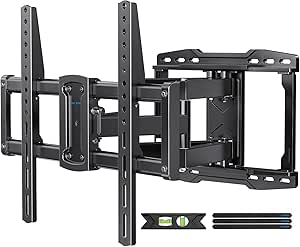 | Best for Flexible Stud Spacing | Compatible TV size: 37–90 inches | Maximum supported weight: 132 lbs | VESA compatibility: 200 × 100 mm to 600 × 400 mm | VIEW ON AMAZON | See Our Full Breakdown |
| USX MOUNT Full-Motion TV Wall Mount for 37–84-Inch TVs |  | Best for Larger TVs | Compatible TV size: 37–84 inches | Weight capacity: 120 lbs | VESA compatibility: 200×100 mm to 600×400 mm | VIEW ON AMAZON | See Our Full Breakdown |
| USX MOUNT Full Motion TV Wall Mount for 32–74 Inch TVs |  | Best for Multiple Wall Types | Model: XMM021 | Compatible TV size: 32–74 inches | Maximum load: 110 lbs | VIEW ON AMAZON | See Our Full Breakdown |
| Mounting Dream Full Motion TV Wall Mount for 32–70-Inch TVs |  | Best for Standard 16-Inch Stud Layouts | Model: MD2380 | Compatible TV size: 32–70 inches | Maximum supported weight: 110 lb | VIEW ON AMAZON | See Our Full Breakdown |
| USX MOUNT Full Motion TV Wall Mount for 32–70-Inch TVs |  | Best for a Close-to-Wall Fit | Model: XMM908 | Compatible TV size: 32–70 inches | Maximum load: 99 lbs | VIEW ON AMAZON | See Our Full Breakdown |
| Amazon Basics Full Motion TV Wall Mount for 26–55-Inch TVs, Black |  | Best for Wide Swivel on Smaller TVs | Model: AM40A | Compatible screen size: 26–55 inches in description; 22–55 inches in product information | Maximum supported weight: 80 lbs | VIEW ON AMAZON | See Our Full Breakdown |
| tv wall mounts full motion | Compatible TV size | VESA compatibility | Tilt | Swivel |
|---|---|---|---|---|
| USX MOUNT Full Motion TV Wall | 26–65 inches | 75 × 75 mm to 400 × 400 mm | +5° / −15° | ±90°; maximum depends on TV |
| Perlegear Full Motion TV Wall | 26–74 inches | 100 × 100 mm to 400 × 400 mm | 5° up, 15° down | ±45° |
| Perlegear Full-Motion TV Wall | 42–90 inches | 200 × 100 mm to 600 × 400 mm | +5° / −15° | ±50° |
| Mounting Dream Full Motion TV | 42–90 inches | — | 5° up, 15° down | Full left/right swivel |
| Perlegear Full-Motion TV Wall | 42–97 inches | 200 × 100 mm to 600 × 400 mm | +5° to −15° | Up to ±45° |
| Pipishell Full Motion TV Wall | 26–65 inches | 75 × 75 mm to 400 × 400 mm | +5° / −15° | ±90° |
| USX Mount Full Motion TV Wall | 42–90 inches | 200 × 100 mm to 600 × 400 mm | +5° / −15° | ±45° |
| Perlegear Full-Motion Corner T | 37–75 inches | 200 × 100 mm to 600 × 400 mm | −15° to +5° | ±90° |
| Amazon Basics Full Motion TV W | 12–40 inches | 75 × 75 mm to 200 × 200 mm | +15° to −5° | Up to 180° |
| USX STAR Full Motion TV Wall M | 37–90 inches | 200 × 100 mm to 600 × 400 mm | +5° / −15° | ±45° |
| USX MOUNT Full-Motion TV Wall | 37–84 inches | 200×100 mm to 600×400 mm | +5° / −15° | ±45° maximum; actual angle depends on TV |
| USX MOUNT Full Motion TV Wall | 32–74 inches | 75×75 mm to 400×400 mm | +5° / −15° | ±45° maximum; actual angle depends on TV |
| Mounting Dream Full Motion TV | 32–70 inches | — | Up 5°, down 15° | — |
| USX MOUNT Full Motion TV Wall | 32–70 inches | 75×75 mm to 400×400 mm | — | — |
| Amazon Basics Full Motion TV W | — | 3.9×3.9 to 15.7×15.7 inches | — | Up to 180° |
More Details on Our Top Picks
USX MOUNT Full Motion TV Wall Mount for 26–65 Inch TVs
For a smaller living room or a TV in the 26–65-inch range, the USX MOUNT XMM006 combines useful reach with a close-to-wall retracted depth. It extends 16.7 inches for angled seating, then folds to 2.81 inches when the screen can sit flat. Compared with the Perlegear PGMF21, it supports a lighter maximum load and a narrower screen-size range, but its ±90° swivel gives more stated turning range than that model’s ±45°.
Its tilt and post-installation leveling adjustment help refine the screen position, while the included bubble level and cable ties are practical additions. The tradeoff is a firm wall requirement: it must attach to wood studs or solid concrete, and concrete anchors are not included. Choose another option if your TV exceeds 77 lb or drywall is your only mounting surface.
Pros:- 16.7-inch extension supports viewing from angled seating
- Retracts to 2.81 inches for a close-to-wall position
- ±90° swivel and ±5° post-installation adjustment allow flexible positioning
- Includes a bubble level, cable ties, and mounting hardware
Cons:- 77 lb capacity is lower than the larger Perlegear and Mounting Dream models
- Cannot be installed on drywall alone
- Concrete anchors are not included
Best for: Owners of 26–65-inch TVs who want wide swivel movement in a compact room and have wood studs or a suitable concrete wall.
Not ideal for: People mounting a TV heavier than 77 lb, TVs outside the stated size or VESA range, or anyone who can attach only to drywall.
- Compatible TV size:26–65 inches
- Maximum supported weight:77 lb
- VESA compatibility:75 × 75 mm to 400 × 400 mm
- Tilt:+5° / −15°
- Swivel:±90°; maximum depends on TV
- Extension:16.7 inches
- Retracted depth:2.81 inches
- Installation surfaces:Wood studs or solid concrete; not drywall alone
Our verdict“Choose the XMM006 for a smaller TV and broad swivel range, provided your wall offers a supported mounting surface.”
Perlegear Full Motion TV Wall Mount for 26–74-Inch TVs
The Perlegear PGMF21 is the most accommodating pick here for buyers balancing a broad TV-size range with a setup designed to reduce assembly work. Its pre-assembled arms and included hardware can make installation more approachable than the Mounting Dream MD2617, whose installation is described as challenging for DIY beginners. Three height settings also give you another way to position the screen after choosing where the wall plate goes.
It supports TVs up to 99 lb and extends 17.3 inches, slightly farther than the USX MOUNT XMM006. The compromise is its ±45° swivel, which offers less stated movement than the USX’s ±90° range, and its VESA range starts at 100 × 100 mm. Buyers with studs spaced wider than 16 inches need an extension bracket; it is not a drywall-only mount.
Pros:- Pre-assembled arms help reduce setup steps
- Three height settings add flexibility when positioning the TV
- Supports TVs up to 99 lb and extends up to 17.3 inches
- Mounts to 12- or 16-inch wood studs, concrete, or brick
Cons:- ±45° swivel is narrower than the USX MOUNT XMM006’s stated range
- Wood studs spaced beyond 16 inches require an extension bracket
- VESA compatibility begins at 100 × 100 mm
Best for: First-time installers with a 26–74-inch flat or curved TV who want pre-assembled arms, height choices, and compatibility with supported stud or masonry walls.
Not ideal for: Owners needing more than ±45° of swivel, a VESA pattern below 100 × 100 mm, or installation across wood studs spaced beyond 16 inches without an extension bracket.
- Compatible TV size:26–74 inches
- Maximum supported weight:99 lb
- VESA compatibility:100 × 100 mm to 400 × 400 mm
- Tilt:5° up, 15° down
- Swivel:±45°
- Extension:3–17.3 inches
- Height settings:3
- Supported wall types:12- or 16-inch wood studs, concrete, or brick
- Warranty:2 years
Our verdict“Pick the PGMF21 if a simpler installation and adjustable mounting height matter more than a very wide swivel range.”
Perlegear Full-Motion TV Wall Mount for 42–90-Inch TVs
The Perlegear PGLF8 is a substantial choice for large screens, supporting TVs up to 90 inches and 132 lb with VESA patterns reaching 600 × 400 mm. Its 16.6-inch extension, ±50° swivel, and +5°/−15° tilt give a large TV room to turn toward a seating area, while the 3-inch retracted profile keeps it relatively close to the wall when parked. Compared with the Mounting Dream MD2617, it has a lower stated weight capacity, but the included drilling template makes layout easier to plan.
The UL-listed steel construction and included installation hardware suit buyers who want a mount built for a large display without stepping up to the Mounting Dream’s 154 lb capacity. Check the wall and stud layout before choosing it: 24-inch stud spacing requires an extension bracket, and the two-year warranty is shorter than the ten-year coverage listed for the Mounting Dream and Perlegear PGLF15.
Pros:- Supports TVs up to 90 inches and 132 lb
- VESA range extends to 600 × 400 mm
- ±50° swivel and 16.6-inch extension suit angled viewing
- Includes a drilling template and installation hardware
Cons:- Does not support 24-inch stud spacing without an extension bracket
- Two-year warranty is shorter than the listed coverage for the Mounting Dream MD2617 and Perlegear PGLF15
- Requires careful checks of TV fit, wall type, and stud spacing
Best for: Owners of 42–90-inch TVs who need broad VESA compatibility, useful swivel travel, and a drilling template for installation planning.
Not ideal for: Buyers with 24-inch stud spacing who do not want an extension bracket, or those seeking the lineup’s highest stated load capacity or longest listed warranty.
- Compatible TV size:42–90 inches
- Maximum supported weight:132 lb
- VESA compatibility:200 × 100 mm to 600 × 400 mm
- Swivel:±50°
- Tilt:+5° / −15°
- Extension:16.6 inches
- Retracted profile:3 inches
- Mounting surfaces:Wood studs, concrete, or brick
- Warranty:2 years
Our verdict“Choose the PGLF8 for a large TV that needs broad movement and fit coverage, but verify the wall layout before committing.”
Mounting Dream Full Motion TV Wall Mount for 42-90 Inch TV up to 154lbs
Among these five mounts, the Mounting Dream MD2617 has the highest stated weight capacity: 154 lb. That makes it the clearest fit for a heavy 42–90-inch TV, while the Perlegear PGLF8 and PGLF15 top out at 132 lb. Its six articulating arms and cold-formed steel construction support the full-motion design, and the mount extends from 2.5 to 16.6 inches so you can pull the screen forward for viewing or push it back toward the wall.
The listing specifies a full left/right swivel rather than an exact angle, so buyers who need a precise swivel limit may prefer a model with a stated range, such as the PGLF8. A paper template, pre-labeled hardware, and cable straps help with setup and wire tidiness, but the installation can be challenging for DIY beginners. It also needs studs or suitable concrete anchors, not drywall alone.
Pros:- Highest stated capacity in this batch at 154 lb
- Six articulating arms support the full-motion layout
- Extends from 2.5 to 16.6 inches and includes leveling adjustment
- Paper template, pre-labeled hardware, and cable straps aid setup and cable management
Cons:- Installation may be challenging for DIY beginners
- Not suitable for drywall-only installation
- Swivel is described as full left/right movement without a numeric angle
Best for: Owners of heavy 42–90-inch TVs who want a high stated load capacity and are comfortable planning a stud- or masonry-based installation.
Not ideal for: DIY beginners seeking the most straightforward installation, or buyers who need a specific published swivel angle or a drywall-only mounting solution.
- Compatible TV size:42–90 inches
- Maximum supported weight:154 lb
- Maximum VESA:600 × 400 mm
- Tilt:5° up, 15° down
- Swivel:Full left/right swivel
- Extension range:2.5–16.6 inches
- Leveling adjustment:±4°
- Material:Cold-formed steel alloy
- Warranty:10 years
Our verdict“Choose the MD2617 for a heavy large-screen TV if its wall requirements suit your room and you can manage a more involved installation.”
Perlegear Full-Motion TV Wall Mount for 42–97-Inch TVs, Up to 132 lbs
The Perlegear PGLF15 reaches the broadest screen-size range in this group, fitting TVs from 42 to 97 inches while supporting up to 132 lb. For buyers choosing a particularly large screen, that extra size coverage sets it apart from the PGLF8 and Mounting Dream MD2617, both of which list a 90-inch maximum. It remains a full-motion option, with tool-free tilt, swivel up to ±45°, and extension to 16.3 inches for adjusting the screen toward different seats.
The UL listing, security locks, anti-drop end caps, and ten-year warranty add reassurance, though the PGLF15 does not have the MD2617’s higher 154 lb capacity. Its ±45° swivel is also narrower than the PGLF8’s ±50° specification. Installation requires 12- or 16-inch wood studs, solid concrete, or brick; wider stud spacing calls for an extension bracket, and drywall alone is not supported.
Pros:- Fits TVs up to 97 inches, the widest listed screen-size ceiling in this batch
- Tool-free tilt simplifies angle adjustments
- UL-listed with security locks and anti-drop end caps
- Ten-year warranty and included drilling template
Cons:- 132 lb capacity is below the Mounting Dream MD2617’s 154 lb rating
- ±45° swivel is less than the Perlegear PGLF8’s stated ±50°
- Cannot mount on drywall alone, and wider-than-16-inch stud spacing requires an extension bracket
Best for: Owners of 42–97-inch TVs weighing no more than 132 lb who want a listed mount with tool-free tilt and long stated warranty coverage.
Not ideal for: Owners of TVs heavier than 132 lb, buyers needing more than ±45° swivel, or households with unsupported wall construction or wider-spaced studs and no extension bracket.
- Compatible TV size:42–97 inches
- Maximum supported weight:132 lb
- VESA compatibility:200 × 100 mm to 600 × 400 mm
- Tilt:+5° to −15°
- Swivel:Up to ±45°
- Extension range:2.9–16.3 inches
- Mounting surfaces:12- or 16-inch wood studs, solid concrete, or brick
- Certification:UL-listed
- Warranty:10 years
Our verdict“Pick the PGLF15 for an extra-large TV within its 132 lb limit when tool-free tilt and a ten-year warranty matter more than maximum swivel or load capacity.”
Pipishell Full Motion TV Wall Mount for 26–65-Inch TVs
The Pipishell is a flexible choice for smaller and mid-size TVs when precise positioning after installation matters. Its ±4° leveling adjustment can help correct a slightly crooked screen without remounting the plate, while the 17-inch extension gives more viewing-angle freedom than the Amazon Basics 12–40-Inch mount’s 16.3-inch reach. It also retracts to just 2.36 inches, so the TV can sit close to the wall between viewing sessions. The broad VESA range and support for TVs up to 80 lbs cover many common setups, but its single-stud design may not suit buyers who prefer a wider mounting footprint. Like the Perlegear corner mount, it requires attachment to a suitable structure—not drywall alone—and it cannot match that model’s exceptionally long extension.
Pros:- Post-install ±4° leveling helps straighten the TV after mounting.
- 17-inch extension and 2.36-inch retracted depth support both angled viewing and a close-to-wall position.
- 75 × 75 mm to 400 × 400 mm VESA range fits many small and mid-size TVs.
- Supports TVs up to 80 lbs and includes mounting hardware and instructions.
Cons:- Cannot be installed on drywall alone; it needs wood studs, concrete, or brick.
- Single-stud design may not suit buyers who prefer a broader mounting footprint.
Best for: Owners of 26–65-inch TVs who want post-install leveling and a mount that both extends for viewing and retracts close to the wall.
Not ideal for: Buyers who need a wider multi-stud mounting arrangement, or renters whose only suitable mounting surface is drywall without a stud.
- Compatible TV size:26–65 inches
- Weight capacity:Up to 80 lbs
- VESA compatibility:75 × 75 mm to 400 × 400 mm
- Tilt:+5° / −15°
- Swivel:±90°
- Extension:Up to 17 inches
- Retracted depth:2.36 inches
- Compatible walls:Wood studs, concrete, and brick; not drywall alone
Our verdict“Choose the Pipishell if you want an adjustable mount for a 26–65-inch TV and value easy leveling after installation.”
USX Mount Full Motion TV Wall Mount for 42–90 Inch TVs
For buyers prioritizing load capacity across a large-screen setup, this USX MOUNT supports TVs up to 132 lbs and up to 90 inches. That makes it a stronger fit for a heavy TV than the Pipishell, which tops out at 80 lbs, while its 16.49-inch extension still gives useful clearance for angled seating or access behind the screen. The package also includes a bubble level and cable ties, handy additions for a cleaner installation. Its ±45° swivel is more limited than the Pipishell’s ±90° range, and actual swivel can be constrained by a wide screen, so it is less suited to sharp corner viewing. Concrete anchors are not included, which adds a sourcing step for masonry installations.
Pros:- Supports TVs up to 132 lbs and as large as 90 inches.
- Extends up to 16.49 inches for access and angled viewing.
- Includes a bubble level, cable ties, and mounting hardware.
- Post-install ±3° adjustment can help correct screen alignment.
Cons:- Swivel is limited to ±45°, and a large screen may reduce the usable angle.
- Concrete anchors are not included.
Best for: Households mounting a large, heavy 42–90-inch TV on a suitable wall who want high weight capacity and included alignment accessories.
Not ideal for: Viewers who need a very wide swivel angle for corner placement, or buyers mounting into concrete who expect anchors in the box.
- Compatible TV size:42–90 inches
- Maximum supported weight:132 lbs
- VESA compatibility:200 × 100 mm to 600 × 400 mm
- Tilt:+5° / −15°
- Swivel:±45°
- Post-install adjustment:±3°
- Extension range:2.40–16.49 inches
- Maximum stud spacing:16 inches
- Included accessories:Bubble level, three cable ties, and mounting hardware
Our verdict“Pick this USX MOUNT for a heavy large-screen TV when load capacity matters more than maximum swivel.”
Perlegear Full-Motion Corner TV Wall Mount for 37–75-Inch TVs
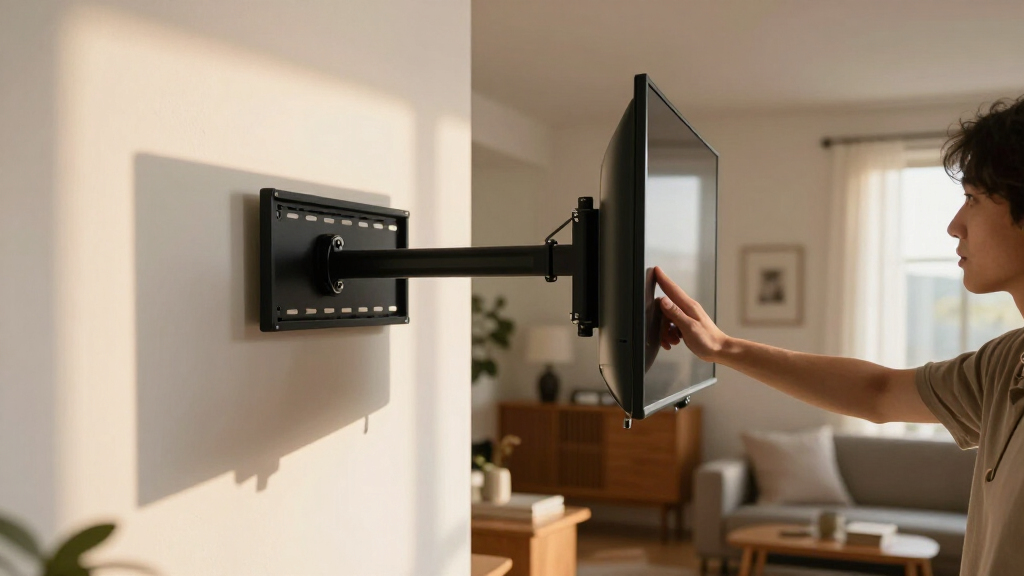
The Perlegear’s defining advantage is its 32.37-inch arm extension, nearly twice the reach of the USX MOUNT 42–90-inch model. That extra travel makes it a more practical choice when a TV needs to swing away from the wall for corner viewing or clear an obstacle nearby. It also offers ±90° swivel, supports up to 100 lbs, and has ±4° post-install leveling for a straighter final position. The reach comes with a tradeoff: this mount is a more specialized pick than a conventional shorter-arm option, and its screen size range stops at 75 inches, unlike the larger-screen USX MOUNT. Installation requires wood studs, concrete, or brick, so drywall alone is not suitable.
Pros:- 32.37-inch maximum extension offers substantial reach for corner layouts.
- ±90° swivel helps direct the screen toward different seating positions.
- Supports TVs up to 100 lbs with VESA patterns through 600 × 400 mm.
- ±4° post-install leveling helps fine-tune screen alignment.
Cons:- Cannot be mounted on drywall alone.
- The 75-inch screen-size limit excludes some large TVs supported by the USX MOUNT 42–90-inch model.
Best for: People placing a 37–75-inch TV near a room corner who need extra arm reach to aim the screen toward different seating areas.
Not ideal for: Buyers with TVs larger than 75 inches or installations where the mount cannot attach to wood studs, concrete, or brick.
- Compatible TV size:37–75 inches
- Maximum load:100 lbs
- VESA compatibility:200 × 100 mm to 600 × 400 mm
- Maximum extension:32.37 inches
- Minimum distance from wall:3.12 inches
- Swivel:±90°
- Tilt:−15° to +5°
- Post-install leveling:±4°
- Installation surfaces:Concrete, brick, or wood studs; not drywall alone
Our verdict“Choose this Perlegear when corner positioning and long reach matter more than fitting the largest TVs.”
Amazon Basics Full Motion TV Wall Mount, 12–40-Inch TVs
This Amazon Basics mount fills a different niche from the larger-screen options: it is sized for 12–40-inch TVs weighing up to 40 lbs, making it a sensible fit for a bedroom, office, or compact secondary screen. Its 180° swivel gives more stated horizontal movement than the Pipishell’s ±90°, while the 16.3-inch extension still lets a small TV angle away from the wall. The included mounting template can make layout easier, especially for buyers mounting a first small-screen set. The limit is capacity: the Pipishell supports both larger TVs and twice the weight, so this is not the choice for a growing or heavy setup. It also needs a single wood stud or masonry surface, not drywall alone.
Pros:- 180° swivel provides broad movement for a compact TV.
- Extends from 2.3 to 16.3 inches, allowing the screen to pull away from the wall.
- Supports common VESA patterns from 75 × 75 mm to 200 × 200 mm.
- Includes mounting hardware, a template, and a user manual.
Cons:- Limited to TVs up to 40 inches and 40 lbs, below the capacity of the Pipishell.
- Requires a single wood stud, concrete, or brick rather than drywall alone.
Best for: Buyers mounting a lightweight 12–40-inch TV in a bedroom, home office, or other compact viewing space.
Not ideal for: Owners of TVs over 40 inches or 40 lbs, and anyone who needs a mount suitable for drywall without a stud.
- Compatible TV size:12–40 inches
- Maximum TV weight:40 lbs
- VESA compatibility:75 × 75 mm to 200 × 200 mm
- Tilt:+15° to −5°
- Swivel:Up to 180°
- Extension range:2.3–16.3 inches
- Wall compatibility:Concrete, brick, or a single wood stud
- Included:Mounting hardware, mounting template, and user manual
Our verdict“Choose this mount for a lightweight small TV when broad swivel and a simple installation template are useful.”
USX STAR Full Motion TV Wall Mount for 37–90-Inch TVs
The USX STAR stands out for fitting a broad 37–90-inch TV range while accommodating 8-, 12-, or 16-inch stud spacing. That flexibility can simplify placement compared with the USX MOUNT 42–90-inch model, which lists a maximum 16-inch stud spacing and starts at 42 inches. Its dual-arm design offers extension, tilt, swivel, and ±4° leveling, giving buyers the core adjustments needed to orient a large screen and correct its final alignment. The tradeoff is moderate reach: at 16.61 inches, it falls well short of the Perlegear corner mount’s 32.37-inch extension. Swivel is limited to ±45° and may narrow with larger screens; concrete anchors are available by request rather than being included outright.
Pros:- Fits TVs from 37 to 90 inches and supports up to 132 lbs.
- Accommodates 8-, 12-, or 16-inch stud spacing.
- Includes tilt, swivel, extension, and ±4° level adjustment.
- Package includes an installation template, level, instructions, and hardware.
Cons:- Maximum extension of 16.61 inches is much shorter than the Perlegear corner mount’s reach.
- Swivel is limited to ±45° and may be constrained by screen size.
- Concrete anchors are available by request rather than listed as included.
Best for: Buyers mounting a 37–90-inch TV who need compatibility with 8-, 12-, or 16-inch stud spacing and want post-install leveling.
Not ideal for: Corner setups that need a very long arm or viewers who require a wide swivel angle; concrete installers should also plan for anchors by request.
- Compatible TV size:37–90 inches
- Maximum supported weight:132 lbs
- VESA compatibility:200 × 100 mm to 600 × 400 mm
- Tilt:+5° / −15°
- Swivel:±45°
- Level adjustment:±4°
- Extension range:2.52–16.61 inches
- Stud spacing:8, 12, or 16 inches
- Warranty support:10 years
Our verdict“Choose the USX STAR when broad TV-size coverage and flexible stud spacing matter more than long extension or wide-angle swivel.”
USX MOUNT Full-Motion TV Wall Mount for 37–84-Inch TVs
For a buyer with a larger, heavier television, this USX MOUNT stands out for its 120-pound capacity and VESA support up to 600×400 mm. That broader fit makes it more accommodating than the 32–70-inch USX MOUNT XMM908, though the XMM908 retracts closer to the wall. Here, the arm reaches 15.16 inches and folds to 2.74 inches, giving useful room to angle the screen without leaving it far out when parked. Tilt, swivel, and ±4° post-install leveling help fine-tune the view after installation. The tradeoffs are its 37-inch minimum and a maximum swivel that varies with TV dimensions. Concrete anchors are not included, so buyers mounting to masonry need to source appropriate anchors separately.
Pros:- Supports TVs up to 120 lbs and VESA patterns up to 600×400 mm
- Combines tilt and swivel with ±4° post-install leveling
- Extends 15.16 inches and retracts to 2.74 inches
- Includes wood-stud or concrete mounting hardware, a bubble level, and cable ties
Cons:- Concrete anchors are not included
- Maximum swivel depends on the TV’s size and shape
- Does not fit TVs smaller than 37 inches
Best for: Owners of 37–84-inch TVs with larger VESA patterns who want a high weight limit and post-install leveling.
Not ideal for: People mounting a TV below 37 inches or anyone who needs concrete anchors included in the box.
- Compatible TV size:37–84 inches
- Weight capacity:120 lbs
- VESA compatibility:200×100 mm to 600×400 mm
- Stud spacing:12–16 inches
- Tilt:+5° / −15°
- Swivel:±45° maximum; actual angle depends on TV
- Extension / retracted depth:15.16 / 2.74 inches
- Material:Alloy steel
Our verdict“Choose this mount for a larger TV that needs broad VESA compatibility and leveling adjustment, but plan separately for concrete anchors if mounting to masonry.”
USX MOUNT Full Motion TV Wall Mount for 32–74 Inch TVs
This XMM021 is a practical pick when the wall surface matters as much as screen size: it is specified for wood studs, concrete, or brick, while the Mounting Dream MD2380 is designed for wood studs and standard 16-inch spacing. Its 32–74-inch range and 110-pound limit cover many household TVs, and 75×75 to 400×400 mm VESA support also accommodates smaller mounting patterns. The dual arms extend 15.07 inches for angled viewing and fold to 3.43 inches when the TV is pushed back. Tilt and swivel add flexibility, with leveling adjustment listed among its features. The main compromise is that the supplied concrete anchors are not guaranteed: they must be requested separately. Maximum swivel can also be constrained by the TV itself.
Pros:- Specified for wood studs, concrete, and brick
- Fits 32–74-inch TVs up to 110 lbs
- Supports VESA patterns from 75×75 mm to 400×400 mm
- Extends 15.07 inches and offers tilt, swivel, and leveling adjustment
Cons:- Concrete anchors must be requested separately
- Maximum swivel depends on the TV
- Retracts to 3.43 inches, farther from the wall than the 2.74-inch depth of the larger USX MOUNT B07PQHH5PB
Best for: Buyers with a 32–74-inch TV who need a mount specified for wood studs, brick, or concrete and want a wide VESA range.
Not ideal for: Masonry installers who need all concrete anchors in the box, or owners of TVs above 110 lbs or beyond 400×400 mm VESA.
- Model:XMM021
- Compatible TV size:32–74 inches
- Maximum load:110 lbs
- VESA compatibility:75×75 mm to 400×400 mm
- Mounting surfaces:Wood studs, concrete, or brick
- Tilt:+5° / −15°
- Swivel:±45° maximum; actual angle depends on TV
- Extension / retracted depth:15.07 / 3.43 inches
Our verdict“Pick the XMM021 when mounting-surface flexibility is a priority, provided you verify the anchor requirements before installing on masonry.”
Mounting Dream Full Motion TV Wall Mount for 32–70-Inch TVs
The MD2380 makes the most sense for buyers whose wall has standard 16-inch stud spacing and who want a clear, long reach for repositioning the screen. Its arm extends up to 17.5 inches—farther than the 15.16-inch reach of the USX MOUNT B07PQHH5PB—so it can suit seating layouts where the TV needs to swing well away from the wall. It supports TVs up to 110 lb, tilts, swivels, and includes ±3° post-install leveling to correct small alignment errors. The paper template and installation hardware are useful additions, but this mount is not intended for drywall-only installation and is specified for 16-inch studs rather than the 12–16-inch range listed for that USX MOUNT. Its 70-inch screen ceiling also rules out larger TVs.
Pros:- Extends up to 17.5 inches for flexible screen positioning
- Supports TVs up to 110 lb and VESA patterns up to 400×400 mm
- Includes ±3° post-install leveling adjustment
- Comes with installation hardware and a paper template
Cons:- Not designed for drywall-only installation
- Specified for standard 16-inch stud spacing
- Its 70-inch maximum is smaller than the 74- and 84-inch USX MOUNT options in this batch
Best for: TV owners with 16-inch stud spacing who need a long extension range and a post-install leveling adjustment.
Not ideal for: People with drywall-only walls, nonstandard stud spacing, or TVs larger than 70 inches.
- Model:MD2380
- Compatible TV size:32–70 inches
- Maximum supported weight:110 lb
- Maximum VESA pattern:400×400 mm
- Stud spacing:16 inches
- Tilt:Up 5°, down 15°
- Extension range:3.4–17.5 inches
- Post-install leveling:±3°
- Warranty:Lifetime
Our verdict“Choose the MD2380 for a wood-stud wall with 16-inch spacing when extra extension matters more than broad stud-spacing flexibility.”
USX MOUNT Full Motion TV Wall Mount for 32–70-Inch TVs
The XMM908 is the compact choice among these mid-size mounts: it retracts to just 2.59 inches, closer than the Mounting Dream MD2380 at 3.4 inches and the USX MOUNT XMM021 at 3.43 inches. That shallow parked position helps keep a TV from projecting far into a room, while the arm still extends 13.89 inches for repositioning. It fits many 32–70-inch TVs with VESA patterns from 75×75 to 400×400 mm and supports wood studs, concrete, or brick. Its 99-pound limit is lower than the 110-pound capacity of the MD2380 and XMM021, so buyers should check the TV’s weight carefully. Concrete anchors or replacement hardware may need to be requested, and the listed tilt range is more limited than some full-motion alternatives.
Pros:- Retracts to 2.59 inches for a close-to-wall parked position
- Fits 32–70-inch TVs with VESA patterns from 75×75 mm to 400×400 mm
- Mounts to 12- or 16-inch wood studs, concrete, or brick
- Provides swivel, tilt, and up to 13.89 inches of extension
Cons:- 99-pound capacity is lower than the 110-pound Mounting Dream MD2380 and USX MOUNT XMM021
- Concrete anchors or replacement hardware may need to be requested
- Extension is shorter than the Mounting Dream MD2380’s 17.5-inch reach
Best for: Owners of 32–70-inch TVs under 99 lbs who want a shallow retracted profile and compatibility with several wall types.
Not ideal for: People with heavier TVs, those needing more than 13.89 inches of extension, or masonry installers relying on included concrete anchors.
- Model:XMM908
- Compatible TV size:32–70 inches
- Maximum load:99 lbs
- VESA compatibility:75×75 mm to 400×400 mm
- Mounting surfaces:12- or 16-inch wood studs, concrete, or brick
- Tilt range:−12° to +5°
- Extension / retracted depth:13.89 / 2.59 inches
- Material:Cold-rolled steel
Our verdict“Choose the XMM908 when keeping the screen close to the wall is more important than maximum load capacity or arm reach.”
Amazon Basics Full Motion TV Wall Mount for 26–55-Inch TVs, Black
This Amazon Basics mount is the small-TV specialist in this group, pairing an 80-pound capacity with a stated 180° swivel and an extension range of 2.6–16.3 inches. That swivel claim offers more stated rotation than the ±45° USX MOUNT B07PQHH5PB, but the actual positioning will depend on the TV and its clearance from the wall. Its screen-size information is inconsistent: the description says 26–55 inches, while product information lists 22–55 inches. I would check the TV’s VESA pattern and the manufacturer’s current compatibility details before choosing it. It supports a single wood stud as well as concrete or brick, and includes a template and bubble level. Compared with the larger-screen USX mounts, its lower weight limit and smaller VESA range make it a poor fit for bigger sets.
Pros:- Offers up to 180° swivel and +10° to −5° tilt
- Extends up to 16.3 inches for flexible viewing angles
- Supports TVs up to 80 lbs
- Includes mounting hardware, a bubble level, and a template
Cons:- Screen-size minimum conflicts: 26 inches in the description versus 22 inches in product information
- Designed for a single wood stud, which may limit placement options
- 80-pound capacity and its smaller VESA range limit suitability for larger TVs
Best for: Owners of smaller TVs up to 55 inches who want substantial swivel and need a mount specified for a single wood stud or masonry.
Not ideal for: Buyers with larger or heavier TVs, or anyone who needs a clear screen-size minimum without checking conflicting listings.
- Model:AM40A
- Compatible screen size:26–55 inches in description; 22–55 inches in product information
- Maximum supported weight:80 lbs
- VESA compatibility:3.9×3.9 to 15.7×15.7 inches
- Tilt range:+10° to −5°
- Swivel:Up to 180°
- Extension range:2.6–16.3 inches
- Wall compatibility:Concrete, brick, or single wood stud
- Included items:Mounting hardware, bubble level, mounting template, and user manual
Our verdict“Choose this mount for a compatible smaller TV when broad swivel matters, but verify the screen-size and VESA fit before buying.”
How We Picked
I compared the 15 listed mounts around the questions that affect a safe, useful installation: supported screen size, maximum TV weight, VESA compatibility, and motion range. A mount’s size range only tells part of the story; buyers also need the TV’s weight and mounting-hole pattern to fall within its specifications. I gave particular attention to specialized use cases, such as corner placement and compact TVs, rather than treating every full-motion design as interchangeable.
The ranking favors models with broad practical fit and a clear role, then separates large-screen, compact, and room-specific alternatives. Where products overlap, I weigh the value of added coverage against the space and installation demands that often come with larger mounts. I can’t infer motion range, hardware, or installation ease from a product name alone, so buyers should verify those specifications on the current listing and in the manual before choosing.
Factors to Consider When Choosing Tv Wall Mounts Full Motion
Before choosing a full-motion mount, I’d work from the TV and the room rather than from the mount’s headline size range. These broader checks help prevent a common mismatch: buying a mount that technically fits the screen but doesn’t suit the wall, viewing positions, or installation plan.
Match Weight and VESA Pattern, Not Just Screen Size
Screen size is a useful first filter, but it does not confirm that a particular mount fits your TV. Check the TV’s weight without its stand and compare it with the mount’s stated limit. Then find the VESA pattern—the spacing of the mounting holes on the back of the TV—and confirm it appears in the mount’s supported range. A large TV can be relatively light, while a smaller older model can be heavier than expected. If either measurement falls outside the mount specifications, choose another model rather than relying on a near match.
Plan the Mount Around Wall Construction
A full-motion arm puts leverage on the wall, especially when extended, so installation location matters as much as the mount’s rated capacity. Identify where the wall studs or other suitable structural support sit before drilling. Drywall anchors alone are not a substitute for the support required by the mount’s instructions. For masonry, use compatible fasteners and follow the manufacturer’s installation guidance rather than assuming included hardware suits every surface. If the ideal viewing location does not line up with a safe mounting point, reassess the TV position or seek qualified installation help.
Choose Motion Range for Your Viewing Positions
Think about where people watch from: straight ahead, across an open-plan room, or from a seat to one side. A mount that tilts and swivels can reduce glare and help serve more than one seating position, but extra movement is useful only if the TV can reach the angles you need. Check the listing for extension, swivel, and tilt specifications rather than assuming all full-motion mounts move equally. Measure the path from the wall to nearby doors, cabinets, and walkways. A shorter extension may suit a compact room better, even if a longer arm appears more versatile on paper.
Measure the Room Before Picking a Large-Screen Mount
Mounts designed for very large TVs can be physically broader and may need more wall space than a compact-screen model. Measure the TV’s width, the available wall area, and the position of nearby outlets before deciding where it will sit. Also account for how far the TV will project when pulled forward and whether that could obstruct a passage or collide with furniture. If the screen needs to sit near a corner, a dedicated corner design may be more practical than forcing a standard mount into an awkward position. These measurements can rule out a poor fit before installation begins.
Treat Cable Access and Installation as Part of the Fit
A mount’s movement can make it easier to reach ports, but cables still need enough slack to move without pulling when the arm extends or swivels. Plan cable routing before attaching the TV, and keep connectors clear of pinch points along the arm. Check the instructions for the recommended number of installers and tools, since lifting and positioning a large screen alone can be unsafe. A manageable installation matters especially for first-time buyers: clear instructions and a straightforward mounting process may be more useful than motion features you rarely use. If you expect to adjust the screen often, leave enough access to inspect cables and connections.
Pay for the Range You Will Use
It can be tempting to choose the mount with the widest screen range, but extra capacity is not automatically a better fit for every room. A compact TV in a bedroom may call for a smaller mount, while a large screen in a shared living space may benefit from a longer reach and wider adjustment range. Compare the full specifications and included installation hardware rather than using brand or screen range as a proxy for quality. Spend more attention on a close match for your TV, wall, and daily viewing angles than on features that will stay unused. When two options appear similar, the clearer specification set is the safer basis for a decision.
Frequently Asked Questions
Can I use a mount rated for a larger TV with a smaller screen?
Possibly, but the TV must also fit the mount’s supported weight and VESA pattern. A mount’s maximum screen size alone does not confirm compatibility with every smaller TV. Check that the mounting plate can line up with the TV’s holes and that the TV’s weight falls within the stated limits. Also consider whether the larger mount will crowd the wall or make placement awkward. If a compact mount fits the specifications and your viewing needs, it may be the neater choice.
How do I know whether a full-motion mount will work on my wall?
Start by identifying the wall material and locating the structural support required by the mount’s instructions. Many installations on framed walls require attachment to studs; drywall by itself may not provide enough support for an extended arm. Masonry walls call for suitable fasteners and installation methods. Check the manual for approved surfaces and hardware, and don’t assume the included parts cover every wall type. If the mounting point or wall construction is uncertain, ask a qualified installer to assess it before drilling.
Is a corner-specific TV mount necessary for a corner installation?
Not always, but a corner-oriented design can make it easier to position the TV and angle it toward the room. A standard full-motion mount may also work if its arm reaches the desired viewing position and the mount can be secured at an appropriate structural point. Measure the corner, nearby walls, and the TV’s path as it swivels before deciding. Check how far the arm extends and whether the screen can clear adjacent walls. If the room layout is the main challenge, compare the Perlegear corner option with standard mounts by their actual motion specifications.
Should I choose a longer arm if I want to adjust my TV more often?
Only if you need the extra reach to serve viewing positions or access the screen’s rear connections. A longer arm can give the TV more room to move, but it also projects farther from the wall and needs a clear path around furniture and walkways. Frequent adjustment does not, by itself, mean that maximum extension is useful. Compare the listed extension and swivel range with the measurements of your room. Choose the shortest reach that covers your regular viewing angles and access needs.
What should I do if my TV’s weight or VESA pattern is close to a mount’s limit?
Do not treat a near match as confirmed compatibility. Verify the TV’s weight without its stand and the exact VESA hole spacing, then compare both with the mount’s published specifications. Look for a mount whose stated limits clearly include your TV rather than one that sits at or beyond a boundary. Keep the TV manufacturer’s mounting instructions in view, including any requirements for spacers or hardware. If the figures conflict or remain unclear, contact the mount maker or choose a model with a confirmed fit.
Conclusion
For most buyers, I’d choose the Perlegear 26–74-inch mount as the best overall starting point, provided its weight and VESA limits match the TV. The USX MOUNT 26–65-inch model is a sensible value-minded pick for a common screen-size range, while the Mounting Dream 42–90-inch model is the large-screen choice for TVs whose weight falls within its listed capacity. Beginners should favor whichever option has clear instructions and a straightforward match for their TV and wall; confirm both before purchase rather than choosing by brand alone. For specific needs, the Amazon Basics 12–40-inch mount suits compact TVs, and the Perlegear corner mount addresses corner placement. The best fit is the one that matches your TV, wall, and real viewing angles—not simply the mount with the broadest advertised range.
Halloween Picks
halloween
As an affiliate, we earn on qualifying purchases.