Highend smart door locks combine advanced security features with sleek design and smart connectivity, making them ideal for modern homeowners. The Philips WiFi Keypad Door Lock stands out as the best overall for its versatile unlocking options and robust app controls. Meanwhile, the Schlage Encode Smart WiFi Lock offers seamless integration with existing smart home systems, and the Aqara UWB Smart Lock emphasizes innovative biometric security. These options showcase a range of features, but they also come with tradeoffs like higher costs or complex installation. Keep reading for a detailed breakdown of the best highend smart door locks in 2026 and what to consider when choosing yours.

Get business pricing on tech for your team
- Business-only prices and quantity discounts
- Tax-exempt purchasing
- Multiple users, one account, clear invoices
Key Takeaways
- Top picks stand out for their integration capabilities with smart home ecosystems and biometric security options.
- Pricing varies significantly, with premium models offering more advanced features but at a higher cost.
- Ease of installation and user interface are critical for ensuring full utilization of highend features.
- Many highend locks now include features like voice control, fingerprint unlocking, and app remote access — but compatibility can vary.
- Durability and build quality are essential, as high-end locks must withstand frequent use and weather conditions.
| Philips WiFi Keypad Door Lock with Handle, Built-in WiFi, APP Remote Control, Voice & Fingerprint Unlock, Satin Nickel |  | Best Overall Smart Lock for Versatile Access and Ease of Use | Connectivity: WiFi 2.4GHz | Material: Satin Nickel | Battery Type: 8 AA alkaline batteries (not included) | VIEW ON AMAZON | See Our Full Breakdown |
| Schlage Arrive Smart WiFi Deadbolt Lock with Camelot Trim, Satin Nickel | 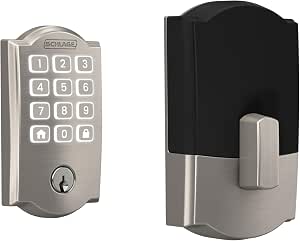 | Best for Trusted Security and Simple Remote Management | Color: Satin Nickel | Trim: Camelot | Connectivity: WiFi | VIEW ON AMAZON | See Our Full Breakdown |
| Schlage Encode Smart WiFi Lock, Lever Handle, Camelot Trim, Satin Nickel |  | Best for Stylish Modern Homes with Remote Access Needs | Type: Smart WiFi Lock | Handle Style: Lever | Finish: Satin Nickel | VIEW ON AMAZON | See Our Full Breakdown |
| Kwikset Halo Wi-Fi Smart Lock, Keyless Entry Door Deadbolt, Satin Nickel |  | Best for Geofence Auto-Unlock and Guest Access Sharing | Material: Satin Nickel | Connectivity: Wi-Fi | Lock Type: Deadbolt | VIEW ON AMAZON | See Our Full Breakdown |
| Built-in WiFi Smart Lock with Handle Set, Keyless Entry Front Door Lock Set |  | Best for All-in-One Convenience with Multiple Unlocking Methods | VIEW ON AMAZON | See Our Full Breakdown | |||
| Aqara UWB Smart Lock U400, Apple Home Key, Fingerprint Deadbolt, Black |  | Best for Hands-Free, Ultra-Secure Access with Ecosystem Integration | Unlocking Technology: UWB, Apple Home Key, fingerprint, passcode, NFC, physical key | Connectivity: Matter over Thread, compatible with multiple smart home platforms | Battery: Rechargeable lithium, lasts up to 6 months | VIEW ON AMAZON | See Our Full Breakdown |
| ULTRALOQ Bolt SE Wi-Fi Smart Lock with Matter over Thread and App Remote Access |  | Best for Versatile Remote Management and Long Battery Life | Fingerprint Storage: up to 50 fingerprints | Passcode Storage: up to 50 passcodes | Connectivity: Wi-Fi 2.4 GHz, Matter over Thread | VIEW ON AMAZON | See Our Full Breakdown |
| Schlage Encode Wi-Fi Smart Lock with Century Handleset Entry Set for Front Door, Matte Black |  | Best for Stylish, Easy DIY Remote Control | Material: Premium metal | Connectivity: WiFi | Certification: BHMA AAA | VIEW ON AMAZON | See Our Full Breakdown |
| Philips Wi-Fi Smart Front Door Lock Set with Fingerprint and Keyless Entry |  | Best for Multi-Method Access with Real-Time Alerts | Connectivity: Wi-Fi 2.4GHz | Fingerprint Recognition Speed: 0.3 seconds | Auto-Lock Timer: 10-180 seconds | VIEW ON AMAZON | See Our Full Breakdown |
| Schlage Sense Pro UWB Smart Deadbolt Lock, Matte Black |  | Best for Ultra-Precise Hands-Free Access with Apple Compatibility | Technology: Schlage Converge Ultra Wideband | Connectivity: WiFi, Thread (requires hub) | Compatibility: Apple HomeKit, Matter | VIEW ON AMAZON | See Our Full Breakdown |
| Schlage Encode Smart WiFi Deadbolt Lock with Century Trim, Matte Black |  | Best Overall for Seamless Wireless Security | Material: Matte Black finish | Connectivity: WiFi | Power: 4 AA batteries (included) | VIEW ON AMAZON | See Our Full Breakdown |
| myQ Secure View™ 3-in-1 Smart Lock with 2K HDR Video Doorbell Camera, Face Access, Fingerprint, PIN & App Control |  | Best for All-in-One Security with Video and Facial Recognition | Design: 3-in-1 (deadbolt, doorbell, camera) | Video Resolution: 2K HDR | Night Vision: Color night vision | VIEW ON AMAZON | See Our Full Breakdown |
| Aqara U300 Smart Lock with Handle and Apple Home Key |  | Best for Apple Ecosystem Integration and Local Security | Fingerprint Sensor Resolution: 160×160 pixels | Fingerprint Storage: Up to 25 fingerprints | Battery Life: Up to 10 months | VIEW ON AMAZON | See Our Full Breakdown |
| Philips Wi-Fi Smart Deadbolt Lock, Keyless Entry Door Lock |  | Best for Versatile Keyless Entry with Fast Recognition | Unlocking Methods: Fingerprint, Passcode, Key, Voice, Remote App | Connectivity: WiFi | Fingerprint Recognition Speed: 0.3 seconds | VIEW ON AMAZON | See Our Full Breakdown |
| highend smart door lock | Connectivity |
|---|---|
| Philips WiFi Keypad Door Lock | WiFi 2.4GHz |
| Schlage Arrive Smart WiFi Dead | WiFi |
| Schlage Encode Smart WiFi Lock | — |
| Kwikset Halo Wi-Fi Smart Lock | Wi-Fi |
| Built-in WiFi Smart Lock with | — |
| Aqara UWB Smart Lock U400 | Matter over Thread, compatible with multiple smart home platforms |
| ULTRALOQ Bolt SE Wi-Fi Smart L | Wi-Fi 2.4 GHz, Matter over Thread |
| Schlage Encode Wi-Fi Smart Loc | WiFi |
| Philips Wi-Fi Smart Front Door | Wi-Fi 2.4GHz |
| Schlage Sense Pro UWB Smart De | WiFi, Thread (requires hub) |
| Schlage Encode Smart WiFi Dead | WiFi |
| myQ Secure View™ 3-in-1 Smart | — |
| Aqara U300 Smart Lock with Han | Matter over Thread, Bluetooth |
| Philips Wi-Fi Smart Deadbolt L | WiFi |
More Details on Our Top Picks
Philips WiFi Keypad Door Lock with Handle, Built-in WiFi, APP Remote Control, Voice & Fingerprint Unlock, Satin Nickel
This Philips model stands out for combining multiple unlocking methods—fingerprint, PIN, voice commands, and remote app control—making it highly adaptable for households with diverse needs. Compared to the Schlage Encode, its handle set simplifies installation and enhances aesthetic appeal. The auto-lock feature and real-time monitoring add layers of security, but reliance on 8 AA batteries not included could be inconvenient, especially if batteries die unexpectedly. Its direct WiFi connection eliminates hub requirements, streamlining setup. However, installation might require some patience, as watching setup videos can be necessary for optimal results. This pick is ideal for tech-savvy homeowners who want a feature-rich, easy-to-control lock with flexible access options.
Pros:- Supports fingerprint, PIN, voice, and app control for flexible access
- Auto-lock and real-time access monitoring enhance security
- Includes handle set for easier installation
Cons:- Batteries are not included, adding to initial setup steps
- Installation may require watching instructional videos for best results
Best for: Homeowners seeking a highly customizable, easy-to-integrate smart lock with multiple unlocking methods
Not ideal for: Less experienced DIYers or those who prefer battery-included packages to avoid extra shopping
- Connectivity:WiFi 2.4GHz
- Material:Satin Nickel
- Battery Type:8 AA alkaline batteries (not included)
- Door Thickness Compatibility:1-3/8″ to 1-3/4″
- Unlock Speed:0.3 seconds
Our verdict“This lock suits tech-savvy homeowners who want a versatile, feature-packed solution with seamless remote control.”
Schlage Arrive Smart WiFi Deadbolt Lock with Camelot Trim, Satin Nickel
The Schlage Arrive offers solid security with trusted encryption and a durable backlit keypad, making it a reliable choice for those prioritizing safety. Compared to the Philips lock, its physical keypad provides a straightforward, tactile option, ideal for users who prefer not relying solely on fingerprint or app access. Its no-wiring-needed installation is appealing for DIYers but offers fewer customization options than the Schlage Encode. Battery life details are sparse, which could be a concern for long-term reliability, especially during power outages or heavy use. This lock is best suited for homeowners who want trusted brand security combined with easy remote management and a traditional keypad interface.
Pros:- Secure, encrypted connection with trusted brand reputation
- Easy installation with no wiring required
- Backlit keypad for visibility in low light
Cons:- Limited details on battery life and backup options
- Less flexible in unlocking methods compared to other models
Best for: Homeowners who prioritize security and straightforward remote access over extensive unlocking options
Not ideal for: Residents who want advanced biometric features or more customizable access codes
- Color:Satin Nickel
- Trim:Camelot
- Connectivity:WiFi
- Backset:2-3/8 in or 2-3/4 in
- Door Thickness:1-3/8 in to 1-3/4 in
Our verdict“This lock is ideal for users seeking dependable security with simple, remote management and traditional keypad entry.”
Schlage Encode Smart WiFi Lock, Lever Handle, Camelot Trim, Satin Nickel
Compared with the Schlage Arrive, the Encode’s lever handle and sleek satin nickel finish give it a more modern, stylish appearance, suitable for contemporary homes. Its remote control via the Schlage app, customizable codes, and auto-lock features make daily management simple and secure. The fingerprint-resistant touchscreen adds durability, but battery life may be a concern for heavy users, as it lasts up to six months on four AA batteries. Installation is straightforward, yet WiFi dependency means potential connectivity issues could disrupt remote access. This lock is best for homeowners who want a sophisticated look combined with reliable app-based control but are aware of the need to monitor battery health regularly.
Pros:- Stylish satin nickel finish with modern design
- Remote management and customizable access codes
- Auto-lock and fingerprint-resistant touchscreen
Cons:- Battery life may require frequent replacement with heavy use
- Dependent on WiFi stability for remote features
Best for: Design-conscious homeowners seeking an elegant, easy-to-manage smart lock with remote access
Not ideal for: Users who prefer physical keys or have inconsistent WiFi connectivity in their homes
- Type:Smart WiFi Lock
- Handle Style:Lever
- Finish:Satin Nickel
- Power Source:4 AA batteries
- Battery Life:Up to 6 months
Our verdict“This lock suits homeowners who want a stylish, remotely manageable lock with modern aesthetics and ease of use.”
Kwikset Halo Wi-Fi Smart Lock, Keyless Entry Door Deadbolt, Satin Nickel
The Kwikset Halo emphasizes convenience with features like geofence auto-unlock and the ability to share up to 250 guest access codes, making it suitable for busy households or rentals. Its simple touchscreen keypad and easy DIY installation attract homeowners who want quick setup without professional help. Compared to the Schlage Encode, its geofence feature adds a layer of smart home integration that enhances daily usability. However, details on battery life are missing, and full functionality depends on WiFi stability. This pick is ideal for users who value effortless access management and smart home integration over advanced biometric options.
Pros:- Supports up to 250 guest access codes
- Geofence auto-unlock for seamless entry
- Easy to install with DIY approach
Cons:- Lack of detailed battery life info
- Requires WiFi for full smart features
Best for: Busy families or rental property owners needing flexible guest management and auto-unlock features
Not ideal for: Tech-averse users or those concerned about dependency on WiFi for core security functions
- Material:Satin Nickel
- Connectivity:Wi-Fi
- Lock Type:Deadbolt
- Backset:2-1/8″ to 2-3/4″
Our verdict“This lock is perfect for users who prioritize convenience, guest management, and smart home features in a straightforward package.”
Built-in WiFi Smart Lock with Handle Set, Keyless Entry Front Door Lock Set
This built-in WiFi smart lock offers a comprehensive approach, supporting fingerprint, passcode, voice commands, IC card, and mechanical key options—making it highly versatile. Its automatic locking and real-time access logs provide peace of mind, especially compared to simpler models like the Kwikset Halo, which lack biometric options. Installation is designed to be straightforward, but the lack of specified battery life and reliance on WiFi means users should stay mindful of power management. It’s an excellent choice for those who want a multi-method, secure, and easy-to-install solution for their front door.
Pros:- Supports fingerprint, passcode, voice, IC card, and mechanical key
- Automatic locking and real-time access logs
- Easy installation with screwdriver
Cons:- Battery life not specified, potential for frequent replacements
- Dependent on WiFi stability for remote features
Best for: Homeowners seeking maximum flexibility in unlocking options with easy installation
Not ideal for: Users seeking a minimalist design or with limited WiFi reliability at home
Our verdict“This lock suits those who want a feature-rich, multi-method entry system with straightforward setup and reliable security features.”
Aqara UWB Smart Lock U400, Apple Home Key, Fingerprint Deadbolt, Black
This lock stands out for its use of UWB technology, enabling hands-free unlocking that feels both futuristic and reliable. Compared to the Schlage Sense Pro, it offers a more seamless, proximity-based experience, but relies heavily on a Thread-enabled hub for full UWB functionality. Its support for Apple Home Key and multiple unlocking options makes it a flexible choice for Apple ecosystem users, though NFC support is sold separately, which could be an additional inconvenience. The IP65 rating ensures durability outdoors, yet battery life may fluctuate with frequent use, requiring occasional recharges. This lock is ideal for users who prioritize convenience and ecosystem integration, but those without compatible hubs or who prefer simpler setups might find it less appealing.
Pros:- Hands-free unlocking with UWB technology for enhanced security
- Supports multiple access methods including Apple Home Key, fingerprint, passcode, NFC, and physical key
- Seamless integration into Matter over Thread ecosystems
Cons:- Requires a Thread-enabled Apple Home hub for full UWB functionality
- NFC support is sold separately, adding extra cost
- Battery life may vary depending on usage intensity
Best for: Apple users seeking a hands-free, ultra-secure lock that integrates seamlessly with their smart home ecosystem
Not ideal for: Homeowners without Thread-enabled hubs or those who prefer standalone locks without reliance on smart home protocols
- Unlocking Technology:UWB, Apple Home Key, fingerprint, passcode, NFC, physical key
- Connectivity:Matter over Thread, compatible with multiple smart home platforms
- Battery:Rechargeable lithium, lasts up to 6 months
- Certification:BHMA-certified
- Water Resistance:IP65-rated
- Rekeyable:Yes
Our verdict“This pick is perfect for Apple ecosystem enthusiasts who want effortless, ultra-secure access with smart home integration, provided they have the necessary hubs.”
ULTRALOQ Bolt SE Wi-Fi Smart Lock with Matter over Thread and App Remote Access
The ULTRALOQ Bolt SE excels in offering multiple access options—fingerprint, passcodes, app, voice, and mechanical key—making it suitable for diverse households. Its support for Matter over Thread and Wi-Fi ensures smooth integration with many smart home systems, paralleling the Schlage Encode but with a longer battery life of up to 18 months, reducing maintenance concerns. Installation is straightforward, often completed in under 10 minutes, and its IP65 rating ensures durability in various weather conditions. The main tradeoff is its reliance on a compatible Matter hub for remote management, which might add complexity and cost. This lock suits tech-savvy homeowners wanting reliable, remote access without frequent battery changes, though those with non-compatible Wi-Fi networks or seeking a simpler setup might prefer different options.
Pros:- Supports multiple unlocking methods including fingerprint, passcodes, app, and voice control
- Supports Matter over Thread and Wi-Fi for easy smart home integration
- Impressive 18-month battery life reduces maintenance
Cons:- Requires a compatible Matter hub for remote access
- Door sensor not included, limiting automation possibilities
- Limited to 2.4 GHz Wi-Fi networks
Best for: Tech-savvy homeowners who want extensive control, long battery life, and smart home integration
Not ideal for: Renters or users without a dedicated Matter hub, or those seeking a very low-cost option
- Fingerprint Storage:up to 50 fingerprints
- Passcode Storage:up to 50 passcodes
- Connectivity:Wi-Fi 2.4 GHz, Matter over Thread
- Battery Life:up to 18 months
- Weather Resistance:IP65 Waterproof
- Material:Zinc alloy
Our verdict“Ideal for households seeking a flexible, long-lasting smart lock with comprehensive access control and smart home compatibility, provided they have the necessary hub setup.”
Schlage Encode Wi-Fi Smart Lock with Century Handleset Entry Set for Front Door, Matte Black
The Schlage Encode offers a straightforward approach to smart front door security, combining a sleek handleset with Wi-Fi connectivity. It enables remote locking, unlocking, and access code management directly via the Schlage Home app, making it accessible for users who prefer a simple, DIY installation—no hubs required. Compared to the Philips Wi-Fi Smart Lock, it emphasizes style and durability, with a premium matte black finish and features like a fingerprint-resistant touchscreen and customizable alarm. While its Wi-Fi dependency means remote features won’t work during internet outages, the device’s high security and easy setup make it a reliable choice for those wanting a stylish, secure front entry. This lock works best for homeowners who want a ready-to-use, remote-capable lock without extra hubs or complicated tech.
Pros:- Remote control and access management via WiFi and app
- Easy DIY installation with self-aligning screw holes
- High security with encrypted connection and integrated alarm
Cons:- Requires Wi-Fi for remote features, so no offline control
- Potentially higher cost compared to traditional locks
- Limited to Wi-Fi, no Bluetooth or UWB support
Best for: Homeowners seeking a stylish, easy-to-install smart lock with reliable remote control via Wi-Fi
Not ideal for: Users who need multi-door functionality or those in areas with unstable Wi-Fi connections
- Material:Premium metal
- Connectivity:WiFi
- Certification:BHMA AAA
- Features:Fingerprint-resistant touchscreen, customizable alarm
- Installation:Self-aligning screw holes
- Lock Type:Smart deadbolt with handleset
Our verdict“A stylish, straightforward choice for homeowners who want remote access and easy installation without extra hubs or complex setup.”
Philips Wi-Fi Smart Front Door Lock Set with Fingerprint and Keyless Entry
The Philips Wi-Fi Smart Lock offers a compelling package for multi-generational households, combining fingerprint, keypad, app, and voice control options. Its quick fingerprint recognition (0.3 seconds) and support for up to 100 access codes make managing family members or frequent visitors straightforward. Compared to the Schlage Encode, it emphasizes a broader set of unlocking methods and real-time activity alerts, making it suitable for busy households seeking peace of mind. Installation is user-friendly, but batteries are not included, and remote features depend on Wi-Fi connectivity, which might limit usability during outages. Its compatibility with standard US doors broadens its appeal, but users with non-standard door sizes or seeking more premium finishes may find it less suited.
Pros:- Multiple unlocking options including fingerprint, keypad, app, and voice control
- Real-time activity alerts and remote management via app
- Easy DIY installation with clear instructions
Cons:- Batteries are sold separately, adding ongoing cost
- Dependent on Wi-Fi for remote features, risking outages
- Potential compatibility issues with non-standard doors
Best for: Families needing flexible, multi-method access with real-time activity monitoring
Not ideal for: Users seeking a premium, high-end finish or those without Wi-Fi stability
- Connectivity:Wi-Fi 2.4GHz
- Fingerprint Recognition Speed:0.3 seconds
- Auto-Lock Timer:10-180 seconds
- Maximum Access Codes:100
- Door Compatibility:Standard US doors
- Batteries:4 AA batteries (not included)
Our verdict“Ideal for active households needing versatile access methods and real-time updates, provided Wi-Fi stability is assured.”
Schlage Sense Pro UWB Smart Deadbolt Lock, Matte Black
The Schlage Sense Pro UWB stands out for its ultra-wideband technology, delivering precise, hands-free unlocking as you approach your door. Compared with the Aqara U400, it offers similar UWB benefits but emphasizes full Apple device integration and remote control via WiFi. Its compatibility with Apple HomeKit and support for up to 250 access codes make it suitable for larger households or those wanting advanced access options. However, it requires a Thread-enabled hub for full functionality, which could mean additional setup costs. Its premium price reflects its advanced features, making it ideal for Apple-centric users who prioritize convenience and security, but less so for those without the necessary infrastructure or on a tighter budget.
Pros:- Ultra-wideband technology for hands-free, secure unlocking
- Full Apple HomeKit integration and remote control
- Supports up to 250 access codes for large households
Cons:- Requires a Thread-enabled hub for full features
- Premium pricing may be prohibitive for some
- Compatibility limited to certain Apple devices and software versions
Best for: Apple users seeking ultra-precise, hands-free unlocking with extensive access management
Not ideal for: Users without a Thread-enabled hub or those seeking a more affordable, straightforward lock
- Technology:Schlage Converge Ultra Wideband
- Connectivity:WiFi, Thread (requires hub)
- Compatibility:Apple HomeKit, Matter
- Control:App control, NFC tap, Home Key
- Access Management:Up to 250 codes
- Power:Built-in WiFi
Our verdict“Best suited for Apple ecosystem users desiring ultra-precise, secure, hands-free access with extensive control options, provided they have the necessary hub infrastructure.”
Schlage Encode Smart WiFi Deadbolt Lock with Century Trim, Matte Black
This model stands out for its straightforward WiFi connectivity, allowing remote control without additional hubs, making it ideal for those wanting a reliable, set-it-and-forget-it smart lock. Compared with the Philips Wi-Fi Smart Deadbolt, the Schlage Encode offers broader voice assistant support and a more familiar, durable design, but its battery life can require frequent replacements under heavy use. Its easy installation and customizable access make it a favorite for busy homeowners seeking convenience and security, though reliance on WiFi means it’s vulnerable to network interruptions. Still, it’s a strong choice for users prioritizing ease of setup and reliable remote access.
Pros:- Remote access and control via WiFi and mobile app
- Supports voice commands with Alexa and Google Home
- Easy to install without hardwiring
Cons:- Battery life may require frequent replacement with heavy use
- Requires WiFi connection for remote features
- Fingerprints may smudge the touchscreen
Best for: Homeowners seeking a dependable, WiFi-enabled lock with broad voice assistant compatibility.
Not ideal for: Users with unstable WiFi connections or those who prefer built-in camera features for security.
- Material:Matte Black finish
- Connectivity:WiFi
- Power:4 AA batteries (included)
- Battery Life:Up to 6 months
- Door Thickness:1-3/8 in to 1-3/4 in
- Backset:2-3/8 in or 2-3/4 in
Our verdict“This lock suits those who want a simple, reliable WiFi-enabled deadbolt with strong voice control support.”
myQ Secure View™ 3-in-1 Smart Lock with 2K HDR Video Doorbell Camera, Face Access, Fingerprint, PIN & App Control
This pick excels in integrating multiple security layers into one device, offering a combination of a smart lock, video doorbell, and security camera—ideal for those wanting comprehensive surveillance at their front door. Unlike the Philips Wi-Fi Smart Deadbolt, the myQ Secure View adds live video, face recognition, and motion alerts, but it demands a subscription for advanced AI alerts, which can add ongoing costs. Its weather-resistant design and multiple unlocking options make it suitable for tech-savvy homeowners seeking full front-door control, though heavy use can drain the battery faster. For users prioritizing all-in-one security, this model offers unmatched versatility, despite the added subscription fee.
Pros:- Combines deadbolt, video doorbell, and camera into one device
- High-quality 2K HDR video with color night vision
- Multiple unlocking options including face, fingerprint, PIN, and app
Cons:- Subscription required for advanced AI-powered alerts
- Face recognition unavailable in some regions
- Battery life may necessitate frequent recharging
Best for: Security-conscious homeowners who want integrated video and multiple unlocking methods.
Not ideal for: Users with limited internet bandwidth or those unwilling to pay for subscriptions.
- Design:3-in-1 (deadbolt, doorbell, camera)
- Video Resolution:2K HDR
- Night Vision:Color night vision
- Unlock Methods:Face, fingerprint, PIN, app, key
- Battery Life:4-6 months
- Weather Resistance:Yes
Our verdict“Ideal for users desiring a comprehensive security setup with video and facial recognition features in one device.”
Aqara U300 Smart Lock with Handle and Apple Home Key
This model appeals most to Apple users who want seamless integration with their devices, especially via the Home Key and Siri. Compared with the Schlage Encode, the Aqara U300 offers a more refined Apple-centric experience and local data encryption, but it requires a Thread-enabled Apple hub to unlock full features like Home Key. Its long-lasting battery and backup USB-C power give it added convenience, though regular battery replacements every 10 months can be a minor inconvenience. For Apple fans prioritizing local control and ecosystem compatibility, this lock delivers precise fingerprint recognition and easy app controls, though it’s less flexible outside the Apple environment.
Pros:- Seamless integration with Apple ecosystem via Home Key and Siri
- Fast, accurate fingerprint recognition with local encryption
- Supports multiple smart home platforms with Matter over Thread
Cons:- Requires Thread-enabled Apple hub for full features
- Battery replacement needed approximately every 10 months
- Some features depend on specific ecosystem setups
Best for: Apple ecosystem users seeking seamless, local access with Siri and Home Key support.
Not ideal for: Android users or those without a Thread-enabled Apple hub, as full features won’t be accessible.
- Fingerprint Sensor Resolution:160×160 pixels
- Fingerprint Storage:Up to 25 fingerprints
- Battery Life:Up to 10 months
- Backup Power:Dual USB-C ports
- Connectivity:Matter over Thread, Bluetooth
- Compatibility:Apple Home Key, Siri
Our verdict“Best suited for dedicated Apple users seeking secure, ecosystem-integrated smart lock solutions.”
Philips Wi-Fi Smart Deadbolt Lock, Keyless Entry Door Lock
This pick offers a flexible array of unlocking methods, including fingerprint, passcode, key, voice, and remote app, making it suitable for diverse household needs. Unlike the Schlage Encode, it emphasizes speed with a 0.3-second fingerprint unlock and the ability to set up to 100 custom passcodes. Its remote control and real-time alerts boost security, but it relies heavily on WiFi for remote features, which could pose issues during network outages. The setup might be complex for some users, and battery dependency remains a concern for consistent operation. Overall, this model is a strong choice for those seeking quick, multiple access options with remote monitoring.
Pros:- Multiple unlocking options for flexibility
- Remote access with real-time alerts enhances security
- Fast fingerprint recognition at 0.3 seconds
Cons:- Requires WiFi connection for remote features
- Potentially complex setup process
- Battery dependency for electronic functions
Best for: Homeowners needing fast fingerprint recognition and multiple access methods for family convenience.
Not ideal for: Users seeking a lock with integrated video or advanced security sensors, as this model focuses on access methods.
- Unlocking Methods:Fingerprint, Passcode, Key, Voice, Remote App
- Connectivity:WiFi
- Fingerprint Recognition Speed:0.3 seconds
- Number of Custom Passcodes:up to 100
- Auto Lock:Yes
- Security Features:Anti-tamper alarm, Low-battery alert
Our verdict“Ideal for users who prioritize speed, multiple access methods, and remote control features over integrated video or advanced sensors.”
How We Picked
I evaluated each product based on performance, build quality, usability, and smart home compatibility. Priority was given to locks that offer seamless app control, reliable biometric or keyless entry, and durable construction. I also considered customer reviews and expert opinions to assess real-world reliability. The ranking reflects a balance between feature richness, ease of installation, and value for the price, ensuring each lock suits different user needs while highlighting standout features and potential tradeoffs.Factors to Consider When Choosing Highend Smart Door Locks
Choosing a highend smart door lock involves more than just selecting the most feature-rich model. Consider compatibility with your existing smart home devices, as some locks work seamlessly with specific ecosystems like Apple HomeKit or Google Home. Durability and weather resistance are vital if your lock will face outdoor elements. Ease of installation can vary; some models require professional setup, while others are DIY-friendly. Price often correlates with features, so define which security features matter most to you. Lastly, think about aesthetics—your lock should complement your home’s design while providing top-tier security.Compatibility with Smart Home Ecosystems
Not all smart locks work with every smart home system. If you already have a preferred platform like Apple HomeKit, Google Assistant, or Amazon Alexa, verify that the lock integrates smoothly. Compatibility ensures you can control your lock via your existing devices and routines, adding convenience and security. Overlooking this can lead to frustration or additional costs down the line, especially if you need to invest in compatible hubs or bridges.
Security Features and Certification
Highend locks often include advanced features like biometric access, encryption, and tamper alarms. Look for locks with reputable certifications—such as ANSI Grade 1 or UL ratings—that indicate robust security standards. Biometric options, like fingerprint scanners, provide quick access but should be paired with strong encryption to prevent hacking. Avoid models that rely solely on Bluetooth without additional security layers, as they can be more vulnerable to breaches.
Installation and Maintenance
Installation complexity varies; some highend models are straightforward DIY projects, while others might require professional help. Consider your comfort level with tools and wiring, especially for models with built-in WiFi or integrated keypads. Maintenance is also worth considering—locks exposed to weather need weatherproofing features, and battery life impacts ongoing usability. Choose a lock that balances smart features with manageable upkeep to prevent future headaches.
Design and Aesthetics
Since these are highend models, design matters. Select a lock that complements your home’s style—whether modern, traditional, or minimalist. Material quality, finish options, and handle design influence overall aesthetics and durability. Remember, a visually appealing lock will enhance curb appeal, but never at the expense of core security features. Prioritize models that combine form with function to get the best of both worlds.
Price and Value
Premium prices often reflect advanced features, superior build quality, and enhanced security. However, not every feature is necessary for every user. Define your must-have features and compare models accordingly. Sometimes, paying a bit more upfront can save on future repairs or upgrades, but it’s also wise to assess whether the added features justify the cost. Balance your budget with your security needs to make a wise investment.
Frequently Asked Questions
Can I install a highend smart lock myself?
Many highend smart locks are designed for DIY installation, especially those that fit standard deadbolt sizes. However, some models with integrated wiring or advanced features might require professional help. Carefully review the installation instructions and consider your comfort level with tools and electrical work. If unsure, hiring a professional can ensure proper setup and optimal security, avoiding potential issues down the line.
Will these locks work if the WiFi or internet goes out?
Most highend smart locks rely on WiFi or internet connectivity for remote access and some advanced features. If your internet goes down, you can still typically unlock the door using a physical key, keypad, or biometric method if available. However, remote control and app features will be temporarily unavailable until your connection is restored. For critical security, consider a lock with a backup access method to avoid being locked out during outages.
Are biometric locks truly secure?
Biometric locks, like fingerprint scanners, add a layer of convenience and security, but their reliability depends on build quality and encryption. High-end biometric locks use advanced sensors and encrypted data storage to prevent spoofing or hacking. Still, no system is entirely foolproof, so combining biometrics with other security measures like PIN codes or physical keys is advisable for maximum protection.
How long do the batteries last on these locks?
Battery life varies widely among highend locks, typically ranging from several months to over a year depending on usage and features. Many models send low-battery alerts to prevent unexpected lockouts. Choosing a lock with easy access to replace batteries and energy-efficient design can save trouble. Always keep spare batteries on hand, especially for locks used frequently or exposed to extreme temperatures.
What should I do if my lock’s WiFi connection is unstable?
If your lock experiences connectivity issues, first check your WiFi signal strength and network stability. Many highend locks perform best when connected to a 2.4GHz network, which offers better range. Updating firmware or resetting the device can also improve performance. For persistent issues, consider upgrading your router or adding a range extender, or choose a lock with alternative access methods like keypad or biometrics for backup.
Conclusion
For most homeowners, the Philips WiFi Keypad Door Lock offers a balanced mix of features, ease of use, and reliable security, making it the best overall pick. Those seeking the highest security and seamless smart home integration may prefer the Schlage Encode Smart WiFi Lock or the Aqara UWB Smart Lock with biometric options. Budget-conscious buyers or newcomers should consider models with straightforward installation and essential features, while premium users aiming for the ultimate in design and advanced security might opt for the most feature-rich options like the myQ Secure View. Tailor your choice to your security needs, smart home ecosystem, and budget to find the best highend smart lock in 2026.