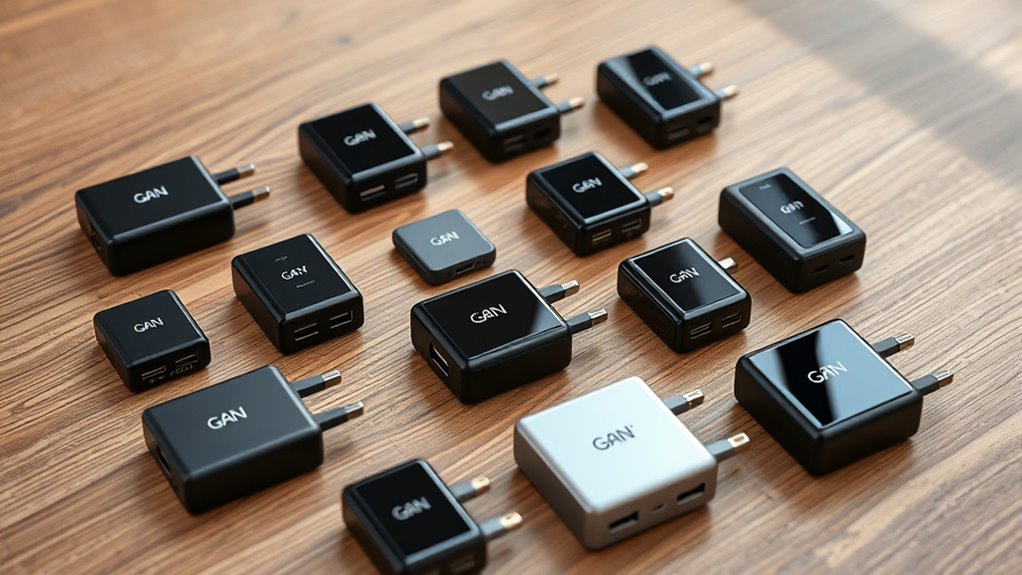

Shopping for GaN laptop chargers mostly comes down to three questions: how much wattage your laptop actually draws, how many devices you charge at once, and whether you need a travel cube or a desk-side station. For a single balanced pick, the 140W USB-C GaN Charger with 4 ports stands out because it can fast-charge a power-hungry laptop while topping up accessories at the same time. If portability matters more, the Anker Nano 65W GaN II shrinks a full laptop charger into a plug that fits in a pocket, while the 200W 4-port GaN wall charger makes the most sense for multi-device households that still want a single wall outlet. The main tradeoff in this category is power versus size — high-wattage units run hotter and cost more, while compact 65W cubes may throttle charging on gaming or creator laptops. Read on for the full breakdown, including when a multi-port charging station beats a wall charger entirely.

Get business pricing on tech for your team
- Business-only prices and quantity discounts
- Tax-exempt purchasing
- Multiple users, one account, clear invoices
Key Takeaways
- Wattage class is the single biggest divide in this lineup: 65W chargers handle ultrabooks and phones fine, but 16-inch laptops and gaming machines really need 100W or more to charge at full speed under load.
- Port count changes real-world output: the amazon.com/dp/B0DBPW1LX2?tag=technocapture-20&ascsubtag=dc-618267″ target=”_blank” rel=”nofollow sponsored noopener”>amazon.com/dp/B0DSFL28MQ?tag=technocapture-20&ascsubtag=dc-618267″ target=”_blank” rel=”nofollow sponsored noopener”>140W and 200W 4-port models split their total power across ports, so charging a laptop plus three accessories may drop the laptop below its rated speed — unlike dedicated one-port chargers.
- Charging stations (500W, 240W, 245W, and the 1000W 10-port) only earn their footprint if you charge four or more devices daily; for one or two devices they waste desk space and money.
- Bundled extras create real value differences: the GaN Tech 65W includes a 5ft cable and the 245W 10-port station ships with four cables, saving $15–30 in accessories compared with bare chargers.
- PPS support is quietly inconsistent across this lineup — the Amazon Basics 65W one-port model is explicitly non-PPS, which matters for fast-charging Samsung phones and some Android devices.
| 140W USB-C GaN Charger Block with 4 Ports (3 USB-C, 1 USB-A) |  | Best Overall | Max Power: 140W | Ports: 3x USB-C, 1x USB-A | Technology: GaN III, PD 3.1, PPS | VIEW ON AMAZON | See Our Full Breakdown |
| Anker Nano 65W GaN II PPS USB-C Charger, Fast Compact Foldable |  | Best Compact Pick | Power Output: 65W | Technology: GaN II, PPS | Ports: 1x USB-C | VIEW ON AMAZON | See Our Full Breakdown |
| GaN Tech 65W Dual Port PD Wall Charger with 5ft USB-C Cable (Black) |  | Best Value Pick | Max Wattage: 65W | Ports: 2x USB-C | Protocols: QC3.0, PD 3.0, Samsung AFC | VIEW ON AMAZON | See Our Full Breakdown |
| Amazon Basics 120W USB-C Nano GaN Wall Charger (3-Port, Black) |  | Best Mid-Range Multi-Port Pick | Total Power: 120W | Single USB-C Max: 100W | USB-A Max: 18W | VIEW ON AMAZON | See Our Full Breakdown |
| Nekteck 60W USB-C GaN Charger with Foldable Plug and PD 3.0 |  | Best Cable-Included Starter Pick | Power Output: 60W | Technology: GaN, Power Delivery 3.0 | Ports: 1x USB-C | VIEW ON AMAZON | See Our Full Breakdown |
| Amazon Basics 65W One-Port GaN USB-C Wall Charger |  | Best Budget Laptop Charger | Power Output: 65W | Port Type: USB-C (single port) | PD Version: PD 3.0 (non-PPS) | VIEW ON AMAZON | See Our Full Breakdown |
| TOPADRE 65W GaN USB-C Charger with 3 Ports |  | Best Value Multi-Port Pick | Maximum Output: 65W total (shared) | Ports: 2x USB-C, 1x USB-A | Protocols: PD 3.0, PPS, Quick Charge 4+ | VIEW ON AMAZON | See Our Full Breakdown |
| 200W GaN Wall Charger with 4 Ports (3x USB-C, 1x USB-A) |  | Best for Multi-Laptop Households | Total Power Output: 200W | Ports: 3x USB-C, 1x USB-A | Max Single Port: 100W (USB-C1) | VIEW ON AMAZON | See Our Full Breakdown |
| wegear 140W USB-C Slim 4-Port PD 3.1 GaN Charger |  | Best Premium Laptop Charger | Power Output: 140W sustained (PD 3.1) | Ports: 3x USB-C, 1x USB-A | Technology: GaN III | VIEW ON AMAZON | See Our Full Breakdown |
| 1000W 10-Port USB-C GaN Charging Station with PD 140W |  | Best for Device Fleets and Families | Total Output: 1000W | Ports: 8x USB-C, 2x USB-A | USB-C Configuration: 4x PD 140W, 4x PD 100W | VIEW ON AMAZON | See Our Full Breakdown |
| 500W USB-C Charger Block, 8-Port Charging Station with Dual 100W PD | 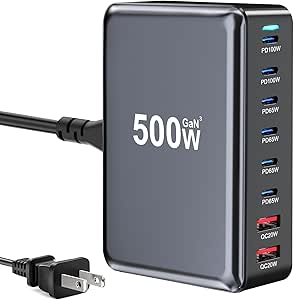 | Best for Powering Several Laptops | Total output: 500W | USB-C ports: 6: two up to 100W PD and four up to 65W PD/PPS | USB-A ports: 2, up to 20W QC | VIEW ON AMAZON | See Our Full Breakdown |
| ASOMETECH 240W 6-Port USB-C Charging Station with LCD Display |  | Best for Monitoring Charging | Total power: 240W | Ports: 4 USB-C and 2 USB-A | Maximum single-port output: 140W PD3.1 | VIEW ON AMAZON | See Our Full Breakdown |
| 10-Port USB-C Charging Station with 4 Cables, 245W GaN Charger Block |  | Best for Charging a Crowd of Small Devices | Total output: 245W | Port configuration: 1 USB-C PD 3.0 up to 65W, 5 USB-C PD 3.0 up to 20W, 4 USB-A up to 20W | Included USB-C cables: Two 6.6 ft and two 3.3 ft C-to-C cables | VIEW ON AMAZON | See Our Full Breakdown |
| gan lapcharger | Ports | Technology |
|---|---|---|
| 140W USB-C GaN Charger Block w | 3x USB-C, 1x USB-A | GaN III, PD 3.1, PPS |
| Anker Nano 65W GaN II PPS USB- | 1x USB-C | GaN II, PPS |
| GaN Tech 65W Dual Port PD Wall | 2x USB-C | — |
| Amazon Basics 120W USB-C Nano | 2x USB-C, 1x USB-A | — |
| Nekteck 60W USB-C GaN Charger | 1x USB-C | GaN, Power Delivery 3.0 |
| Amazon Basics 65W One-Port GaN | — | GaN |
| TOPADRE 65W GaN USB-C Charger | 2x USB-C, 1x USB-A | — |
| 200W GaN Wall Charger with 4 P | 3x USB-C, 1x USB-A | GaN |
| wegear 140W USB-C Slim 4-Port | 3x USB-C, 1x USB-A | GaN III |
| 1000W 10-Port USB-C GaN Chargi | 8x USB-C, 2x USB-A | GaN |
| 500W USB-C Charger Block | — | GaN III Pro chip with multiple protection system |
| ASOMETECH 240W 6-Port USB-C Ch | 4 USB-C and 2 USB-A | GaN Pro |
| 10-Port USB-C Charging Station | — | — |
More Details on Our Top Picks
140W USB-C GaN Charger Block with 4 Ports (3 USB-C, 1 USB-A)
Most buyers shopping GaN chargers want one brick that replaces everything else in their bag, and this is the pick that actually pulls it off. The 140W ceiling means a full-size MacBook Pro 16″ charges at its native speed — something the Anker Nano 65W simply cannot do — while the three USB-C ports plus USB-A let a laptop, tablet, and phone share one outlet without fighting over adapters. PD 3.1 and PPS support also future-proofs it for newer Android flagships. Compared with the Amazon Basics 120W, you get a fourth port and extra headroom, though the 10.93 oz build is noticeably chunkier than single-port travel cubes. The included 3.9 ft cable is a genuine plus since most rivals ship bare.
Pros:- Full 140W output fast-charges large laptops like the MacBook Pro 16″
- Four ports let you replace multiple wall adapters with one brick
- PD 3.1 and PPS support covers newer Apple and Android fast-charge standards
- Includes a 3.9 ft USB-C cable and 18-month replacement warranty
Cons:- Heavier than single-port GaN cubes at 10.93 ounces
- Hitting max speed with third-party cables requires high-wattage e-marked cables
Best for: Laptop-first users who also charge a phone and tablet at the same outlet and want one charger for everything
Not ideal for: Minimalist travelers who only carry a phone and want pocket-size — the Anker Nano 65W is half the bulk
- Max Power:140W
- Ports:3x USB-C, 1x USB-A
- Technology:GaN III, PD 3.1, PPS
- Weight:10.93 oz
- Cable Included:3.9 ft USB-C cable
- Compatibility:MacBook, iPhone, iPad, Galaxy, Pixel, USB-C/USB-A devices
- Safety:Temperature monitoring, overcharge protection
Our verdict“If you want a single charger that handles a big laptop plus accessories without compromise, this is the one to buy.”
Anker Nano 65W GaN II PPS USB-C Charger, Fast Compact Foldable
This is the charger for people who resent every cubic inch of their bag. Anker’s GaN II design shrinks a 65W brick to 58% the size of a standard 61W adapter, and the folding prongs mean it never snags on anything. It tops up a MacBook Air in under two hours and pushes iPhones and Samsung phones at full speed thanks to PPS — a protocol the cheaper Amazon Basics 65W single-port lacks. The obvious tradeoff is that lone USB-C port: unlike the GaN Tech 65W dual-port, there’s no way to charge a second device simultaneously. And with no cable in the box, the true cost of ownership sits a bit higher than the sticker suggests.
Pros:- One of the smallest 65W GaN chargers available at 58% smaller than standard 61W bricks
- PPS support unlocks fastest charging on Samsung and other Android flagships
- Folding prongs protect the charger and everything around it in a bag
- Reputable brand backing with an 18-month warranty
Cons:- Single USB-C port cannot charge multiple devices at once
- No cable included, so you must buy one separately
Best for: Frequent travelers and MacBook Air owners who value pocketability above port count
Not ideal for: Desk-dwellers juggling a phone, earbuds, and laptop — one port forces constant swapping
- Power Output:65W
- Technology:GaN II, PPS
- Ports:1x USB-C
- Foldable Plug:Yes
- Size:58% smaller than a standard 61W charger
- Warranty:18 months
Our verdict“Buy this if you want laptop-grade charging in the smallest possible footprint and only ever charge one device at a time.”
GaN Tech 65W Dual Port PD Wall Charger with 5ft USB-C Cable (Black)
This is the value play of the roundup: 65W of GaN power, two USB-C ports, and a 5-foot cable in the box — a combination that covers a laptop-plus-phone setup without buying anything extra. The Anker Nano 65W is smaller and slicker, but it charges one device and skips the cable entirely, so this model wins on pure practicality per dollar. Broad protocol support (QC3.0, PD 3.0, Samsung AFC) means it fast-charges nearly anything you plug in, and the safety stack covers short circuit, over-current, and overheating. The catches are real: the North American Type A plug makes it a poor choice for international travel, and the undocumented port-splitting behavior means you may not know your laptop’s charging speed until both ports are loaded.
Pros:- Dual USB-C ports allow simultaneous charging of a laptop and phone
- Includes a generous 5 ft USB-C cable out of the box
- Supports QC3.0, PD 3.0, and Samsung AFC fast-charge protocols
- Multi-layer protection against shorts, over-current, over-voltage, and heat
Cons:- Fixed North American Type A plug limits international use
- Power distribution across the two ports is not specified, complicating laptop charging while both are in use
Best for: Students and home-office users who want a laptop-capable charger with a spare port and a long cable without paying premium prices
Not ideal for: International travelers — the fixed Type A plug only works in North America without an adapter
- Max Wattage:65W
- Ports:2x USB-C
- Protocols:QC3.0, PD 3.0, Samsung AFC
- Output:20V / 3.25A
- Plug Type:Type A, 2-pin (North America)
- Included Cable:5 ft USB-C
- Color:Black
Our verdict“The most sensible pick if you want two ports and a cable included for the lowest total spend, as long as you stay in North America.”
Amazon Basics 120W USB-C Nano GaN Wall Charger (3-Port, Black)
Sitting neatly between the single-purpose Anker Nano 65W and the pricier 140W four-port block, this charger hits a sweet spot for people who need multi-device power without maximum wattage. The headline spec is a 100W single-port output — enough for a 14- or 16-inch MacBook Pro in solo use — with a documented split of 60W + 45W + 12W across all three ports, which is more transparency than the GaN Tech 65W offers. The 100-240V input also makes it travel-friendly internationally, unlike the Type A-locked GaN Tech. Just know that plugging in a second laptop drops each USB-C port well below 100W, and there’s no cable in the box.
Pros:- 100W from a single USB-C port covers full-speed MacBook Pro charging
- Published per-port power distribution (60W + 45W + 12W) removes guesswork
- 100-240V input works worldwide with a plug adapter
- Compact 2.7 x 2.7 x 1.3 in body with folding prongs
Cons:- No charging cable included
- Per-port output drops sharply when multiple devices are connected
Best for: Owners of a 14″ MacBook Pro or similar laptop who also need to top up a phone and earbuds from one compact brick
Not ideal for: Dual-laptop households — the split output means two computers cannot both fast-charge at once
- Total Power:120W
- Single USB-C Max:100W
- USB-A Max:18W
- 3-Port Split:60W + 45W + 12W
- Ports:2x USB-C, 1x USB-A
- Input:100-240V AC
- Dimensions:2.7 x 2.7 x 1.3 in
Our verdict“A well-priced middle ground that charges one serious laptop fast and handles accessories, provided you already own cables.”
Nekteck 60W USB-C GaN Charger with Foldable Plug and PD 3.0
Nekteck’s entry wins on completeness: unlike the Anker Nano 65W, which ships bare, this comes with a 2-meter USB-C to USB-C cable — long enough to reach a nightstand or desk from a floor outlet. Its 60W output fully charges a MacBook Pro 14″ in about 1.5 hours at up to 90% efficiency, and it carries USB-IF, FCC, and ETL certifications, which is more third-party validation than most budget bricks can claim. It’s roughly half the size of a standard charger and folds flat for travel. The limitations mirror the Anker’s: one USB-C port, no USB-A fallback, and — oddly for a US-market listing — a German/F-type plug that requires an adapter in North American outlets, a real annoyance the competition avoids.
Pros:- Includes a high-quality 2-meter USB-C cable suitable for desk or bedside setups
- USB-IF, FCC, and ETL certifications back up the safety claims
- Charges a MacBook Pro 14″ fully in roughly 1.5 hours
- About 50% smaller than standard chargers with a foldable plug
Cons:- German/F-type plug requires an adapter in most American and UK outlets
- Single USB-C port with no USB-A option for older accessories
Best for: First-time GaN buyers who want a certified charger and a quality long cable in a single purchase
Not ideal for: Buyers in North America — the German/F-type plug means an adapter is required out of the box
- Power Output:60W
- Technology:GaN, Power Delivery 3.0
- Ports:1x USB-C
- Plug Type:Foldable, German/F-type 2-pin
- Included Cable:2M USB-C to USB-C
- Certifications:USB-IF, FCC, ETL
- Warranty:12 months
Our verdict“A smart starter pick if you value certified safety and an included long cable, but check your outlet type before ordering.”
Amazon Basics 65W One-Port GaN USB-C Wall Charger
Amazon Basics strips charging down to the essentials: one USB-C port, 65W of Power Delivery, and a foldable plug, all in a small GaN body that stays cool under load. Compared with the TOPADRE 65W, you give up multi-device charging entirely, but you gain a simpler, more affordable proposition for anyone who charges one laptop at a time. The real tradeoff is the lack of PPS support — Samsung Galaxy and Google Pixel owners will be capped at 9V charging, so this is squarely a laptop-and-tablet charger rather than a phone-first option. Safety protections are present, and the foldable prongs make it a solid travel companion. If the Anker Nano 65W feels like overkill for your needs, this covers the same wattage with fewer frills.
Pros:- Full 65W Power Delivery 3.0 charges most laptops and tablets at speed
- Compact GaN design runs cooler and more efficiently than traditional chargers
- Foldable plug packs flat for travel
- Built-in over-voltage, overheat, and short-circuit protection
Cons:- No PPS support limits fast charging on Samsung and Pixel phones
- Single USB-C port means no simultaneous device charging
Best for: Students and budget-conscious laptop owners who need reliable single-device 65W charging for a MacBook Air, ultrabook, or tablet
Not ideal for: Samsung or Pixel owners who want super-fast phone charging — without PPS, phones are limited to slower 9V speeds
- Power Output:65W
- Port Type:USB-C (single port)
- PD Version:PD 3.0 (non-PPS)
- Voltage/Current:5V/3A, 9V/3A, 12V/3A, 15V/3A, 20V/3.25A
- Technology:GaN
- Foldable Plug:Yes
- Safety Features:Over-voltage, overheating, short-circuit protection
- Warranty:1-year limited
Our verdict“A no-frills 65W charger that makes sense for laptop-first buyers who charge one device at a time and want to keep spending minimal.”
TOPADRE 65W GaN USB-C Charger with 3 Ports
The TOPADRE 65W answers the biggest complaint about the Amazon Basics 65W — its single port — by adding a second USB-C and a USB-A into a similarly compact foldable body. For travelers carrying a laptop, phone, and earbuds, that flexibility matters more than raw power. Crucially, it adds PPS and Quick Charge 4+ support, which the Amazon Basics lacks, meaning Samsung and Pixel phones can hit their faster charging speeds. The tradeoff is that 65W is shared across ports, so a 65W laptop charging alongside a phone will negotiate down — power users should look at the 200W 4-port model instead. The bundled 3.33-inch cable is nearly useless for desk setups, but the 24-month warranty and UL/FCC certifications add peace of mind.
Pros:- Three ports (2 USB-C, 1 USB-A) from one outlet
- PPS and Quick Charge 4+ support for fast Samsung and Pixel charging
- UL and FCC certified with multi-layer electrical protection
- 24-month warranty doubles the Amazon Basics coverage
Cons:- Included USB-C cable is only 3.33 inches long
- 65W total output splits across ports, slowing multi-device charging
Best for: Travelers and commuters who want to charge a phone, earbuds, and a smaller laptop or tablet from one compact brick
Not ideal for: Owners of power-hungry 16-inch laptops — shared 65W output drops noticeably when multiple devices are plugged in
- Maximum Output:65W total (shared)
- Ports:2x USB-C, 1x USB-A
- Protocols:PD 3.0, PPS, Quick Charge 4+
- Design:Foldable plug
- Materials:Fireproof ABS and PC
- Certifications:UL, FCC
- Included Cable:3.33-inch USB-C
- Warranty:24 months
Our verdict“The smart pick if you want multi-port flexibility and PPS support at 65W without moving up to bigger, pricier chargers.”
200W GaN Wall Charger with 4 Ports (3x USB-C, 1x USB-A)
This is where the lineup shifts from travel chargers to desk-and-desk-adjacent power hubs. With 200W across three USB-C PD 3.0 ports and one USB-A QC 3.0 port — including a 100W primary port — it can charge two full-size laptops plus phones at the same time, something neither the TOPADRE 65W nor the Amazon Basics can attempt. GaN construction keeps the brick reasonable in size despite the output, and PD 3.0/PPS/QC 3.0 coverage spans Apple, Samsung, Dell, and HP devices. The catch: reaching 100W on the primary port depends on port combinations, so filling all four ports reshuffles the power budget. Compared with the wegear 140W, you trade PD 3.1 and sustained-output discipline for higher total wattage — the right call for households, less so for a single gaming laptop.
Pros:- 200W total output handles multiple high-demand devices at once
- Dedicated 100W primary USB-C port for full-size laptops
- Broad protocol support including PD 3.0, PPS, and QC 3.0
- Universal 100-240V input for international travel
Cons:- Max per-port output depends on which ports are in use
- Larger than single- or dual-port 65W alternatives
Best for: Families or shared workspaces where two laptops, a tablet, and a phone all need to charge simultaneously from one outlet
Not ideal for: Minimalists carrying a single device — the bulk and multi-port design go unused, and a 65W option is far lighter
- Total Power Output:200W
- Ports:3x USB-C, 1x USB-A
- Max Single Port:100W (USB-C1)
- Technology:GaN
- Protocols:PD 3.0, PPS, QC 3.0
- Input Voltage:100-240V
- Certification:UL Certified
Our verdict“The best choice when multiple laptops need real charging power at the same time from a single wall outlet.”
wegear 140W USB-C Slim 4-Port PD 3.1 GaN Charger
The wegear 140W targets a specific weakness in most GaN chargers: power sag. It claims sustained 140W for 24 minutes, which matters for video editing, gaming laptops, and Lenovo Legion-class machines that throttle charging when heat climbs — a discipline the 200W 4-port charger doesn’t advertise. Its PD 3.1 support also unlocks full-speed charging for 16-inch MacBook Pro models, which PD 3.0 chargers cap lower. The slim chassis is 27% smaller than typical 140W adapters and won’t crowd neighbors on a power strip, a real advantage over chunkier bricks. With four ports, it doubles as a hybrid travel charger. The honest tradeoff: real-world speeds vary by device, and if you never push past 100W loads, the premium over the wegear’s cheaper 4-port rivals buys headroom you won’t use.
Pros:- Sustained 140W output for 24 minutes where standard chargers throttle
- PD 3.1 enables full-speed 16-inch MacBook Pro charging
- Slim design 27% smaller than typical 140W adapters
- Up to 93% energy conversion efficiency with GaN III runs cooler
Cons:- Charging speed varies by connected device
- Overkill in price and capacity for phone-and-tablet users
Best for: Owners of 16-inch MacBook Pros or gaming laptops who need sustained high-wattage charging plus occasional multi-device flexibility
Not ideal for: Casual users with a phone and tablet — PD 3.1 and 140W are wasted capability at a premium tier
- Power Output:140W sustained (PD 3.1)
- Ports:3x USB-C, 1x USB-A
- Technology:GaN III
- Sustained Output:Full 140W for 24 minutes
- Energy Efficiency:Up to 93% conversion
- Safety Features:Over-current, over-voltage, over-temperature, short-circuit protection
- Compatibility:MacBook Pro/Air, Lenovo Legion, ThinkPad, Dell, iPhone, Galaxy, Pixel, Steam Deck, Switch
Our verdict“The premium pick for high-performance laptop owners who need sustained 140W without giving up extra ports.”
1000W 10-Port USB-C GaN Charging Station with PD 140W
This is not a charger you toss in a bag — it’s a charging station for households and teams that manage many devices daily. Ten ports (8 USB-C, 2 USB-A) with four ports capable of 140W PD means a 16-inch MacBook Pro, three other laptops, and a pile of phones can all charge at once — capacity the 200W 4-port charger can’t touch, let alone the TOPADRE. The 5-foot cord lets it live on a desk or counter instead of hogging the wall. Real charging speeds are strong: the quoted MacBook Pro 0-55% in 35 minutes holds up against dedicated single-port bricks. The tradeoffs are physical and electrical — heat buildup under full load is a genuine consideration, and a 1000W draw demands a robust outlet. If you’re comparing it to the 500W 8-port station, the extra 140W ports justify the step up only for serious fleets.
Pros:- Charges up to 10 devices simultaneously with 1000W total output
- Four dedicated 140W PD ports for fast full-size laptop charging
- 5-foot power cord enables flexible desk or nightstand placement
- Fast real-world speeds: MacBook Pro 0-55% in 35 minutes
Cons:- Can generate substantial heat when many ports are loaded
- Requires a high-capacity wall outlet to handle peak load
Best for: Large families, IT teams, or content creators managing many phones, tablets, and laptops that all need charging overnight
Not ideal for: Apartment dwellers on shared or older circuits — the potential 1000W draw may trip breakers, and it’s overkill for 3-4 devices
- Total Output:1000W
- Ports:8x USB-C, 2x USB-A
- USB-C Configuration:4x PD 140W, 4x PD 100W
- USB-A Configuration:2x QC 20W
- Technology:GaN
- Power Cord:5 ft / 1.5 m
- Charging Speed:MacBook Pro 16: 0-55% in 35 min; iPhone: 0-50% in 20 min
Our verdict“A fleet-scale charging hub for households and teams that need every device topped up from one outlet — and have the wiring to support it.”
500W USB-C Charger Block, 8-Port Charging Station with Dual 100W PD
Six USB-C ports and 500W total output give this station a different job from compact wall chargers: it can anchor a shared desk where several people need laptop and device charging. Two ports offer up to 100W, while four provide up to 65W, so it has more high-output USB-C capacity than the ASOMETECH 240W 6-Port USB-C Charging Station. That extra capacity suits a mix of laptops, phones, and tablets, though the port-by-port limits mean buyers need to check which device goes where. The detachable five-foot cord and compact block help with placement, but it still needs a nearby outlet and takes more desk space than a travel charger. Its power distribution can also be confusing when several devices are connected.
Pros:- Six USB-C ports include two rated up to 100W and four up to 65W
- 500W total output supports a busy mix of laptops and smaller devices
- Detachable five-foot power cord gives flexibility for desk and bedside placement
- GaN III Pro technology packs substantial output into a compact block
Cons:- Port-specific wattage limits make choosing the right connection less straightforward
- High total capacity is excessive for buyers charging only one or two devices
Best for: Households or shared workspaces charging multiple laptops alongside phones and tablets
Not ideal for: Solo travelers who want a simple wall charger or buyers who need clear, predictable output from every port
- Total output:500W
- USB-C ports:6: two up to 100W PD and four up to 65W PD/PPS
- USB-A ports:2, up to 20W QC
- Technology:GaN III Pro chip with multiple protection system
- Dimensions:4.3 × 2.9 × 1.5 inches
- Power cord:Detachable, 5 ft
- Compatibility:USB-C and USB-A laptops, phones, tablets, and other devices
Our verdict“Choose this station for a shared setup with several USB-C laptops; pick a smaller multiport charger if you do not need its broad high-output capacity.”
ASOMETECH 240W 6-Port USB-C Charging Station with LCD Display
The real-time LCD makes this six-port station a good fit for buyers who want to see power use rather than guess which device is drawing the most. Its four USB-C and two USB-A ports cover a typical desk setup, and the 140W PD3.1 port can serve a compatible high-power laptop. Compared with the 500W USB-C Charger Block, it offers less total capacity and fewer USB-C ports, but the display gives it a more legible view of charging activity. Maximum 140W charging depends on a compatible device and cable, and output is shared as more ports are occupied. The listed 240V input and US-style plug are also worth checking against your local power setup before buying.
Pros:- LCD shows real-time power output per port
- PD3.1 USB-C port supports up to 140W for compatible devices
- Four USB-C and two USB-A ports cover a varied desk setup
- GaN Pro design combines multiple ports in a compact station
Cons:- 140W charging requires a compatible device and cable
- Available output per device falls as more ports are used
- Listed input voltage and plug type may not suit every buyer’s setup
Best for: Desk users with a compatible high-power laptop who want to monitor charging output across several connected devices
Not ideal for: Buyers who need to charge several high-demand laptops at once or cannot use the listed 240V input and US-style plug
- Total power:240W
- Ports:4 USB-C and 2 USB-A
- Maximum single-port output:140W PD3.1
- Technology:GaN Pro
- Display:Real-time LCD
- Input voltage:240V
- Plug type:US-style, A-2 pin
- Cable length:4 ft / 1.2 m
Our verdict“Pick the ASOMETECH if visible power readings and a 140W-capable USB-C port matter more than the 500W station’s greater capacity.”
10-Port USB-C Charging Station with 4 Cables, 245W GaN Charger Block
With ten ports and four included USB-C cables, this station is aimed at a household or desk where phones, tablets, and accessories pile up. Its 245W total output sounds substantial, but only the first USB-C port is rated for laptop charging at 65W; the other nine connections are limited to 20W each. That makes it a better match for many lower-power devices than the 500W USB-C Charger Block, which offers several higher-output USB-C ports for laptops. The bundled cables reduce setup friction, and the detachable five-foot power cord helps keep the station positioned away from the outlet. Buyers should verify the port layout and output against their needs, since the supplied data flags possible differences between the printed manual and product specifications.
Pros:- Ten ports let many devices charge from one station
- Dedicated 65W USB-C port supports a compatible laptop
- Includes four USB-C cables and a detachable five-foot power cord
- 245W total output serves a broad collection of smaller devices
Cons:- Only one USB-C port is rated for laptop charging; the others are limited to 20W
- Printed manual specifications may differ from the product’s listed specifications
Best for: Families or shared desks charging many phones, tablets, and accessories, with just one laptop needing USB-C power
Not ideal for: People who need laptop-speed charging from multiple USB-C ports or want documentation that clearly matches the device
- Total output:245W
- Port configuration:1 USB-C PD 3.0 up to 65W, 5 USB-C PD 3.0 up to 20W, 4 USB-A up to 20W
- Included USB-C cables:Two 6.6 ft and two 3.3 ft C-to-C cables
- Power cord:Detachable, 5 ft
- Input voltage:110V AC
- Connectors:USB-C and USB-A
- Warranty:24 months
Our verdict“Choose this station for a crowded device-charging spot with one laptop; the 500W block is a better fit when several laptops need higher-output ports.”

How We Picked
I evaluated these chargers against four buyer-facing criteria. Real-world output came first: I looked at rated wattage per port, not just total wattage, because a 140W charger that drops to 45W on its laptop port when other ports are occupied is not really a 140W charger. Port flexibility was second — the mix of USB-C and USB-A, PD 3.0 versus PD 3.1, and PPS support determine what a charger can actually fast-charge. Physical design mattered too: foldable plugs, slim chassis, and cable length affect travel usability, while stations earn their bulk only through capacity.
The ranking logic follows use case rather than raw specs. High-wattage multi-port models lead for versatility, 65W cubes fill the travel and budget roles, and the charging stations are ordered by capacity-per-port and display features like the ASOMETECH’s LCD screen. I deprioritized products with hidden drawbacks — non-PPS support, missing cables, or power-splitting behavior that undermines the headline wattage — so the tradeoffs are visible in each entry rather than buried.
Factors to Consider When Choosing Gan Lapchargers
Before picking a specific charger, it helps to understand how GaN charging actually works and where the marketing numbers mislead buyers. These are the factors that separate a charger you’ll keep for years from one you’ll replace in six months.
Match Wattage to Your Laptop, Not the Marketing Number
The wattage printed on the box is a ceiling, not a guarantee. A MacBook Air needs about 30–35W, a 14-inch MacBook Pro draws around 67W, and gaming laptops can pull 180W or more — and if the charger can’t deliver that, your laptop either charges slowly or drains while gaming despite being plugged in. The most common mistake I see is buying a 65W charger for a machine that shipped with a 140W adapter, then blaming the charger when the battery percentage crawls. Check your original adapter’s label or your laptop’s spec sheet before choosing. It’s also smart to buy about 20–30% above your laptop’s draw, because shared ports and cable losses mean you rarely get the full rated number in practice.
Understand How Multi-Port Chargers Split Power
Almost every multi-port GaN charger uses dynamic power allocation: the total wattage is shared, and priorities are fixed by the manufacturer. A 140W charger might give you 100W on one port alone, but only 65W plus 45W when you plug in a second device — and the laptop port often loses. Some models publish a power-split table; if you can’t find one, assume the worst case. This is why a one-port 65W charger can sometimes outperform a 140W four-port model for a single laptop. If you regularly charge a laptop alongside a tablet and phone, look for chargers that dedicate at least 100W to a specific USB-C port no matter what else is connected.
GaN II Versus GaN III: Does the Generation Matter?
GaN generation mostly affects size and heat, not charging speed. Newer generations fit more wattage into a smaller body and run cooler, but a 65W GaN I charger and a 65W GaN III charger charge your laptop at identical speeds. The real reason to prefer newer generations is thermal behavior — older or cheaper GaN units can get hot enough to throttle, which does slow charging. Heat is also a longevity signal: a charger that runs cool will typically survive years of daily use. Don’t pay a large premium for a generation bump alone; pay it for a smaller body or better thermal design that you can actually verify from the product specs.
When a Charging Station Beats a Wall Charger
Stations like the 500W, 245W, and 1000W models in this lineup make sense only when device count justifies them. If you charge a laptop, tablet, two phones, earbuds, a smartwatch, and a camera battery every night, a station replaces six wall warts and one tangled power strip. Below four devices, a station is dead weight — it occupies desk space, needs its own outlet, and costs far more than a multi-port wall charger. Also check whether the station includes cables; bundled cables (like the four included with the 245W model) offset a meaningful part of the price. Families with shared charging drawers and small offices are the sweet spot here.
PPS and PD 3.1: The Compatibility Details Most Buyers Miss
PPS (Programmable Power Supply) is what Samsung and some Android phones need for their fastest charging rates — without it, a nominally fast charger may cap a Galaxy at 25W. Meanwhile, PD 3.1 is the standard that unlocks 140W and 240W output over USB-C; older PD 3.0 chargers top out around 100W per port. If you own a mixed device household (Apple laptop, Samsung phone, Nintendo Switch), PPS support should be a filter, not a bonus. One warning: cheap USB-C cables often can’t carry more than 60W. For high-wattage charging you need an E-marked 100W or 240W-rated cable, which is why chargers that bundle a proper cable have an edge.
Build Quality, Plugs, and Travel Practicality
Small details decide whether a charger is pleasant to live with. A foldable plug matters enormously for travel — prongs that fold flat won’t scratch other items in your bag or snag on clothing. Body shape matters too: slim, elongated chargers fit better behind furniture and crowded power strips than wide cube designs that block adjacent outlets. Watch the weight if you fly frequently; 140W+ chargers can weigh three or four times a 65W cube. Finally, check the warranty length, because GaN components are long-lived but the cheaper no-name builds in this category sometimes cut corners on internal cooling that shortens lifespan.
Frequently Asked Questions
Is 65W enough to charge my laptop, or do I need 100W+?
It depends entirely on your machine. Thin ultrabooks like the MacBook Air, Dell XPS 13, and most 13-inch Windows laptops charge happily at 65W and won’t benefit from more. Larger 15- and 16-inch laptops, and especially gaming machines with discrete GPUs, often draw 100–240W and will charge slowly — or drain under load — on a 65W brick. The simplest check is to look at the wattage printed on your original charger. As a rule, matching or slightly exceeding that number guarantees full-speed charging, while going under it works in a pinch for light use but won’t keep up with heavy workloads.
Will a multi-port charger slow down my laptop if other devices are plugged in?
Usually yes, and by how much depends on the charger’s power-splitting logic. Most 140W-class chargers reserve roughly 100W for one USB-C port when used alone, but drop that to 60–65W the moment a second port draws power. For most laptops this is still fine for charging overnight or during light work. The problem case is gaming or video editing while also charging a phone — the reduced allocation may not cover the laptop’s draw. If that describes your setup, look for chargers that publish a fixed per-port table, or accept that a dedicated one-port charger is the safer choice for your main machine.
Can one charger safely replace all the adapters in my house?
A high-wattage multi-port GaN charger can replace most of them, with two exceptions. Laptops that use proprietary barrel connectors or magnetic connectors (some older Dell, HP, and Surface models) can’t charge over USB-C at all — check your laptop’s spec sheet for USB-C Power Delivery support. The second exception is devices with unusual voltage requirements, rare outside laptops but occasionally seen with portable monitors. Beyond that, a 200W four-port charger or a 500W+ station can legitimately run a laptop, tablet, phone, and earbuds from one outlet, and quality GaN units include over-current and temperature protection that makes mixing devices safe.
Are the big charging stations worth it if I only have two or three devices?
Almost never. Stations like the 500W and 1000W models trade portability for capacity — they need their own outlet, take up desk real estate, and cost considerably more per port than a wall charger. The break-even point is roughly four devices charged daily. Below that, a 200W four-port wall charger does the same job in a fraction of the space. Where stations genuinely win is shared households, home offices with multiple laptops, or content creators charging cameras, drones, and batteries overnight. The ASOMETECH’s LCD display adds a nice monitoring layer for exactly those heavy users, but it’s overkill for a phone-and-laptop setup.
Do I need to buy a special cable for fast laptop charging?
Yes, if your laptop charges at more than 60W. USB-C cables that lack an E-marker chip are electronically limited to 60W (3A at 20V), regardless of how powerful the charger is. For 100W charging you need a 5A-rated E-marked cable, and for 140–240W output over PD 3.1 you need a 240W-certified cable. Many chargers in this category ship without any cable, which quietly adds to the real cost — that’s why the GaN Tech 65W with its included 5ft cable and the 245W station with four bundled cables score well on value. If your laptop charges slowly despite a powerful brick, the cable is the first thing to check.
Conclusion
After comparing all 13 options, the right pick maps cleanly to how you actually charge. For best overall, the 140W 4-port GaN charger balances laptop-grade power, accessory ports, and a wall-plug form factor that suits almost any desk or bag. The 200W 4-port model is the better choice if you want more headroom for simultaneous fast charging without stepping up to a station. For best value, the GaN Tech 65W dual-port charger with included cable delivers one-port-fast laptop charging plus a second device for minimal outlay, and the Amazon Basics 120W is the value play if your laptop needs more juice. Best for travel and beginners is the Anker Nano 65W GaN II — it’s foolproof, tiny, and covers most ultrabooks; just skip it if you own a power-hungry 16-inch machine. For premium and multi-device needs, the ASOMETECH 240W station with LCD display or the 1000W 10-port station justify their price only for families, home offices, or creators charging four or more devices daily. Whichever you choose, verify your laptop’s wattage needs and budget for a proper E-marked cable — those two steps prevent nearly every charging disappointment in this category.
Halloween Picks

12.5-Foot Lighted Halloween Inflatable Archway

Haunted Hill Farm 2-Ft. Zombie Raccoon Halloween Animatronic

Govee Outdoor Halloween Projector Light with 3D Effects
As an affiliate, we earn on qualifying purchases.