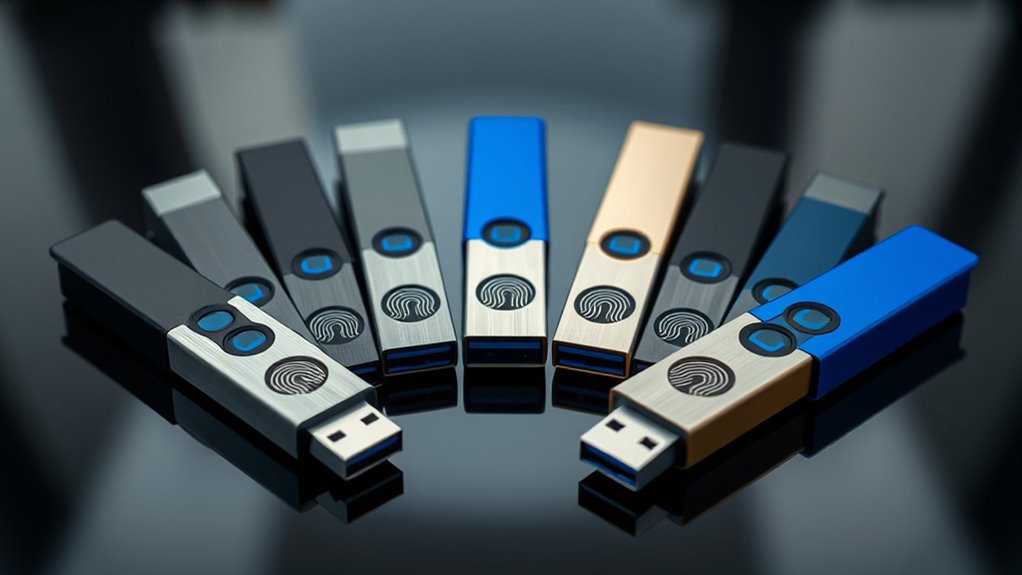

For the broadest mix of security, speed, and device support, I rank the iDiskk 1TB Fingerprint SSD first. Its claimed 500MB/s read speed, USB-A and USB-C connectors, and large capacity suit buyers moving substantial photo or work archives. The Lexar F35 Pro 256GB is my stronger choice for conventional business documents because it pairs fingerprint access with clearly stated AES-256 encryption.

Get business pricing on tech for your team
- Business-only prices and quantity discounts
- Tax-exempt purchasing
- Multiple users, one account, clear invoices
Price is only one part of this decision. I would also weigh connector compatibility, enrollment restrictions, storage capacity, and how clearly each seller documents its encryption. The Lexar 128GB model offers better value for smaller workloads, while the Lightning-based drive serves older iPhones. The generic USB-C option ranks last because its security and speed details are vague.
Key Takeaways
- iDiskk leads overall through 1TB capacity, dual connectors, and SSD-class claimed speeds.
- Lexar F35 Pro 256GB has the clearest security proposition for portable business files.
- The 128GB Lexar retains the 256GB model’s fingerprint capacity but writes more slowly.
- The Lightning model is aimed at older iPhones and iPads, not newer USB-C Apple hardware.
- The generic USB-C drive provides too few technical details for highly sensitive records.
| iDiskk SSD 1TB Fingerprint Encryption USB Flash Drive |  | Best Overall | Capacity: 1TB | Maximum read speed: Up to 500MB/s claimed | Maximum write speed: Up to 450MB/s claimed | VIEW ON AMAZON | See Our Full Breakdown |
| Lexar 256GB JumpDrive Fingerprint F35 Pro |  | Best for Business Documents | Capacity: 256GB | Interface: USB 3.2 Gen 1 | Maximum read speed: Up to 400MB/s | VIEW ON AMAZON | See Our Full Breakdown |
| Lexar 128GB JumpDrive Fingerprint F35 Pro | | Best Value | Capacity: 128GB | Interface: USB 3.2 Gen 1 | Maximum read speed: Up to 400MB/s | VIEW ON AMAZON | See Our Full Breakdown |
| 128GB Fingerprint Encrypted Drive for iPhone and iPad |  | Best for Legacy Lightning Devices | Capacity: 128GB | Interfaces: Lightning and USB 3.0 Type-A | Authentication: Fingerprint and password | VIEW ON AMAZON | See Our Full Breakdown |
| Fingerprint USB-C Biometric Security Drive |  | Best for Low-Stakes USB-C Storage | Capacity range: 16GB to 256GB listed | Interface: USB-C | Authentication: Fingerprint | VIEW ON AMAZON | See Our Full Breakdown |
| biometric usb flash drife | Capacity | Maximum read speed | Maximum write speed | Encryption |
|---|---|---|---|---|
| iDiskk SSD 1TB Fingerprint Enc | 1TB | Up to 500MB/s claimed | Up to 450MB/s claimed | AES-256 software encryption and fingerprint access |
| Lexar 256GB JumpDrive Fingerpr | 256GB | Up to 400MB/s | Up to 350MB/s | 256-bit AES |
| Lexar 128GB JumpDrive Fingerpr | 128GB | Up to 400MB/s | Up to 300MB/s | 256-bit AES |
| 128GB Fingerprint Encrypted Dr | 128GB | — | — | — |
| Fingerprint USB-C Biometric Se | — | — | — | — |
More Details on Our Top Picks
iDiskk SSD 1TB Fingerprint Encryption USB Flash Drive
The iDiskk 1TB Fingerprint SSD takes first place because it combines the lineup’s largest fixed capacity with USB-A and USB-C connections. Its advertised 500MB/s reads and 450MB/s writes exceed both Lexar models on paper, which can shorten large photo, video, and project backups. AES-256 software encryption adds a stated security layer beyond the fingerprint reader.
This is also the most flexible mobile pick, particularly for USB-C iPhones and Android phones. Compared with the Lexar F35 Pro, though, its app story is less tidy: ordinary storage is described as plug-and-play, while one-click photo backup relies on an app. I would choose it for mixed-device media workflows, but Lexar remains the simpler document drive. Buyers should also confirm app support and recovery procedures before placing irreplaceable files behind dual encryption.
Pros:- Large 1TB capacity
- Claimed speeds up to 500MB/s read and 450MB/s write
- USB-A and USB-C connectors
- Fingerprint access plus stated AES-256 encryption
Cons:- Automatic mobile backup may require an app
- Security recovery details are not explained
- Larger capacity may be excessive for document-only use
Best for: I would choose it for photographers, students, and professionals carrying large files across USB-A and USB-C devices.
Not ideal for: I would skip it for buyers who want a simple USB-A office drive with minimal mobile-app involvement.
- Capacity:1TB
- Maximum read speed:Up to 500MB/s claimed
- Maximum write speed:Up to 450MB/s claimed
- Interfaces:USB-A and USB-C
- Encryption:AES-256 software encryption and fingerprint access
- Mobile support:USB-C iPhone and Android devices
- Construction:Metal, shock- and dust-resistant design claimed
Our verdict“I rank the iDiskk first for buyers who value <strong>capacity, speed, and cross-device flexibility</strong> in one encrypted drive.”
Lexar 256GB JumpDrive Fingerprint F35 Pro
The Lexar F35 Pro 256GB is my preferred office-focused pick. It stores up to ten fingerprints, advertises recognition in under one second, and states 256-bit AES encryption. Those details make its security proposition easier to evaluate than the generic USB-C drive or the Lightning model, neither of which names an encryption standard.
Its 400MB/s read and 350MB/s write ratings trail the iDiskk SSD, yet they remain well suited to reports, presentations, and moderate media folders. The durable metal body also fits frequent travel. The main compromise is USB-A-only connectivity; many thin laptops and phones need an adapter. I place it second because it offers less capacity and device flexibility than iDiskk, but its focused feature set may appeal more to business buyers.
Pros:- Clearly stated 256-bit AES encryption
- Stores up to ten fingerprints
- Fast claimed 400MB/s reads
- Durable metal body
Cons:- No native USB-C connector
- Lower capacity than the iDiskk
- Costs more than a basic non-biometric drive
Best for: I recommend it to professionals sharing confidential documents between USB-A computers.
Not ideal for: I would avoid it for phone-first workflows or buyers needing more than 256GB.
- Capacity:256GB
- Interface:USB 3.2 Gen 1
- Maximum read speed:Up to 400MB/s
- Maximum write speed:Up to 350MB/s
- Encryption:256-bit AES
- Fingerprint storage:Up to 10 fingerprints
- Recognition time:Less than 1 second claimed
- Body:Metal
Our verdict“I see the Lexar 256GB as the <strong>most convincing business-document choice</strong> when USB-A fits the buyer’s hardware.”
Lexar 128GB JumpDrive Fingerprint F35 Pro
The 128GB Lexar F35 Pro keeps the traits that make the 256GB version appealing: ten enrolled fingerprints, sub-second claimed recognition, a metal body, and 256-bit AES protection. I rank it as the value pick for buyers whose secure folder contains documents rather than a large photo or video library.
Compared with its 256GB sibling, it halves capacity and drops the advertised write ceiling from 350MB/s to 300MB/s. Read speed remains 400MB/s, so opening files should feel similar, while large backups may take a little longer. I would not choose it merely because its upfront price is lower; the 256GB version makes more sense if storage needs are likely to grow. For a stable, modest workload, however, this model avoids paying for unused space.
Pros:- Same stated encryption as the 256GB model
- Supports up to ten fingerprints
- Fast 400MB/s claimed reads
- Compact metal construction
Cons:- Only 128GB of storage
- Slower writes than the 256GB version
- USB-C devices may need an adapter
Best for: I would point budget-aware office users with modest document libraries toward this model.
Not ideal for: I would skip it for video archives, large creative projects, or native USB-C access.
- Capacity:128GB
- Interface:USB 3.2 Gen 1
- Maximum read speed:Up to 400MB/s
- Maximum write speed:Up to 300MB/s
- Encryption:256-bit AES
- Fingerprint storage:Up to 10 fingerprints
- Recognition time:Less than 1 second claimed
- Body:Metal
Our verdict“I recommend this Lexar when <strong>strong stated security matters more than high capacity</strong>.”
128GB Fingerprint Encrypted Drive for iPhone and iPad
This 128GB Lightning and USB-A drive serves a narrow audience better than the higher-ranked models: owners of older iPhones or iPads who want to enroll fingerprints directly through iOS. After setup through the i-Encrypted Pro app, the listing says fingerprint verification permits plug-and-play access on Windows and Mac.
The limitation is baked into that same workflow. Passwords and fingerprints can only be managed from a compatible Lightning iPhone or iPad, not Android, Windows, or macOS. That makes it less adaptable than iDiskk, which targets newer USB-C phones, and less transparent than Lexar because no encryption cipher is stated. I would reserve it for committed Lightning users who need convenient media handling, not buyers selecting a drive for regulated or highly sensitive data.
Pros:- Native Lightning and USB-A connectors
- Fingerprint and password access
- iOS app supports file and media management
- Can authenticate before use on a computer
Cons:- Enrollment is restricted to Lightning iOS devices
- Encryption standard is not disclosed
- App dependence adds long-term compatibility risk
Best for: I recommend it only to buyers who still center their storage workflow on a Lightning iPhone or iPad.
Not ideal for: I would skip it for USB-C iPhones, Android phones, or security policies requiring a named encryption standard.
- Capacity:128GB
- Interfaces:Lightning and USB 3.0 Type-A
- Authentication:Fingerprint and password
- Setup platform:Compatible Lightning iPhone or iPad
- Required app:i-Encrypted Pro
- Computer support:Windows and Mac after authentication
- Encryption standard:Not stated
Our verdict“I view this as a <strong>special-purpose Lightning pick</strong>, not a broadly compatible secure drive.”
Fingerprint USB-C Biometric Security Drive
This generic fingerprint USB-C drive offers a metal body, plug-and-play operation, and capacities reportedly ranging from 16GB to 256GB. Its native connector may suit phones and modern laptops more readily than either Lexar model, and the listing also claims shock-resistant portable storage.
I rank it last because the information needed to judge a security product is missing. The listing gives no named encryption method, measured transfer rate, fingerprint capacity, enrollment process, or recovery policy. Compared with Lexar’s specific AES and recognition claims, that ambiguity is a major weakness. Even iDiskk provides much clearer speed and connector details. I would limit this option to replaceable, low-sensitivity files unless the seller supplies technical documentation. A lower price cannot compensate for unclear data protection when biometrics are the reason for buying.
Pros:- Native USB-C connection
- Multiple listed capacity choices
- Metal body
- Plug-and-play design
Cons:- Encryption standard is not identified
- No numerical speed ratings
- Enrollment and recovery details are absent
Best for: I would limit it to cautious budget buyers storing replaceable files on USB-C hardware.
Not ideal for: I would not select it for confidential business records, identity documents, or sole-copy backups.
- Capacity range:16GB to 256GB listed
- Interface:USB-C
- Authentication:Fingerprint
- Encryption standard:Not stated
- Transfer speed:No numerical rating stated
- Construction:Metal
- Device support:Phones and laptops with compatible USB-C ports
- Resistance:Shockproof design claimed
Our verdict“I place this drive fifth because <strong>USB-C convenience does not offset weak technical disclosure</strong>.”

How We Picked
I ranked these drives around the question that matters most here: how safely and conveniently can a buyer carry private files? I gave the most weight to stated encryption, fingerprint enrollment, connector support, transfer performance, capacity, and setup requirements. A fingerprint reader alone did not earn a high position; the seller also needed to explain what protects the stored data.
I did not treat manufacturer claims as independent test results. Where a listing omits a cipher, measured speed, warranty, or recovery policy, I count that absence as a drawback. My order rewards the iDiskk model’s versatility and 1TB capacity, then Lexar’s clearer security specifications. The final two picks have narrower compatibility or weaker documentation, making them better for specific buyers than for general secure storage.
| biometric usb flash drife | Maximum read speed | Maximum write speed | Interface |
|---|---|---|---|
| iDiskk SSD 1TB Fingerprint Enc | Up to 500MB/s claimed | Up to 450MB/s claimed | — |
| Lexar 256GB JumpDrive Fingerpr | Up to 400MB/s | Up to 350MB/s | USB 3.2 Gen 1 |
| Lexar 128GB JumpDrive Fingerpr | Up to 400MB/s | Up to 300MB/s | USB 3.2 Gen 1 |
| 128GB Fingerprint Encrypted Dr | — | — | — |
| Fingerprint USB-C Biometric Se | — | — | USB-C |
Factors to Consider When Choosing Biometric Usb Flash Drives
I would buy a biometric USB drive only after matching its security design, connector, and capacity to the files and devices involved.Fingerprint Access Is Not the Same as Encryption
A sensor controls who can open a drive, while encryption protects the stored bytes. I favor models that identify a recognized cipher, which is why the AES-256-equipped Lexar and iDiskk drives rank above vaguely described alternatives. I would also check how fingerprints are enrolled, how a forgotten password is handled, and whether resetting the drive erases its contents.
Match the Connector to Every Device
USB-C is the better fit for current phones and thin laptops, while USB-A remains common on office desktops. Lightning now serves older Apple hardware. A dual-interface model such as iDiskk reduces adapter use; the Lightning pick only makes sense if an older iPhone or iPad remains central to the workflow.
Choose Capacity Around the Workload
I see 128GB as ample for documents, 256GB as a comfortable mixed-file tier, and 1TB as the media-oriented choice. Capacity should leave room for growth, but it should not replace backup discipline. I would keep another encrypted copy because a fingerprint reader cannot prevent hardware failure, accidental deletion, or loss.
Read Speed and Write Speed Serve Different Jobs
Read speed affects how quickly files open or copy from the drive; write speed governs backups to it. The iDiskk has the fastest claimed figures, followed by the two Lexar models. I would treat listings that only say “fast” as unknown rather than equivalent to a measured rating.
Frequently Asked Questions
Are biometric USB flash drives safer than password-only drives?
They can provide more convenient access control, but I would judge safety by the full design. A fingerprint sensor paired with clearly stated hardware or software encryption is more persuasive than biometrics alone. Recovery methods, reset behavior, and backup practices also shape the real level of protection.
Can more than one person use the same fingerprint drive?
Some models support multiple users. Both Lexar F35 Pro capacities can store up to ten fingerprints, making them suitable for several approved fingers or a small trusted group. The other listings do not clearly state their fingerprint limits, so I would verify that point before planning shared access.
Will a biometric USB drive work without installing software?
File access may be plug-and-play after enrollment, but initial setup often needs software or a supported device. The Lightning model requires the i-Encrypted Pro app for password and fingerprint management, while iDiskk’s automatic mobile backup also uses an app. I would separate setup requirements from everyday use when comparing claims.
Which capacity should I buy?
I would choose 128GB for documents and coursework, 256GB for a mixed collection, and 1TB for recurring photo or video backups. The best capacity leaves sensible headroom without encouraging the drive to become the only copy of valuable data.
What happens if the fingerprint reader stops working?
The answer depends on the product’s password fallback and recovery process. I would read the manual before storing private files and keep a separate encrypted backup. A damaged sensor or controller can make data inaccessible even when the memory itself survives, so biometric storage should never be the sole archive.
Conclusion
For large, mixed-device backups, I would buy the iDiskk 1TB. For confidential office documents, the Lexar F35 Pro 256GB offers the clearest balance of stated security and speed, while the 128GB version suits smaller budgets. I would choose the Lightning drive only for an older iPhone-centered workflow. The generic USB-C model belongs with low-sensitivity files until its seller provides stronger technical documentation.
Fall Picks
fall essentials
As an affiliate, we earn on qualifying purchases.