
TL;DR
A buyer’s guide from Thorsten Meyer AI compares 13 meeting transcription products, from desk hardware and pocket recorders to wearables and Windows software. The guide highlights differences in recording format, storage, language support and app requirements; it does not establish a single best choice for every user.
Thorsten Meyer AI has published a buyer’s guide comparing 13 meeting transcription options, including desk hardware, portable recorders, wearables, a recording pen and dedicated Windows software. The comparison focuses on practical differences such as recording setup, app dependence, language features and monthly transcription limits, which can affect whether a product suits a desk-based team or someone capturing conversations on the move.

Get business pricing on tech for your team
- Business-only prices and quantity discounts
- Tax-exempt purchasing
- Multiple users, one account, clear invoices
The guide recommends the HiDock H1E as a starting point for people who want a meeting-note device integrated into a desk dock. It describes Philips SpeechExec as a more traditional transcription workflow for Windows offices that assign dictation to authors and transcriptionists. For hands-free or mobile capture, it points to wearables such as the Fieldy 3, a wristband recorder and an Apple Watch-band recorder.
Product features vary across the AI meeting transcription roundup. The HiDock H1E is listed with transcription and summaries in 75 languages through the HiNotes app, while Fieldy 3 is listed with speaker labels and transcription in more than 100 languages. The Tupuniu recorder’s listing says it supports transcription and translation in up to 255 languages. The source does not establish that these language counts represent equivalent features or real-world accuracy.
The guide also calls out constraints alongside features. Fieldy 3’s free Basic transcription is listed at 150 minutes per month; RECPOINT is listed at 360 monthly minutes. Some devices require a compatible phone or computer for AI processing, and the guide says the DOWAY recorder needs an internet connection for that processing. NOTEVOX is listed with 128 GB of storage, but its battery life is inconsistent within the product listing: 14 hours in specifications and 24 hours in an item highlight.
13 Options for Clearer Notes AI Meeting Transcription in 2027
Thorsten Meyer AI compares desk devices, portable recorders, wearables and Windows software. The guide highlights different workflows and limits without naming one best choice for everyone.
Choose by recording workflow
Where conversations happen can matter as much as listed features.
- HiDock H1E combines a meeting-note device with a desk dock.
- Philips SpeechExec suits Windows offices organizing dictation for authors and transcriptionists.
- Fieldy 3 and other wearables support hands-free capture.
- Portable recorders and a recording pen offer other ways to capture conversations.
Language claims vary
The guide lists different language counts, but does not establish equivalent features or accuracy.
75 languages
Transcription and summaries are listed through the HiNotes app.
More than 100
The listing describes transcription with speaker labels.
Up to 255
The listing describes transcription and translation.
Check practical constraints
App, device and internet requirements affect how recordings become usable notes.
Some products need a compatible phone or computer for AI processing; DOWAY requires an internet connection for that processing.
Fieldy 3 Basic lists 150 minutes per month; RECPOINT lists 360.
NOTEVOX lists 128 GB storage, while its battery life appears as both 14 and 24 hours.
Read the comparison with care
The supplied guide does not include independent tests, consistent accuracy measures, user research or total ownership costs.
Choosing by Recording Workflow
The comparison matters because meeting capture is not a single workflow. A desk dock can keep recording and notes close to a regular workstation, while a wearable may be easier for conversations outside an office. A software product such as SpeechExec targets organized dictation work rather than the same all-in-one hardware experience.
Feature totals alone may not settle the choice. Cloud access, companion apps, internet requirements and monthly limits affect how easily recordings become usable notes. Likewise, more storage does not remove the need to transfer files or use an app for transcription. Buyers comparing products should check how each listing defines transcription, translation and recording time before treating headline specifications as directly comparable.
Products Worth Considering
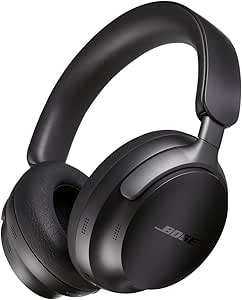
Bose QuietComfort Ultra Wireless Over-Ear Headphones with Spatial Audio and Noise Cancellation, Black

Anker SOLIX C1000 Gen 2 Portable Power Station with 200W Solar Panel

Bose Lifestyle Ultra Soundbar and Ultra Subwoofer Bundle
As an affiliate, we earn on qualifying purchases.
Thirteen Formats in One Guide
The source frames its list as a comparison of 13 options across 12 brands. It includes standalone recorders such as the DOWAY and RECPOINT models, a pen from Neyes, desk-focused HiDock hardware, several wearables and Philips SpeechExec software. The roundup therefore spans both dedicated recording devices and computer-based transcription organization.
Thorsten Meyer AI discloses that the post was created with AI assistance and that it may earn commissions on qualifying Amazon purchases. That disclosure is relevant to readers assessing a shopping guide: the source presents product descriptions and recommendations, while the supplied material does not include independent testing methods, comparative accuracy results or user research.
“Hardware and software solve different problems.”
— Thorsten Meyer AI buying guide
Limits of the Product Comparison
The supplied source does not give a publication date, independent test results or a consistent method for measuring transcription quality, speaker identification or translation accuracy. It also does not show whether listed language counts refer to transcription, translation or both in each case. Product specifications and service limits may change, so current terms should be checked with the seller or manufacturer.
Some details are explicitly unclear even within the source material. NOTEVOX battery life is listed as both 14 and 24 hours, and the Philips SpeechExec entry does not specify AI transcription or automated meeting summaries. The roundup also does not provide enough information to compare total ownership costs across devices, apps and subscriptions.
Check Current Product Terms
Readers considering a purchase can use the roundup’s format and limitation notes to narrow the field, then verify current pricing, app compatibility, transcription allowances and supported languages in the product listings. Teams should also check how recordings are transferred and processed before choosing a device for routine meetings. The source does not announce a follow-up test or a next update date.
Key Questions
What products does the guide compare?
It compares 13 options, including desk hardware, portable recorders, wearables, a recording pen and Philips SpeechExec transcription software.
Which option does the source recommend for desk meetings?
The guide suggests starting with the HiDock H1E for people who want meeting notes alongside a desk dock. It presents Philips SpeechExec as a fit for Windows offices with a traditional dictation workflow.
Are all of the listed transcription features offline?
No. The source says some AI features depend on a companion app, compatible device or internet connection. Requirements differ by product and should be checked before purchase.
Are the language counts directly comparable?
The source lists different language counts, including 75 for HiDock H1E transcription, more than 100 for Fieldy 3 and up to 255 for Tupuniu transcription and translation. It does not establish that these counts cover identical features or indicate comparable accuracy.
Source: Thorsten Meyer AI