TL;DR
FPV means first-person view: a drone sends a live camera feed to goggles or a compatible screen so you can steer while seeing a view from the aircraft. FPV drones range from tiny indoor whoops to agile freestyle craft and camera-focused models, and they vary in flight feel, video quality, repair needs, and learning curve. Start with a simulator, check local rules, and compare the complete kit—including controller, goggles, batteries, and charger—before choosing.
A narrow gap between two trees can feel enormous when you see it through a drone’s camera. FPV drones put that moving view in goggles or on a screen, so you steer from the aircraft’s perspective instead of watching it from the ground. The result can feel immediate and immersive—like guiding a small camera through the air.

Get business pricing on tech for your team
- Business-only prices and quantity discounts
- Tax-exempt purchasing
- Multiple users, one account, clear invoices
FPV stands for first-person view. It describes how you see the flight, not one particular shape or purpose. A palm-sized indoor quad, a fast racing craft, and a drone carrying a stabilized camera can all use FPV. That variety is useful, but it can make the first buying decision confusing.
This guide explains how the camera feed and controls work, what separates the main kinds of FPV drones, and why a simulator can make your first real flight less stressful. You’ll also find a practical way to compare kits, including options related to the DJI Avata 2 Fly More Combo with three batteries. Product lineups change, so treat any named model as an example and verify its current specifications before you buy.
FPV means you steer while viewing a live camera feed; it does not identify one fixed drone design.
Match the drone type to your flying space and purpose: indoor whoops, racing craft, freestyle models, and camera-focused aircraft have different tradeoffs.
Check that goggles or a screen, controller, video link, batteries, and charger form a compatible, complete setup.
Use a simulator to practice orientation and throttle before flying a physical aircraft, then choose a clear practice area.
Compare the exact bundle contents and verify current product specifications and local flight rules before buying.
What FPV goggles show you while you fly
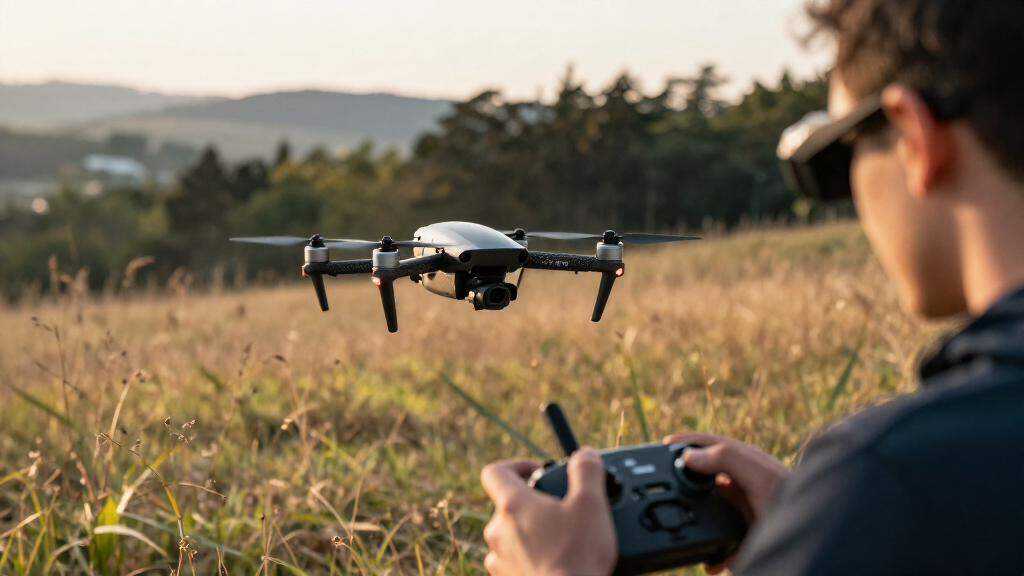
FPV drones send a live camera feed to goggles or a compatible screen, letting you steer while looking out from the aircraft. FPV means first-person view: the camera becomes your viewpoint, and your control inputs change what you see next. It’s a direct, moving picture—not a guarantee that the aircraft is autonomous or easy to fly.
Most FPV aircraft use several small propellers, commonly four, to rise, turn, and move in different directions. A camera and video transmitter send the image to your display, while a radio link carries your commands from a handheld transmitter. Those links do different jobs. You can have a clear picture but a control problem, or lose the picture while the radio connection behaves differently; the outcome depends on the equipment and setup.
Imagine easing a small drone down a broad hallway. Through goggles, the door frame grows in front of you and slides past as you turn. That view can help you judge a shot or line, but it can also make distance and orientation harder to read when you’re new.
Goggles are common, but they are not the only way to view the feed. Some setups use a compatible monitor. Before choosing, check which display works with the aircraft’s video system; “FPV-ready” does not mean every headset and camera can connect.
Products Worth Considering

DJI Mic 2 Wireless Microphone System with 2 Transmitters, 1 Receiver, and Charging Case

Amazon Kindle Paperwhite (2024) – 16GB, 7 Glare-Free Display, Waterproof

Sonos Era 100 Wireless Smart Speaker, White
As an affiliate, we earn on qualifying purchases.
How FPV drones differ from camera drones
FPV drones often give you more direct control over movement, while many traditional camera drones focus on assisted flight and stable aerial photography. The difference is a useful starting point, not a hard boundary: FPV models can offer assistance or stabilized video, and camera drones can include live viewing. Your intended shot and comfort with manual control matter more than the label alone.
A typical camera drone may hold position while you compose a view of a shoreline or roof. A freestyle FPV quad is built to respond quickly as you swoop under a safe, open arch or arc around a tree. One feels like positioning a camera platform; the other feels closer to steering a nimble object. That agility brings a steeper learning curve and more need to plan your flying area.
Stabilization changes the footage, too. Some FPV craft carry action cameras or use stabilized camera systems, while others prioritize low weight and maneuverability. If your goal is smooth landscape footage, check how the camera is stabilized and whether the drone can carry the camera you want. If you mainly want the immersive view, the live feed and control feel may matter more.
Think of the difference like choosing between a tripod and a handheld camera: one makes a steady composition easier, while the other gives you freedom to move. Neither tool is automatically better. A family member filming a calm beach panorama and a pilot practicing a close, flowing line are solving different problems.
Which FPV drone type fits your first flights
FPV drone types suit different spaces and flying goals: whoops fit indoor practice, racing drones favor speed and agility, freestyle models emphasize expressive movement, and larger craft can carry cameras or other payloads. The right type depends on where you can fly and what you want to see. A small drone isn’t automatically beginner-proof, but a light, guarded model can be a more suitable choice for a confined practice space.
| Type | Typical use | What to weigh |
|---|---|---|
| Whoop | Indoor or confined flying | Compact size; check guards and suitable space |
| Racing | Agile, course-based flying | Responsive controls; practice and a suitable course matter |
| Freestyle | Acrobatic movement and creative footage | Movement, repairability, and camera needs |
| Camera-focused | Filming with a mounted or stabilized camera | Payload, stabilization, and overall setup |
For example, a person hoping to practice in a spare room should look at a small model intended for confined flying, not assume a larger freestyle quad will be comfortable among lamps and furniture. Someone filming a sweeping outdoor shot may care more about camera stabilization and battery options.
Categories overlap. A freestyle craft can carry an action camera, and an integrated camera drone can offer an immersive FPV view. Use the type as a shortlist tool, then inspect the specific aircraft’s size, controls, camera, and safety features.
What the full FPV setup includes
An FPV setup includes more than the aircraft: you need compatible control equipment, a way to see the video feed, batteries, and charging gear. Some products bundle these pieces, while others sell the drone and viewing equipment separately. Comparing the package contents can explain why two similarly named kits serve different needs.
A typical craft combines a frame, motors, propellers, electronic speed controllers, a flight controller, radio receiver, camera, and video transmitter. The goggles or screen display the camera feed. The battery powers the aircraft, and the transmitter sends your steering commands. If one component uses an incompatible radio or video system, the setup can become more complicated than a ready-to-fly bundle suggests.
As a concrete example, the source brief lists an Avata 2 Fly Smart Combo with the DJI RC Motion 3 and Goggles N3, while another listed Avata 2 Fly More package includes a controller, Goggles 3, and three intelligent batteries. Those included items describe different bundles; they do not establish current stock or guarantee that a particular package is offered. Check the exact listing and manufacturer details before deciding.
For a replacement search, make a short inventory of what you need: aircraft, controller, goggles, batteries, charger, spare propellers, and any camera accessories. A listing that includes the drone alone may not be a complete flying setup. A clearly matched bundle can simplify a first purchase, while separate components can offer more choice if you already own compatible gear.
Why a simulator can make your first flight calmer
A flight simulator lets you practice orientation and throttle control before you fly a physical drone. You can repeat a turn, recover from a wobble, and learn how control inputs change the view without risking a propeller strike or broken frame. It cannot replace outdoor judgment or teach every real-world sensation, but it gives your hands a low-pressure place to learn.
New pilots often find that the controls feel backward at first. When the aircraft faces you, a left input may not look like the leftward motion you expect from standing behind it. In a simulator, you can practice that moment until the view feels less like a spinning room and more like a controllable path.
Try a simple progression. Start by holding a steady hover in open space, then make broad turns, then fly a large rectangle while keeping a comfortable height. If you clip an imaginary gate, reset and repeat the same line more slowly. That repetition builds the basic habits you’ll need before attempting close obstacles or fast movement.
Some modern systems offer assisted modes, but the help varies by aircraft. Read the manual to learn what those modes do and when they apply. A beginner considering an integrated option such as the DJI Avata 2 should compare its control method, goggles, included batteries, and safety features with their own practice plan; the product name alone doesn’t tell you whether its flight style will feel right.
How to choose a kit that matches your goal
Choose an FPV kit by matching the flying space, control style, video system, and included accessories to your goal. Start with where you plan to fly; then work out which camera view and level of hands-on repair you want. That order can stop a long specification list from distracting you from the basics.
- Name your use: indoor practice, racing, freestyle footage, or steadier camera work.
- Check your space: identify where you can practice and what local rules apply there.
- Choose your view: confirm whether the kit uses goggles or a compatible screen and which video system it needs.
- Count the complete gear: compare the controller, batteries, charger, spare propellers, guards, and camera accessories.
- Plan for upkeep: consider whether you want modular parts and repairs or a more integrated setup.
Suppose you want an immersive camera view and prefer a guided package. An Avata 2 Fly Smart Combo is one current-alternative example in the brief, with a listed motion controller and goggles. If you need several batteries in the box, the brief also names a three-battery Fly Smart bundle. These descriptions are not a promise of present availability; verify the precise package and specifications with the seller or manufacturer.
A DJI Mini 5 Pro Fly More Combo Plus and a Loiley foldable 2K camera drone appear in the brief as alternatives with overlapping accessories or camera specifications. They are not automatically direct FPV substitutes: the former is described with a 1-inch sensor and RC 2, while the latter lists 2K video and two batteries. Compare the actual live-view system and flight experience before treating similar accessories as equivalent.
Why batteries, repairs, and safety shape the experience
Battery life, repairs, and safe flying affect how much useful practice you get from an FPV drone. Many FPV aircraft use lithium polymer (LiPo) batteries, and flight time varies with the drone, battery, payload, and flying style. Small agile models may stay airborne for only several minutes per battery, so a pack of spares can matter more than a headline camera feature.
Picture a pilot packing for an afternoon at an open practice site. One battery gives a brief flight; the pilot lands, swaps packs, and uses the pause to check the propellers and frame. That rhythm is normal for many performance-focused setups. Follow the battery maker’s charging, storage, and handling instructions, and use a charger suited to the pack.
Modular construction can make repairs practical: a damaged propeller or replaceable part may be easier to address than replacing an entire aircraft. The tradeoff is that you may need to diagnose a fault and check component compatibility. If you would rather spend less time on repairs, prioritize a supported, integrated kit and learn what service options exist before purchasing.
Propellers can injure people, and losing video or radio control can make an aircraft unpredictable. Choose a clear practice area away from bystanders, inspect the craft before flight, and learn its failsafe behavior in a safe setting. Rules vary by location, aircraft, purpose, and whether you fly within visual line of sight; check the current aviation authority guidance and local airspace restrictions before you launch.
What’s changing in FPV gear—and what still matters
FPV equipment has moved from predominantly analog video toward more digital options, while analog systems remain in use. Digital systems can offer sharper images and features such as on-screen data; analog can have different performance and cost tradeoffs. These broad trends do not tell you which system will suit a specific aircraft or location, so compare the actual equipment.
Smaller craft, more capable cameras, integrated electronics, and wider use of simulators and ready-to-fly kits have also shaped the hobby. For a beginner, integration can reduce the number of compatibility choices. For a hands-on builder, modular parts can make customization and repair more appealing. Your preference may change after you’ve flown enough to know which controls and image quality matter most.
Consider a buyer who wants to record a smooth outdoor path. A sharper digital feed may make the flight easier to watch, while the recording quality still depends on the camera, stabilization, pilot skill, and intended shot. A crisp image in goggles does not automatically produce cinematic footage. The feed is a piloting tool; the recorded result is a separate consideration.
Product specifications and regulations change over time. The examples in this guide come from a supplied product brief, not a live market check, and should be verified before publication or purchase. When comparing model versions, record the date and consult current manufacturer documentation; a bundle name can hide meaningful differences in goggles, controller, batteries, and camera features.
Frequently Asked Questions
What does FPV mean on a drone?
FPV means first-person view. The drone sends a live camera feed to goggles or a compatible screen so you can steer while seeing a view from the aircraft.
Do I need goggles to fly an FPV drone?
Goggles are common, but some systems can show the feed on a compatible monitor or other display. Check the aircraft’s video system and confirm which displays can connect before buying.
Are FPV drones difficult for beginners?
Manual FPV control can take practice, especially learning orientation and throttle. A simulator and a suitable small, durable model can help you build basic control skills before flying in a real space.
How long does an FPV drone battery last?
Flight time depends on the aircraft, battery, payload, and how you fly. Many small, agile FPV models fly for only several minutes per battery, so check the maker’s specifications and follow its charging and storage instructions.
Can FPV drones record smooth cinematic video?
Yes, some FPV drones carry action cameras or use stabilized camera systems. Smooth results depend on the camera, stabilization, aircraft, pilot skill, and the shot you plan to capture.
What should I check before buying an FPV kit?
Confirm that the drone, controller, goggles or screen, video link, batteries, and charger work together. Match the kit to your flying space and goal, compare exact bundle contents, and check current product specifications and local flight rules.
Conclusion
Start with where and how you want to fly. Then choose an FPV setup whose control style, display, battery plan, and repair needs fit that goal. Practice in a simulator, check the rules for your location, and verify the exact contents of any kit before you buy.
Once the controls feel familiar, that tiny live image can turn an ordinary open space into a new path through the sky—one careful flight at a time.