
If you’re shopping for Wi-Fi 6E mesh routers, the two names dominating the field in 2026 are Google and TP-Link, and each takes a very different approach. The TP-Link Deco XE75 Pro 3-Pack is the strongest all-around choice here, pairing a dedicated 6 GHz backhaul with 2.5 Gbps ports and easy expansion. The Google Nest Wifi Pro 3-Pack is the better pick for beginners who want plug-and-play simplicity and tight smart-home integration, while the Deco XE70 Pro line wins on value. The core tradeoff you’ll face: TP-Link gives you more raw hardware and wired-backhaul flexibility, while Google gives you polish and software that stays out of your way. Read on for the full breakdown of all thirteen systems.

Get business pricing on tech for your team
- Business-only prices and quantity discounts
- Tax-exempt purchasing
- Multiple users, one account, clear invoices
Key Takeaways
- TP-Link dominates this lineup with nine of thirteen entries, so the real decision is usually between Deco tiers — the XE75 Pro’s 2.5 Gbps port is what separates it from the nearly identical XE75 and XE70 Pro for wired-backhaul setups.
- The Google Nest Wifi Pro appears in single, 3-pack, and 4-pack configurations; buying the larger packs is the only way to cover bigger homes, since it lacks the multi-gig ports that make TP-Link units future-proof expansion nodes.
- The 6 GHz band is the whole point of these systems: it serves as a dedicated backhaul between units, but devices older than a couple of years can’t use it directly, which caps the benefit for mixed-device households.
- The renewed Deco XE75 Pro 3-Pack is the only entry here with condition caveats, trading cosmetic assurance for accessibility to tri-band 6E performance — a reasonable bet given that mesh hardware rarely fails mechanically.
- Two WiFi 7 Deco systems made the list because WiFi 7 hardware is now priced close to WiFi 6E gear; buyers planning to keep a system for five-plus years should weigh them, though their dual-band Deco 7 configuration lacks the dedicated third band the 6E models offer.
| TP-Link Deco 7 Pro Tri-Band WiFi 7 BE10000 Whole Home Mesh System (3-Pack) |  | Best Future-Proof Flagship | WiFi Standard: Wi-Fi 7 (BE10000) | Bands: Tri-Band (6 GHz, 5 GHz, 2.4 GHz) | Max Speeds: 5,188 Mbps (6 GHz), 4,324 Mbps (5 GHz), 574 Mbps (2.4 GHz) | VIEW ON AMAZON | See Our Full Breakdown |
| Google Nest Wifi Pro 6E Mesh Router, Snow |  | Best for Simplicity | Wi-Fi Standard: Wi-Fi 6E | Bands: 2.4 GHz, 5 GHz, and 6 GHz | Coverage: Up to 2,200 sq.ft. per router | VIEW ON AMAZON | See Our Full Breakdown |
| Google Nest WiFi Pro Wi-Fi 6E Mesh Router, Snow |  | Best Starter Unit for Google Homes | Wi-Fi Standard: Wi-Fi 6E | Bands: 2.4 GHz, 5 GHz, 6 GHz | Coverage: Up to 2,200 sq.ft. per router | VIEW ON AMAZON | See Our Full Breakdown |
| TP-Link Archer AXE75 AXE5400 Tri-Band WiFi 6E Router |  | Best Budget 6E Entry Point | WiFi Standard: Wi-Fi 6E (AXE5400) | Bands: Tri-Band | Total WiFi Speed: Up to 5,400 Mbps (2,402 Mbps on 6 GHz) | VIEW ON AMAZON | See Our Full Breakdown |
| TP-Link Deco XE70 Pro AXE4900 Tri-Band Wi-Fi 6E Mesh Router, 1-Pack |  | Best Value Mesh Building Block | Wi-Fi Standard: Wi-Fi 6E (AXE4900) | Bands: Tri-band, including 6 GHz | Maximum Wi-Fi Speed: Up to 4.9 Gbps | VIEW ON AMAZON | See Our Full Breakdown |
| TP-Link Deco 7 Dual-Band BE5000 WiFi 7 Mesh Wi-Fi System (4-Stream, 5 Gbps, 240 MHz) |  | Best Future-Proof Upgrade | WiFi Standard: WiFi 7 (BE5000) | Bands: Dual-Band (5 GHz / 2.4 GHz) | Max Speed (5 GHz): 4324 Mbps | VIEW ON AMAZON | See Our Full Breakdown |
| TP-Link Deco XE75 Pro AXE5400 Tri-Band Wi-Fi 6E Mesh Router |  | Best Single-Node Starter | Wi-Fi Standard: Wi-Fi 6E | Bands: 6 GHz, 5 GHz, 2.4 GHz | Combined Speed: Up to 5,400 Mbps | VIEW ON AMAZON | See Our Full Breakdown |
| TP-Link Deco AXE5400 Tri-Band WiFi 6E Mesh System (Deco XE75 Pro) – 3-Pack (Renewed) | 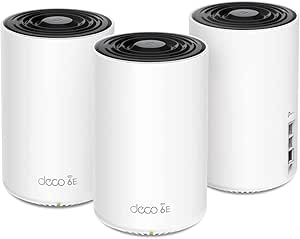 | Best Budget Whole-Home Coverage | WiFi Standard: WiFi 6E | Bands: Tri-Band (6 GHz / 5 GHz / 2.4 GHz) | Total Speed: Up to 5,400 Mbps | VIEW ON AMAZON | See Our Full Breakdown |
| TP-Link Deco XE70 Pro Tri-Band Wi-Fi 6E Mesh System, 2-Pack |  | Best Value Two-Node Pick | Wi-Fi Standard: Wi-Fi 6E | Bands: Tri-Band (6 GHz / 5 GHz / 2.4 GHz) | Maximum Wireless Speed: Up to 4.9 Gbps | VIEW ON AMAZON | See Our Full Breakdown |
| TP-Link Deco XE75 AXE5400 Tri-Band WiFi 6E Mesh System, 3-Pack |  | Best for Large Homes | WiFi Standard: WiFi 6E | Bands: Tri-Band (6 GHz / 5 GHz / 2.4 GHz) | Total Speed: Up to 5,400 Mbps | VIEW ON AMAZON | See Our Full Breakdown |
| Google Nest WiFi Pro 6E Mesh Router, 3-Pack, Snow |  | Best for Effortless Smart Home Management | Product Type: Mesh Wi-Fi System | Pack Size: 3 routers | Wi-Fi Technology: Wi-Fi 6E (tri-band) | VIEW ON AMAZON | See Our Full Breakdown |
| TP-Link Deco XE70 Pro AXE4900 Tri-Band WiFi 6E Mesh System (3-Pack) |  | Best Overall Performance | Wi-Fi Standard: Wi-Fi 6E (AXE4900) | Bands: Tri-band (2.4 GHz, 5 GHz, 6 GHz) | Max Speed: Up to 4.9 Gbps | VIEW ON AMAZON | See Our Full Breakdown |
| Google Nest WiFi Pro Wi-Fi 6E Mesh Router – 4 Pack – Snow |  | Best for Very Large or Multi-Floor Homes | Product Type: Mesh Wi-Fi System | Pack Size: 4 routers | Wi-Fi Standard: Wi-Fi 6E | VIEW ON AMAZON | See Our Full Breakdown |
| wifi 6e mesh router | Coverage | Bands | Wi-Fi Standard |
|---|---|---|---|
| TP-Link Deco 7 Pro Tri-Band Wi | Up to 7,600 sq.ft. (3-pack) | Tri-Band (6 GHz, 5 GHz, 2.4 GHz) | — |
| Google Nest Wifi Pro 6E Mesh R | Up to 2,200 sq.ft. per router | 2.4 GHz, 5 GHz, and 6 GHz | Wi-Fi 6E |
| Google Nest WiFi Pro Wi-Fi 6E | Up to 2,200 sq.ft. per router | 2.4 GHz, 5 GHz, 6 GHz | Wi-Fi 6E |
| TP-Link Archer AXE75 AXE5400 T | — | Tri-Band | — |
| TP-Link Deco XE70 Pro AXE4900 | Up to 2,900 sq.ft. per unit | Tri-band, including 6 GHz | Wi-Fi 6E (AXE4900) |
| TP-Link Deco 7 Dual-Band BE500 | Up to 6,600 sq. ft. | Dual-Band (5 GHz / 2.4 GHz) | — |
| TP-Link Deco XE75 Pro AXE5400 | Up to 2,900 sq. ft. | 6 GHz, 5 GHz, 2.4 GHz | Wi-Fi 6E |
| TP-Link Deco AXE5400 Tri-Band | Up to 7,200 sq. ft. | Tri-Band (6 GHz / 5 GHz / 2.4 GHz) | — |
| TP-Link Deco XE70 Pro Tri-Band | Up to 2,900 sq. ft. | Tri-Band (6 GHz / 5 GHz / 2.4 GHz) | Wi-Fi 6E |
| TP-Link Deco XE75 AXE5400 Tri- | Up to 7,200 sq. ft. | Tri-Band (6 GHz / 5 GHz / 2.4 GHz) | — |
| Google Nest WiFi Pro 6E Mesh R | Up to 6,600 square feet | — | — |
| TP-Link Deco XE70 Pro AXE4900 | Up to 7,200 sq. ft. | Tri-band (2.4 GHz, 5 GHz, 6 GHz) | Wi-Fi 6E (AXE4900) |
| Google Nest WiFi Pro Wi-Fi 6E | Up to 6,600 sq ft or more depending on layout | — | Wi-Fi 6E |
More Details on Our Top Picks
TP-Link Deco 7 Pro Tri-Band WiFi 7 BE10000 Whole Home Mesh System (3-Pack)
This option stands out for buyers who want to leapfrog Wi-Fi 6E entirely and land on Wi-Fi 7 hardware that still makes full use of the 6 GHz band. With BE10000 tri-band throughput, a 10G WAN/LAN port, and four 2.5G ports, this kit is built for multi-gig internet plans and dense smart homes — the 200+ device ceiling matters if you run cameras, hubs, and consoles simultaneously. Compared with the Deco XE70 Pro, the raw speed and port selection are in a different league, though both share the same Deco app and HomeShield ecosystem. The tradeoff is cost and diminishing returns: most client devices today can’t exploit Wi-Fi 7 speeds, and real-world performance drops with walls and distance. Anyone on a sub-gig plan gets little from this over cheaper 6E mesh kits.
Pros:- Wi-Fi 7 speeds up to 10 Gbps across three bands
- 10G WAN/LAN plus four 2.5G ports for multi-gig wired backhaul
- Coverage up to 7,600 sq.ft. with 200+ device capacity
- HomeShield security with parental controls and VPN client/server
Cons:- Performance varies noticeably with distance, walls, and network conditions
- Requires a separate modem and needs at least two units for mesh backhaul
- Most current client devices cannot take advantage of Wi-Fi 7 speeds
Best for: Tech-forward households with multi-gig internet, 100+ connected devices, and a desire for hardware that stays relevant for years
Not ideal for: Buyers on internet plans under 1 Gbps or with mostly older devices — the extra speed headroom goes unused and the premium is wasted
- WiFi Standard:Wi-Fi 7 (BE10000)
- Bands:Tri-Band (6 GHz, 5 GHz, 2.4 GHz)
- Max Speeds:5,188 Mbps (6 GHz), 4,324 Mbps (5 GHz), 574 Mbps (2.4 GHz)
- Coverage:Up to 7,600 sq.ft. (3-pack)
- Ports:1x 10G WAN/LAN, 4x 2.5G WAN/LAN, 1x USB 3.0
- Backhaul:Simultaneous wired and wireless
- Security:TP-Link HomeShield with parental controls and IoT protection
Our verdict“This is the pick for enthusiasts with multi-gig service who want maximum headroom, while everyone else gets better value from a 6E kit like the Deco XE70 Pro.”
Google Nest Wifi Pro 6E Mesh Router, Snow
This model makes the most sense for buyers who prioritize effortless setup and management over raw throughput. The single-unit Nest Wifi Pro covers up to 2,200 sq.ft. and handles tri-band 6E without any tinkering — it prioritizes video calls and self-diagnoses network problems, which is exactly what non-technical households need. Compared with the TP-Link Archer AXE75, it gives up VPN flexibility and granular control, but demands far less attention day to day. The key tradeoff is expansion: it cannot mesh with older Google Wifi or Nest Wifi units, so upgrading means replacing everything. There are also no multi-gig ports for wired backhaul growth. For apartments and modest single-story homes, though, the simplicity is worth those limitations.
Pros:- Tri-band Wi-Fi 6E with a dedicated 6 GHz band
- Covers up to 2,200 sq.ft. per router, expandable with more units
- Automatically prioritizes video calls and diagnoses network issues
- Guest networks and per-device controls built in
Cons:- Not compatible with previous generations of Google Wifi or Nest Wifi
- Lacks multi-gig Ethernet ports for wired backhaul
- Larger or multi-story homes will need additional units at extra cost
Best for: Non-technical users and small households in apartments or homes up to ~2,200 sq.ft. who want set-and-forget Wi-Fi
Not ideal for: Owners of older Google Wifi or Nest Wifi gear hoping to expand an existing system — compatibility was dropped entirely
- Wi-Fi Standard:Wi-Fi 6E
- Bands:2.4 GHz, 5 GHz, and 6 GHz
- Coverage:Up to 2,200 sq.ft. per router
- Color:Snow
- Expandability:Add more Nest Wifi Pro units to extend mesh
- Compatibility:Not compatible with older Google Wifi or Nest Wifi
Our verdict“Choose this if you want the easiest 6E mesh experience available and don’t need wired backhaul or VPN features.”
Google Nest WiFi Pro Wi-Fi 6E Mesh Router, Snow
Functionally the same hardware as the single-unit Nest Wifi Pro above, this listing earns its spot as the entry point into Google’s 6E ecosystem — the smart buy for someone starting with one router and expanding later. Its strengths are self-monitoring and automatic optimization: the system diagnoses and fixes common issues on its own, and secure boot plus automatic updates keep the network protected without user input. Compared with the Deco XE70 Pro, it trades a 2.5 Gbps port and deeper settings for a cleaner, friendlier experience. The same real limitation applies — no compatibility with older Google Wifi nodes — and the 6 GHz band only benefits devices that actually support 6E. Difficult layouts with thick walls may need a second unit sooner than the coverage figure suggests.
Pros:- Fast Wi-Fi 6E across three bands for smooth streaming and calls
- Expandable mesh — add units to grow coverage
- Automatic performance optimization and self-diagnostics
- Secure boot, automatic updates, and device pausing controls
Cons:- Cannot mix with older Google Wifi or Nest Wifi hardware
- 6 GHz speeds require Wi-Fi 6E-capable client devices
- No multi-gig Ethernet ports for high-speed wired backhaul
Best for: Google ecosystem households starting fresh who want one router now and the option to add units as needs grow
Not ideal for: Power users who want VPN server support, multi-gig ports, or fine-grained network control — the Deco line suits them better
- Wi-Fi Standard:Wi-Fi 6E
- Bands:2.4 GHz, 5 GHz, 6 GHz
- Coverage:Up to 2,200 sq.ft. per router
- Security:Secure boot, automatic software updates, device management
- Network Management:Automatic optimization, self-monitoring, diagnostics
- Compatibility:Not compatible with previous-generation Google Wifi or Nest Wifi
Our verdict“This is the low-commitment way into Google’s 6E mesh platform — buy one, add more only if your layout demands it.”
TP-Link Archer AXE75 AXE5400 Tri-Band WiFi 6E Router
This option stands out as the cheapest legitimate path into the 6 GHz band — a standalone router rather than a mesh kit, which is exactly the point. With tri-band AXE5400 speeds and a dedicated 6 GHz band delivering 2,402 Mbps with near-zero latency, it handles gaming and 4K streaming well in a compact footprint. Compared with the Deco XE70 Pro, it costs less but covers less; the saving grace is EasyMesh compatibility, so it can later anchor a mesh by adding compatible nodes. Full VPN server/client support (OpenVPN, PPTP, L2TP) is something neither Nest Wifi Pro model offers. The tradeoffs are real: a modest 1.0 GHz dual-core CPU, gigabit-only ports, and advanced HomeShield features gated behind a paid tier. A separate modem is also required for most ISPs.
Pros:- Tri-band Wi-Fi 6E with dedicated 6 GHz bandwidth
- OFDMA handles many simultaneous devices smoothly
- Full VPN server and client support
- EasyMesh-compatible for future whole-home expansion
Cons:- Requires a separate modem for most internet providers
- Advanced HomeShield features locked behind a premium subscription
- Gigabit-only ports limit wired speeds for multi-gig plans
Best for: Budget-conscious buyers in small-to-medium homes who want 6E speeds now and optional mesh expansion later
Not ideal for: Large multi-story homes — a single router, even a capable one, can’t match a dedicated multi-unit mesh system
- WiFi Standard:Wi-Fi 6E (AXE5400)
- Bands:Tri-Band
- Total WiFi Speed:Up to 5,400 Mbps (2,402 Mbps on 6 GHz)
- CPU:1.0 GHz dual-core
- Memory:512 MB
- VPN:Server and client (OpenVPN, PPTP, L2TP)
- Mesh Compatibility:EasyMesh-compatible
- Warranty:2-year warranty
Our verdict“The smart budget play for 6E — just accept that bigger homes will eventually need mesh nodes added around it.”
TP-Link Deco XE70 Pro AXE4900 Tri-Band Wi-Fi 6E Mesh Router, 1-Pack
This single Deco unit is the most flexible value play in the lineup: start with one, add a second or third later, and only pay for coverage you actually need. With AXE4900 tri-band speeds, up to 2,900 sq.ft. of coverage, and a 2.5 Gbps port the Nest Wifi Pro lacks, it hits a sweet spot between the cheaper standalone Archer AXE75 and the pricier Deco 7 Pro. Simultaneous wired and wireless backhaul support means a 200-device smart home stays stable as it grows. The tradeoffs are honest ones: a single unit struggles in large or complex layouts, so plan on a second node for multi-story homes. And while HomeShield basics are included, the deeper security features sit behind a premium subscription — a recurring cost the Google options avoid entirely.
Pros:- Tri-band Wi-Fi 6E with a 6 GHz band for reduced congestion
- 2.5 Gbps port plus two Gigabit ports per unit
- Supports both wired and wireless backhaul
- Handles up to 200 devices with simple Deco app management
Cons:- A single unit won’t cover larger or complex multi-story homes
- Key HomeShield security features require a paid premium service
Best for: Buyers who want to build a 6E mesh incrementally — one unit now, expand later — with wired backhaul headroom
Not ideal for: Anyone wanting full advanced security out of the box without subscription fees, or large homes unwilling to buy additional units
- Wi-Fi Standard:Wi-Fi 6E (AXE4900)
- Bands:Tri-band, including 6 GHz
- Maximum Wi-Fi Speed:Up to 4.9 Gbps
- Coverage:Up to 2,900 sq.ft. per unit
- Ethernet Ports:One 2.5 Gbps port, two Gigabit ports
- Device Capacity:Up to 200 devices
- Backhaul:Wireless and wired
Our verdict“The best grow-as-you-go mesh option here — buy one unit, expand only when your floor plan demands it.”
TP-Link Deco 7 Dual-Band BE5000 WiFi 7 Mesh Wi-Fi System (4-Stream, 5 Gbps, 240 MHz)
For buyers whose devices are starting to adopt WiFi 7, this system makes sense as a forward-looking upgrade rather than a pure play on today’s speeds. The 240 MHz channel width and 4-stream configuration translate into more headroom for AR/VR headsets and 8K streaming than the WiFi 6E Deco XE75 can muster, and 6,600 sq. ft. of claimed coverage with 2.5G wired backhaul support keeps multi-node performance stable. The tradeoff is real, though: because this is a dual-band system, it lacks the dedicated 6 GHz band that gives the tri-band XE75 Pro its cleaner backhaul. Compared with the Deco XE75 3-pack, the Deco 7 bets on tomorrow’s standard rather than maximizing today’s congestion management.
Pros:- WiFi 7 with 240 MHz channels and 4-stream throughput for bandwidth-hungry AR/VR and 8K use
- Covers up to 6,600 sq. ft. with support for 150+ devices
- Simultaneous wireless and 2.5G wired backhaul keeps mesh nodes fast
- Straightforward Deco app setup with HomeShield security and VPN support
Cons:- Dual-band design sacrifices the dedicated 6 GHz backhaul of tri-band rivals
- Only expandable with other TP-Link Deco units
- Requires a separate modem for most internet providers
Best for: Early adopters with WiFi 7 laptops, phones, or headsets who want a mesh system that won’t feel dated in two years
Not ideal for: Households full of current WiFi 6E and older devices — the dual-band design means giving up a dedicated 6 GHz backhaul for bandwidth you can’t use yet
- WiFi Standard:WiFi 7 (BE5000)
- Bands:Dual-Band (5 GHz / 2.4 GHz)
- Max Speed (5 GHz):4324 Mbps
- Channel Width:240 MHz
- Coverage:Up to 6,600 sq. ft.
- Backhaul:Wireless and 2.5G Ethernet wired
- Security:TP-Link HomeShield
Our verdict“A sensible pick only if you own or plan to buy WiFi 7 devices; everyone else gets more practical value from the tri-band XE75 line.”
TP-Link Deco XE75 Pro AXE5400 Tri-Band Wi-Fi 6E Mesh Router
Most Wi-Fi 6E mesh products in this roundup ship as multi-packs, but the single-unit Deco XE75 Pro suits a different buyer: someone in an apartment or smaller home who wants one capable node now and the option to add more later. The standout feature versus the standard XE75 is the 2.5 Gbps WAN/LAN port, which matters if you’re paying for a multi-gig internet plan — the XE75’s gigabit ports would cap you below what you’re funding each month. With the tri-band 6 GHz band available as dedicated backhaul, a second node added down the road won’t halve your wireless throughput the way dual-band meshes do. The catch is coverage: 2,900 sq. ft. of claimed range shrinks quickly with brick walls and multiple floors, so larger homes should start with a 2-pack or 3-pack instead.
Pros:- Dedicated 6 GHz band for low-interference connections and clean backhaul
- 2.5 Gbps WAN/LAN port makes the most of multi-gig internet plans
- Backward compatible and expandable with other Deco units
- Handles up to 200 devices with simple app management
Cons:- Single-node coverage caps it at roughly 2,900 sq. ft. under ideal conditions
- Requires a separate modem
- 6 GHz speeds only benefit WiFi 6E-compatible devices
Best for: Apartment dwellers or small-home owners on multi-gig internet plans who want to build a mesh gradually
Not ideal for: Homes over 2,500 sq. ft. with multiple floors — one node will leave dead zones the 3-pack XE75 handles easily
- Wi-Fi Standard:Wi-Fi 6E
- Bands:6 GHz, 5 GHz, 2.4 GHz
- Combined Speed:Up to 5,400 Mbps
- Ports:1 × 2.5 Gbps WAN/LAN, 2 × 1 Gbps LAN
- Coverage:Up to 2,900 sq. ft.
- Device Capacity:Up to 200 devices
- Management:Deco app
Our verdict“The smartest entry point into Wi-Fi 6E mesh for compact homes, especially with a 2.5 Gbps internet connection in the mix.”
TP-Link Deco AXE5400 Tri-Band WiFi 6E Mesh System (Deco XE75 Pro) – 3-Pack (Renewed)
This is the same Deco XE75 Pro hardware as the single-unit pick above, but as a renewed 3-pack covering up to 7,200 sq. ft. — making it the value play of the lineup for large homes on a tight budget. You still get the 2.5 Gbps multi-gig port on each unit and the 6 GHz band dedicated to backhaul by default, which is what keeps node-to-node speeds strong across a big footprint. Compared with buying the standard Deco XE75 3-pack new, the tradeoff comes down to condition and peace of mind: refurbished units carry more risk of cosmetic wear or a shorter effective lifespan, and TP-Link’s best security features sit behind a paid HomeShield Pro subscription at $5.99/month — an ongoing cost that can quietly erase your upfront savings.
Pros:- 7,200 sq. ft. of whole-home coverage from three nodes
- 2.5 Gbps port on every unit supports multi-gig internet
- 6 GHz band serves as dedicated backhaul by default
- Easy Deco app setup with Alexa support
Cons:- Renewed condition rather than new
- Advanced security and parental controls require a paid HomeShield Pro subscription
- Requires a separate modem for most providers
Best for: Budget-conscious owners of large homes (4,000+ sq. ft.) who want tri-band Wi-Fi 6E coverage without paying new-unit prices
Not ideal for: Buyers who want a full warranty and premium network security out of the box — renewed condition and subscription-gated features add friction
- WiFi Standard:WiFi 6E
- Bands:Tri-Band (6 GHz / 5 GHz / 2.4 GHz)
- Total Speed:Up to 5,400 Mbps
- Coverage:Up to 7,200 sq. ft.
- Quantity:3-pack
- Ports per Unit:1 × 2.5 Gbps WAN/LAN, 2 × Gigabit LAN
- Condition:Renewed
- Security:TP-Link HomeShield (Pro subscription optional)
Our verdict“A legitimate way to blanket a big house in Wi-Fi 6E for less, as long as you accept refurbished hardware and subscription-gated extras.”
TP-Link Deco XE70 Pro Tri-Band Wi-Fi 6E Mesh System, 2-Pack
The Deco XE70 Pro 2-pack occupies a sensible middle ground: more coverage than the single XE75 Pro node, less hardware and cost than the 3-pack XE75. At 4.9 Gbps combined versus the XE75’s 5,400 Mbps, the raw speed difference is modest in practice — most households will never notice it — and you still get the full tri-band layout with a less congested 6 GHz band, plus a 2.5 Gbps port on each unit for wired backhaul. Where TP-Link trims costs is in the software layer: the most useful security and parental control features sit behind the paid HomeShield service, the same limitation affecting the renewed XE75 Pro 3-pack. For mid-sized homes of roughly 2,000–2,900 sq. ft., this is arguably the best balance of coverage, hardware, and price in the batch.
Pros:- Tri-band Wi-Fi 6E with a clean 6 GHz band for interference-free connections
- 2.5 Gbps port plus two Gigabit ports on each unit for wired backhaul
- Supports up to 200 devices
- Backward compatible with all Wi-Fi generations and works with any ISP
Cons:- Slightly lower combined throughput (4.9 Gbps) than the XE75 line
- Premium security and parental controls require paid HomeShield service
- Two nodes may still fall short in multi-floor homes with dense walls
Best for: Owners of mid-sized homes who find one node insufficient but don’t need a third node’s worth of coverage
Not ideal for: Buyers who want robust parental controls and network security included — those features require a premium HomeShield subscription
- Wi-Fi Standard:Wi-Fi 6E
- Bands:Tri-Band (6 GHz / 5 GHz / 2.4 GHz)
- Maximum Wireless Speed:Up to 4.9 Gbps
- Package Quantity:2 units
- Coverage:Up to 2,900 sq. ft.
- Device Capacity:Up to 200 devices
- Ports per Unit:1 × 2.5 Gbps, 2 × Gigabit
Our verdict“A well-balanced two-node system for average-sized homes, giving up little speed and coverage while avoiding the cost of a third unit.”
TP-Link Deco XE75 AXE5400 Tri-Band WiFi 6E Mesh System, 3-Pack
The Deco XE75 3-pack is the workhorse of this lineup: three tri-band nodes covering up to 7,200 sq. ft., with the 6 GHz band defaulting to backhaul duty so node-to-node traffic never competes with your devices. Unlike the renewed XE75 Pro 3-pack, this version ships new with a 2-year warranty and 24/7 support, which matters for a system you’ll rely on for years. Compared with the Deco XE70 Pro 2-pack, you trade a little per-unit port flexibility for a third node — the right call for multi-story homes or properties with detached offices. Two honest caveats: the gigabit LAN ports mean no multi-gig wired backhaul (the XE75 Pro’s 2.5 Gbps port is the fix for that), and 6 GHz benefits only reach devices that actually support the band.
Pros:- Up to 7,200 sq. ft. of coverage replaces routers and extenders entirely
- Tri-band design with 6 GHz band as default backhaul reduces interference
- Supports 200 devices at combined speeds up to 5,400 Mbps
- New condition with 2-year warranty and 24/7 technical support
Cons:- Gigabit LAN ports limit wired backhaul and multi-gig plans
- 6 GHz advantages require WiFi 6E-compatible client devices
- Advanced HomeShield protection goes beyond the free tier
Best for: Owners of large multi-story homes who want new, warrantied whole-home Wi-Fi 6E coverage with room for 200+ devices
Not ideal for: Households on multi-gig internet plans or with gigabit+ wired backhaul ambitions — the gigabit LAN ports become a bottleneck the XE75 Pro avoids
- WiFi Standard:WiFi 6E
- Bands:Tri-Band (6 GHz / 5 GHz / 2.4 GHz)
- Total Speed:Up to 5,400 Mbps
- Coverage:Up to 7,200 sq. ft.
- Pack Quantity:3-Pack
- Device Capacity:Up to 200 devices
- Backhaul:6 GHz band by default; wired supported
- Warranty:2-year warranty
Our verdict“The safest large-home choice for buyers who want tri-band 6E coverage, a full warranty, and don’t need multi-gig wired ports.”
Google Nest WiFi Pro 6E Mesh Router, 3-Pack, Snow
For buyers who want a mesh system that manages itself, this option stands out for its hands-off approach. The Nest WiFi Pro 3-pack covers up to 6,600 square feet while automatically optimizing performance for video calls and connected devices — a contrast to the TP-Link Deco XE70 Pro, which leans on specs and multi-gig ports but demands a subscription for its full security suite. Google’s built-in protections, self-monitoring, and guest controls cost nothing extra, which makes this the more stress-free ecosystem choice.
The tradeoff is raw capability. Compared with the Deco XE70 Pro’s 2.5 Gbps ports and 200-device ceiling, the Nest system is less suited to wired backhaul builds or dense device households. It also refuses to mix with older Google Wifi or Nest Wifi units, so existing Google mesh owners can’t extend their current setup — they have to start fresh.
Pros:- Tri-band Wi-Fi 6E performance up to 2x faster than Wi-Fi 6
- Covers up to 6,600 square feet across three units
- Automatic call prioritization and self-monitoring with no subscription fees
- Guest network and device access controls built in
Cons:- Not backward compatible with previous Google Wifi or Nest Wifi generations
- Full 6 GHz benefits require Wi-Fi 6E client devices
- More coverage and cost than smaller homes need
Best for: Google-centric households that prioritize simple app-based management, free security features, and clean whole-home coverage without tinkering
Not ideal for: Owners of older Google Wifi or Nest Wifi hardware who want to expand an existing mesh — this system only works with matching Pro units
- Product Type:Mesh Wi-Fi System
- Pack Size:3 routers
- Wi-Fi Technology:Wi-Fi 6E (tri-band)
- Frequency Bands:2.4 GHz, 5 GHz, 6 GHz
- Coverage:Up to 6,600 square feet
- Network Features:Automatic optimization, self-monitoring, diagnostics, guest network
- Security:Secure booting, automatic updates, device access controls
- Compatibility:Not compatible with older Google Wifi or Nest Wifi
Our verdict“This pick makes the most sense for smart-home households that want set-and-forget Wi-Fi with free security rather than maximum throughput.”
TP-Link Deco XE70 Pro AXE4900 Tri-Band WiFi 6E Mesh System (3-Pack)
This model earns the top spot because it balances speed, coverage, and wired flexibility better than anything else in this batch. The AXE4900 rating pushes up to 4.9 Gbps over the 6 GHz band, and the 2.5 Gbps port on every unit opens the door to wired backhaul — something the Google Nest WiFi Pro 3-pack simply can’t match with its port selection. Compared with the single-unit Deco XE70 Pro elsewhere in this roundup, the 3-pack spreads 7,200 square feet of coverage and handles up to 200 devices, making it better suited to large, device-heavy homes.
The compromises are real, though. TP-Link gates its strongest HomeShield security and parental controls behind a paid subscription, whereas Google includes equivalent protections free. And as with every Wi-Fi 6E system here, the 6 GHz band only benefits phones and laptops that support it — older devices fall back to 5 GHz.
Pros:- Tri-band Wi-Fi 6E speeds up to 4.9 Gbps on the uncongested 6 GHz band
- Covers up to 7,200 sq. ft. and supports up to 200 devices
- 2.5 Gbps port per unit with combined wireless and wired backhaul
- Straightforward setup and remote management via the Deco app
Cons:- Full HomeShield security and parental controls require a paid subscription
- 6 GHz speeds only apply to Wi-Fi 6E compatible client devices
Best for: Large households with gigabit-plus internet plans, many connected devices, and the wiring to take advantage of multi-gig Ethernet backhaul
Not ideal for: Buyers on a budget who would resent paying a subscription to unlock the full security and parental control feature set
- Wi-Fi Standard:Wi-Fi 6E (AXE4900)
- Bands:Tri-band (2.4 GHz, 5 GHz, 6 GHz)
- Max Speed:Up to 4.9 Gbps
- Streams:6
- Ports per Unit:1x 2.5 Gbps, 2x Gigabit
- Coverage:Up to 7,200 sq. ft.
- Max Devices:200
- Security:HomeShield with parental controls and IoT protection
- Compatibility:All Wi-Fi generations, works with any ISP
Our verdict“The strongest all-around choice for big homes that need speed, capacity, and wired backhaul — provided you accept the subscription upsell.”
Google Nest WiFi Pro Wi-Fi 6E Mesh Router – 4 Pack – Snow
Where the Nest WiFi Pro 3-pack tops out as a whole-home solution for most houses, this 4-pack targets properties where walls, floors, and square footage defeat ordinary mesh setups. Four nodes deliver smoother roaming across sprawling or multi-story layouts than three units spaced at their limits, and each added node strengthens the mesh rather than just extending it. Like its smaller sibling, it prioritizes video calls automatically and doubles Wi-Fi 6 speeds using the 6 GHz band — a simpler, subscription-free proposition compared with the TP-Link Deco XE70 Pro’s spec-first approach.
The obvious drawback is paying for a fourth router you may not need; the 3-pack covers most homes up to 6,600 square feet already. The same compatibility wall applies too — it won’t merge with legacy Google Wifi hardware, so this is a clean-slate purchase rather than an upgrade path.
Pros:- Four-node mesh for dense coverage in large or multi-floor homes
- Wi-Fi 6E speeds up to 2x faster than Wi-Fi 6
- Automatically optimizes performance and prioritizes video calls
- Expandable system that can grow with additional matching units
Cons:- Not compatible with previous generations of Google Wifi or Nest Wifi
- Fourth router adds cost that smaller homes won’t benefit from
- 6 GHz advantages limited to Wi-Fi 6E capable devices
Best for: Owners of very large, multi-floor, or awkwardly laid-out homes who want dense Wi-Fi 6E coverage without dead zones and without managing complex settings
Not ideal for: Homes under 4,000 square feet — the 3-pack or even a 2-pack covers that footprint for less money
- Product Type:Mesh Wi-Fi System
- Pack Size:4 routers
- Wi-Fi Standard:Wi-Fi 6E
- Coverage:Up to 6,600 sq ft or more depending on layout
- Speed:Up to 2x faster than Wi-Fi 6
- Color:Snow
- Compatibility:Not compatible with previous Google Wifi or Nest Wifi generations
Our verdict“The right call when three nodes aren’t enough — sprawling homes get gap-free Google-managed 6E coverage, while everyone else should buy the 3-pack.”

How We Picked
Since every product here promises the same core benefit — the 6 GHz band spread across a whole home — I focused on what actually differentiates one mesh system from another in daily use. The first criterion was backhaul design: tri-band systems with a dedicated 6 GHz link between nodes consistently outperform dual-band setups where client traffic and inter-node traffic compete. The second was port selection, because a 2.5 Gbps WAN/LAN port determines whether your mesh can keep pace with gigabit-plus internet plans and wired backhaul. Third, I weighed ecosystem and usability: Google’s setup and smart-home integration suit hands-off users, while TP-Link’s HomeShield and broader configuration options suit tinkerers.
Ranking also reflected pack configuration and value per node — a single router, a 2-pack, and a 3-pack of the same model serve entirely different home sizes, so they occupy different slots rather than competing head-to-head. Finally, I considered upgradability: with WiFi 7 arriving, I judged how well each 6E system justifies itself in 2026 rather than in 2022 when most of these launched. Products ranked higher either deliver more hardware per dollar, scale more cleanly, or offer a meaningfully better ownership experience than the entries below them.
| wifi 6e mesh router | Wi-Fi Standard |
|---|---|
| TP-Link Deco 7 Pro Tri-Band Wi | — |
| Google Nest Wifi Pro 6E Mesh R | Wi-Fi 6E |
| Google Nest WiFi Pro Wi-Fi 6E | Wi-Fi 6E |
| TP-Link Archer AXE75 AXE5400 T | — |
| TP-Link Deco XE70 Pro AXE4900 | Wi-Fi 6E (AXE4900) |
| TP-Link Deco 7 Dual-Band BE500 | — |
| TP-Link Deco XE75 Pro AXE5400 | Wi-Fi 6E |
| TP-Link Deco AXE5400 Tri-Band | — |
| TP-Link Deco XE70 Pro Tri-Band | Wi-Fi 6E |
| TP-Link Deco XE75 AXE5400 Tri- | — |
| Google Nest WiFi Pro 6E Mesh R | — |
| TP-Link Deco XE70 Pro AXE4900 | Wi-Fi 6E (AXE4900) |
| Google Nest WiFi Pro Wi-Fi 6E | Wi-Fi 6E |
Factors to Consider When Choosing Wifi 6e Mesh Routers
Before settling on a specific model, it helps to understand the decisions that shape Wi-Fi 6E mesh performance in a real home. The factors below determine whether you’ll actually notice the difference you paid for.Match Node Count to Your Floor Plan, Not Your Square Footage Alone
Manufacturers quote coverage figures based on open floor plans with drywall interiors, and real homes rarely cooperate with that math. Brick chimneys, plaster walls, metal appliances, and floor joists can cut a node’s effective radius dramatically, which is why a 3-pack often makes sense for homes well under the quoted maximum. Placement matters as much as quantity: nodes should overlap enough to hold a strong inter-node link, because a mesh is only as fast as its weakest hop. A common mistake is spreading nodes to maximum distance, which creates dead zones exactly where you were trying to eliminate them. If you’re torn between pack sizes, my advice is to buy one node per floor plus one for the far end of your main living level, then add satellites later if needed — most of these systems, especially the Deco line, expand easily. Starting with too few nodes and stretching them thin wastes the money you spent on 6E in the first place.
The 6 GHz Band Is Only as Useful as Your Devices
Wi-Fi 6E’s headline feature is access to the wide-open 6 GHz band, but only devices released in the last few years can see it at all. Older laptops, TVs, and phones will quietly fall back to 5 GHz, which means a household of legacy gadgets gets congestion relief but not direct 6 GHz speed. Where 6E shines regardless is backhaul: when the 6 GHz band shuttles data between nodes, every device on every band benefits from reduced competition. If you own a WiFi 6E or WiFi 7 laptop and a modern phone, the direct speed gains are real, especially in apartment buildings where 5 GHz is crowded. Before buying, do a quick audit of your ten most-used devices and check their WiFi specs — this single check determines whether 6E is transformative or merely pleasant. Buyers with mostly older devices might reasonably spend less on plain WiFi 6 mesh hardware.
Wired Backhaul Changes the Math Entirely
If your home has Ethernet runs between rooms, a mesh system with wired-backhaul support will outperform any wireless configuration, full stop. This is where port speed quietly separates products: a 2.5 Gbps port, like the one on the Deco XE75 Pro, keeps up with fast internet plans and fast inter-node links, while gigabit ports can become the bottleneck in an otherwise capable system. Wired backhaul also frees up the 6 GHz band exclusively for client devices, which is the most efficient use of tri-band hardware. The mistake I see most often is buyers paying for tri-band 6E and then running everything wirelessly through walls when Cat6 was already in the walls. Even one wired run to a distant node — a daisy-chain layout — improves the whole network. Check whether your chosen model supports Ethernet backhaul out of the box; all the Deco units here do, and the Nest Wifi Pro does as well, though its port selection limits top speed.
Ecosystem Lock-In Is Real — Choose Your Software First
A mesh system is a long-term relationship with an app, and the day-to-day software experience differs more between Google and TP-Link than the hardware does. Google’s app is deliberately simple: setup takes minutes, parental controls are clear, and Google Home devices integrate seamlessly, but advanced users hit a ceiling — no real VPN client options, limited VLAN support, and fewer diagnostics. TP-Link’s Deco app offers more depth, including HomeShield security features and more granular controls, at the cost of a slightly busier interface and upsell prompts for subscription features. Once you add nodes, you’ll almost certainly buy more from the same family, so the ecosystem you choose now is the one you’ll live with for years. Mixing brands with third-party mesh standards works poorly compared with staying in one family. Decide whether you want an appliance that disappears or a tool you can tune, then pick your brand before your model.
Should You Skip Ahead to WiFi 7 Instead?
With WiFi 7 gear like the Deco 7 series now sitting in similar price territory, 6E buyers should pause and think about their timeline. WiFi 7 adds wider 240 MHz channels and Multi-Link Operation, but the catch is that the entry-level Deco 7 units are dual-band — they lack the dedicated third band that makes the 6E tri-band systems so stable under load. A tri-band 6E system can genuinely outperform a dual-band WiFi 7 mesh in busy households, which is why both remain on this list. The sensible rule: if you’ll replace your network in three years or your devices are mostly current-generation, 6E tri-band hardware is a mature, discounted sweet spot. If you’re building for a decade and own WiFi 7-capable devices already, stepping up to tri-band WiFi 7 (at higher cost than anything here) makes sense. What I’d avoid is paying full 2022 prices for 6E in 2026 — the entries ranked high on this list earn their place partly on value.
Single Routers Versus Multi-Packs: Don’t Overbuy or Underbuy
This lineup includes single units, 2-packs, 3-packs, and one 4-pack, and choosing wrong in either direction is costly. A single Deco XE70 Pro or single Nest Wifi Pro works well for an apartment or modest two-bedroom home, but a single mesh router can’t demonstrate what mesh is for — coverage grows only when you add nodes. Multi-packs are cheaper per node, so buying a 3-pack for a two-node home is often smarter than buying two singles, since the spare becomes a growth node or covers a garage or patio later. The 4-pack Nest configuration suits large or multi-floor homes but is overkill for anything under roughly 4,000 square feet with friendly walls. Renewed multi-packs can stretch a budget further, provided you understand you’re trading cosmetic perfection for savings. Sketch your home’s layout and node positions before clicking buy; the pack size decision deserves ten minutes of thought.
Frequently Asked Questions
What’s the actual difference between the Deco XE75, XE75 Pro, and XE70 Pro?
These three models look nearly identical and share the same AXE5400/AXE4900-class tri-band 6E platform, so the differences come down to ports and small spec shifts. The XE75 Pro adds a 2.5 Gbps port, which matters if you have a multi-gig internet plan or want wired backhaul that won’t bottleneck — the standard XE75 tops out at gigabit. The XE70 Pro sits slightly below both in raw throughput but is usually the value play, especially in its 2-pack and 3-pack configurations. In everyday wireless use at typical internet speeds, you’d struggle to tell them apart; the Pro premium is purely about the wired side. If your internet plan is under a gigabit and you’ll never run Ethernet between nodes, the cheaper models give up almost nothing.
Is the Google Nest Wifi Pro or a TP-Link Deco system better for a smart home?
If your smart home leans on Google Home, Nest speakers, or Android, the Nest Wifi Pro is the smoother fit — devices integrate natively, setup is nearly automatic, and Google’s Matter controller support is well integrated. TP-Link’s Deco systems work fine with any smart home but don’t offer that native integration, instead giving you more network-level control through HomeShield and broader compatibility with networking features like VPN and more detailed parental controls. Alexa-centric households won’t notice much difference either way. The tradeoff to weigh: Google’s simplicity means fewer advanced options, while Deco’s flexibility means a slightly steeper learning curve. Homes with 50+ smart devices should also note that the Nest Wifi Pro handles device counts well, but TP-Link’s tri-band backhaul tends to hold up better when many devices stream simultaneously across a wide area.
Do I need a dedicated 6 GHz backhaul, or is dual-band mesh enough?
A dedicated 6 GHz backhaul is the single biggest performance differentiator in this roundup. On dual-band systems, the radio link between nodes shares airtime with your devices, so every hop roughly halves throughput and latency suffers under load. Tri-band 6E systems like the XE75 and XE70 Pro reserve the 6 GHz band for node-to-node traffic (unless your devices need it), which keeps speeds consistent even in busy households. The exception: if you can run Ethernet between nodes, backhaul band becomes irrelevant and even a cheaper dual-band mesh performs beautifully. The WiFi 7 Deco 7 units on this list are dual-band, which is exactly why they rank differently than their tri-band siblings despite newer technology. My rule of thumb is tri-band for wireless-only installations, and don’t stress about it if you can wire the backhaul.
Is buying a renewed mesh system like the Deco XE75 Pro 3-Pack a smart move?
Mesh hardware is a good renewed category because routers have no moving parts and failure modes are mostly firmware-related rather than mechanical, so a refurbished unit typically performs identically to a new one. The real risks are cosmetic wear, missing accessories like Ethernet cables, and shorter warranty windows depending on the refurbisher. Since mesh systems are usually hidden behind furniture, cosmetics matter less here than with most electronics. The practical advice: verify the return window before purchasing, and test all nodes immediately — pair each satellite with the main unit in the first week so any dud surfaces while returns are easy. For a multi-pack, the savings compound across three units, which is why the renewed XE75 Pro 3-Pack earns its slot for budget-conscious buyers who accept a little paperwork risk.
How many Nest Wifi Pro units do I need for my home?
Google rates each Nest Wifi Pro unit for roughly 2,200 square feet, but that assumes ideal conditions — treat it more like 1,200–1,500 square feet per node in a typical home with interior walls. A single unit suits an apartment or small ranch; a 3-pack handles most two-story homes up to around 4,000 square feet; and the 4-pack makes sense for larger or three-story homes, odd layouts with wings, or properties with detached structures. Because the Nest Wifi Pro has no multi-gig ports, its wireless performance ceiling is lower than the Deco tri-band systems, so leaning toward one extra node rather than stretching fewer units is the safer call. Remember that nodes need power outlets and reasonable spacing — roughly one per floor plus one per distant living zone is a reliable formula. You can always add a single unit later, though per-node pricing favors buying the pack you’ll eventually need upfront.
Conclusion
After comparing all thirteen systems, the right choice comes down to who you are as a buyer. For best overall, the TP-Link Deco XE75 Pro 3-Pack delivers the strongest balance of tri-band 6E performance, 2.5 Gbps wired flexibility, and room to expand. The best value pick is the Deco XE70 Pro 3-Pack, which gives up the multi-gig port but little else for less money, with the renewed XE75 Pro 3-Pack as the aggressive value play for comfortable buyers. For beginners, nothing here beats the Google Nest Wifi Pro — the single unit for apartments, the 3-pack for typical homes, and the 4-pack for large properties, all with setup that takes minutes. The best premium direction is the Deco 7 Pro BE10000 3-Pack, which future-proofs you with WiFi 7 at the top of this lineup’s performance range. For specific needs: renters and small spaces get the single Deco XE70 Pro or XE75 Pro, gigabit-plus households with wired homes should insist on the XE75 Pro’s 2.5 Gbps port, and Google-smart-home households should stay with Nest despite the hardware tradeoffs. Whatever you choose, match the node count to your floor plan and pick the ecosystem you’ll want to live with — those two decisions matter more than any spec sheet.