
When searching for USBC to HDMI cables, the main challenge is balancing compatibility, performance, and price. The best overall pick, BENFEI USB-C to HDMI Cable, offers reliable 4K@60Hz output with durable build quality. For high-end needs, the USB C to HDMI 2.1 Cable supports 8K and 144Hz for gamers and creative professionals. Meanwhile, budget-friendly options like the Amazon Basics USB-C to HDMI Cable deliver decent performance at a lower cost. The choice depends on your device compatibility, desired resolution, and budget constraints. Continue reading for a detailed comparison and guidance to find your ideal cable.

Get business pricing on tech for your team
- Business-only prices and quantity discounts
- Tax-exempt purchasing
- Multiple users, one account, clear invoices
Key Takeaways
- Higher refresh rate and 8K support are available but often come with a higher price tag.
- Build quality varies significantly, affecting longevity and reliability.
- Cable length impacts signal stability; longer cables may require active or higher-quality solutions.
- Compatibility with Thunderbolt 3/4 and specific devices can influence performance and choice.
- Pricing ranges from budget to premium, with premium cables offering better durability and future-proofing.
| BENFEI USB-C to HDMI Cable 6 Feet, 4K@60Hz, Aluminum Shell, Nylon Braided, Compatible with MacBook Pro/Air, iPad Pro, Surface, Galaxy S23 | 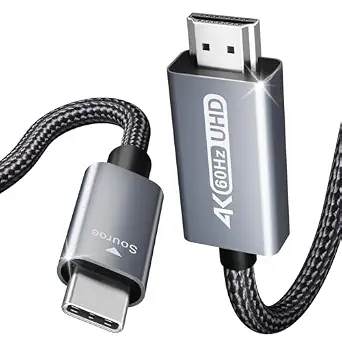 | Best Overall | Length: 6 feet | Resolution: 4K@60Hz | Connector Type: USB-C to HDMI | VIEW ON AMAZON | See Our Full Breakdown |
| USB C to HDMI 2.1 Cable, 8K@60Hz 4K@144Hz, Thunderbolt 4/5 to HDMI, 6.6ft |  | Best for High-End Gaming and Professional Use | Connector Type: USB-C to HDMI | Supported Resolutions: 8K@60Hz, 4K@144Hz | Bandwidth: 48 Gbps | VIEW ON AMAZON | See Our Full Breakdown |
| UANTIN USB C to HDMI Cable 6Ft for Home Office 4K High-Speed |  | Best Budget for Office Use | Length: 6 feet | Resolution: 4K@30Hz | Connector Type: USB-C to HDMI | VIEW ON AMAZON | See Our Full Breakdown |
| uni USB-C to HDMI Cable, 4K High-Speed Type C to HDMI for Home Office |  | Best for Office and Presentation Use | Connector Type: USB-C (Male) to HDMI (Male) | Resolution Support: 4K@30Hz | Length: 6 feet | VIEW ON AMAZON | See Our Full Breakdown |
| USB C to HDMI Cable 4K@60Hz 8 FT, Type C to HDMI 2.0 Cord for Home Office |  | Best for Versatile Home Office Setup | Resolution Support: 4K@60Hz | Bandwidth: 32.4 Gbps | Cable Length: 8 ft | VIEW ON AMAZON | See Our Full Breakdown |
| WARRKY USB C to HDMI Cable 6FT for 4K@60Hz High-Speed Video Transmission |  | Best Overall for Versatile High-Quality Video Output | Connector Type: USB-C Male (DP Alt Mode) to HDMI Male | Cable Type: One-way cable, exclusive for transmission from USB-C to HDMI | Supports 4K Ultra-High Definition: Yes | VIEW ON AMAZON | See Our Full Breakdown |
| JSAUX USB C to HDMI Cable 10FT, 4K@60Hz, USB 3.1 Type C to HDMI 2.0 Cord |  | Best for Extended Setups and Versatile Compatibility | Connector Type: USB C to HDMI | Length: 10 feet | Resolution Support: 4K@60Hz | VIEW ON AMAZON | See Our Full Breakdown |
| Anker 4K@60Hz USB-C to HDMI Cable, 3ft |  | Best Premium Choice for Durability and High-Performance Use | Connector Type: HDMI, USB Type C | Cable Type: USB C to HDMI | Compatible Devices: HDMI monitors, TVs, laptops, phones, tablets | VIEW ON AMAZON | See Our Full Breakdown |
| Amazon Basics USB-C to HDMI Cable Adapter, Thunderbolt 3 Compatible, 4K@30Hz, 6-Foot, Black |  | Best Budget-Friendly Option for Basic 4K Video | Source (USB-C): Laptop, Tablet with Thunderbolt 3/4 port | Display (HDMI): HDTV, Monitor, Projector with HDMI port | Number of Ports: 1 | VIEW ON AMAZON | See Our Full Breakdown |
| Acer USB-C to HDMI Cable, 6.6FT, 4K@60Hz |  | Best for Reliable High-Resolution Display in Longer Lengths | Length: 6.6 feet | Resolution: 4K@60Hz | Backward Compatibility: 1440P@60Hz, 1080P@120Hz | VIEW ON AMAZON | See Our Full Breakdown |
| Anker HDMI Cable, 4K@60Hz Ultra-Fast USB C to HDMI Cord, 6ft |  | Best Overall | Connector Type: HDMI, USB Type C | Cable Type: USB C to HDMI | Display Resolution: 4K@60Hz with HDR | VIEW ON AMAZON | See Our Full Breakdown |
| Mindorlen USB-C to HDMI Cable 6ft 4K for Monitor, Adapter for MacBook, iPad Pro, Chromebook, TV |  | Best Value | Length: 6ft | Maximum Resolution: 4K (3840 x 2160) | Backward Compatibility: 2K, 1080P, 720P | VIEW ON AMAZON | See Our Full Breakdown |
| uni USB-C to HDMI Cable 4K@60Hz, USB Type C to HDMI for Home Office |  | Best for Home Office | Connector Type: USB Type C (male), HDMI (male) | Cable Type: Uni-directional transmission | Resolution Support: 4K@60Hz | VIEW ON AMAZON | See Our Full Breakdown |
| Highwings USB C to HDMI Cable 6FT (4K@60Hz), High Speed Type C to HDMI 2.0 |  | Best for Gaming and Streaming | Connector Type: USB-C to HDMI | Cable Length: 6ft | Resolution Support: 4K@60Hz | VIEW ON AMAZON | See Our Full Breakdown |
| usbc to hdmi cable | Connector Type | Compatibility |
|---|---|---|
| BENFEI USB-C to HDMI Cable 6 F | USB-C to HDMI | MacBook Pro/Air, iPad Pro, Surface, Galaxy S23, and more |
| USB C to HDMI 2.1 Cable | USB-C to HDMI | — |
| UANTIN USB C to HDMI Cable 6Ft | USB-C to HDMI | Dell XPS, MacBook, Samsung Galaxy, and more |
| uni USB-C to HDMI Cable | USB-C (Male) to HDMI (Male) | Laptops, Android phones supporting DisplayPort Alt Mode |
| USB C to HDMI Cable 4K@60Hz 8 | USB-C to HDMI | USB-C, Thunderbolt 3 devices, MacBook, Galaxy, Dell XPS |
| WARRKY USB C to HDMI Cable 6FT | USB-C Male (DP Alt Mode) to HDMI Male | — |
| JSAUX USB C to HDMI Cable 10FT | USB C to HDMI | USB C, Thunderbolt 3, HDMI 2.0 |
| Anker 4K@60Hz USB-C to HDMI Ca | HDMI, USB Type C | — |
| Amazon Basics USB-C to HDMI Ca | — | — |
| Acer USB-C to HDMI Cable | USB-C Male to HDMI Male | — |
| Anker HDMI Cable | HDMI, USB Type C | — |
| Mindorlen USB-C to HDMI Cable | — | USB-C, Thunderbolt 3/4 |
| uni USB-C to HDMI Cable 4K@60H | USB Type C (male), HDMI (male) | USB-C source to HDMI display |
| Highwings USB C to HDMI Cable | USB-C to HDMI | USB-C supporting DisplayPort Alt Mode |
More Details on Our Top Picks
BENFEI USB-C to HDMI Cable 6 Feet, 4K@60Hz, Aluminum Shell, Nylon Braided, Compatible with MacBook Pro/Air, iPad Pro, Surface, Galaxy S23
This cable stands out for its reliable support of 4K UHD at 60Hz, making it ideal for high-quality video streaming from a variety of USB-C devices. Compared with the more advanced USB C to HDMI 2.1 options, it offers solid performance without the complexity of higher resolutions or refresh rates, making it a balanced choice for most users. Its durable aluminum shell and nylon braid ensure longevity, even with frequent use. However, its one-way design limits flexibility, and it only supports HDMI displays, excluding other connection types like Ethernet or audio return. Overall, this pick makes the most sense for users seeking dependable 4K output with universal device compatibility and straightforward plug-and-play convenience.
Pros:- Supports crisp 4K UHD resolution at 60Hz for smooth video playback
- Durable aluminum shell and nylon braided exterior for long-term use
- Plug-and-play with broad device compatibility
Cons:- Limited to one-way USB-C to HDMI output
- No support for Ethernet, audio return, or other features
Best for: general users needing reliable 4K at 60Hz from common USB-C devices like laptops and tablets
Not ideal for: gamers or professional video editors requiring higher resolutions or specialized features, as it lacks HDR or higher refresh rates
- Length:6 feet
- Resolution:4K@60Hz
- Connector Type:USB-C to HDMI
- Material:Aluminum shell, Nylon braided
- Compatibility:MacBook Pro/Air, iPad Pro, Surface, Galaxy S23, and more
- Data Transfer Rate:18 Gbps
Our verdict“This cable is best suited for users who want reliable 4K streaming without extra bells and whistles.”
USB C to HDMI 2.1 Cable, 8K@60Hz 4K@144Hz, Thunderbolt 4/5 to HDMI, 6.6ft
This cable is tailored for users who need cutting-edge video performance, supporting 8K@60Hz and 4K@144Hz for ultra-smooth visuals. Its high bandwidth of 48 Gbps and compatibility with Thunderbolt 4/5 and USB4 make it ideal for gaming, professional video editing, or home theater setups. Compared to the slightly lower-spec USB-C to HDMI 2.0 options like the B0H294SP1X, it offers higher resolutions, faster refresh rates, and features like dynamic HDR and eARC, but requires compatible ports for full functionality. Its triple-shielded, gold-plated connectors and nylon braiding ensure durability over intensive use. The main tradeoff is that it may be overkill for casual streaming or simple presentations, and it demands specific hardware support. This cable is best for those who prioritize maximum resolution and refresh rate capabilities.
Pros:- Supports ultra-high-definition 8K@60Hz and 4K@144Hz for exceptional clarity and fluidity
- Robust construction with triple shielding and gold-plated connectors for durability
- Compatible with a broad range of devices including Macs, gaming consoles, and high-end monitors
Cons:- Requires Thunderbolt 4/3 or USB4 with DisplayPort Alt Mode for full feature utilization
- Premium price point and potentially over-spec for everyday use
Best for: gamers, videographers, or professionals needing 8K/4K high-refresh-rate output with future-proof features
Not ideal for: average users or casual streamers who do not have compatible Thunderbolt or USB4 ports, as they won’t benefit from full capabilities
- Connector Type:USB-C to HDMI
- Supported Resolutions:8K@60Hz, 4K@144Hz
- Bandwidth:48 Gbps
- Cable Length:6.6ft
- Features:HDCP 2.3, Dynamic HDR, eARC, Adaptive Sync
- Durability:Triple-shielded, gold-plated connectors
Our verdict“This cable is perfect for users seeking the highest possible resolution and refresh rate from a USB-C to HDMI connection, especially in gaming or professional settings.”
UANTIN USB C to HDMI Cable 6Ft for Home Office 4K High-Speed
This cable supports 4K@30Hz, making it suitable for basic office tasks, presentations, or streaming content. While it doesn’t match the higher refresh rates of premium models like the B0DL5V5SH1, it offers solid performance at a lower price point. Its universal compatibility with many devices like Dell XPS, MacBook, and Samsung Galaxy ensures versatility. The braided outer layer and advanced shielding give it good durability, but its 30Hz refresh rate limits smoothness for fast-paced video or gaming. Compared to the more capable uni or BENFEI models, it’s a good choice for budget-conscious users who primarily need 4K output for static images or presentations. Its main drawback is the lack of support for higher resolutions or HDR, which might matter for more demanding uses.
Pros:- Supports crisp 4K resolution at 30Hz for clear visuals
- Universal compatibility with many popular devices
- Braided nylon construction enhances durability
Cons:- Limited to 30Hz refresh rate, unsuitable for fast video or gaming
- No support for HDR or higher resolutions
Best for: home office users, students, or professionals who need 4K output for static content and basic video streaming
Not ideal for: gamers or videographers requiring higher refresh rates or HDR support, as it only supports 30Hz
- Length:6 feet
- Resolution:4K@30Hz
- Connector Type:USB-C to HDMI
- Material:Braided nylon
- Compatibility:Dell XPS, MacBook, Samsung Galaxy, and more
- Data Transfer Rate:5 Gbps
Our verdict“This cable offers a reliable, budget-friendly option for basic 4K display needs in a home or office setting.”
uni USB-C to HDMI Cable, 4K High-Speed Type C to HDMI for Home Office
This cable provides a dependable connection for connecting USB-C laptops or Android phones to HDMI displays at 4K@30Hz, focusing on office and presentation environments. Its durability, with braided nylon and aluminum housing, ensures steady performance during daily use. Compared with the BENFEI or HMDI cables supporting higher resolutions or refresh rates, it emphasizes stability and broad compatibility over speed, making it suitable for static content. The indicator light on the C port adds convenience for ensuring connection status. However, it only supports 30Hz, limiting its suitability for fast-paced media or gaming. For users who need a straightforward, durable cable for everyday display output, this model delivers consistent performance at a reasonable price point.
Pros:- Supports stable 4K output at 30Hz for clear visuals
- Durable braided nylon and aluminum housing for long-term use
- Includes an indicator light for easy connection status checking
Cons:- Limited to 30Hz, not suitable for fast-motion video or gaming
- Does not support HDR or higher resolutions
Best for: business professionals or educators needing reliable 4K output for presentations and video conferencing
Not ideal for: gamers or enthusiasts requiring high refresh rates or HDR features, as it supports only 30Hz
- Connector Type:USB-C (Male) to HDMI (Male)
- Resolution Support:4K@30Hz
- Length:6 feet
- Material:Braided nylon, aluminum housing
- Additional Features:Indicator light on C port
- Compatibility:Laptops, Android phones supporting DisplayPort Alt Mode
Our verdict“This cable is an excellent choice for professionals seeking a dependable, straightforward 4K connection for office use.”
USB C to HDMI Cable 4K@60Hz 8 FT, Type C to HDMI 2.0 Cord for Home Office
This cable combines a solid 4K@60Hz performance with an 8-foot length, offering flexibility for home office arrangements. It supports high-quality audio and video, compatible with a wide range of devices such as MacBook, Dell XPS, and Samsung Galaxy. Compared to shorter cables, the 8 ft length provides added flexibility, though it may introduce slight signal degradation if not well-shielded. Its triple-tin shielding and double-braided nylon enhance durability and reduce interference, making it suitable for daily use. However, it’s limited to HDMI 2.0 features, lacking support for HDMI 2.1’s higher bandwidth and advanced features like eARC or Variable Refresh Rate. This makes it a practical, budget-conscious option for users who want reliable 4K@60Hz without the premium price.
Pros:- Supports crisp 4K resolution at 60Hz for smooth visuals
- Durable double-braided nylon and triple shielding for longevity
- Extended 8 ft length for flexible setup options
Cons:- Limited to HDMI 2.0 bandwidth, missing newer features
- Potential signal degradation over longer runs if unshielded
Best for: home office users who need a reliable, longer cable for connecting laptops or tablets to HDMI displays
Not ideal for: users wanting the latest HDMI 2.1 features or higher resolutions beyond 4K@60Hz, as it doesn’t support those
- Resolution Support:4K@60Hz
- Bandwidth:32.4 Gbps
- Cable Length:8 ft
- Connector Type:USB-C to HDMI
- Build Quality:Triple tin shielding, double-braided nylon
- Compatibility:USB-C, Thunderbolt 3 devices, MacBook, Galaxy, Dell XPS
Our verdict“This cable offers a good balance of performance and length for everyday home office needs at a reasonable price point.”
WARRKY USB C to HDMI Cable 6FT for 4K@60Hz High-Speed Video Transmission
This cable stands out for its ability to deliver crisp 4K@60Hz visuals, matching the performance of the Anker 4K@60Hz USB-C to HDMI Cable but with a slightly shorter length. Its durable nylon braided exterior and gold-plated connectors ensure longevity and reliable signal transfer, making it suitable for frequent use. However, being a one-way cable limits its functionality to transmitting from USB-C to HDMI only, unlike some multi-purpose adapters. The straightforward plug-and-play setup guarantees ease of use, but it’s not compatible with hub or docking station features, which might be a drawback for those needing multiple outputs. Overall, this cable is perfect for users who prioritize high-quality video and durability in a simple, dedicated connection.
Pros:- Supports 4K@60Hz resolution for sharp, smooth visuals
- Durable nylon braided jacket and gold-plated connectors for longevity
- Plug-and-play with wide device compatibility
Cons:- Limited to one-way transmission (USB-C to HDMI only)
- Does not support hub or docking station functions
Best for: Power users who need reliable high-quality video output from their USB-C devices to HDMI displays.
Not ideal for: Users seeking a multi-functional hub or docking solution, as this cable only transmits from USB-C to HDMI.
- Connector Type:USB-C Male (DP Alt Mode) to HDMI Male
- Cable Type:One-way cable, exclusive for transmission from USB-C to HDMI
- Supports 4K Ultra-High Definition:Yes
- Data Transfer Rate:18 Gbps
- Frequency:60 Hz
- Compatible Devices:Smartphone, Tablet, PC, Monitor, TV, Projector, Laptop
Our verdict“This cable suits those needing a straightforward, high-performance USB-C to HDMI connection with a focus on durability.”
JSAUX USB C to HDMI Cable 10FT, 4K@60Hz, USB 3.1 Type C to HDMI 2.0 Cord
Compared to the shorter Anker 4K@60Hz USB-C to HDMI Cable, the JSAUX 10-foot version offers greater flexibility for more spacious setups, making it ideal for home entertainment or professional presentations. Its braided nylon exterior enhances durability, and the 10-foot length allows for more adaptable arrangements. However, it requires devices that support USB-C and HDMI 2.0, which might exclude older hardware. While it supports full 4K@60Hz output, it lacks active adapter features or additional ports, meaning it’s mainly suited for straightforward connections. This cable is best suited for users who need longer reach and wide device compatibility, but those with older HDMI standards or limited device support should consider alternatives.
Pros:- Supports 4K@60Hz for crisp visuals
- Long 10-foot length adds setup flexibility
- Nylon braided construction for durability
Cons:- Requires compatible USB-C and HDMI 2.0 devices
- No active or multi-port features
Best for: Home users and professionals needing a longer cable for flexible device placement and high-quality 4K video.
Not ideal for: People with older HDMI devices or limited device support, as compatibility depends on HDMI 2.0 and USB-C standards.
- Connector Type:USB C to HDMI
- Length:10 feet
- Resolution Support:4K@60Hz
- Bandwidth:32.4 Gbps
- Compatibility:USB C, Thunderbolt 3, HDMI 2.0
- Material:Nylon braided, triple tin shielded
Our verdict“This cable offers excellent length and compatibility for users with modern devices needing flexible setups.”
Anker 4K@60Hz USB-C to HDMI Cable, 3ft
This compact cable from Anker shares the 4K@60Hz support of the WARRKY option but excels in durability, thanks to its reinforced shielding and over 10,000 plug cycles. Its 3-foot length makes it perfect for desktop setups or close-range connections, offering a reliable, stable signal. While it’s compatible with Thunderbolt 3, 4, and 5 ports, its shorter length limits flexibility compared to longer cables like the JSAUX model. It’s designed for users who need a durable, high-quality cable that can withstand frequent plugging and unplugging, but those requiring longer reach will find it less suitable.
Pros:- Supports 4K@60Hz with HDR for vibrant visuals
- Durable with over 10,000 plug cycles and corrosion-resistant exterior
- Braided nylon for tangle resistance
Cons:- Limited length at 3 feet
- Requires device support for DisplayPort Alt Mode or Thunderbolt
Best for: Professionals and enthusiasts needing a compact, durable connection for high-resolution video transfer.
Not ideal for: Users needing longer cables for distance or multiple device connections, as its length is limited to 3 feet.
- Connector Type:HDMI, USB Type C
- Cable Type:USB C to HDMI
- Compatible Devices:HDMI monitors, TVs, laptops, phones, tablets
- Display Resolution:4K@60Hz with HDR
- Data Transfer Rate:60 Hz
- Warranty:18 months
Our verdict“This high-quality, durable cable is ideal for users prioritizing longevity over extended reach.”
Amazon Basics USB-C to HDMI Cable Adapter, Thunderbolt 3 Compatible, 4K@30Hz, 6-Foot, Black
This adapter offers a straightforward solution for connecting Thunderbolt 3 devices to HDMI displays, supporting 4K at 30Hz — slightly lower than other options like the WARRKY or Anker cables. Its 6-foot length provides reasonable flexibility, and its plug-and-play nature makes it accessible for quick setups. However, the 30Hz refresh rate at 4K may be noticeable to users accustomed to smoother visuals, especially for gaming or fast-moving content. Its compatibility with Thunderbolt 3 devices makes it a solid choice for basic use, but those needing higher refresh rates or broader feature support should look elsewhere.
Pros:- Affordable and easy to use
- Supports 4K@30Hz for decent visual quality
- 6-foot length offers flexible placement
Cons:- Limited to 30Hz at 4K, which may affect motion smoothness
- Requires device compatibility for video output
Best for: Budget-conscious users needing reliable 4K video output at a lower refresh rate from Thunderbolt 3 devices.
Not ideal for: Gamers or users demanding higher refresh rates at 4K, as this adapter only supports 30Hz.
- Source (USB-C):Laptop, Tablet with Thunderbolt 3/4 port
- Display (HDMI):HDTV, Monitor, Projector with HDMI port
- Number of Ports:1
- Current Rating:1 A
- Color:Black
- Finish:Hdmi
Our verdict“This adapter suits users who need a simple, budget-friendly 4K connection with moderate refresh rates.”
Acer USB-C to HDMI Cable, 6.6FT, 4K@60Hz
Compared with the WARRKY and JSAUX cables, the Acer 6.6-foot model provides a good balance of length and performance, supporting 4K@60Hz with a durable braided exterior. Its compatibility with DisplayPort Alt Mode makes it versatile for various USB-C devices, but it doesn’t support HDR, unlike some premium options. This cable’s straightforward plug-and-play design is ideal for users who want stable, high-quality visuals without additional features or complexity. The main tradeoff involves the absence of HDR support, which might matter for visual enthusiasts seeking the most vibrant images.
Pros:- Supports crisp 4K@60Hz visuals
- Braided design enhances durability
- Plug-and-play straightforward setup
Cons:- No HDR support for enhanced color and contrast
- Cannot charge devices or provide power through the cable
Best for: Users needing a longer, reliable connection for 4K video without extra frills, suitable for home or office setups.
Not ideal for: Those requiring HDR support or advanced features, as this cable only supports standard 4K@60Hz without HDR enhancements.
- Length:6.6 feet
- Resolution:4K@60Hz
- Backward Compatibility:1440P@60Hz, 1080P@120Hz
- Connector Type:USB-C Male to HDMI Male
- Supports:DisplayPort Alt Mode
Our verdict“This cable works well for users seeking a long, reliable 4K connection with no extra features but without HDR support.”
Anker HDMI Cable, 4K@60Hz Ultra-Fast USB C to HDMI Cord, 6ft
This Anker cable earns its place as the best overall choice because it combines high-quality 4K@60Hz support with robust build quality. Compared with the uni USB-C to HDMI Cable, it offers similar resolution support but stands out for its superior shielding and durability, making it more reliable for daily use. Its nylon braided exterior and nickel-plated connectors reduce wear and corrosion, though performance can vary depending on connected devices’ compatibility, especially if they lack DisplayPort Alt Mode or Thunderbolt support. The 6-foot length strikes a good balance between flexibility and practicality, suitable for most desktop setups or TV connections. While it excels in delivering stable, high-quality visuals, it’s limited to indoor environments and may not work well with older or less compatible devices.
Pros:- Supports 4K@60Hz with HDR for crisp, vibrant images
- Durable nylon braiding and corrosion-resistant connectors
- Advanced shielding minimizes signal interference
- Plug-and-play with broad device compatibility
Cons:- Performance depends heavily on device compatibility and support for DisplayPort Alt Mode or Thunderbolt 3/4
- Limited to indoor use; not designed for outdoor or rugged environments
Best for: Tech enthusiasts or professionals needing reliable high-resolution connection for presentations or media editing.
Not ideal for: Casual users who need a longer cable or a more budget-friendly option for occasional use.
- Connector Type:HDMI, USB Type C
- Cable Type:USB C to HDMI
- Display Resolution:4K@60Hz with HDR
- Cable Length:6 ft
- Material:Nylon braided, nickel-plated aluminum
- Shielding:Tinned copper conductor, dual-layer aluminum, TPE shielding
- Durability:Supports 10,000 plug cycles
- Frequency:60 Hz
- Number of Pins:43
Our verdict“This cable is ideal for users who prioritize high-quality, reliable video output in a stable setup.”
Mindorlen USB-C to HDMI Cable 6ft 4K for Monitor, Adapter for MacBook, iPad Pro, Chromebook, TV
Choosing the Mindorlen USB-C to HDMI cable makes the most sense for users seeking a straightforward, budget-conscious 4K solution. Unlike the Highwings or uni cables, it emphasizes affordability while maintaining 4K@60Hz support, though it does not support audio or data transfer, which limits versatility compared to multi-functional options like the Anker or Highwings cables. Its simple plug-and-play design works with a wide array of devices, including MacBook, Chromebook, and Samsung Galaxy tablets, backed by a 24-month warranty for peace of mind. However, the lack of audio support means it’s less suitable for media playback or presentations that require sound, and some users might find the cable length restrictive in larger setups. Still, for basic video mirroring, it offers a solid balance of performance and price.
Pros:- Supports 4K resolution at 60Hz for sharp visuals
- Plug-and-play, no drivers needed
- Compatible with a wide range of devices and OS
- Includes a 24-month warranty
Cons:- Limited to video transfer; no audio or data support
- May face compatibility issues with some older devices
- Cable length could be restrictive for larger setups
Best for: Budget-conscious users needing reliable 4K video output for occasional screen sharing or presentations.
Not ideal for: Content creators or entertainment setups that require audio transmission or data connectivity alongside video.
- Length:6ft
- Maximum Resolution:4K (3840 x 2160)
- Backward Compatibility:2K, 1080P, 720P
- Compatibility:USB-C, Thunderbolt 3/4
- Warranty:24 months
- Supports Audio:No
Our verdict“This cable offers dependable 4K video output at an attractive price point for users with basic needs.”
uni USB-C to HDMI Cable 4K@60Hz, USB Type C to HDMI for Home Office
This uni cable is tailored for home office setups, combining 4K@60Hz support with a durable braided nylon exterior and aluminum casing. Compared to the Highwings cable, it offers similar resolution capabilities but emphasizes a sleek, heat-dissipating design that withstands daily use. Its plug-and-play nature ensures quick connection to MacBook, Surface, or Galaxy tablets without additional software. However, it’s limited by only supporting unidirectional transmission—meaning it only converts from USB-C to HDMI, which could be a drawback for those needing reverse or multi-directional capabilities. It also requires both devices to support 4K@60Hz for optimal performance, making it less suitable for mixed or older devices. This pick makes the most sense for users who want a reliable, straightforward connection for presentations or streaming in a dedicated workspace.
Pros:- Supports 4K@60Hz for high-quality visuals
- Durable braided nylon and heat-dissipating aluminum casing
- Plug-and-play with broad device compatibility
- Sleek, professional appearance
Cons:- Only supports direction from USB-C to HDMI, not vice versa
- Requires both devices to support 4K@60Hz for best results
- Not compatible with docking stations or hubs
Best for: Home office users needing a sturdy, reliable cable for high-quality video to large screens or monitors.
Not ideal for: Users requiring multi-directional or data transfer capabilities, or those with older devices lacking 4K support.
- Connector Type:USB Type C (male), HDMI (male)
- Cable Type:Uni-directional transmission
- Resolution Support:4K@60Hz
- Material:Braided nylon, aluminum alloy casing
- Wattage:100 watts
- Compatibility:USB-C source to HDMI display
Our verdict“This cable is well-suited for home office environments where stable, high-quality video output is needed without complex features.”
Highwings USB C to HDMI Cable 6FT (4K@60Hz), High Speed Type C to HDMI 2.0
The Highwings cable stands out for its durability and performance under demanding conditions, supporting 4K@60Hz with a sturdy aerospace-grade aluminum casing and an impressive bend tolerance exceeding 25,000 bends. Compared with the uni Cable, it emphasizes its high-speed capability suitable for gaming, streaming, and presentations, thanks to its robust construction and high-quality shielding. It does, however, require the USB-C port to support DisplayPort Alt Mode, which may limit compatibility with some devices. Its 6-foot length offers plenty of flexibility, but it doesn’t support charging or data transfer, making it less versatile for multitasking setups. Overall, this cable is designed for users who need high performance and durability in active environments like gaming or frequent movement.
Pros:- Supports 4K@60Hz with crisp visuals
- Highly durable with aerospace-grade aluminum and heat resistance
- Supports over 25,000 bends for long-term flexibility
- Plug and play with broad device compatibility
Cons:- Requires device to support DisplayPort Alt Mode
- Unidirectional—only USB-C to HDMI, not reverse
- Does not support charging or data transfer
Best for: Gamers, streamers, or professionals who need a durable, high-performance cable for frequent use.
Not ideal for: Users requiring multi-functional cables that support charging, data, and audio transfer simultaneously.
- Connector Type:USB-C to HDMI
- Cable Length:6ft
- Resolution Support:4K@60Hz
- Features:Unidirectional, durable nylon braid, heat dissipation
- Compatibility:USB-C supporting DisplayPort Alt Mode
Our verdict“This cable is ideal for active users demanding a tough, reliable connection for gaming and streaming environments.”

How We Picked
I evaluated these USBC to HDMI cables based on several key factors: performance capabilities such as maximum resolution and refresh rate, build quality including materials and durability, compatibility with various devices like MacBook, Surface, and Android phones, and value in terms of price-to-performance ratio. Cables that supported higher resolutions and refresh rates while maintaining reliable signal transmission earned higher rankings. Additionally, I considered user-reported reliability, ease of use, and whether the cable’s length and flexibility suited typical home or office setups. This approach ensures I highlight options that balance quality and affordability for different user needs.Factors to Consider When Choosing Usbc To Hdmi Cables
Choosing the right USBC to HDMI cable involves considering several factors that influence performance, durability, and compatibility. Not all cables are created equal, and a mismatch between your device’s capabilities and the cable’s features can lead to subpar display quality or connection issues. By understanding key aspects like resolution support, build quality, and device compatibility, you can select a cable that meets your specific needs without overspending on features you don’t require.Resolution and Refresh Rate Support
Ensure the cable supports the resolution and refresh rate you need, whether it’s 4K@60Hz for crisp visuals or 8K@60Hz for future-proofing. Higher resolutions and refresh rates demand more from the cable’s internal chipset and wiring. If you’re a gamer or creator working with high-resolution content, prioritize cables that explicitly support these standards to avoid lag or image degradation. Cheaper cables may only handle lower resolutions or refresh rates, which can limit your display quality.
Build Quality and Durability
Look for cables with reinforced connectors, braided sheathing, or metal shells, as these features extend lifespan and resist wear. Cheaper cables often use thinner internal wiring and lower-quality materials, leading to fraying or failure over time. If you plan to use the cable daily or travel with it, investing in a sturdily constructed cable can prevent frustrating interruptions. Remember, a longer-lasting cable often justifies a slightly higher initial price.
Compatibility and Device Support
Verify whether the cable explicitly supports your device’s standards, such as Thunderbolt 3/4 or specific USB-C configurations. Some cables are optimized for particular platforms like MacBook or Samsung Galaxy devices, ensuring maximum compatibility and performance. Mismatched cables may work intermittently or not at all, especially with newer or high-power devices. Always check the product specifications and user reviews for compatibility insights.
Cable Length and Flexibility
The length of the cable influences both convenience and signal quality. Longer cables, especially beyond 6 feet, may require active components or higher-grade wiring to prevent signal loss. Shorter cables are more reliable but less versatile. Consider your setup layout: a cable too short could cause strain or clutter, while a very long one might introduce latency or degrade image quality if not properly designed. Balance length needs with build quality for best results.
Price and Future-Proofing
While budget cables can handle basic tasks, investing in higher-end cables with support for 8K or higher refresh rates can extend the cable’s usefulness as standards evolve. Premium options tend to feature better shielding, higher-quality components, and longer warranties. However, pay attention to actual device needs—if your current setup only supports 4K@60Hz, a more expensive 8K cable may be unnecessary now but beneficial later. Avoid paying for features that won’t benefit your current or near-future use.
Frequently Asked Questions
Will a USB-C to HDMI cable work with any device?
While many USB-C to HDMI cables are designed to be widely compatible, their effectiveness depends on your device’s hardware and software support. Devices with Thunderbolt 3/4 or DisplayPort Alt Mode support are more likely to work reliably. Always check your device specifications to confirm compatibility before purchasing, especially if you need 4K or higher resolutions. Incompatible devices may result in no signal or lower-than-expected display quality.
Can I use a USB-C to HDMI cable for gaming or high-refresh-rate tasks?
Yes, but only if the cable supports the required standards—preferably HDMI 2.1 for 4K@120Hz or 8K@60Hz, or HDMI 2.0 for 4K@60Hz. Many budget cables only support 4K@30Hz or 60Hz, which might cause lag or motion blur during gaming or fast-paced videos. Always verify the specifications and ensure your device also supports these higher standards to get smooth visuals and minimal latency.
Is it better to choose a shorter or longer cable?
The ideal length depends on your setup. Shorter cables generally offer more reliable signal quality, especially for high resolutions and refresh rates. Longer cables can introduce signal degradation unless they are active or well-shielded. If you need extra length, opt for a high-quality cable designed for longer runs or consider active adapters. Measure your space carefully to avoid unnecessary cable slack or strain.
Do premium cables really last longer?
Typically, yes. Premium cables often feature reinforced connectors, better shielding, and higher-quality internal wiring, which all contribute to longer durability. They also tend to resist wear from frequent plugging and unplugging, and some come with warranties. While they cost more upfront, they can save money over time by avoiding replacements, especially if you rely on your cable daily or travel often.
Should I prioritize 8K support or higher refresh rates?
It depends on your current and future needs. If you plan to use a future-proof setup or have an 8K display, choosing a cable with 8K support makes sense. For gaming or fast-paced content, higher refresh rates like 120Hz or 144Hz are more noticeable, so prioritize cables that support those standards at your desired resolution. Consider your device’s capabilities and your budget—higher specs usually mean a higher price.
Conclusion
For most users, the BENFEI USB-C to HDMI Cable strikes a good balance of performance, durability, and affordability, making it the best overall choice. Those seeking the best value may prefer budget options like Amazon Basics, which cover essential needs without extra features. Creative professionals or gamers should consider premium or high-spec cables like the USB C to HDMI 2.1 Cable for future-proofing and top-tier performance. Beginners should focus on simple, reliable options, while advanced users with specific resolution or refresh rate needs should prioritize cables supporting 8K or high refresh rates to match their setups.
As an affiliate, we earn on qualifying purchases.Halloween Picks
halloween