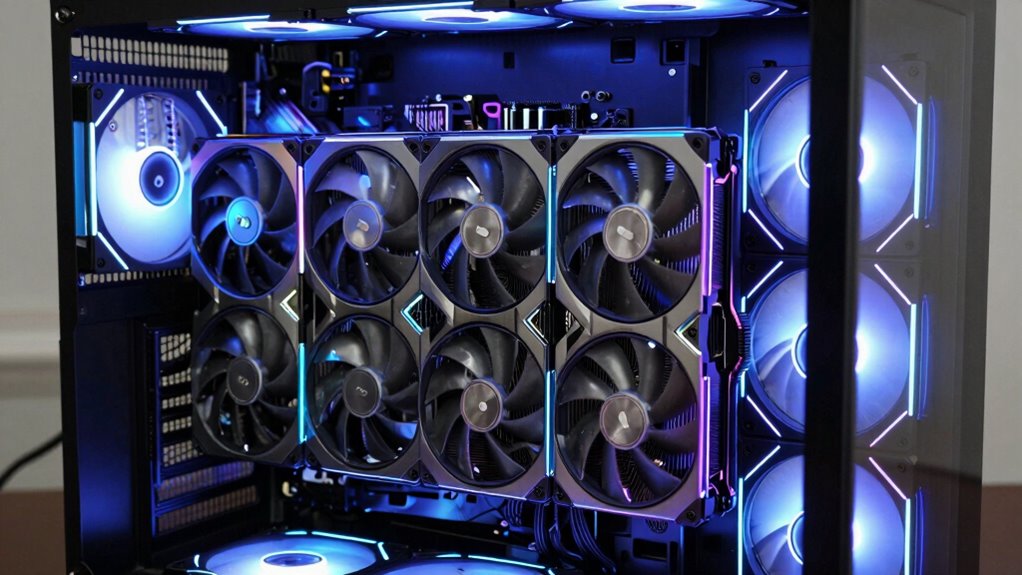

For a GPU upgrade for an older VR PC, my best overall pick is the GIGABYTE GeForce RTX 5060 WINDFORCE OC 8G, thanks to its newer generation and 8GB of memory—provided the rest of the PC can support it. The ASUS GeForce GTX 1660 SUPER is a practical middle ground for a system that cannot make good use of a newer card, while the RTX 3050 6GB models offer current-generation features in a modest-power class. The tradeoff is that an older processor, limited power supply, or headset connection can cap the benefit of a GPU upgrade. The renewed GTX 1060 may suit a particularly constrained legacy build, but its older architecture limits its headroom. Read on for how I rank these six cards and which one fits your PC.

Get business pricing on tech for your team
- Business-only prices and quantity discounts
- Tax-exempt purchasing
- Multiple users, one account, clear invoices
Key Takeaways
- The RTX 5060 WINDFORCE OC leads on upgrade headroom, but its newer hardware is most useful when the older PC has a suitable power supply, slot, and processor.
- The GTX 1660 SUPER sits between legacy and newer options: it is a more capable step up than the GTX 1060, though it lacks the newer RTX-family feature set.
- All three RTX 3050 6GB cards share a similar class of capability; cooler size, card fit, and exact system compatibility matter more here than expecting major performance differences.
- The renewed GTX 1060 is the most conservative legacy choice, but its age makes it harder to recommend when the goal is a clear VR performance uplift.
- VR readiness depends on the whole PC: headset ports, processor, power supply, case clearance, and USB connectivity can matter as much as the graphics card.
| ASUS GeForce GTX 1660 SUPER Overclocked 6GB Dual-Fan EVO Graphics Card (Renewed) |  | Best Value for Older VR PCs | GPU: NVIDIA GeForce GTX 1660 SUPER | Memory: 6GB GDDR6 | GPU clock speed: 2 GHz | VIEW ON AMAZON | See Our Full Breakdown |
| ASUS GeForce GTX 1060 6GB Dual-Fan OC Edition Graphics Card (Renewed) |  | Best for Legacy Headset Connections | GPU: NVIDIA GeForce GTX 1060 | Memory: 6GB GDDR5 | Boost clock: Up to 1809 MHz in OC mode | VIEW ON AMAZON | See Our Full Breakdown |
| ASUS Dual GeForce RTX 3050 6GB GDDR6 OC Edition Graphics Card |  | Best Compact New-Generation Pick | GPU: NVIDIA GeForce RTX 3050 | Memory: 6GB GDDR6 | Boost clock: 1500 MHz OC mode; 1470 MHz default mode | VIEW ON AMAZON | See Our Full Breakdown |
| GIGABYTE GeForce RTX 5060 WINDFORCE OC 8G Graphics Card |  | Best Premium Headroom | GPU and architecture: NVIDIA GeForce RTX 5060; Blackwell | Memory: 8GB GDDR7 | Memory interface: 128-bit | VIEW ON AMAZON | See Our Full Breakdown |
| GIGABYTE GeForce RTX 3050 WINDFORCE OC V2 6G Graphics Card |  | Best Straightforward New RTX Upgrade | GPU: NVIDIA GeForce RTX 3050 | Memory: 6GB GDDR6 | Memory interface: 96-bit | VIEW ON AMAZON | See Our Full Breakdown |
| MSI GeForce RTX 3050 Ventus 2X 6G OC Graphics Card |  | Best for a Compact, Feature-Rich Upgrade | GPU: NVIDIA GeForce RTX 3050 | Memory: 6GB GDDR6 | Memory interface: 96-bit | VIEW ON AMAZON | See Our Full Breakdown |
| gpu upgrade for an older vr pc | Memory | GPU | Interface | Video outputs |
|---|---|---|---|---|
| ASUS GeForce GTX 1660 SUPER Ov | 6GB GDDR6 | NVIDIA GeForce GTX 1660 SUPER | PCI-Express x16 | DisplayPort, HDMI, DVI |
| ASUS GeForce GTX 1060 6GB Dual | 6GB GDDR5 | NVIDIA GeForce GTX 1060 | PCI Express | DisplayPort, dual HDMI 2.0 |
| ASUS Dual GeForce RTX 3050 6GB | 6GB GDDR6 | NVIDIA GeForce RTX 3050 | PCI Express 4.0 x16 | HDMI 2.1, DisplayPort 1.4a, DVI-D |
| GIGABYTE GeForce RTX 5060 WIND | 8GB GDDR7 | — | PCIe 5.0, PCI-Express x16 | DisplayPort, HDMI |
| GIGABYTE GeForce RTX 3050 WIND | 6GB GDDR6 | NVIDIA GeForce RTX 3050 | — | — |
| MSI GeForce RTX 3050 Ventus 2X | 6GB GDDR6 | NVIDIA GeForce RTX 3050 | PCI Express x16 | — |
More Details on Our Top Picks
ASUS GeForce GTX 1660 SUPER Overclocked 6GB Dual-Fan EVO Graphics Card (Renewed)
For an older VR PC, I’d put the renewed GTX 1660 SUPER ahead of the GTX 1060 when the system can support it: its 6GB of GDDR6 and 2 GHz listed clock make it the more capable of these two older-generation choices. The dual-fan cooler and DisplayPort, HDMI, and DVI outputs also give it practical flexibility for older monitors and headset connections. It is a more direct fit for a modest upgrade than the newer RTX 5060, which brings a larger performance and platform leap that may be poorly matched to an aging CPU. The tradeoff is condition: this is a renewed card with only a 90-day limited warranty, and 6GB can constrain demanding VR titles. I’d choose it for a budget-conscious refresh, not as a long-term high-resolution VR card.
Pros:- 6GB of GDDR6 is a faster memory generation than the GTX 1060’s GDDR5
- Dual-fan cooling suits sustained gaming loads
- DisplayPort, HDMI, and DVI provide useful connection choices for older displays
- Listed length of 8.98 inches may fit cases that cannot accommodate larger cards
Cons:- Renewed condition carries more uncertainty than a new graphics card
- 90-day limited warranty is short compared with the three-year coverage listed for the RTX 3050 and RTX 5060 cards
- 6GB of memory can limit newer, demanding VR workloads
Best for: Owners of older VR desktops seeking a step up from an entry-level GPU who can accept renewed hardware and have a compatible power supply and case.
Not ideal for: Buyers who want a new card, longer warranty coverage, or more than 6GB of memory for demanding VR games.
- GPU:NVIDIA GeForce GTX 1660 SUPER
- Memory:6GB GDDR6
- GPU clock speed:2 GHz
- Interface:PCI-Express x16
- Video outputs:DisplayPort, HDMI, DVI
- Cooling:Dual fan
- Length:8.98 inches
- Condition and warranty:Renewed; 90-day limited warranty
Our verdict“Choose this renewed GTX 1660 SUPER for a modest older-PC VR upgrade if its short warranty and 6GB capacity fit your expectations.”
ASUS GeForce GTX 1060 6GB Dual-Fan OC Edition Graphics Card (Renewed)
The renewed GTX 1060 6GB is the most conservative choice here: it offers familiar older-generation hardware and dual HDMI 2.0 ports, which can simplify connecting a headset and monitor at once. That connection mix gives it a specific use case the GTX 1660 SUPER does not match as directly, though the 1660 SUPER is the stronger pick between these two for a general performance upgrade. Its 6GB of GDDR5 and boost clock up to 1809 MHz are modest by current standards, so I would treat it as a replacement or low-demand VR option rather than a card for newer, graphics-heavy titles. Like the other renewed ASUS option, it comes with a 90-day limited warranty; unlike the new RTX 3050 cards, it lacks the same newer feature set.
Pros:- Two HDMI 2.0 ports can connect a headset and monitor without relying on an adapter
- 6GB of memory is more usable than lower-capacity legacy cards
- Dual-fan cooling is designed for gaming operation
- DisplayPort adds another common headset and monitor connection
Cons:- GDDR5 memory is older than the GDDR6 used by the GTX 1660 SUPER and RTX 3050 options
- Renewed condition and a 90-day limited warranty offer less coverage than new cards with three-year warranties
- Older GPU generation is a weaker choice for newer, demanding VR workloads
Best for: VR PC owners whose headset and monitor setup benefits from two HDMI 2.0 ports and who need a basic renewed replacement card.
Not ideal for: Buyers upgrading for demanding modern VR games or seeking a meaningful performance step beyond the GTX 1660 SUPER.
- GPU:NVIDIA GeForce GTX 1060
- Memory:6GB GDDR5
- Boost clock:Up to 1809 MHz in OC mode
- Interface:PCI Express
- Video outputs:DisplayPort, dual HDMI 2.0
- Cooling:Dual fan
- Maximum resolution:3840 × 2160
- Condition and warranty:Renewed; 90-day limited warranty
Our verdict“Pick the renewed GTX 1060 if its dual-HDMI layout suits your headset setup, but choose the GTX 1660 SUPER for a stronger general upgrade.”
ASUS Dual GeForce RTX 3050 6GB GDDR6 OC Edition Graphics Card
I’d choose this compact RTX 3050 when an older VR PC has limited case space but needs a new card with current-generation features. Its 20 cm, two-slot design is easier to place than many larger gaming GPUs, while two Axial-tech fans and IP5X dust resistance address practical case conditions. Compared with the renewed GTX 1660 SUPER, it adds DLSS 3 and ray tracing support and a three-year warranty, but its 6GB memory ceiling still makes it a measured upgrade rather than a high-end VR solution. The RTX 5060 offers 8GB of faster GDDR7 and DLSS 4, so it is the better fit for buyers seeking more headroom; this ASUS model makes more sense when size and newer features matter more than memory capacity.
Pros:- 20 cm length and two-slot form factor suit many compact cases
- 6GB of GDDR6 and DLSS 3 support provide newer capabilities than the renewed GTX cards
- Two Axial-tech fans and IP5X dust resistance support practical everyday use
- Three-year warranty is longer than the renewed ASUS cards’ 90-day coverage
Cons:- 6GB of graphics memory can restrict demanding VR settings and newer games
- RTX 5060’s 8GB GDDR7 and DLSS 4 offer more headroom for buyers with compatible systems
- PCI Express 4.0 x16 may be a poor fit for some very old motherboards without checking compatibility
Best for: Owners of compact older VR desktops who want a new, two-slot card with DLSS 3 support and documented three-year warranty coverage.
Not ideal for: VR gamers who need more than 6GB of graphics memory or want the extra capacity and newer feature generation of the RTX 5060.
- GPU:NVIDIA GeForce RTX 3050
- Memory:6GB GDDR6
- Boost clock:1500 MHz OC mode; 1470 MHz default mode
- Interface:PCI Express 4.0 x16
- Cooling and form factor:Two Axial-tech fans; 2-slot
- Length:20 cm
- Video outputs:HDMI 2.1, DisplayPort 1.4a, DVI-D
- Warranty:3 years
Our verdict“Choose this RTX 3050 if your older VR PC needs a compact new card and you value DLSS 3 and warranty coverage over extra memory.”
GIGABYTE GeForce RTX 5060 WINDFORCE OC 8G Graphics Card
Among these five, the RTX 5060 WINDFORCE OC is the most forward-looking choice for an older VR PC that has enough CPU, power-supply, and case capacity to support it. Its 8GB GDDR7, Blackwell architecture, and DLSS 4 give it more memory and newer features than the 6GB RTX 3050 cards, making it the lineup’s clearest choice for added graphics headroom. The small 7.83-inch listed length may also help with case fit, though I’d still check clearance and power requirements against the complete system before buying. Its tradeoff is platform balance: pairing this card with a very old processor can leave performance unused, and the provided data does not specify power draw or connector needs. It is a less sensible match than the RTX 3050 for a severely dated PC.
Pros:- 8GB of GDDR7 provides more memory capacity than the 6GB cards in this roundup
- Blackwell architecture and DLSS 4 offer the newest listed feature set
- Dual-fan WINDFORCE cooling keeps the card’s cooling design straightforward
- 7.83-inch listed length can suit cases with limited graphics-card clearance
Cons:- A very old CPU can limit the benefit of upgrading to this newer GPU
- The product data does not state power draw or required power connectors, so system compatibility needs checking
- PCIe 5.0 support may exceed what an older motherboard provides, though the card uses a PCI-Express x16 interface
Best for: Owners of older VR desktops with a capable processor, suitable power supply, and room in the budget for newer graphics features and 8GB of memory.
Not ideal for: Users with very old CPUs, uncertain power-supply capacity, or systems where a smaller step-up like an RTX 3050 is a better-balanced match.
- GPU and architecture:NVIDIA GeForce RTX 5060; Blackwell
- Memory:8GB GDDR7
- Memory interface:128-bit
- GPU clock speed:2512 MHz
- Interface:PCIe 5.0, PCI-Express x16
- Cooling:WINDFORCE dual-fan
- Video outputs:DisplayPort, HDMI
- Dimensions:7.83 × 4.57 inches
- Warranty:3 years
Our verdict“Choose the RTX 5060 for the most graphics headroom here only if the rest of your older VR PC can support and feed it.”
GIGABYTE GeForce RTX 3050 WINDFORCE OC V2 6G Graphics Card
This GIGABYTE RTX 3050 WINDFORCE OC V2 is a straightforward new-generation option for an older VR PC when the goal is RTX features without moving up to the RTX 5060. Its dual WINDFORCE fans, 6GB of GDDR6, second-generation RT cores, and third-generation Tensor cores give it a modern feature mix compared with the GTX 1660 SUPER and GTX 1060. Against the ASUS RTX 3050, this listing confirms the same 6GB capacity and broad GPU class, but provides less detail on outputs, dimensions, warranty, and clock speed, making fit and connection checks especially important. The 96-bit memory interface is a limitation, and 6GB leaves less room for demanding VR assets than the RTX 5060’s 8GB. I’d choose it for a restrained RTX refresh, not a major leap in VR capability.
Pros:- 6GB of GDDR6 and modern RT and Tensor cores add newer features than the GTX 1060 and GTX 1660 SUPER
- Two WINDFORCE fans provide active cooling
- RTX 3050 positioning offers a more restrained upgrade than the RTX 5060
- OC V2 model designation identifies this specific card variant
Cons:- 96-bit memory interface is narrower than the RTX 5060’s listed 128-bit interface
- 6GB of memory can constrain demanding VR titles and high-resolution assets
- Provided product data omits dimensions, video outputs, clock speed, and warranty, so buyers must verify system fit and coverage
Best for: VR PC owners who want a new RTX 3050 with dual-fan cooling and modern RT and Tensor cores, without targeting the RTX 5060 tier.
Not ideal for: Buyers who need extra memory for demanding VR games or require published dimensions, outputs, and warranty details before confirming compatibility.
- GPU:NVIDIA GeForce RTX 3050
- Memory:6GB GDDR6
- Memory interface:96-bit
- Cooling:Two WINDFORCE fans
- RT cores:2nd generation
- Tensor cores:3rd generation
- Model:GV-N3050WF2OCV2-6GD
Our verdict“Pick this GIGABYTE RTX 3050 for a basic new RTX feature set, but verify dimensions, outputs, and warranty before ordering.”
MSI GeForce RTX 3050 Ventus 2X 6G OC Graphics Card
I’d place the MSI RTX 3050 Ventus 2X 6G OC among the more practical upgrades for an older VR PC when the case is short on room. Its 7.4-inch length and two-fan design can suit builds where a larger card is awkward, while Ampere’s Tensor Cores add access to supported upscaling features that the older ASUS GTX 1660 SUPER lacks. It also has dedicated ray-tracing hardware, though ray tracing is rarely the priority for a VR upgrade, and 6GB of VRAM plus a 96-bit memory interface limit its headroom for demanding newer games. The newer GIGABYTE RTX 5060 is the more ambitious choice for performance and memory capacity, but this MSI card is a smaller, less demanding step. Check your headset’s requirements and power supply before buying; the listed specifications do not establish compatibility with every older system.
Pros:- Compact 7.4-inch card length can fit cases that rule out longer GPUs.
- Ampere Tensor Cores provide support for compatible upscaling features.
- Dedicated ray-tracing hardware is available for supported non-VR games.
- Includes one DisplayPort 1.4a and two HDMI 2.1a outputs.
Cons:- 6GB of GDDR6 and a 96-bit memory interface constrain headroom in demanding games.
- The RTX 3050 is a modest upgrade target compared with the GIGABYTE RTX 5060 in this roundup.
- Ray-tracing capability may add little value for buyers focused mainly on VR performance.
Best for: Owners of compact older VR PCs who want an RTX feature set and a short dual-fan card for supported games.
Not ideal for: VR players seeking a large performance leap, extra VRAM headroom, or the strongest option for demanding modern titles; the 6GB capacity and 96-bit interface are limiting factors.
- GPU:NVIDIA GeForce RTX 3050
- Memory:6GB GDDR6
- Memory interface:96-bit
- Boost clock:1492 MHz
- Memory speed:14 Gbps
- Outputs:1 × DisplayPort 1.4a, 2 × HDMI 2.1a
- Dimensions:7.4 × 4.3 in
- Interface:PCI Express x16
- Warranty:3 years
Our verdict“Choose this MSI for a compact older VR PC that needs an RTX feature set, but skip it if you want a substantial performance jump or more memory headroom.”

How We Picked
I ranked these cards for the specific job of upgrading an older VR desktop, not for general gaming alone. I weighed expected performance headroom, memory capacity, generation and feature support, and the likelihood that an older PC could accommodate the card. I also considered practical ownership factors such as renewed condition, cooler and card dimensions, and whether the product’s position in the lineup makes sense for a modest system.
The RTX 5060 ranks first for buyers whose PCs can support a newer, more capable card; its 8GB of memory gives it a clearer headroom advantage over the 6GB options. The GTX 1660 SUPER follows as a more modest upgrade path, while the RTX 3050 cards form a close group suited to buyers prioritizing a newer GPU in a restrained build. I place the renewed GTX 1060 last because it is the oldest option and offers the least forward-looking upgrade. These rankings are starting points: a weak CPU, unsuitable power supply, or incompatible headset connection can change which choice makes sense.
| gpu upgrade for an older vr pc | GPU | Interface | Video outputs | Cooling |
|---|---|---|---|---|
| ASUS GeForce GTX 1660 SUPER Ov | NVIDIA GeForce GTX 1660 SUPER | PCI-Express x16 | DisplayPort, HDMI, DVI | Dual fan |
| ASUS GeForce GTX 1060 6GB Dual | NVIDIA GeForce GTX 1060 | PCI Express | DisplayPort, dual HDMI 2.0 | Dual fan |
| ASUS Dual GeForce RTX 3050 6GB | NVIDIA GeForce RTX 3050 | PCI Express 4.0 x16 | HDMI 2.1, DisplayPort 1.4a, DVI-D | — |
| GIGABYTE GeForce RTX 5060 WIND | — | PCIe 5.0, PCI-Express x16 | DisplayPort, HDMI | WINDFORCE dual-fan |
| GIGABYTE GeForce RTX 3050 WIND | NVIDIA GeForce RTX 3050 | — | — | Two WINDFORCE fans |
| MSI GeForce RTX 3050 Ventus 2X | NVIDIA GeForce RTX 3050 | PCI Express x16 | — | — |
Factors to Consider When Choosing Gpu Upgrade For An Older Vr Pc
Before choosing a card, I would check the parts and connections around it. In an older VR PC, the best GPU on paper may not be the best upgrade if it outstrips the processor, will not fit, or cannot connect to the headset.
Check the Headset’s Required Connections
Start with the exact headset model and its connection requirements, rather than assuming any modern graphics card will work with it. Check whether the headset needs DisplayPort, HDMI, USB-A, or USB-C, and confirm which ports are physically available on the card and the rest of the PC. Some headsets also depend on a particular port generation or adapter arrangement, where an adapter may not preserve every function. A card upgrade does not add missing motherboard USB controllers or solve every tracking connection problem. Write down the headset’s required ports and compare them against the complete PC before choosing a GPU. This step can prevent buying a capable card that cannot connect cleanly to the VR setup.
Match the GPU to the Processor
VR performance depends on more than rendering power: the CPU must keep up with the headset’s frame pacing and the game’s simulation work. An older four-core processor can limit the benefit of a substantial GPU upgrade, especially in busy scenes or games that rely heavily on physics and artificial intelligence. Check whether the PC’s CPU is below the headset or game’s stated requirements before spending more on graphics hardware. If the processor is already near its limits, a middle-tier card may be a more balanced upgrade than the strongest option in this roundup. Also check whether the motherboard supports a compatible CPU upgrade, since that may shape a sensible longer-term plan. A GPU replacement can still help, but the gain may be smaller than the card’s specifications suggest.
Verify Power Supply and Case Fit
Older desktops often have power supplies selected for the original graphics card, so check the PSU’s wattage, quality, age, and available PCIe power connectors. Do not rely on the wattage printed on the PSU alone; a low-quality or aging unit may not be a safe match for a more demanding replacement. Measure the case’s available card length and account for thickness, nearby drive cages, and airflow space. Compact dual-fan cards can be easier to fit, but the exact dimensions still vary by model. Compare the card maker’s power recommendations with the PSU label and connector layout before ordering. A card that physically fits but lacks the required power connection is not a practical upgrade.
Set Expectations for Memory and VR Workloads
Graphics memory affects how comfortably a card handles detailed textures, high render resolutions, and demanding VR scenes. The 8GB RTX 5060 has more memory headroom than the 6GB choices here, but that does not make it an automatic match for every older system or every headset. Resolution, refresh rate, supersampling, and game settings all change how much GPU capacity a VR workload needs. A high-resolution headset can stress a card more than an older headset, even when both run the same game. Check the recommended requirements for the specific VR titles you play, then decide whether smoother settings or a longer upgrade runway matter more. Avoid treating memory capacity as a direct guarantee of frame rate.
Account for Drivers, Operating System, and Used Condition
Before replacing a legacy GPU, confirm that the operating system and VR software still support the card and its driver branch. Older products can remain useful for compatible setups, but their age may mean less room for future software changes and newer titles. Renewed hardware adds another variable: check what the seller says about testing, included accessories, warranty coverage, and return terms. A renewed card may be appealing when the existing system cannot justify a newer GPU, but the condition and support terms deserve extra attention. For a first upgrade, a new card with clear documentation can be easier to troubleshoot than an older renewed model. Keep the old card until the new one is installed and the headset connection has been checked.
Choose an Upgrade That Fits the Whole PC
Think about whether this GPU is a final refresh for the current PC or the first part of a broader rebuild. If the motherboard, processor, PSU, and headset will stay unchanged for years, prioritize compatibility and balanced performance over the newest generation. If a platform upgrade is already planned, a newer card with more memory may carry forward into that build. Also consider how much time you want to spend troubleshooting: a replacement in the same power and size class is often simpler than changing several system components at once. Avoid paying for GPU capability that the current processor or headset cannot use. The right choice is the card that improves the complete VR setup, not just the graphics benchmark.
Frequently Asked Questions
Will an RTX 5060 work in an older PC with a PCIe 3.0 motherboard?
A PCIe graphics card can generally operate in an older PCIe slot, but the motherboard slot is only one compatibility check. Confirm the card’s physical dimensions, power connectors, PSU capacity, and the motherboard’s firmware support before buying. A slower older processor may also limit how much the card improves VR performance. Check the card maker’s system requirements and your PC or motherboard documentation for any known restrictions. If those checks pass, the remaining question is whether the rest of the PC can make good use of the upgrade.
Is a renewed GTX 1060 still a sensible VR upgrade?
It can make sense when the PC is very limited and the goal is to replace a weaker card without changing other components. It is the oldest option in this lineup, so I would not choose it for a large performance uplift or a longer runway with demanding new VR games. Check the specific headset and game requirements, as well as the renewed card’s warranty and return terms. Compare its condition and support against the GTX 1660 SUPER before deciding. If the price and condition do not clearly favor the GTX 1060, the newer model is the more forward-looking choice.
Are the three RTX 3050 6GB cards meaningfully different for an older VR PC?
They share the same general GPU class and 6GB memory capacity, so I would not assume a major performance gap from the model names alone. Differences in cooler design, dimensions, clock settings, and power connectors may matter more for an older case and PSU. Compare the exact specifications for the ASUS Dual, GIGABYTE WINDFORCE OC V2, and MSI Ventus 2X against your available space and power connections. Also check which outputs your headset needs. For many older builds, the easiest card to fit and power is the more useful choice among these closely grouped options.
Should I upgrade my CPU or GPU first for VR?
Check which part is limiting the games and headset you use before replacing either component. If the processor is below a game’s stated requirements or is already heavily loaded while the GPU has room, a CPU upgrade may help more with frame pacing. If GPU load is consistently high and the system meets the CPU requirements, a graphics card is the more direct route. Older systems may need a new motherboard or memory to support a newer CPU, which can make that upgrade a larger project. Review the headset and game requirements alongside your PC’s specifications rather than choosing by component age alone.
What should I verify before installing a new GPU in a VR PC?
Confirm the card fits the case, the PSU has adequate capacity and the correct PCIe power connectors, and the motherboard has a compatible slot. Check that the graphics card provides the video output required by your headset, and that the PC has the required USB connections too. Update or prepare the graphics drivers using the card maker’s guidance, and check that your operating system supports the card. After installation, confirm the headset is detected and that the VR software is using the new GPU. Keeping the old card available until these checks are complete gives you a fallback if troubleshooting is needed.
Conclusion
For a balanced older PC that can support a newer card, my best overall choice is the GIGABYTE RTX 5060 WINDFORCE OC 8G, with the strongest headroom in this group. The best value-style fit for a modest system is the ASUS GTX 1660 SUPER, though renewed condition and limited newer-generation features are tradeoffs. For a beginner who wants a newer card without jumping to the most capable option, I would compare the three RTX 3050 6GB models by case fit, ports, and power needs. The best premium pick is the RTX 5060, but only when the CPU and PSU can support it. For a particularly constrained legacy PC, the renewed GTX 1060 may suit a cautious replacement; otherwise, I would favor a newer option and verify the headset, power, and processor compatibility before deciding.