If you’re looking for the top gaming mice with customizable buttons for precision in 2025, I’ve got you covered. From wired options like the Logitech G502 HERO with 11 programmable buttons to wireless models like the G305 LIGHTSPEED with six, there’s a perfect fit for every playstyle. These mice boast high DPI sensors, customizable profiles, and ergonomic designs for comfort during long sessions. Keep exploring to find out which one suits you best.
Key Takeaways
- Many top gaming mice feature numerous programmable buttons, ideal for macros, quick commands, and enhancing gameplay precision.
- Ergonomic designs and customizable profiles improve comfort and control during extended gaming sessions.
- High-precision sensors with adjustable DPI ensure accurate tracking and responsiveness across various playstyles.
- Wireless options with long battery life provide seamless, lag-free performance for competitive gaming.
- Software support allows extensive macro programming, RGB customization, and profile management for tailored gaming experiences.

Logitech G502 Hero High Performance Wired Gaming Mouse, Hero 25K Sensor, 25,600 DPI, RGB, Adjustable Weights, 11 Programmable Buttons, On-Board Memory, PC/Mac - Black
HERO Gaming Sensor: Next generation HERO mouse sensor delivers precision tracking up to 25600 DPI with zero smoothing,...
As an affiliate, we earn on qualifying purchases.
Logitech G502 HERO Wired Gaming Mouse
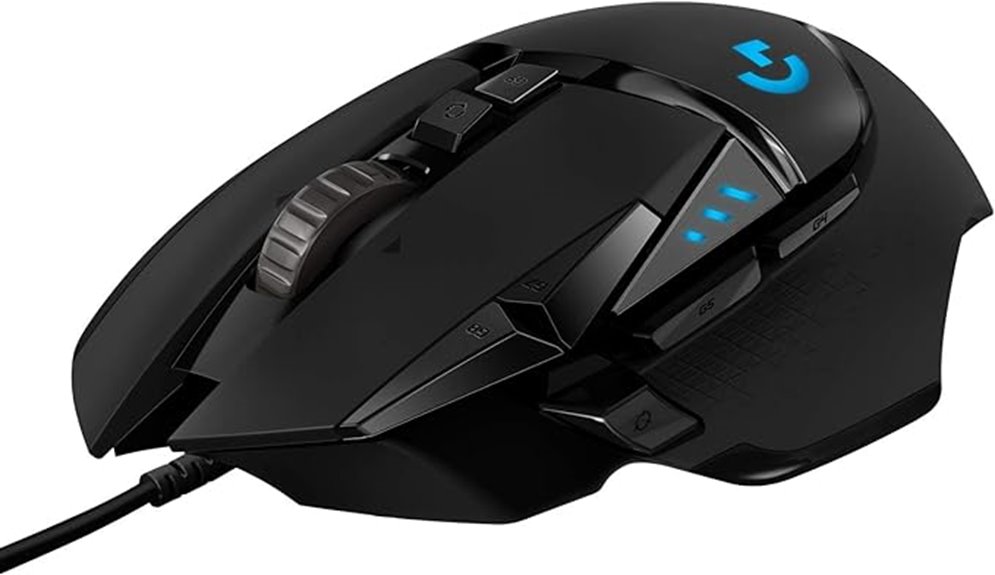
If you’re serious about gaming and need a mouse that offers precise control and extensive customization, the Logitech G502 HERO Wired Gaming Mouse is an excellent choice. It features the HERO 25K sensor with 1:1 tracking, over 400 IPS, and DPI from 100 to 25,600, ensuring ultra-precise movement without smoothing or acceleration. You can customize your feel with five removable weights and 11 programmable buttons for tailored commands. The RGB lighting with Lightsync technology lets you personalize colors. Its ergonomic design, adjustable DPI, and onboard profiles make it versatile for different gaming styles, delivering reliable performance for competitive play.
Best For: gamers seeking a highly precise, customizable wired gaming mouse with ergonomic design and extensive profile options for competitive and casual gaming.
Pros:
- Ultra-precise HERO 25K sensor with 1:1 tracking and high DPI range for accurate control.
- Customizable with five removable weights and 11 programmable buttons for tailored gameplay.
- RGB lighting with Lightsync technology for personalized aesthetics and device synchronization.
Cons:
- Wired connection may limit mobility compared to wireless gaming mice.
- Slightly heavier weight at 4.3 ounces, which might not suit users preferring a lighter mouse.
- Higher price point relative to basic gaming mice, potentially limiting accessibility for casual gamers.

Razer Basilisk V3 Customizable Ergonomic Gaming Mouse: Fastest Gaming Mouse Switch - Chroma RGB Lighting - 26K DPI Optical Sensor - 11 Programmable Buttons - HyperScroll Tilt Wheel - Classic Black
ICONIC ERGONOMIC DESIGN WITH THUMB REST — PC gaming mouse favored by millions worldwide with a form factor...
As an affiliate, we earn on qualifying purchases.
Razer Basilisk V3 Gaming Mouse

The Razer Basilisk V3 Gaming Mouse stands out for its 11 programmable buttons, making it an ideal choice for gamers who want quick access to macros and custom commands. Its ergonomic design with a thumb rest guarantees comfort during long gaming sessions, supporting natural hand positioning. Weighing just 3.56 ounces, it offers precise control without fatigue. The dual-mode HyperScroll tilt wheel provides fast scrolling or tactile feedback, perfect for in-game cycling. Equipped with a Focus Plus 26K DPI sensor and Razer Optical Switches Gen 2, it guarantees accurate, responsive movements. Plus, customizable RGB lighting adds a personal touch to your setup.
Best For: gamers seeking a highly customizable, ergonomic mouse with precise tracking and rapid response capabilities for extended gaming sessions.
Pros:
- Ergonomic design with thumb rest ensures comfort during long gaming sessions
- 11 programmable buttons allow for extensive customization and quick access to macros
- Focus Plus 26K DPI sensor and Razer Optical Switches Gen 2 provide accurate, responsive control
Cons:
- Slightly higher price point compared to basic gaming mice
- The multitude of features may require a learning curve for new users
- The mouse’s size and weight might not suit users preferring ultra-light or smaller devices

Redragon M908 Impact RGB LED MMO Gaming Mouse with 12 Side Buttons, Optical Wired Ergonomic Mouse with Max 12,400DPI, High Precision, 18 Programmable Macro Shortcuts, Comfort Grip
Professional Gaming Mouse - Redragon M908 optical gaming mouse is designed with up to 12400 DPI, 5 adjustable...
As an affiliate, we earn on qualifying purchases.
Redragon M908 Impact RGB Gaming Mouse with 12 Buttons

For gamers who demand maximum control and customization, the Redragon M908 Impact RGB Gaming Mouse with 12 buttons stands out as a top choice. Its ergonomic, aggressive design guarantees comfort during long gaming sessions, while durable TEFLON feet pads provide smooth, precise movement. The high-precision Pixart PAW3327 sensor offers up to 12400 DPI with adjustable levels, delivering lethal accuracy. With 18 programmable buttons—including 12 side buttons and macro support—plus five memory profiles, you can tailor commands for any game. The extensive RGB lighting options, customizable via software, add style and quick profile identification. Built for durability and versatility, this mouse is perfect for competitive gaming and detailed work.
Best For: gamers and enthusiasts seeking a highly customizable, ergonomic mouse with precision control and extensive programmable options for competitive gaming and productivity.
Pros:
- Ergonomic, aggressive design optimized for comfort during long gaming sessions
- High-precision Pixart PAW3327 sensor with 12400 DPI and 5 adjustable levels
- 18 programmable buttons including macro support and 5 memory profiles for tailored commands
Cons:
- May be complex for beginners due to extensive customization options
- Heavier weight with the option to tune, which might not suit all users
- Premium features could come at a higher price point compared to basic gaming mice

Corsair Scimitar RGB Elite Wired MOBA/MMO Gaming Mouse – 18,000 DPI – 17 Programmable Buttons – iCUE Compatible – PC, Mac, PS5, PS4, Xbox – Black
17 Fully Programmable Buttons: Built with Ideal for performing frequent actions and executing complex macros in MMOs and...
As an affiliate, we earn on qualifying purchases.
Corsair Scimitar RGB Elite Gaming Mouse (Wired, 18,000 DPI)
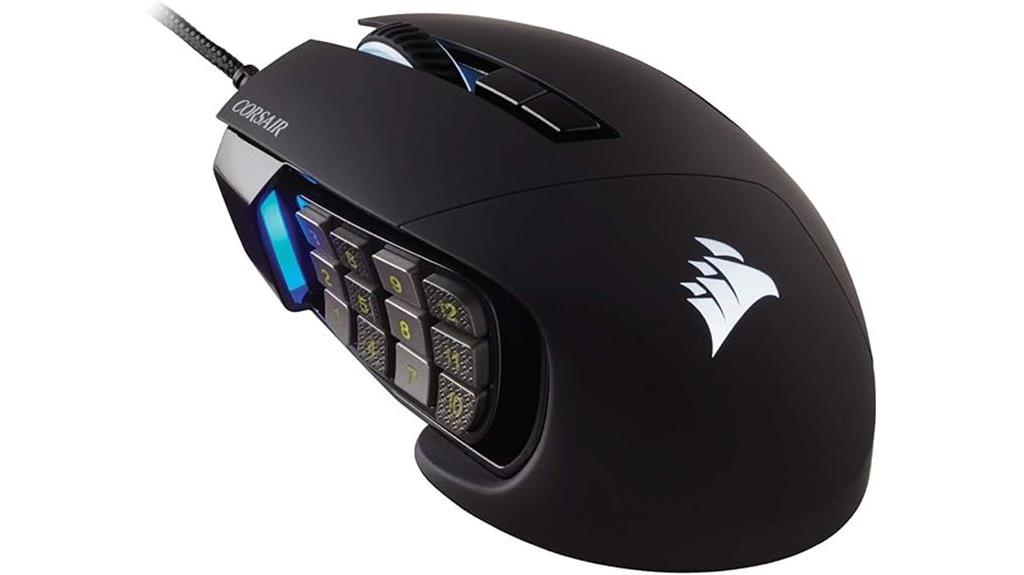
Gamers who thrive on complex macros and customizable controls will find the Corsair Scimitar RGB Elite an excellent choice. With 17 fully programmable buttons, including 12 mechanical side buttons that can be repositioned using the patented Key Slider system, it offers unmatched flexibility. The 18,000 DPI optical sensor provides precise tracking, adjustable in 1 DPI steps. Its ergonomic design, featuring a right-side finger rest, ensures comfort during long sessions. Built with durable Omron switches rated for 50 million clicks and a braided cable, this wired mouse combines performance and longevity. Powered by Corsair iCUE software, it allows detailed macro, lighting, and profile customization for tailored gameplay.
Best For: gamers who need highly customizable controls and precise tracking for MOBA/MMO genres.
Pros:
- 17 fully programmable buttons, including repositionable mechanical side buttons for tailored control
- 18,000 DPI optical sensor with adjustable precision in 1 DPI steps for accuracy
- Durable build with Omron switches rated for 50 million clicks and a braided cable for longevity
Cons:
- Wired connection may limit mobility compared to wireless mice
- Slightly heavier at 4.3 ounces, which might be less comfortable for some users over long gaming sessions
- Requires Corsair iCUE software for full customization, which may be complex for new users
Razer Basilisk V3 X Wireless Gaming Mouse

Looking for a gaming mouse that combines precision with extensive customization options? The Razer Basilisk V3 X Wireless is a solid choice. It features an ergonomic design suitable for different grips and nine programmable controls, perfect for complex commands and macros. The mouse’s 5G Advanced 18K Optical Sensor delivers pixel-perfect tracking with adjustable sensitivity, ensuring accuracy. With Razer Chroma RGB lighting supporting 16.8 million colors and dynamic effects, it enhances immersion. Plus, its wireless connectivity offers low latency via HyperSpeed or extended use through Bluetooth. Long-lasting battery life—up to 285 hours—means you can game longer without interruptions.
Best For: gamers seeking a highly customizable, ergonomic wireless mouse with precision tracking and long battery life for extended gaming sessions.
Pros:
- Wireless connectivity with low latency via Razer HyperSpeed and Bluetooth
- 9 programmable controls for complex commands and macros
- Long battery life of up to 285 hours on HyperSpeed Wireless
Cons:
- Very lightweight at approximately 0.317 ounces, which may feel too light for some users
- Requires an AA battery (included), which may need replacement over time
- Limited to a maximum of 60 million clicks lifespan, which, while durable, may be less than some higher-end models
Redragon M612 Predator RGB Gaming Mouse with 8000 DPI

The Redragon M612 Predator RGB Gaming Mouse stands out for gamers who need precise control and customizable functionality. With 8000 DPI and software support for up to 8000 DPI, I can easily tailor sensitivity for different games or tasks. Its 11 programmable buttons, including macro and rapid fire options, boost efficiency and gameplay. The ergonomic claw-grip design with textured sides feels comfortable during long sessions, while five backlit modes add visual flair. Built with durability in mind, it’s perfect for intense gaming marathons. Overall, the M612 combines precision, customization, and comfort, making it a solid choice for gamers seeking versatile control.
Best For: gamers and esports enthusiasts seeking a highly customizable, precise, and comfortable gaming mouse for extended play sessions.
Pros:
- 8000 DPI with customizable levels up to 8000 for tailored sensitivity
- 11 programmable buttons including macro and rapid fire for enhanced gameplay
- Ergonomic claw-grip design with textured sides for comfort and improved control
Cons:
- Wired connection may limit mobility compared to wireless options
- Slightly higher weight at 5.1 ounces could be less suitable for users preferring lightweight mice
- Complex software setup for custom DPI profiles might be overwhelming for some users
TMKB Falcon M1SE Gaming Mouse with High-Precision 12800DPI Optical Sensor
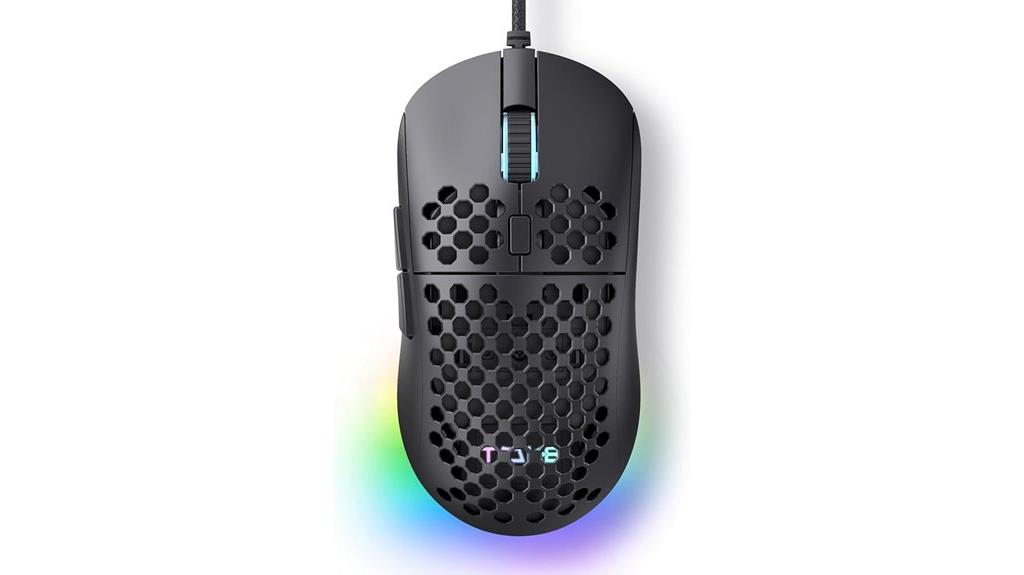
For those seeking pinpoint accuracy and customizable controls, the TMKB Falcon M1SE Gaming Mouse stands out with its high-precision 12800 DPI optical sensor. Its ultralight honeycomb shell weighs only 75 grams, reducing fatigue during long gaming sessions. The ergonomic shape fits comfortably in my hand, while the drag-free paracord and smooth mouse feet provide silky, responsive movement. The DPI is adjustable from 200 to 12,800, and the polling rate can be set between 125Hz and 1000Hz for rapid responsiveness. Six programmable buttons, layered configurations, and powerful software allow me to remap functions, create macros, and personalize the RGB lighting to match my setup.
Best For: gamers and power users seeking high-precision control, customizable features, and lightweight design for extended gaming or office sessions.
Pros:
- High-precision 12800 DPI optical sensor for accurate cursor control
- Ultraleight honeycomb shell weighing only 75g reduces fatigue
- Extensive customization options with programmable buttons, macros, and RGB lighting
Cons:
- May require software installation for full customization which could be complex for some users
- Limited to wired connectivity despite wireless-like features for certain models
- The layered configuration system might be overwhelming for beginners unfamiliar with advanced settings
TMKB Falcon M1SE Gaming Mouse with 12800DPI Optical Sensor
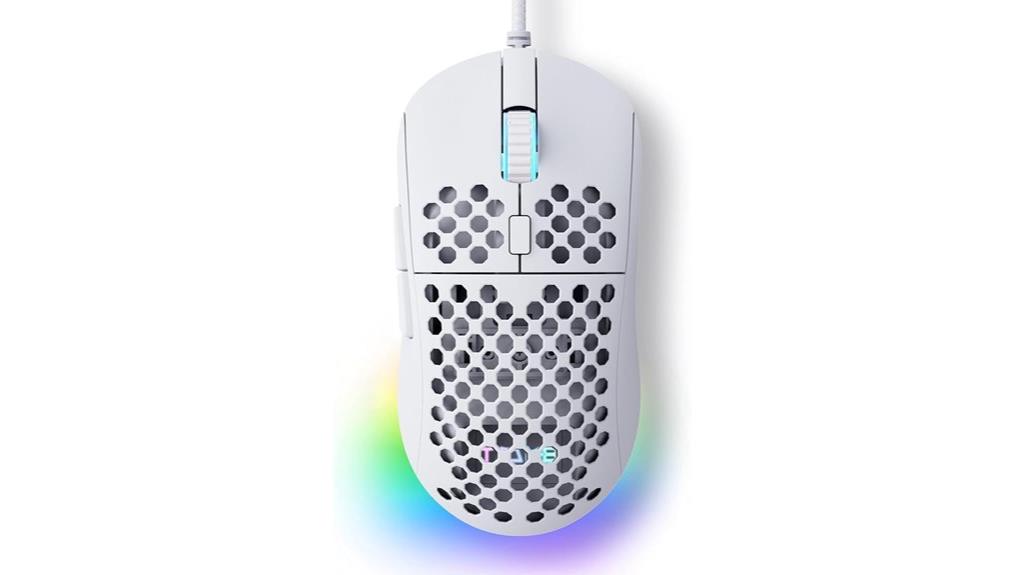
If you want a gaming mouse that combines high precision with extensive customization, the TMKB Falcon M1SE is an excellent choice. It features a 12800 DPI optical sensor, ensuring pinpoint accuracy and smooth cursor control, even during fast-paced gameplay. The lightweight honeycomb shell, weighing only 75 grams, offers comfort without sacrificing durability. Its six programmable buttons and customizable RGB lighting allow for tailored setups. The mouse’s smooth, drag-free paracord and high-quality skates deliver silky operation, making it ideal for both gaming and professional tasks. Overall, the M1SE provides responsive performance and personalized control in a sleek, ergonomic design.
Best For: gamers and professionals seeking a lightweight, highly customizable mouse with high-precision tracking and ergonomic comfort.
Pros:
- High-speed 12800 DPI optical sensor for precise and smooth cursor control
- Lightweight honeycomb shell weighing only 75 grams for extended comfort during long use
- Extensive customization options including six programmable buttons and RGB lighting
Cons:
- The medium size may not fit users with very small or very large hands comfortably
- Limited wired options if wireless connectivity is preferred (though it offers a wireless-like feel with paracord)
- The advanced features and software may have a learning curve for new users
Logitech G305 LIGHTSPEED Wireless Gaming Mouse
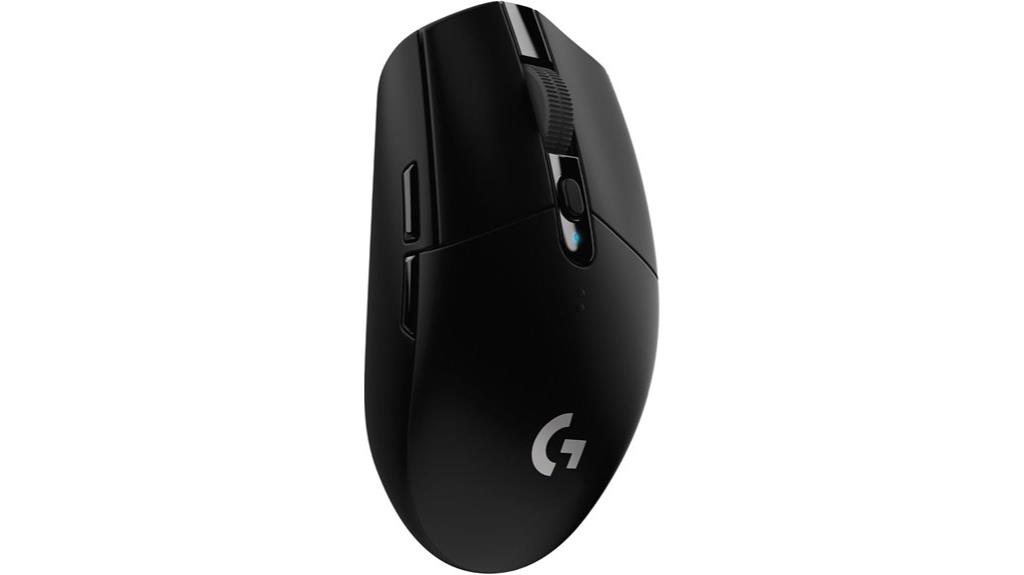
Gamers seeking a lightweight, highly responsive wireless mouse will find the Logitech G305 LIGHTSPEED an excellent choice, especially if customizable buttons are a priority. Weighing only 99 grams, it offers superb maneuverability with a compact design that includes built-in storage for the USB receiver—perfect for gaming on the go. Equipped with the Logitech HERO 12K sensor, it delivers up to 12,000 DPI and 400 IPS precision, ensuring accuracy in fast-paced gameplay. The wireless technology provides a lag-free 1ms report rate, matching wired performance. Plus, with six programmable buttons and up to 250 hours of battery life, it’s a versatile, reliable option for serious gamers.
Best For: gamers seeking a lightweight, highly responsive wireless mouse with customizable buttons for competitive gameplay.
Pros:
- Ultra-lightweight design at just 99 grams for excellent maneuverability
- High-precision Logitech HERO 12K sensor with up to 12,000 DPI and 400 IPS accuracy
- Long battery life of up to 250 hours with efficient power consumption
Cons:
- Uses a single AA battery, which may require frequent replacement over extended periods
- Limited to six programmable buttons, which may not suit gamers needing extensive customization
- Compatibility is primarily with PC and Mac, potentially limiting use on other devices
EVGA X15 MMO Gaming Mouse
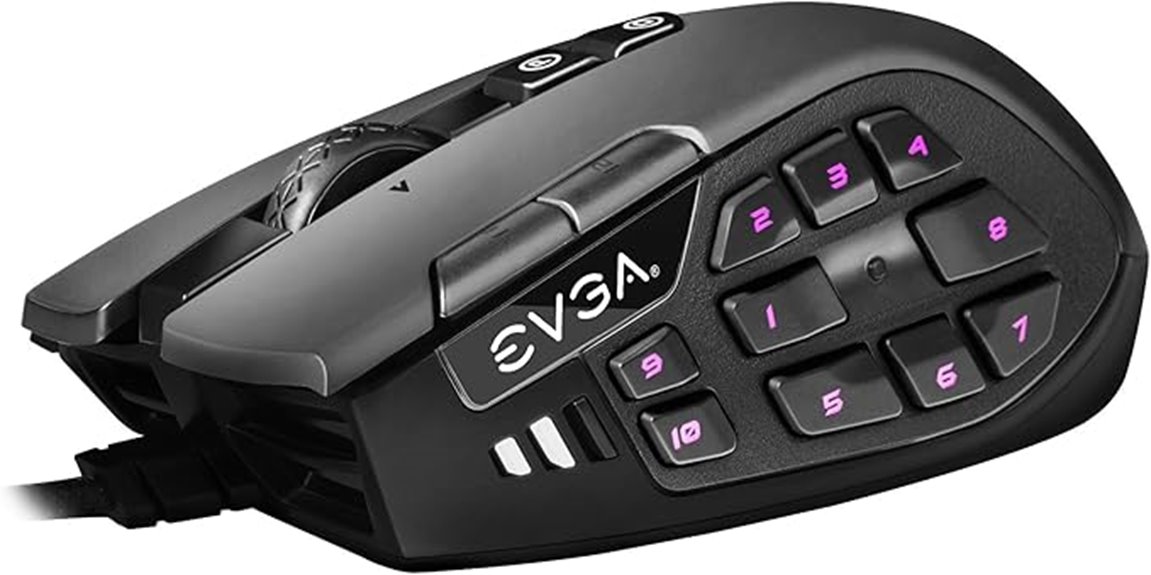
The EVGA X15 MMO Gaming Mouse stands out as an excellent choice for serious MMO players seeking maximum customization and responsiveness. Its wired USB 2.0 High-Speed connection guarantees ultra-fast data transfer with a native 8K Hz report rate, making every movement incredibly precise. The 32-bit Arm Cortex-M33 microprocessor handles complex commands smoothly. With 20 programmable buttons, five onboard profiles, and on-the-fly DPI adjustments, it’s built for versatility. The Light Strike LK Optical switches deliver faster response and durability up to 70 million clicks. Plus, the customizable 3-zone RGB lighting and ergonomic design provide both style and comfort during long gaming sessions.
Best For: MMO gamers seeking maximum customization, fast responsiveness, and ergonomic comfort for extended gaming sessions.
Pros:
- Ultra-fast 8K Hz report rate ensures precise and responsive control
- 20 programmable buttons and 5 onboard profiles for extensive customization
- Durable Light Strike LK optical switches with up to 70 million clicks
Cons:
- Wired connection may limit freedom of movement compared to wireless mice
- Complex features and customizable options might require a learning curve for new users
- Higher price point due to advanced features and build quality
Logitech G203 Wired Gaming Mouse with RGB Lighting
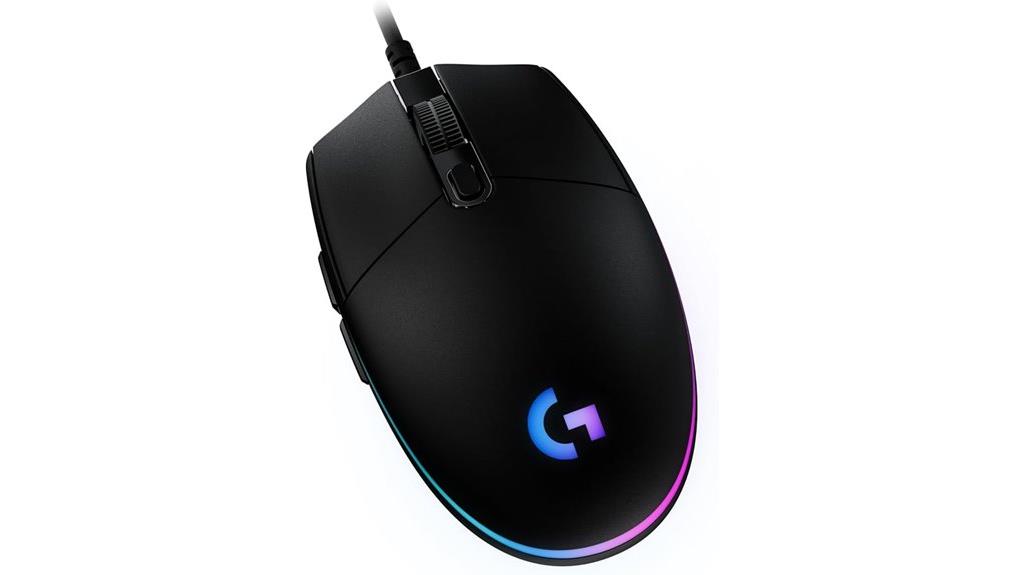
For anyone seeking a reliable gaming mouse with customizable controls, the Logitech G203 Wired Gaming Mouse stands out with its 8,000 DPI optical sensor and programmable buttons. It features a classic six-button layout, including dedicated DPI cycling, allowing quick sensitivity adjustments. The mechanical primary buttons provide crisp, reliable clicks, while the LIGHTSYNC RGB lighting offers personalized colors and effects. Its onboard memory saves profiles, and the Logitech G HUB software lets you assign commands and customize lighting. Weighing just 4.9 ounces and connected via a long USB cable, it offers precise control and immersive aesthetics, making it a top choice for gamers who want both performance and personalization.
Best For: gamers seeking a reliable, customizable wired gaming mouse with precise control and immersive RGB lighting.
Pros:
- High-precision 8,000 DPI optical sensor with zero smoothing and filtering for accuracy
- Customizable LIGHTSYNC RGB lighting and programmable controls via Logitech G HUB software
- Ergonomic six-button layout with durable mechanical primary buttons for crisp clicks
Cons:
- Wired connection may limit freedom of movement compared to wireless mice
- Some users might find the 6-button layout less suitable for complex macros or extensive command setups
- Limited to compatibility with Windows, Mac, and PC, which may exclude some gaming consoles
Monster Alpha 9.0 RGB Wired Gaming Mouse
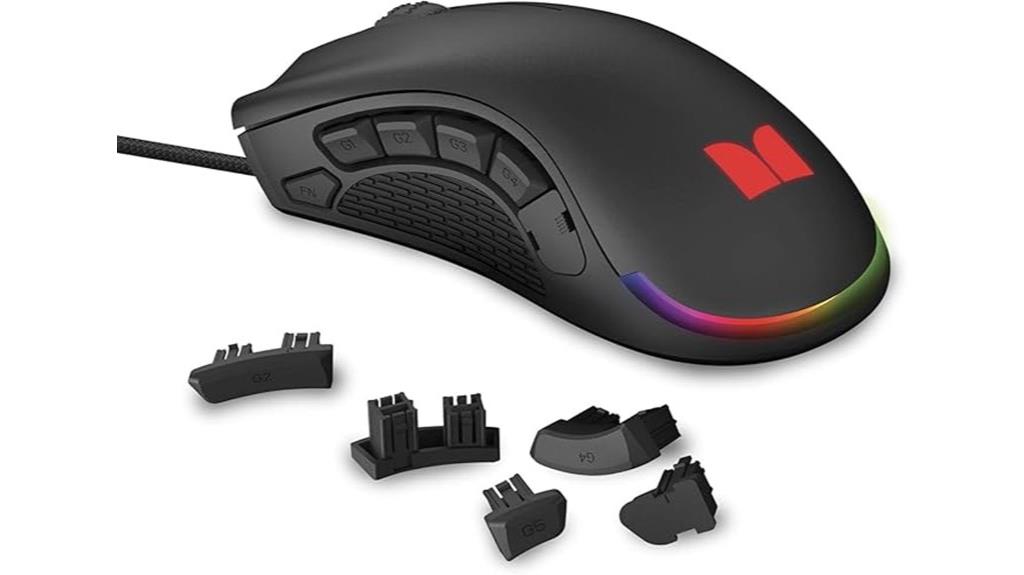
If you’re looking for a gaming mouse that offers extensive control and customization, the Monster Alpha 9.0 RGB Wired Gaming Mouse stands out. Its ergonomic design fits comfortably in my palm, even during long sessions, and its compact shape guarantees high performance without fatigue. With nine swappable side buttons, I can tailor controls to my playstyle, while the software makes customizing commands quick and easy. The RGB lighting adds a vibrant, customizable glow that matches my setup. Powered by a fast PMW3380 sensor and up to 16,000 DPI, it delivers precise tracking for every move. Though software is Windows-only, it’s a versatile choice for serious gamers seeking control and style.
Best For: serious gamers seeking a highly customizable, ergonomic wired mouse with precise tracking and vibrant RGB lighting.
Pros:
- Ergonomic design ensures comfort during extended gaming sessions
- 9 swappable side buttons provide extensive tactical control
- Adjustable DPI up to 16,000 for precise accuracy and versatility
Cons:
- Software is incompatible with macOS, limiting customization options for Mac users
- Wired connection may restrict mobility compared to wireless alternatives
- Limited to Windows support for software customization features
Acer Wired Gaming Mouse with RGB Lighting and Programmable Buttons

Gamers who demand precise control and extensive customization will appreciate the Acer Wired Gaming Mouse, especially with its 8 programmable buttons and adjustable DPI up to 12,800. I’ve found that it’s perfect for switching between sniper shots and rapid movements, thanks to its four preset DPI levels. The mouse’s RGB lighting offers 12 effects that you can personalize or cycle through easily. Its ergonomic design feels comfortable during long gaming sessions, and the onboard memory guarantees your settings stay intact across devices. With ultra-responsive tracking and compatibility across multiple platforms, this mouse combines style, function, and precision—making it an excellent choice for serious gamers and productivity users alike.
Best For: gamers seeking a highly customizable, precise, and comfortable wired mouse for both competitive play and productivity tasks.
Pros:
- High adjustable DPI up to 12,800 with multiple preset levels for versatile accuracy
- 8 programmable buttons for macros, custom keybinds, and DPI adjustments
- Bright RGB lighting with 12 effects that can be personalized and synchronized
Cons:
- Slightly heavier weight at 6.7 ounces may affect extended comfort for some users
- Wired connection may limit mobility compared to wireless options
- Requires driver software for full customization, which may be less convenient for some users
UtechSmart Venus Gaming Mouse with RGB and 12 Side Buttons

The UtechSmart Venus Gaming Mouse stands out as an ideal choice for gamers who demand maximum customization and precision. Its high-precision 16,400 DPI laser sensor delivers smooth, accurate control, while 12 programmable side buttons let you map key functions or macros for faster gameplay. The mouse features five profiles with customizable RGB lighting, over 16 million colors, and quick profile switching. Its ergonomic, textured design ensures comfort during long sessions, and adjustable weights help tailor the feel. Built with durable micro switches and a braided cable, it’s designed for longevity and responsiveness. Overall, it combines performance, personalization, and comfort in a sleek, feature-rich package.
Best For: gamers seeking a highly customizable, precise, and comfortable gaming mouse for extended sessions and competitive play.
Pros:
- High-precision 16,400 DPI laser sensor for accurate control
- 12 programmable side buttons and 5 customizable profiles for extensive personalization
- Ergonomic right-handed design with textured grip and adjustable weights for comfort and tailored feel
Cons:
- Slightly heavier weight at 6.1 ounces may be less ideal for some users
- The extensive customization options might require a learning curve for new users
- Limited to wired connection, which could restrict movement compared to wireless mice
Logitech G305 LIGHTSPEED Wireless Gaming Mouse

For players who prioritize responsiveness and customization, the Logitech G305 LIGHTSPEED Wireless Gaming Mouse stands out as an excellent choice. It’s lightweight at just 99 grams, making it easy to maneuver during intense sessions. Its compact design includes built-in storage for the USB receiver, adding portability. With six programmable buttons, you can tailor controls to your playstyle. The LIGHTSPEED wireless tech guarantees a lag-free connection with a 1ms report rate, perfect for competitive gaming. The HERO 12K sensor offers up to 12,000 DPI and 400 IPS tracking accuracy. Plus, its battery lasts up to 250 hours, so you can game uninterrupted for days.
Best For: gamers seeking a lightweight, highly responsive wireless mouse with customizable controls for competitive play.
Pros:
- Ultra-fast LIGHTSPEED wireless connection with 1ms report rate ensures lag-free responsiveness.
- Compact design with built-in storage enhances portability and convenience.
- Long-lasting battery life of up to 250 hours supports extended gaming sessions.
Cons:
- Uses a single AA battery, which may require frequent replacements for intense use.
- Limited to six programmable buttons, which might be insufficient for some users’ customization needs.
- Lacks customizable weight options, potentially affecting personal comfort preferences.
Factors to Consider When Choosing Gaming Mice With Customizable Buttons
When choosing a gaming mouse with customizable buttons, I consider several key factors to enhance my experience. From button layout and sensor accuracy to software options and comfort, each aspect impacts performance and ease of use. Let’s explore what you should keep in mind to find the perfect fit for your gaming needs.
Button Quantity and Placement
Choosing the right gaming mouse with customizable buttons depends heavily on both the number of buttons it offers and how they’re arranged. Some mice have as few as six buttons, while others feature over 18, providing extensive macro options. Button placement is vital; ideally, controls should be within quick reach, often on the side for thumb access or near the primary buttons for seamless actions. Proper placement minimizes finger movement, reducing fatigue and boosting response times during intense gameplay. Strategically positioned buttons allow for efficient macro execution and rapid access to essential commands without breaking flow. The layout and ergonomics of these buttons considerably influence usability, especially in fast-paced games that demand quick, multi-command inputs. The right combination can elevate your gameplay and overall experience.
Sensor Accuracy and DPI
Sensor accuracy directly affects how precisely your mouse tracks movements, which is vital during fast-paced gameplay. A high-quality sensor ensures smooth, consistent tracking, especially during quick or small movements, reducing lag and improving responsiveness. Optical sensors with zero smoothing or filtering are ideal because they provide reliable, accurate data without unwanted adjustments that can hinder performance. DPI, or dots per inch, measures sensitivity, and higher settings allow for faster cursor movement, adaptable to different scenarios. Adjustable DPI buttons let you switch sensitivity on-the-fly, giving you quick control over your aiming or navigation. Ultimately, a precise sensor combined with customizable DPI settings ensures you can tailor your mouse’s responsiveness to your playstyle, enhancing accuracy and reaction time during intense gaming moments.
Software Customization Features
Software customization features are essential because they give you the ability to tailor your gaming mouse to your specific needs. With these features, you can assign macros, remap buttons, and create profiles that suit different games or play styles. Advanced software allows for complex macro scripting, enabling actions like multi-key presses or rapid fire with a single click, saving you time and improving accuracy. Onboard memory lets you save multiple profiles, so switching between setups during gameplay is seamless. Many programs also offer RGB lighting control, allowing you to customize lighting effects and synchronize them with other peripherals. Regular software updates improve button remapping, add new features, and boost compatibility, ensuring your mouse remains versatile and adaptable for the latest games.
Ergonomic Design and Comfort
An ergonomic design is essential for gaming mice with customizable buttons because it directly impacts comfort and control during long gaming sessions. A well-designed mouse fits comfortably in my hand, reducing fatigue and allowing me to play longer without discomfort. Features like thumb rests and contoured shapes support natural hand positions, making control feel effortless. Proper ergonomics also minimize strain on my wrist and fingers, helping prevent repetitive stress injuries over time. It’s important that the size and shape match my grip style—whether I use palm, claw, or fingertip grip—for maximum comfort. Additionally, adjustable or customizable buttons should be within easy reach, reducing unnecessary hand movements and increasing efficiency. Prioritizing ergonomic design ensures that I stay comfortable and focused during intense gaming moments.
Compatibility and Connectivity
Choosing a gaming mouse with customizable buttons requires guaranteeing it works smoothly with your setup, so compatibility and connectivity are key factors. First, check that the mouse supports your operating system, whether it’s Windows, macOS, or Linux, for seamless use. Decide if you prefer a wired USB connection for reliability or wireless options like Bluetooth or proprietary RF for freedom of movement. Make sure the mouse has enough programmable buttons and that its software allows easy customization of macros and commands. Compatibility with your gaming or productivity software is essential for effective remapping. Additionally, look for on-board memory support so you can save profiles directly on the device, ensuring your personalized settings stay consistent across different systems. These factors ensure smooth, hassle-free performance during critical moments.
Frequently Asked Questions
How Do Customizable Buttons Affect Gaming Performance?
Customizable buttons really boost my gaming performance by giving me quick access to key commands without breaking my focus. I can assign macros or shortcuts to these buttons, making complex actions faster and more precise. This customization helps me react faster, execute strategies more smoothly, and stay in control during intense moments. Overall, these buttons streamline my gameplay, giving me an edge over opponents who don’t have this personalized advantage.
Are Programmable Buttons Durable Over Extended Use?
Yes, programmable buttons are generally durable over extended use, especially on high-quality gaming mice. I’ve found that reputable brands put these buttons through rigorous testing, ensuring they can withstand thousands of presses without failing. Of course, durability also depends on how often and intensely you use them. Regular maintenance and gentle use can help prolong their lifespan, so you get consistent performance during those vital gaming moments.
Can Customizable Buttons Be Remapped for Different Games?
Yes, customizable buttons can be remapped for different games. I love how flexible this feature is because I can set specific functions for each game I play. Most gaming mice come with dedicated software that makes remapping quick and easy, so I can switch button functions on the fly without hassle. This way, I maximize my mouse’s potential and tailor my setup for every gaming experience.
What Software Is Required for Button Customization?
Think of it like a secret code—most gaming mice use dedicated software for button customization. Popular options include Logitech G Hub, Razer Synapse, and Corsair iCUE. I just download the software, connect my mouse, and then assign functions or macros to each button. It’s straightforward, much like tuning an instrument, and it really boosts my game precision. So, yes, specific software is essential for customizing your mouse buttons effectively.
Do Customizable Buttons Increase Mouse Weight Significantly?
Customizable buttons usually don’t add much weight to a gaming mouse. Manufacturers often use lightweight materials and design the buttons to be as minimal as possible, so the overall weight remains manageable. I’ve found that even with several programmable buttons, my mouse still feels nimble and comfortable. If weight is a concern, check the specs—most gaming mice are designed to balance functionality with a lightweight feel for precision and ease of use.
Conclusion
Did you know that gamers who customize their mice buttons see a 20% boost in reaction times? With so many great options like the Logitech G502 HERO and Razer Basilisk V3, there’s a perfect fit for everyone. Remember, choosing a mouse with the right number of programmable buttons can elevate your gameplay and give you that competitive edge. Invest in the right gear, and watch your skills sharpen in 2025!