
Finding the right AMD GPU for VR involves balancing performance, price, and compatibility. The MSI Radeon RX 6600 XT MECH 2X 8G OC stands out as the best overall choice due to its solid performance-to-price ratio, making it suitable for most VR setups. The ASRock Radeon RX 7700 XT Challenger 12GB offers a step-up in power for enthusiasts who want smoother, more immersive experiences, while the XFX Speedster SWFT210 Radeon RX 7600 delivers good value for budget-conscious gamers. Common tradeoffs include balancing VR performance against higher power consumption or longer-term upgrade paths. Keep reading for a detailed analysis of each option to help you make an informed choice.

Get business pricing on tech for your team
- Business-only prices and quantity discounts
- Tax-exempt purchasing
- Multiple users, one account, clear invoices
Key Takeaways
- The top-ranked AMD GPUs in this roundup balance performance and price, making them suitable for different types of VR users.
- VR-focused models with more VRAM, like the RX 9060 XT, tend to offer better future-proofing but come at a higher cost.
- Power consumption and cooling solutions vary significantly; premium options often include advanced cooling for sustained performance.
- Entry-level cards like the RX 7600 can handle most VR content but may struggle with the latest demanding titles or high refresh rates.
- Pricing and availability fluctuate, so prioritizing features over brand or aesthetics can lead to better long-term value.
| MSI Gaming Radeon RX 6600 XT MECH 2X 8G OC Graphics Card | 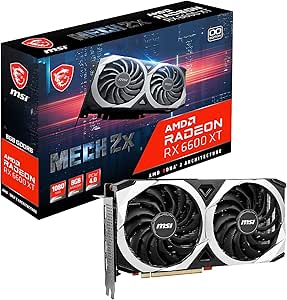 | Best for Budget VR Enthusiasts | Model: Radeon RX 6600 XT MECH 2X 8G OC | Memory: 8GB GDDR6 | Interface: PCIe | VIEW ON AMAZON | See Our Full Breakdown |
| ASRock Radeon RX 7700 XT Challenger 12GB OC Graphics Card |  | Best for High-Resolution and Multitasking | Architecture: AMD RDNA 3 | Compute Units: 54 | Boost Clock: 2584 MHz | VIEW ON AMAZON | See Our Full Breakdown |
| ASRock Radeon RX 9060 XT Challenger 16GB OC Graphics Card |  | Best for 1440p and AI-Enhanced VR | GPU Architecture: RDNA 4 | Memory: 16GB GDDR6 | Memory Speed: 20 Gbps | VIEW ON AMAZON | See Our Full Breakdown |
| XFX Speedster SWFT210 Radeon RX 7600 Graphics Card with 8GB GDDR6 |  | Best for Compact Builds and Budget-Friendly VR | Chipset: AMD RX 7600 | Memory: 8GB GDDR6 | Cooling: Dual Fan | VIEW ON AMAZON | See Our Full Breakdown |
| ASUS Prime Radeon RX 9070 GRE EVO OC Edition Graphics Card |  | Best for Overclocking and Future-Ready VR | GPU Model: Radeon RX 9070 GRE EVO | Clock Speed: Up to 2880 MHz (Boost) | Default Mode Clock: Up to 2860 MHz | VIEW ON AMAZON | See Our Full Breakdown |
| XFX Radeon RX 580 GTS XXX Edition 8GB GDDR5 VR Ready Graphics Card |  | Best Budget VR-Ready GPU | GPU Model: Radeon RX 580 GTS XXX Edition | Memory: 8GB GDDR5 | Core Clock: 1386MHz OC+ | VIEW ON AMAZON | See Our Full Breakdown |
| XFX Swift AMD Radeon RX 9060 XT OC Triple Fan Gaming Edition with 16GB GDDR6 | 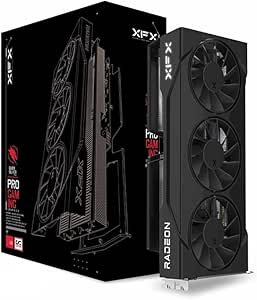 | Best High-Performance VR GPU | Chipset: AMD RX 9060 XT | Memory: 16 GB GDDR6 | Cooling: Triple Fan | VIEW ON AMAZON | See Our Full Breakdown |
| amd gpu for vr | Memory | Boost Clock |
|---|---|---|
| MSI Gaming Radeon RX 6600 XT M | 8GB GDDR6 | — |
| ASRock Radeon RX 7700 XT Chall | 12GB GDDR6 | 2584 MHz |
| ASRock Radeon RX 9060 XT Chall | 16GB GDDR6 | 3290 MHz |
| XFX Speedster SWFT210 Radeon R | 8GB GDDR6 | 2655 MHz |
| ASUS Prime Radeon RX 9070 GRE | — | — |
| XFX Radeon RX 580 GTS XXX Edit | 8GB GDDR5 | — |
| XFX Swift AMD Radeon RX 9060 X | 16 GB GDDR6 | 3320 MHz |
More Details on Our Top Picks
MSI Gaming Radeon RX 6600 XT MECH 2X 8G OC Graphics Card
This model stands out for offering a balanced entry into VR gaming with a focus on affordability and performance. Compared to the higher-end options like the ASRock RX 9060 XT Challenger, it sacrifices some raw power and memory, but makes up for it with excellent overclocking potential and VR readiness. Its support for FreeSync helps reduce tearing during immersive experiences, making it a solid choice for gamers on a budget who still want a smooth VR experience. The dual Torx fans provide effective cooling, though the renewed status might limit warranty coverage, and power consumption could be higher with overclocking. Overall, this card is ideal for those starting with VR or upgrading from older hardware without breaking the bank.
Pros:- Overclocking capabilities enhance performance for demanding VR titles
- VR ready for seamless immersive experiences
- Supports FreeSync for tearless gameplay
- Effective dual fan cooling system
Cons:- Renewed product may have limited warranty coverage
- Higher power consumption due to overclocking potential
Best for: Casual gamers and entry-level VR users with a moderate budget
Not ideal for: Power users seeking top-tier performance or those with limited power supply capacity
- Model:Radeon RX 6600 XT MECH 2X 8G OC
- Memory:8GB GDDR6
- Interface:PCIe
- VR Ready:Yes
- FreeSync:Yes
- Dimensions:8.2L x 26.8W x 35.41H cm
Our verdict“This card suits gamers seeking an affordable, VR-ready GPU with decent overclocking headroom but limited future-proofing.”
ASRock Radeon RX 7700 XT Challenger 12GB OC Graphics Card
This pick excels at high-resolution VR experiences because of its high boost clock of 2584 MHz and 12GB of GDDR6 memory, making it a step above the RX 6600 XT in raw power. Compared with the RX 9060 XT, it offers a more budget-friendly alternative while still supporting high-quality visuals, though it doesn’t match the 16GB VRAM capacity or PCIe 5.0 support of the flagship. Its dual fan cooling with heatpipes ensures stable operation during extended VR sessions, but the requirement for dual 8-pin power connectors might be a challenge for some pre-builts. If you’re targeting high-res VR gaming with quieter operation and solid build quality, this card makes a compelling case—just verify your system compatibility first.
Pros:- High boost clock for smooth VR performance
- Dual fan cooling with heatpipes for stability
- Supports multiple high-res displays with modern outputs
- Durable metal backplate
Cons:- Requires dual 8-pin power connectors, potentially limiting compatibility
- Not compatible with all pre-built systems
Best for: Gamers wanting high performance for 1440p VR and content creation
Not ideal for: Users with small form-factor cases or limited power supply capacity
- Architecture:AMD RDNA 3
- Compute Units:54
- Boost Clock:2584 MHz
- Memory:12GB GDDR6
- Memory Bus:192-bit
- Display Outputs:3 x DisplayPort 2.1, 1 x HDMI 2.1
Our verdict“This card is ideal for high-res VR gaming and creative work in a mid-range build, provided your system can support its power needs.”
ASRock Radeon RX 9060 XT Challenger 16GB OC Graphics Card
This high-end choice features RDNA 4 architecture and a massive 16GB of GDDR6, making it suitable for demanding VR applications and AI workloads. Its impressive boost clock of 3290 MHz outperforms the other options, delivering smooth, high-fidelity visuals at 1440p or higher. It supports PCIe 5.0, ensuring fast data transfer and future-proofing, but requires a 550W power supply and a spacious case due to its dimensions. Compared to the RX 7700 XT, it offers more VRAM and raw power, yet at a higher cost and power draw. It’s ideal for enthusiasts who want the best possible VR experience and have the system capacity, but not for budget-conscious builds or limited space cases.
Pros:- Exceptional boost clock of up to 3290 MHz
- Massive 16GB VRAM for complex scenes and AI tasks
- Supports PCIe 5.0 for fast data transfer
- Quiet operation with 0dB silent fans
Cons:- Requires a robust 550W power supply
- Large size demands a spacious case
Best for: High-end VR users and content creators demanding maximum performance
Not ideal for: Budget builders or those with small cases and limited power capacity
- GPU Architecture:RDNA 4
- Memory:16GB GDDR6
- Memory Speed:20 Gbps
- Boost Clock:3290 MHz
- Power Connector:8-pin
- Dimensions:249 mm x 132 mm x 41 mm
Our verdict“This card targets high-end VR setups and professional workflows but may be overkill for casual gaming or smaller systems.”
XFX Speedster SWFT210 Radeon RX 7600 Graphics Card with 8GB GDDR6
This card offers a solid balance of performance with the AMD RX 7600 chipset and 8GB of GDDR6, making it suitable for gamers who want VR-ready hardware in a smaller form factor. Compared to the higher-tier cards like the RX 7700 XT, it may lack some horsepower but compensates with a more accessible price point and less demanding power requirements. Its dual fan system provides adequate cooling, though detailed specifications are limited, which could be a concern for those seeking maximum performance. If space is tight or budget is a priority, this model provides a capable entry point into VR gaming without sacrificing compatibility or quality.
Pros:- AMD RX 7600 chipset delivers good performance
- 8GB GDDR6 memory suitable for most VR titles
- Dual fan cooling ensures stable operation
Cons:- Limited detailed features and benchmarks available
- Potentially less future-proof compared to higher-end models
Best for: Small form-factor PC builders and budget-conscious VR gamers
Not ideal for: Power users or those aiming for ultra-high-resolution VR experiences
- Chipset:AMD RX 7600
- Memory:8GB GDDR6
- Cooling:Dual Fan
- Boost Clock:2655 MHz
Our verdict“This card is well-suited for compact builds and entry-level VR gaming, but may struggle with future demanding titles or higher resolutions.”
ASUS Prime Radeon RX 9070 GRE EVO OC Edition Graphics Card
This flagship model stands out for its overclocking potential and advanced cooling, with a boost clock of up to 2880 MHz and phase-change thermal pads that improve thermal performance. Supporting PCIe 5.0 and the latest display standards, it offers the most forward-looking features in this lineup. Compared with the RX 9060 XT, it offers better thermal management and overclocking headroom, although its large 2.5-slot design demands more space and power. For enthusiasts who want maximum VR performance and plan to push their system through overclocking, this card delivers robust performance, but it’s not ideal for smaller cases or users with limited power supplies.
Pros:- High overclocking potential with boost speeds up to 2880 MHz
- Enhanced cooling with phase-change thermal pads and axial-tech fans
- Supports PCIe 5.0 and latest display standards
- Durable 2.5-slot design for compatibility
Cons:- Requires a large case due to 2.5-slot design
- High power consumption at OC speeds
Best for: Overclockers and high-end VR enthusiasts building spacious, high-power systems
Not ideal for: Small form-factor setups or budget-conscious builders
- GPU Model:Radeon RX 9070 GRE EVO
- Clock Speed:Up to 2880 MHz (Boost)
- Default Mode Clock:Up to 2860 MHz
- Fan Technology:Axial-tech fans with phase-change pads
- Design:2.5-slot
- Connectivity:HDMI 2.1, DisplayPort 2.1
Our verdict“This card appeals most to overclocking aficionados and high-end VR users seeking maximum performance and future-proof features.”
XFX Radeon RX 580 GTS XXX Edition 8GB GDDR5 VR Ready Graphics Card
The XFX Radeon RX 580 GTS XXX Edition stands out for offering solid VR performance at a more accessible price point, especially when compared with the higher-end RX 9060 XT options. Its Polaris architecture, combined with 8GB GDDR5 memory and factory overclocking to 1386MHz, ensures decent VR experiences without the premium cost. The dual BIOS and advanced Double Dissipation cooling are added benefits for maintaining stable performance, but being a renewed product means potential warranty limitations and possible cooling noise during intensive VR use. It works well for budget-conscious gamers who want to dip into VR but don’t need the absolute highest settings.
Pros:- Factory overclocked for improved VR performance
- VR Ready with AMD LiquidVR technology
- Effective Double Dissipation cooling system
- Multiple display outputs for versatile setup
Cons:- Renewed/Refurbished status may limit warranty coverage
- Potential noise from cooling fans during extended VR sessions
- Requires a compatible power supply and sufficient case space
Best for: Budget-conscious VR gamers who want reliable performance without breaking the bank
Not ideal for: Enthusiasts seeking the latest high-end graphics with maximum future-proofing, as this card may struggle with demanding VR titles at ultra settings
- GPU Model:Radeon RX 580 GTS XXX Edition
- Memory:8GB GDDR5
- Core Clock:1386MHz OC+
- VR Ready:Yes
- Outputs:3x DisplayPort, HDMI, DVI
- Cooling Technology:Double Dissipation
- Architecture:Polaris
- Process Technology:FinFET 14
Our verdict“This card is ideal for budget-minded users who want a VR-capable GPU that balances performance and affordability, with some tradeoffs in warranty and noise.”
XFX Swift AMD Radeon RX 9060 XT OC Triple Fan Gaming Edition with 16GB GDDR6
The XFX Swift AMD Radeon RX 9060 XT OC makes a strong case for high-end VR experiences, especially when contrasted with the RX 580. Its 16GB GDDR6 memory and a turbocharged boost clock of 3320 MHz deliver the raw power needed for demanding VR titles and future-proofing. The triple fan cooling system keeps temperatures in check during extended sessions, supporting sustained performance. However, the lack of detailed compatibility info and potentially high power consumption mean you’ll want a robust power supply and a modern system. This GPU is best suited for gamers who want top-tier VR performance without stepping into the very high-end segment, recognizing that it may require a more capable and expensive system.
Pros:- Massive 16GB GDDR6 memory for demanding VR applications
- High boost clock of 3320 MHz for maximum performance
- Effective triple fan cooling system for thermal stability
- Designed for high-performance gaming and VR
Cons:- Limited details on compatibility and system requirements
- Potentially high power draw requiring a strong power supply
- No mention of additional features like ray tracing or DLSS
Best for: High-end VR gamers and enthusiasts with a powerful system who prioritize performance and future-proofing
Not ideal for: Casual users or those with limited system power, as this card demands significant power and a high-spec PC
- Chipset:AMD RX 9060 XT
- Memory:16 GB GDDR6
- Cooling:Triple Fan
- Boost Clock:3320 MHz
- VR Ready:Yes
- Outputs:Not specified
Our verdict“This card suits serious VR enthusiasts seeking a significant performance boost, provided their system can support its power needs and cooling requirements.”

How We Picked
The selection process for these AMD GPUs centered on their ability to deliver smooth, high-quality VR experiences. We evaluated performance benchmarks specific to VR applications, focusing on frame rates, latency, and stability. Build quality, cooling efficiency, and power efficiency also played a role, as VR setups demand consistent operation. Cost-to-performance ratio was crucial, alongside factors like VRAM size for future-proofing. The ranking reflects a combination of these technical merits and real-world usability for various user needs, from casual to enthusiast VR gamers.Factors to Consider When Choosing Amd Gpu For Vr
Choosing the right AMD GPU for VR involves considering multiple factors beyond raw power. Understanding your specific VR headset requirements, budget constraints, and future upgrade plans can help you select a model that offers the best value and performance. Compatibility with your existing PC setup is also important, as some GPUs may require additional power or specific connectors. Let’s explore key considerations to keep in mind before making your purchase.Performance and VR Capabilities
VR demands high and stable frame rates, generally 90Hz or higher, to avoid discomfort and lag. When selecting an AMD GPU, look for models with proven benchmarks in VR applications—these ensure smoother experiences and less motion sickness. Higher-end cards with more VRAM and compute units tend to handle more complex virtual environments, future-proofing your setup. However, balance this with your actual use case; for casual VR gaming, a mid-range GPU might suffice, while enthusiasts should opt for the most powerful options available.
VRAM and Future-Proofing
VR applications are becoming increasingly demanding, especially with higher resolutions and graphical fidelity. A GPU with at least 8GB of VRAM is recommended for most current VR content, with 12GB or more providing added longevity. Investing in more VRAM can prevent bottlenecks as VR titles evolve, but it also increases upfront cost. Consider your upgrade plans and whether you prefer to buy a slightly more capable card now to avoid early replacements.
Cooling and Power Consumption
VR gaming often involves sustained GPU loads, making cooling solutions critical. Premium models with advanced cooling can maintain higher clock speeds without thermal throttling, improving performance consistency. Be mindful of your power supply’s capacity—some high-end AMD GPUs draw significant power, requiring robust PSU units. Efficient cooling and power management also extend the lifespan of your hardware, reducing long-term maintenance costs.
Compatibility and System Requirements
Ensure your PC meets the GPU’s compatibility specs, including PCIe slot version, power connectors, and physical dimensions. Some AMD cards may need additional power connectors or clearance space in your case. Compatibility extends to your VR headset requirements—verify that your GPU supports the necessary APIs and resolutions for seamless integration. Investing in a compatible setup now can save headaches and extra expenses later.
Price and Long-Term Value
Price fluctuations are common, so balancing cost against features is essential. Cheaper cards may suffice for casual VR use but could limit performance with future titles. Conversely, premium models offer more headroom but at a higher cost. Think about your budget, how often you plan upgrades, and whether spending more now prevents early obsolescence. Sometimes, a slightly lower-tier GPU with better cooling or a larger warranty can deliver better overall value.
Frequently Asked Questions
Can I use a mid-range AMD GPU for high-end VR gaming?
Yes, many mid-range AMD GPUs can handle most VR titles effectively, especially at 1080p or 1440p resolutions. They are capable of delivering smooth frame rates and decent visual quality for casual or moderate VR users. However, for the most demanding experiences or future-proofing, higher-end cards with more VRAM and processing power will offer better performance and longevity. Consider your specific VR headset requirements and whether you prioritize budget or cutting-edge performance.
Is VRAM more important than GPU raw power for VR?
Both VRAM and raw GPU power are essential for a good VR experience, but VRAM becomes increasingly critical as VR resolutions and detail levels rise. Adequate VRAM prevents bottlenecks when loading large textures and complex environments, especially in demanding titles. At the same time, a powerful GPU ensures high frame rates and low latency. Ideally, you want a balanced combination of both to maximize your VR setup’s performance and longevity.
Will my existing PC be compatible with a new AMD GPU for VR?
Compatibility depends on your PC’s motherboard, power supply, and physical space inside your case. Check that your power supply can deliver enough wattage and has the required connectors. Confirm that your motherboard supports the PCIe slot version needed for the GPU. Additionally, ensure your case has enough clearance for larger, high-performance cards. Upgrading to a new GPU might also require driver updates or BIOS adjustments, so verify these before purchasing.
How do cooling solutions impact VR gaming experience?
Effective cooling solutions help maintain consistent GPU performance during prolonged VR sessions, which generate significant heat. Overheating can cause thermal throttling, reducing frame rates and increasing latency, both detrimental to VR comfort. Premium cooling options with multiple fans or vapor chambers tend to offer more stable operation, especially with high-end GPUs. Good cooling also prolongs hardware lifespan and reduces noise levels, making VR gaming more enjoyable.
Should I prioritize price or performance for VR GPUs?
Deciding between price and performance depends on your usage and future plans. If you play casually or are on a tight budget, a mid-range GPU can provide a satisfying experience without overspending. Enthusiasts or those seeking cutting-edge visuals will benefit from higher-tier models, despite the higher cost. Consider how long you plan to keep your GPU and whether investing more now will delay future upgrades, ultimately saving money in the long run.
Conclusion
For most users seeking a reliable, high-quality VR experience, the MSI Radeon RX 6600 XT MECH 2X 8G OC offers an excellent balance of performance and value. Enthusiasts wanting smoother, more immersive visuals should consider the ASRock Radeon RX 9060 XT Challenger 16GB, despite its higher price. Budget-conscious buyers will find the XFX Speedster SWFT210 Radeon RX 7600 a capable choice. Beginners should focus on models with good cooling and warranty support, while power users should prioritize premium options with larger VRAM and advanced cooling solutions. Your ideal pick depends on your specific VR setup, budget, and performance expectations.
As an affiliate, we earn on qualifying purchases.Fall Picks
fall essentials