
This checklist is for anyone setting up a workspace for AI tools and automation, from voice input and document capture to connected devices. It brings together six practical gear categories so you can consider how each one might fit into your workflow.

Get business pricing on tech for your team
- Business-only prices and quantity discounts
- Tax-exempt purchasing
- Multiple users, one account, clear invoices
The sections follow the individual gear slots: audio, scanning, shortcut control, energy monitoring, document sharing, and networking. Each one explains why the category matters, what to check before choosing a product, and who the listed pick may suit.
Use the checklist to compare the needs of your setup with the product names and features provided. Check your computer connections, available space, network layout, and the way you plan to use each device before buying.
USB Conference Microphone
A microphone can make voice interactions and recorded notes easier to incorporate into an AI workflow. This slot is for a desk setup where you want a dedicated device for speaking, calls, or podcast-style recording. The listed pick combines USB-C and XLR connections with a dynamic microphone design and RGB lighting.
Before choosing, check which connection you will actually use and whether your computer or audio setup supports it. A common mistake is to focus on the number of connection types without confirming the cable, port, and any additional equipment needed. Consider the microphone’s placement and reach too: make sure it can sit where you speak without crowding your keyboard or other desk gear. RGB lighting is a visible feature, but it should not outweigh the connection and positioning needs of your workflow.
What to look for:
- Confirm whether your setup will use USB-C or XLR.
- Check your computer or audio equipment for compatible connections.
- Consider where the microphone will sit in relation to your speaking position.
- Leave enough desk space for the microphone and other work essentials.
USB-C/XLR Dynamic Podcast Microphone with RGB Lighting

This wired dynamic microphone offers USB and XLR connections for podcasting, streaming, gaming, and voice recording. It features a cardioid pickup pattern, a touch mute button, gain and volume controls, a headphone jack for monitoring, and a foam windshield with pop filter; several controls work only over USB.
Pros:
- Supports both USB and XLR connections
- Includes mute, gain, and volume controls plus a headphone monitoring jack
- Cardioid pickup and included pop filter help reduce unwanted noise and plosive sounds
Cons:
- Mute and other control functions work only with USB
- XLR cable is not included
Best for: People who want USB-C and XLR connection options.
Not ideal for: Setups that have no compatible connection available.
Bottom line: Choose this pick if its connection options and desk placement work for your setup.
Portable Document Scanner
A dedicated scanner can give paper documents and receipts a place in a digital workflow. This slot is useful when you regularly handle physical paperwork and want a device specifically named for scanning both documents and receipts. The Doxie Pro pick is described as a duplex document and receipt scanner.
Think about the kinds of pages you expect to scan, how often you will use the device, and where it will live between sessions. A common buying mistake is to choose a scanner without considering the space needed to set it up or the mix of materials it is intended to handle. Confirm that duplex scanning matches your document routine, and check the product’s current connection and software requirements before purchase. If you mainly work with digital files already, a dedicated scanner may not be a priority; if paper is a recurring input, it may deserve an earlier place on the checklist.
What to look for:
- Check whether duplex scanning fits your document routine.
- Consider whether you regularly scan receipts as well as documents.
- Measure the space available for setup and storage.
- Confirm current connection and software requirements before buying.
Doxie Pro Duplex Document and Receipt Scanner

A compact wired scanner that captures two-sided documents, receipts, business cards, photos, and more. Its software supports text recognition, automatic cropping, rotation, contrast adjustment, and sharing scans with apps such as Dropbox, Evernote, OneNote, and iCloud.
Pros:
- Scans both sides of a page automatically
- Compact design for home or office use
- Software includes text recognition and image adjustments
- Can scan a variety of materials, including receipts and photos
Cons:
- Wired USB connectivity
- Document feeder holds up to 20 sheets
Best for: Workflows that regularly include documents and receipts.
Not ideal for: Setups with little recurring paper to scan.
Bottom line: Prioritize this scanner when physical documents are a regular part of your process.
Programmable Macro Keypad
A programmable keypad can put repeated controls within easy reach, making it a useful category to consider for a workflow with recurring actions. The listed VSD N4 Pro Stream Controller name includes customizable LCD keys and RGB knobs, features that may appeal to people who want visible controls on a desk.
Before choosing a controller, identify which actions you expect to assign and check that your intended software supports the necessary controls. A common mistake is to buy a keypad for its controls before confirming how it can be configured for your particular workflow. Think about the number and placement of keys and knobs, the space available beside your keyboard, and whether the controller’s layout will be comfortable to reach. The product name provided ends with “an,” so verify the complete product listing and its specifications, including compatibility, before making a decision.
What to look for:
- List the repeated actions you want to control.
- Confirm software compatibility and configuration requirements.
- Check the layout and reach of the LCD keys and RGB knobs.
- Verify the complete product name and specifications before purchase.
VSD N4 Pro Stream Controller with Customizable LCD Keys, RGB Knobs, and Touch Ba
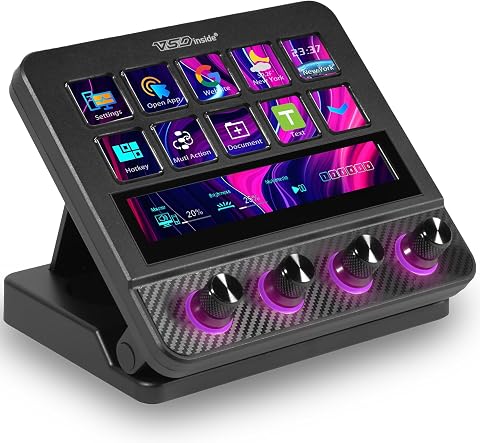
The VSD N4 Pro is a programmable stream controller with 10 customizable LCD keys, four RGB knobs, a touch bar, and support for one-tap macros and multiple scene presets. It connects via USB-C to Windows 10+ PCs and macOS 11.0+ devices, and includes a passive USB dock, adjustable stand, and customizable RGB lighting.
Pros:
- Customizable keys, knobs, and touch bar support macros and scene presets
- Works with Windows and macOS
- Includes a passive USB dock and foldable ergonomic stand
- Supports expandable plugins and customizable RGB lighting
Cons:
- No built-in speakers; audio functions send commands to the computer
- Full features may depend on downloadable plugins
Best for: People who want customizable desk controls.
Not ideal for: Buyers who need confirmed compatibility before choosing.
Bottom line: Check the full listing and software fit before deciding whether this controller belongs in your setup.
Smart Plug Energy Monitor
Energy monitoring can help make connected equipment part of a more observable workspace. This checklist slot pairs a whole-home monitor with smart plugs, and the listed Emporia product name specifies 16 sensors and 4 smart plugs. Consider it if tracking energy use is part of how you want to manage your home or work environment.
Before buying, check whether the monitor’s installation and the smart plugs suit your space and the devices you intend to connect. A common mistake is to focus on the included count without checking how the system is installed or whether it works with your electrical setup. Verify the compatibility and requirements in the current product listing, and consider whether you want whole-home monitoring, plug-level monitoring, or both. Match the product’s stated components to your actual use rather than assuming every sensor or plug will be useful in your workflow.
What to look for:
- Confirm installation requirements for the whole-home monitor.
- Check compatibility with your electrical setup.
- Identify which devices you would connect to the smart plugs.
- Consider whether whole-home and plug-level monitoring match your needs.
Emporia Whole-Home Energy Monitor with 16 Sensors and 4 Smart Plugs

Monitor whole-home electricity use and up to 16 individual circuits with second-by-second energy tracking. The bundle includes four Wi-Fi smart plugs for remote control, scheduling, and outlet-level usage monitoring, with app support for iOS and Android and compatibility with Alexa and solar systems.
Pros:
- Tracks whole-home and individual circuit electricity usage
- Includes four smart plugs with remote control and scheduling
- Supports solar energy monitoring and net metering
- App provides usage trends, automations, and notifications
Cons:
- Cloud data storage is required for anytime app access
- Installation involves sensors for the electrical panel
Best for: People who want a monitor with sensors and smart plugs.
Not ideal for: Setups without a clear need for energy monitoring.
Bottom line: Confirm installation and compatibility requirements before adding this monitor to your workspace.
Desktop Document Camera
A document camera offers another way to bring physical material into a computer-based workflow. The IPEVO V4K pick is identified as an 8MP Ultra HD USB document camera, making this slot relevant if you want a camera specifically for showing documents at your desk.
Think about the materials you need to present or capture, the camera’s position, and the USB connection available on your computer. A common buying mistake is to assume a camera will fit a desk or capture area without checking its footprint and working position. Confirm that the USB connection works with your computer and review the product listing for setup requirements. Consider whether a document camera serves a distinct need alongside a scanner: the camera may suit a workflow centered on showing material, while the scanner slot is framed around digitizing documents and receipts.
What to look for:
- Check that your computer has a compatible USB connection.
- Consider the desk space and camera position needed.
- Identify the documents or materials you want to show or capture.
- Review setup requirements in the current product listing.
IPEVO V4K 8MP Ultra HD USB Document Camera

The IPEVO V4K captures images up to 3264 × 2448 pixels and streams at up to 30 fps in Full HD. Its fast autofocus, Sony CMOS image sensor, and adjustable multi-jointed stand make it suited to presentations, teaching, and document demonstrations.
Pros:
- Captures high-resolution images
- Streams at up to 30 fps in Full HD
- Fast focusing helps reduce interruptions
- Compatible with Mac, Windows, and Chromebook
Cons:
- Requires compatible software that recognizes UVC video sources
- Dim-light performance and streaming depend on the sensor and system requirements
Best for: Workflows that need a USB document camera.
Not ideal for: Setups with no suitable desk space or USB connection.
Bottom line: Choose this camera when its USB setup and document use fit your desk.
Wi-Fi 6E Mesh Router
Reliable connectivity is a foundational consideration when a workflow depends on network-connected tools and devices. This slot lists the eero Pro 6E Mesh Wi-Fi System as a 3-pack mesh system with Wi-Fi 6E in its name. Consider the network layout of your home or workspace before deciding whether this category belongs on your checklist.
A common mistake is to select a mesh system without mapping where internet access is needed or checking the existing network equipment. Review the product’s current requirements and confirm that its Wi-Fi 6E compatibility aligns with your devices and service setup. Think through where each unit could be placed and whether the available locations make sense for your space. A three-unit system is only useful if its components suit the layout and your network needs; verify coverage details and setup guidance from the product listing rather than assuming the pack will suit every environment.
What to look for:
- Map the areas where you need network access.
- Check compatibility with your devices and existing network equipment.
- Consider suitable placement for all three units.
- Review setup and coverage details in the current listing.
eero Pro 6E Mesh Wi-Fi System (3-Pack)

The eero Pro 6E mesh Wi-Fi system supports Wi-Fi 6E technology, providing fast speeds up to 2.3 Gbps and extensive coverage of up to 6,000 sq. ft.
Pros:
- Supports Wi-Fi 6E for faster speeds and lower latency
- Extensive coverage of up to 6,000 sq. ft.
- Supports over 100 devices simultaneously
- Easy setup and management via the app
Cons:
- Requires compatible Wi-Fi 6E devices for full benefit
- Additional subscription needed for advanced security features
Best for: Workspaces considering a three-unit mesh system.
Not ideal for: Setups whose network needs are already met by existing equipment.
Bottom line: Match the mesh system’s requirements and unit placement to your space before buying.
If you are building your setup over time, start with the category that addresses your most frequent workflow bottleneck. For paper-heavy work, consider scanning; for voice use, check the microphone connection; for network or energy needs, verify compatibility and installation first. Prioritize the clearest practical need before adding convenience controls or other secondary gear.
Use the checklist as a starting point, then confirm current specifications and requirements for each product before purchase. A workspace comes together one useful choice at a time, and the right fit for your routine matters more than filling every slot at once.
Halloween Picks
halloween
As an affiliate, we earn on qualifying purchases.