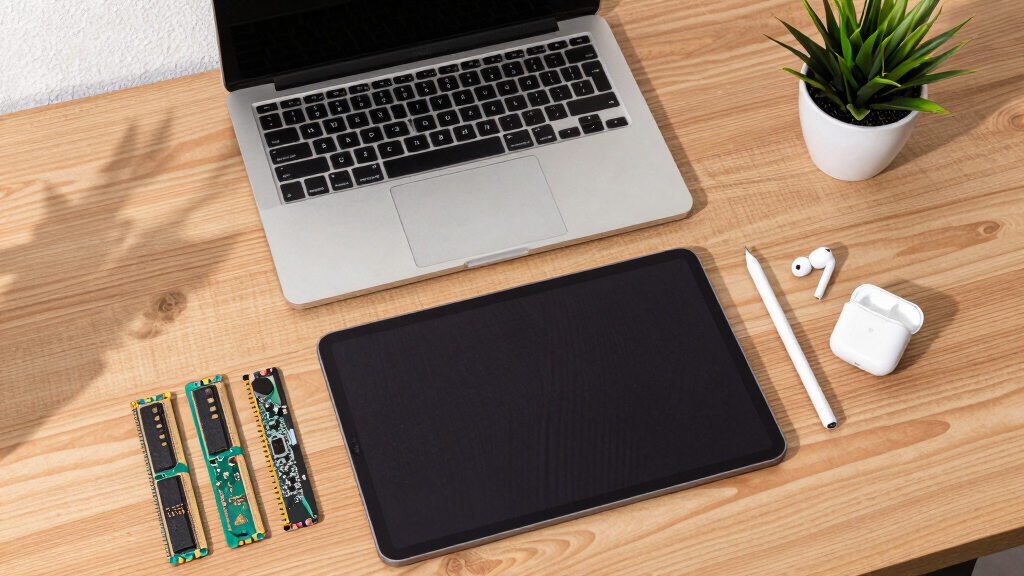

The Microsoft Surface Pro 2024 13-inch Copilot+ PC is my best overall pick because it offers the strongest mix of laptop-style productivity, modern AI-ready hardware, and long-term usefulness. The Lenovo Idea Tab Pro is the better choice for students who want a larger 3K screen with pen and folio included, while the Fusion5 10.1-inch Rugged Windows 11 Pro Tablet stands out for buyers who need Windows, storage, and warranty protection without paying Surface money. The main tradeoff is simple: Android tablets usually give better casual value, while Windows tablets are better for desktop apps, accessories, and work software. Buyers also need to weigh screen size, included keyboards or pens, storage, and whether a renewed premium model beats a new budget one. Continue reading for the full breakdown of which model fits each type of buyer.

Get tech for your team delivered free — and shop member deals
- Fast, free delivery on millions of items
- Access to Prime Big Deal Days deals on October 6–7
- Prime Video, Amazon Music and more included
Key Takeaways
- Microsoft Surface Pro 2024 earns the top spot because it is the only pick here that feels like a true premium computer replacement rather than just a media tablet.
- Lenovo’s two tablets separate themselves through display quality and student-friendly bundles, with the Idea Tab Pro making more sense for serious note-taking than the smaller Idea Tab 11.
- Fusion5 is the Windows value lane: the Rugged Tablet PC offers stronger storage and warranty coverage, while the Helios 12 favors a sharper display and active cooling.
- Budget Android models such as the TABWEE T20, TABWEE T90, and Jeazans bundle compete on accessories and headline memory claims, but buyers should focus more on processor quality, software polish, and support.
- Renewed Surface Pro 7+ is still appealing for Microsoft 2-in-1 buyers on a tighter budget, but its age makes it less future-ready than the Surface Pro 2024 or Lenovo Idea Tab Pro.
| Lenovo Idea Tab 11″ College Tablet with 2.5K IPS Display and MediaTek Dimensity 6300 |  | Best Student Tablet Bundle | Screen Size: 11 inches | Display: 2.5K IPS touchscreen, 90Hz | Processor: MediaTek Dimensity 6300 | VIEW LATEST PRICE | See Our Full Breakdown |
| 10.1″ Windows 11 Tablet with 6GB RAM, 128GB Storage, Intel Processor, 6000 mAh Battery |  | Best Budget Windows Tablet | Screen Size: 10.1 inches | Operating System: Windows 11 Home | Processor: Intel processor | VIEW LATEST PRICE | See Our Full Breakdown |
| Fusion5 10.1” Windows 11 Professional Rugged Tablet PC – 12GB RAM, 512GB SSD, Intel 13th Gen N100 CPU – 2 Year Full Warranty with Accidental Damage |  | Best Rugged Windows Tablet | Display: 10.1-inch Full HD IPS touchscreen | CPU: Intel 13th Gen N100 | RAM: 12GB | VIEW LATEST PRICE | See Our Full Breakdown |
| Microsoft Surface Pro 7+ 12.3″ Tablet 2-in-1 (Renewed) |  | Best Renewed 2-in-1 Performance Pick | Screen Size: 12.3 inches | Resolution: 2736 x 1824 | Processor: Intel Core i7-1165G7 | VIEW LATEST PRICE | See Our Full Breakdown |
| TABWEE T20 Android 16 Tablet with 24GB RAM, 256GB ROM (Expandable to 2TB), Octa-Core Processor and Gemini AI |  | Best Accessory-Packed Android Workstation | Display: 10-inch HD 1280×800 Incell | Processor: MediaTek T606 Octa-Core at 2 GHz | RAM: 24GB total, 8GB physical plus 16GB virtual | VIEW LATEST PRICE | See Our Full Breakdown |
| Microsoft Surface Pro 2024 13″ Copilot+ PC |  | Best Premium 2-in-1 | Processor: Snapdragon X Plus, 10-core | RAM: 16GB | Storage: 512GB | VIEW LATEST PRICE | See Our Full Breakdown |
| Fusion5 Helios 12 Windows 11 Tablet PC | 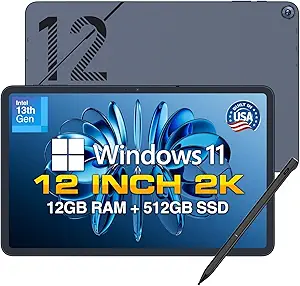 | Best Windows Tablet for Ports | Display: 12-inch 2K touchscreen | Resolution: 2000 x 1200 | Processor: Intel 13th Gen Quad-Core | VIEW LATEST PRICE | See Our Full Breakdown |
| TABWEE T90 11-Inch Android 16 Tablet with Gemini AI 3.5 | 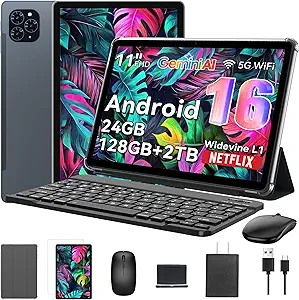 | Best Android Productivity Bundle | Operating System: Android 16 | Display Size: 11 inches | Resolution: 1920 x 1200 FHD | VIEW LATEST PRICE | See Our Full Breakdown |
| Jeazans Android 16 Tablet 2-in-1 Bundle with Keyboard, Mouse, Stylus & Case |  | Best Budget Accessory Kit | Model Number: Jzpad-KB10L | Model Year: 2026 | Operating System: Android 16 | VIEW LATEST PRICE | See Our Full Breakdown |
| Lenovo Idea Tab Pro Student Tablet with Google Gemini |  | Best Student Media Tablet | Display Size: 12.7 inches | Resolution: 3K LCD | Processor: MediaTek Dimensity 8300 | VIEW LATEST PRICE | See Our Full Breakdown |
More Details on Our Top Picks
Lenovo Idea Tab 11″ College Tablet with 2.5K IPS Display and MediaTek Dimensity 6300
I would place the Lenovo Idea Tab 11 high for students because it balances a sharp 2.5K IPS screen, a capable Dimensity 6300 chip, and included study gear without pushing into laptop-replacement pricing. Compared with the TABWEE T20, this pick has the better display for reading, note review, and streaming, while the bundled pen and folio make it more useful out of the box than a bare tablet. The tradeoff is that its 90Hz panel is less fluid than 120Hz rivals, and Android stylus support still feels less rich than Surface-style Windows pen workflows. I see this as the sensible study-first choice, not the most powerful productivity machine in the lineup.
Pros:- Sharp 11-inch 2.5K IPS display is better for reading and video than lower-resolution budget tablets
- Up to 12 hours of streaming battery life fits long school days
- Tab Pen and Folio Case add real value for note-taking and coursework
- Circle to Search and AI apps make quick lookup and translation easier
Cons:- 90Hz refresh rate trails smoother 120Hz tablets
- Android stylus app support is less mature than Windows 2-in-1 options
- MediaTek Dimensity 6300 is better for study and media than heavy creative workloads
Best for: College students who want a sharp media-and-note tablet with pen and case included from day one
Not ideal for: Buyers who need desktop-class Windows apps or advanced pen software for design and engineering work
- Screen Size:11 inches
- Display:2.5K IPS touchscreen, 90Hz
- Processor:MediaTek Dimensity 6300
- RAM:8 GB
- Storage:256 GB
- Battery Life:Up to 12 hours YouTube playback
- Charging:20W fast charger
- Included Accessories:Tab Pen and Folio Case
Bottom line: I would choose this for students who care more about screen quality, battery life, and bundled accessories than raw laptop-grade power.
10.1″ Windows 11 Tablet with 6GB RAM, 128GB Storage, Intel Processor, 6000 mAh Battery
The 10.1-inch Windows 11 Tablet earns its spot as the low-cost route into a familiar PC interface. Compared with the Fusion5 Rugged Tablet PC, it gives up RAM, storage, and durability, but it still covers everyday needs such as browser work, email, video calls, and light document editing. I like that it includes USB 3.0 and Micro HDMI, since those ports make it easier to connect displays and accessories than many Android tablets in this class. The catch is performance headroom: 6GB RAM can feel tight on Windows 11, especially with several browser tabs and apps open. Its plastic shell also feels more practical than premium, so this is a value computer, not a polished travel workstation.
Pros:- Runs Windows 11 Home for familiar desktop software and browser-based work
- USB 3.0 and Micro HDMI add useful accessory and monitor support
- 6000 mAh battery is rated for up to 12 hours depending on use
- 128GB storage with microSD expansion is workable for basic files
Cons:- 6GB RAM can limit multitasking on Windows 11
- Plastic body feels less premium than Surface or metal Android tablets
- 128GB expansion ceiling is modest for media libraries or large files
Best for: Budget buyers who need Windows basics for web apps, school portals, email, and light Office-style work
Not ideal for: Power users who keep many Windows apps open or expect a premium metal tablet feel
- Screen Size:10.1 inches
- Operating System:Windows 11 Home
- Processor:Intel processor
- RAM:6GB
- Storage:128GB internal, expandable to 128GB via microSD
- Battery:6000 mAh
- Connectivity:Wi-Fi, Bluetooth 5.0
- Ports:USB 3.0, Micro HDMI
Bottom line: I would pick this as the inexpensive Windows option for basic computing, not as a heavy multitasking tablet.
Fusion5 10.1” Windows 11 Professional Rugged Tablet PC – 12GB RAM, 512GB SSD, Intel 13th Gen N100 CPU – 2 Year Full Warranty with Accidental Damage
The Fusion5 Rugged Tablet PC is the durability pick I would put ahead of the standard 10.1-inch Windows 11 Tablet for field work, warehouse use, service calls, or rougher travel. Its 12GB RAM and 512GB SSD give Windows far more breathing room, while the Intel N100 is a stronger fit for real PC tasks than the vague entry Intel chip in the budget model. The rugged housing, covered ports, and accidental damage warranty are the real reason to buy it over sleeker tablets such as the Microsoft Surface Pro 7+. The compromise is portability and screen size: 10.1 inches can feel cramped for spreadsheets, and rugged builds rarely feel as slim or elegant as consumer 2-in-1 designs.
Pros:- Rugged, dustproof design is better suited to rough environments than standard consumer tablets
- 12GB RAM and 512GB SSD give Windows 11 more room for apps and files
- Intel 13th Gen N100 is a practical low-power PC processor
- Two-year warranty includes accidental damage coverage
Cons:- 10.1-inch display can feel small for multitasking
- Rugged body is less sleek than Surface-style 2-in-1 tablets
- MicroSD expansion is useful but slower than internal SSD storage
Best for: Field technicians, small business teams, and mobile workers who need a tougher Windows tablet with stronger storage
Not ideal for: Desk-based users who want a larger display for split-screen documents and spreadsheet work
- Display:10.1-inch Full HD IPS touchscreen
- CPU:Intel 13th Gen N100
- RAM:12GB
- Storage:512GB SSD, expandable with MicroSD
- Battery:6000mAh
- Cameras:Dual Full HD cameras
- Connectivity:Dual-band Wi-Fi, Bluetooth 5.0
- Warranty:2 years with accidental damage coverage
Bottom line: I would choose this when durability and warranty protection matter more than a large screen or premium styling.
Microsoft Surface Pro 7+ 12.3″ Tablet 2-in-1 (Renewed)
The Microsoft Surface Pro 7+ is the most laptop-like option in this group, and I would rank it above the Lenovo Idea Tab 11 for buyers who need Windows software, a sharper productivity display, and stronger multitasking. Its Core i7 processor and 16GB RAM are a clear step up from the budget Windows tablet and the Fusion5 Rugged Tablet PC for heavier browser sessions, Office work, and app switching. The 12.3-inch PixelSense screen also gives more workspace without becoming bulky. The renewed status is the main tradeoff, along with only 256GB of storage and the listed lack of a built-in webcam. It is less carefree than buying new, but the performance-per-dollar case is strong for Windows-first buyers.
Pros:- Core i7-1165G7 and 16GB RAM make it stronger for Windows multitasking than budget tablets
- 12.3-inch 2736 x 1824 PixelSense display offers more workspace and sharper text
- USB-C and USB-A support both modern and older accessories
- Light 1.70-pound body works well for travel and classes
Cons:- Renewed condition may not suit buyers who want a brand-new device
- 256GB SSD can fill quickly with large apps and media
- No built-in webcam is a serious drawback for video meetings
Best for: Students, remote workers, and professionals who want a light Windows 2-in-1 with stronger CPU and RAM than budget tablets
Not ideal for: Buyers who need new-device certainty, large local storage, or built-in webcam support
- Screen Size:12.3 inches
- Resolution:2736 x 1824
- Processor:Intel Core i7-1165G7
- RAM:16GB
- Storage:256GB SSD
- Operating System:Windows 11 Pro
- Ports:USB-C, USB-A, Surface Connect
- Weight:1.70 lbs
- Connectivity:Wi-Fi 6, Bluetooth 5.0
Bottom line: I would buy this for Windows productivity on a budget, as long as renewed hardware and limited storage are acceptable.
TABWEE T20 Android 16 Tablet with 24GB RAM, 256GB ROM (Expandable to 2TB), Octa-Core Processor and Gemini AI
The TABWEE T20 is the pick for buyers who want the most pieces in the box: tablet, keyboard, stylus, mouse, and screen protector. Compared with the Lenovo Idea Tab 11, it leans harder into a mini workstation setup with 24GB listed RAM and up to 2TB microSD expansion, which helps for file-heavy school, travel, or family use. The downside is display quality. Its 1280×800 HD screen is much less sharp than Lenovo’s 2.5K panel, so text, streaming, and drawing detail will not feel as refined. Battery life is also shorter at up to 6 hours. I see this as a bundle-first Android option, not the best screen-first tablet.
Pros:- Keyboard, stylus, mouse, and screen protector create a ready-made 2-in-1 setup
- 256GB storage plus up to 2TB microSD expansion is generous for the category
- Widevine L1 support allows 1080p streaming on supported services
- Two-year US warranty adds buyer reassurance
Cons:- 1280×800 display is far less sharp than 2K and 2.5K rivals
- Up to 6 hours of battery life trails longer-lasting tablets in the lineup
- Keyboard and accessories add bulk when used as a travel tablet
Best for: Buyers who want an inexpensive Android tablet bundle for typing, streaming, storage, and light productivity
Not ideal for: Readers, artists, and movie watchers who care most about high resolution and long unplugged use
- Display:10-inch HD 1280×800 Incell
- Processor:MediaTek T606 Octa-Core at 2 GHz
- RAM:24GB total, 8GB physical plus 16GB virtual
- Storage:256GB ROM, expandable to 2TB via MicroSD
- Battery:5000mAh lithium polymer, 20Wh
- Cameras:8MP rear, 5MP AI front
- Streaming:Widevine L1 for 1080p streaming
- Included Accessories:Keyboard, stylus pen, mouse, anti-glare screen protector
- Warranty:2-year US warranty
Bottom line: I would choose this for accessory value and storage flexibility, while skipping it if screen sharpness is the main priority.
Microsoft Surface Pro 2024 13″ Copilot+ PC
I rank the Microsoft Surface Pro 2024 highest for buyers who want one device to cover tablet sketching, laptop-style work, and AI-assisted productivity. Compared with the Microsoft Surface Pro 7+ Renewed, this model’s Snapdragon X Plus chip, NPU, 16GB RAM, and longer battery estimate make it the more forward-looking computer. It also feels more polished than the Fusion5 Helios 12 if display quality, mobility, and premium ecosystem fit matter more than port variety. The tradeoff is cost: the keyboard is sold separately, and some Copilot+ features depend on software rollout timing. I would treat this as a premium productivity machine first, tablet second.
Pros:- Premium 2-in-1 form factor works across laptop and tablet workflows
- Snapdragon X Plus processor with NPU is built for newer AI productivity features
- 16GB RAM and 512GB storage suit serious multitasking
- Up to 14 hours of battery life supports long workdays
Cons:- Keyboard is sold separately, making the complete setup more expensive
- Some Copilot+ features may depend on later software updates
- Port flexibility is weaker than Windows tablets with more physical connections
Best for: Mobile professionals, students, and creators who want a premium Windows tablet that can replace a light laptop.
Not ideal for: Budget buyers who need the keyboard included, since the detachable keyboard adds to the real purchase cost.
- Processor:Snapdragon X Plus, 10-core
- RAM:16GB
- Storage:512GB
- Display Size:13 inches
- Device Type:2-in-1 laptop/tablet
- AI Features:Copilot+ PC with NPU
- Battery Life:Up to 14 hours
- Keyboard:Detachable keyboard sold separately
Bottom line: Choose this if you want the most polished premium Windows 2-in-1 in this group and can budget for accessories.
Fusion5 Helios 12 Windows 11 Tablet PC
The Fusion5 Helios 12 earns its spot as the practical Windows pick for buyers who care about connectivity and sustained workloads. Against the Microsoft Surface Pro 2024, it gives up the polished Copilot+ positioning but counters with dual USB-C, USB 3.0, Micro HDMI, a bundled stylus, and an active cooling fan. That matters if the tablet will sit on a desk, connect to accessories, and handle longer work sessions. Compared with the Fusion5 10.1” Rugged Tablet, the Helios 12 is less jobsite-focused but better suited to screen-heavy productivity thanks to its 12-inch 2K panel. The drawbacks are size and price: the metal build and cooling system make it less casual than slim Android tablets.
Pros:- 12-inch 2K display gives more workspace than smaller budget tablets
- Active cooling helps performance hold up during heavier tasks
- Generous port selection reduces adapter dependence
- Metal casing gives it a sturdier, more premium feel
Cons:- Likely heavier than simpler tablets because of the metal body and cooling hardware
- Higher price may not make sense for basic browsing or streaming
- Windows tablet use can feel less touch-first than Android or iPad-style devices
Best for: Windows users who need a tablet-style PC with strong ports, stylus input, and better sustained performance.
Not ideal for: Travel-light readers or casual streamers who would be happier with a thinner Android tablet.
- Display:12-inch 2K touchscreen
- Resolution:2000 x 1200
- Processor:Intel 13th Gen Quad-Core
- RAM:12GB DDR5
- Storage:512GB SSD
- Cooling:Built-in active fan
- Ports:2x USB-C, USB 3.0, Micro HDMI, 3.5mm jack
- Operating System:Windows 11 Home
- Charging:36W USB-C PD fast charging
Bottom line: Pick this when ports, Windows software, and sustained performance matter more than slimness.
TABWEE T90 11-Inch Android 16 Tablet with Gemini AI 3.5
The TABWEE T90 is the Android pick I would move up for buyers who want a ready-to-work bundle without building the setup piece by piece. Compared with the Jeazans Android 16 Tablet, it offers a larger 11-inch FHD display, more built-in storage, and a stronger productivity pitch through Gemini AI 3.5. Compared with the Lenovo Idea Tab Pro, it is less premium for media and study, but the included keyboard, mouse, and stylus make it easier to justify as a low-cost laptop alternative. The main caveat is the Unisoc T615 processor; the huge RAM figure includes virtual memory and does not turn this into a workstation or gaming tablet.
Pros:- Includes keyboard, mouse, and stylus for a complete productivity setup
- 11-inch FHD display gives more room than smaller 10.1-inch bundles
- Expandable storage up to 2TB is useful for downloaded media and files
- 8000mAh battery supports long video playback sessions
Cons:- Unisoc T615 processor may lag behind premium tablet chips
- 24GB RAM figure relies partly on virtual memory
- 128GB base storage is modest before adding a TF card
Best for: Students and home-office users who want an Android tablet bundle for typing, notes, video calls, and media.
Not ideal for: Power users running demanding games or heavy creative apps, since the processor is the limiting factor.
- Operating System:Android 16
- Display Size:11 inches
- Resolution:1920 x 1200 FHD
- Processor:Unisoc T615 Octa-Core
- RAM:24GB total, 8GB built-in + 16GB virtual
- Storage:128GB ROM, expandable to 2TB
- Battery:8000mAh
- Cameras:13MP rear, 5MP front
- Included Accessories:Keyboard, mouse, stylus
Bottom line: Buy this if you want an affordable Android work-and-study kit with accessories included from the start.
Jeazans Android 16 Tablet 2-in-1 Bundle with Keyboard, Mouse, Stylus & Case
The Jeazans Android 16 Tablet makes sense as the value bundle for buyers who want the most pieces in the box: keyboard, mouse, stylus, and case. Compared with the TABWEE T90, it has a smaller 10.1-inch display and less built-in storage, so it is less comfortable for split-screen work or large app libraries. Its advantage is simplicity: the full 2-in-1 accessory kit, WiFi6, and Bluetooth 5.4 make it a tidy starter setup for school notes, email, and web tasks. I would be cautious about the unclear camera details and unusual processor listing, though. The 64GB base storage also means a memory card becomes part of the plan quickly.
Pros:- Keyboard, mouse, stylus, and case are included
- WiFi6 and Bluetooth 5.4 support modern wireless connections
- Storage expansion up to 1TB helps offset the small base capacity
- Android 16 gives buyers a current software platform
Cons:- 64GB internal storage is tight for apps, files, and offline media
- Camera specs are vague, making video quality harder to judge
- Processor details are unclear for a tablet in this class
Best for: Students or casual users who want a low-cost Android tablet bundle with all basic accessories included.
Not ideal for: Buyers who need a larger display, clearer performance specs, or plenty of built-in storage without expansion.
- Model Number:Jzpad-KB10L
- Model Year:2026
- Operating System:Android 16
- Display Size:10.1 inches
- RAM:24GB total, 3GB built-in + 21GB virtual
- Storage:64GB, expandable to 1TB
- Battery Capacity:19 watt-hours
- Connectivity:WiFi6, Bluetooth 5.4
- Included Accessories:Keyboard, mouse, stylus, leather case
Bottom line: This is the sensible pick when the bundle matters more than premium specs.
Lenovo Idea Tab Pro Student Tablet with Google Gemini
The Lenovo Idea Tab Pro is the student-focused choice I would favor when screen quality, note-taking, and entertainment carry equal weight. Compared with the TABWEE T90, it has less RAM on paper, but its MediaTek Dimensity 8300, 12.7-inch 3K LCD display, and quad JBL Dolby Atmos speakers make it the stronger pick for lectures, textbooks, streaming, and casual gaming. It is also less expensive in spirit than the Microsoft Surface Pro 2024 because it targets Android study workflows rather than full Windows laptop replacement. The tradeoffs are storage and flexibility: 128GB may feel tight, and the product data does not list expandable storage. Still, the included pen and folio case add real student value.
Pros:- 12.7-inch 3K display is well suited to reading, note-taking, and media
- MediaTek Dimensity 8300 gives it stronger performance than many budget Android tablets
- Tab Pen Plus and folio case are included
- Quad JBL Dolby Atmos speakers improve video and class playback
Cons:- 128GB storage may fill quickly with apps, downloads, and media
- Expandable storage is not listed in the provided specs
- Android may not replace a laptop for desktop-class software
Best for: Students who want a large-screen Android tablet for notes, reading, streaming, and study tools.
Not ideal for: Users who need Windows desktop apps or lots of confirmed expandable storage for large project files.
- Display Size:12.7 inches
- Resolution:3K LCD
- Processor:MediaTek Dimensity 8300
- RAM:8GB
- Storage:128GB
- Battery Life:11 hours video streaming
- AI Features:Google Gemini study tools
- Audio:Quad JBL speakers with Dolby Atmos
- Included Accessories:Tab Pen Plus, folio case
Bottom line: Choose this for a student tablet that favors display quality, pen use, and media over desktop-style computing.
How We Picked
I ranked these picks by looking at how well each one works as a real computer, tablet, or 2-in-1 productivity device, not just by comparing spec-sheet numbers. The most weight went to performance for everyday work, display quality, storage, accessory support, operating system usefulness, and whether the price makes sense for the buyer type. Windows models ranked higher when they could replace a laptop, while Android models scored better when they offered strong media, school, or bundle value.
I also gave extra credit to products that solve a clear buying problem. The Surface Pro 2024 leads because it has the broadest long-term appeal, while the Lenovo Idea Tab Pro ranks highly because its screen, pen, and folio make it easy to recommend for students. Lower-ranked models are not poor choices, but they ask buyers to accept bigger compromises around brand support, processor strength, older hardware, or accessory quality.
Factors to Consider When Choosing Best Computers, Tablets & Components
Choosing among the best computers, tablets, and components in this lineup means deciding how much of a laptop replacement you really need. I would start with the operating system, then narrow the field by screen size, accessories, storage, and upgrade expectations.
Choose Windows If You Need Desktop Apps
Windows tablets make the most sense when your work depends on traditional desktop software, browser-heavy multitasking, file management, or external peripherals. That is why the Surface Pro 2024, Surface Pro 7+, Fusion5 Rugged Tablet PC, Fusion5 Helios 12, and the 10.1-inch Windows tablet sit in a different lane from the Android picks. The tradeoff is that Windows usually asks more from the hardware, so a cheap Windows tablet can feel slower than an Android tablet with similar-looking specs. I would pay close attention to processor class, SSD storage, cooling, and RAM rather than assuming Windows alone makes a device more capable. If you only need streaming, notes, email, and light schoolwork, Android may give better value. If you need spreadsheets, work portals, desktop apps, and a laptop-like workflow, Windows is the safer choice.
Do Not Let Big RAM Claims Decide Everything
Some budget Android tablets advertise very high RAM numbers, but those figures can include virtual memory that depends on storage rather than true physical memory. That matters because a tablet with a weaker processor can still feel modest even when the listing shows a large RAM figure. In this roundup, models like the TABWEE T20 and TABWEE T90 look generous on paper, but the Lenovo and Surface options have stronger overall platform credibility. I would treat RAM as one part of the story alongside chipset, storage speed, display quality, update support, and app compatibility. For buyers comparing tablets at similar prices, a better processor and cleaner software often matter more than a headline memory number. This is where the Lenovo Idea Tab Pro earns trust against cheaper spec-heavy Android rivals.
Match Screen Size To The Job
Screen size changes the whole buying decision because a tablet used for reading in bed has different needs from one used for spreadsheets or split-screen notes. The Lenovo Idea Tab 11 and 10.1-inch Windows tablet are easier to carry, but they feel more limited when documents, browser tabs, or drawing apps share the screen. The Lenovo Idea Tab Pro, Surface Pro 2024, and Fusion5 Helios 12 are better for buyers who want a larger canvas. Higher resolution also matters when reading dense text or using a stylus, which is why the Lenovo 3K panel and Fusion5 Helios 2K display help those models stand out. The tradeoff is weight, bag space, and hand fatigue. I would choose smaller only when portability matters more than workspace.
Included Accessories Can Change The Real Price
A tablet that includes a keyboard, pen, case, or folio can be a better deal than a cheaper model that needs add-ons later. The Jeazans Android 16 bundle is attractive for beginners because it includes the basics in one box, while the Lenovo Idea Tab Pro gains value by including a pen and folio case. Surface models can be excellent productivity machines, but buyers often need to budget for a keyboard, pen, or protective case separately. That can move a premium pick into a much higher final price tier. I would compare the total setup cost, not only the tablet price. This matters most for students, remote workers, and anyone buying a device as a laptop substitute.
Think About Support, Warranty, And Device Age
Support matters more than it first appears, especially for a device expected to last through school, travel, or daily work. The Fusion5 Rugged Tablet PC earns attention partly because its warranty and accidental damage coverage reduce risk for rougher use. The renewed Surface Pro 7+ can be a smart buy, but it carries the tradeoff of older hardware and a shorter future runway than a newer model. Budget Android brands may offer appealing accessories and storage, yet software updates and long-term parts support can be less predictable. I would pay more for stronger support when the device will hold important files, serve as a work machine, or travel often. For casual streaming and light browsing, a lower-cost model can still be reasonable.
Frequently Asked Questions
Which Pick Is Best If I Want One Device To Replace A Laptop?
I would choose the Microsoft Surface Pro 2024 13-inch Copilot+ PC if the goal is a true laptop replacement. It has the strongest mix of modern performance, Windows flexibility, premium screen quality, and long-term relevance in this lineup. The Fusion5 Helios 12 and Fusion5 Rugged Tablet PC are better value options for Windows buyers, but they do not match the Surface for polish or premium ecosystem support. The Surface Pro 7+ costs less because it is renewed and older, which makes it better for budget Microsoft buyers than for anyone planning a long ownership cycle. For full-time productivity, the Surface Pro 2024 is the cleanest answer.
Is An Android Tablet Or Windows Tablet Better For Students?
For most students, I would split the answer by workload. The Lenovo Idea Tab Pro is my favorite student pick for note-taking, reading, streaming, and class apps because it includes a pen and folio with a large 3K display. A Windows tablet is better if the student needs desktop software, advanced spreadsheets, coding tools, or school systems that work best in a full PC browser. The Lenovo Idea Tab 11 is easier to carry and likely enough for lighter college use, while the Surface Pro 2024 is better for students who want one premium device for everything. The safer student choice depends on whether the schoolwork is app-based or desktop-software-based.
Are The Budget Android Tablets With 24GB RAM Worth It?
They can be worth it for buyers who want a low-cost tablet bundle, but I would not treat 24GB RAM claims as proof of premium performance. Models such as the TABWEE T20 and TABWEE T90 are appealing for media, browsing, storage, and casual multitasking. The catch is that processor quality, screen calibration, update support, and app behavior often matter more than advertised memory. Compared with the Lenovo Idea Tab Pro, these models usually compete on price and extras rather than overall platform strength. I would buy one for casual use, not as a dependable long-term computer replacement.
Should I Buy The Renewed Surface Pro 7+ Or A New Budget Windows Tablet?
The Surface Pro 7+ renewed makes sense if you want Microsoft build quality and a familiar Surface design at a lower price. It can feel more refined than many budget Windows tablets, especially in screen quality, keyboard ecosystem, and overall design. A new budget Windows tablet may offer fresher storage numbers, warranty coverage, or included accessories, but it may not feel as polished in daily use. The Fusion5 Rugged Tablet PC is the stronger pick if warranty protection and storage are priorities. I would choose the Surface Pro 7+ for a more premium feel on a budget, and Fusion5 for practical value and lower ownership risk.
Which Option Is Best For Someone Buying Their First Tablet Computer?
For a first tablet computer, I would favor a model that includes the accessories and keeps the setup simple. The Jeazans Android 16 2-in-1 bundle is the easiest beginner package because it includes a keyboard, mouse, stylus, and case. It is not the strongest performer in the lineup, so buyers who expect heavy multitasking should step up to the Lenovo Idea Tab Pro or a Windows option. The Lenovo Idea Tab 11 is also beginner-friendly if portability and a better-known brand matter more than the bundle. For a first device, the best choice is the one that reduces extra purchases and matches the apps the buyer already uses.
Conclusion
My best overall recommendation is the Microsoft Surface Pro 2024 13-inch Copilot+ PC because it comes closest to replacing both a laptop and tablet for serious daily use. For best value, I would choose the Fusion5 10.1-inch Windows 11 Professional Rugged Tablet PC because its RAM, SSD, Windows Pro setup, and warranty make it unusually practical. The Lenovo Idea Tab Pro is my pick for students and note-takers, while the Jeazans Android 16 2-in-1 bundle is the easiest beginner choice. Buyers who want a lower-cost Microsoft 2-in-1 should look at the Surface Pro 7+ renewed, and buyers who want a sharper midrange Windows screen should compare the Fusion5 Helios 12. If the decision feels close, I would choose Windows for work software, Lenovo for school and media, and budget Android only when price and included accessories matter most.
Fall Picks
fall essentials
As an affiliate, we earn on qualifying purchases.