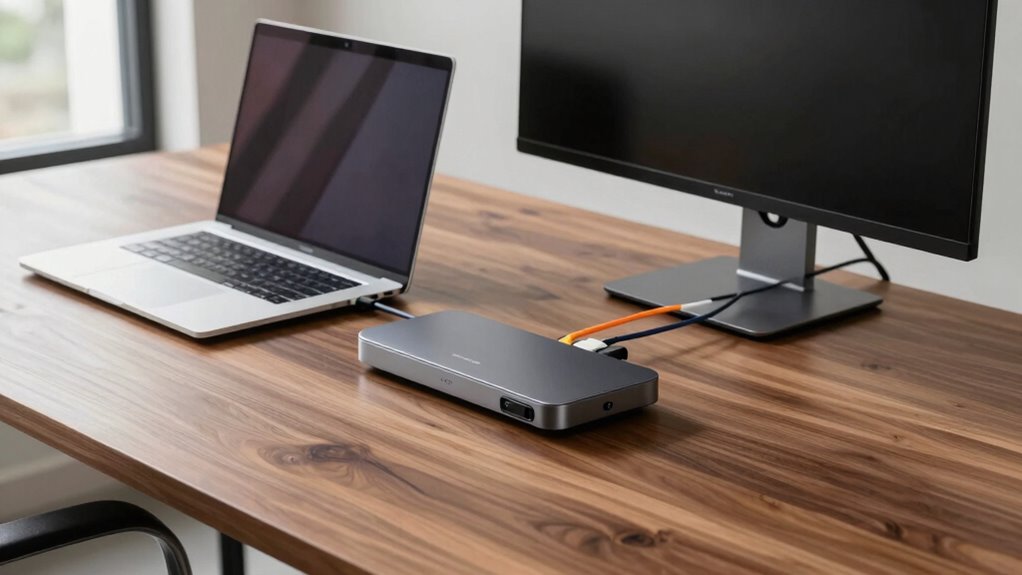

Finding the right laptop docking station can transform your workspace by expanding connectivity and boosting productivity. The Anker Prime Docking Station stands out as the best overall for its versatile 14-in-1 port array and dual monitor support. For those needing maximum performance, the CalDigit E5 Thunderbolt 5 Hub offers blazing-fast Thunderbolt 5 connectivity with multiple high-resolution display options. Meanwhile, the Dell Pro WD25 strikes a balance for users who want reliable power delivery and multiple video outputs without breaking the bank. Every option in this category involves tradeoffs—whether it’s port variety, power, or size—so keep reading for a detailed comparison to find your perfect fit.

Get business pricing on tech for your team
- Business-only prices and quantity discounts
- Tax-exempt purchasing
- Multiple users, one account, clear invoices
Key Takeaways
- The best docking stations blend multiple high-speed ports with reliable power delivery, often at a premium price.
- Thunderbolt 4 and Thunderbolt 5 hubs provide the fastest data transfer, ideal for power users with demanding workflows.
- Many docking stations support multiple monitors, but not all handle 4K or 8K displays equally well, so check display compatibility carefully.
- Compact hubs like the Anker Nano excel in portability but may sacrifice port variety or power output.
- Build quality and brand reputation significantly influence long-term reliability, especially for intensive daily use.
| Anker Prime Docking Station, 14-in-1 Laptop Docking Station Dual Monitor |  | Best Overall for Versatile Multi-Device Management | Connectivity: 14-in-1 | Total Power Output: 160W | USB-C Ports: 3 ports at 100W each | VIEW ON AMAZON | See Our Full Breakdown |
| CalDigit E5 Thunderbolt 5 Element 5 Hub – 9 Ports, 4 Thunderbolt 5/USB4 v2, USB-A & USB-C, 90W Charging, 8K/6K Displays, 0.8m Cable, 180W PSU |  | Best for High-Speed Professional Workflows | Ports: 9 (including 4 Thunderbolt) | Thunderbolt Ports: 4 | USB-A Ports: 3 | VIEW ON AMAZON | See Our Full Breakdown |
| Laptop Docking Station with 3 Monitors and 4K/8K Display Support, USB-C Hub with 2 HDMI Ports | 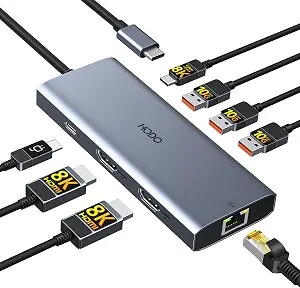 | Best for Multi-Monitor Professionals on a Budget | Video Output: Triple 4K or dual 8K@30Hz via HDMI | USB-C Power Delivery: Up to 100W, 87W output | Data Transfer Speed: 10Gbps | VIEW ON AMAZON | See Our Full Breakdown |
| USB C Docking Station Dual Monitor for HP and Laptops |  | Best for Budget-Conscious Dual Monitor Users | Video Outputs: 2 HDMI, DisplayPort, VGA | Max Resolution: 4K@60Hz (HDMI/DisplayPort), 1080P (VGA) | USB Ports: 3 USB 2.0 | VIEW ON AMAZON | See Our Full Breakdown |
| Anker Nano Laptop Docking Station, 13-in-1 Dock with Detachable 6-in-1 USB-C Hub |  | Best for Travel and Flexibility with Multi-Monitor Support | Number of Ports: 13-in-1, 6-in-1 detachable hub | Monitor Support: Up to 3 monitors, 4K@60Hz, dual 2K | Power Delivery: 100W | VIEW ON AMAZON | See Our Full Breakdown |
| Dell Pro Laptop Docking Station WD25, USB-C, 100W, DisplayPort, HDMI |  | Best Overall for Versatile Multi-Display Setups | Power Output: 100W | Display Support: Up to 4 high-res displays | Ports: DisplayPort, HDMI, USB-C, USB | VIEW ON AMAZON | See Our Full Breakdown |
| Acer 11-in-1 USB-C Docking Station for Laptops with 3 Monitors |  | Best for High-Resolution Triple Monitor Setups | Number of Monitors Supported: 3 | Display Outputs: 2 HDMI (4K@60Hz), 1 DP (8K@30Hz) | USB-C Ports: 2 (10Gbps) | VIEW ON AMAZON | See Our Full Breakdown |
| Anker 8-in-1 USB-C Hub with Dual 4K HDMI, Ethernet, and SD Card Reader |  | Best for Compact Multi-Display and Versatile Connectivity | Ports: 2 HDMI, 2 USB-A, Ethernet, SD/microSD card reader, USB-C PD-IN | Max Resolution: 4K@60Hz for single display, 4K@30Hz for dual | Power Delivery: Up to 85W | VIEW ON AMAZON | See Our Full Breakdown |
| Anker Nano Laptop Docking Station Dual Monitor 8-in-1 USB-C Hub for Windows |  | Best for Windows Users Seeking Dual 4K and Fast Data Transfer | Connectivity: USB-C, USB-A, HDMI, SD/TF card slots | Max Power Output: 85W | Data Transfer Speed: 10 Gbps | VIEW ON AMAZON | See Our Full Breakdown |
| Acer USB-C Docking Station Dual Monitor, 9-in-1 Laptop Dock with 2 HDMI |  | Best for High-Resolution Dual 4K Display and Extensive Ports | Number of HDMI ports: 2 | HDMI resolution: 4K@60Hz | USB-A ports: 3 | VIEW ON AMAZON | See Our Full Breakdown |
| laptop docking station | Power Delivery |
|---|---|
| Anker Prime Docking Station | — |
| CalDigit E5 Thunderbolt 5 Elem | 90W |
| Laptop Docking Station with 3 | — |
| USB C Docking Station Dual Mon | Up to 100W |
| Anker Nano Laptop Docking Stat | 100W |
| Dell Pro Laptop Docking Statio | — |
| Acer 11-in-1 USB-C Docking Sta | 100W input, 85W to laptop |
| Anker 8-in-1 USB-C Hub with Du | Up to 85W |
| Anker Nano Laptop Docking Stat | — |
| Acer USB-C Docking Station Dua | 100W |
More Details on Our Top Picks
Anker Prime Docking Station, 14-in-1 Laptop Docking Station Dual Monitor
This dock stands out for its comprehensive 14-in-1 connectivity, supporting dual 4K displays at 60Hz, which makes it ideal for users who need high-quality visuals alongside multiple data ports. Compared to the CalDigit E5, it offers broader compatibility across Windows, ChromeOS, and Thunderbolt laptops. However, it does not support monitors with ultra-wide resolutions like 5120×1440, and macOS users will find the dual displays are identical instead of extended. Its 160W power output ensures fast charging for most laptops, and multiple USB ports simplify peripheral management. The main tradeoff is its limited support for certain high-resolution monitors and lack of Linux compatibility. This pick makes the most sense for professionals needing a flexible, all-in-one docking solution without the need for the latest ultra-high-resolution display support.
Pros:- Supports dual 4K displays at 60Hz for crisp visuals
- Powerful 160W charging supports fast laptop recharge
- Multiple versatile ports including USB-C, USB-A, and data transfer options
- Compatible with Windows, ChromeOS, and Thunderbolt laptops
Cons:- Does not support monitors with 5120×1440 resolution
- Displays on macOS are mirrored, not extended
- Lacks Linux compatibility
Best for: Professionals who require reliable dual 4K display support and extensive port options across multiple operating systems.
Not ideal for: Linux users or those with ultra-wide monitors with resolutions over 5120×1440, as compatibility is limited.
- Connectivity:14-in-1
- Total Power Output:160W
- USB-C Ports:3 ports at 100W each
- USB-A Port:1 port at 12W
- Display Support:Dual 4K at 60Hz or 1080p at 60Hz
- Supported Connections:USB-C, USB4, Thunderbolt
Our verdict“This docking station is ideal for users who want a highly compatible, multi-display setup with robust power delivery and broad device support.”
CalDigit E5 Thunderbolt 5 Element 5 Hub – 9 Ports, 4 Thunderbolt 5/USB4 v2, USB-A & USB-C, 90W Charging, 8K/6K Displays, 0.8m Cable, 180W PSU
The CalDigit E5 Hub offers ultra-fast data transfer and supports the latest Thunderbolt 5 and USB4 v2 standards, making it suitable for demanding tasks like 8K video editing or large file transfers. Compared to the Anker Prime, it emphasizes raw speed and high-resolution display support, supporting up to 8K or dual 6K/8K displays. This makes it a clear choice for creative professionals and power users. Its 90W charging capacity is sufficient for most laptops, but some M1 Macs may not support dual displays without additional adapters. The setup can be complex because Thunderbolt 5 and USB4 v2 compatibility are required, which may necessitate specific cables or hardware. It excels in high-performance environments but is less suited for casual users or older laptops lacking Thunderbolt 5 support.
Pros:- Supports up to 8K or dual 6K/8K displays for high-end visual workflows
- Blazing fast 80Gb/s data transfer speeds
- Powerful 90W charging with offline charging features
- Multiple high-speed ports including 4 Thunderbolt 5
Cons:- Requires Thunderbolt 5 or USB4 v2 for full functionality
- Setup complexity for non-expert users
- Limited support for older Macs (M1-M3) for dual displays
Best for: Creative professionals and power users needing ultra-fast data transfer and high-resolution display support.
Not ideal for: Casual users or those with older laptops that lack Thunderbolt 5 or USB4 v2 compatibility, as they won’t utilize full capabilities.
- Ports:9 (including 4 Thunderbolt)
- Thunderbolt Ports:4
- USB-A Ports:3
- USB-C Ports:2
- Display Support:Up to 8K or dual 6K/8K
- Power Delivery:90W
- Cable Length:0.8m
- Power Supply:180W
Our verdict“This hub is best suited for professionals who demand maximum speed and high-resolution display support in demanding creative workflows.”
Laptop Docking Station with 3 Monitors and 4K/8K Display Support, USB-C Hub with 2 HDMI Ports
This docking station offers impressive support for triple 4K displays and dual 8K outputs, making it suitable for users who need extensive visual real estate. Its USB-C port supports 8K video and 10Gbps data transfer, outperforming many basic hubs like the Anker 8-in-1 in display capabilities. However, macOS users should note that displays are mirrored, not extended, limiting flexibility on Apple systems. The lack of included power adapter and the need for compatible laptops with USB-C power delivery can pose hurdles for some. Still, the combination of high-resolution support and multiple ports provides a compelling value for professionals working with high-res content or multiple screens.
Pros:- Supports triple 4K displays and dual 8K video output
- Fast 10Gbps data transfer and multiple USB-A ports
- Includes gigabit Ethernet for reliable wired networking
- Supports up to 100W power input for charging
Cons:- macOS only mirrors displays, no extended mode
- Power cord not included, requiring a compatible power supply
- Dependent on laptop support for USB-C power delivery
Best for: Content creators and professionals needing multiple high-resolution displays on compatible Windows systems.
Not ideal for: macOS users who require extended multi-monitor support or those without laptops supporting USB-C Power Delivery.
- Video Output:Triple 4K or dual 8K@30Hz via HDMI
- USB-C Power Delivery:Up to 100W, 87W output
- Data Transfer Speed:10Gbps
- USB Ports:3 USB-A 3.1
- Ethernet:Gigabit
Our verdict“This station offers high-resolution multi-monitor support ideal for Windows users with compatible laptops needing extensive visual output.”
USB C Docking Station Dual Monitor for HP and Laptops
This docking station provides a straightforward 8-in-1 setup capable of supporting dual 4K monitors via HDMI and DisplayPort, making it a practical choice for users with limited space or budget. Compared to the Anker Nano, it offers more video outputs but relies on laptops with full USB-C support for DisplayPort Alt Mode. Its VGA port limits maximum resolution to 1080P, which could be a drawback for those seeking sharper visuals. The absence of an included power adapter means users must supply their own, adding to setup complexity. It’s well-suited for office environments where basic dual-monitor setups and fast charging are needed, but it’s less ideal for high-end creative workflows requiring ultra-high resolutions.
Pros:- Supports dual 4K monitors at 60Hz
- Power delivery up to 100W for fast charging
- Multiple USB ports for peripherals
Cons:- VGA port limits resolution to 1080P
- Requires full USB-C with DisplayPort Alt Mode support
- Power adapter not included, requiring additional purchase
Best for: Business users or students with USB-C laptops needing reliable dual 4K monitor support at a lower cost.
Not ideal for: Power users requiring 8K or dual high-res displays, or those with laptops lacking DisplayPort Alt Mode support.
- Video Outputs:2 HDMI, DisplayPort, VGA
- Max Resolution:4K@60Hz (HDMI/DisplayPort), 1080P (VGA)
- USB Ports:3 USB 2.0
- Power Delivery:Up to 100W
Our verdict“This dock offers a balanced mix of performance and affordability for users needing dual 4K displays with basic features.”
Anker Nano Laptop Docking Station, 13-in-1 Dock with Detachable 6-in-1 USB-C Hub
The Anker Nano offers a flexible 13-in-1 setup with a detachable hub, making it ideal for users who move between work and travel. It supports up to three monitors with resolutions up to 4K or dual 2K, which is sufficient for most daily tasks but less demanding than the ultra-high-res setups of the CalDigit or the triple 8K setup of the third product. Its detachable design provides portability, but the need for a compatible power adapter can add bulk, and macOS users will find only mirror mode available. This dock makes sense for those who value versatility and portability over maximum resolution or the newest high-end features.
Pros:- Detachable hub for portability and versatility
- Supports triple monitor setups at high resolutions
- Provides extensive ports including HDMI, Ethernet, SD/TF slots
- Delivers up to 100W charging for laptops
Cons:- Requires connection to activate ports and lights
- macOS only mirrors displays, no extended mode
- Power adapter included can be bulky for travel
Best for: Travelers and remote workers needing a multi-monitor solution that’s easy to carry and set up on different devices.
Not ideal for: Power users with intensive creative workflows requiring 8K support or extensive port configurations.
- Number of Ports:13-in-1, 6-in-1 detachable hub
- Monitor Support:Up to 3 monitors, 4K@60Hz, dual 2K
- Power Delivery:100W
- Included Cables:3ft USB C, 5ft power
Our verdict“This docking station is best suited for users who need flexible multi-monitor support on the go without requiring the highest resolutions.”
Dell Pro Laptop Docking Station WD25, USB-C, 100W, DisplayPort, HDMI
The Dell Pro Dock WD25 stands out for supporting up to four high-resolution displays, making it an excellent choice for professionals needing expansive screen real estate. Compared with the Anker 8-in-1 Hub, it offers more display outputs, but it doesn’t include built-in Ethernet or SD card slots, which might require additional adapters. Its 100W power delivery ensures laptops stay charged during intensive multitasking, and its eco-friendly build aligns with sustainability goals. However, setup can be complex for users unfamiliar with multiple port configurations, and the lack of detailed port specifications may leave some unclear about compatibility. This dock is ideal for high-productivity workstations requiring multiple displays and robust charging.
Pros:- Supports up to four high-resolution displays for expansive workspace
- Provides up to 100W power delivery to keep laptops charged
- Built with at least 65% postconsumer recycled materials, promoting sustainability
- Flexible USB-C cable routing for workspace customization
Cons:- Setup may be complex for non-technical users
- Limited details on port types and configurations might cause confusion
Best for: Power users with multi-monitor workflows seeking a flexible, eco-conscious dock
Not ideal for: Casual users or those with simple single-monitor setups, as its features may be overkill
- Power Output:100W
- Display Support:Up to 4 high-res displays
- Ports:DisplayPort, HDMI, USB-C, USB
- Compatibility:Dell and non-Dell PCs
- Sustainability:Made with at least 65% postconsumer recycled materials
Our verdict“This dock makes the most sense for professionals who need multiple high-res displays and reliable power delivery, despite a potentially complex setup.”
Acer 11-in-1 USB-C Docking Station for Laptops with 3 Monitors
The Acer 11-in-1 Dock excels at supporting triple monitors with 4K and 8K resolutions, making it ideal for creative professionals or data analysts who need extensive visual workspace. Its support for 8K@30Hz on DisplayPort and 4K@60Hz on HDMI surpasses many competitors like the Anker 8-in-1, which only offers dual 4K outputs, but it requires a device with USB-C with video output support, limiting compatibility. Its 100W power delivery ensures laptops stay charged, yet users need to confirm their device supports DisplayPort Alt Mode for optimal performance. The inclusion of SD/microSD slots adds convenience, but the setup might be challenging for less tech-savvy users. This dock is perfect for those who need maximum display resolution and multi-device connectivity in a professional environment.
Pros:- Supports triple monitor setup with 8K and 4K resolutions
- Reliable 100W charging for laptops
- Includes SD/microSD slots for easy media transfer
- High-speed data transfer for professional workflows
Cons:- Requires device with USB-C with video output support
- Mac users can only mirror displays, not extend
- DisplayPort Alt Mode support needed for full performance
Best for: Creative professionals or data analysts with multi-monitor high-resolution needs
Not ideal for: Mac users who only want mirror displays or those with non-Alt Mode USB-C ports
- Number of Monitors Supported:3
- Display Outputs:2 HDMI (4K@60Hz), 1 DP (8K@30Hz)
- USB-C Ports:2 (10Gbps)
- USB-A Ports:2 (5Gbps)
- Ethernet:1 Gbps
- Power Delivery:100W input, 85W to laptop
Our verdict“This dock makes the most sense for users who need the highest resolution multi-display setup and are prepared for complex configuration, especially on Windows devices.”
Anker 8-in-1 USB-C Hub with Dual 4K HDMI, Ethernet, and SD Card Reader
The Anker 8-in-1 USB-C Hub offers a compact solution for expanding connectivity with dual 4K HDMI ports, Ethernet, SD card slots, and multiple USB-A ports. It’s especially suitable for users who value portability and straightforward setup, such as remote workers or students. While it supports dual 4K@30Hz displays—less than the dual 4K@60Hz output of the Nano Dock—it remains practical for multitasking on multiple screens. Its 85W power delivery is sufficient for most laptops, but the limited resolution support and lack of additional display modes on macOS mean it’s less suitable for high-performance video editing or extensive display configurations. Compared to larger docks like the Dell WD25, it sacrifices some expandability for a smaller footprint and ease of use. This hub is ideal for users needing multiple ports in a portable form factor with decent display support.
Pros:- Supports dual 4K@30Hz displays for multitasking
- Multiple connectivity options including Ethernet and SD card reader
- Power delivery up to 85W for efficient charging
- Compact and easy to carry
Cons:- Display output limited to 4K@30Hz on both monitors on macOS
- Requires compatible USB-C or Thunderbolt ports for full features
- Does not support higher refresh rates or advanced display modes
Best for: Remote workers or students needing versatile, portable connectivity
Not ideal for: Power users requiring high-refresh-rate dual displays or more advanced display modes
- Ports:2 HDMI, 2 USB-A, Ethernet, SD/microSD card reader, USB-C PD-IN
- Max Resolution:4K@60Hz for single display, 4K@30Hz for dual
- Power Delivery:Up to 85W
- Compatibility:USB-C, USB4, Thunderbolt, Windows 10/11, ChromeOS
Our verdict“This hub suits users seeking portability and versatile connectivity for everyday multitasking, with some limitations on display performance.”
Anker Nano Laptop Docking Station Dual Monitor 8-in-1 USB-C Hub for Windows
The Anker Nano Dual Monitor Dock is tailored for Windows and ChromeOS users who need dual 4K@60Hz display support and fast data transfer. Compared with the Acer 11-in-1, it offers similar dual 4K capabilities but emphasizes faster data throughput at 10 Gbps, making it suitable for file-intensive tasks. Its 85W charging supports most laptops, but the limitation to HDMI output on macOS means Mac users should look elsewhere, especially since dual 4K support requires DP 1.4 compatibility. The charger and cable for full 85W charging are not included, potentially adding to the setup cost. Its compact design makes it ideal for office or travel use, but users with Linux systems might encounter compatibility issues. This dock is perfect for Windows users who prioritize speed and dual high-res monitor support.
Pros:- Supports dual 4K@60Hz monitors for sharp, smooth visuals
- Fast 10 Gbps data transfer speeds across ports
- Provides up to 85W charging for laptops
- Compact, travel-friendly design
Cons:- MacOS can only mirror, not extend, displays
- Requires DP 1.4 support for dual 4K output
- Charger and cable for full 85W charging are not included
Best for: Windows professionals needing dual 4K displays and rapid data transfer
Not ideal for: Mac users or Linux users who want extensive display customization or full compatibility
- Connectivity:USB-C, USB-A, HDMI, SD/TF card slots
- Max Power Output:85W
- Data Transfer Speed:10 Gbps
- Video Output:Dual 4K@60Hz (Windows), HDMI only (macOS)
- Compatibility:Windows 10/11, ChromeOS
Our verdict“This hub makes a strong case for Windows users seeking rapid data transfer and dual 4K display support in a portable package.”
Acer USB-C Docking Station Dual Monitor, 9-in-1 Laptop Dock with 2 HDMI
The Acer 9-in-1 Dock provides a comprehensive connection hub with dual 4K@60Hz HDMI outputs, multiple USB ports, SD card slots, and 100W power delivery. Compared with the Anker Nano, it offers more USB ports and supports dual high-res monitors, but limits the dual monitor modes to A-AA or A-BB, which might restrict advanced display configurations. Its aluminum alloy build adds durability, and the 100W charging ensures your laptop remains powered. However, requiring a separate 100W power adapter and only supporting specific dual monitor modes could be limiting for some users. MacOS users face only mirrored displays, similar to other docks in this range. Despite these tradeoffs, it remains a solid choice for multi-monitor setups in professional environments. This dock is suitable for users seeking robust dual 4K performance and multiple device support.
Pros:- Supports dual 4K@60Hz monitors for high-quality visuals
- Multiple USB and SD card ports for versatile connectivity
- Provides 100W power delivery for efficient charging
- Durable aluminum alloy construction
Cons:- Dual monitor modes limited to A-AA or A-BB configurations
- macOS only mirrors displays, not extends
- Requires a separate 100W power adapter for full charging
Best for: Professionals needing reliable dual 4K displays and a variety of ports in a durable design
Not ideal for: Users requiring advanced multi-display modes or macOS extended desktop support
- Number of HDMI ports:2
- HDMI resolution:4K@60Hz
- USB-A ports:3
- SD card slots:Yes
- Power delivery:100W
- Supported monitor modes:A-AA or A-BB modes
Our verdict“This dock is ideal for users who prioritize dual high-resolution displays and extensive port options in a sturdy, professional package.”

How We Picked
In selecting these docking stations, I focused on performance, versatility, build quality, and user convenience. High-speed data transfer capabilities, especially Thunderbolt and USB-C standards, were prioritized for future-proofing. Ease of setup, cable management, and the availability of essential ports like HDMI, DisplayPort, and Ethernet also influenced rankings. I balanced these features against price to identify options that offer genuine value without unnecessary extras, aiming to help buyers find solutions tailored to different needs and budgets.Factors to Consider When Choosing Laptop Docking Stations
Choosing the right laptop docking station involves understanding your specific needs, from display support to power requirements. Not all docks are created equal, and mismatched features can lead to frustration or performance bottlenecks. This guide will outline key factors to consider, helping you avoid common pitfalls and select a dock that enhances your productivity without overspending.Port Selection and Compatibility
Ensure the docking station offers the ports you need, such as HDMI, DisplayPort, USB-C, USB-A, Ethernet, and SD card readers. Consider future device compatibility, especially if you upgrade your laptop or peripherals. Mismatched or limited ports can restrict productivity, so check specifications carefully before buying. Also, confirm that the dock supports your monitor resolutions, especially if you work with 4K or higher displays.
Power Delivery and Charging
Power delivery (PD) is a critical feature that allows your dock to charge your laptop while connected. A dock with insufficient wattage may slow down your device’s charging or fail to meet power needs, especially with high-performance laptops. Look for docks offering at least 60W to 100W for most ultrabooks and 120W+ for gaming or workstation laptops. Balance this with port availability, as some docks sacrifice power for more ports.
Display Support and Resolution
Different docks handle multiple monitors with varying resolutions and refresh rates. If you require dual 4K monitors or an 8K display, verify that the dock supports these resolutions at your desired refresh rate. Not all docks can handle high bandwidth demands, leading to reduced display quality or flickering. Check compatibility with your GPU and monitor specifications to avoid surprises.
Size, Portability, and Build Quality
Consider where you’ll use your dock most often—at a fixed desk or on the go. Compact models are portable but might have fewer ports or lower power output. Larger docks often include more features but can be cumbersome. Material quality impacts durability, especially for travel, so choose a model with sturdy construction if portability is key. Balance size and features based on your workspace or mobility needs.
Price and Long-term Value
While premium docks offer advanced features like Thunderbolt 4/5 and higher wattage, they come at a higher cost. Cheaper options might lack essential features or durability, leading to additional expenses over time. Consider your long-term needs and whether investing in a more capable dock pays off by reducing the need for upgrades or replacements. Sometimes, spending more upfront yields better reliability and performance.
Frequently Asked Questions
Can I connect multiple monitors with a single docking station?
Yes, most modern docking stations support multiple monitors, but the number and resolution depend on the specific model and ports available. Some docks support dual 4K displays, while others may only handle one 4K and additional lower-resolution screens. Always verify the maximum supported resolutions and monitor count in the product specs to ensure compatibility with your setup.
Will a docking station charge my laptop effectively?
Most docks with Power Delivery (PD) can charge laptops effectively, but the wattage varies. For most ultrabooks, 60W-100W is sufficient, while high-performance or gaming laptops may require 120W or more. Check your laptop’s power needs and compare it with the dock’s PD output. Using a dock with inadequate wattage can lead to slow charging or draining during intensive tasks.
Are Thunderbolt docking stations worth the extra cost?
Thunderbolt docks provide significantly faster data transfer speeds and support for higher-resolution displays, making them ideal for demanding workflows like video editing or 3D design. However, they tend to be more expensive. If you need maximum performance and future-proofing, investing in a Thunderbolt dock can be worthwhile. For basic usage, USB-C docks often suffice and offer better value.
How important is build quality in a docking station?
Build quality directly impacts durability, especially if you move your dock frequently. A well-constructed dock made from sturdy materials will last longer and resist wear and tear. Cheaper models may be more prone to failure or connection issues over time. Prioritize reputable brands with good reviews if you plan to rely on the dock daily or take it on the go.
What should I consider if I need a docking station for gaming or high-performance tasks?
For gaming or intensive workloads, focus on docks with high wattage Power Delivery, multiple high-bandwidth ports, and robust build quality. Thunderbolt 3 or 4 support is beneficial for fast data and high-resolution display outputs. Also, ensure the dock can handle your GPU’s bandwidth requirements if you connect external graphics solutions or multiple monitors at high resolutions.
Conclusion
For most users seeking a reliable, all-around solution, the Anker Prime Docking Station offers impressive versatility and value. If performance is your priority, especially with high-resolution displays or data transfer speeds, the CalDigit E5 Thunderbolt 5 Hub stands out as the best premium choice. Beginners or casual users will find the Acer 11-in-1 USB-C Docking Station simple and effective. For those on a budget, the Anker 8-in-1 USB-C Hub provides essential features without overspending. Ultimately, your choice depends on your specific needs—whether that’s maximum performance, portability, or affordability.
Fall Picks
fall essentials
As an affiliate, we earn on qualifying purchases.