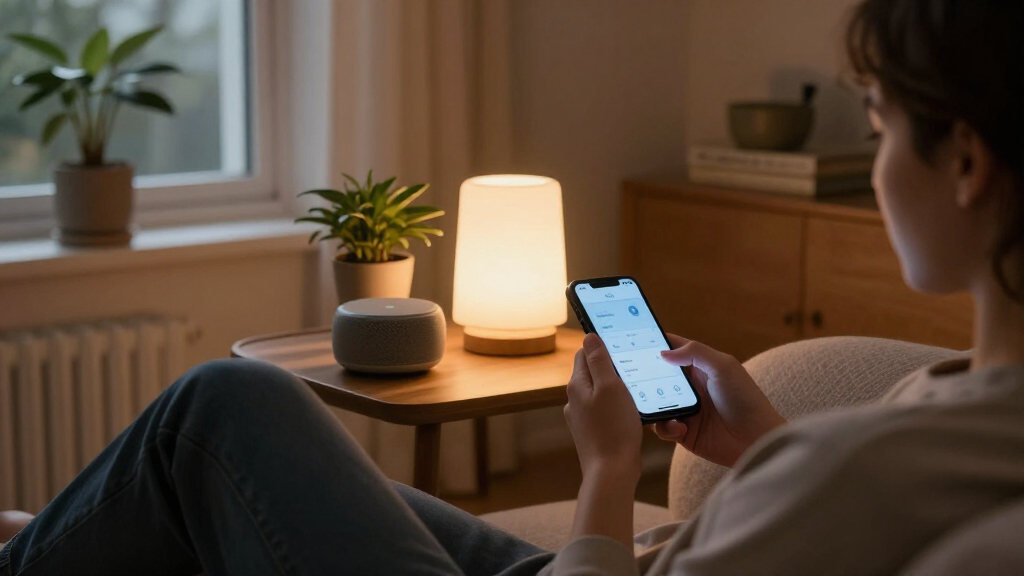

When choosing AI-powered home automation, the real decision is whether to make an AI smart speaker or display the center of the home, or use a dedicated smart-home hub as the system’s control backbone. Speakers are familiar, relatively inexpensive, and useful for voice requests, music, and simple routines. Dedicated hubs put more emphasis on connecting devices, running automations, and supporting local control, though they can take more setup and may still need a separate voice assistant.

Get business pricing on tech for your team
- Business-only prices and quantity discounts
- Tax-exempt purchasing
- Multiple users, one account, clear invoices

Hubitat Elevation C-8 Pro Smart Home Hub
- ✔ Protocols: Matter 1.5, Z-Wave 800 Series with Long Range, Zigbee 3.0, Bluetooth
- ✔ Voice assistants: Amazon Alexa, Google Home, Apple HomeKit
- ✔ Device compatibility: 1,000+ devices across 100+ brands
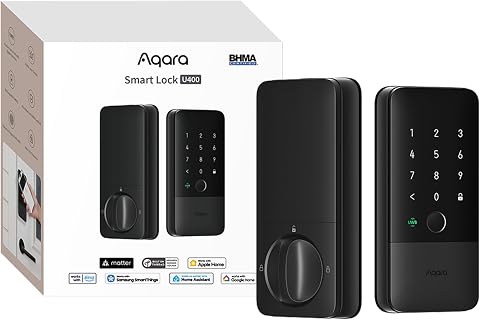
Aqara U400 UWB Smart Lock with Apple Home Key and Fingerprint Deadbolt, Black
- ✔ Unlock methods: UWB, Apple Home Key, fingerprint, touchscreen passcode, voice assistant, app, NFC card, physical key
- ✔ Connectivity: Matter over Thread
- ✔ Battery: Removable rechargeable lithium battery; rated for up to 6 months per charge
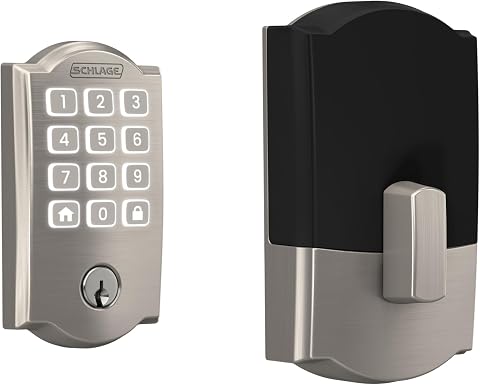
Schlage Arrive Smart WiFi Deadbolt with Camelot Trim, Satin Nickel
- ✔ Connectivity: WiFi and Bluetooth
- ✔ App: Schlage Home
- ✔ Access codes: Up to 250
The difference matters most as a home grows. A few Wi-Fi bulbs and plugs may work smoothly through a speaker’s companion app; sensors, locks, lighting controls, and devices using different wireless standards can call for a hub with broader coordination. The comparison below weighs compatibility, automation depth, ease of use, voice control, reliability, privacy, and value. Choose speakers for a simple voice-first setup; choose a dedicated hub when the home’s devices and routines need a more capable coordinator.
At a Glance
| Criteria | AI smart speakers and displays | Dedicated smart-home hubs | Winner |
|---|---|---|---|
| Setup and everyday ease | Usually straightforward: add devices in an app and use spoken commands or basic routines. | More planning and configuration; device pairing and automation rules can take time. | A |
| Device compatibility | Convenient for supported Wi-Fi and mainstream devices; coverage varies by speaker ecosystem and model. | Often supports a wider mix of protocols, depending on the hub and its supported devices. | B |
| Automation depth | Good for common routines, but advanced triggers and cross-device logic can be limited. | Better suited to layered rules, sensor triggers, and coordination across device types. | B |
| Voice control and AI access | Strongest point: voice assistant and speaker are in one device. | Voice control may require linking a separate assistant or compatible speaker. | A |
| Reliability and local control | Some functions depend on internet access, cloud services, or the speaker platform. | Some hubs can process automations locally, but capability depends on device, setup, and cloud integrations. | B |
| Privacy and data handling | Microphones and cloud-linked voice features require attention to settings and account policies. | Local processing can reduce some cloud dependence; connected services and integrations still have their own policies. | B |
| Value as a system grows | Strong value for small setups; extra speakers may add coverage but not necessarily deeper automation. | Higher initial cost and effort can pay off in larger, more varied systems. | Depends |
Hubitat Elevation C-8 Pro Smart Home Hub
The C-8 Pro is the strongest match for buyers who mean home automation in the broad sense: coordinating lights, locks, thermostats, and routines rather than controlling one door. Its AI-assisted routine builder can help shape automations, while an advanced rule engine gives experienced users more control over how devices respond to conditions. That combination is more ambitious than the Schlage Arrive’s app-centered lock management or the Aqara U400’s entry-focused features.Its most consequential difference is local processing. Compatible routines can keep running without an internet connection, which makes the hub a better foundation for dependable automations than relying only on cloud-mediated commands. Support for Matter, Z-Wave, Zigbee, and Bluetooth also offers more ways to connect devices across brands. The stated compatibility spans over 1,000 devices from more than 100 brands, but buyers should still check specific device support rather than assuming every feature is interchangeable.There is a real learning curve. Hubitat’s flexibility can require documentation, community guidance, and time spent refining rules; shoppers looking for a plug-in-and-forget experience may find Schlage’s focused lock app easier. It also does not make a smart lock by itself: unlike the two deadbolts here, its value depends on building a compatible set of devices and automations. For a buyer ready to configure that system, though, it delivers the broadest automation role in this lineup without a required subscription.
Pros:
- Local processing lets compatible automations continue during internet outages.
- Matter, Z-Wave, Zigbee, and Bluetooth support broaden device options.
- AI-assisted routine builder works alongside an advanced rule engine.
- No subscription is required for its features.
Cons:
- Setup and advanced rules may take time and require documentation or community help.
- It is a hub, not a lock; useful routines depend on compatible devices and configuration.
Best for: People building a multi-brand smart home who value local automations, protocol flexibility, and the ability to customize routines.
Not ideal for: Buyers seeking a single simple smart lock, minimal setup, or an automation system that configures itself with little user involvement.
Bottom line: We recommend Hubitat as the lineup’s most capable automation foundation for buyers willing to invest time in setup.
“We recommend Hubitat as the lineup’s most capable automation foundation for buyers willing to invest time in setup.”
Aqara U400 UWB Smart Lock with Apple Home Key and Fingerprint Deadbolt, Black
The Aqara U400 is the more feature-rich of the two deadbolts for households that want entry to feel automatic as well as secure. Its headline option, UWB hands-free unlocking, is joined by Apple Home Key, fingerprint, passcode, app, voice assistant, NFC card, and a physical key. Compared with Schlage’s keypad-and-app approach, Aqara gives household members more ways to get inside without sharing one method of access.That breadth comes with a crucial condition: UWB and Apple Home Key rely on compatible Apple devices and a Thread-enabled Apple Home hub, along with specified operating-system versions. Buyers outside that setup should judge the lock on its other entry methods, not assume hands-free unlocking will work for them. Matter over Thread makes the lock relevant to a connected home, but it does not turn this deadbolt into a general-purpose automation hub like Hubitat.The hardware addresses practical ownership concerns with a removable rechargeable battery, USB-C charging, a rekeyable cylinder, BHMA certification, and an IP65-rated exterior. Its battery is rated for up to six months per charge, though actual life depends on use. The NFC card is sold separately. We place Aqara above Schlage for buyers who can use its Apple-dependent convenience and want more unlock choices; Schlage remains the simpler alternative when WiFi remote control and a backlit keypad matter more than a specialized ecosystem.
Pros:
- Offers UWB hands-free unlocking, Apple Home Key, fingerprint, passcode, app, and physical-key access.
- Matter over Thread supports use in a connected home ecosystem.
- Removable rechargeable battery charges over USB-C.
- Includes an IP65-rated exterior, BHMA certification, and a rekeyable cylinder.
Cons:
- UWB and Apple Home Key require compatible Apple devices and a Thread-enabled Apple Home hub.
- NFC card is sold separately, and battery life depends on use.
- Its lock-focused functions do not provide Hubitat’s broad device-automation role.
Best for: Apple households with compatible devices and a Thread-enabled Apple Home hub that want hands-free entry plus several fallback methods.
Not ideal for: People without compatible Apple hardware who mainly need a straightforward WiFi deadbolt, or buyers unwilling to recharge a removable battery.
Bottom line: We favor the U400 when compatible Apple gear unlocks its hands-free features; otherwise, its advantage over Schlage narrows.
“We favor the U400 when compatible Apple gear unlocks its hands-free features; otherwise, its advantage over Schlage narrows.”
Schlage Arrive Smart WiFi Deadbolt with Camelot Trim, Satin Nickel
Schlage Arrive makes the most sense when the goal is specific: check and control a front-door deadbolt remotely, manage access codes, and receive lock activity without building a larger automation system. The Schlage Home app connects over WiFi for remote control and uses Bluetooth when a user is nearby. That focused approach is simpler than Hubitat’s configurable rules, while its backlit keypad and support for up to 250 access codes suit households that need to provide separate entry credentials.Compared with Aqara, Schlage offers fewer ways to unlock the door: it has a keypad and app-based control, but not the listed UWB, fingerprint, or Apple Home Key options. In return, it avoids making its defining convenience depend on a compatible Apple Home setup. Alexa and Google Home support can fit into common assistant households, though the lock’s remote features still require WiFi. This is a connected deadbolt, not a multi-protocol hub, so it will not coordinate a broad mix of smart devices like Hubitat.Installation is designed for a standard door and requires a screwdriver, with no hardwiring. Its battery-powered design avoids a wired installation but creates an ongoing need to maintain the batteries. Door dimensions matter: buyers should confirm the listed thickness and backset fit before ordering. We rank Schlage third because it offers less automation depth and fewer entry methods than the other picks, yet it is the clearest choice here for people who want practical remote access and code management without the Aqara’s Apple-specific requirements.
Pros:
- Remote locking and monitoring are available through the Schlage Home app.
- Supports up to 250 access codes and lock history.
- Works with Alexa and Google Home.
- Designed for screwdriver installation without hardwiring.
Cons:
- Remote control requires a WiFi connection.
- Battery-powered operation means batteries need eventual replacement.
- Offers fewer listed entry methods and less automation breadth than Aqara and Hubitat, respectively.
Best for: Households wanting an app-connected keypad deadbolt, remote lock monitoring, and multiple access codes with Alexa or Google Home compatibility.
Not ideal for: Buyers seeking a whole-home automation hub, hands-free UWB entry, fingerprint access, or a lock that does not rely on WiFi for remote control.
Bottom line: We recommend Schlage for uncomplicated remote deadbolt control and code sharing, not for advanced whole-home automation.
“We recommend Schlage for uncomplicated remote deadbolt control and code sharing, not for advanced whole-home automation.”
As an Amazon Associate we earn from qualifying purchases.
Key Differences
The clearest split is convenience versus coordination. An AI speaker puts a microphone, assistant, and everyday audio device in one place, so a user can ask for lights to turn off without opening an app. Many also offer accessible setup for compatible devices and routines. That makes them an easy starting point, but voice convenience should not be mistaken for broad device support or sophisticated automation. A speaker can only control devices and features its platform supports.
A dedicated hub is more useful when the home has devices from several categories or needs routines based on sensors, schedules, and conditions. Depending on the model, it may support additional wireless standards and run some rules locally. That can improve coordination and reduce dependence on cloud services, but it is not automatic: check protocol support, device compatibility, and which features still require an account or internet connection. Hubs also add setup work and may leave voice interaction to a separate speaker.
For a small setup, paying extra for a hub may yield little practical benefit. For a growing installation, the hub’s broader coordination can prevent a collection of disconnected apps and limited routines. The strongest choice is not simply the device with the most AI branding; it is the one that supports the devices and control style the household will actually use.
Detailed Comparison
Setup and everyday ease (AI smart speakers and displays wins — moderate)
Winner: AI smart speakers, by a moderate margin. A speaker-led setup usually keeps device addition, voice commands, and simple routines in one familiar ecosystem. A dedicated hub asks the owner to check compatibility, pair devices, and build rules, which can take more attention upfront. In practice, speakers suit people who want lights and plugs working with minimal configuration; hub users trade some simplicity for greater control.
Device compatibility (Dedicated smart-home hubs wins — moderate)
Winner: dedicated smart-home hubs, by a moderate margin. A hub may bridge devices using multiple protocols, while a speaker’s reach depends on its model and platform. Neither category supports every product, and labels alone are not enough: confirm compatibility with the specific device and features. The hub advantage becomes meaningful when a home mixes sensors, locks, switches, and devices from different brands; a speaker often suffices for a small group of mainstream products.
Automation depth (Dedicated smart-home hubs wins — major)
Winner: dedicated smart-home hubs, by a major margin for complex homes. Speakers generally handle common schedules and simple routines well. Hubs are better positioned to combine triggers and conditions—for example, using a sensor, time of day, and another device’s state in one rule—though exact features vary by product. If the goal is one-command convenience, this advantage may not matter; if routines need to respond to several conditions, a hub is the stronger foundation.
Voice control and AI access (AI smart speakers and displays wins — major)
Winner: AI smart speakers, by a major margin. Voice interaction is built into the speaker, making it immediately accessible for commands, questions, and compatible assistant features. A hub may offer voice control through integrations, but often needs a separate assistant device. For households that primarily want to speak to their home, speakers are the more direct choice. Hub owners can still add speakers, but that means extra devices and setup.
Reliability and local control (Dedicated smart-home hubs wins — moderate)
Winner: dedicated hubs, by a moderate margin, when local automation is supported. Some hubs can run selected routines within the home, while speaker-based services may depend more on an internet connection or cloud processing. This distinction can matter during an outage, but it is model- and feature-specific: remote access, voice services, and third-party integrations may still need the cloud. Check which actions continue offline rather than assuming any hub is fully local.
Privacy and data handling (Dedicated smart-home hubs wins — minor)
Winner: dedicated hubs, by a minor-to-moderate margin if local processing is available. Hubs can reduce some reliance on cloud processing, but their integrations may still send data to external services. Smart speakers have microphones and commonly connect voice features to online accounts, so their privacy controls and retention policies deserve particular attention. Neither category is inherently private: review device settings, account policies, and the handling of recordings or household activity.
Value as a system grows (moderate difference)
Winner: depends on the home’s size and plans. A speaker usually offers better immediate value for a handful of compatible devices because it combines voice control with a familiar interface. A hub costs more and takes additional effort, but can be better value when it replaces fragmented control and supports more demanding routines. Buy for current needs and likely additions, not for a hypothetical future system that may never be built.
AI smart speakers and displays: Pros and Cons
Pros:
- Voice assistant and speaker are combined in one device.
- Usually easier to set up for basic devices and routines.
- Useful for music, questions, and household controls beyond automation.
- Often a cost-effective starting point for a small smart home.
Cons:
- Compatibility and automation features depend on the speaker platform and model.
- Complex, multi-condition routines may be limited.
- Some functions can rely on internet access and cloud services.
- Microphone use and voice-data policies require careful settings.
Dedicated smart-home hubs: Pros and Cons
Pros:
- Often better suited to coordinating mixed device types and protocols.
- More capable for layered automations and sensor-based rules.
- Some models support local processing for selected functions.
- Can serve as a stronger control foundation as a home expands.
Cons:
- More setup, compatibility checking, and maintenance may be required.
- Voice control may call for a separate assistant or speaker.
- Higher upfront cost can be hard to justify for a few simple devices.
- Local control and offline features vary; a hub does not make every service cloud-free.
Who Should Choose What
Choose AI smart speakers and displays if:
- You want hands-free control, music, and simple routines in one easy-to-use device.
- Your home has only a few compatible bulbs, plugs, or other mainstream products.
- You value quick setup more than advanced automation rules.
- You want to start small without paying for hub features you may not use.
Choose Dedicated smart-home hubs if:
- You already use, or plan to add, a mix of sensors, switches, locks, and other device types.
- You want routines driven by multiple conditions rather than basic schedules.
- Local operation for supported automations matters to you, and you have checked the hub’s offline limits.
- You are willing to spend more time on setup for stronger system coordination.
Skip both if: Skip both as a purchase decision until you confirm that the devices you own work with the chosen platform. If you do not want microphones, account-linked services, or a more involved hub setup, use standalone controls or a simple non-voice system instead.
Value for Money
For a small home setup, an AI smart speaker is usually the better value: it provides voice control and basic routines without asking the owner to pay for advanced coordination they may never need. Paying more for a hub is worthwhile when the home has a diverse device mix, routines need several triggers, or supported local control has a clear benefit. That added cost buys capability, not guaranteed compatibility or complete independence from the cloud. Before spending more, check the hub’s supported protocols, device list, and offline behavior; if those do not match the planned system, the premium is not justified.
Final Verdict
For most people starting with a few smart-home devices, choose an AI smart speaker. It is the simpler, better-value way to add voice control and ordinary routines. Choose a dedicated hub instead when the home is growing across device types or when automation logic and local operation matter more than effortless setup. The biggest deciding factor is not whether a device advertises AI; it is whether you need a convenient voice interface or a capable coordinator. Pay extra for the hub only when its specific compatibility and automation features solve a real problem in your home.
Frequently Asked Questions
Can an AI smart speaker replace a dedicated smart-home hub?
For a small setup of supported devices and straightforward routines, often yes. A speaker may not replace a hub when you need broader protocol support, more complex automations, or local processing. Check the exact speaker’s capabilities and the devices you plan to connect.
Does a dedicated hub mean my smart home works without the internet?
Not necessarily. Some hubs can run selected automations locally, but voice assistants, remote access, cloud integrations, and certain device features may still need an internet connection. Look up which functions continue during an outage for the specific hub and devices.
Which option is better for privacy?
A hub that processes supported automations locally may reduce some cloud dependence. A smart speaker’s microphone and online voice features make account and recording settings especially relevant. Both choices can involve third-party services, so review data controls rather than treating either category as automatically private.
Is it reasonable to use both a speaker and a dedicated hub?
Yes. A hub can coordinate devices and routines while a compatible speaker provides voice control. This combination can suit a larger home, but confirm that the two systems integrate with the devices and automations you care about before buying.
Fall Picks
fall essentials
As an affiliate, we earn on qualifying purchases.