🔍 Read the full analysis: 10 Best AI Mini PCs For Private, Local Workloads In 2027 on ThorstenMeyerAI.com

Get business pricing on tech for your team
- Business-only prices and quantity discounts
- Tax-exempt purchasing
- Multiple users, one account, clear invoices
TL;DR
This buyer’s guide ranks 10 mini PCs by the hardware details provided for local AI and general workloads, with the MINISFORUM MS-S1 MAX as the source’s top pick. The list includes newer Ryzen AI systems, Core Ultra models and less AI-focused options, but incomplete configuration details mean buyers should verify specifications and software compatibility before choosing.
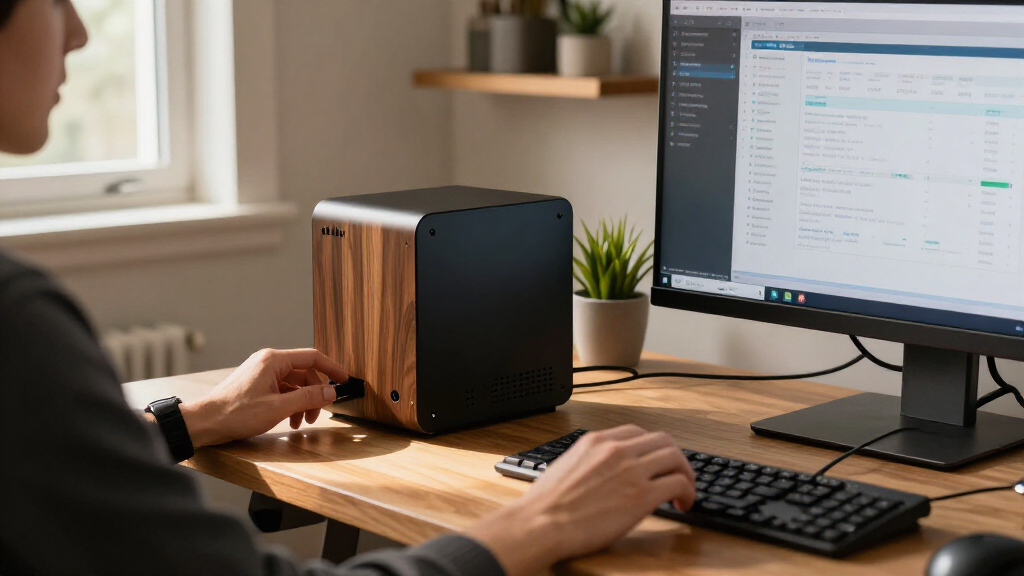
ThorstenMeyerAI.com has published a 2027 ranking of 10 mini PCs for private, local workloads, naming the MINISFORUM MS-S1 MAX its top overall pick. The guide points to its listed Ryzen AI Max+ 395 processor, 64GB of memory and 2TB SSD as the basis for that recommendation, while noting that workstation-oriented hardware may exceed the needs of users with lighter workloads.
The list compares compact computers ranging from systems built around newer Ryzen AI processors to machines aimed chiefly at everyday desktop tasks. The source ranks models by how clearly their listed processor, memory and storage support demanding use, alongside day-to-day usability. It does not provide standardized test results in the supplied material, so the ranking is a hardware-based assessment rather than a reported benchmark comparison.
The GEEKOM A9 Max, with a Ryzen AI 9 HX 470 and 32GB of memory, is presented as a more balanced high-performance alternative. That is half the memory listed for the MS-S1 MAX. The guide also lists the GMKtec EVO-X2 with a Ryzen AI Max+ 395, but says its memory and storage details are not specified in the listing it reviewed. The shared processor name alone does not establish that the two systems offer the same overall capability.
Other entries include the GMKtec K17, described as a newer, lower-power option with less memory, and several systems using Intel Core Ultra 9 185H hardware. The GEEKOM A5 is a less AI-focused choice: its Ryzen 7 7730U and DDR4 memory make it more appropriate for basic desktop use than demanding local AI, according to the guide. Two GEEKOM IT13 MAX versions reportedly list different memory types, making exact configuration checks important.
The 10 picks
- 1
 MINISFORUM MS-S1 MAX Mini AI Workstation PC, Ryzen AI Max+ 395, 64GB LPDDR5x,…View on Amazon →
- 2
 GMKtec EVO-X2 AI Mini PC with AMD Ryzen AI Max+ 395View on Amazon →
- 3
 GEEKOM A9 Max Mini PC with AMD Ryzen AI 9 HX 470, 32GB DDR5 RAM, and 2TB SSDView on Amazon →
- 4
 GEEKOM IT15 Mini PC, Intel Core Ultra 9 285H, 32GB DDR5 RAM, 1TB NVMe SSDView on Amazon →
- 5
 ACEMAGIC F5A Top AI Mini PC with AMD Ryzen AI 9 HX 470View on Amazon →
- 6
 ACEMAGIC Retro X5 Mini Gaming PC with AMD Ryzen AI 9 365, 32GB RAM and 1TB SSDView on Amazon →
- 7
 GEEKOM IT13 MAX AI Mini PC 2026, Intel Ultra 9 185H, 24GB LPDDR5, 500GB SSDView on Amazon →
- 8
 GEEKOM IT13 MAX Mini PC with Intel Core Ultra 9 185H, 24GB RAM, 512GB SSDView on Amazon →
- 9
 GMKtec K17 AI Mini PC – Intel Core Ultra 5 226V, 16GB LPDDR5X, Intel Arc 130V…View on Amazon →
- 10
 GEEKOM A5 Mini PC with AMD Ryzen 7 7730U, 16GB RAM, 500GB SSDView on Amazon →
Choosing Hardware for Private AI
Running AI workloads locally can keep processing and files on a user’s own computer rather than sending them to a remote service. That can matter for people working with sensitive material or needing offline access, though the guide does not claim that any particular model guarantees privacy. Local operation depends on the chosen software, configuration and workload.
The practical tradeoff is between capability and cost, power and size. More memory and storage can make it easier to run larger workloads alongside development or creative applications, but a powerful processor label does not establish that a specific model will run well. Buyers need to match the system to their software and check memory limits, graphics support and upgrade options before paying for workstation-class hardware.
Products Worth Considering

Bose QuietComfort Headphones (2nd Gen), Wireless Noise-Cancelling Over-Ear Headphones, Black

DJI Osmo Mobile 8 Tracking and Fill Light Combo

LG UltraGear 32-inch 4K UHD OLED Gaming Monitor, 165Hz
As an affiliate, we earn on qualifying purchases.
How the Ten Picks Were Ranked
The guide says it prioritizes hardware that is clearly specified and likely to support useful AI-related workloads, then weighs everyday usability, storage and system demands. It gives less confidence to listings with incomplete configurations. The supplied material does not include full prices, power measurements, independent tests or a complete item-by-item specification table, so readers should treat the rankings as recommendations rather than a definitive performance contest.
Its central distinction is between local and cloud-based AI. A computer accessing a cloud assistant may not need specialist hardware because remote servers do much of the processing. Running models on the mini PC itself can place greater demands on memory, graphics and processor capability. The guide advises checking the requirements of the specific model-running tools and applications rather than relying on an AI label alone.
“The MINISFORUM MS-S1 MAX leads for demanding local workloads in this lineup.”
— ThorstenMeyerAI.com guide
Specifications Buyers Should Verify
The supplied source material does not give a complete specification sheet for all 10 picks, full pricing, benchmark results or a confirmed release and availability schedule for each configuration. In particular, the guide says the GMKtec EVO-X2 listing does not specify memory and SSD details, while GEEKOM IT13 MAX variants differ in listed memory type. Buyers should confirm the exact unit being sold, including installed memory, whether it can be upgraded, storage capacity and expansion options.
It is also unclear from the material which local AI models, drivers and acceleration frameworks were tested on each machine. Processor branding alone cannot establish performance across different tools, and integrated graphics may not meet the needs of every image, video or model workload. The ranking should not be read as proof that every listed system supports every private or offline AI use case.
Check Configurations Before Buying
Before purchasing, readers should compare the retailer’s current configuration against the guide’s listed specifications, then check the memory and hardware requirements of the software they plan to run. Confirm whether memory is fixed or replaceable, what storage expansion is available, and whether the system’s operating system and drivers support the intended tools. Prices and product configurations can change, so the 2027 ranking is a starting point rather than a substitute for a current listing.
For light or occasional cloud-based AI use, the guide’s reasoning suggests that a less expensive everyday system may be sufficient. Buyers intending to run larger models locally should pay close attention to memory, storage and software compatibility, not just the processor name. The source provides no later testing or revised ranking in the material supplied; future comparisons would need current prices, exact configurations and workload-specific results.
Key Questions
Which mini PC is the guide’s top pick?
The guide names the MINISFORUM MS-S1 MAX its top overall option for demanding local workloads, citing its listed Ryzen AI Max+ 395, 64GB of memory and 2TB SSD. That is the source’s recommendation, not an independently verified benchmark result.
What is the main alternative to the MS-S1 MAX?
The guide presents the GEEKOM A9 Max as a more balanced high-performance alternative. Its listed Ryzen AI 9 HX 470 and 32GB memory provide a different configuration, with half the memory capacity specified for the MS-S1 MAX.
Does a Ryzen AI processor guarantee local model support?
No. A processor name does not establish that a particular model or application will run well. Check software requirements, memory capacity, graphics support, drivers and operating-system compatibility for the workload you intend to use.
Are all 10 computers equally suited to local AI?
No. The guide distinguishes newer Ryzen AI and Core Ultra systems from options such as the GEEKOM A5, whose Ryzen 7 7730U and DDR4 memory are described as better suited to basic desktop tasks. Suitability still depends on the specific workload and configuration.
What should buyers confirm before ordering?
Check the exact processor, installed memory and memory type, SSD capacity, upgrade options, current price and software compatibility. The source notes missing configuration details for the GMKtec EVO-X2 listing and differing memory details across GEEKOM IT13 MAX versions.
Source: ThorstenMeyerAI.com